
Add your description here

Project description
Gemini Playground
Gemini Playground provides a Python interface and a user interface to interact with different Gemini model variants. With Gemini Playground, you can:
- Engage in conversation with your data either through a simple code API or using the API: Upload images and videos using a simple API and generate responses based on your prompts.
- Chat with your codebase as you do with images, PDFs and audio files: Ask Gemini to analyze your code, explain its functionality, suggest improvements or even write documentation for it.
- Explore multimodal capabilities: Combine different data types in your prompts, like asking Gemini to describe what's happening in a video and an image simultaneously.
Features
- Intuitive API: The
GeminiClientclass offers a simple and easy-to-use interface for interacting with the Gemini API. - Multimodal Support: Upload and use text, images, videos, and code in your prompts.
- File Management: Upload, list, and remove files from your Gemini storage.
- Token Counting: Estimate the number of tokens required for a prompt and response.
- Response Generation: Generate responses from Gemini based on your prompts and uploaded content.
- Rich Logging: Get informative and colorful logging messages for better understanding of the process.
You can find usage examples in the examples directory.
Installation
pip install geminiplayground
Usage
-
Set up your API key:
- Obtain an API key from Google AI-Studio.
- Set the
GEMINI_API_KEYenvironment variable with your API key.
-
Create a
GeminiClientinstance:
from geminiplayground.core import GeminiClient
from geminiplayground.parts import VideoFile, ImageFile

gemini_client = GeminiClient()
- Define your files:
video_file_path = "./data/BigBuckBunny_320x180.mp4"
video_file = VideoFile(video_file_path, gemini_client=gemini_client)

image_file_path = "https://upload.wikimedia.org/wikipedia/commons/4/47/PNG_transparency_demonstration_1.png"
image_file = ImageFile(image_file_path, gemini_client=gemini_client)
- Create a prompt:
multimodal_prompt = [
    "See this video",
    video_file,
    "and this image",
    image_file,
    "Explain what you see."
]
- Generate a response:
response = gemini_client.generate_response(
    "models/gemini-1.5-pro-latest",
    multimodal_prompt,
    stream=True
)
# Print the response
for chunk in response:
    print(chunk.text, end="")
The video is a short animated film called "Big Buck Bunny." It is a comedy about a large, white rabbit
who is bullied by three smaller animals. The rabbit eventually gets revenge on his tormentors. The film
was created using Blender, a free and open-source 3D animation software.

The image is of four dice, each a different color. The dice are transparent and have white dots. The
image is isolated on a black background.
- You can also chat with your data:
Chat with your codebase:
from rich import print

from geminiplayground.core import GeminiClient
from geminiplayground.parts import GitRepo
from dotenv import load_dotenv, find_dotenv

load_dotenv(find_dotenv())


def chat_wit_your_code():
    """
    Get the content parts of a github repo and generate a request.
    :return:
    """
    repo = GitRepo.from_url(
        "https://github.com/karpathy/ng-video-lecture",
        branch="master",
        config={
            "content": "code-files",  # "code-files" or "issues"
            "file_extensions": [".py"],
        },
    )
    prompt = [
        "use this codebase:",
        repo,
        "Describe the `bigram.py` file, and generate some code snippets",
    ]
    model = "models/gemini-1.5-pro-latest"
    gemini_client = GeminiClient()
    tokens_count = gemini_client.count_tokens(model, prompt)
    print("Tokens count: ", tokens_count)
    response = gemini_client.generate_response(model, prompt, stream=True)

    # Print the response
    for message_chunk in response:
        if message_chunk:
            print(message_chunk.text)


if __name__ == "__main__":
    chat_wit_your_code()
Chat with your videos:
from rich import print

from geminiplayground.core import GeminiClient
from geminiplayground.parts import VideoFile
from dotenv import load_dotenv, find_dotenv

load_dotenv(find_dotenv())


def chat_wit_your_video():
    """
    Get the content parts of a video and generate a request.
    :return:
    """
    gemini_client = GeminiClient()
    model_name = "models/gemini-2.0-flash-exp"

    video_file_path = "./../data/transformers-explained.mp4"
    video_file = VideoFile(video_file_path, gemini_client=gemini_client)
    keyframes = video_file.extract_keyframes()
    print(keyframes)

    prompt = [
        "Describe the content of the video",
        video_file,
        "what is the video about?",
    ]
    tokens_count = gemini_client.count_tokens(model_name, prompt)
    print("Tokens count: ", tokens_count)
    response = gemini_client.generate_response(model_name, prompt, stream=True)
    for message_chunk in response:
        if message_chunk:
            print(message_chunk.text, end="")


if __name__ == "__main__":
    chat_wit_your_video()
Chat with your images:
from rich import print

from geminiplayground.core import GeminiClient
from geminiplayground.parts import ImageFile
from dotenv import load_dotenv, find_dotenv

load_dotenv(find_dotenv())


def chat_wit_your_images():
    """
    Get the content parts of an image and generate a request.
    :return:
    """
    gemini_client = GeminiClient()

    image_file_path = "./../data/roses.jpg"
    image_file = ImageFile(image_file_path, gemini_client=gemini_client)
    prompt = ["what do you see in this image?", image_file]
    model_name = "models/gemini-2.0-flash-exp"
    tokens_count = gemini_client.count_tokens(model_name, prompt)
    print(f"Tokens count: {tokens_count}")
    response = gemini_client.generate_response(model_name, prompt, stream=True)
    for message_chunk in response:
        if message_chunk:
            print(message_chunk.text, end="")


if __name__ == "__main__":
    chat_wit_your_images()
Chat with your Pdfs:
from rich import print

from geminiplayground.core import GeminiClient
from geminiplayground.parts import PdfFile
from dotenv import load_dotenv, find_dotenv

load_dotenv(find_dotenv())


def chat_wit_your_pdf():
    """
    Get the content parts of a pdf file and generate a request.
    :return:
    """
    gemini_client = GeminiClient()
    pdf_file_path = "./../data/vis-language-model.pdf"
    pdf_file = PdfFile(pdf_file_path, gemini_client=gemini_client)
    prompt = ["Please create a summary of the pdf file:", pdf_file]
    model_name = "models/gemini-2.0-flash-exp"
    tokens_count = gemini_client.count_tokens(model_name, prompt)
    print(f"Tokens count: {tokens_count}")
    response = gemini_client.generate_response(model_name, prompt, stream=True)
    for message_chunk in response:
        if message_chunk:
            print(message_chunk.text)


if __name__ == "__main__":
    chat_wit_your_pdf()
Function calling in chat:
from dotenv import load_dotenv, find_dotenv

from geminiplayground.core import GeminiPlayground, Message, ToolCall

load_dotenv(find_dotenv())

if __name__ == "__main__":
    playground = GeminiPlayground(
        model="models/gemini-2.0-flash-exp"
    )


    @playground.tool
    def subtract(a: int, b: int) -> int:
        """This function only subtracts two numbers"""
        return a - b


    @playground.tool
    def write_poem(about: str) -> str:
        """write a poem
        @param about: the subject of the poem
        """
        return "Roses are red, violets are blue, sugar is sweet, and so are you."


    chat = playground.start_chat(history=[])
    while True:
        user_input = input("You: ")
        if user_input == "exit":
            break
        try:
            model_response = chat.send_message(user_input)
            for response_chunk in model_response:
                print(response_chunk.text, end="")
            print()
        except Exception as e:
            print("Something went wrong: ", e)
            break
This is a basic example. Explore the codebase and documentation for more advanced functionalities and examples.
GUI
You can also use the GUI to interact with Gemini.
Remember to set the GEMINI_API_KEY environment variable with your API key. You can do so globally, pass it as an
argument to the command, or create a .env file in the root of your project and set the AISTUDIO_API_KEY variable
there.
For running the GUI, use the following command:
geminiplayground ui
or
export GEMINI_API_KEY=<YOUR_API_KEY>
geminiplayground ui
This will start a local server and open the GUI in your default browser.
In case the browser does not open automatically, you can access the GUI by visiting http://localhost:8080.
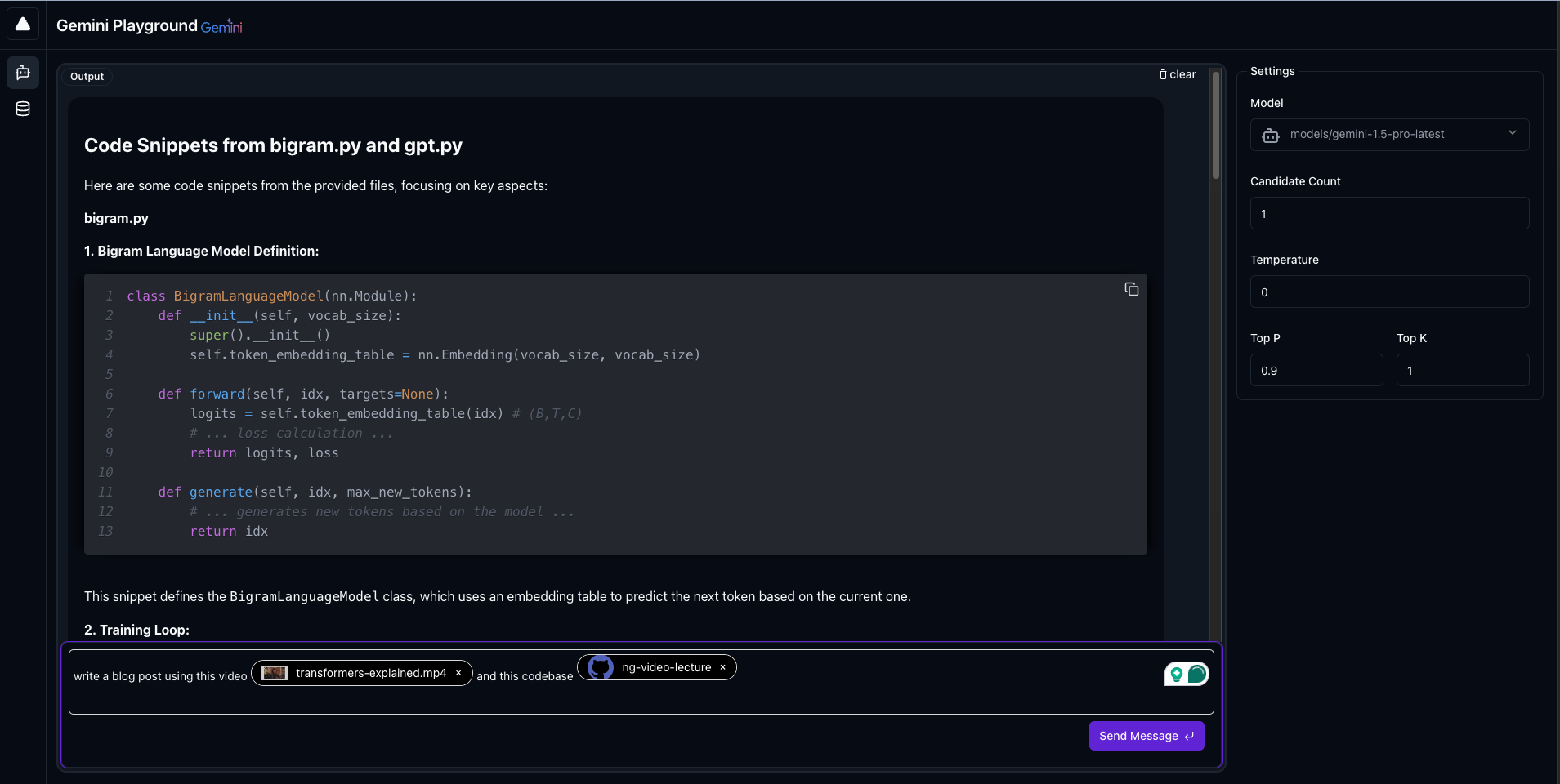
To access the uploaded files from the UI, just type @. It will open a popup list where you can select the file you
want.
Contributing
Contributions are welcome! Please see the 'CONTRIBUTING.md` file for guidelines [Coming soon].
License
This codebase is licensed under the MIT License. See theLICENSE file for details.
Release history Release notifications | RSS feed


Download files
Download the file for your platform. If you're not sure which to choose, learn more about installing packages.
Source Distribution
Built Distribution
Filter files by name, interpreter, ABI, and platform.
If you're not sure about the file name format, learn more about wheel file names.
Copy a direct link to the current filters
File details
Details for the file geminiplayground-1.0.2.tar.gz.
File metadata
- Download URL: geminiplayground-1.0.2.tar.gz
- Upload date:
- Size: 5.6 MB
- Tags: Source
- Uploaded using Trusted Publishing? No
- Uploaded via: uv/0.6.2
File hashes
| Algorithm | Hash digest | |
|---|---|---|
| SHA256 |
0b88d086d64e5d8ba9b1bb5b33c293debeb06111a33d53f9db51d8ed9445458e
|
|
| MD5 |
ecbcbb958ba4961fdf535d217440d6f5
|
|
| BLAKE2b-256 |
158b9c508bed39ed532ff574e24361536e701fb0239c3d0ea8dc48dfdb54884d
|
File details
Details for the file geminiplayground-1.0.2-py3-none-any.whl.
File metadata
- Download URL: geminiplayground-1.0.2-py3-none-any.whl
- Upload date:
- Size: 5.7 MB
- Tags: Python 3
- Uploaded using Trusted Publishing? No
- Uploaded via: uv/0.6.2
File hashes
| Algorithm | Hash digest | |
|---|---|---|
| SHA256 |
6906220ac2656f56c11d88b1a2ba2bc298ee8018c806d3c0281b28364cef603d
|
|
| MD5 |
35357773c8a6efd1510b563643145773
|
|
| BLAKE2b-256 |
ecc11636b0864858b54b392d696368f1afeb050f7517c1b72b5804603d87efae
|






