
This release is a pre-release and may not be stable for production use.





Generate Docs using ChatGPT
CLI to generate API documentation in MarkDown based on the models and api handlers for given project using ChatGPT.
genDocsGPT badge

ChatGPT API Key
The genDosGPT demand a ChatGPT API Key that you can generate after create your free account in OpenAI. Tutorial here. After this, create a .env file in the following format:
API_KEY="chatgpt_api_Key"
Usage
usage: genDocsGPT [-h] [-v, --verbose] -m / --model <model_paths> -a / --api <api_paths>
[-o / --output <filename>] [-t / --token <token>] [--env <filename>] [--gpt_model <model>]

CLI to generate API documentation in MarkDown based on the models and api handlers for
given project using ChatGPT.

options:
  -h, --help            show this help message and exit
  -v, --verbose         Show all the messages to debug
  -m / --model <model_paths>
                        Model paths. If more than one, separate with a comma
  -a / --api <api_paths>
                        API paths. If more than one, separate with a comma
  -o / --output <filename>
                        Filename to the documentation generated. Default: ./api.md
  -t / --token <token>  ChatGPT API KEY
  --env <filename>      Env file that MUST and ONLY have API_KEY="chatgpt_api_key".
                        Default: ./.env
  --gpt_model <model>   Model that will be used by ChatGPT. Default: gpt-3.5-turbo

We do not recommend using it in non-open-source projects.
Standalone
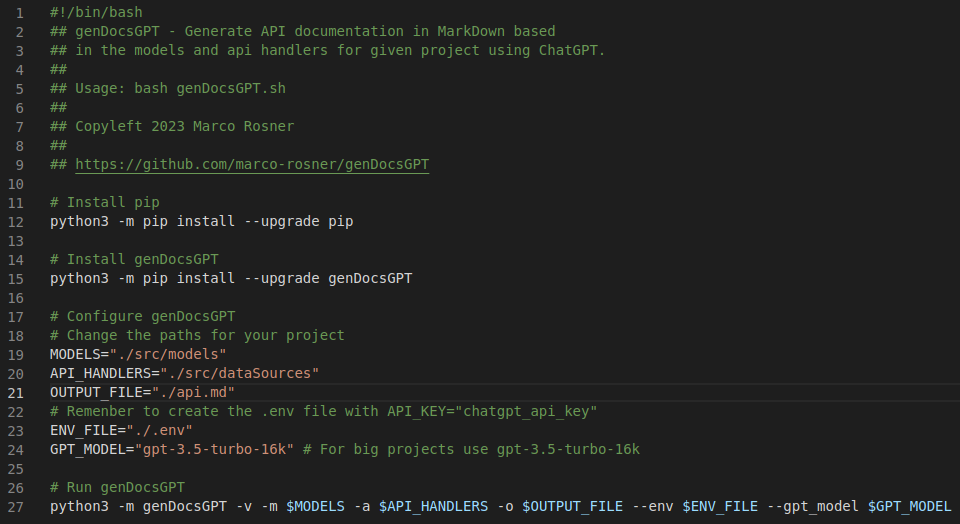
The genDocsGPT.sh, the bash script above, should be used in projects where the documentation should be generated not frequently. You only need to copy this file, change the configuration (models, API handlers…), paste it into your project, create the .env file with the ChatGPT API Key, and run this bash script.
I am using this standalone version in the DadosJusBr’s GraphQL project which is a Node/ExpressJS using Apollo Server. So, I created a script in the package.json to run it only using: npm run genDocsGPT or yarn genDocsGPT
GitHub Action
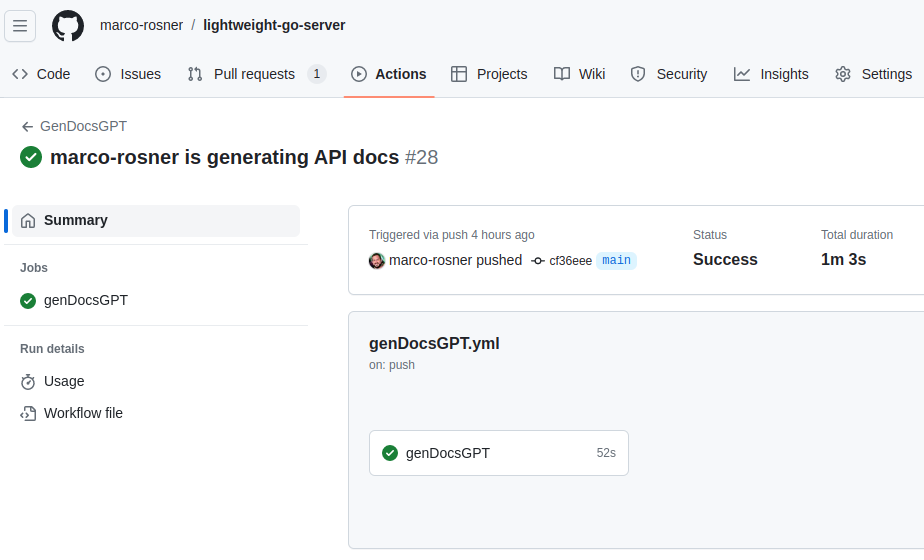
This GitHub Action will run after every commit in the main/master branch and create a pull request that you only need to approve (or not) and the documentation will be updated.
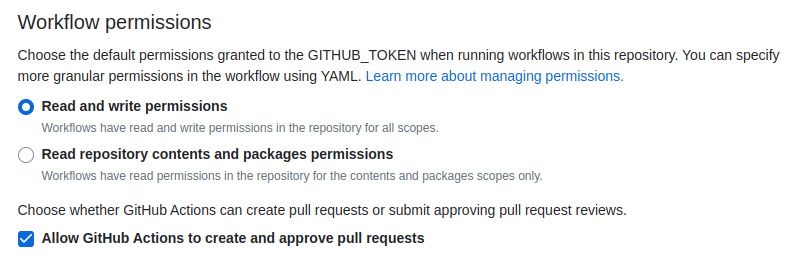
For genDocsGPT.yml works fine in your project, you should set the model, API handlers paths, and other options (line 30), create, in the GitHub, the secret ChatGPT_API_KEY (tutorial here), and change the workflow permissions (tutorial here) to “Read and Write permissions” and use the “Allow GitHub Action to create and approve pull requests”.
For more detail, I integrated this GitHub Action in the Lightweight Go Server project, a Go servers benchmark between Echo, Gin, and Fiber.
1 maintainer

Metadata
1 maintainer
Release files for genDocsGPT 1.0b17
For a detailed explanation of source distributions (sdists) and built distributions (wheels), please see the package formats documentation.
Source distribution (sdist)
| File | Size | Uploaded | |
|---|---|---|---|
| genDocsGPT-1.0b17.tar.gz | 8.1 kB | Details |
Built distribution (wheel)
| File | Interpreter | ABI | Platform | Reset |
|---|---|---|---|---|
| genDocsGPT-1.0b17-py3-none-any.whl | Python 3 | none | any | Details |
Total release size: 19.6 kB
Release files / genDocsGPT-1.0b17.tar.gz
| Download URL | genDocsGPT-1.0b17.tar.gz |
|---|---|
| Size | 8.1 kB |
| Tags | Source |
|
SHA-256 checksum How to use checksums |
657ddca2fe58ee50cd05b447119feb48ec8ceb2e7b3dd879f0abe8662896c855
|
|
BLAKE2b-256 checksum How to use checksums |
e14313997ba8670e5b53a3f8fc60beb01b1d5748b9de3d7003f361f9960bae0d
|
| Upload date | |
|
Uploaded using Trusted Publishing? What is trusted publishing? |
No |
| Uploaded via |
twine/4.0.2 CPython/3.10.12
|
Release files / genDocsGPT-1.0b17-py3-none-any.whl
| Download URL | genDocsGPT-1.0b17-py3-none-any.whl |
|---|---|
| Size | 11.4 kB |
| Tags | Python 3 |
|
SHA-256 checksum How to use checksums |
db8744a0e7218f12aa02e7a98d83168c301b234a2574188c619d7d48db894820
|
|
BLAKE2b-256 checksum How to use checksums |
3f161727c33989e3c5aeb9f7ee6ef56c5ad583942849847478ae02872a733fcf
|
| Upload date | |
|
Uploaded using Trusted Publishing? What is trusted publishing? |
No |
| Uploaded via |
twine/4.0.2 CPython/3.10.12
|














