
Comprehensive OpenTelemetry auto-instrumentation for LLM/GenAI applications

Project description
TraceVerde
















Production-ready OpenTelemetry instrumentation for GenAI/LLM applications with zero-code setup.
Features
🚀 Zero-Code Instrumentation - Just install and set env vars 🤖 19+ LLM Providers - OpenAI, OpenRouter, Anthropic, Google, AWS, Azure, SambaNova, Hyperbolic, Sarvam AI, and more 🤝 Multi-Agent Frameworks - CrewAI, LangGraph, OpenAI Agents SDK, AutoGen, AutoGen AgentChat, Google ADK, Pydantic AI for agent orchestration 🔧 MCP Tool Support - Auto-instrument databases, APIs, caches, vector DBs 💰 Cost Tracking - Automatic cost calculation for both streaming and non-streaming requests ⚡ Streaming Support - Full observability for streaming responses with TTFT/TBT metrics and cost tracking 🎮 GPU Metrics - Real-time GPU utilization, memory, temperature, power, and electricity cost tracking (NVIDIA & AMD) 🛡️ PII Detection (NEW) - Automatic PII detection with GDPR/HIPAA/PCI-DSS compliance modes ☢️ Toxicity Detection (NEW) - Detect harmful content with Perspective API and Detoxify ⚖️ Bias Detection (NEW) - Identify demographic and other biases in prompts and responses 📊 Complete Observability - Traces, metrics, and rich span attributes ➕ Service Instance ID & Environment - Identify your services and environments ⏱️ Configurable Exporter Timeout - Set timeout for OTLP exporter 🔗 OpenInference Instrumentors - Smolagents, MCP, and LiteLLM instrumentation
Quick Start
Installation
pip install genai-otel-instrument
Usage
Option 1: Environment Variables (No code changes)
export OTEL_SERVICE_NAME=my-llm-app
export OTEL_EXPORTER_OTLP_ENDPOINT=http://localhost:4318
python your_app.py
Option 2: One line of code
import genai_otel
genai_otel.instrument()

# Your existing code works unchanged
import openai
client = openai.OpenAI()
response = client.chat.completions.create(...)
Option 3: CLI wrapper
genai-instrument python your_app.py
For a more comprehensive demonstration of various LLM providers and MCP tools, refer to example_usage.py in the project root. Note that running this example requires setting up relevant API keys and external services (e.g., databases, Redis, Pinecone).
What Gets Instrumented?
LLM Providers (Auto-detected)
- With Full Cost Tracking: OpenAI, OpenRouter, Anthropic, Google AI, AWS Bedrock, Azure OpenAI, Cohere, Mistral AI, Together AI, Groq, Ollama, Vertex AI, SambaNova, Hyperbolic, Sarvam AI
- Hardware/Local Pricing: Replicate (hardware-based $/second), HuggingFace (local execution with estimated costs)
- HuggingFace Support:
pipeline(),AutoModelForCausalLM.generate(),AutoModelForSeq2SeqLM.generate(),InferenceClientAPI calls
- HuggingFace Support:
- Other Providers: Anyscale
- Special Configuration: Hyperbolic (requires OTLP gRPC exporter - see
examples/hyperbolic_example.py)
Frameworks
- LangChain (chains, agents, tools)
- LlamaIndex (query engines, indices)
- Haystack (modular NLP pipelines with RAG support)
- DSPy (Stanford NLP declarative LM programming with automatic optimization)
- Instructor (Pydantic-based structured output extraction with validation and retries)
- Guardrails AI (input/output validation guards with on-fail policies: reask, fix, filter, refrain)
Multi-Agent Frameworks
- OpenAI Agents SDK (agent orchestration with handoffs, sessions, guardrails)
- CrewAI (role-based multi-agent collaboration with crews and tasks)
- Complete span hierarchy: Crew -> Task -> Agent -> LLM calls
- All kickoff variants:
kickoff(),kickoff_async(),akickoff(),kickoff_for_each(), and async batch variants - Automatic ThreadPoolExecutor context propagation for worker threads
- Three span types:
crewai.crew.execution,crewai.task.execution,crewai.agent.execution
- Google ADK (Google Agent Development Kit - open-source agent framework)
- Instruments
Runner.run_async()andInMemoryRunner.run_debug() - Captures agent name, model, tools, sub-agents, session info
- Instruments
- AutoGen AgentChat (v0.4+ - ChatAgent, Teams, RoundRobinGroupChat, SelectorGroupChat, Swarm)
- Instruments agent
run()/run_stream()and team execution - Captures participants, task content, termination conditions
- Instruments agent
- AutoGen (legacy Microsoft multi-agent conversations with group chats)
- LangGraph (stateful workflows with graph-based orchestration)
- Pydantic AI (type-safe agents with Pydantic validation and multi-provider support)
- AWS Bedrock Agents (managed agent runtime with knowledge bases and RAG)
MCP Tools (Model Context Protocol)
- Databases: PostgreSQL, MySQL, MongoDB, SQLAlchemy
- Caching: Redis
- Message Queues: Apache Kafka
- Vector Databases: Pinecone, Weaviate, Qdrant, ChromaDB, Milvus, FAISS
- APIs: HTTP/REST requests (requests, httpx)
OpenInference (Optional - Python 3.10+ only)
- Smolagents - HuggingFace smolagents framework tracing
- MCP - Model Context Protocol instrumentation
- LiteLLM - Multi-provider LLM proxy
Cost Enrichment: OpenInference instrumentors are automatically enriched with cost tracking! When cost tracking is enabled (GENAI_ENABLE_COST_TRACKING=true), a custom CostEnrichmentSpanProcessor extracts model and token usage from OpenInference spans and adds cost attributes (gen_ai.usage.cost.total, gen_ai.usage.cost.prompt, gen_ai.usage.cost.completion) using our comprehensive pricing database of 340+ models across 20+ providers.
The processor supports OpenInference semantic conventions:
- Model:
llm.model_name,embedding.model_name - Tokens:
llm.token_count.prompt,llm.token_count.completion - Operations:
openinference.span.kind(LLM, EMBEDDING, CHAIN, RETRIEVER, etc.)
Note: OpenInference instrumentors require Python >= 3.10. Install with:
pip install genai-otel-instrument[openinference]
Screenshots
See the instrumentation in action across different LLM providers and observability backends.
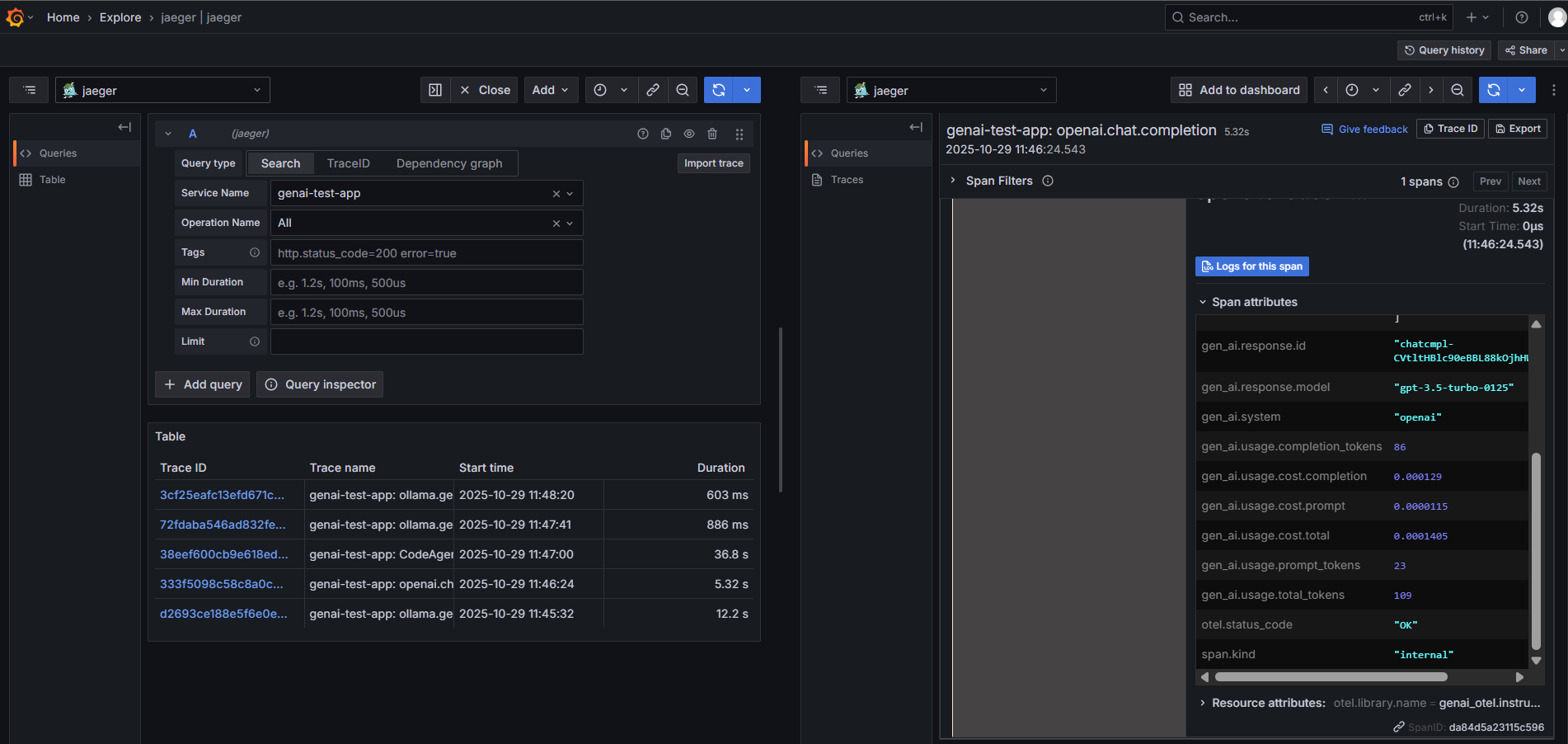
OpenAI Instrumentation
Full trace capture for OpenAI API calls with token usage, costs, and latency metrics.
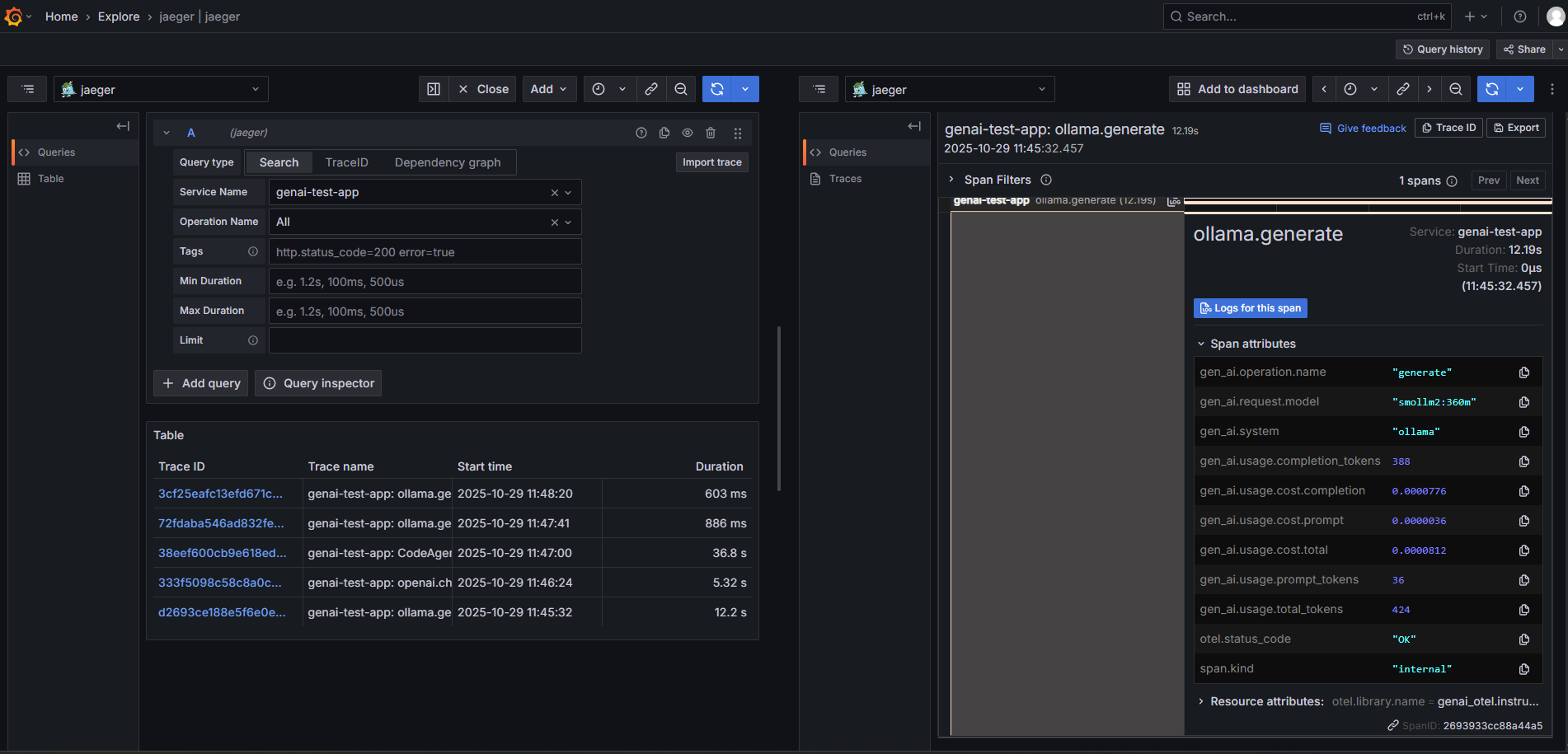
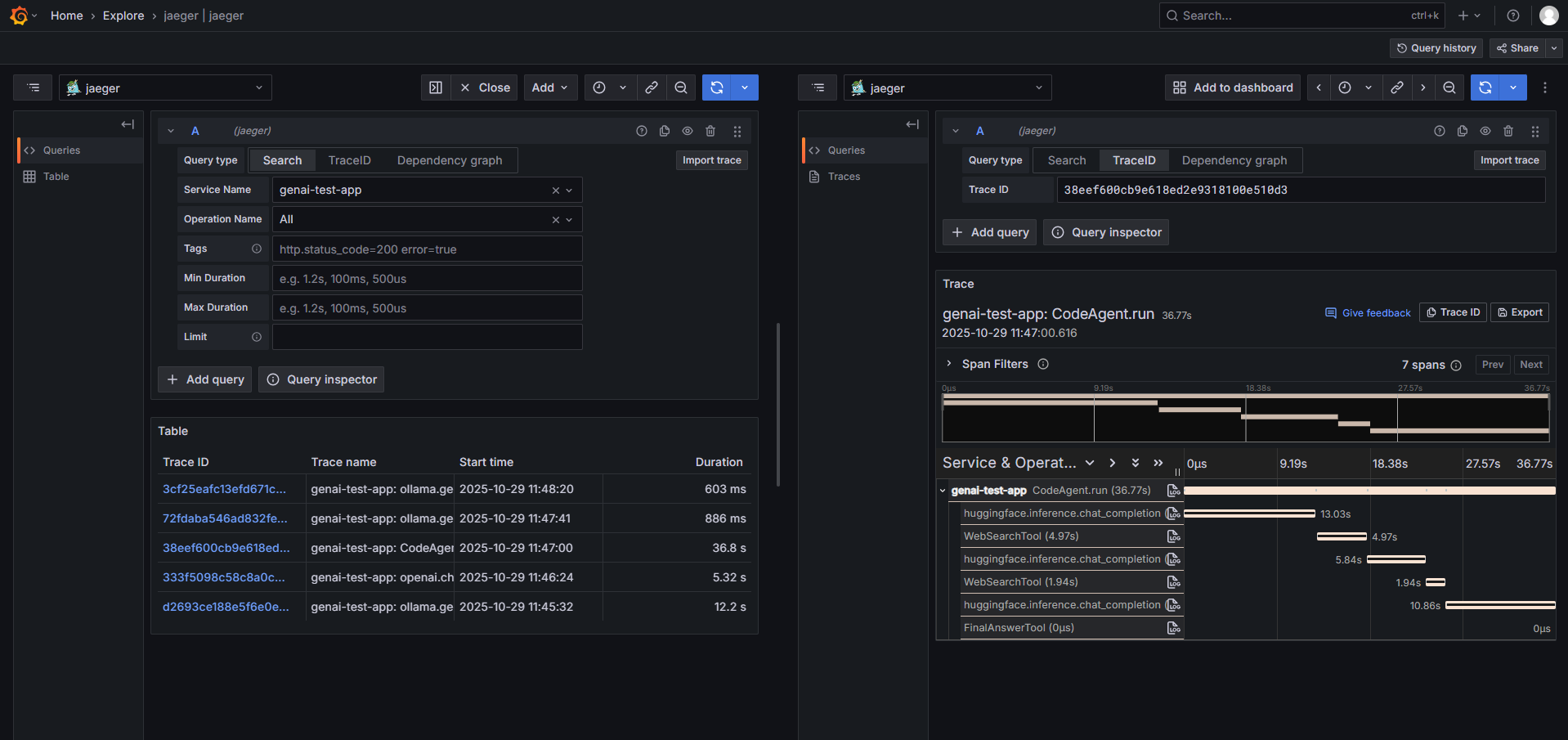
Ollama (Local LLM) Instrumentation
Zero-code instrumentation for local models running on Ollama with comprehensive observability.
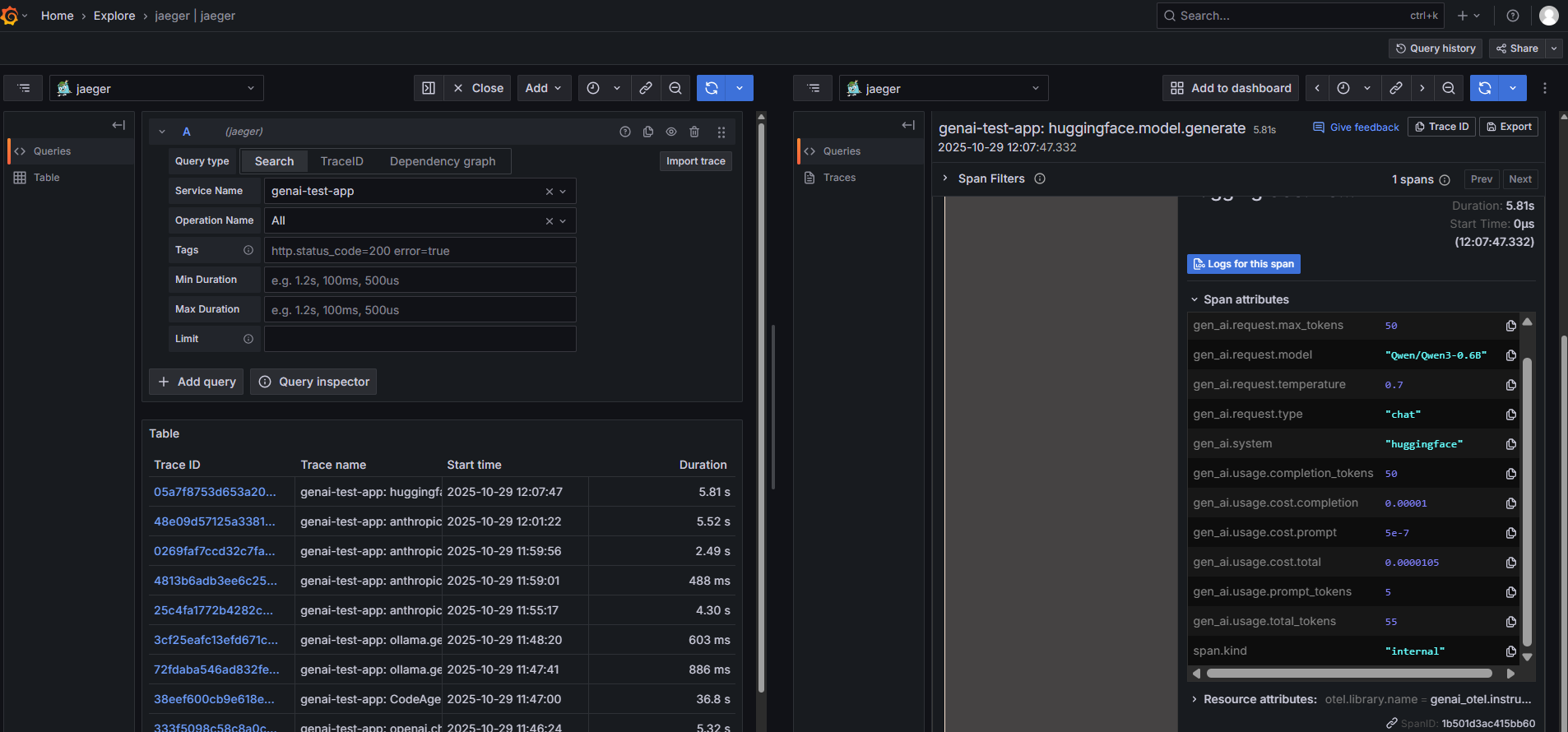
HuggingFace Transformers
Direct instrumentation of HuggingFace Transformers with automatic token counting and cost estimation.
SmolAgents Framework
Complete agent workflow tracing with tool calls, iterations, and cost breakdown.
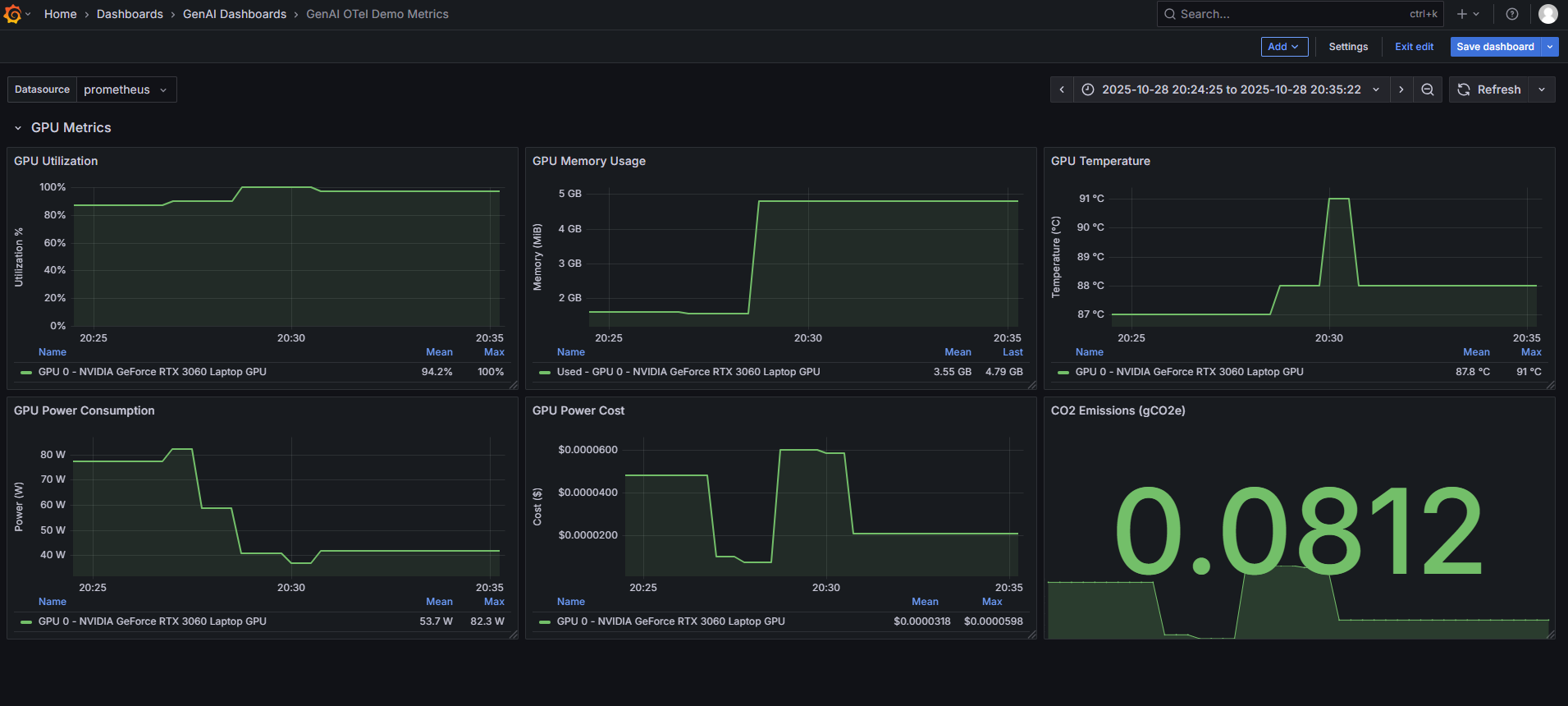
GPU Metrics Collection
Real-time GPU utilization, memory, temperature, and power consumption metrics for both NVIDIA and AMD GPUs.
Additional Screenshots
- Token Cost Breakdown - Detailed token usage and cost analysis for SmolAgent workflows
- OpenSearch Dashboard - GenAI metrics visualization in OpenSearch/Kibana
Demo Video
Watch a comprehensive walkthrough of GenAI OpenTelemetry Auto-Instrumentation in action, demonstrating setup, configuration, and real-time observability across multiple LLM providers.
🎥 Watch Demo Video (Coming Soon)
Cost Tracking Coverage
The library includes comprehensive cost tracking with pricing data for 350+ models across 21+ providers:
Providers with Full Token-Based Cost Tracking
- OpenAI: GPT-4o, GPT-4 Turbo, GPT-3.5 Turbo, o1/o3 series, embeddings, audio, vision (35+ models)
- Anthropic: Claude 3.5 Sonnet/Opus/Haiku, Claude 3 series (10+ models)
- Google AI: Gemini 1.5/2.0 Pro/Flash, PaLM 2 (12+ models)
- AWS Bedrock: Amazon Titan, Claude, Llama, Mistral models (20+ models)
- Azure OpenAI: Same as OpenAI with Azure-specific pricing
- Cohere: Command R/R+, Command Light, Embed v3/v2 (8+ models)
- Mistral AI: Mistral Large/Medium/Small, Mixtral, embeddings (8+ models)
- Together AI: DeepSeek-R1, Llama 3.x, Qwen, Mixtral (25+ models)
- Groq: Llama 3.x series, Mixtral, Gemma models (15+ models)
- Ollama: Local models with token tracking (pricing via cost estimation)
- Vertex AI: Gemini models via Google Cloud with usage metadata extraction
- Sarvam AI: sarvam-m chat, Saarika/Saaras STT, Bulbul TTS, Mayura/Sarvam Translate, Vision (12+ models)
Special Pricing Models
- Replicate: Hardware-based pricing ($/second of GPU/CPU time) - not token-based
- HuggingFace Transformers: Local model execution with estimated costs based on parameter count
- Supports
pipeline(),AutoModelForCausalLM.generate(),AutoModelForSeq2SeqLM.generate() - Cost estimation uses GPU/compute resource pricing tiers (tiny/small/medium/large)
- Automatic token counting from tensor shapes
- Supports
Pricing Features
- Differential Pricing: Separate rates for prompt tokens vs. completion tokens
- Reasoning Tokens: Special pricing for OpenAI o1/o3 reasoning tokens
- Cache Pricing: Anthropic prompt caching costs (read/write)
- Granular Cost Metrics: Per-request cost breakdown by token type
- Auto-Updated Pricing: Pricing data maintained in
llm_pricing.json - Custom Pricing: Add pricing for custom/proprietary models via environment variable
Adding Custom Model Pricing
For custom or proprietary models not in llm_pricing.json, you can provide custom pricing via the GENAI_CUSTOM_PRICING_JSON environment variable:
# For chat models
export GENAI_CUSTOM_PRICING_JSON='{"chat":{"my-custom-model":{"promptPrice":0.001,"completionPrice":0.002}}}'

# For embeddings
export GENAI_CUSTOM_PRICING_JSON='{"embeddings":{"my-custom-embeddings":0.00005}}'

# For multiple categories
export GENAI_CUSTOM_PRICING_JSON='{
  "chat": {
    "my-custom-chat": {"promptPrice": 0.001, "completionPrice": 0.002}
  },
  "embeddings": {
    "my-custom-embed": 0.00005
  },
  "audio": {
    "my-custom-tts": 0.02
  }
}'
Pricing Format:
- Chat models:
{"promptPrice": <$/1k tokens>, "completionPrice": <$/1k tokens>} - Embeddings: Single number for price per 1k tokens
- Audio: Price per 1k characters (TTS) or per second (STT)
- Images: Nested structure with quality/size pricing (see
llm_pricing.jsonfor examples)
Hybrid Pricing: Custom prices are merged with default pricing from llm_pricing.json. If you provide custom pricing for an existing model, the custom price overrides the default.
Coverage Statistics: As of v0.1.3, 89% test coverage with 415 passing tests, including comprehensive cost calculation validation and cost enrichment processor tests (supporting both GenAI and OpenInference semantic conventions).
Collected Telemetry
Traces
Every LLM call, database query, API request, and vector search is traced with full context propagation.
Metrics
GenAI Metrics:
gen_ai.requests- Request counts by provider and modelgen_ai.client.token.usage- Token usage (prompt/completion)gen_ai.client.operation.duration- Request latency histogram (optimized buckets for LLM workloads)gen_ai.usage.cost- Total estimated costs in USDgen_ai.usage.cost.prompt- Prompt tokens cost (granular)gen_ai.usage.cost.completion- Completion tokens cost (granular)gen_ai.usage.cost.reasoning- Reasoning tokens cost (OpenAI o1 models)gen_ai.usage.cost.cache_read- Cache read cost (Anthropic)gen_ai.usage.cost.cache_write- Cache write cost (Anthropic)gen_ai.client.errors- Error counts by operation and typegen_ai.gpu.*- GPU utilization, memory, temperature, power (ObservableGauges)gen_ai.co2.emissions- CO2 emissions tracking with codecarbon integration (opt-in viaGENAI_ENABLE_CO2_TRACKING)gen_ai.power.cost- Cumulative electricity cost in USD based on GPU power consumption (configurable viaGENAI_POWER_COST_PER_KWH)
CO2 Tracking Options:
- Automatic (codecarbon): Uses region-based carbon intensity data for accurate emissions calculation
- Manual: Uses
GENAI_CARBON_INTENSITYvalue (gCO2e/kWh) for calculation - Set
GENAI_CO2_USE_MANUAL=trueto force manual calculation even when codecarbon is installed gen_ai.server.ttft- Time to First Token for streaming responses (histogram, 1ms-10s buckets)gen_ai.server.tbt- Time Between Tokens for streaming responses (histogram, 10ms-2.5s buckets)
MCP Metrics (Database Operations):
mcp.requests- Number of MCP/database requestsmcp.client.operation.duration- Operation duration histogram (1ms to 10s buckets)mcp.request.size- Request payload size histogram (100B to 5MB buckets)mcp.response.size- Response payload size histogram (100B to 5MB buckets)
Span Attributes
Core Attributes:
gen_ai.system- Provider name (e.g., "openai")gen_ai.operation.name- Operation type (e.g., "chat")gen_ai.request.model- Model identifiergen_ai.usage.prompt_tokens/gen_ai.usage.input_tokens- Input tokens (dual emission supported)gen_ai.usage.completion_tokens/gen_ai.usage.output_tokens- Output tokens (dual emission supported)gen_ai.usage.total_tokens- Total tokens
Request Parameters:
gen_ai.request.temperature- Temperature settinggen_ai.request.top_p- Top-p samplinggen_ai.request.max_tokens- Max tokens requestedgen_ai.request.frequency_penalty- Frequency penaltygen_ai.request.presence_penalty- Presence penalty
Response Attributes:
gen_ai.response.id- Response ID from providergen_ai.response.model- Actual model used (may differ from request)gen_ai.response.finish_reasons- Array of finish reasons
Tool/Function Calls:
llm.tools- JSON-serialized tool definitionsllm.output_messages.{choice}.message.tool_calls.{index}.tool_call.id- Tool call IDllm.output_messages.{choice}.message.tool_calls.{index}.tool_call.function.name- Function namellm.output_messages.{choice}.message.tool_calls.{index}.tool_call.function.arguments- Function arguments
Cost Attributes (granular):
gen_ai.usage.cost.total- Total costgen_ai.usage.cost.prompt- Prompt tokens costgen_ai.usage.cost.completion- Completion tokens costgen_ai.usage.cost.reasoning- Reasoning tokens cost (o1 models)gen_ai.usage.cost.cache_read- Cache read cost (Anthropic)gen_ai.usage.cost.cache_write- Cache write cost (Anthropic)
Streaming Attributes:
gen_ai.server.ttft- Time to First Token (seconds) for streaming responsesgen_ai.streaming.token_count- Total number of chunks in streaming responsegen_ai.usage.prompt_tokens- Actual prompt tokens (extracted from final chunk)gen_ai.usage.completion_tokens- Actual completion tokens (extracted from final chunk)gen_ai.usage.total_tokens- Total tokens (extracted from final chunk)gen_ai.usage.cost.total- Total cost for streaming requestgen_ai.usage.cost.prompt- Prompt tokens cost for streaming requestgen_ai.usage.cost.completion- Completion tokens cost for streaming request- All granular cost attributes (reasoning, cache_read, cache_write) also available for streaming
Content Events (opt-in):
gen_ai.prompt.{index}events with role and contentgen_ai.completion.{index}events with role and content
Additional:
- Database, vector DB, and API attributes from MCP instrumentation
Configuration
Environment Variables
# Required
OTEL_SERVICE_NAME=my-app
OTEL_EXPORTER_OTLP_ENDPOINT=http://localhost:4318

# Optional
OTEL_EXPORTER_OTLP_HEADERS=x-api-key=secret
GENAI_ENABLE_GPU_METRICS=true
GENAI_ENABLE_COST_TRACKING=true
GENAI_ENABLE_MCP_INSTRUMENTATION=true
GENAI_GPU_COLLECTION_INTERVAL=5  # GPU metrics collection interval in seconds (default: 5)
OTEL_SERVICE_INSTANCE_ID=instance-1 # Optional service instance id
OTEL_ENVIRONMENT=production # Optional environment
OTEL_EXPORTER_OTLP_TIMEOUT=60 # Timeout for OTLP exporter in seconds (default: 60)
OTEL_EXPORTER_OTLP_PROTOCOL=http/protobuf # Protocol: "http/protobuf" (default) or "grpc"

# Semantic conventions (NEW)
OTEL_SEMCONV_STABILITY_OPT_IN=gen_ai  # "gen_ai" for new conventions only, "gen_ai/dup" for dual emission
GENAI_ENABLE_CONTENT_CAPTURE=false  # WARNING: May capture sensitive data. Enable with caution.

# Logging configuration
GENAI_OTEL_LOG_LEVEL=INFO  # DEBUG, INFO, WARNING, ERROR, CRITICAL. Logs are written to 'logs/genai_otel.log' with rotation (10 files, 10MB each).

# Error handling
GENAI_FAIL_ON_ERROR=false  # true to fail fast, false to continue on errors
Programmatic Configuration
import genai_otel

genai_otel.instrument(
    service_name="my-app",
    endpoint="http://localhost:4318",
    enable_gpu_metrics=True,
    enable_cost_tracking=True,
    enable_mcp_instrumentation=True
)
Sample Environment File (sample.env)
A sample.env file has been generated in the project root directory. This file contains commented-out examples of all supported environment variables, along with their default values or expected formats. You can copy this file to .env and uncomment/modify the variables to configure the instrumentation for your specific needs.
Advanced Features
Session and User Tracking
Track user sessions and identify users across multiple LLM requests for better analytics, debugging, and cost attribution.
Configuration:
import genai_otel
from genai_otel import OTelConfig

# Define extractor functions
def extract_session_id(instance, args, kwargs):
    """Extract session ID from request metadata."""
    # Option 1: From kwargs metadata
    metadata = kwargs.get("metadata", {})
    return metadata.get("session_id")

    # Option 2: From custom headers
    # headers = kwargs.get("headers", {})
    # return headers.get("X-Session-ID")

    # Option 3: From thread-local storage
    # import threading
    # return getattr(threading.current_thread(), "session_id", None)

def extract_user_id(instance, args, kwargs):
    """Extract user ID from request metadata."""
    metadata = kwargs.get("metadata", {})
    return metadata.get("user_id")

# Configure with extractors
config = OTelConfig(
    service_name="my-rag-app",
    endpoint="http://localhost:4318",
    session_id_extractor=extract_session_id,
    user_id_extractor=extract_user_id,
)

genai_otel.instrument(config)
Usage:
from openai import OpenAI

client = OpenAI()

# Pass session and user info via metadata
response = client.chat.completions.create(
    model="gpt-3.5-turbo",
    messages=[{"role": "user", "content": "What is OpenTelemetry?"}],
    extra_body={"metadata": {"session_id": "sess_12345", "user_id": "user_alice"}}
)
Span Attributes Added:
session.id- Unique session identifier for tracking conversationsuser.id- User identifier for per-user analytics and cost tracking
Use Cases:
- Track multi-turn conversations across requests
- Analyze usage patterns per user
- Debug session-specific issues
- Calculate per-user costs and quotas
- Build user-specific dashboards
CrewAI Multi-Agent Orchestration (Zero-Code Context Propagation)
Get complete observability for CrewAI multi-agent applications with automatic context propagation across threads and async execution—no manual context management required!
Key Features:
- ✨ Zero-code setup - Just instrument and go, no wrapper functions needed
- 🔗 Complete trace hierarchy - Crew → Agent → Task → LLM calls automatically linked
- 🧵 Automatic ThreadPoolExecutor patching - Context propagates to worker threads
- 📊 Three span types with rich attributes:
crewai.crew.execution- Crew-level attributes (process type, agent/task counts, tools, inputs)crewai.task.execution- Task attributes (description, expected output, assigned agent)crewai.agent.execution- Agent attributes (role, goal, backstory, LLM model)
Setup (One-time):
from genai_otel import setup_auto_instrumentation, OTelConfig

# Setup BEFORE importing CrewAI
otel_config = OTelConfig(
    service_name="my-crewai-app",
    endpoint="http://localhost:4318",
    enabled_instrumentors=["crewai", "openai", "ollama"],  # Enable CrewAI + LLM providers
    enable_cost_tracking=True,
)
setup_auto_instrumentation(otel_config)

# Now import and use CrewAI normally
from crewai import Crew, Agent, Task
Usage (Zero Code Changes):
# Define your agents
researcher = Agent(
    role="Senior Researcher",
    goal="Research and analyze topics thoroughly",
    backstory="Expert researcher with 10 years experience",
    llm="gpt-4"  # Or "ollama:llama2", etc.
)

writer = Agent(
    role="Technical Writer",
    goal="Create clear, comprehensive documentation",
    backstory="Professional technical writer",
    llm="ollama:llama2"
)

# Define your tasks
research_task = Task(
    description="Research OpenTelemetry best practices",
    expected_output="Comprehensive research report",
    agent=researcher
)

writing_task = Task(
    description="Write a blog post based on research",
    expected_output="Well-structured blog post",
    agent=writer
)

# Create and run the crew
crew = Crew(
    agents=[researcher, writer],
    tasks=[research_task, writing_task],
    process="sequential"
)

# Just call kickoff() normally - context propagates automatically!
result = crew.kickoff()
# ✅ Complete traces with proper parent-child relationships
# ✅ All LLM calls (GPT-4, Ollama) are linked to tasks and agents
# ✅ Cost tracking works automatically
FastAPI Integration (Like Your TraceVerde App):
from fastapi import FastAPI
import asyncio

# Setup instrumentation FIRST
setup_auto_instrumentation(OTelConfig(...))

# Then import CrewAI
from crewai import Crew

app = FastAPI()
crew = Crew(...)

@app.post("/analyze")
async def analyze(query: str):
    # No manual context management needed!
    result = await asyncio.to_thread(crew.kickoff, inputs={"query": query})
    return {"result": result}
    # ✅ HTTP request → Crew → Agents → Tasks → LLM calls all properly traced
What You Get in Traces:
{
  "spans": [
    {
      "name": "crewai.crew.execution",
      "attributes": {
        "crewai.process.type": "sequential",
        "crewai.agent_count": 2,
        "crewai.task_count": 2,
        "crewai.agent.roles": ["Senior Researcher", "Technical Writer"],
        "crewai.tools": ["search", "scrape", "write_file"]
      }
    },
    {
      "name": "crewai.agent.execution",
      "parent": "crewai.crew.execution",
      "attributes": {
        "crewai.agent.role": "Senior Researcher",
        "crewai.agent.goal": "Research and analyze topics thoroughly",
        "crewai.agent.llm_model": "gpt-4"
      }
    },
    {
      "name": "crewai.task.execution",
      "parent": "crewai.agent.execution",
      "attributes": {
        "crewai.task.description": "Research OpenTelemetry best practices",
        "crewai.task.agent_role": "Senior Researcher"
      }
    },
    {
      "name": "openai.chat.completion",
      "parent": "crewai.task.execution",
      "attributes": {
        "gen_ai.request.model": "gpt-4",
        "gen_ai.response.model": "gpt-4",
        "gen_ai.usage.prompt_tokens": 1250,
        "gen_ai.usage.completion_tokens": 850,
        "gen_ai.usage.cost.total": 0.0325
      }
    }
  ]
}
Before vs After:
| Aspect | Before (Manual) | After (Zero-Code) |
|---|---|---|
| Code Changes | run_in_thread_with_context() wrapper |
None - just setup |
| Trace Continuity | Manual propagation | Automatic |
| FastAPI Integration | Custom middleware | Works automatically |
| Maintenance | Update on CrewAI changes | Self-healing |
Technical Details:
- Instruments
Crew.kickoff(),Task.execute_sync(),Task.execute_async(),Agent.execute_task() - Patches
concurrent.futures.ThreadPoolExecutor.submit()for automatic context propagation - Thread-safe using OpenTelemetry's context API
- Works with CrewAI's internal threading model
- Compatible with all async frameworks (FastAPI, Flask, etc.)
RAG and Embedding Attributes
Enhanced observability for Retrieval-Augmented Generation (RAG) workflows, including embedding generation and document retrieval.
Helper Methods:
The BaseInstrumentor provides helper methods to add RAG-specific attributes to your spans:
from opentelemetry import trace
from genai_otel.instrumentors.base import BaseInstrumentor

# Get your instrumentor instance (or create spans manually)
tracer = trace.get_tracer(__name__)

# 1. Embedding Attributes
with tracer.start_as_current_span("embedding.create") as span:
    # Your embedding logic
    embedding_response = client.embeddings.create(
        model="text-embedding-3-small",
        input="OpenTelemetry provides observability"
    )

    # Add embedding attributes (if using BaseInstrumentor)
    # instrumentor.add_embedding_attributes(
    #     span,
    #     model="text-embedding-3-small",
    #     input_text="OpenTelemetry provides observability",
    #     vector=embedding_response.data[0].embedding
    # )

    # Or manually set attributes
    span.set_attribute("embedding.model_name", "text-embedding-3-small")
    span.set_attribute("embedding.text", "OpenTelemetry provides observability"[:500])
    span.set_attribute("embedding.vector.dimension", len(embedding_response.data[0].embedding))

# 2. Retrieval Attributes
with tracer.start_as_current_span("retrieval.search") as span:
    # Your retrieval logic
    retrieved_docs = [
        {
            "id": "doc_001",
            "score": 0.95,
            "content": "OpenTelemetry is an observability framework...",
            "metadata": {"source": "docs.opentelemetry.io", "category": "intro"}
        },
        # ... more documents
    ]

    # Add retrieval attributes (if using BaseInstrumentor)
    # instrumentor.add_retrieval_attributes(
    #     span,
    #     documents=retrieved_docs,
    #     query="What is OpenTelemetry?",
    #     max_docs=5
    # )

    # Or manually set attributes
    span.set_attribute("retrieval.query", "What is OpenTelemetry?"[:500])
    span.set_attribute("retrieval.document_count", len(retrieved_docs))

    for i, doc in enumerate(retrieved_docs[:5]):  # Limit to 5 docs
        prefix = f"retrieval.documents.{i}.document"
        span.set_attribute(f"{prefix}.id", doc["id"])
        span.set_attribute(f"{prefix}.score", doc["score"])
        span.set_attribute(f"{prefix}.content", doc["content"][:500])

        # Add metadata
        for key, value in doc.get("metadata", {}).items():
            span.set_attribute(f"{prefix}.metadata.{key}", str(value))
Embedding Attributes:
embedding.model_name- Embedding model usedembedding.text- Input text (truncated to 500 chars)embedding.vector- Embedding vector (optional, if configured)embedding.vector.dimension- Vector dimensions
Retrieval Attributes:
retrieval.query- Search query (truncated to 500 chars)retrieval.document_count- Number of documents retrievedretrieval.documents.{i}.document.id- Document IDretrieval.documents.{i}.document.score- Relevance scoreretrieval.documents.{i}.document.content- Document content (truncated to 500 chars)retrieval.documents.{i}.document.metadata.*- Custom metadata fields
Safeguards:
- Text content truncated to 500 characters to avoid span size explosion
- Document count limited to 5 by default (configurable via
max_docs) - Metadata values truncated to prevent excessive attribute counts
Complete RAG Workflow Example:
See examples/phase4_session_rag_tracking.py for a comprehensive demonstration of:
- Session and user tracking across RAG pipeline
- Embedding attribute capture
- Retrieval attribute capture
- End-to-end RAG workflow with full observability
Use Cases:
- Monitor retrieval quality and relevance scores
- Debug RAG pipeline performance
- Track embedding model usage
- Analyze document retrieval patterns
- Optimize vector search configurations
Example: Full-Stack GenAI App
import genai_otel
genai_otel.instrument()

import openai
import pinecone
import redis
import psycopg2

# All of these are automatically instrumented:

# Cache check
cache = redis.Redis().get('key')

# Vector search
pinecone_index = pinecone.Index("embeddings")
results = pinecone_index.query(vector=[...], top_k=5)

# Database query
conn = psycopg2.connect("dbname=mydb")
cursor = conn.cursor()
cursor.execute("SELECT * FROM context")

# LLM call with full context
client = openai.OpenAI()
response = client.chat.completions.create(
    model="gpt-4",
    messages=[...]
)

# You get:
# ✓ Distributed traces across all services
# ✓ Cost tracking for the LLM call
# ✓ Performance metrics for DB, cache, vector DB
# ✓ GPU metrics if using local models
# ✓ Complete observability with zero manual instrumentation
Backend Integration
Works with any OpenTelemetry-compatible backend:
- Jaeger, Zipkin
- Prometheus, Grafana
- Datadog, New Relic, Honeycomb
- AWS X-Ray, Google Cloud Trace
- Elastic APM, Splunk
- Self-hosted OTEL Collector
Project Structure
genai-otel-instrument/
├── setup.py
├── MANIFEST.in
├── README.md
├── LICENSE
├── example_usage.py
└── genai_otel/
    ├── __init__.py
    ├── config.py
    ├── auto_instrument.py
    ├── cli.py
    ├── cost_calculator.py
    ├── gpu_metrics.py
    ├── instrumentors/
    │   ├── __init__.py
    │   ├── base.py
    │   └── (other instrumentor files)
    └── mcp_instrumentors/
        ├── __init__.py
        ├── manager.py
        └── (other mcp files)
Roadmap
v0.2.0 Release (In Progress) - Q1 2026
We're implementing significant enhancements for this release, focusing on evaluation metrics and safety guardrails alongside completing OpenTelemetry semantic convention compliance.
✅ Completed Features:
-
PII Detection - Automatic detection and handling of personally identifiable information with Microsoft Presidio
- Three modes: detect, redact, or block
- GDPR, HIPAA, and PCI-DSS compliance modes
- 15+ entity types (email, phone, SSN, credit cards, IP addresses, etc.)
- Span attributes and metrics for PII detections
- Example:
examples/pii_detection_example.py
-
Toxicity Detection - Monitor and alert on toxic or harmful content
- Dual detection methods: Perspective API (cloud) and Detoxify (local)
- Six toxicity categories: toxicity, severe_toxicity, identity_attack, insult, profanity, threat
- Automatic fallback from Perspective API to Detoxify
- Configurable threshold and blocking mode
- Batch processing support
- Span attributes and metrics for toxicity detections
- Example:
examples/toxicity_detection_example.py
-
Bias Detection - Identify demographic and other biases in prompts and responses
- 8 bias types: gender, race, ethnicity, religion, age, disability, sexual_orientation, political
- Pattern-based detection (always available, no external dependencies)
- Optional ML-based detection with Fairlearn
- Configurable threshold and blocking mode
- Batch processing and statistics generation
- Span attributes and metrics for bias detections
- Example:
examples/bias_detection_example.py
-
Prompt Injection Detection - Protect against prompt manipulation attacks
- 6 injection types: instruction_override, role_playing, jailbreak, context_switching, system_extraction, encoding_obfuscation
- Pattern-based detection (always available)
- Configurable threshold and blocking mode
- Automatic security blocking for high-risk prompts
- Span attributes and metrics for injection attempts
- Example:
examples/comprehensive_evaluation_example.py
-
Restricted Topics Detection - Monitor and block sensitive topics
- 9 topic categories: medical_advice, legal_advice, financial_advice, violence, self_harm, illegal_activities, adult_content, personal_information, political_manipulation
- Pattern-based topic classification
- Configurable topic blacklists
- Industry-specific content filters
- Span attributes and metrics for topic violations
- Example:
examples/comprehensive_evaluation_example.py
-
Hallucination Detection - Track factual accuracy and groundedness
- Factual claim extraction and validation
- Hedge word detection for uncertainty
- Citation and attribution tracking
- Context contradiction detection
- Unsupported claims identification
- Span attributes and metrics for hallucination risks
- Example:
examples/comprehensive_evaluation_example.py
Evaluation Support Coverage:
15 out of 31 providers (48%) now support full evaluation metrics:
Direct Provider Support (12 providers):
- ✅ OpenAI
- ✅ Anthropic
- ✅ HuggingFace
- ✅ Ollama
- ✅ Google AI
- ✅ Hyperbolic
- ✅ SambaNova
- ✅ Cohere (NEW)
- ✅ Mistral AI (NEW)
- ✅ Groq (NEW)
- ✅ Azure OpenAI (NEW)
- ✅ AWS Bedrock (NEW)
Via Span Enrichment (3 providers):
- ✅ LiteLLM (NEW) - Enables evaluation for 100+ proxied providers
- ✅ Smolagents (NEW) - HuggingFace agents framework
- ✅ MCP (NEW) - Model Context Protocol tools
Implementation:
import genai_otel

# Enable all 6 evaluation features
genai_otel.instrument(
    # Detection & Safety
    enable_pii_detection=True,
    enable_toxicity_detection=True,
    enable_bias_detection=True,
    enable_prompt_injection_detection=True,
    enable_restricted_topics=True,
    enable_hallucination_detection=True,

    # Configure thresholds (defaults shown - adjust based on your needs)
    pii_threshold=0.5,  # Presidio scores: 0.5-0.7 for valid PII
    toxicity_threshold=0.7,
    bias_threshold=0.4,  # Pattern matching scores: 0.3-0.5 for clear bias
    prompt_injection_threshold=0.5,  # Injection patterns score: 0.5-0.7
    restricted_topics_threshold=0.5,
    hallucination_threshold=0.7,
)
All Features Completed! ✅
-
Restricted Topics - Block sensitive or inappropriate topics
- Configurable topic blacklists (legal, medical, financial advice)
- Industry-specific content filters
- Topic detection with confidence scoring
- Custom topic definition support
-
Sensitive Information Protection - ✅ COMPLETED - Prevent PII leakage
- ✅ PII detection (emails, phone numbers, SSN, credit cards, IPs, and more)
- ✅ Automatic redaction or blocking modes
- ✅ Compliance modes (GDPR, HIPAA, PCI-DSS)
- ✅ Data leak prevention metrics
- ✅ Microsoft Presidio integration with regex fallback
Implementation:
import genai_otel

# Configure guardrails (PII Detection is LIVE!)
genai_otel.instrument(
    # PII Detection (✅ AVAILABLE NOW)
    enable_pii_detection=True,
    pii_mode="redact",  # "detect", "redact", or "block"
    pii_threshold=0.5,  # Default: 0.5 (Presidio typical scores: 0.5-0.7)
    pii_gdpr_mode=True,  # Enable GDPR compliance
    pii_hipaa_mode=True,  # Enable HIPAA compliance
    pii_pci_dss_mode=True,  # Enable PCI-DSS compliance

    # Coming Soon:
    enable_prompt_injection_detection=True,
    enable_restricted_topics=True,
    restricted_topics=["medical_advice", "legal_advice", "financial_advice"],
)
Metrics Added:
- ✅
genai.evaluation.pii.detections- PII detection events (by location and mode) - ✅
genai.evaluation.pii.entities- PII entities detected by type - ✅
genai.evaluation.pii.blocked- Requests/responses blocked due to PII - ✅
genai.evaluation.toxicity.detections- Toxicity detection events - ✅
genai.evaluation.toxicity.categories- Toxicity by category - ✅
genai.evaluation.toxicity.blocked- Blocked due to toxicity - ✅
genai.evaluation.toxicity.score- Toxicity score distribution (histogram) - ✅
genai.evaluation.bias.detections- Bias detection events (by location) - ✅
genai.evaluation.bias.types- Bias detections by type - ✅
genai.evaluation.bias.blocked- Requests/responses blocked due to bias - ✅
genai.evaluation.bias.score- Bias score distribution (histogram) - ✅
genai.evaluation.prompt_injection.detections- Injection attempts detected - ✅
genai.evaluation.prompt_injection.types- Injection attempts by type - ✅
genai.evaluation.prompt_injection.blocked- Blocked due to injection - ✅
genai.evaluation.prompt_injection.score- Injection score distribution (histogram) - ✅
genai.evaluation.restricted_topics.detections- Restricted topics detected - ✅
genai.evaluation.restricted_topics.types- Detections by topic - ✅
genai.evaluation.restricted_topics.blocked- Blocked due to restricted topics - ✅
genai.evaluation.restricted_topics.score- Topic score distribution (histogram) - ✅
genai.evaluation.hallucination.detections- Hallucination risks detected - ✅
genai.evaluation.hallucination.indicators- Detections by indicator type - ✅
genai.evaluation.hallucination.score- Hallucination score distribution (histogram)
Span Attributes:
- ✅
evaluation.pii.prompt.detected- PII detected in prompt (boolean) - ✅
evaluation.pii.response.detected- PII detected in response (boolean) - ✅
evaluation.pii.*.entity_count- Number of PII entities found - ✅
evaluation.pii.*.entity_types- Types of PII detected (array) - ✅
evaluation.pii.*.score- Detection confidence score - ✅
evaluation.pii.*.redacted- Redacted text (in redact mode) - ✅
evaluation.pii.*.blocked- Whether blocked due to PII (boolean) - ✅
evaluation.toxicity.prompt.detected- Toxicity in prompt (boolean) - ✅
evaluation.toxicity.response.detected- Toxicity in response (boolean) - ✅
evaluation.toxicity.*.max_score- Maximum toxicity score - ✅
evaluation.toxicity.*.categories- Toxic categories detected (array) - ✅
evaluation.toxicity.*.<category>_score- Individual category scores - ✅
evaluation.toxicity.*.blocked- Whether blocked due to toxicity - ✅
evaluation.bias.prompt.detected- Bias detected in prompt (boolean) - ✅
evaluation.bias.response.detected- Bias detected in response (boolean) - ✅
evaluation.bias.*.max_score- Maximum bias score - ✅
evaluation.bias.*.detected_biases- Bias types detected (array) - ✅
evaluation.bias.*.<bias_type>_score- Individual bias type scores - ✅
evaluation.bias.*.<bias_type>_patterns- Matched patterns for each bias type - ✅
evaluation.bias.*.blocked- Whether blocked due to bias - ✅
evaluation.prompt_injection.detected- Injection attempt detected (boolean) - ✅
evaluation.prompt_injection.score- Injection risk score - ✅
evaluation.prompt_injection.types- Injection types detected (array) - ✅
evaluation.prompt_injection.*_patterns- Matched patterns by injection type - ✅
evaluation.prompt_injection.blocked- Whether blocked due to injection - ✅
evaluation.restricted_topics.prompt.detected- Restricted topic in prompt (boolean) - ✅
evaluation.restricted_topics.response.detected- Restricted topic in response (boolean) - ✅
evaluation.restricted_topics.*.max_score- Maximum topic score - ✅
evaluation.restricted_topics.*.topics- Detected topics (array) - ✅
evaluation.restricted_topics.*.<topic>_score- Individual topic scores - ✅
evaluation.restricted_topics.*.blocked- Whether blocked due to topic - ✅
evaluation.hallucination.detected- Hallucination risk detected (boolean) - ✅
evaluation.hallucination.score- Hallucination risk score - ✅
evaluation.hallucination.indicators- Indicators found (array) - ✅
evaluation.hallucination.hedge_words_count- Count of uncertainty markers - ✅
evaluation.hallucination.citation_count- Count of citations found - ✅
evaluation.hallucination.unsupported_claims- List of unsupported claims (limited)
🔄 Migration Support
Backward Compatibility:
- All new features are opt-in via configuration
- Existing instrumentation continues to work unchanged
- Gradual migration path for new semantic conventions
Version Support:
- Python 3.9+ (evaluation features require 3.10+)
- OpenTelemetry SDK 1.20.0+
- Backward compatible with existing dashboards
2026-2027 Roadmap
Our roadmap focuses on comprehensive LLM observability, from RAG evaluation to enterprise governance.
v0.3.0 - RAG & Retrieval Observability (Q1-Q2 2026)
🎯 Goal: Complete monitoring and optimization for RAG applications
RAG Evaluation Metrics
-
Retrieval Quality Metrics
- Context relevance scoring (how relevant are retrieved documents)
- Retrieval precision & recall (did we get the right documents)
- MRR (Mean Reciprocal Rank) for ranked results
- NDCG (Normalized Discounted Cumulative Gain)
- Semantic similarity between query and retrieved chunks
-
Answer Groundedness Metrics
- Citation accuracy (claims backed by sources)
- Hallucination vs grounded statements ratio
- Answer-context alignment scoring
- Faithfulness metrics (answer faithful to context)
-
RAG Pipeline Tracing
- Query understanding and rewriting traces
- Retrieval step instrumentation (vector DB queries)
- Re-ranking step metrics
- Context compression tracking
- Generation step with attribution
Vector Database Monitoring
- Embedding quality metrics (cosine similarity distributions)
- Index performance (latency, throughput)
- Semantic drift detection (embedding space changes over time)
- Vector DB integration: Pinecone, Weaviate, Qdrant, Milvus, ChromaDB
- Cache hit rates and efficiency
v0.4.0 - Prompt Engineering & Optimization (Q2-Q3 2026)
🎯 Goal: Production-grade prompt lifecycle management
Prompt Management
-
Versioning & Registry
- Prompt version control with Git-like semantics
- Centralized prompt registry
- Rollback capabilities
- Change history and diff tracking
-
A/B Testing Framework
- Multi-variant prompt testing
- Automatic traffic splitting
- Statistical significance testing
- Winner selection algorithms
-
Optimization Engine
- Automatic prompt optimization suggestions
- Few-shot example selection
- Chain-of-thought template optimization
- Token usage optimization recommendations
Prompt Analytics
- Performance by prompt template
- Cost per prompt version
- Success rate tracking
- User satisfaction correlation
- Conversion metrics by prompt
v0.5.0 - Human Feedback & Active Learning (Q3 2026)
🎯 Goal: Close the loop with human feedback integration
Feedback Collection
-
Multi-Channel Feedback
- Thumbs up/down collection
- Star ratings (1-5 scale)
- Free-text feedback
- Issue categorization
- Custom feedback schemas
-
Feedback API & SDKs
- REST API for feedback submission
- JavaScript/Python SDKs
- React components for UI
- Slack/Discord integrations
Active Learning Pipeline
- Feedback → Dataset → Fine-tuning workflow
- Automatic dataset curation from feedback
- Export to fine-tuning formats (JSONL, Parquet)
- Integration with training platforms
- RLHF (Reinforcement Learning from Human Feedback) support
Analytics & Insights
- Feedback trends and patterns
- Issue clustering and categorization
- User satisfaction scores (CSAT, NPS)
- Feedback-based model comparison
- Root cause analysis for negative feedback
v0.6.0 - Advanced Agent Observability (Q4 2026)
🎯 Goal: Deep visibility into complex multi-agent systems
Multi-Agent Tracing
-
Agent Workflow Visualization
- Agent collaboration graphs
- Communication pattern analysis
- Handoff tracking and optimization
- Deadlock and bottleneck detection
-
Agent Performance Metrics
- Per-agent success rates
- Agent utilization and load balancing
- Task completion times
- Agent-to-agent latency
-
Advanced Agent Patterns
- Hierarchical agent systems
- Swarm intelligence monitoring
- Autonomous agent chains
- Agent memory and state tracking
Tool & Function Calling
- Tool invocation traces
- Tool success/failure rates
- Tool latency and cost
- Tool chain optimization
- Error propagation analysis
v0.7.0 - Custom Evaluators & Extensibility (Q1 2027)
🎯 Goal: Flexible evaluation framework for any use case
Custom Evaluator Framework
-
SDK for Custom Metrics
- Python decorator-based evaluators
- Async evaluation support
- Batch evaluation APIs
- Streaming evaluation
-
Evaluator Marketplace
- Community-contributed evaluators
- Domain-specific evaluators (medical, legal, finance)
- Language-specific evaluators
- Industry benchmark evaluators
Evaluation Orchestration
- Parallel evaluation execution
- Conditional evaluation chains
- Evaluation result caching
- Scheduled batch evaluations
- Integration with CI/CD pipelines
Pre-built Evaluator Library
- Answer correctness (exact match, F1, BLEU, ROUGE)
- Semantic similarity (embeddings-based)
- Code execution evaluators
- SQL query validation
- JSON schema validation
- Regex pattern matching
- Custom business rule evaluators
v0.8.0 - Multi-Modal & Advanced Models (Q2 2027)
🎯 Goal: Support for next-generation AI capabilities
Multi-Modal Observability
-
Vision Models (GPT-4V, Claude 3, Gemini Vision)
- Image input/output tracking
- Image quality metrics
- OCR accuracy monitoring
- Visual question answering evaluation
-
Audio Models (Whisper, ElevenLabs, etc.)
- Audio transcription accuracy
- Speech synthesis quality
- Audio processing latency
- WER (Word Error Rate) tracking
-
Video Models
- Video understanding metrics
- Frame-by-frame analysis
- Video generation monitoring
Advanced Model Types
-
Code Generation Models (Codex, CodeLlama)
- Code syntax validation
- Execution success rates
- Security vulnerability detection
- Code quality metrics
-
Reasoning Models (o1, o3)
- Reasoning step tracking
- Logical consistency checking
- Multi-hop reasoning evaluation
v0.9.0 - Production Debugging & Optimization (Q3 2027)
🎯 Goal: Powerful tools for production issue resolution
Trace Replay & Debugging
-
Replay Capabilities
- Request replay from traces
- Environment reconstruction
- Deterministic replay for debugging
- Step-by-step execution debugging
-
Issue Reproduction
- One-click issue reproduction
- Local environment setup from trace
- Integration with IDEs (VS Code, PyCharm)
Performance Optimization
-
Caching Layer Monitoring
- Semantic caching effectiveness
- Cache hit/miss ratios
- Cache invalidation patterns
- LRU/LFU cache optimization
-
Token Optimization
- Automatic prompt compression suggestions
- Redundancy detection
- Context pruning recommendations
- Cost vs quality trade-offs
-
Latency Optimization
- Bottleneck identification
- Parallel execution opportunities
- Streaming optimization
- Model selection recommendations
v1.0.0 - Enterprise & Governance (Q4 2027)
🎯 Goal: Enterprise-ready platform with compliance and governance
Enterprise Features
-
Multi-Tenancy
- Tenant isolation
- Resource quotas and limits
- Tenant-specific configurations
- Cross-tenant analytics (with permissions)
-
Access Control
- Role-based access control (RBAC)
- Attribute-based access control (ABAC)
- API key management
- SSO/SAML integration
- Audit logging
Compliance & Governance
-
Audit & Compliance
- Complete audit trails
- Compliance reporting (SOC 2, GDPR, HIPAA)
- Data retention policies
- Right to deletion (GDPR Article 17)
- Data lineage tracking
-
Policy Enforcement
- Custom policy rules
- Automated policy violations
- Remediation workflows
- Compliance dashboards
SLA & Reliability
- SLA monitoring and alerting
- Uptime tracking
- Error budget management
- Incident management integration
- On-call scheduling integration
Community & Contributions
We're building the future of LLM observability together! 🚀
How to Influence the Roadmap:
- 🌟 Star us on GitHub to show support
- 💬 Join discussions on feature prioritization
- 🐛 Report bugs and request features via Issues
- 🔧 Contribute code via Pull Requests
- 📖 Improve documentation and examples
- 🎤 Share your use cases and feedback
Priority is determined by:
- Community feedback and votes (👍 reactions on issues)
- Industry trends and adoption
- Integration partnerships
- Security and compliance requirements
- Developer experience improvements
See Contributing.md for detailed contribution guidelines.
Join our Community:
- GitHub Discussions: [Share ideas and questions]
- Discord: [Coming soon - Real-time chat]
- Twitter/X: [@genai_otel]
- Blog: [Technical deep-dives and updates]
License
TraceVerde is licensed under the GNU Affero General Public License v3.0 or later (AGPL-3.0-or-later).
Copyright (C) 2025 Kshitij Thakkar
This program is free software: you can redistribute it and/or modify it under the terms of the GNU Affero General Public License as published by the Free Software Foundation, either version 3 of the License, or (at your option) any later version.
See the LICENSE file for the full license text.
Release history Release notifications | RSS feed


Download files
Download the file for your platform. If you're not sure which to choose, learn more about installing packages.
Source Distribution
Built Distribution
Filter files by name, interpreter, ABI, and platform.
If you're not sure about the file name format, learn more about wheel file names.
Copy a direct link to the current filters
File details
Details for the file genai_otel_instrument-0.1.39.tar.gz.
File metadata
- Download URL: genai_otel_instrument-0.1.39.tar.gz
- Upload date:
- Size: 2.2 MB
- Tags: Source
- Uploaded using Trusted Publishing? No
- Uploaded via: twine/6.2.0 CPython/3.11.14
File hashes
| Algorithm | Hash digest | |
|---|---|---|
| SHA256 |
a2b55de42386f77b339450d89546ec665abe6f24caee2c841328777d475e1c98
|
|
| MD5 |
88226420d55623d2fea0984bce8b0381
|
|
| BLAKE2b-256 |
32ae3b899cb7dff922dee2e23046b9114afee2efa2d29421cb9b59278bce3d70
|
File details
Details for the file genai_otel_instrument-0.1.39-py3-none-any.whl.
File metadata
- Download URL: genai_otel_instrument-0.1.39-py3-none-any.whl
- Upload date:
- Size: 243.8 kB
- Tags: Python 3
- Uploaded using Trusted Publishing? No
- Uploaded via: twine/6.2.0 CPython/3.11.14
File hashes
| Algorithm | Hash digest | |
|---|---|---|
| SHA256 |
46c4c8686a13ee0f76d632ac99c5df4fb52980d1dcda9bd4fd79915eeb48e240
|
|
| MD5 |
532446fcf5cd002d637614718880e974
|
|
| BLAKE2b-256 |
151cf3a5a8cb1089bb78841323d94cbcb65b8aced67111e08a80db65a894e0a9
|








