
Genalog - Synthetic Data Generator







Genalog is an open source, cross-platform python package for generating document images with synthetic noise that mimics scanned analog documents (thus the name genalog). You can also add various text degradations to these images. The purpose of this tool is to provide a fast and efficient way to generate synthetic documents from text data by leveraging layout from templates that you create in simple HTML format.
Overview
Genalog has various capabilities:
- Flexible format Image Generation
- Custom image degradation
- Extract Text from Images using Cognitive Search Pipeline
- Get OCR Performance Metrics
The aim of this project is to provide a complete solution for generating synthetic images from any text data rich in natural language and to imitate most of OCR noises founded in scanned text documents.
Please refer to our Genalog documentation for more tutorials.
Installation
See the Genalog install guide for more details.
To install the latest release:
pip install genalog
Extra Installation Steps in MacOs and Windows
We have a dependency on Weasyprint, which in turn has non-python dependencies including Pango, cairo and GDK-PixBuf that need to be installed separately.
So far, Pango, cairo and GDK-PixBuf libraries are available in Ubuntu-18.04 and later by default.
If you are running on Windows, MacOS, or other Linux distributions, please see installation instructions from WeasyPrint.
NOTE: If you encounter the errors like no library called "libcairo-2" was found, this is probably due to the three extra dependencies missing.
Getting Started
The following is a summary of the common applications scenarios of Genalog. Please refer the Jupyter notebook examples that make use of the core code base of Genalog and repository utilities.
TLDR
If you are interested in a full document generation and degration pipeline, please see the following notebook:
| Description | Indepth Jupyter Notebook Examples | |
|---|---|---|
| 1 | Analog Document Generation Pipeline | Demo Notebook |
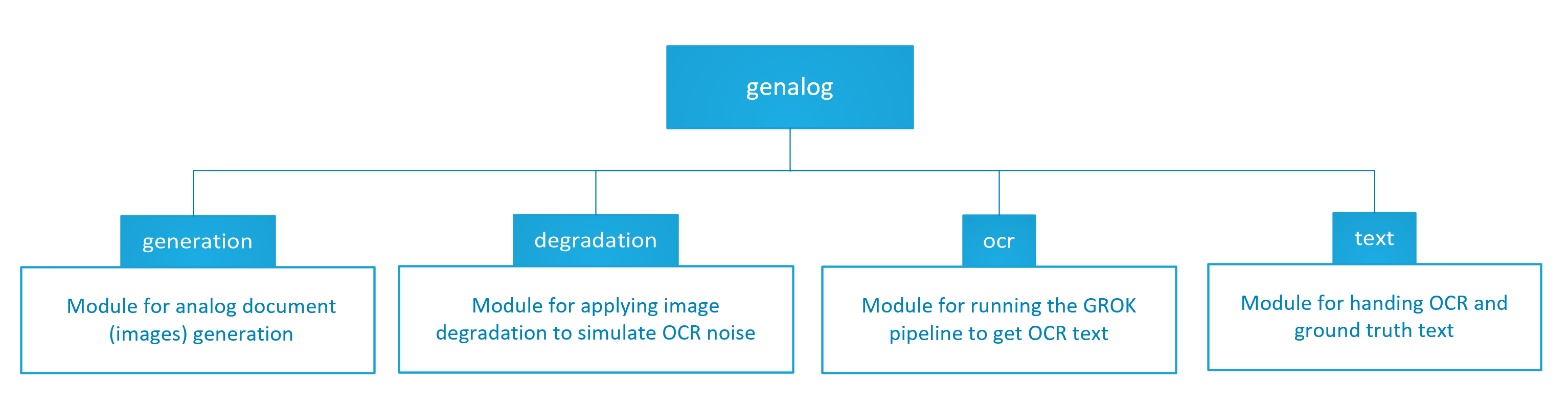
Else we have in-depth walkthroughs of each of the module in Genalog.
| Steps | Indepth Jupyter Notebook Examples | Quick Start Guides | |
|---|---|---|---|
| 1 | Create Template for Image Generation | Demo Notebook | Here is our guide to Document Generation |
| 2 | Degrade Prebuilt Images | Demo Notebook | Here is our guide to Image Degradation |
| 3 | Get Text From Images Using OCR | Demo Notebook | Here is our guide to Extracting Text |
| 4 | Align Text Produced from OCR with Ground Truth Text | Demo Notebook | Here is our guide to Text Alignment |
| 5 | NER Label Propagation from Ground Truth to OCR Tokens | Demo Notebook | Here is our guide to Label Propagation |
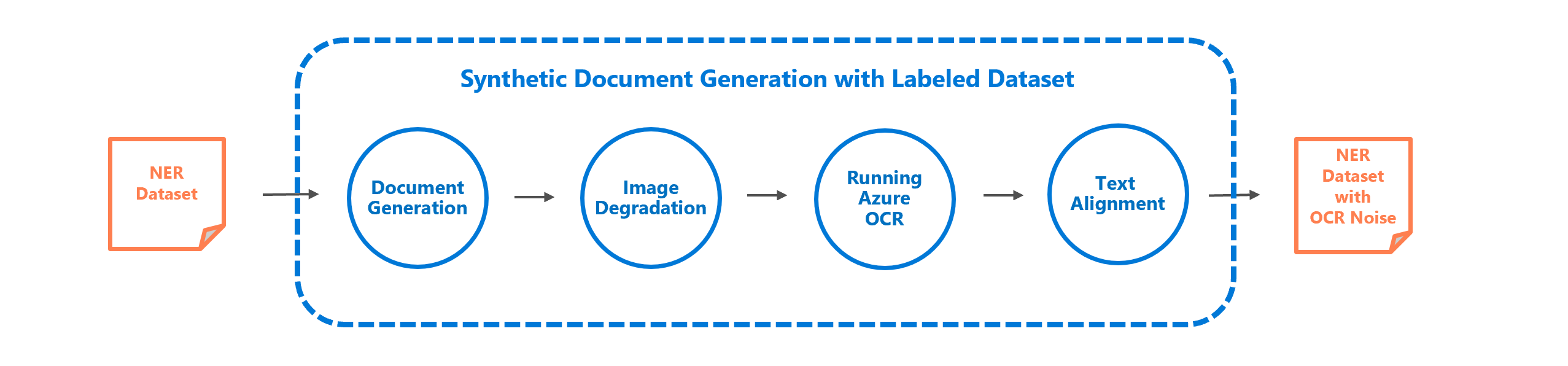
We also provide notebooks for the complete end-to-end scenario of generating a synthetic dataset connecting all the components of genalog:
| Scenario | Indepth Jupyter Notebook | |
|---|---|---|
| 1 | Synthetic Dataset Generation with LABELED NER Dataset | Demo Notebook |
Other Requirements:
-
If you want to use the OCR Capabilities of Azure to Extract Text from the Images You'll require the following resources:
- Azure Cognitive Search Service Quickstart Guide Here
- Azure Blob Storage Quickstart Guide Here
See Azure Docs for more information on Azure Cognitive Search.
Package Release
Please see RELEASE.md for more details on the release process.
Repo Structure
genalog
├────genalog
│       ├─── generation                      # generate text images
│       ├──── degradation                    # methods for image degradation
│       ├──── ocr                            # running the Azure Search Pipeline
│       └──── text                           # methods to Align OCR Output Text with
├────devops                                  # CI/CD pipelines
├────docs                                    # containing online documentaions
├────examples                                # example Jupyter Notebooks for Various
├────tests                                   # tests
├────tox.ini                                 # CI orchestration and configurations
├────README.md
└────LICENSE
Trademark Notice
This project may contain trademarks or logos for projects, products, or services. Authorized use of Microsoft trademarks or logos is subject to and must follow Microsoft’s Trademark & Brand Guidelines. Use of Microsoft trademarks or logos in modified versions of this project must not cause confusion or imply Microsoft sponsorship. Any use of third-party trademarks or logos are subject to those third-party’s policies.
Microsoft Open Source Code of Conduct
This project has adopted the Microsoft Open Source Code of Conduct. For more information see the Code of Conduct FAQ or contact opencode@microsoft.com with any additional questions or comments.
Contribution Guidelines
This project welcomes contributions and suggestions. Most contributions require you to agree to a Contributor License Agreement (CLA) declaring that you have the right to, and actually do, grant us the rights to use your contribution. For details, visit https://cla.microsoft.com.
When you submit a pull request, a CLA-bot will automatically determine whether you need to provide a CLA and decorate the PR appropriately (e.g., label, comment). Simply follow the instructions provided by the bot. You will only need to do this once across all repositories using our CLA.
This project has adopted the Microsoft Open Source Code of Conduct. For more information see the Code of Conduct FAQ or contact opencode@microsoft.com with any additional questions or comments.
Collaborators
Genalog was originally developed by the MAIDAP team at Microsoft Cambridge NERD in association with the Text Analytics Team in Redmond.
1 maintainer

Metadata
1 maintainer
Release files for genalog 0.1.0
For a detailed explanation of source distributions (sdists) and built distributions (wheels), please see the package formats documentation.
Built distribution (wheel)
| File | Interpreter | ABI | Platform | Reset |
|---|---|---|---|---|
| genalog-0.1.0-py3-none-any.whl | Python 3 | none | any | Details |
Release files / genalog-0.1.0-py3-none-any.whl
| Download URL | genalog-0.1.0-py3-none-any.whl |
|---|---|
| Size | 61.2 kB |
| Tags | Python 3 |
|
SHA-256 checksum How to use checksums |
d96dada134184a797d03ed5c49d0dd1c7737418724ca78607a02487eb9b54d54
|
|
BLAKE2b-256 checksum How to use checksums |
d60f25e14a5ed3f15bc01bcf0b715813a8e98e9b86342c84f4c28f8d7e981fc9
|
| Upload date | |
|
Uploaded using Trusted Publishing? What is trusted publishing? |
No |
| Uploaded via |
twine/3.4.2 importlib_metadata/4.6.1 pkginfo/1.7.1 requests/2.26.0 requests-toolbelt/0.9.1 tqdm/4.61.2 CPython/3.6.14
|














