
Python-based command line tool for generative design using IFC file format

Project description
gendgn
Getting Started
- This tutorial uses Ubuntu 24.04 OS
- install openstudio application 1.8.0 (https://github.com/openstudiocoalition/OpenStudioApplication/releases/tag/v1.8.0)
FreeCAD example
-
Download FreeCAD (https://www.freecad.org/downloads.php)
-
Download the example files from this url https://github.com/chenkianwee/ifc2osmod_gendgn_egs/archive/refs/heads/main.zip
-
Unzip the folder and you will see this folder structure.
ifc2osmod_gendgn_egs |----- epw |----- freecad |----- ifc |----- json |----- measure -
Open the file in ifc2osmod_gendgn_egs/freecad/small_office.FCStd with FreeCAD. In Ubuntu, right click -> choose FreeCAD to open it
-
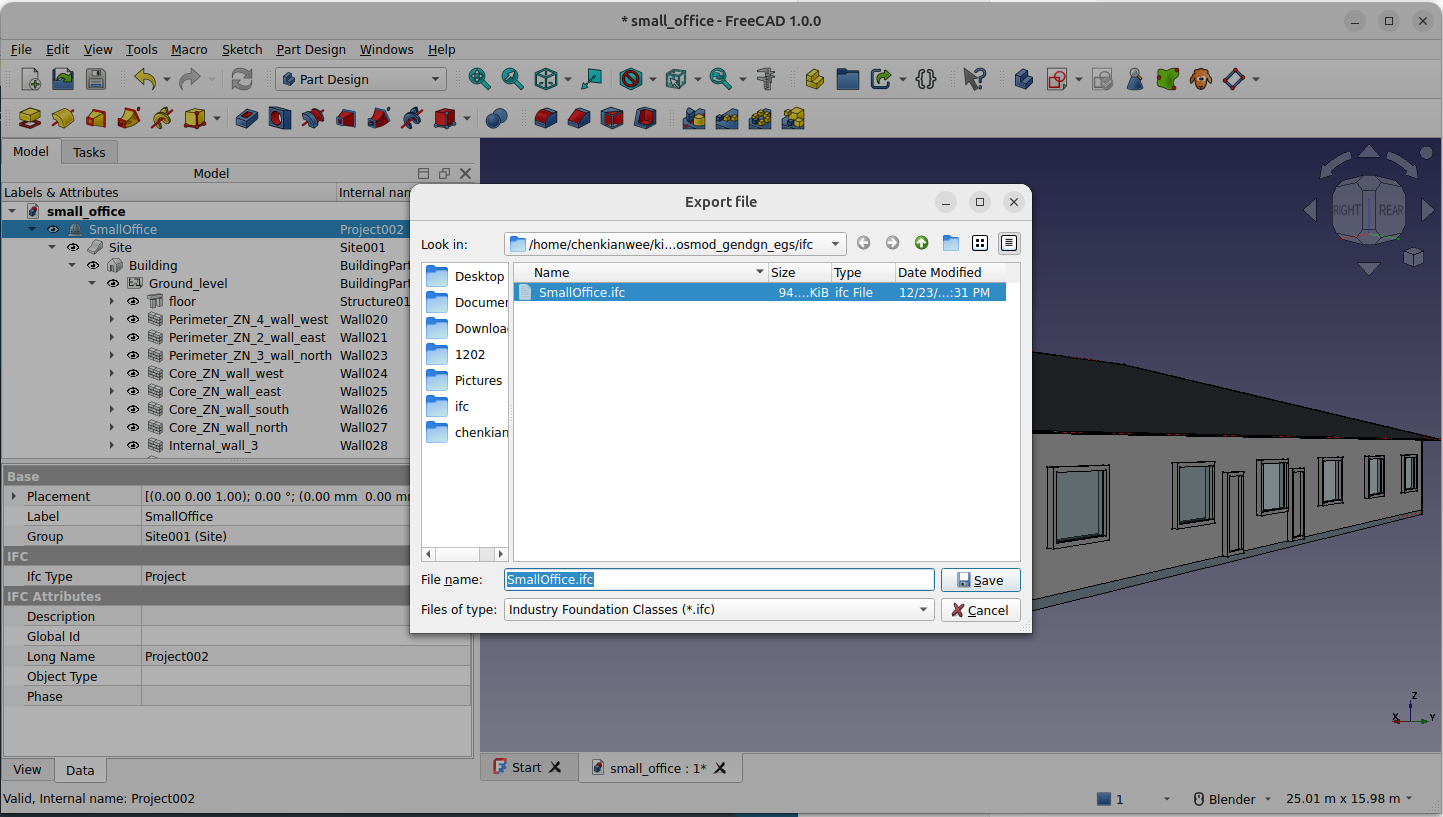
Once you open the file. You can export the model as IFC. Select SmallOffice on the Model Tab. Go to File -> Export. At the Files of type parameter choose Industry Foundation Classes (*.ifc). Export it to the ifc folder ifc2osmod_gendgn_egs/ifc/small_office.ifc
-
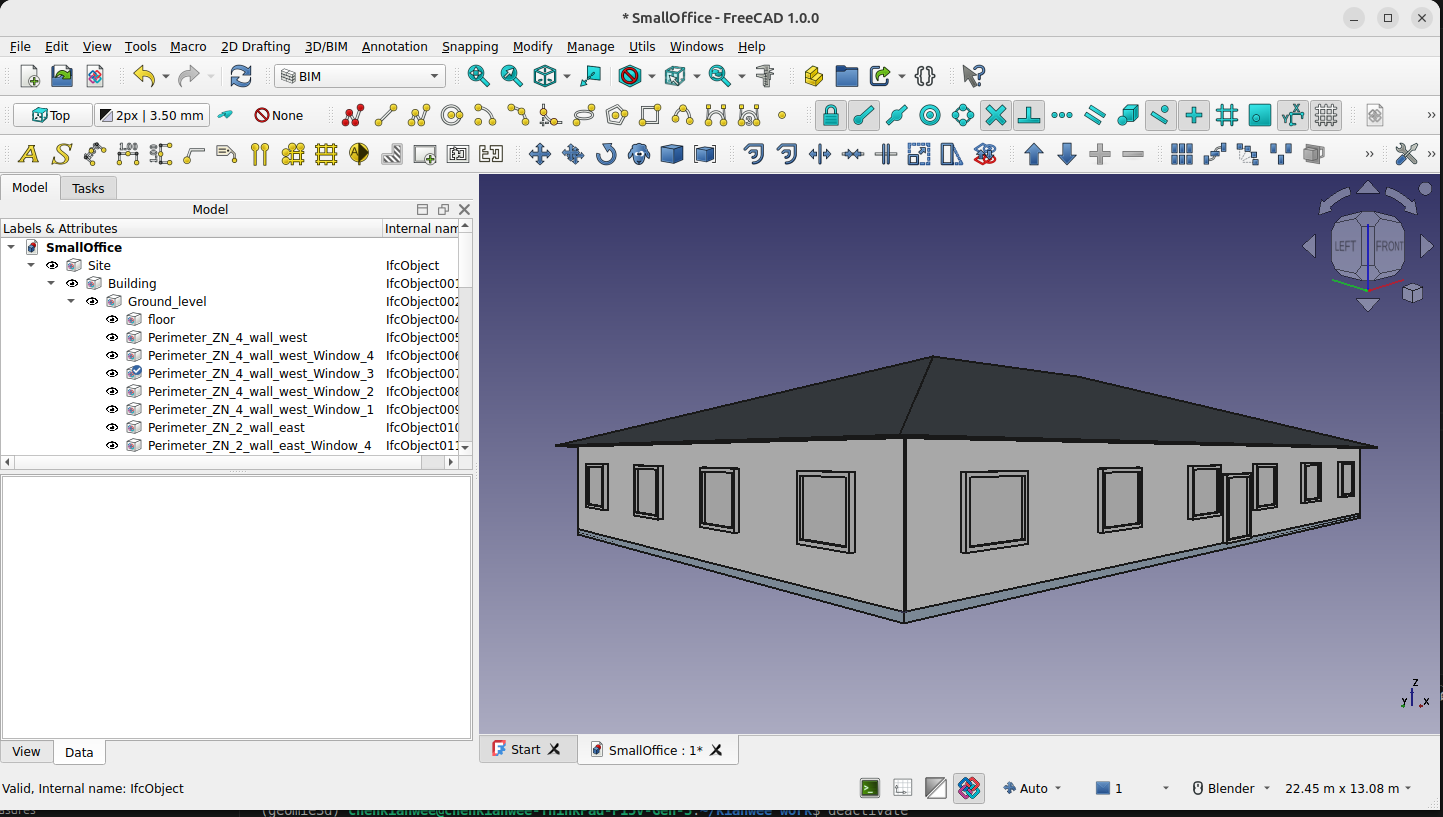
Reopen the IFC file in FreeCAD to check the export. File -> Open and choose the exported IFC file. You should be able to open the file as shown below.
-
Now that we have successfully exported an IFC file we will use the file in gendgn module to generate variants of this design.
gendgn
- Create a virtual environment called gendgn
python3 -m venv venv/gendgn - Activate the virtual environment.
source venv/gendgn/bin/activate - Install the gendgn python library.
pip install gendgn - Go to the directory where you have downloaded the example files for this tutorial.
cd ifc2osmod_gendgn_egs - Once installed we will parameterized the IFC that was generated in the previous section by running this command on the terminal
pmtrz_wwr_constr -i ifc/small_office.ifc -r json/pmtrz_wwr_constr.json - Open the file ifc2osmod_gendgn_egs/json/pmtrz_wwr_constr.json. You will see the following. The file describes the parameterization. There are 8 parameters each with a range.
{ "exe_script": "exe_wwr_constr", "parameters": { "wall_thermal_resistance": {"range": [0.5, 3]}, "roof_thermal_resistance": {"range": [3, 6]}, "floor_thermal_resistance": {"range": [3, 6]}, "glazing_uvalue": {"range": [0.5, 3]}, "north_wwr": {"range": [0.1, 0.4]}, "south_wwr": {"range": [0.1, 0.4]}, "east_wwr": {"range": [0.1, 0.4]}, "west_wwr": {"range": [0.1, 0.4]} } } - With the pmtrz_wwr_constr.json. We can use the next command to generate a sample of options. Specify the number variants to generate with the -n variable. In this tutorial we will only generate 5 variants.
sample_variants -n 5 -j json/pmtrz_wwr_constr.json -r json/sample_variants.json - Open the file ifc2osmod_gendgn_egs/json/sample_variants.json. You will see a new section "parameter_normalized_values". You will see 5 sets of 8 values for 5 design variants and each having 8 parameters.
"parameter_normalized_values": [ [ 0.2428181727019519, 0.22216051440303392, 0.3179248195128799, 0.1822885785823198, 0.11343437238467262, 0.4284061572769124, 0.724093446021713, 0.07539211757349876 ], ... ... ... - With the sample_variants.json file. We can generate 5 variants with the following command.
exe_wwr_constr -j json/sample_variants.json -i ifc/small_office.ifc -r ifc/small_office_variants - Go to ifc/small_office_variants folder. You will see that there will be 5 variants generated. You can open them with FreeCAD to see the variants.
Note: API not available due to missing dependencies: geometry.add_representation - No module named 'bpy'
Note: API not available due to missing dependencies: grid.create_axis_curve - No module named 'bpy'
ifc2osmod
- Once you have generated the IFC files. We can convert those files to Openstudio models and run the simulation with this batch simulation command:
batch_eval -v ifc/small_office_variants/ -r res/small_office/ -e epw/miami/USA_FL_Miami.Intl.AP.722020_TMY3.epw -d epw/miami/USA_FL_Miami.Intl.AP.722020_TMY3.ddy -m json/measure_sel.json - Once done you can go to the res/small_office/small_office_0/csv/small_office_0_wrkflw_1_1_to_12_31_between_0_and_23_at1.csv and look at the simulation results.
Development
- Download the example files from this url https://github.com/chenkianwee/ifc2osmod_gendgn_egs/archive/refs/heads/main.zip
cd to the right folder
cd gendgn/src
execute pmtrz_wwr_constr.py
python -m gendgn.pmtrz_wwr_constr -i path_to/ifc2osmod_gendgn_egs/ifc/small_office.ifc -r path_to/ifc2osmod_gendgn_egs/json/pmtrz_wwr_constr.json
execute sample_variants.py
python -m gendgn.sample_variants -n 5 -j path_to/ifc2osmod_gendgn_egs/json/pmtrz_wwr_constr.json
execute exe_wwr_constr.py
python -m gendgn.exe_wwr_constr -j path_to/ifc2osmod_gendgn_egs/json/pmtrz_wwr_constr.json -i path_to/ifc2osmod_gendgn_egs/ifc/small_office.ifc -r path_to/ifc2osmod_gendgn_egs/ifc/small_office_variants
execute batch_eval.py
python -m gendgn.batch_eval -v path_to/ifc2osmod_gendgn_egs/ifc/small_office_variants -r path_to/ifc2osmod_gendgn_egs/res/batch_small_offices -e path_to/ifc2osmod_gendgn_egs/epw/miami/USA_FL_Miami.Intl.AP.722020_TMY3.epw -d path_to/ifc2osmod_gendgn_egs/epw/miami/USA_FL_Miami.Intl.AP.722020_TMY3.ddy -m path_to/ifc2osmod_gendgn_egs/json/measure_sel.json


Download files
Download the file for your platform. If you're not sure which to choose, learn more about installing packages.
Source Distribution
Built Distribution
Filter files by name, interpreter, ABI, and platform.
If you're not sure about the file name format, learn more about wheel file names.
Copy a direct link to the current filters
File details
Details for the file gendgn-0.0.7.tar.gz.
File metadata
- Download URL: gendgn-0.0.7.tar.gz
- Upload date:
- Size: 27.0 kB
- Tags: Source
- Uploaded using Trusted Publishing? No
- Uploaded via: twine/6.1.0 CPython/3.12.3
File hashes
| Algorithm | Hash digest | |
|---|---|---|
| SHA256 |
b86a5139f11fb5789a31ac1c84c48da33788d71b6a3006a687423effb1eca769
|
|
| MD5 |
eb10da57271af82d961a5ff75971dde1
|
|
| BLAKE2b-256 |
b8eb0c47956e516c573ae24eb4d10c4ba88e8765b0cacb929f83700dbf43f3a8
|
File details
Details for the file gendgn-0.0.7-py3-none-any.whl.
File metadata
- Download URL: gendgn-0.0.7-py3-none-any.whl
- Upload date:
- Size: 28.8 kB
- Tags: Python 3
- Uploaded using Trusted Publishing? No
- Uploaded via: twine/6.1.0 CPython/3.12.3
File hashes
| Algorithm | Hash digest | |
|---|---|---|
| SHA256 |
f7962d7b09757bf6fea6e01885f3fd15e2fa14a8a26254adf772aa11338af937
|
|
| MD5 |
a4a7b8a28858361c82fd62613c738e32
|
|
| BLAKE2b-256 |
6aa66a4cf78469c2885fb89d9a041a2ac213dee0fea6bf3f80fd70395d2b8b91
|






