
General Navigation Python Module





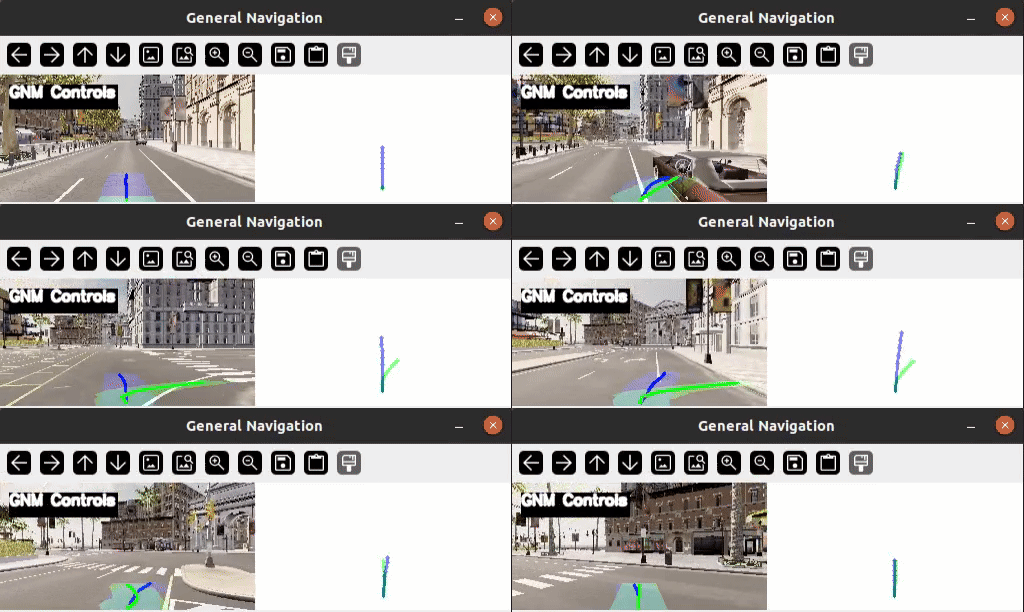
General Navigation Models based on GNM, ViNT, NoMaD as a pytorch repo installable from pip for quick and easy deployment. This repo provides functionality to load and run the models and use MPC to generate steering commands for your robot. If you find any functionality in this repo useful, consider citing it:
@misc{aditya2024general_navigation,
  title        = {General Navigation Python Module},
  author       = {Aditya, NG},
  howpublished = {\url{https://pypi.org/project/general-navigation/}},
  version      = {1.0.0},
  year         = {2024},
  note         = {Accessed: 2024-06-09}
}
Install it from PyPI
Install our project from pip and quickly get started by trying it out on your own test video!
pip install general_navigation
python3 -m general_navigation --media media/test.mp4
If you want to connect with the Carla simulator, you will also need to seperately install carla
pip install carla==0.9.15  # Linux and Windows
pip install carla==0.9.5  # Mac
Usage
Creating a pytorch instance of the model
from general_navigation.models.factory import (
  get_default_config, get_model, get_weights
)

config = get_default_config()
model = get_model(config)
model = get_weights(config, model, device)
Using the command line tool for inference on a video
$ python3 -m general_navigation --help
usage: general_navigation [-h] [--device {auto,cuda,cpu}] [--media MEDIA]

options:
  -h, --help            show this help message and exit
  --device {auto,cuda,cpu}, -d {auto,cuda,cpu}
  --media MEDIA, -m MEDIA
                        File path, use camera index if you want to use the webcam
$ python3 -m general_navigation --media media/test.mp4
Using the command line tool for working with Carla simulator
$ python3 -m general_navigation.carla_run
TODO
- Import models from visualnav-transformer
- Script to use specified video camera to feed video into the models
- Visualize model's trajectory output
- Arguments to CLI
- Auto download model weights from google drive
- Demo video
- PyPi release
- Example usage
- Carla Integration
- MPC implementation
- Visualize MPC reconstructed trajectory
- Visualize all of the model's trajectories
- Visualize Steering angle
- Fix scaling issue
- Intrinsic matrix as argument
- Documentation:
mkdocs gh-deploy - Linting fixes
- MyPy testing
- Add test cases for code coverage
Development
Read the CONTRIBUTING.md file.
References
1 maintainer

Metadata
1 maintainer
Release files for general-navigation 1.2.0
For a detailed explanation of source distributions (sdists) and built distributions (wheels), please see the package formats documentation.
Source distribution (sdist)
| File | Size | Uploaded | Provenance | Actions |
|---|---|---|---|---|
| general_navigation-1.2.0.tar.gz | 15.4 MB | Without provenance | Details for general_navigation-1.2.0.tar.gz |
Built distribution (wheel)
| File | Interpreter | ABI | Platform | Actions Reset |
|---|---|---|---|---|
| general_navigation-1.2.0-py3-none-any.whl | Python 3 | none | any | Details for general_navigation-1.2.0-py3-none-any.whl |
Total release size: 16.2 MB
Security for general-navigation 1.2.0
Provenance
Provenance describes where a file came from. On PyPI, provenance is shared via attestations, which provide a verifiable record of the build or publishing details. View details, limitations and caveats.
No provenance found
None of the files in this release were uploaded with provenance metadata.
A note on package security
PyPI is a repository for distributing packages, not a service for auditing them. While third-party security researchers and our staff do their best to detect and remove malicious packages, PyPI cannot guarantee the quality, security or suitability of any given package.
To learn more about protecting yourself from malicious actors, visit our package security documentation.














