
Sovereign trust, identity, and communication fabric for AI agents, edge systems, and distributed infrastructure.
Verified details
These details have been verified by PyPIProject links
GitHub Statistics
Maintainers

Project description
 Genesis Mesh





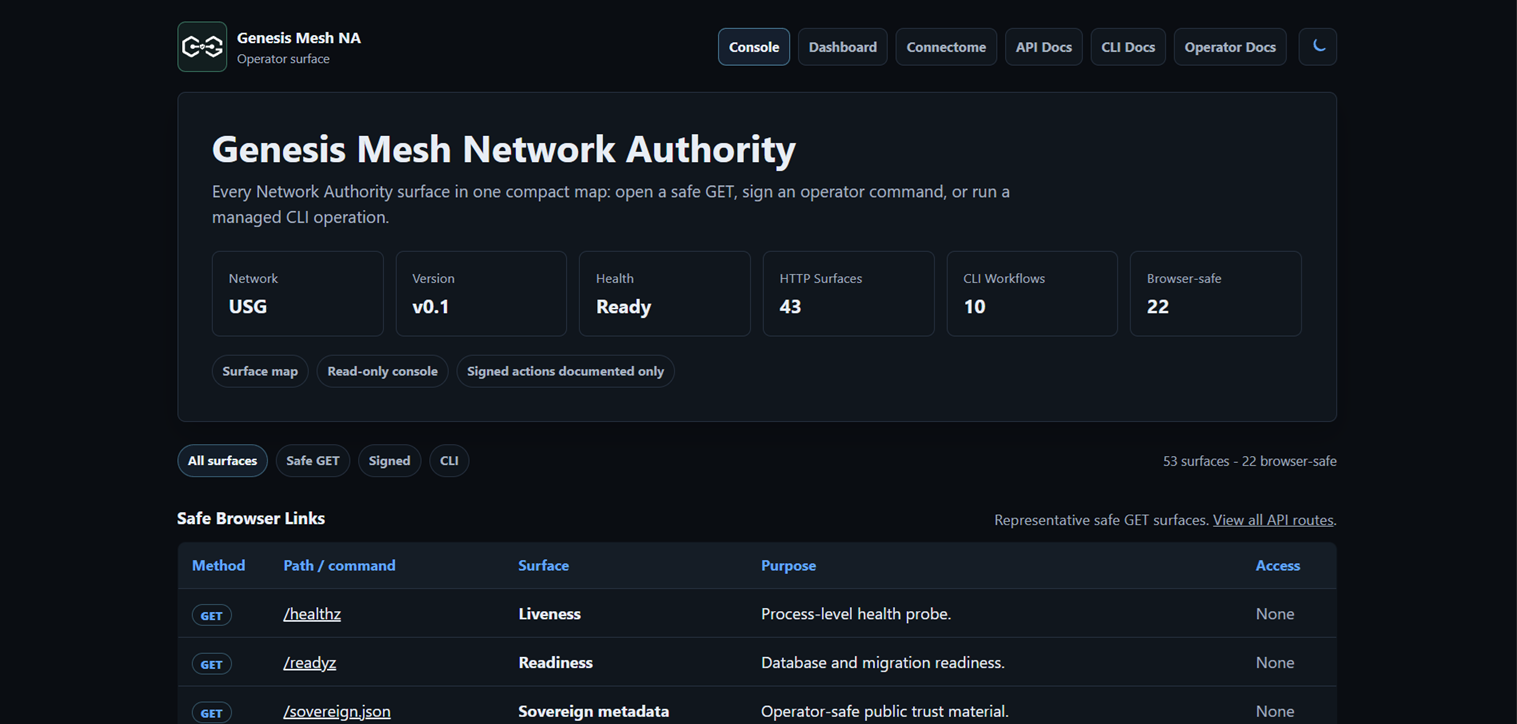
Live Deployment
| Network Authority | Online |
| Public Endpoint | https://na.genesismesh.connectorzzz.com |
| Deployment | Azure VM, Sweden Central |
| TLS | Enabled |
| Active Nodes | 2 |
| Tracked Nodes | 2 |
| Remote Nodes | 1 |
| Online since | 2026-05-30 |
Current deployment demonstrates:
- Identity and certificate-based enrollment
- Remote nodes across separate networks
- Noise XX encrypted peer sessions
- Direct message delivery
- Multi-hop routing and packet forwarding
- Route failure recovery
- Certificate revocation and CRL enforcement

Live Message Delivery
A remote local node sends a DATA message to an Azure-hosted node over a Noise XX encrypted peer session.
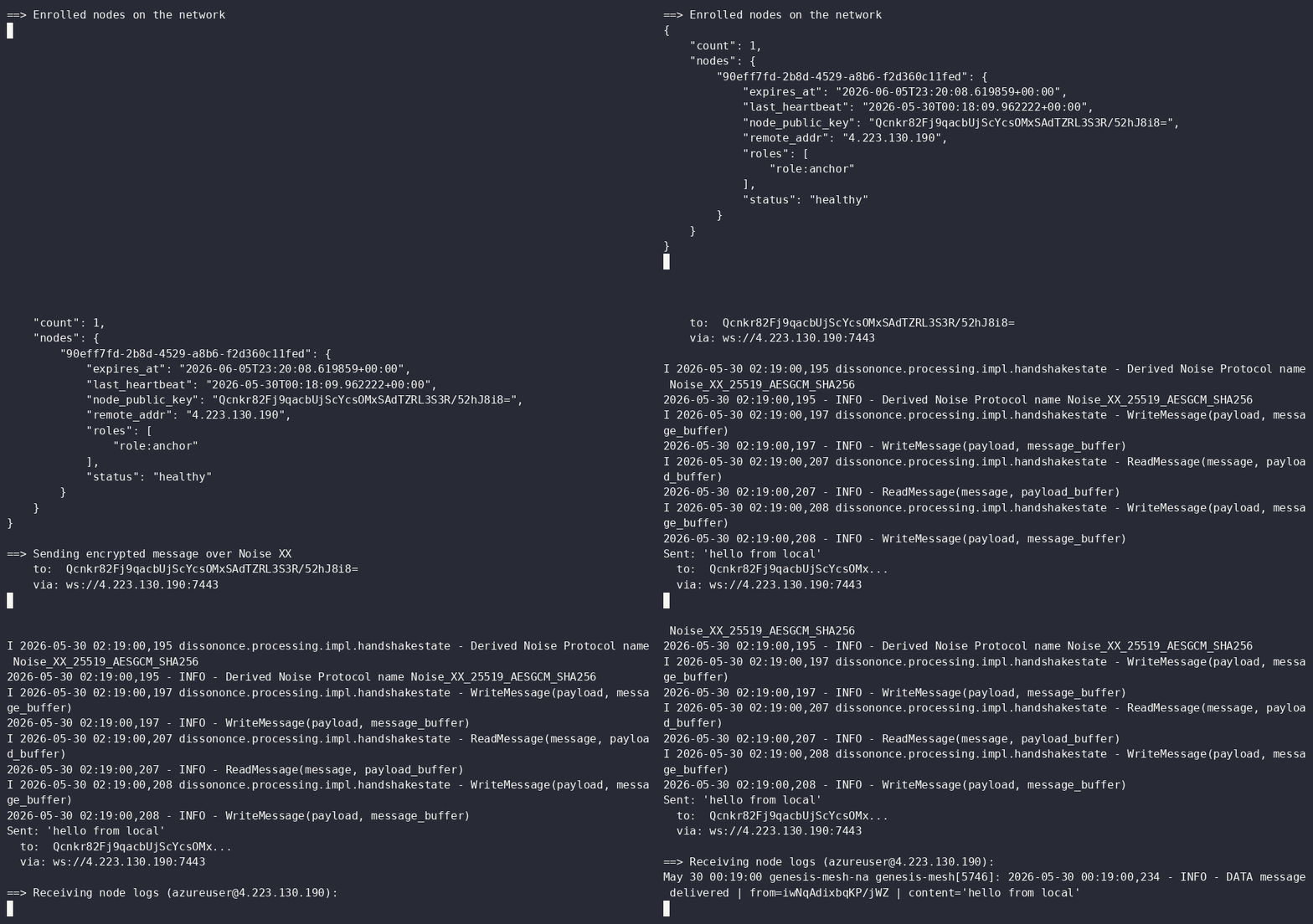
- Noise XX handshake completed
- Connection established
- Neighbor added
- DATA message delivered
Multi-Hop Routing
Genesis Mesh supports decentralized route propagation and packet forwarding.
Node A and Node C do not connect directly. Instead:
Node A → Node B → Node C
Node B learns routes, forwards packets, and decrements TTL values during transit.
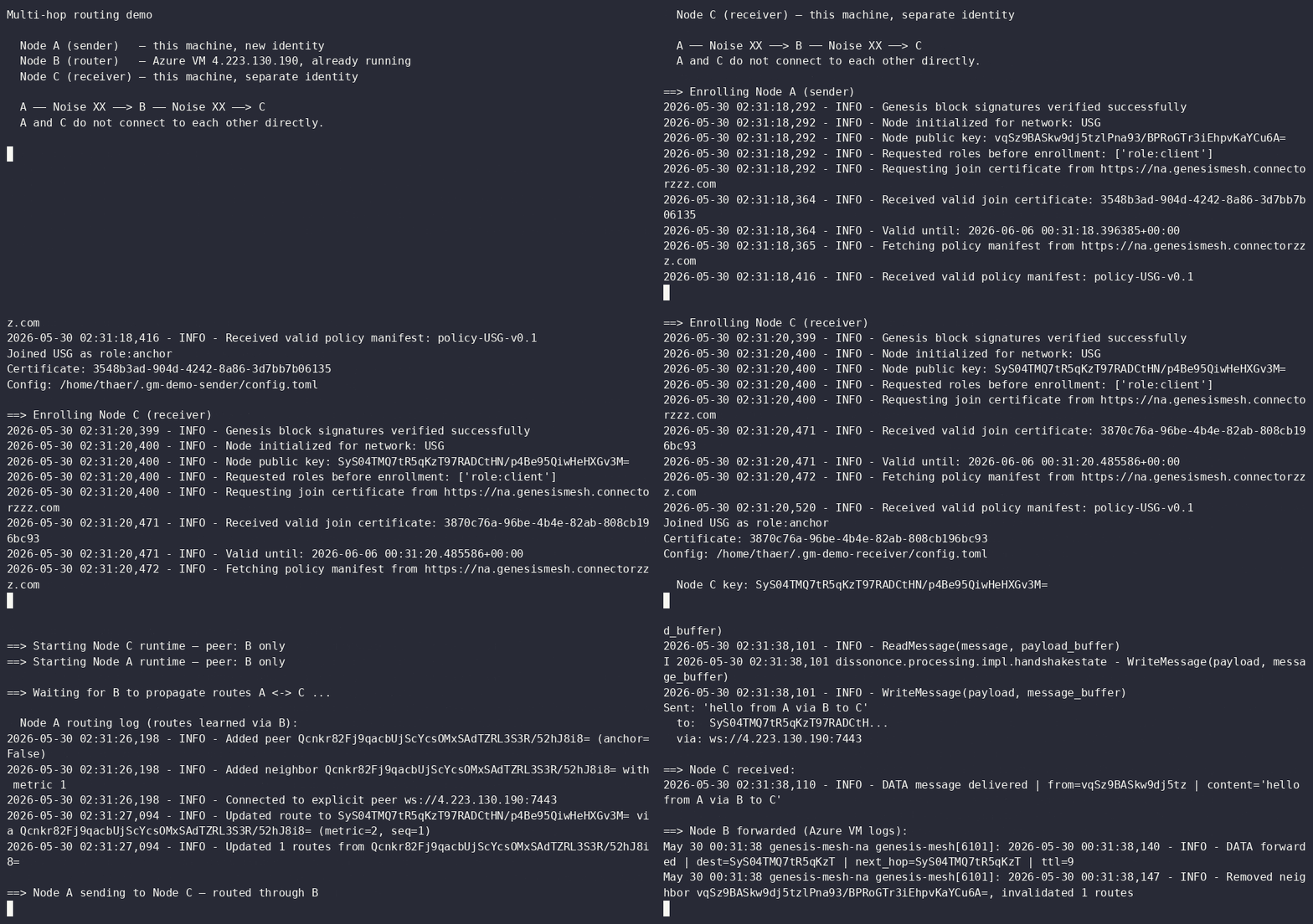
- Route learned via intermediate node
- DATA forwarded by router
- DATA delivered to destination
Route Failure Recovery
When a router goes offline, neighboring nodes withdraw its routes and traffic re-routes through a surviving path — no operator intervention.
Topology: A reaches C through two routers — B (primary) and D (backup). B is killed mid-demo.
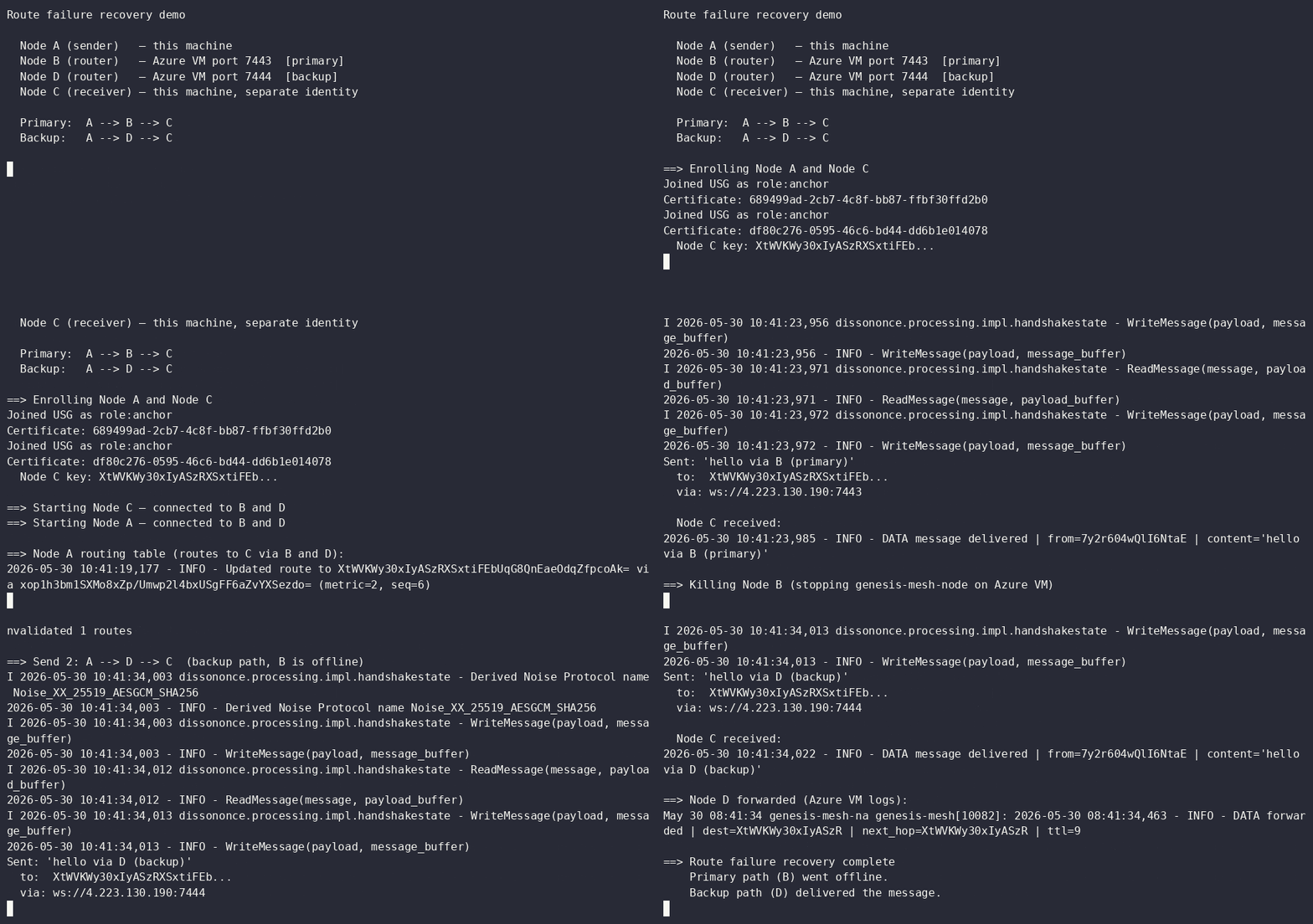
- Primary path A → B → C delivers
- B goes offline
- A detects the disconnect and invalidates B's routes
- A → D → C delivers without retry or operator action

Trust can be revoked.
A revoked node is removed from the active set, added to a signed CRL, and immediately rejected by heartbeat, renewal, handshake, and routing checks.
Genesis Mesh treats revocation as a first-class control-plane action. When an operator revokes a certificate, the Network Authority publishes a new signed CRL, removes the node from the active set, and rejects further heartbeat, renewal, peer handshake, and routing activity from that identity.
Genesis Mesh is a sovereign trust, identity, and communication fabric for AI agents, edge systems, and distributed infrastructure.
It answers the operational questions that basic mesh networking leaves open: who is allowed to be a node, how peers prove identity, what each node is allowed to do, how messages reach the right peer, and how a compromised or retired identity is removed.
Genesis Mesh combines five capabilities in one trust fabric:
- Identity: every node has an Ed25519 identity and a signed join certificate.
- Trust: a signed genesis block, Network Authority, operator keys, and CRLs define who the network trusts.
- Routing: authenticated peers discover routes and forward messages without depending on the Network Authority for every data exchange.
- Authorization: enrollment roles, policy manifests, RBAC, and signed admin actions define what identities may do.
- Sovereignty: the operator owns the trust chain, membership process, revocation process, and policy distribution path.
Every enrolled node holds a signed join certificate issued by the Network Authority. Peer sessions are encrypted with the Noise XX protocol, deriving X25519 keys directly from each node's Ed25519 identity. No separate TLS certificate lifecycle is required for peer transport.
Why It Exists
Most overlay networks focus on connectivity: can this machine reach that machine? Genesis Mesh focuses on controlled participation: should this machine be here, what identity is it using, what is it authorized to do, and can the network remove it quickly?
Use Genesis Mesh when your system needs:
- a private trust domain for agents, devices, or edge services
- operator-controlled enrollment instead of open peer discovery
- certificate-backed peer authentication
- signed policy distribution
- revocation that affects heartbeats, renewal, peer handshakes, and routing
- audit trails for security-relevant control-plane actions
Do not use it when you only need public peer discovery, anonymous networking, a general service mesh for Kubernetes ingress, or a permissionless blockchain.
Architecture
flowchart TD
    RS["Root Sovereign<br/>offline trust anchor"]
    NA["Network Authority<br/>invite enrollment, certs, CRLs, policy"]
    A["Node A"]
    B["Node B"]
    C["Node C"]

    RS -->|"signs genesis"| NA
    NA -->|"invite token + join certificate"| A
    NA -->|"invite token + join certificate"| B
    NA -->|"invite token + join certificate"| C

    A <-->|"Noise XX encrypted peer session"| B
    B <-->|"Noise XX encrypted peer session"| C
    A <-->|"Noise XX encrypted peer session"| C

    NA -.->|"signed CRL bootstrap"| A
    A -.->|"CRL gossip"| B
    B -.->|"CRL gossip"| C
At a high level, the Network Authority admits identities and publishes trust state. Nodes use that state to communicate directly, route messages, and reject revoked peers.
Documentation
Founding Community Operators
v0.18.0 records the founding community operator cohort: non-maintainers who
tested Genesis Mesh through the early public releases and now maintain their
own sovereigns. Their public artifacts are under
examples/founding-community-operators/
and examples/official-operators/.
Requirements
- Python 3.12 or later
- See
requirements.txtfor pinned runtime dependencies
Installation
pip install genesis-mesh
For development from a clone:
git clone https://github.com/thaersaidi/genesismesh.git
cd genesismesh
python -m venv .venv
source .venv/bin/activate   # PowerShell: .\.venv\Scripts\Activate.ps1
pip install -e ".[dev,docs]"
Quick Start
The local workflow runs the NA in one terminal and joins a node in a second.
# Create keys, genesis block, and CLI config (one time).
genesis-mesh init

# Start the Network Authority (keep this terminal open).
genesis-mesh na start

# In a second terminal: create a single-use invite and join.
INVITE_TOKEN=$(genesis-mesh admin invite --role anchor)
genesis-mesh join --na http://127.0.0.1:8443 --token "$INVITE_TOKEN"

# Inspect NA health and node certificate state.
genesis-mesh status
PowerShell:
$INVITE_TOKEN = genesis-mesh admin invite --role anchor
genesis-mesh join --na http://127.0.0.1:8443 --token $INVITE_TOKEN
Full local smoke test:
genesis-mesh dev up
Production Deployment
Container startup uses start.sh and Gunicorn. Set SERVICE_ROLE=na for the
Network Authority or SERVICE_ROLE=node for a peer node. The NA role requires
two mounted secrets and fails closed if either is absent:
| Environment variable | Description |
|---|---|
SERVICE_ROLE |
na or node |
GENESIS_FILE |
Path to the signed genesis block |
NA_PRIVATE_KEY_FILE |
Path to the NA Ed25519 signing key (NA role) |
OPERATOR_PUBLIC_KEYS_JSON |
JSON map of operator key IDs to public keys |
DB_PATH |
SQLite database path (default: genesis_mesh_na.db) |
PORT |
Bind port (default: 8443) |
WEB_CONCURRENCY |
Gunicorn worker count (default: 4) |
The NA private key never leaves the NA process.
Health and readiness probes are available at /healthz and /readyz.
Application Examples
- Agent network — two agents (a researcher and a knowledge base) hold a structured conversation over the mesh. The responder's identity is unforgeable, the conversation is private, and revoking the responder blocks further answers. See
examples/agent-network/. Easy to extend to an LLM, database, or MCP backend without changing the mesh code.
Deployment Examples
Genesis Mesh includes deployment examples for:
- Local process —
genesis-mesh init && genesis-mesh na start - Docker —
docker runand Docker Compose (docs/examples/compose/) - Kubernetes — manifests under
examples/kubernetes/ - Terraform on Azure —
infrastructure/azure/, the same module used by the live deployment
See the deployment guide for the full walkthrough.
Repository Layout
.
  Dockerfile              Container image definition
  start.sh                Container entry point (NA and node roles)
  requirements.txt        Pinned runtime dependencies
  setup.py                Package metadata and entry points
  docs/                   Sphinx documentation source
  examples/               Demo workflows, sample genesis blocks, Kubernetes manifests
  genesis_mesh/           Python package
  infrastructure/         Terraform, Azure scripts, and operational tools
genesis_mesh/
  audit/                  Tamper-evident security audit logging
  cli/                    High-level and low-level CLI commands
  crypto/                 Ed25519 signing and key management
  gossip/                 CRL gossip protocol
  models/                 Genesis, certificate, policy, CRL, and enrollment models
  monitoring/             Prometheus metrics and health checks
  na_service/             Network Authority REST API and WSGI entry point
  node/                   Node client, runtime, discovery, RBAC, and control plane
  routing/                Routing table, protocol, and message forwarding
  tests/                  Unit and integration tests
  transport/              WebSocket transport, Noise XX, protocol framing, and connections
Testing
python -m pytest genesis_mesh/tests -v
Security
See SECURITY.md for:
- What Genesis Mesh defends against (enrollment, identity, transport, revocation)
- What it explicitly does not defend against (DoS, traffic analysis, key compromise, supply chain)
- How to report a vulnerability privately
Quick reporting link: github.com/thaersaidi/genesismesh/security/advisories/new
License
Project details
Verified details
These details have been verified by PyPIProject links
GitHub Statistics
Maintainers
Release history Release notifications | RSS feed


Download files
Download the file for your platform. If you're not sure which to choose, learn more about installing packages.
Source Distribution
Built Distribution
Filter files by name, interpreter, ABI, and platform.
If you're not sure about the file name format, learn more about wheel file names.
Copy a direct link to the current filters
File details
Details for the file genesis_mesh-0.19.0.tar.gz.
File metadata
- Download URL: genesis_mesh-0.19.0.tar.gz
- Upload date:
- Size: 196.2 kB
- Tags: Source
- Uploaded using Trusted Publishing? Yes
- Uploaded via: twine/6.1.0 CPython/3.13.12
File hashes
| Algorithm | Hash digest | |
|---|---|---|
| SHA256 |
96516ab26f0e46e4ee34f9188526de3bf803299ea890cf02e0b445bc2b2d43f5
|
|
| MD5 |
bab9a50101a4f92ab50c246fd27e9126
|
|
| BLAKE2b-256 |
5fa8fd7ac2ba6c395b206f973f8f176695441ac0f38343f25deb48dabc1227b9
|
Provenance
The following attestation bundles were made for genesis_mesh-0.19.0.tar.gz:
Publisher:
publish-pypi.yml on thaersaidi/genesismesh
-
Statement:
-
Statement type:
https://in-toto.io/Statement/v1 -
Predicate type:
https://docs.pypi.org/attestations/publish/v1 -
Subject name:
genesis_mesh-0.19.0.tar.gz -
Subject digest:
96516ab26f0e46e4ee34f9188526de3bf803299ea890cf02e0b445bc2b2d43f5 - Sigstore transparency entry: 1754878606
- Sigstore integration time:
-
Permalink:
thaersaidi/genesismesh@18d10e5d4a9e745780d062a0565251af03addb11 -
Branch / Tag:
refs/tags/v0.19.0 - Owner: https://github.com/thaersaidi
-
Access:
public
-
Token Issuer:
https://token.actions.githubusercontent.com -
Runner Environment:
github-hosted -
Publication workflow:
publish-pypi.yml@18d10e5d4a9e745780d062a0565251af03addb11 -
Trigger Event:
release
-
Statement type:
File details
Details for the file genesis_mesh-0.19.0-py3-none-any.whl.
File metadata
- Download URL: genesis_mesh-0.19.0-py3-none-any.whl
- Upload date:
- Size: 234.3 kB
- Tags: Python 3
- Uploaded using Trusted Publishing? Yes
- Uploaded via: twine/6.1.0 CPython/3.13.12
File hashes
| Algorithm | Hash digest | |
|---|---|---|
| SHA256 |
b580add028f9b252a98224c15574e6e4e2fe5f2793bd4b75b2c9ca67acf66eb8
|
|
| MD5 |
8560eabc925bd0f779f7e018d5c28e27
|
|
| BLAKE2b-256 |
fb9d020126c1598ff2f999ae8bd4969987bdeae6a886af335269e599d3c30f8a
|
Provenance
The following attestation bundles were made for genesis_mesh-0.19.0-py3-none-any.whl:
Publisher:
publish-pypi.yml on thaersaidi/genesismesh
-
Statement:
-
Statement type:
https://in-toto.io/Statement/v1 -
Predicate type:
https://docs.pypi.org/attestations/publish/v1 -
Subject name:
genesis_mesh-0.19.0-py3-none-any.whl -
Subject digest:
b580add028f9b252a98224c15574e6e4e2fe5f2793bd4b75b2c9ca67acf66eb8 - Sigstore transparency entry: 1754878622
- Sigstore integration time:
-
Permalink:
thaersaidi/genesismesh@18d10e5d4a9e745780d062a0565251af03addb11 -
Branch / Tag:
refs/tags/v0.19.0 - Owner: https://github.com/thaersaidi
-
Access:
public
-
Token Issuer:
https://token.actions.githubusercontent.com -
Runner Environment:
github-hosted -
Publication workflow:
publish-pypi.yml@18d10e5d4a9e745780d062a0565251af03addb11 -
Trigger Event:
release
-
Statement type:






