
Official MCP server for the Geneva Forecasting API

Project description
Geneva MCP
Time-Series Forecasting & Demand Planning for AI Agents
Powered by the Geneva Forecasting Engine — by RoadMap Technologies





Geneva MCP brings production-grade statistical forecasting directly into AI assistants and coding agents. Connect any MCP-compatible client to the Geneva Forecasting Engine and run rigorous time series forecasts through natural conversation — no code, no pipelines, no exports required.
"Forecast the next 12 months of this sales data with 95% prediction intervals."
The agent calls the Geneva Engine behind the scenes, receives a numerical analysis and a forecast chart, and delivers a complete, statistically grounded interpretation — all in a single conversation turn.
Why Geneva MCP?
Free to Get Started — No Credit Card Required
The Geneva API is free with 1,000 forecasts per month. Sign up at the Developer Portal, generate your API key, and start forecasting in minutes. No trial periods, no paywalls, no surprises.
Forecast in Claude Chat
With Geneva MCP connected, Claude becomes a full forecasting analyst. Paste your data directly into the conversation, ask a question in plain language, and Claude will forecast, analyze, and visualize the results — model selection, accuracy metrics, trend commentary, and a chart, all delivered in a single response.
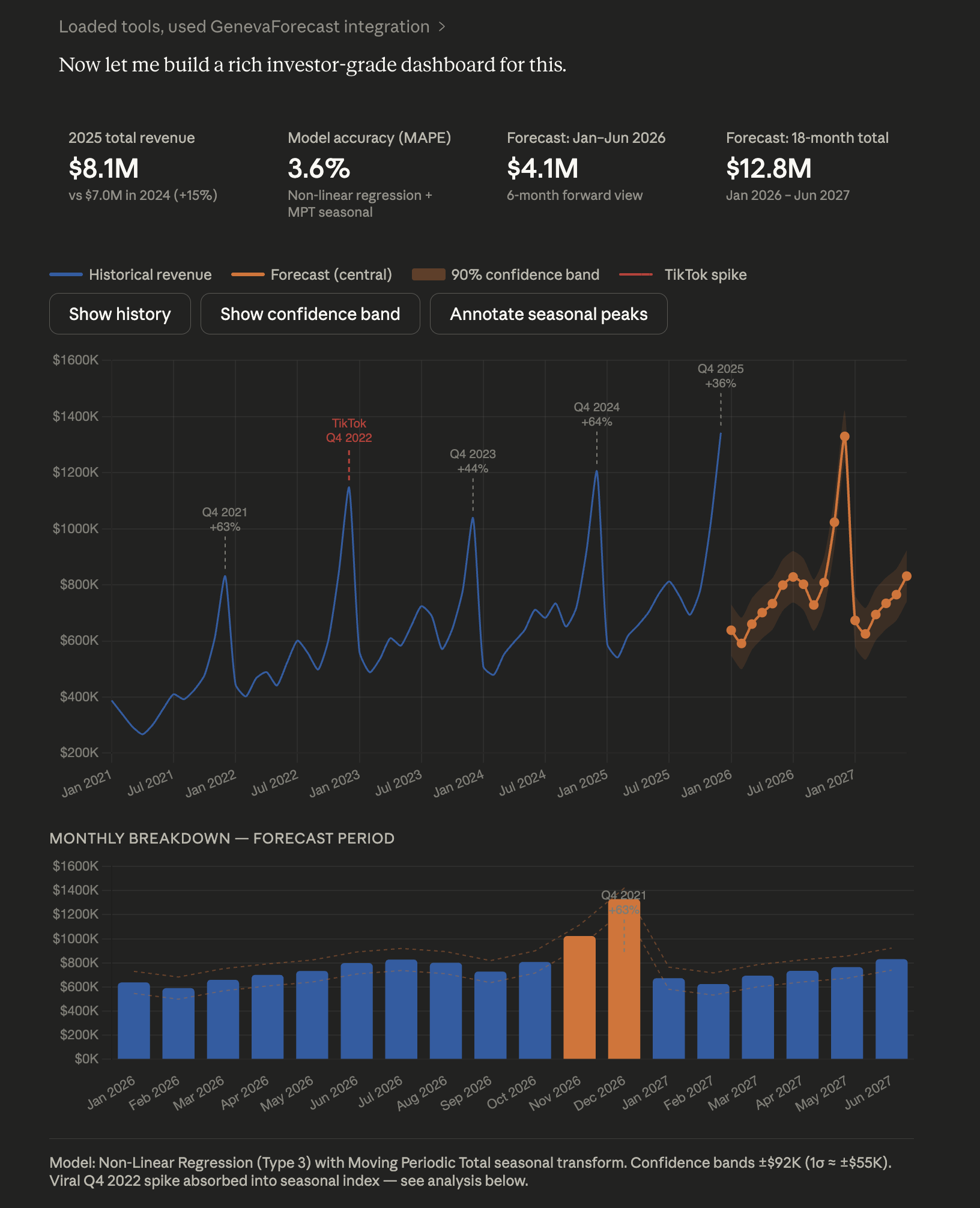
Claude with Geneva MCP — describe your data, get a complete forecast with analysis and chart in one turn
Forecast from Excel with Claude Cowork
Claude Cowork users can forecast directly from spreadsheets. Drop your .xlsx or .csv file into the conversation, describe the column you want to forecast, and Geneva handles the rest — complete with prediction intervals and a chart. No data pipelines, no Python scripts, no manual exports.
From spreadsheet to forecast in one sentence.
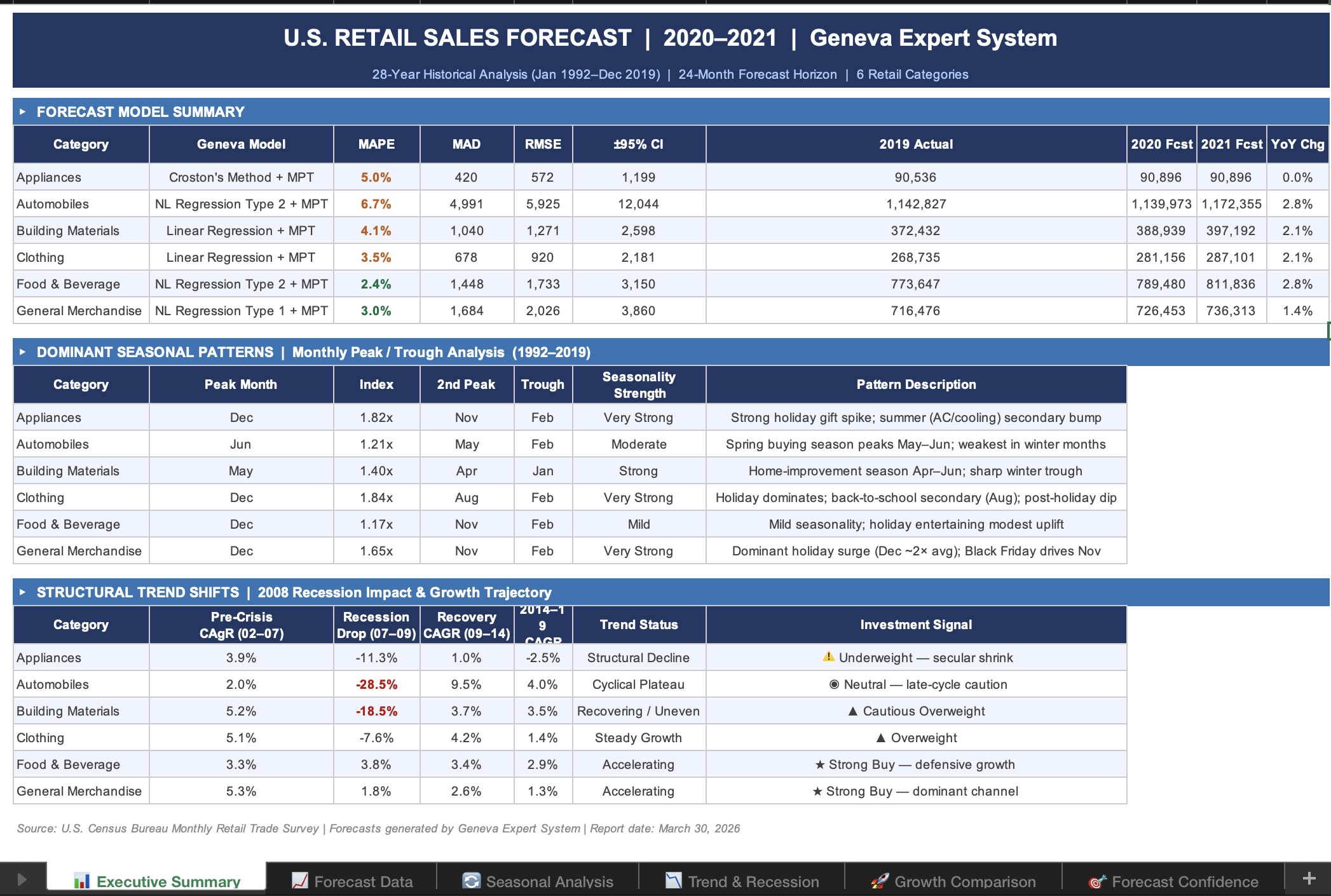
Claude Cowork with Geneva MCP — attach an Excel or CSV file and forecast any column in plain language
Fast & Purpose-Built
Geneva is a dedicated forecasting engine, not a general-purpose language model. Forecasts return in milliseconds with structured output and a chart — every time, with consistent and reproducible results. Geneva returns both a full numerical analysis and a chart image ready for the agent to embed directly in the conversation.
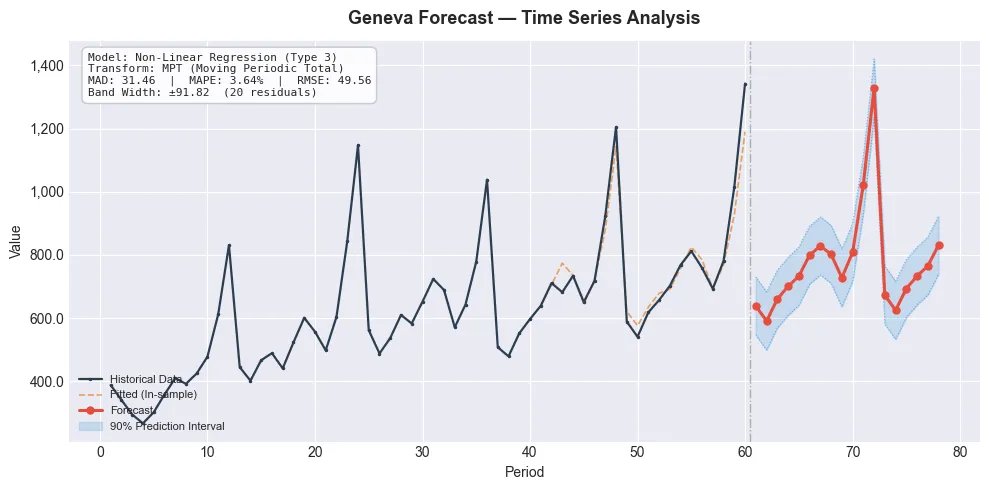
Chart generated by Geneva MCP — historical data, forecast line, and confidence interval bands at your chosen level
Requirements
| Requirement | Details |
|---|---|
| Python | 3.10 or later |
| API Key | Free — sign up at portal.roadmap-tech.com |
| Agent | Any MCP-compatible client (Claude, ChatGPT, Cursor, Windsurf, and more) |
Security: Your API key is injected as a process environment variable in your agent's MCP configuration. It is never exposed in the chat, the agent context window, or transmitted to any third party.
Installation
Option 1 — uvx (Recommended)
uvx runs Geneva MCP in an isolated environment with no permanent installation — it pulls the latest version from PyPI automatically each time. This is the cleanest approach and what the configuration examples below use.
First, install uv (a fast Python package manager) if you don't have it:
| Platform | Command |
|---|---|
| Mac | brew install uv |
| Windows | powershell -ExecutionPolicy ByPass -c "irm https://astral.sh/uv/install.ps1 | iex" |
| Linux / Mac (no Homebrew) | curl -LsSf https://astral.sh/uv/install.sh | sh |
Then run the server directly with:
uvx geneva-mcp
uvis open source and maintained by Astral — the same team behind the popularrufflinter. It is the package manager recommended by Anthropic for MCP server distribution.
Option 2 — pip
If you already have Python 3.10+ and prefer a traditional install, pip works without any additional tooling:
pip install geneva-mcp
Then use geneva-mcp as the command in your agent config instead of uvx geneva-mcp.
When to use pip vs uvx:
uvxis self-contained and version-isolated — ideal for running MCP servers where you don't want package conflicts.pipinstalls into your active Python environment and is the simpler choice if you're already managing a Python setup.
Supported Agents
| Agent | Status | Notes |
|---|---|---|
| Claude Desktop | ✅ Fully Supported | Full multimodal output (text + chart) |
| Claude Cowork | ✅ Fully Supported | Forecast directly from Excel & CSV files |
| ChatGPT Desktop | ✅ Fully Supported | Requires Developer Mode (Plus or Pro) |
| Cursor | ✅ Fully Supported | Full multimodal output |
| Windsurf | ✅ Fully Supported | Full multimodal output |
| Any MCP-compatible client | ✅ Supported | Via stdio transport |
Quick Start
Step 1 — Get Your Free API Key
Visit the Geneva Developer Portal to create a free account and generate your API key. The free tier includes 1,000 forecasts per month with no credit card required.
Step 2 — Configure Your Agent
Add the Geneva MCP server to your agent's configuration file. Replace gva_your_key_here with your API key.
Claude Desktop
Edit ~/Library/Application Support/Claude/claude_desktop_config.json:
{
  "mcpServers": {
    "geneva": {
      "command": "uvx",
      "args": ["geneva-mcp"],
      "env": {
        "GENEVA_API_URL": "https://api.roadmap-tech.com",
        "GENEVA_API_KEY": "gva_your_key_here"
      }
    }
  }
}
Restart Claude Desktop — the forecast tool will appear automatically in the tool list.
Claude Cowork
Follow the same configuration as Claude Desktop above. Once configured, you can attach an .xlsx or .csv file to the conversation and instruct Claude to forecast any column — Geneva will handle model selection, computation, and visualization automatically.
ChatGPT Desktop
- Open ChatGPT Desktop → Settings → Developer Mode (requires Plus or Pro)
- Add an MCP server with:
- Command:
uvx - Args:
geneva-mcp - Environment variables:
GENEVA_API_URL=https://api.roadmap-tech.comGENEVA_API_KEY=gva_your_key_here
- Command:
Cursor
Add to .cursor/mcp.json in your project root or global settings:
{
  "mcpServers": {
    "geneva": {
      "command": "uvx",
      "args": ["geneva-mcp"],
      "env": {
        "GENEVA_API_URL": "https://api.roadmap-tech.com",
        "GENEVA_API_KEY": "gva_your_key_here"
      }
    }
  }
}
Windsurf
Add to ~/.windsurf/mcp.json:
{
  "mcpServers": {
    "geneva": {
      "command": "uvx",
      "args": ["geneva-mcp"],
      "env": {
        "GENEVA_API_URL": "https://api.roadmap-tech.com",
        "GENEVA_API_KEY": "gva_your_key_here"
      }
    }
  }
}
Step 3 — Start Forecasting
Ask your agent to forecast any time series in plain language:
"Here are my last 36 months of revenue: [120, 135, 128, ...]. Forecast the next 18 months with 95% confidence intervals."
The agent receives structured forecast data and an embedded chart visualization, then provides a complete analysis covering model selection rationale, accuracy metrics, trend direction, seasonal patterns, and prediction intervals.
How It Works
┌──────────────────────┐     stdio (JSON-RPC)     ┌──────────────────────┐
│  AI Agent            │ ◄──────────────────────► │  Geneva MCP Server   │
│  (Claude, ChatGPT,   │                          │  (local process)     │
│   Cursor, Windsurf)  │                          │                      │
└──────────────────────┘                          └────────┬─────────────┘
                                                           │ HTTPS
                                                           ▼
                                                  ┌──────────────────────┐
                                                  │  Geneva Engine API   │
                                                  │  api.roadmap-tech.com│
                                                  └──────────────────────┘
The MCP server runs locally as a lightweight Python process. It communicates with the AI agent over stdio using the MCP protocol and calls the Geneva Forecasting Engine API over HTTPS. The server is fully stateless and produces no local side effects.
Tool Reference
forecast
Run a single time series forecast through the Geneva Forecasting Engine.
Note: Each tool call processes one time series. For batch forecasting across multiple series, use the Geneva Python SDK directly.
| Parameter | Type | Required | Default | Description |
|---|---|---|---|---|
data |
list[float] |
✅ | — | Time series observations (3–10,000 data points) |
horizon |
int |
— | auto | Number of future periods to forecast |
wave_periods |
list[int] |
— | [12] |
Seasonal cycle lengths (12=monthly, 4=quarterly, 52=weekly, 7=daily) |
confidence_level |
float |
— | 0.95 |
Prediction interval confidence level (0.0–1.0) |
method |
int |
— | auto | Force a specific method (0–9). Omit to let the Expert System select automatically |
seasonal_transform |
int |
— | 0 |
Seasonal transform: 0=None, 1=Seasonal, 2=MPT |
smoothing |
bool |
— | false |
Enable median smoothing for noisy data |
max_periods_factor |
float |
— | engine default | Fit window cap factor — increase for long series |
holdout_ratio |
float |
— | engine default | Fraction of data reserved for model evaluation |
Returns: A structured multimodal response containing:
- Text summary — Selected model name, accuracy metrics (MAD, MAPE, RMSE), forecast values with prediction intervals, in markdown format ready for agent interpretation
- Chart image — A forecast chart with historical data, forecast line, and shaded prediction interval bands
Forecasting Methods
The Geneva Expert System automatically evaluates all 10 methods and selects the best fit for your data. You can also specify a method manually using the method parameter.
| ID | Method | Best For |
|---|---|---|
| 0 | Linear Regression | Steady linear growth or decline |
| 1–5 | Non-Linear Regression (5 curve types) | Exponential, s-curve, power trends |
| 6 | Simple Exponential Smoothing | Stable, level series |
| 7 | Double Exponential Smoothing (Holt) | Trending series without seasonality |
| 8 | Holt-Winters (Seasonal) | Trending + seasonal series |
| 9 | Croston (Intermittent Demand) | Sporadic, zero-inflated series |
Troubleshooting
GENEVA_API_KEY environment variable is not set
The env block is missing from your agent's MCP configuration, or the API key value is empty. Add a valid key from the Geneva Developer Portal.
Server transport closed unexpectedly
The Python process crashed before the MCP handshake completed. Verify your installation by running the server manually:
GENEVA_API_KEY=your_key GENEVA_API_URL=https://api.roadmap-tech.com geneva-mcp
Chart rendering issues
The server uses a headless matplotlib backend (Agg) that requires no display server. If chart generation fails, reinstall matplotlib:
pip install matplotlib --force-reinstall
Related Resources
| Resource | Description |
|---|---|
| Geneva Developer Portal | Free API keys, usage dashboard, and account management |
| Geneva Python SDK | Direct API client with batch forecasting support |
| Geneva API Documentation | Full API reference, parameter guides, and examples |
License
MIT License — Copyright © 2026 RoadMap Technologies, Inc.
Release history Release notifications | RSS feed


Download files
Download the file for your platform. If you're not sure which to choose, learn more about installing packages.
Source Distribution
Built Distribution
Filter files by name, interpreter, ABI, and platform.
If you're not sure about the file name format, learn more about wheel file names.
Copy a direct link to the current filters
File details
Details for the file geneva_mcp-1.0.3.tar.gz.
File metadata
- Download URL: geneva_mcp-1.0.3.tar.gz
- Upload date:
- Size: 16.4 kB
- Tags: Source
- Uploaded using Trusted Publishing? No
- Uploaded via: twine/6.2.0 CPython/3.14.3
File hashes
| Algorithm | Hash digest | |
|---|---|---|
| SHA256 |
3e0dd0ae715ea60a80208ad250f2009853064b10d542da222ef555abbe766cbe
|
|
| MD5 |
a1736f88b2eb895c5459fce6f320b56e
|
|
| BLAKE2b-256 |
5a28f8fb9f4372a5bfc2250043df4e47bf545270f2cfca05513a196496f45749
|
File details
Details for the file geneva_mcp-1.0.3-py3-none-any.whl.
File metadata
- Download URL: geneva_mcp-1.0.3-py3-none-any.whl
- Upload date:
- Size: 14.3 kB
- Tags: Python 3
- Uploaded using Trusted Publishing? No
- Uploaded via: twine/6.2.0 CPython/3.14.3
File hashes
| Algorithm | Hash digest | |
|---|---|---|
| SHA256 |
e2898c740d07b74bfca2fda81ff4d3878363243533cd9a5d027c22c5d19bce37
|
|
| MD5 |
12d5047df212050a96b245488d3ca4dd
|
|
| BLAKE2b-256 |
b100e9a667390b912e89b26cf6957f1033b336dc319c9e4757af4cae20af7409
|






