
This release is a pre-release and may not be stable for production use.
Genoss GPT
One line replacement for openAI ChatGPT & Embeddings powered by OSS models

Genoss is a pioneering open-source initiative that aims to offer a seamless alternative to OpenAI models such as GPT 3.5 & 4, using open-source models like GPT4ALL.
Project bootstrapped using Sicarator
Features
- Open-Source: Genoss is built on top of open-source models like GPT4ALL.
- One Line Replacement: Genoss is a one-line replacement for OpenAI ChatGPT API.
Demo
Chat Completion and Embedding with GPT4ALL
https://github.com/OpenGenenerativeAI/GenossGPT/assets/19614572/9cfd4f69-6396-4883-b94d-e94dd76663dc
Supported Models
- GPT4ALL Model & Embeddings
- More models coming soon!
Starting Up
Before you embark, ensure Python 3.11 or higher is installed on your machine.
Install the server
Using pip (RECOMMENDED)
:warning: we are currently in prepublish.
pip install genoss
Install the latest version from this repository
pip install git+https://github.com/OpenGenerativeAI/GenossGPT.git@main\#egg\=genoss
Run the server
genoss-server
# To know more
genoss-server --help
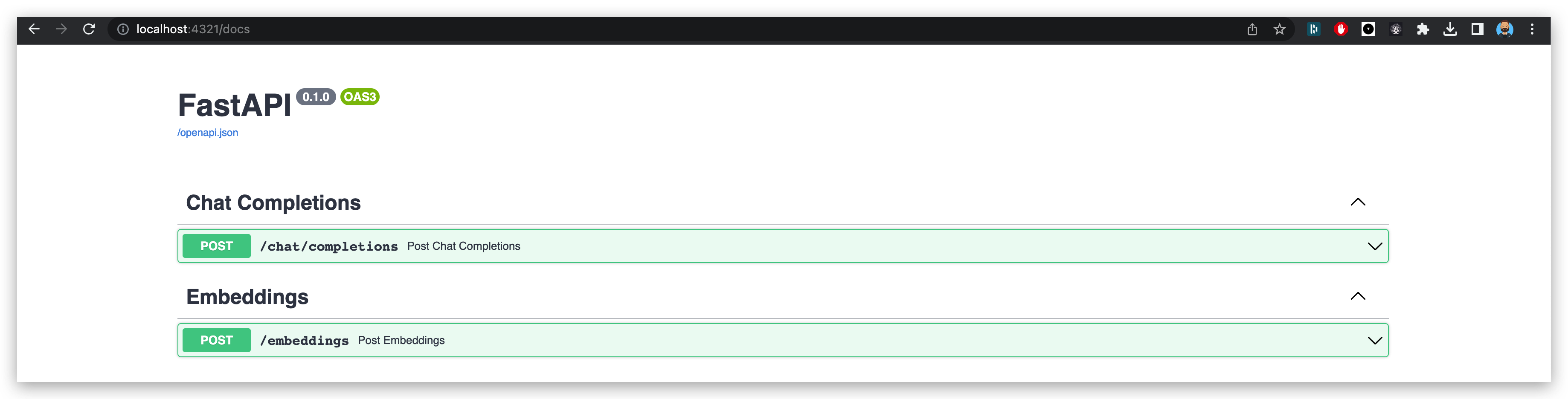
Access the api docs via http://localhost:4321/docs .
Models Installation
Install GPT4ALL Model
The first step is to install GPT4ALL, which is the only supported model at the moment. You can do this by following these steps:- Clone the repository:
git clone --recurse-submodules git@github.com:nomic-ai/gpt4all.git
- Navigate to the backend directory:
cd gpt4all/gpt4all-backend/
- Create a new build directory and navigate into it:
mkdir build && cd build
- Configure and build the project using cmake:
cmake ..
cmake --build . --parallel
-
Verify that libllmodel.* exists in
gpt4all-backend/build. -
Navigate back to the root and install the Python package:
cd ../../gpt4all-bindings/python
pip3 install -e .
- Download it to your local machine from here and put it in the
local_modelsdirectory aslocal_models/ggml-gpt4all-j-v1.3-groovy.bin
Running the Application
You need to install poetry and a valid python version (3.11*).
poetry install
For more, on a complete install for development purpose, you can check the CONTRIBUTING.md. If you simply want to start the server, you can install with the corresponding poetry groups :
poetry install --only main,llms
After the Python package has been installed, you can run the application. The Uvicorn ASGI server can be used to run your application:
uvicorn main:app --host 0.0.0.0 --port 4321
This command launches the Genoss application on port 4321 of your machine.
Running the Webapp Demo
In the demo/
cp .env.example .env
Replace the values and then
PYTHONPATH=. streamlit run demo/main.py
Genoss API Usage
The Genoss API is a one-line replacement for the OpenAI ChatGPT API. It supports the same parameters and returns the same response format as the OpenAI API.
Simply replace the OpenAI API endpoint with the Genoss API endpoint and you're good to go!
Modify the models to the supported list of models and you're good to go!
You can find the API documentation at /docs or /redoc.
Upcoming Developments
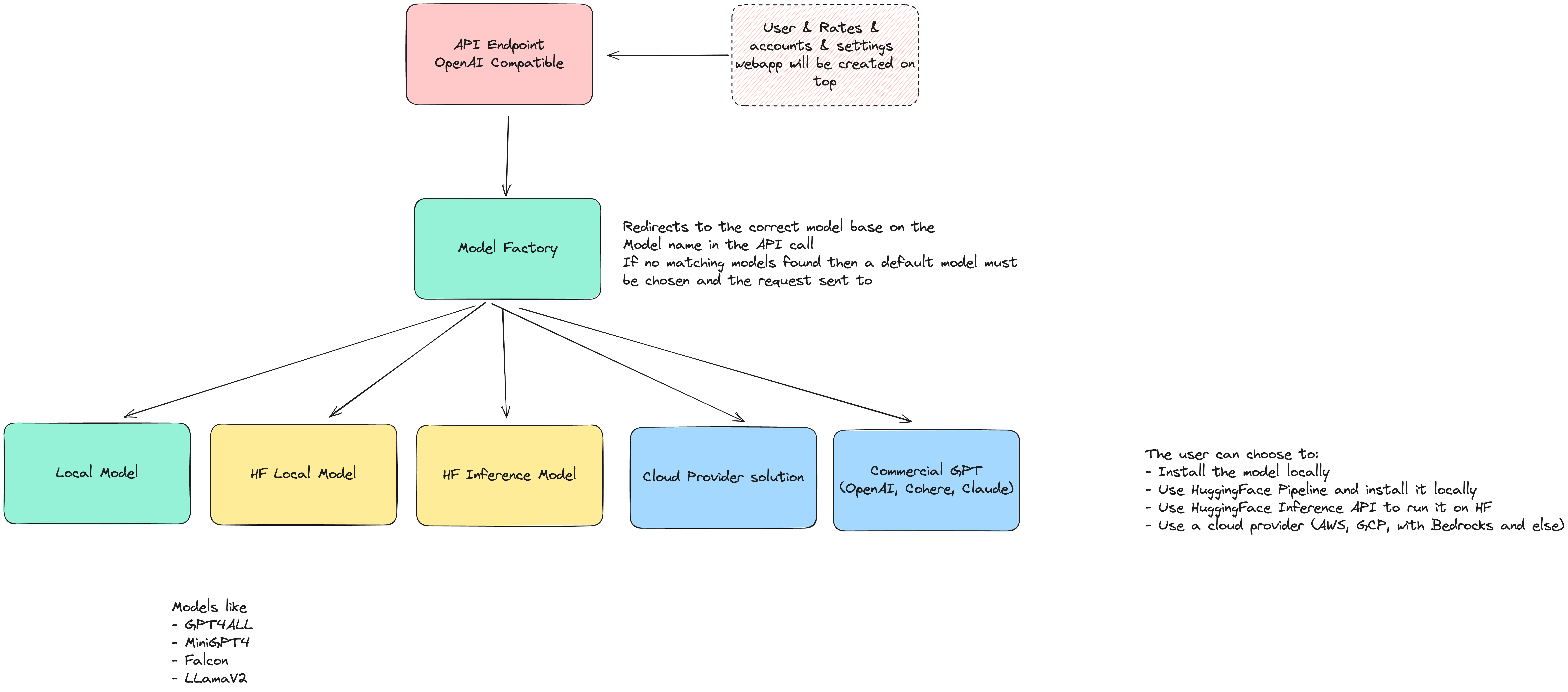
While GPT4ALL is the only model currently supported, we are planning to add more models in the future. So, stay tuned for more exciting updates.
The vision:
- Allow LLM models to be ran locally
- Allow LLM to be ran locally using HuggingFace
- ALlow LLM to be ran on HuggingFace and just be a wrapper around the inference API.
- Allow easy installation of LLM models locally
- Allow users to use cloud provider solutions such as GCP, AWS, Azure, etc ...
- Allow users management with API keys
- Have all kinds of models available for use (text to text, text to image, text to audio, audio to text, etc.)
- Be compatible with OpenAI API for models that are compatible with OpenAI API
History
Genoss was imagined by Stan Girard when a feature of Quivr became too big and complicated to maintain.
The idea was to create a simple API that would allow to use any model with the same API as OpenAI's ChatGPT API.
Then @mattzcarey, @MaximeThoonsen, @Wirg and @StanGirard started working on the project and it became a reality.
Contributions
Your contributions to Genoss are immensely appreciated! Feel free to submit any issues or pull requests.
Thanks go to these wonderful people:

Sponsors ❤️
This project could not be possible without the support of our sponsors. Thank you for your support!



License
Genoss is licensed under the Apache2 License. For more details, refer to the LICENSE file.
1 maintainer

Metadata
1 maintainer
Release files for genoss 0.0.2a3
For a detailed explanation of source distributions (sdists) and built distributions (wheels), please see the package formats documentation.
Source distribution (sdist)
| File | Size | Uploaded | |
|---|---|---|---|
| genoss-0.0.2a3.tar.gz | 16.1 kB | Details |
Built distribution (wheel)
| File | Interpreter | ABI | Platform | Reset |
|---|---|---|---|---|
| genoss-0.0.2a3-py3-none-any.whl | Python 3 | none | any | Details |
Total release size: 34.2 kB
Release files / genoss-0.0.2a3.tar.gz
| Download URL | genoss-0.0.2a3.tar.gz |
|---|---|
| Size | 16.1 kB |
| Tags | Source |
|
SHA-256 checksum How to use checksums |
c0641bb0f69c6d2eace3e00b9565410a83bc2fa6463b30994e5bafd4d013258b
|
|
BLAKE2b-256 checksum How to use checksums |
9c358fbe6b7d0e3f14d2312f6cb994ba7108b4642f99057006a9a2c07b297ca0
|
| Upload date | |
|
Uploaded using Trusted Publishing? What is trusted publishing? |
No |
| Uploaded via |
poetry/1.5.1 CPython/3.11.4 Darwin/22.5.0
|
Release files / genoss-0.0.2a3-py3-none-any.whl
| Download URL | genoss-0.0.2a3-py3-none-any.whl |
|---|---|
| Size | 18.0 kB |
| Tags | Python 3 |
|
SHA-256 checksum How to use checksums |
922ccc9c719591f99462764bf77f8b91488934924bea85cb4b72d400bf8ec796
|
|
BLAKE2b-256 checksum How to use checksums |
28256de14b59ff1d0dc94133b33f0e4b088f6cbfcf8921fde58ae85e8f206b7d
|
| Upload date | |
|
Uploaded using Trusted Publishing? What is trusted publishing? |
No |
| Uploaded via |
poetry/1.5.1 CPython/3.11.4 Darwin/22.5.0
|














