
Automatically get Genshin Impact daily check-in rewards from miHoYo bbs and HoYoLAB Community.

Project description
English | 简体中文
genshinhelper
Automatically get Genshin Impact daily check-in rewards.










░█▀▀▀░█▀▀░█▀▀▄░█▀▀░█░░░░░▀░░█▀▀▄░█░░░░█▀▀░█░░▄▀▀▄░█▀▀░█▀▀▄
░█░▀▄░█▀▀░█░▒█░▀▀▄░█▀▀█░░█▀░█░▒█░█▀▀█░█▀▀░█░░█▄▄█░█▀▀░█▄▄▀
░▀▀▀▀░▀▀▀░▀░░▀░▀▀▀░▀░░▀░▀▀▀░▀░░▀░▀░░▀░▀▀▀░▀▀░█░░░░▀▀▀░▀░▀▀
Table of Contents
If this project is helpful to you, please give us a ⭐️Star QAQ ♥
Features
- miHoYo BBS Genshin Impact daily check-in
- HoYoLAB Community Genshin Impact daily check-in
- Weibo super topic daily check-in
- Support subscription push
- Support multiple accounts
- Support multiple roles (CN Server)
Installation
This project uses Docker or Python3. Go check it out if you don't have one of them locally installed.
- Docker
You can use the following command to pull the image:
$ docker pull yindan/genshinhelper
This pulls the latest release of genshinhelper.
It can be found at Docker Hub.
- PyPI Package
You can also use the pypi package:
$ pip install genshinhelper
Usage
Docker
In the following commands, COOKIE_MIHOYOBBS is the variable name and <COOKIE_MIHOYOBBS> is your COOKIE_MIHOYOBBS value. The same goes for DISCORD_WEBHOOK and so on.
You can find all the environment variables used in this project in the Configuration section.
- Basic usage
$ docker run -d --name=genshinhelper \
-e COOKIE_MIHOYOBBS="<COOKIE_MIHOYOBBS>" \
-e DISCORD_WEBHOOK="<DISCORD_WEBHOOK>" \
--restart always \
yindan/genshinhelper:latest
- Advanced usage
Docker triggers tasks at 6:00 (UTC+8) every day by default. Use the CRON_SIGNIN variable to customize the trigger time.
Tips: Trigger time according to UTC+8
$ docker run -d --name=genshinhelper \
-e COOKIE_MIHOYOBBS="<COOKIE_MIHOYOBBS>" \
-e DISCORD_WEBHOOK="<DISCORD_WEBHOOK>" \
-e CRON_SIGNIN="0 7 * * *" \
--restart always \
yindan/genshinhelper:latest
If you want to use the config.json configuration file, use the following command to map the relevant folder.
Assuming your configuration file is located at /etc/genshin/config.json.
$ docker run -d --name=genshinhelper \
-v /etc/genshin:/app/genshinhelper/config \
--restart always \
yindan/genshinhelper:latest
- Useful commands
# Logs
$ docker logs -f genshinhelper --tail 100

# Restart
$ docker restart genshinhelper

# Update
$ docker pull yindan/genshinhelper
$ docker rm -f genshinhelper
# Re-create the container with the latest image according to basic usage or Advanced usage.

# Uninstall
$ docker rm -f genshinhelper
$ docker image rm genshinhelper
PyPI Package
You must add environment variables in host at first. See Configuration for more details.
The following command assume that you have already added the environment variables.
$ python -m genshinhelper
Serverless
If you don't have a host, you can try using serverless deployment. It can help you to automatically check-in every day.
You need to download the latest genshinhelper-xxx-serverless.zip serverless zip file at first. The entry point of the zip file is index.main_handler.
Tencent Cloud SCF
Tips: Cron expressions are 7 digits
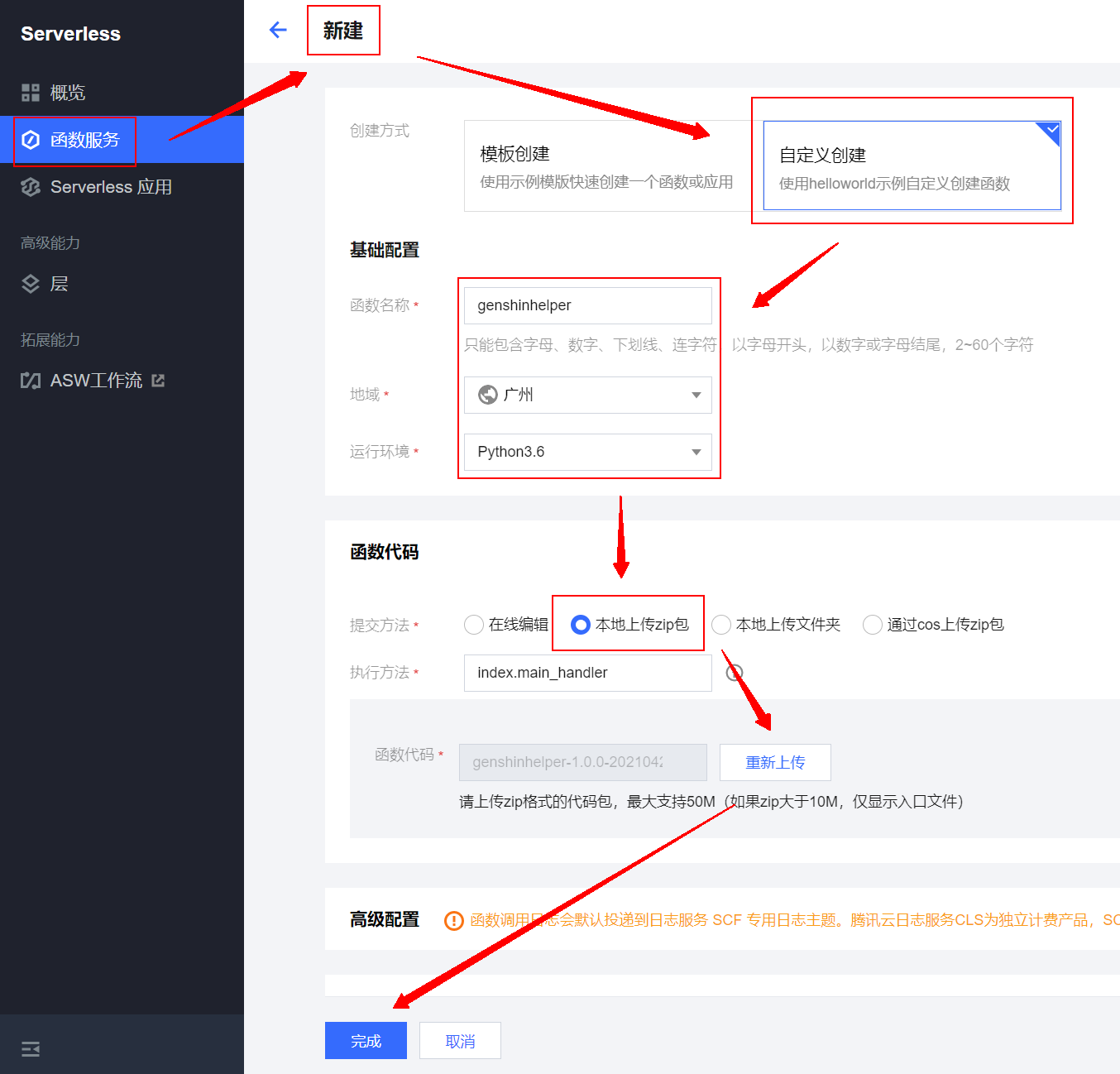
- Go to 云函数 SCF 管理控制台 →
函数服务→新建→自定义创建→基础配置→本地上传zip包→上传→本地上传zip包→ Select the downloaded filegenshinhelper-xxx-serverless.zip→完成
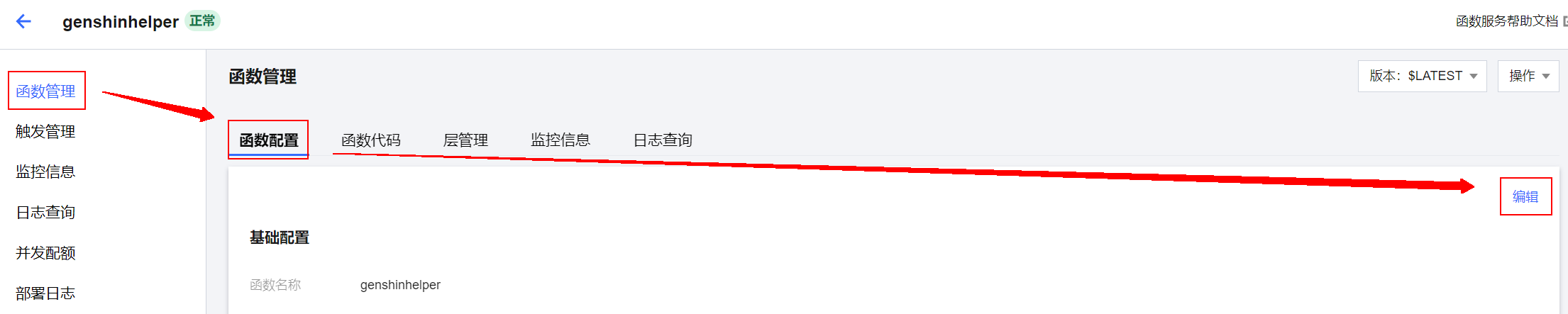
- Go to
genshinhelper→函数管理→函数配置→编辑
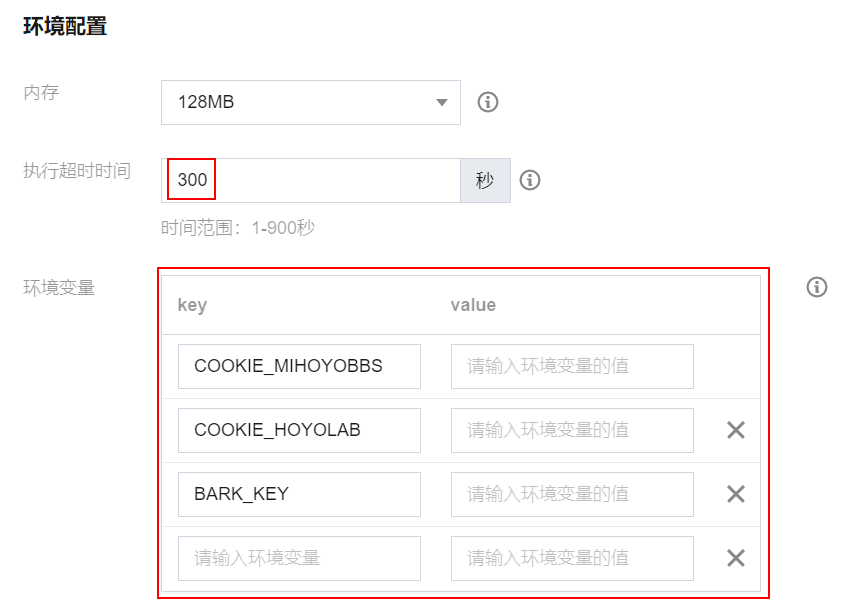
- Modify
执行超时时间to300seconds and add environment variables in环境变量. The list of environment variables can be found in the Configuration section.
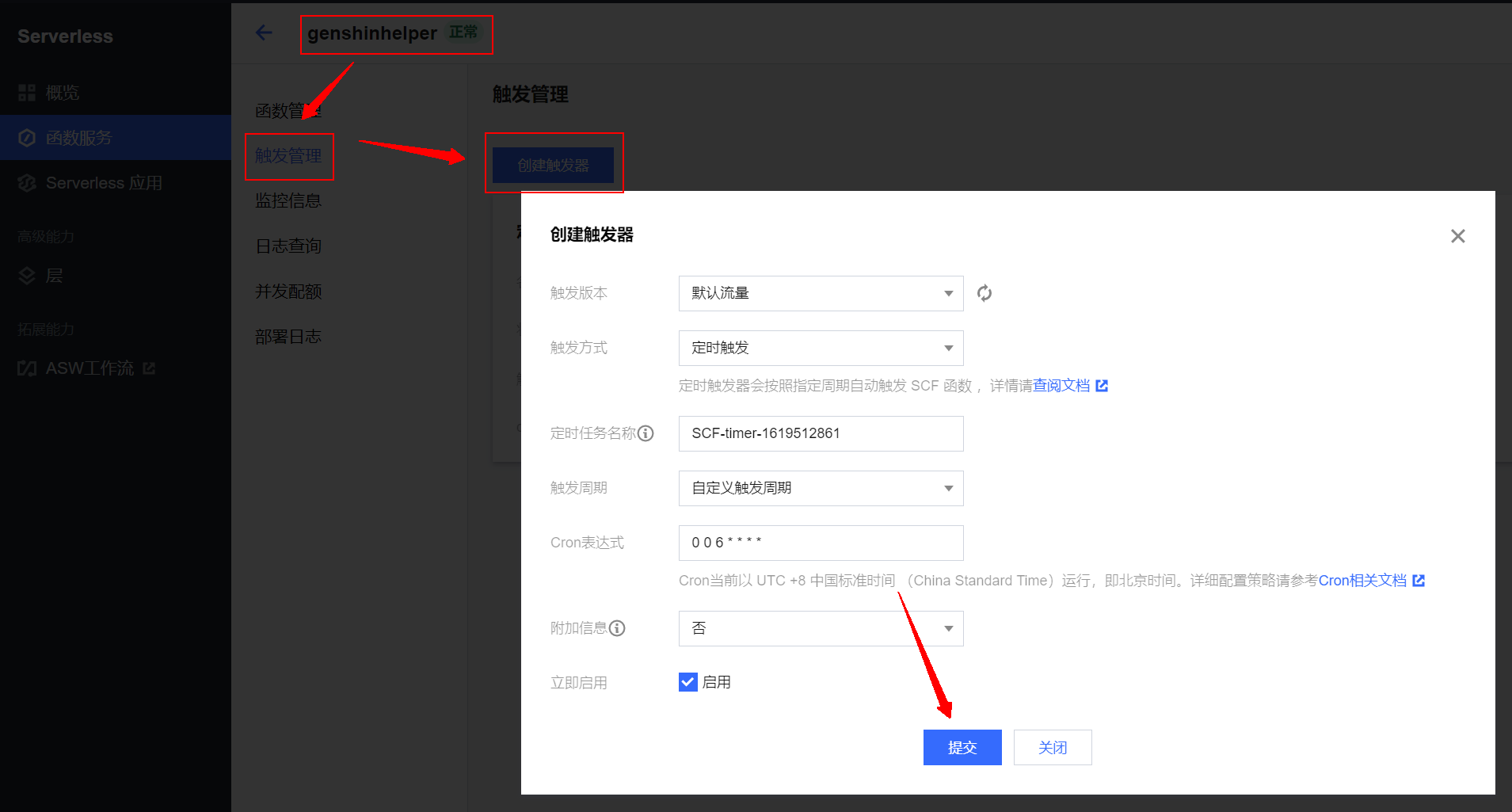
- Go to
genshinhelper→触发管理→新建触发器→ Configure as shown below:
Alibaba Cloud FC
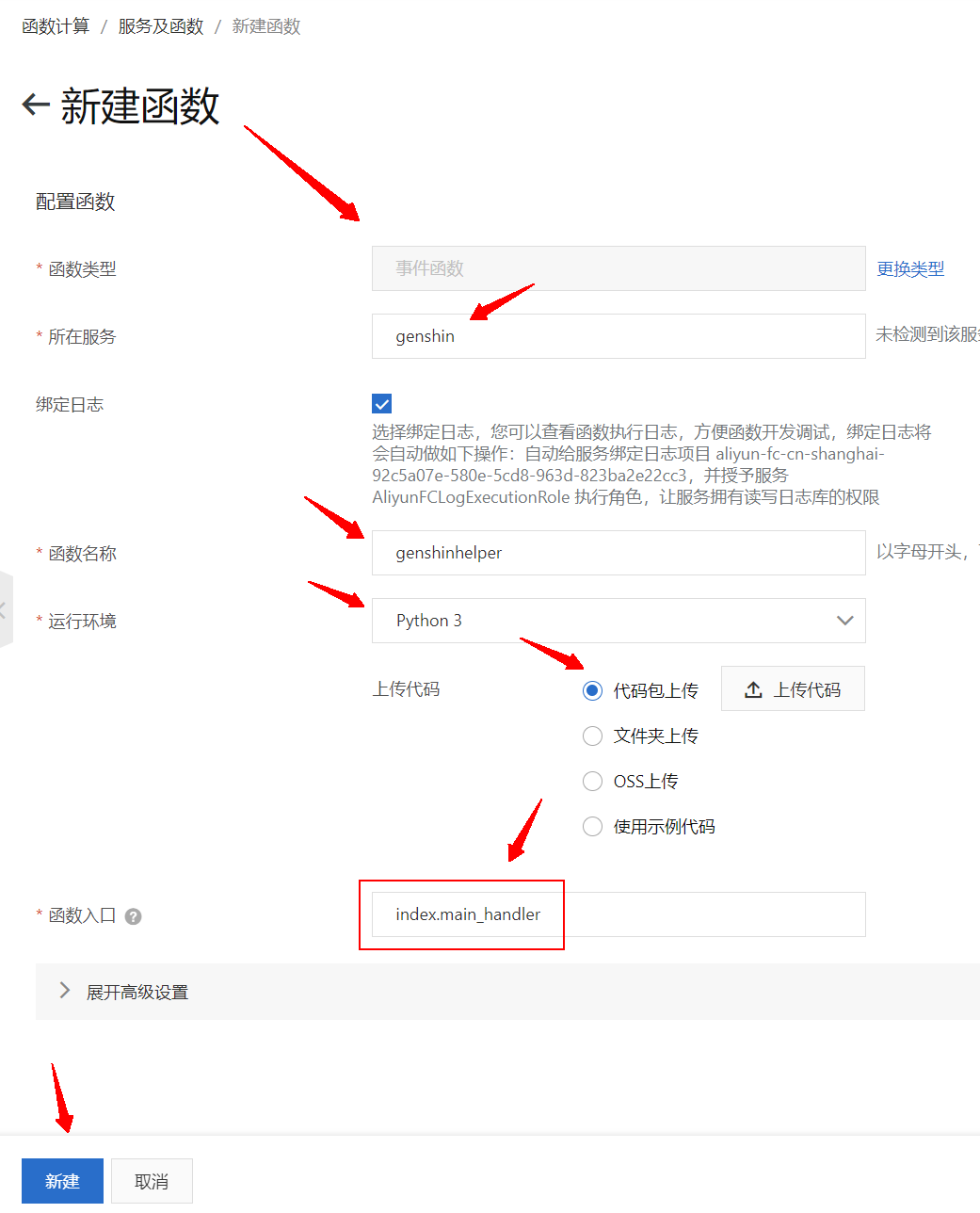
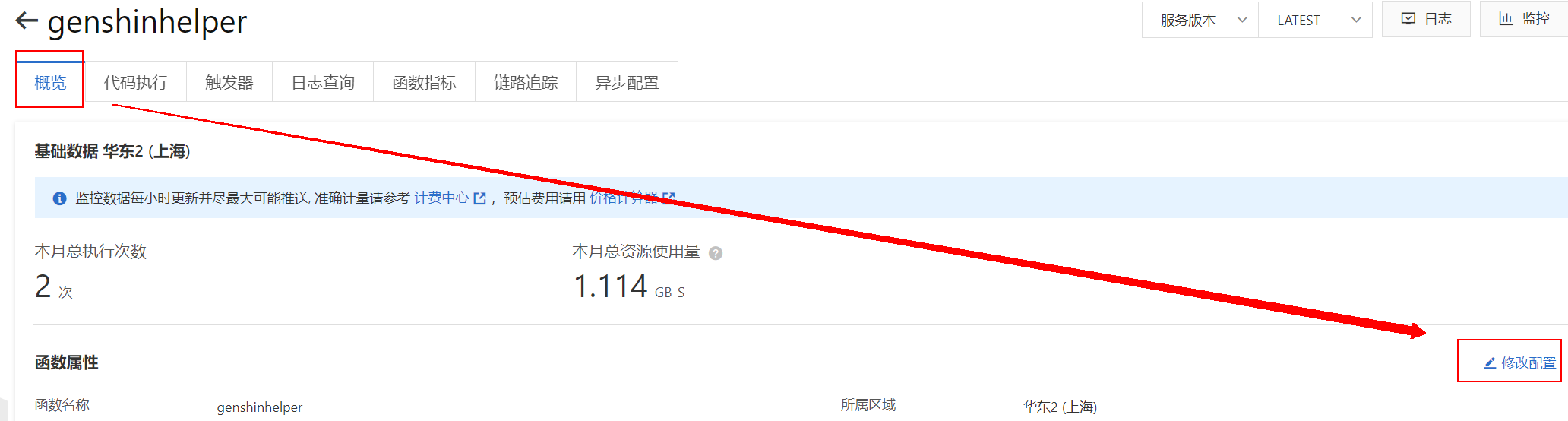
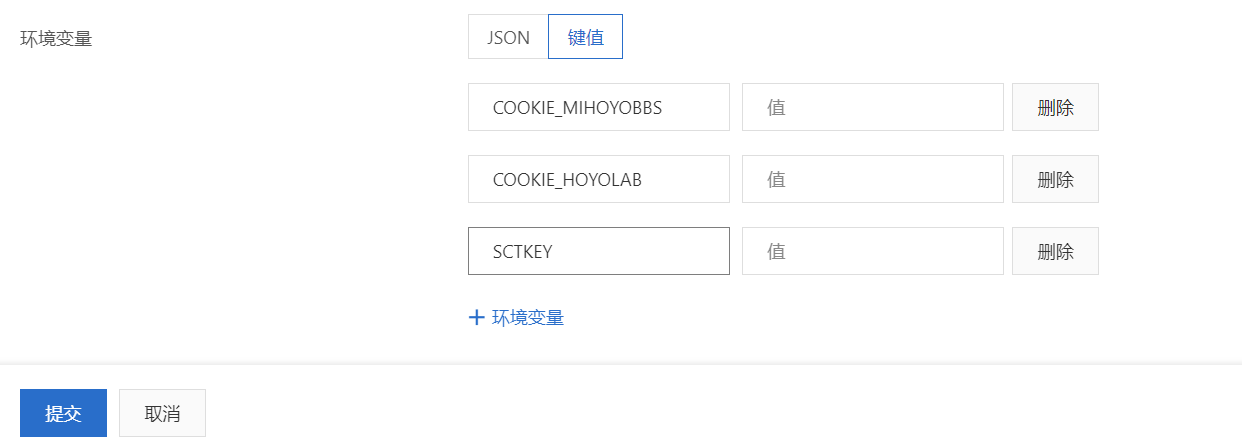
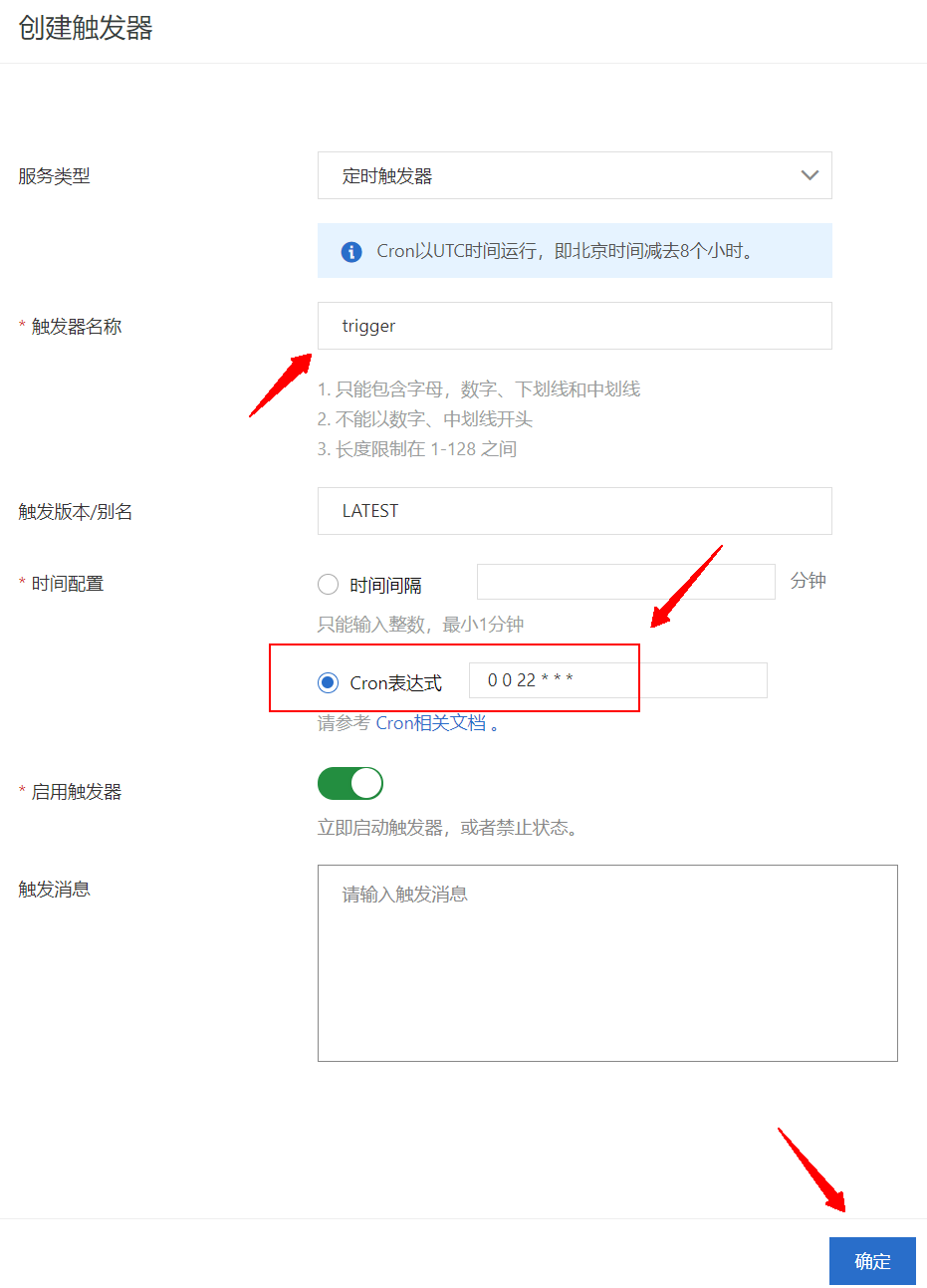
Tips: Cron expressions are 6 digits
- Go to 函数计算 FC 管理控制台 →
新建函数→事件函数→代码包上传→上传代码→ Select the downloaded filegenshinhelper-xxx-serverless.zip→ Configure as shown below. Note that the entry point isindex.main_handler→新建
- Go to
genshinhelper→概览→修改配置
- Scroll down and find
环境变量to add environment variables. The list of environment variables can be found in the Configuration section.
- Go to
genshinhelper→触发器→创建触发器→ Configure as shown below:
AWS Lambda
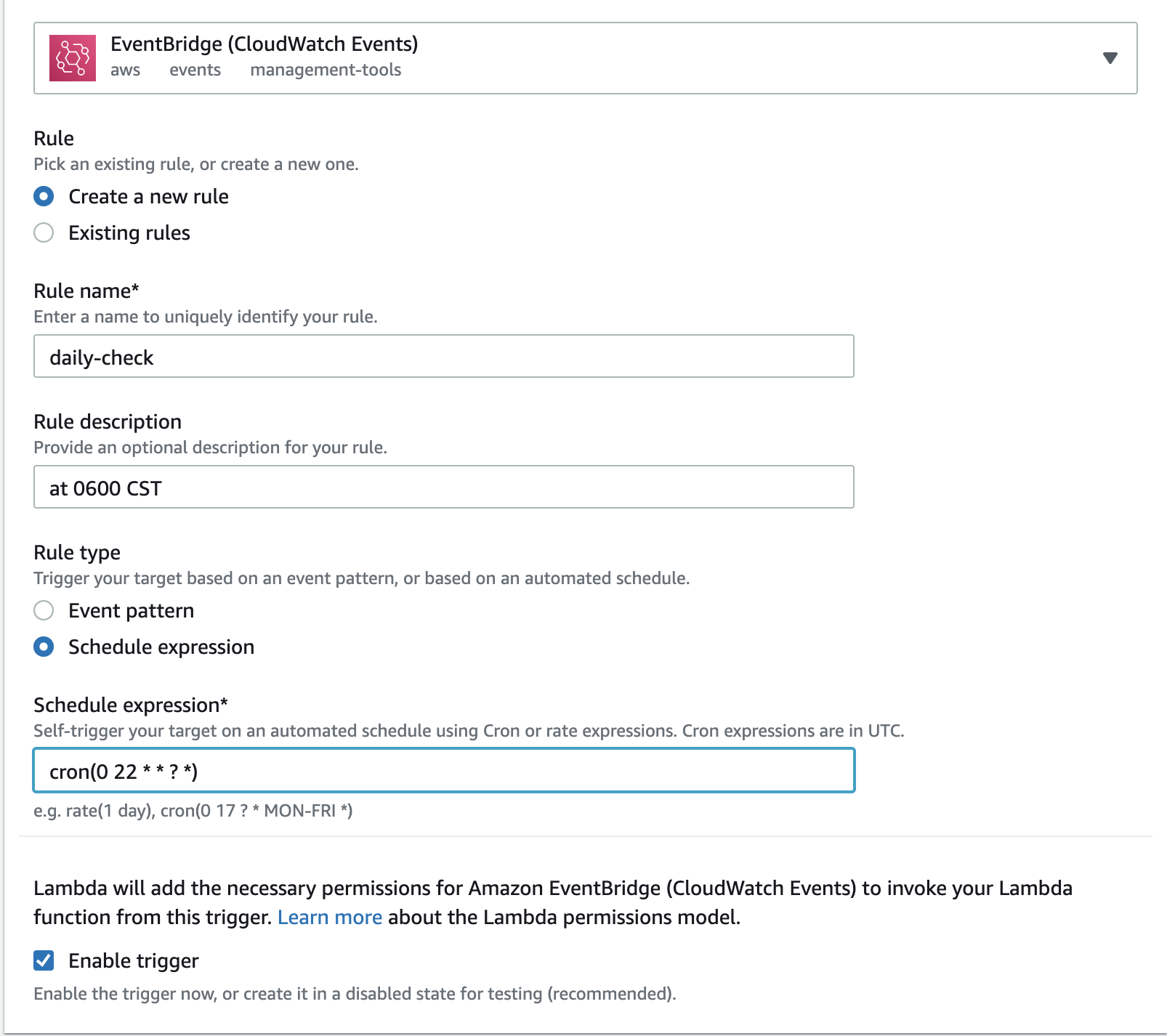
Tips: About AWS cron expressions, check out here.
- Go to AWS Lambda → Sign In to the Console → Choose a region (Singapore for example)
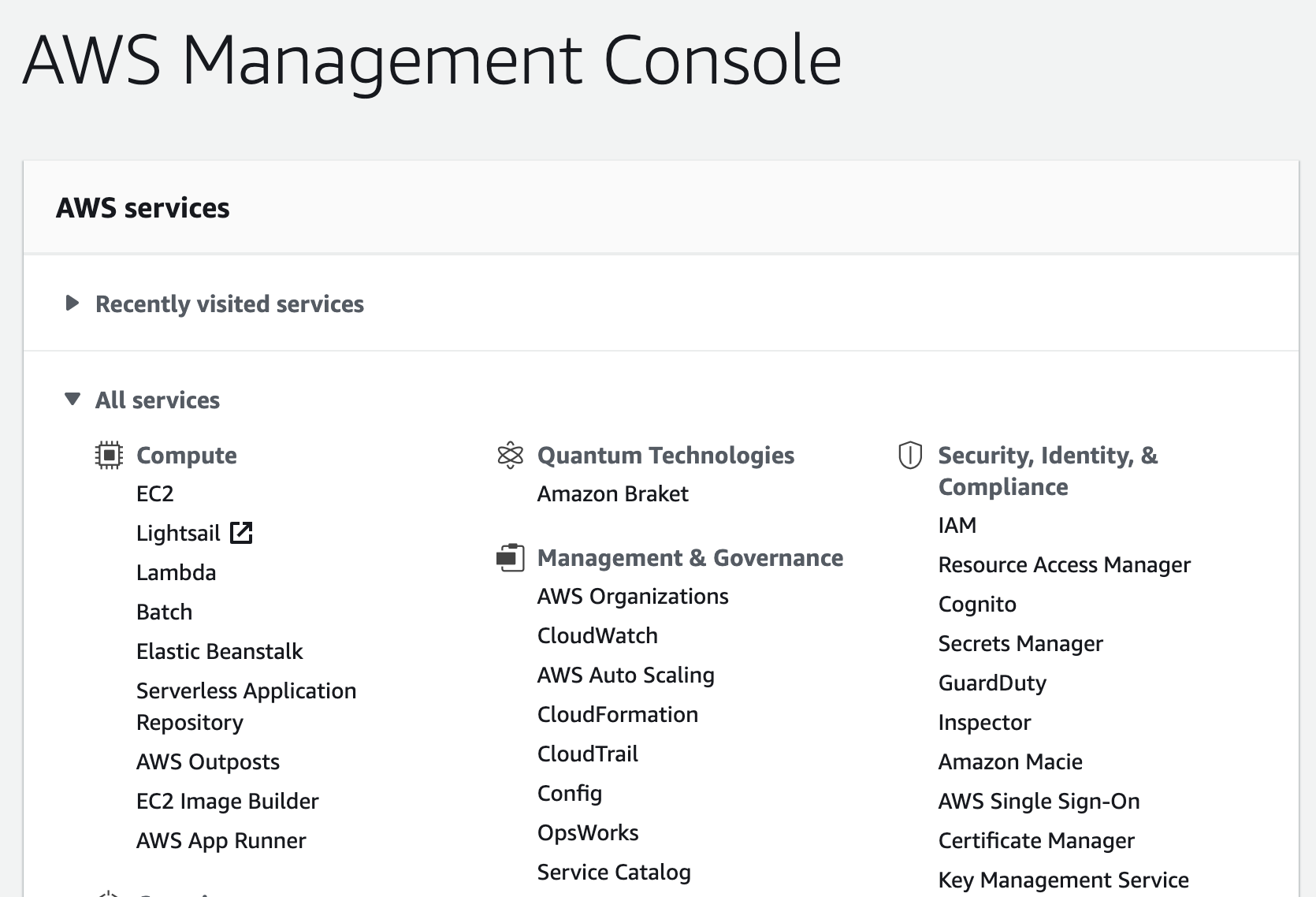
- Click
All services→Lambda - In the left,
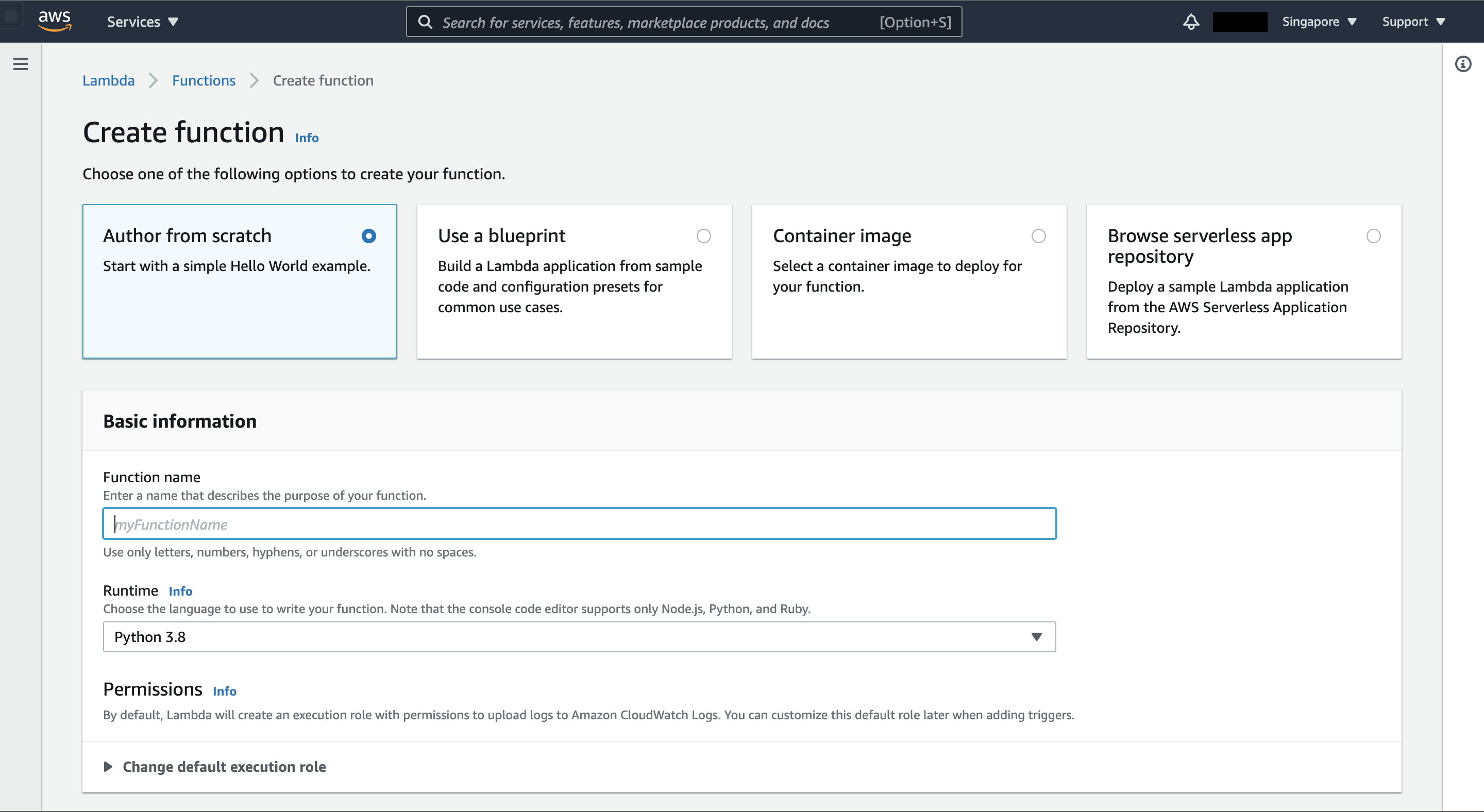
Functions→Create function - Choose
Author from scratch/ Function name: yourAwesomeFunctionName / Runtime: Python 3.8 →Create function
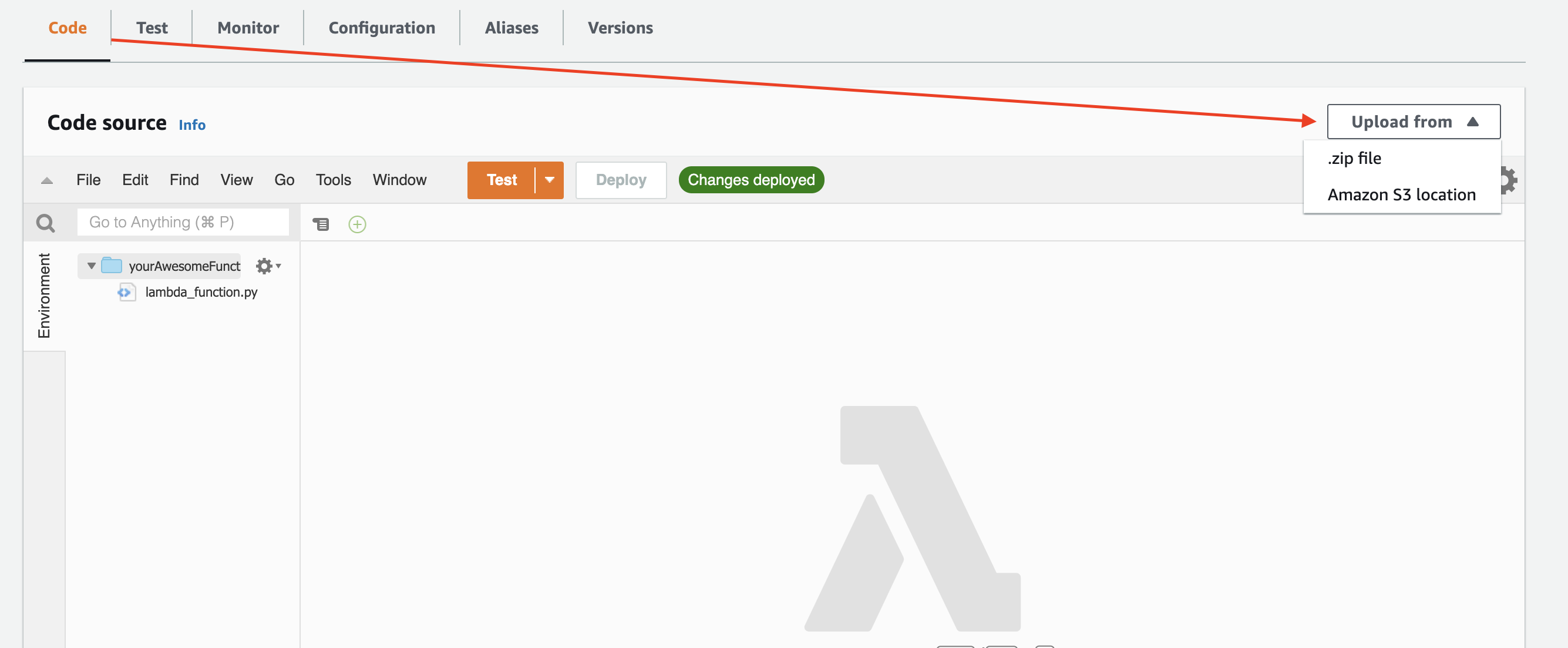
- In function dashboard,
Code→Upload from→.zip file→ Select the downloaded filegenshinhelper-xxx-serverless.zip→Save
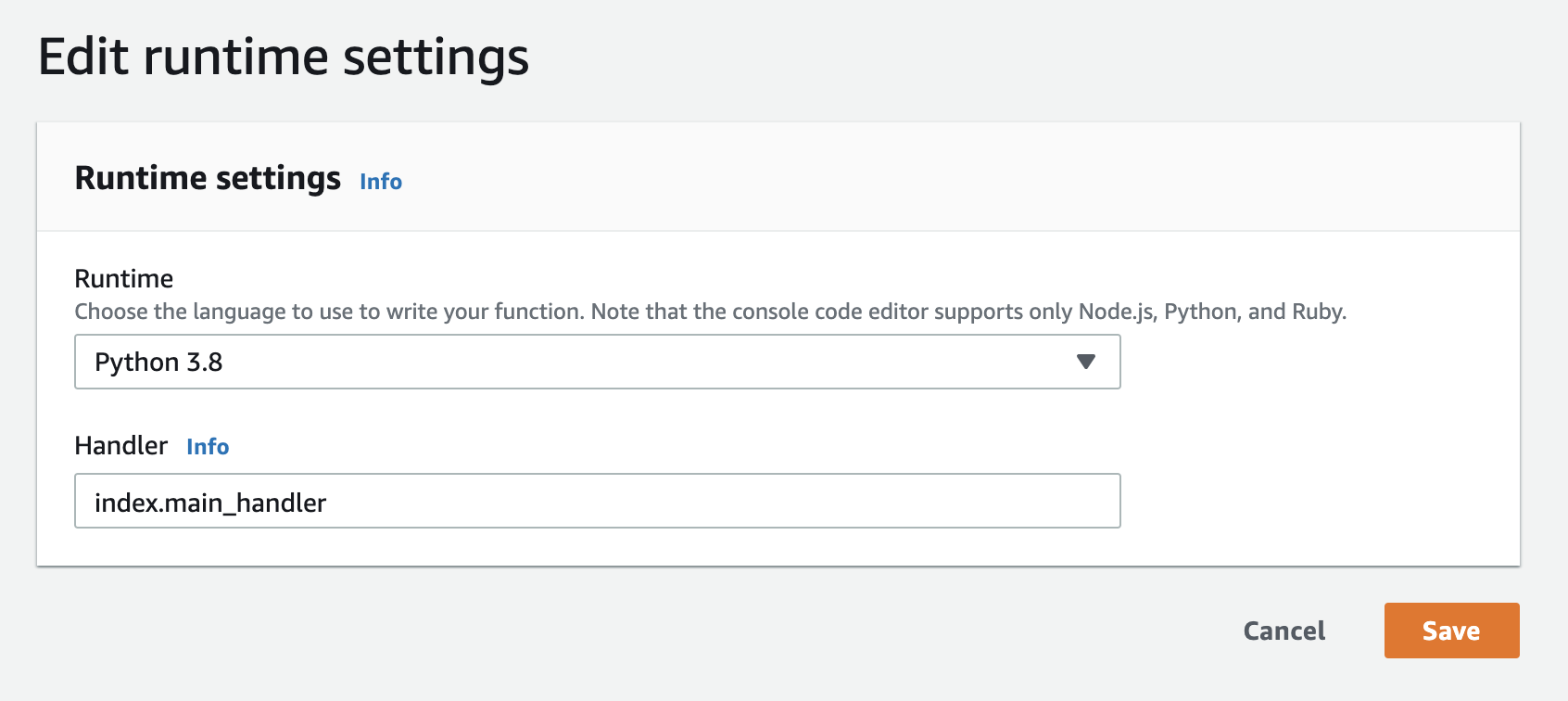
- Scroll down, edit runtime settings. Change the original
lambda_function.lambda_handlerinHandlersection toindex.main_handler→Save
- Back to Function overview, click
Add trigger→ search / chooseEventBridge→ Configue as shown below
- Function dashboard →
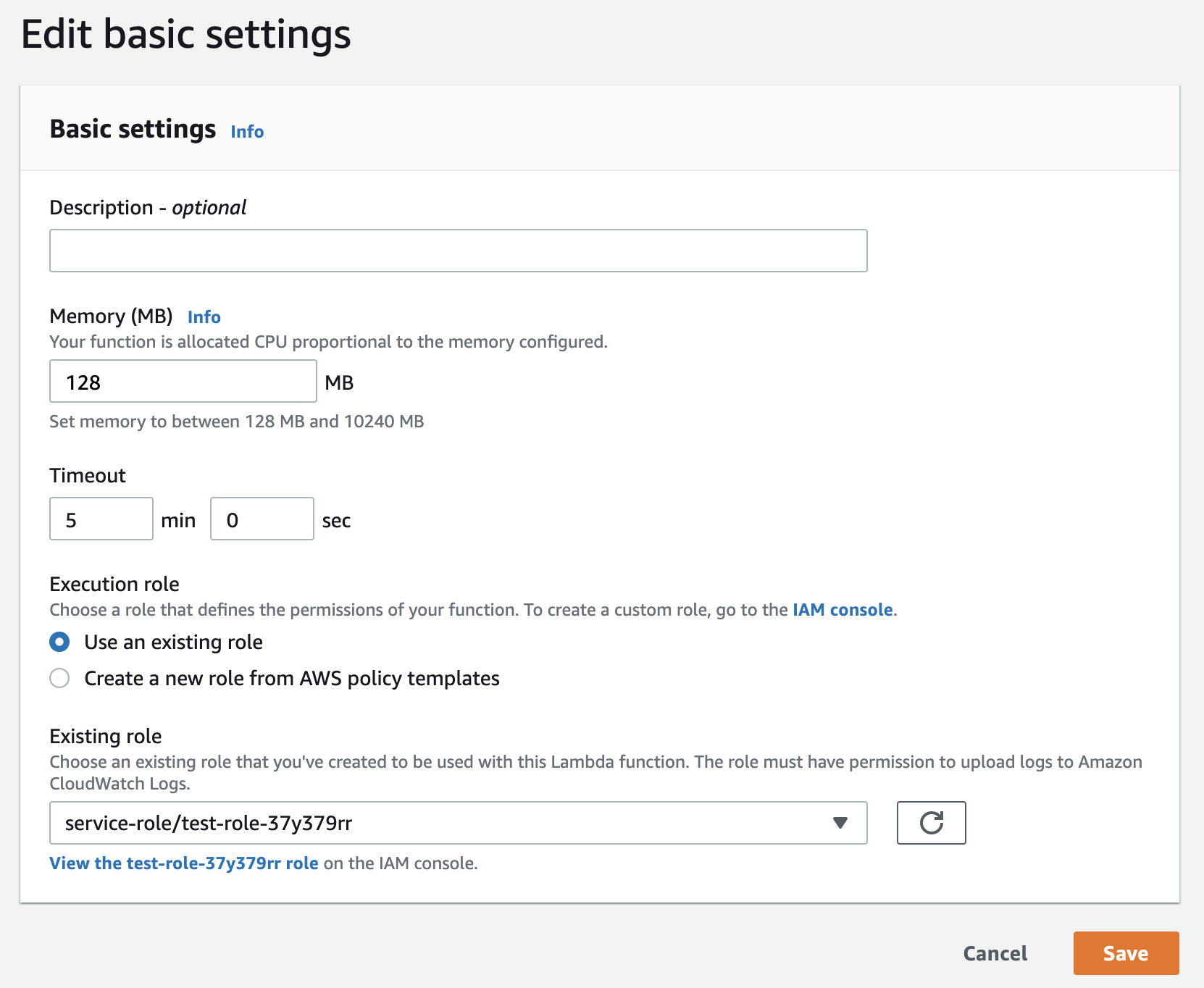
Configuration→General configuration→Edit→ Timeout change to5 min 0 sec
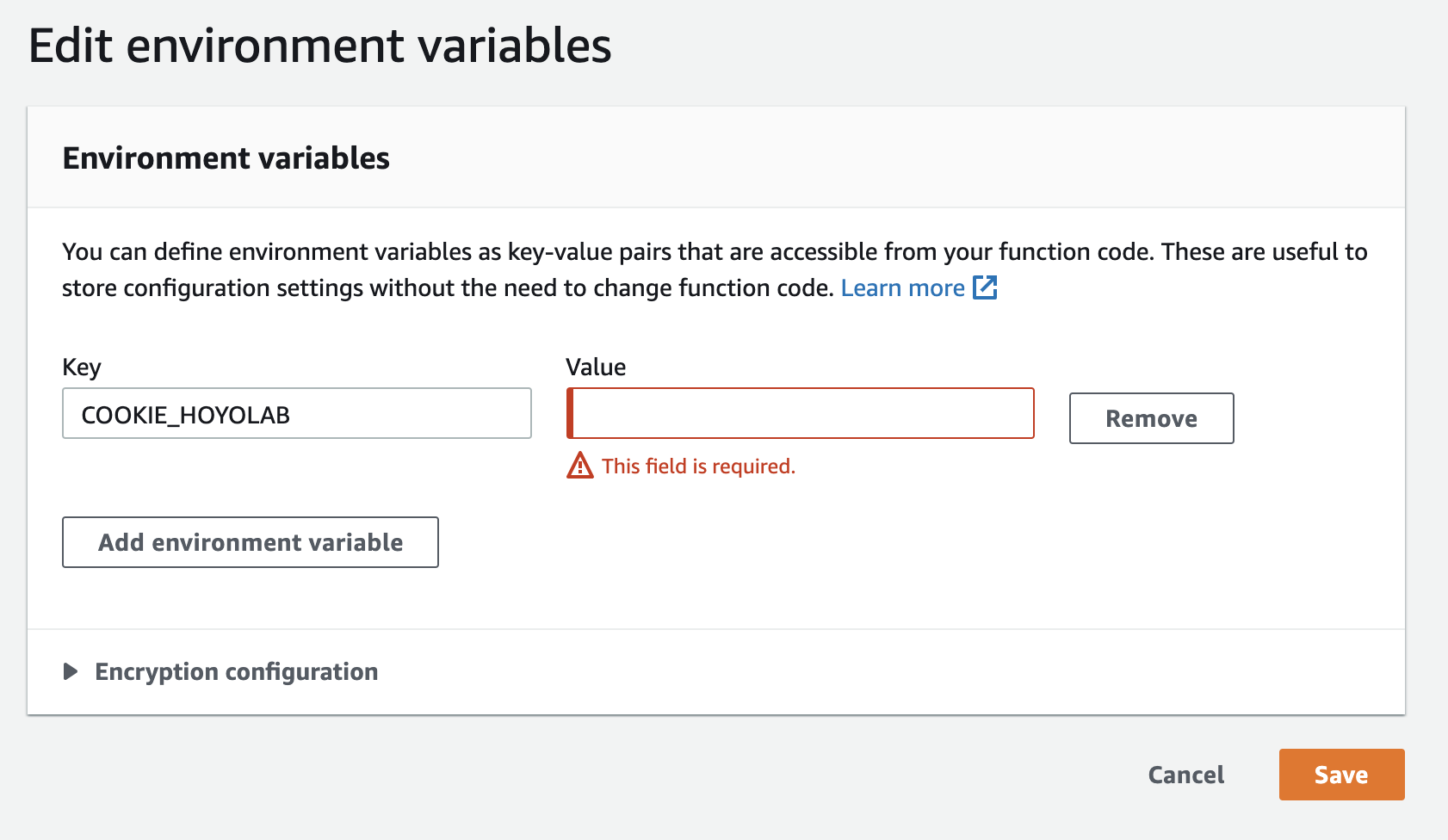
Configuration→Environment variables→Edit→Add environment variable
Configuration
The project has two ways of using custom configurations.
Environment Variables
You can write your configuration directly into the environment variables.
The following table lists all the environment variables used in this project:
Click here
| Variable Name | Required | Default | Description |
|---|---|---|---|
| LANGUAGE | ❌ | en-us | Rewards language for HoYoLAB daily check-in. |
| COOKIE_MIHOYOBBS | ❌ | Cookie from miHoYo bbs. https://bbs.mihoyo.com/ys/ | |
| COOKIE_MIYOUBI | ❌ | Cookie from miHoYo bbs. https://bbs.mihoyo.com/ys/ | |
| COOKIE_HOYOLAB | ❌ | Cookie from HoYoLAB community. https://webstatic-sea.mihoyo.com/ys/event/signin-sea/index.html?act_id=e202102251931481&lang=en-us | |
| COOKIE_WEIBO | ❌ | Cookie from Weibo intl app. | |
| COOKIE_KA | ❌ | Cookie from https://ka.sina.com.cn/ | |
| BARK_KEY | ❌ | iOS Bark app's IP or device code. For example: https://api.day.app/xxxxxx | |
| BARK_SOUND | ❌ | healthnotification | iOS Bark app's notification sound. Default: healthnotification |
| COOL_PUSH_SKEY | ❌ | SKEY for Cool Push. https://cp.xuthus.cc/ | |
| COOL_PUSH_MODE | ❌ | send | Push method for Cool Push. Choose from send(私聊),group(群组),wx(微信). Default: send |
| CRON_SIGNIN | ❌ | 0 6 * * * | Docker custom runtime |
| CUSTOM_NOTIFIER | ❌ | Custom notifier configuration | |
| DD_BOT_TOKEN | ❌ | 钉钉机器人WebHook地址中access_token后的字段. | |
| DD_BOT_SECRET | ❌ | 钉钉加签密钥.在机器人安全设置页面,加签一栏下面显示的以SEC开头的字符串. | |
| DISCORD_WEBHOOK | ❌ | Webhook of Discord. | |
| IGOT_KEY | ❌ | KEY for iGot. For example: https://push.hellyw.com/xxxxxx | |
| PUSH_PLUS_TOKEN | ❌ | 一对一推送 | pushplus 一对一推送或一对多推送的token.不配置push_plus_user则默认为一对一推送. https://www.pushplus.plus/doc/ |
| PUSH_PLUS_USER | ❌ | pushplus 一对多推送的群组编码.在'一对多推送'->'您的群组'(如无则新建)->'群组编码'里查看,如果是创建群组人,也需点击'查看二维码'扫描绑定,否则不能接收群组消息. | |
| SCKEY | ❌ | SCKEY for ServerChan. https://sc.ftqq.com/3.version/ | |
| SCTKEY | ❌ | SENDKEY for ServerChanTurbo. https://sct.ftqq.com/ | |
| TG_BOT_API | ❌ | api.telegram.org | Telegram robot api address. Default: api.telegram.org |
| TG_BOT_TOKEN | ❌ | Telegram robot token. Generated when requesting a bot from @botfather | |
| TG_USER_ID | ❌ | User ID of the Telegram push target. | |
| WW_ID | ❌ | 企业微信的企业ID(corpid).在'管理后台'->'我的企业'->'企业信息'里查看. https://work.weixin.qq.com/api/doc/90000/90135/90236 | |
| WW_APP_SECRET | ❌ | 企业微信应用的secret.在'管理后台'->'应用与小程序'->'应用'->'自建',点进某应用里查看. | |
| WW_APP_USERID | ❌ | @all | 企业微信应用推送对象的用户ID.在'管理后台'->' 通讯录',点进某用户的详情页里查看.默认: @all |
| WW_APP_AGENTID | ❌ | 企业微信应用的agentid.在'管理后台'->'应用与小程序'->'应用',点进某应用里查看. | |
| WW_BOT_KEY | ❌ | 企业微信机器人WebHook地址中key后的字段. https://work.weixin.qq.com/api/doc/90000/90136/91770 |
Configuration file
It is recommended to copy and rename config.example.json to config.json before use the configuration file.
A config.example.json in JSON like below:
Click here
{
  "LANGUAGE": "en-us",
  "COOKIE_MIHOYOBBS": "",
  "COOKIE_MIYOUBI": "",
  "COOKIE_HOYOLAB": "",
  "COOKIE_WEIBO": "",
  "COOKIE_KA": "",
  "BARK_KEY": "",
  "BARK_SOUND": "healthnotification",
  "COOL_PUSH_SKEY": "",
  "COOL_PUSH_MODE": "send",
  "CUSTOM_NOTIFIER": {
    "method": "post",
    "url": "",
    "data": {
    },
    "retcode_key": "",
    "retcode_value": 200,
    "data_type": "data",
    "merge_title_and_desp": false,
    "set_data_title": "",
    "set_data_sub_title": "",
    "set_data_desp": ""
  },
  "DD_BOT_TOKEN": "",
  "DD_BOT_SECRET": "",
  "DISCORD_WEBHOOK": "",
  "IGOT_KEY": "",
  "PUSH_PLUS_TOKEN": "",
  "PUSH_PLUS_USER": "",
  "SCKEY": "",
  "SCTKEY": "",
  "TG_BOT_API": "api.telegram.org",
  "TG_BOT_TOKEN": "",
  "TG_USER_ID": "",
  "WW_ID": "",
  "WW_APP_SECRET": "",
  "WW_APP_USERID": "@all",
  "WW_APP_AGENTID": "",
  "WW_BOT_KEY": ""
}
Multiple accounts
Multiple account cookies need to be separated by "#" symbol. e.g. COOKIE_MIHOYOBBS="<cookie1>#<cookie2>#<cookie3>"
Contributing
Feel free to dive in! Open an issue or submit PRs.
Help and Support
Please join our chat groups for help and support.
Acknowledgements
The idea for the miyoubi feature is inspired by XiaoMiku01's project miyoubiAuto.
Huge thanks to the contributors of the y1ndan/genshin-impact-helper project:
- PomeloWang
- Celeter
- Arondight
- chenkid999
- xe5700
- Renari
- journey-ad
- aflyhorse
- thesadru
- PeterPanZH
- cainiaowu
- alwaysmiddle
- qianxu2001
License

Release history Release notifications | RSS feed


Download files
Download the file for your platform. If you're not sure which to choose, learn more about installing packages.
Source Distribution
Built Distribution
Filter files by name, interpreter, ABI, and platform.
If you're not sure about the file name format, learn more about wheel file names.
Copy a direct link to the current filters
File details
Details for the file genshinhelper-1.3.3.tar.gz.
File metadata
- Download URL: genshinhelper-1.3.3.tar.gz
- Upload date:
- Size: 41.9 kB
- Tags: Source
- Uploaded using Trusted Publishing? No
- Uploaded via: twine/3.4.1 importlib_metadata/4.5.0 pkginfo/1.7.0 requests/2.25.1 requests-toolbelt/0.9.1 tqdm/4.61.0 CPython/3.9.5
File hashes
| Algorithm | Hash digest | |
|---|---|---|
| SHA256 |
dae4cc54a0b4b81acc63b0b213067b23ae58839e4641bed4c081810226dbf302
|
|
| MD5 |
4c7d15ed8aa26c5edf6eb94f1791f1b3
|
|
| BLAKE2b-256 |
15fa2ebe34b1824e7de163d6201d16c44efeb98fe6e435ca6edb3aaa09721ea3
|
File details
Details for the file genshinhelper-1.3.3-py3-none-any.whl.
File metadata
- Download URL: genshinhelper-1.3.3-py3-none-any.whl
- Upload date:
- Size: 45.5 kB
- Tags: Python 3
- Uploaded using Trusted Publishing? No
- Uploaded via: twine/3.4.1 importlib_metadata/4.5.0 pkginfo/1.7.0 requests/2.25.1 requests-toolbelt/0.9.1 tqdm/4.61.0 CPython/3.9.5
File hashes
| Algorithm | Hash digest | |
|---|---|---|
| SHA256 |
7370bee5dd2330ab797dc9b29981edf3c1de776935b7482992d8366cffe23dea
|
|
| MD5 |
a3d3bc4439139657a1ffa2ab124033a8
|
|
| BLAKE2b-256 |
272e8610ab89baa2d4bebd4501f563203ee7bce5e73442572b991f482ff7568f
|






