
Genstates
A flexible state machine library for Python with support for state actions and dynamic transitions.
Table of Contents
Installation
pip install genstates
Quick Start
You can define your state machine either directly with a Python dictionary or using a YAML file:
Using Python Dictionary
from genstates import Machine

class Calculator:
    def mul_wrapper(self, state, x, y):
        """Wrapper around multiplication that ignores state argument."""
        return x * y

# Define state machine configuration
schema = {
    "machine": {"initial_state": "start"},
    "states": {
        "start": {
            "name": "Start State",
            "transitions": {
                "to_double": {
                    "destination": "double",
                    "rule": "(boolean.tautology)",
                    "validation": {
                        "rule": '(condition.gt (basic.field "value") 0)',
                        "message": "Number must be positive"
                    }
                }
            }
        },
        "double": {
            "name": "Double State",
            "action": "mul_wrapper",  # Calculator.mul_wrapper
            "transitions": {
                "to_triple": {
                    "destination": "triple",
                    "rule": "(boolean.tautology)",
                    "validation": {
                        "rule": '(condition.gt (basic.field "value") 0)',
                        "message": "Number must be positive"
                    }
                }
            }
        },
        "triple": {
            "name": "Triple State",
            "action": "mul_wrapper",
            "transitions": {
                "to_triple": {
                    "destination": "triple",
                    "rule": "(boolean.tautology)",
                    "validation": {
                        "rule": '(condition.gt (basic.field "value") 0)',
                        "message": "Number must be positive"
                    }
                }
            }
        }
    }
}

# Create state machine with Calculator instance for actions
machine = Machine(schema, Calculator())

# Process sequence of numbers
numbers = [2, 3, 4]
results = list(machine.map_action(machine.initial, numbers))
# [4, 9, 12]  # Each number is processed through the states
Using YAML File
Alternatively, you can define the state machine in a YAML file (states.yaml):
machine:
  initial_state: start
states:
  start:
    name: Start State
    transitions:
      to_double:
        destination: double
        rule: "(boolean.tautology)"
        validation:
          rule: '(condition.gt (basic.field "value") 0)'
          message: "Number must be positive"
  double:
    name: Double State
    action: mul_wrapper
    transitions:
      to_triple:
        destination: triple
        rule: "(boolean.tautology)"
        validation:
          rule: '(condition.gt (basic.field "value") 0)'
          message: "Number must be positive"
  triple:
    name: Triple State
    action: mul_wrapper
    transitions:
      to_triple:
        destination: triple
        rule: "(boolean.tautology)"
        validation:
          rule: '(condition.gt (basic.field "value") 0)'
          message: "Number must be positive"
Then load and use it in Python:
import yaml  # requires pyyaml package
from genstates import Machine

class Calculator:
    def mul_wrapper(self, state, x, y):
        """Wrapper around multiplication that ignores state argument."""
        return x * y

# Load schema from YAML file
with open('states.yaml') as file:
    schema = yaml.safe_load(file)

# Create state machine with Calculator instance for actions
machine = Machine(schema, Calculator())

# Process sequence of numbers
numbers = [2, 3, 4]
results = list(machine.map_action(machine.initial, numbers))
# [4, 9, 12]  # Each number is processed through the states
Core Concepts
State Machine
The state machine manages a collection of states and their transitions. It:
- Maintains the current state
- Handles state transitions based on rules
- Executes state actions on items
- Provides methods for processing sequences
States
States represent different stages or conditions in your workflow. Each state can:
- Have an optional action to process items
- Define transitions to other states
- Include metadata like name and description
Transitions
Transitions define how states can change. Each transition:
- Has a destination state
- Uses a rule to determine when to trigger
- Can include metadata like name and description
Actions
Actions are functions that process items in a state. They can be:
- Instance methods from a class
- Functions from a Python module
- Any callable that accepts appropriate arguments
Configuration
Schema Structure
The state machine is configured using a dictionary with this structure:
schema = {
    "machine": {
        "initial_state": "state_key",  # Key of the initial state
    },
    "states": {
        "state_key": {  # Unique key for this state
            "name": "Human Readable Name",  # Display name for the state
            "action": "action_name",  # Optional: Name of action function
            "transitions": {  # Optional: Dictionary of transitions
                "transition_key": {  # Unique key for this transition
                    "name": "Human Readable Name",  # Display name
                    "destination": "destination_state_key",  # Target state
                    "rule": "(boolean.tautology)",  # Transition rule
                    "validation": {  # Optional: Validation for the transition
                        "rule": "(condition.gt 0)",  # Validation rule
                        "message": "Error message if validation fails"  # Custom error message
                    }
                },
            },
        },
    },
}
State Configuration
States are configured with these fields:
name: Human-readable name for the stateaction: Optional name of function to executetransitions: Dictionary of possible transitions
Transition Rules
Transitions use genruler expressions to determine when they trigger. Common patterns:
(boolean.tautology): Always transition(condition.equal (basic.field "value") 10): Transition when value equals 10(condition.gt (basic.field "count") 5): Transition when count greater than 5
Features
State Actions
State actions are functions that process items in a state.
Action Resolution
-
Actions are specified in state configuration:
"double_state": {
    "name": "Double State",
    "action": "double",  # Name of the function to call
    "transitions": { ... }
}
-
Functions are looked up in the provided module:
class NumberProcessor:
    def double(self, state, x, context=None):
        """Wrapper around multiplication that ignores state argument."""
        return x * 2

machine = Machine(schema, NumberProcessor())
Action Types
Actions can be defined in several ways. When do_action is called with a context parameter, it is passed as the second argument to the action:
-
Instance methods:
class Processor:
    # Without context
    def double(self, state, x):
        # state is the current State object
        # x is the item to process
        return x * 2

    # With context
    def process(self, state, context, x):
        # state is the current State object
        # context is passed from do_action
        # x is the item to process
        return x * context['multiplier']
Then set up the state machine as follows:
machine = Machine(schema, Processor())
-
Module functions (via wrapper class):
# state_operations.py

# Without context
def add(state, x, y):
    # state is ignored
    # x and y are items to process
    return x + y

# With context
def add_with_bonus(state, context, x, y):
    # state is ignored
    # context is passed from do_action
    # x and y are items to process
    return x + y + context['bonus']
Then set up the state machine as follows:
import state_operations

machine = Machine(schema, state_operations)
Calling Actions
Using the OperatorWrapper defined above as an example, actions can be called using do_action. The state machine will resolve the action based on the current state and pass arguments appropriately:
import state_operations

# Define a simple schema with two states
schema = {
    "machine": {"initial_state": "start"},
    "states": {
        "start": {
            "action": "add",
            ...
        },
        "bonus": {
            "action": "add_with_bonus",
            ...
        }
    }
}

# Initialize machine
machine = Machine(schema, state_operations)

# Get state and call action without context
start_state = machine.states["start"]
result = start_state.do_action(3, 4)  # calls add(state, 3, 4)

# Get state and call action with context
start_state = machine.states["bonus"]
context = {'bonus': 10}
result = bonus_state.do_action(3, 4, context=context)  # calls add_with_bonus(state, context, 3, 4)
State Transitions and Rules
Transitions between states can be controlled using rules. Rules are boolean expressions that determine if a transition should occur:
from genstates import Machine

schema = {
    "machine": {"initial_state": "start"},
    "states": {
        "start": {
            "action": "process",
            "transitions": {
                "to_ten": {
                    "destination": "ten",
                    "rule": "(condition.equal (basic.field \"value\") 10)",  # True when value is 10
                },
                "to_other": {
                    "destination": "other",
                    "rule": "(boolean.not (condition.equal (basic.field \"value\") 10))",  # True when value is not 10
                }
            }
        },
        "ten": {
            "action": "process"
        },
        "other": {
            "action": "process"
        }
    }
}

machine = Machine(schema, None)  # No module needed for this example

# Check if a transition is valid
state = machine.states["start"]
transition = state.transitions["to_ten"]
is_valid = transition.check_condition({"value": 10})  # True
is_valid = transition.check_condition({"value": 5})   # False

# Progress to next state based on rules
# Use machine.progress when the next state depends on which rule evaluates to true
# given a context, rather than knowing the exact transition to take
next_state = machine.progress(state, {"value": 10})  # Goes to "ten" state because value=10 rule matches
next_state = machine.progress(state, {"value": 5})   # Goes to "other" state because value!=10 rule matches
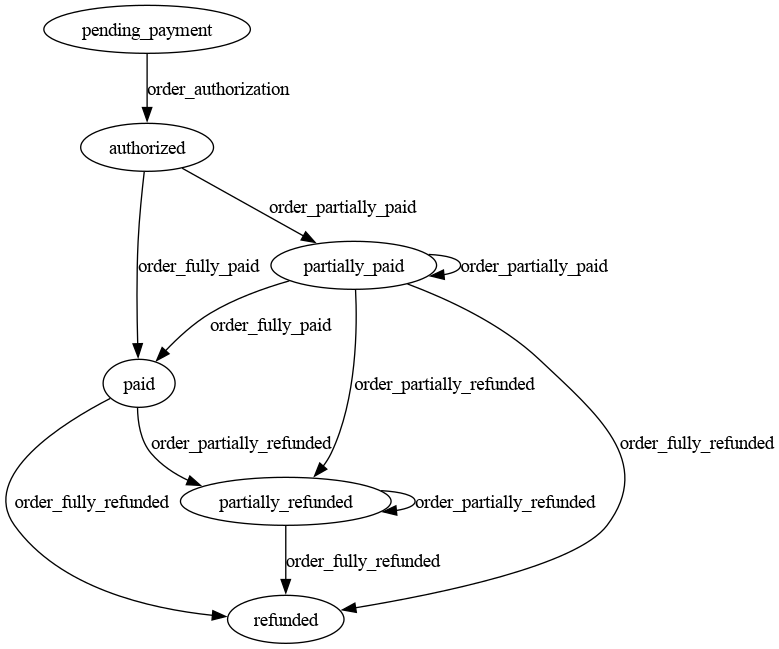
Visualization
Export state machine as a Graphviz DOT string:
dot_string = machine.graph()

# Generate visualization using graphviz
import graphviz
graph = graphviz.Source(dot_string)
graph.render("state_machine", format="png")
Advanced Usage
Sequence Processing
Process items through state transitions and actions in different ways:
Map Action
Process a sequence of items through the state machine, returning a list of results:
from genstates import Machine

class Calculator:
    def mul_wrapper(self, state, x, y):
        """Wrapper around multiplication that ignores state argument."""
        return x * y

schema = {
    "machine": {"initial_state": "start"},
    "states": {
        "start": {
            "name": "Start State",
            "action": "mul_wrapper",  # Calculator.mul_wrapper
            "transitions": {
                "to_multiply": {
                    "destination": "multiply",
                    "rule": "(boolean.tautology)",
                }
            }
        },
        "multiply": {
            "name": "Multiply State",
            "action": "mul_wrapper",
            "transitions": {
                "to_multiply": {
                    "destination": "multiply",
                    "rule": "(boolean.tautology)",
                }
            }
        }
    }
}

machine = Machine(schema, Calculator())

# Process numbers through the state machine
numbers = [(2,3), (4,5), (6,7)]
result = machine.map_action(machine.initial, numbers)
# Result: [6, 20, 42]
Reduce Action
Process a sequence of items through the state machine, accumulating results:
from genstates import Machine

class Calculator:
    def mul_wrapper(self, state, x, y):
        """Wrapper around multiplication that ignores state argument."""
        return x * y

schema = {
    "machine": {"initial_state": "start"},
    "states": {
        "start": {
            "name": "Start State",
            "action": "mul_wrapper",  # Calculator.mul_wrapper
            "transitions": {
                "to_multiply": {
                    "destination": "multiply",
                    "rule": "(boolean.tautology)",
                }
            }
        },
        "multiply": {
            "name": "Multiply State",
            "action": "mul_wrapper",
            "transitions": {
                "to_multiply": {
                    "destination": "multiply",
                    "rule": "(boolean.tautology)",
                }
            }
        }
    }
}

machine = Machine(schema, Calculator())

# Process numbers through the state machine
numbers = [2, 3, 4]
result = machine.reduce_action(machine.initial, numbers)
# Result: 24 (first mul: 2*3=6, then mul: 6*4=24)
Foreach Action
Process a sequence of items through the state machine, executing each state's action on the items as they flow through:
from genstates import Machine

# Module to store processed results
class Module:
    def __init__(self):
        self.processed = []

    def collect(self, state, x):
        self.processed.append(x)
        return x

    def double(self, state, x):
        result = x * 2
        self.processed.append(result)
        return result

# Create module instance to store results
module = Module()

schema = {
    "machine": {"initial_state": "start"},
    "states": {
        "start": {
            "action": "collect",  # collect items
            "transitions": {
                "next": {
                    "destination": "double",
                    "rule": "(boolean.tautology)",
                }
            }
        },
        "double": {
            "action": "double",  # double items
        }
    }
}

machine = Machine(schema, module)

# Process items through the state machine
items = [1, 2, 3]
machine.foreach_action(machine.initial, items)

# First item: progress from start -> double, then double(1) -> [2]
# Next items: progress back to double state, double(2) -> [2, 4], double(3) -> [2, 4, 6]
print(module.processed)  # [2, 4, 6]
Unlike map_action which returns results, foreach_action is used when you want to execute state actions for their side effects (e.g., saving to a database, sending notifications) rather than collecting return values.
Custom Action Modules
Create custom modules for complex processing:
class DataProcessor:
    def __init__(self, config):
        self.config = config

    def process(self, data):
        # Complex processing logic
        return processed_data

machine = Machine(schema, DataProcessor(config))
Complex State Transitions
Use transition rules for complex logic:
"transitions": {
    "to_error": {
        "destination": "error",
        "rule": """(boolean.and
            (condition.gt (basic.field "retries") 3)
            (condition.equal (basic.field "status") "failed")
        )""",
    }
}
Contributing
Contributions are welcome! Please feel free to submit a Pull Request.
License
This project is licensed under the MIT License.
1 maintainer

Metadata
1 maintainer
Release files for genstates 0.2.1
For a detailed explanation of source distributions (sdists) and built distributions (wheels), please see the package formats documentation.
Source distribution (sdist)
| File | Size | Uploaded | |
|---|---|---|---|
| genstates-0.2.1.tar.gz | 13.2 kB | Details |
Built distribution (wheel)
| File | Interpreter | ABI | Platform | Reset |
|---|---|---|---|---|
| genstates-0.2.1-py3-none-any.whl | Python 3 | none | any | Details |
Total release size: 23.9 kB
Release files / genstates-0.2.1.tar.gz
| Download URL | genstates-0.2.1.tar.gz |
|---|---|
| Size | 13.2 kB |
| Tags | Source |
|
SHA-256 checksum How to use checksums |
b35adfb7b3d0ed4338104569975066e9ee40a0635822e2515144fef2e075d2b4
|
|
BLAKE2b-256 checksum How to use checksums |
f8bd62090724853b4cbf7c2105e1615383c134526389ba042192dc090ef99d72
|
| Upload date | |
|
Uploaded using Trusted Publishing? What is trusted publishing? |
No |
| Uploaded via |
poetry/1.8.4 CPython/3.12.7 Linux/6.11.0-8-generic
|
Release files / genstates-0.2.1-py3-none-any.whl
| Download URL | genstates-0.2.1-py3-none-any.whl |
|---|---|
| Size | 10.7 kB |
| Tags | Python 3 |
|
SHA-256 checksum How to use checksums |
6cf0602b08061b3fc27fa405fccc2f5bc479604457effd0b974cb4789e9fa943
|
|
BLAKE2b-256 checksum How to use checksums |
be6b8984df4251e19336804050548f9daf6068e95643d32051cf204600b61e4a
|
| Upload date | |
|
Uploaded using Trusted Publishing? What is trusted publishing? |
No |
| Uploaded via |
poetry/1.8.4 CPython/3.12.7 Linux/6.11.0-8-generic
|














