

OSS RL environment + evals toolkit. Wrap software as environments, run benchmarks, and train with RL – locally or at scale.






Are you a startup building agents?
📅 Hop on a call or 📧 founders@hud.so
Highlights
- 🎓 One-click RL – Run
hud rlto get a trained model on any environment. - 🚀 MCP environment skeleton – any agent can call any environment.
- ⚡️ Live telemetry – inspect every tool call, observation, and reward in real time.
- 🗂️ Public benchmarks – OSWorld-Verified, SheetBench-50, and more.
- 🌐 Cloud browsers – AnchorBrowser, Steel, BrowserBase integrations for browser automation.
- 🛠️ Hot-reload dev loop –
hud devfor iterating on environments without rebuilds.
We welcome contributors and feature requests – open an issue or hop on a call to discuss improvements!
Installation
# SDK - MCP servers, telemetry, evaluation
pip install hud-python

# CLI - RL pipeline, environment design
uv tool install hud-python
# uv tool update-shell
See docs.hud.so, or add docs to any MCP client:
claude mcp add --transport http docs-hud https://docs.hud.so/mcp
Before starting, get your HUD_API_KEY at hud.so.
Quickstart: Training
RL using GRPO a Qwen2.5-VL model on any hud dataset:
hud get hud-evals/basic-2048 # from HF
hud rl basic-2048.json
Or make your own environment and dataset:
hud init my-env && cd my-env
hud dev --interactive
# When ready to run:
hud rl
Quickstart: Evals
For a tutorial that explains the agent and evaluation design, run:
uvx hud-python quickstart
Or just write your own agent loop (more examples here).
import asyncio, hud, os
from hud.settings import settings
from hud.clients import MCPClient
from hud.agents import ClaudeAgent
from hud.datasets import Task  # See docs: https://docs.hud.so/reference/tasks

async def main() -> None:
    with hud.trace("Quick Start 2048"): # All telemetry works for any MCP-based agent (see https://hud.so)
        task = {
            "prompt": "Reach 64 in 2048.",
            "mcp_config": {
                "hud": {
                    "url": "https://mcp.hud.so/v3/mcp",  # HUD's cloud MCP server (see https://docs.hud.so/core-concepts/architecture)
                    "headers": {
                        "Authorization": f"Bearer {settings.api_key}",  # Get your key at https://hud.so
                        "Mcp-Image": "hudpython/hud-text-2048:v1.2"  # Docker image from https://hub.docker.com/u/hudpython
                    }
                }
            },
            "evaluate_tool": {"name": "evaluate", "arguments": {"name": "max_number", "arguments": {"target": 64}}},
        }
        task = Task(**task)

        # 1. Define the client explicitly:
        client = MCPClient(mcp_config=task.mcp_config)
        agent = ClaudeAgent(
            mcp_client=client,
            model="claude-sonnet-4-20250514",  # requires ANTHROPIC_API_KEY
        )

        result = await agent.run(task)

        # 2. Or just:
        # result = await ClaudeAgent().run(task)

        print(f"Reward: {result.reward}")
        await client.shutdown()

asyncio.run(main())
The above example let's the agent play 2048 (See replay)

Reinforcement Learning with GRPO
This is a Qwen‑2.5‑VL‑3B agent training a policy on the 2048-basic browser environment:
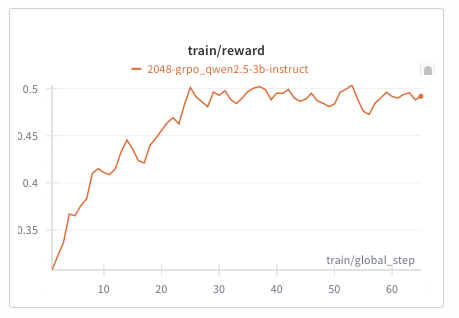
Train with the new interactive hud rl flow:
# Install CLI
uv tool install hud-python

# Option A: Run directly from a HuggingFace dataset
hud rl hud-evals/basic-2048

# Option B: Download first, modify, then train
hud get hud-evals/basic-2048
hud rl basic-2048.json

# Optional: baseline evaluation
hud eval basic-2048.json
Supports multi‑turn RL for both:
- Language‑only models (e.g.,
Qwen/Qwen2.5-7B-Instruct) - Vision‑Language models (e.g.,
Qwen/Qwen2.5-VL-3B-Instruct)
By default, hud rl provisions a persistent server and trainer in the cloud, streams telemetry to hud.so, and lets you monitor/manage models at hud.so/models. Use --local to run entirely on your machines (typically 2+ GPUs: one for vLLM, the rest for training).
Any HUD MCP environment and evaluation works with our RL pipeline (including remote configurations). See the guided docs: https://docs.hud.so/train-agents/quickstart.
Pricing: Hosted vLLM and training GPU rates are listed in the Training Quickstart → Pricing. Manage billing at the HUD billing dashboard.
Benchmarking Agents
This is Claude Computer Use running on our proprietary financial analyst benchmark SheetBench-50:
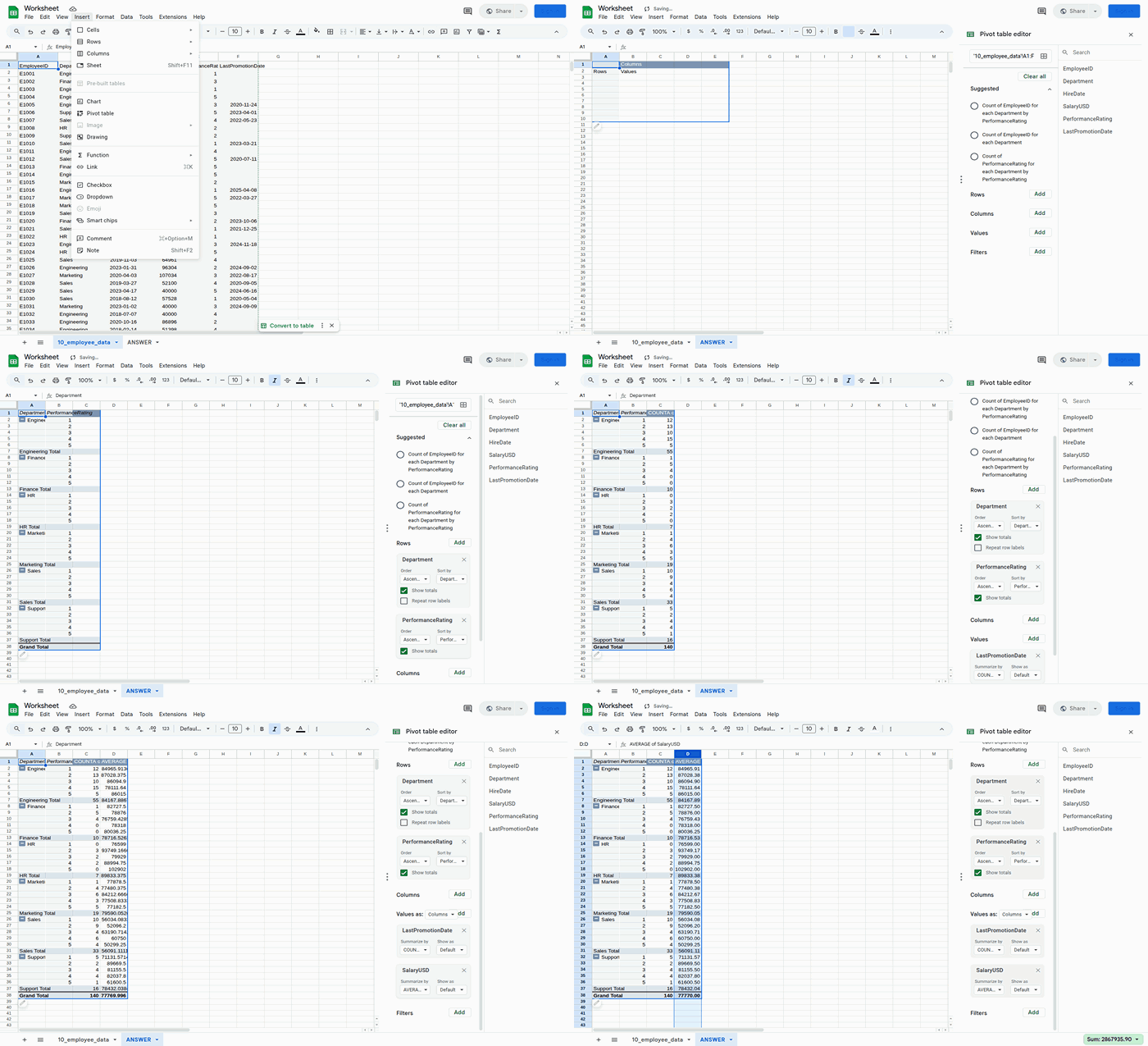
This example runs the full dataset (only takes ~20 minutes) using run_evaluation.py:
python examples/run_evaluation.py hud-evals/SheetBench-50 --full --agent claude
Or in code:
import asyncio
from hud.datasets import run_dataset
from hud.agents import ClaudeAgent

results = await run_dataset(
    name="My SheetBench-50 Evaluation",
    dataset="hud-evals/SheetBench-50",      # <-- HuggingFace dataset
    agent_class=ClaudeAgent,                # <-- Your custom agent can replace this (see https://docs.hud.so/evaluate-agents/create-agents)
    agent_config={"model": "claude-sonnet-4-20250514"},
    max_concurrent=50,
    max_steps=30,
)
print(f"Average reward: {sum(r.reward for r in results) / len(results):.2f}")
Running a dataset creates a job and streams results to the hud.so platform for analysis and leaderboard submission.
Building Environments (MCP)
This is how you can make any environment into an interactable one in 5 steps:
- Define MCP server layer using
MCPServer
from hud.server import MCPServer
from hud.tools import HudComputerTool

mcp = MCPServer("My Environment")

# Add hud tools (see all tools: https://docs.hud.so/reference/tools)
mcp.tool(HudComputerTool())

# Or custom tools (see https://docs.hud.so/build-environments/adapting-software)
@mcp.tool("launch_app"):
def launch_app(name: str = "Gmail")
...

if __name__ == "__main__":
    mcp.run()
- Write a simple Dockerfile that installs packages and runs:
CMD ["python", "-m", "hud_controller.server"]
And build the image:
hud build # runs docker build under the hood
Or run it in interactible mode
hud dev
- Debug it with the CLI to see if it launches:
$ hud debug my-name/my-environment:latest

✓ Phase 1: Docker image exists
✓ Phase 2: MCP server responds to initialize
✓ Phase 3: Tools are discoverable
✓ Phase 4: Basic tool execution works
✓ Phase 5: Parallel performance is good

Progress: [█████████████████████] 5/5 phases (100%)
✅ All phases completed successfully!
Analyze it to see if all tools appear:
$ hud analyze hudpython/hud-remote-browser:latest
⠏ ✓ Analysis complete
...
Tools
├── Regular Tools
│   ├── computer
│   │   └── Control computer with mouse, keyboard, and screenshots
...
└── Hub Tools
    ├── setup
    │   ├── navigate_to_url
    │   ├── set_cookies
    │   ├── ...
    └── evaluate
        ├── url_match
        ├── page_contains
        ├── cookie_exists
        ├── ...

📡 Telemetry Data
 Live URL  https://live.anchorbrowser.io?sessionId=abc123def456
- When the tests pass, push it up to the docker registry:
hud push # needs docker login, hud api key
- Now you can use
mcp.hud.soto launch 100s of instances of this environment in parallel with any agent, and see everything live on hud.so:
from hud.agents import ClaudeAgent

result = await ClaudeAgent().run({  # See all agents: https://docs.hud.so/reference/agents
    "prompt": "Please explore this environment",
    "mcp_config": {
        "my-environment": {
            "url": "https://mcp.hud.so/v3/mcp",
            "headers": {
                "Authorization": f"Bearer {os.getenv('HUD_API_KEY')}",
                "Mcp-Image": "my-name/my-environment:latest"
            }
        }
        # "my-environment": { # or use hud run which wraps local and remote running
        #     "cmd": "hud",
        #     "args": [
        #         "run",
        #         "my-name/my-environment:latest",
        #     ]
        # }
    }
})
See the full environment design guide and common pitfalls in
environments/README.md
Leaderboards & benchmarks
All leaderboards are publicly available on hud.so/leaderboards (see docs)
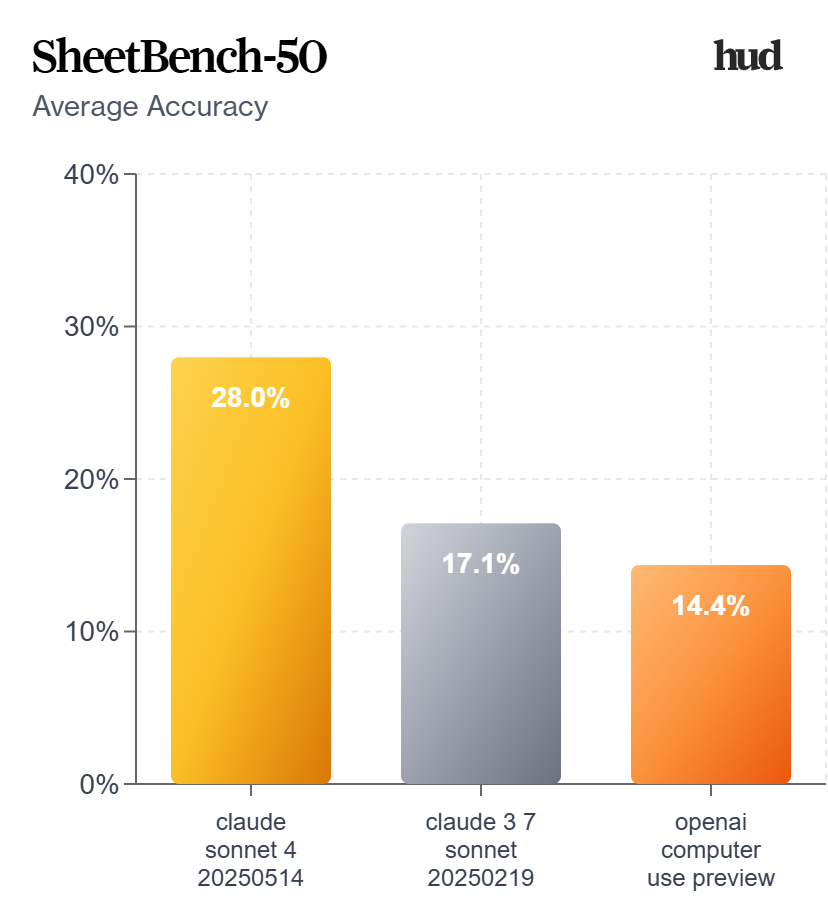
We highly suggest running 3-5 evaluations per dataset for the most consistent results across multiple jobs.
Using the run_dataset function with a HuggingFace dataset automatically assigns your job to that leaderboard page, and allows you to create a scorecard out of it:
Architecture
%%{init: {"theme": "neutral", "themeVariables": {"fontSize": "14px"}} }%%
graph LR
    subgraph "Platform"
        Dashboard["📊 hud.so"]
        API["🔌 mcp.hud.so"]
    end

    subgraph "hud"
        Agent["🤖 Agent"]
        Task["📋 Task"]
        SDK["📦 SDK"]
    end

    subgraph "Environments"
        LocalEnv["🖥️ Local Docker<br/>(Development)"]
        RemoteEnv["☁️ Remote Docker<br/>(100s Parallel)"]
    end

    subgraph "otel"
        Trace["📡 Traces & Metrics"]
    end

    Dataset["📚 Dataset<br/>(HuggingFace)"]

    AnyMCP["🔗 Any MCP Client<br/>(Cursor, Claude, Custom)"]

    Agent <--> SDK
    Task --> SDK
    Dataset <-.-> Task
    SDK <-->|"MCP"| LocalEnv
    SDK <-->|"MCP"| API
    API  <-->|"MCP"| RemoteEnv
    SDK  --> Trace
    Trace --> Dashboard
    AnyMCP -->|"MCP"| API
CLI reference
| Command | Purpose | Docs |
|---|---|---|
hud init |
Create new environment with boilerplate. | 📖 |
hud dev |
Hot-reload development with Docker. | 📖 |
hud build |
Build image and generate lock file. | 📖 |
hud push |
Share environment to registry. | 📖 |
hud pull <target> |
Get environment from registry. | 📖 |
hud analyze <image> |
Discover tools, resources, and metadata. | 📖 |
hud debug <image> |
Five-phase health check of an environment. | 📖 |
hud run <image> |
Run MCP server locally or remotely. | 📖 |
Roadmap
- Merging our forks in to the main
mcp,mcp_userepositories - Helpers for building new environments (see current guide)
- Integrations with every major agent framework
- Evaluation environment registry
- MCP opentelemetry standard
Contributing
We welcome contributions! See CONTRIBUTING.md for guidelines.
Key areas:
- Environment examples - Add new MCP environments
- Agent implementations - Add support for new LLM providers
- Tool library - Extend the built-in tool collection
- RL training - Improve reinforcement learning pipelines
Thanks to all our contributors!

Citation
@software{hud2025agentevalplatform,
  author = {HUD and Jay Ram and Lorenss Martinsons and Parth Patel and Oskars Putans and Govind Pimpale and Mayank Singamreddy and Nguyen Nhat Minh},
  title  = {HUD: An Evaluation Platform for Agents},
  date   = {2025-04},
  url    = {https://github.com/hud-evals/hud-python},
  langid = {en}
}
License: HUD is released under the MIT License – see the LICENSE file for details.
1 maintainer

Release files for genteki-hdp 0.4.50.1
For a detailed explanation of source distributions (sdists) and built distributions (wheels), please see the package formats documentation.
Source distribution (sdist)
| File | Size | Uploaded | |
|---|---|---|---|
| genteki_hdp-0.4.50.1.tar.gz | 398.2 kB | Details |
Built distribution (wheel)
| File | Interpreter | ABI | Platform | Reset |
|---|---|---|---|---|
| genteki_hdp-0.4.50.1-py3-none-any.whl | Python 3 | none | any | Details |
Total release size: 886.8 kB
Release files / genteki_hdp-0.4.50.1.tar.gz
| Download URL | genteki_hdp-0.4.50.1.tar.gz |
|---|---|
| Size | 398.2 kB |
| Tags | Source |
|
SHA-256 checksum How to use checksums |
e8754a46afe4e881eaa381fe98bc1ef24a886d845bf12ade77f51e869b603456
|
|
BLAKE2b-256 checksum How to use checksums |
5a35b504691174623e2a0e0feb2e55c3480b2c011ef513d9bcdd8291f5b7e91d
|
| Upload date | |
|
Uploaded using Trusted Publishing? What is trusted publishing? |
No |
| Uploaded via |
twine/6.2.0 CPython/3.13.7
|
Release files / genteki_hdp-0.4.50.1-py3-none-any.whl
| Download URL | genteki_hdp-0.4.50.1-py3-none-any.whl |
|---|---|
| Size | 488.6 kB |
| Tags | Python 3 |
|
SHA-256 checksum How to use checksums |
7512a9539f591ccc05c8485e448e1d3da47f7a38f76d822b68c7e22344d242ef
|
|
BLAKE2b-256 checksum How to use checksums |
ca973a09c4d16409f68ba32f1aff07b113848ce6fcfa8d4fa288b60783ba1d6f
|
| Upload date | |
|
Uploaded using Trusted Publishing? What is trusted publishing? |
No |
| Uploaded via |
twine/6.2.0 CPython/3.13.7
|













