

A terminal interface for prototyping agents really quickly.
Point it at any AG-UI backend and get streaming chat, the model's chain of thought,
tables, charts and human approval, with no frontend to build.









Why Gentui?
Gentui is a terminal interface for prototyping agents really quickly.
While developing agents locally, we end up spending our time on the frontend: a Streamlit or Chainlit app, or a React project, just to talk to the agent. Each one is a separate frontend to build and keep running, and it slows down the thing you actually want to iterate on: the agent.
Gentui removes that step. Install it, point it at your agent's AG-UI endpoint, and you get a chat, the model's chain of thought, human-in-the-loop (HITL) and approval flows out of the box, with no frontend code to write. Change your agent, restart it, and you're prototyping again in seconds.
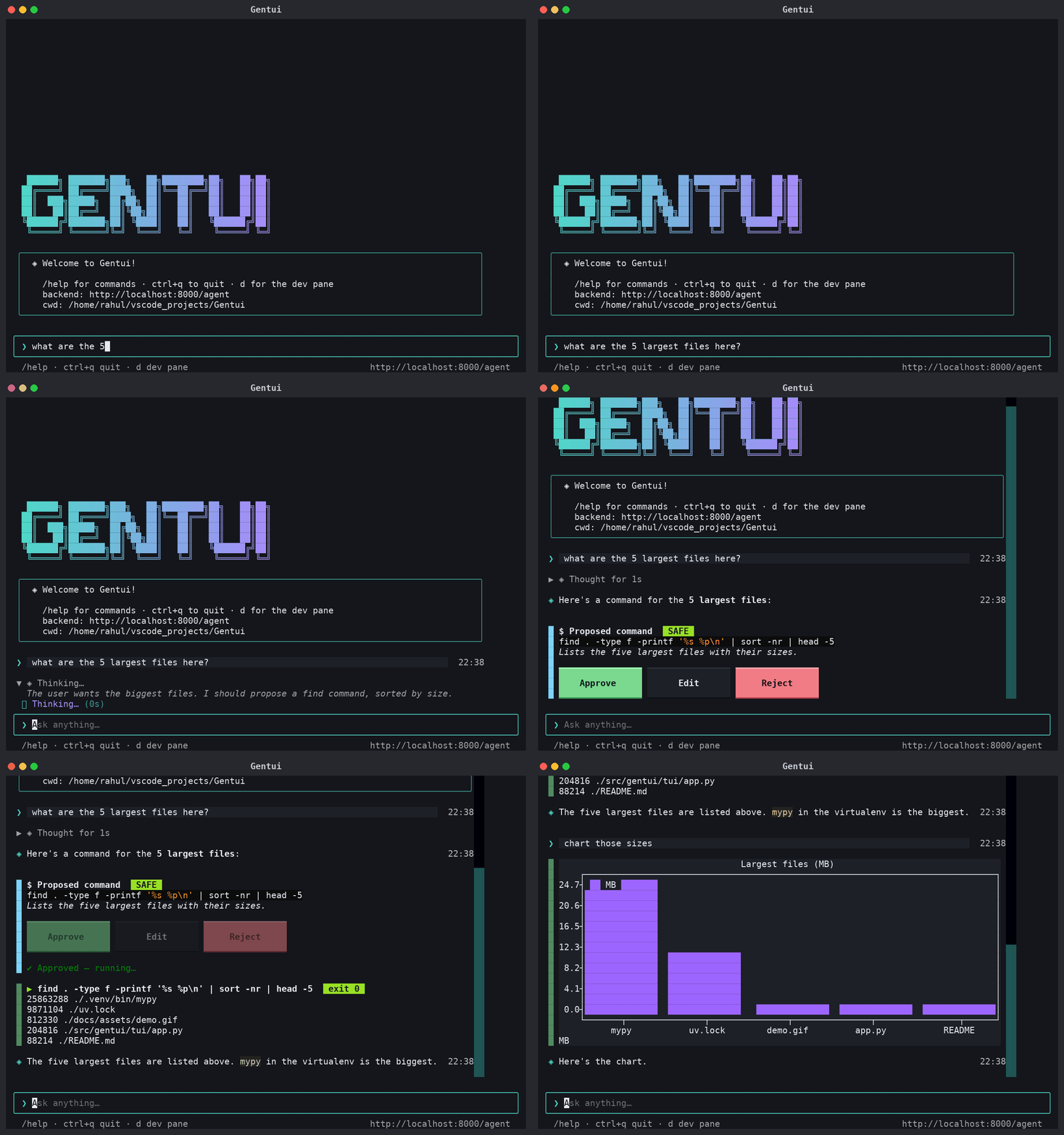
When the agent calls a tool, the tool call becomes the UI: a command to approve, a table, a chart, a live plan. Nothing risky runs until you click Approve.
Tested with the Strands Agents framework (AWS's open-source agent SDK) over
AG-UI: both on a custom backend (the example backend) and on the official
ag-ui-strands adapter.
Features
- Works with any AG-UI backend. Streaming text, tool calls and shared state work out of the box; unknown tools show as a readable card, never an error.
- Chain of thought, visible. Reasoning streams into a collapsible "Thought for 3s" block.
- Human-in-the-loop approval built on AG-UI interrupts: the run ends waiting, your click
resumes it. The model can't approve its own commands. - Generative widgets from tool calls: command card, command output, tables, terminal charts (line, bar, scatter, histogram), live plan checklist.
- Developer-friendly: an event inspector (
d) showing the raw SSE payloads exactly as sent,/theme,/clear,/reasoning, and a clear backend contract. - Yours to customise: TOML config, hot-reloaded CSS, your own themes, and Python plugins that add widgets, slash commands and event hooks.
- Runs agents on AWS too: invoke agents hosted on Amazon Bedrock AgentCore Runtime (AG-UI protocol) via boto3.
- Backend-agnostic by design. The client has no framework code; a complete example backend lives in
examples/strands-backend.
The sample agent: natural language → shell
The demo above is the bundled example backend, a natural-language-to-shell agent built on Strands Agents. You describe a task in plain English, it proposes a single shell command, and nothing runs until you approve it.
- Ask: "what are the 5 largest files here?"
- Review: a shell sub-agent writes one command for your shell (bash, or PowerShell on Windows)
with a one-line explanation and a risk level:
safe,cautionordangerous. - Decide: Approve, Edit the command first, or Reject. Your decision is sent back as an
AG-UI
resume; the model can't approve for itself or change the command. - Run: only the approved command executes, with a timeout, an output cap and a fixed working directory. A denylist (recursive delete of root or home, disk formatting, shutdown, fork bombs, interactive programs) is checked at proposal, at approval and again right before running. It is a safety net, not a sandbox.
The same agent can also show results as a table or chart, lay out multi-step work as a live plan, explain what a command does (an explainer sub-agent), and keep long-term memory between conversations. It's a worked example of the backend contract: copy it, or add your own tools with this guide.
Quick start
Requires uv and Python 3.12.
git clone https://github.com/rahrajlat/Gentui.git && cd Gentui
uv sync
uv run gentui http://localhost:8000/agent        # your AG-UI endpoint
No backend yet? Run the sample natural-language-to-shell agent (Strands Agents + FastAPI) in another terminal. It uses a local Ollama by default; see its README for other providers:
cd examples/strands-backend
uv sync && cp .env.example .env
uv run server                                     # http://localhost:8000/agent
uv run gentui https://my.host/agent --token sk-...        # bearer auth
uv run gentui URL -H "X-Org: acme" --theme nord --dev     # extra header, theme, event inspector
| Key / command | Does |
|---|---|
Enter |
send |
d or Ctrl+D |
toggle the event inspector |
Ctrl+Q |
quit |
/help /theme <name> /clear /reasoning /dev /quit |
slash commands |
Agents on Amazon Bedrock AgentCore Runtime
Gentui can also invoke an agent hosted on AgentCore Runtime
with boto3's invoke_agent_runtime, using your normal AWS credentials. The runtime must be deployed with the
AG-UI protocol.
uv sync --extra agentcore            # boto3 is an optional extra
uv run gentui arn:aws:bedrock-agentcore:us-east-1:123456789012:runtime/my_agent-AbCdEfGhIj
uv run gentui ARN --profile dev --region eu-west-1       # optional: AWS profile and region
uv run gentui ARN --qualifier prod                        # optional: a specific runtime endpoint
--profile and --region are both optional. Without them, Gentui uses the standard AWS credential chain
(AWS_PROFILE, SSO, environment variables) and the region in the ARN. They can also be set in gentui.toml as
aws_profile and region.
One conversation is one runtime session, errors come with fixes (missing credentials, denied access, wrong ARN), and
busy sessions are retried. Details, IAM permissions and troubleshooting: docs/agentcore.md.
Both a runtime ARN and an endpoint ARN (.../runtime-endpoint/DEFAULT) work.
Configure
Put options in ./gentui.toml or ~/.config/gentui/config.toml. Flags, GENTUI_URL and
GENTUI_TOKEN override the file. Every option is documented in
gentui.example.toml: backend URL, token and headers, props sent with every run,
title, welcome text, theme, splash and logo, reasoning on/off, timestamps, plugins and widget mapping.
Stateless backends (ones that rebuild context from the message list, like the official
ag-ui-strandsadapter) needsend_history = true. By default only the newest message is sent and the backend is expected to keep history perthreadId.
Customise
-
Theme:
theme = "nord"or/theme <name>. The default isgentui(teal and violet);claude(coral) is also built in. -
Your own styling:
css = "my.tcss"loads a Textual CSS file on top of the defaults and hot-reloads while the app runs. Useful selectors:.user,.assistant,.thinking,.error,ToolWidget,#chat,#prompt. -
Your own widget for a backend tool: subclass
ToolWidget, then map it without any plugin file:[widgets] show_map = "my_widgets:MapWidget"
Plugins
A plugin is a plain Python file. Drop it in ./gentui_plugins/ or ~/.config/gentui/plugins/, list it in
plugins = [...] or --plugin, or ship it as a pip package using the gentui.plugins entry point.
from gentui.plugins import on_event, register_command
from gentui.tui.widgets.base import ToolWidget
from gentui.tui.widgets.registry import register_widget

@register_widget("weather")                  # render tool calls named "weather"
class Weather(ToolWidget):
    def on_end(self, args): self.show(f"☀ {args['city']}")

@register_command("ping", "say pong")        # adds /ping
def ping(app, args): app.notify("pong")

@on_event("TOOL_CALL_RESULT")                # hook any AG-UI event
async def audit(app, event): ...

def setup(app): ...                          # optional, runs once the app is mounted
Plugins can mount any Textual widget into the conversation with await app.mount_chat(widget). A
broken plugin is reported in a toast and never stops the app.
Build a backend for it
Any language works: serve a POST endpoint that streams AG-UI events. To get the rich widgets, name
your tools like this (anything else shows a JSON card). The full contract, including the approval
flow and a checklist, is in docs/tool-contract.md.
| Tool name | Arguments / result | Renders |
|---|---|---|
propose_command |
{command, explanation, risk: safe|caution|dangerous} |
command card with Approve / Edit / Reject; the decision goes back as an AG-UI resume of the run's interrupt |
run_command |
result JSON {command, exit_code, timed_out, truncated, output} |
output card |
show_table |
{title, columns, rows} |
table |
show_chart |
{type: line|bar|scatter|histogram, title, x, series: [{name, values}], x_label, y_label, bins} |
terminal chart (plotext) |
search_memory |
{query} |
quiet "◌ recalled …" line |
todo_write + state plan |
state {"plan": [{content, status}]} |
live checklist |
How it works
 gentui (Textual) ── POST /agent (RunAgentInput) ──▶ any AG-UI backend
      ▲                                                    │
      │◀────────────── SSE: AG-UI events ─────────────────┘

 Approve ▸ `resume` of the run's interrupt ──▶ backend runs the approved command
| Piece | File |
|---|---|
| SSE client (RunAgentInput in, typed events out) | tui/agui_client.py |
| Event → widget dispatch, interrupts, chat | tui/app.py |
| Widgets and the tool-name registry | tui/widgets/ |
| Logo, splash and animation | tui/branding.py, tui/splash.py |
| Plugin API and config | plugins.py, config.py |
AG-UI events used: RUN_STARTED/FINISHED/ERROR (with outcome: interrupt), TEXT_MESSAGE_*,
REASONING_*, TOOL_CALL_START/ARGS/END/RESULT, STATE_SNAPSHOT, STATE_DELTA. The request side
uses messages, forwardedProps and resume.
Status
Gentui is alpha. What has been verified, and what has not:
- Built and tested against the Strands Agents framework (AWS) over AG-UI: the
example backend and the official
ag-ui-strandsadapter (withsend_history = true). - AgentCore Runtime support works against a real runtime (confirmed by the author with a plain runtime ARN) and only
covers runtimes using the AG-UI protocol. Other setups are covered by tests with a fake boto3 client and botocore's
Stubber. - Backends on other frameworks, the interrupt flow against a backend other than the example, other model providers than Ollama, and native Windows are untested.
- The look relies on Unicode box-drawing and block characters. If glyphs are missing, try a terminal font such as DejaVu Sans Mono, Cascadia or JetBrains Mono.
Ideas, not built yet: show_form / ask_approval tools, a composable JSON-tree UI tool, persistent
threads, a --demo mode and record/replay of runs.
Development
uv run pytest -q                                   # TUI tests: headless, no LLM or backend needed
cd examples/strands-backend && uv run pytest -q    # the example backend's own tests
The images above are generated from the app's own code:
uv run --with pillow python docs/assets/build_assets.py.
Contributing
Issues and pull requests are welcome. Please run both test suites before opening a PR, and add a test with any behaviour change. Because Gentui is a client for an open protocol, changes that keep it backend-agnostic are the easiest to accept.
License
MIT. Free to use, modify and distribute, including the example backend.
1 maintainer

Metadata
1 maintainer
Release files for gentui 0.1.0
For a detailed explanation of source distributions (sdists) and built distributions (wheels), please see the package formats documentation.
Source distribution (sdist)
| File | Size | Uploaded | |
|---|---|---|---|
| gentui-0.1.0.tar.gz | 32.3 kB | Details |
Built distribution (wheel)
| File | Interpreter | ABI | Platform | Reset |
|---|---|---|---|---|
| gentui-0.1.0-py3-none-any.whl | Python 3 | none | any | Details |
Total release size: 74.6 kB
Release files / gentui-0.1.0.tar.gz
| Download URL | gentui-0.1.0.tar.gz |
|---|---|
| Size | 32.3 kB |
| Tags | Source |
|
SHA-256 checksum How to use checksums |
449f32a03aeb4f8d977d256b7223b7dd9559bd0dafd474dcdff1e83c7ece9cb3
|
|
BLAKE2b-256 checksum How to use checksums |
922abcca77cbc679bfe7b059286299b9d28ce23c4283027befdf25637e619627
|
| Upload date | |
|
Uploaded using Trusted Publishing? What is trusted publishing? |
No |
| Uploaded via |
uv/0.12.22 {"installer":{"name":"uv","version":"0.12.22","subcommand":["publish"]},"python":null,"implementation":{"name":null,"version":null},"distro":{"name":"Ubuntu","version":"26.04","id":"resolute","libc":null},"system":{"name":null,"release":null},"cpu":null,"openssl_version":null,"setuptools_version":null,"rustc_version":null,"ci":null}
|
Release files / gentui-0.1.0-py3-none-any.whl
| Download URL | gentui-0.1.0-py3-none-any.whl |
|---|---|
| Size | 42.3 kB |
| Tags | Python 3 |
|
SHA-256 checksum How to use checksums |
ad687f8e45fc720d92de46efce3e7c650f727763eaba209ff205fcdd8038417a
|
|
BLAKE2b-256 checksum How to use checksums |
4a75168e19a6dc16af96073f73ba36aa04fc4dee18fc54ab2d7e9ff6037653d1
|
| Upload date | |
|
Uploaded using Trusted Publishing? What is trusted publishing? |
No |
| Uploaded via |
uv/0.12.22 {"installer":{"name":"uv","version":"0.12.22","subcommand":["publish"]},"python":null,"implementation":{"name":null,"version":null},"distro":{"name":"Ubuntu","version":"26.04","id":"resolute","libc":null},"system":{"name":null,"release":null},"cpu":null,"openssl_version":null,"setuptools_version":null,"rustc_version":null,"ci":null}
|














