
GenUML - Generate PlantUML from Java class files



This tool aids in creating PlantUML class diagrams by generating UML diagrams from Java class files. Diagrams can be generated from single class files, or generated diagrams can be inserted into PlantUML code based on comments containing the correct "pattern".
$ genuml --help
Usage: genuml [OPTIONS] COMMAND [ARGS]...

  Generate PlantUML class diagram DSL from Java class files.

Options:
  --version
  --help     Show this message and exit.

Commands:
  generate  Generate PlantUML for single given Java class file.
  insert    Insert diagrams into PlantUML containing pattern comments.
Some functionality, as well as the generated diagram style, are based on ObjectAid UML Explorer, an Eclipse plug-in which seems to no longer be supported.
Example usage
genuml insert --class-dir "WEB-INF/classes" plantuml-diagram.puml \
    | java -jar plantuml.jar -pipe > diagram.png
Some explanation:
- Compiled classes are found in
WEB-INF/classes. plantuml-diagram.pumlcontains PlantUML code as well as "pattern" comments referencing specific classes contained in the given folders (see example).- This file will be processed with the generated diagrams being placed directly after their pattern comments. Transformed output will be printed to stdout (and in this example, piped directly to PlantUML).
plantuml.jarhas been downloaded to the local folder.
Example PlantUML with pattern comments
@startuml
skinparam linetype polyline

' Pattern comments that will be processed by GenUML:
'!gen_java tests.data.ExampleClass
'!gen_java tests.data.ExampleAbstract
'!gen_java tests.data.ExampleInterface
'!gen_java tests.data.ExampleEnum: LOW HIGH

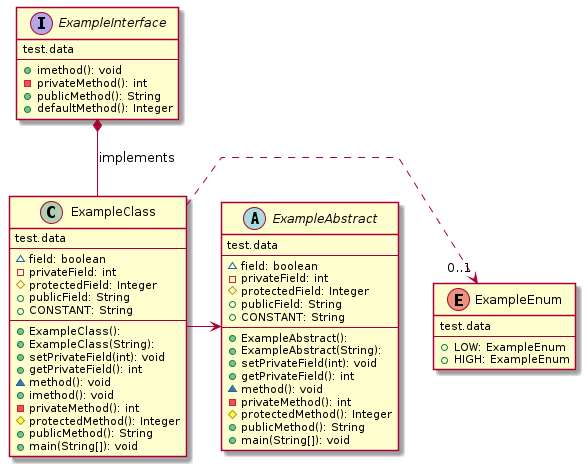
ExampleInterface *-- ExampleClass : implements
ExampleClass .> "0..1" ExampleEnum
ExampleClass -> ExampleAbstract

@enduml
which could then be used to generate this diagram:
Installation
Install from PyPI
With Python 3 installed on your system, you can run:
pip install genuml
To test that installation worked, run:
genuml --help
and you can uninstall at any time with:
pip uninstall genuml
Install from Github
To install the newest code directly from Github:
pip install git+https://github.com/samuller/genuml
And uninstall remains the same:
pip uninstall genuml
1 maintainer

Download files
Download the file for your platform. If you're not sure which to choose, learn more about installing packages.
Source Distribution
Built Distribution
Filter files by name, interpreter, ABI, and platform.
If you're not sure about the file name format, learn more about wheel file names.
Copy a direct link to the current filters
File details
Details for the file genuml-0.6.1.tar.gz.
File metadata
- Download URL: genuml-0.6.1.tar.gz
- Upload date:
- Size: 7.6 kB
- Tags: Source
- Uploaded using Trusted Publishing? No
- Uploaded via:
poetry/1.1.11 CPython/3.8.10 Linux/5.10.16.3-microsoft-standard-WSL2
File hashes
| Algorithm | Hash digest | |
|---|---|---|
| SHA256 |
decbc7587ed383863605a59645e818a1130bc1defbf6305af8dc263d3d6c3e21
|
|
| MD5 |
cc66a5ee8f6ab1328c0e07b9e8cdbdf3
|
|
| BLAKE2b-256 |
61cd25e53d720f02f25beebfc5af2785b376268e46d5c6f69a4ff15d0b9d32a5
|
File details
Details for the file genuml-0.6.1-py3-none-any.whl.
File metadata
- Download URL: genuml-0.6.1-py3-none-any.whl
- Upload date:
- Size: 7.5 kB
- Tags: Python 3
- Uploaded using Trusted Publishing? No
- Uploaded via:
poetry/1.1.11 CPython/3.8.10 Linux/5.10.16.3-microsoft-standard-WSL2
File hashes
| Algorithm | Hash digest | |
|---|---|---|
| SHA256 |
2bcab27c2e6b2ea59d4acaab46d6e0df3d71308b6c4e25f97ff66aeeba6f4fa0
|
|
| MD5 |
d92aef8ab096e3af0ba860b0793856f1
|
|
| BLAKE2b-256 |
98dd1ca9dcfddeacf29f2c08406ad4e1e5cf24597779df0d6f3110c212aadd03
|














