
geo-gremlin

Bunch of geo related stuff:
- download tiles from WMS
- makes polygons orthogonal
- resolves geometries overlaps
- etc.
Install
pip install "geo-gremlin[vector,raster]"
If you need any GDAL-based helpers (like run_gdal_retiling, gdal_imread), install GDAL in two steps:
- Install system GDAL separately (for example via
brewon macOS orconda). - Install Python bindings with the same version as your system GDAL to avoid ABI/version mismatch:
CLI
WMS tile operations
geo-gremlin install-bash-completion
Install bash compeltion for CLI into ~/.bashrc file.
Run it once after install.
geo-gremlin download_wms_tiles
geo-gremlin download_wms_tiles \
    WMS_SERVER \
    ZOOM_LEVEL \
    BOUNDS_FN \
    OUTPUT_DIR \
    [--n-workers=100] \
    [--first-n-tiles=N] \
    [--wld-suffix=.wld]
Download map tiles intersecting a GeoJSON boundary. Tiles outside the exact boundary are masked, and a world file is created for every downloaded image. Tiles are loaded in EPSG:3857 projection (web-mercator).
geo-gremlin download_wms_tiles \
    "esri" \
    19 \
    data/test-wms/bounds.geojson \
    ./test
This creates the downloaded tiles in test/esri_19/.
Parameters:
WMS_SERVER: tile provider:"esri","google","bing","yandex", or"mapbox".ZOOM_LEVEL: zoom level used to select tiles,19is usually the best you can get.BOUNDS_FN: path to a vector file defining the download boundary as Polygon feature.OUTPUT_DIR: parent directory for the generated<server>_<zoom>folder.--n-workers: number of concurrent download workers. Defaults to100.--first-n-tiles: optionally limit the number of downloaded tiles.--wld-suffix: suffix used for generated world files. Defaults to.wld.
geo-gremlin merge_wms_tiles
geo-gremlin merge-wms-tiles \
    INPUT_DIR \
    [--output=OUTPUT_TIF] \
    [--crs=EPSG:3857]
Merge georeferenced PNG or WebP tiles into a single GeoTIFF.
geo-gremlin merge-wms-tiles test/esri_19/
When --output is omitted, this example creates test/esri_19.tif.
Parameters:
INPUT_DIR: directory containing image tiles and their world files.--output: output GeoTIFF path. By default, a.tiffile is created alongside the input directory.--crs: coordinate reference system assigned to the output. Defaults toEPSG:3857.
Requires GDAL and its Python bindings.
geo-gremlin retile_wms_tiles
geo-gremlin retile-wms-tiles \
    INPUT_DIR \
    OUTPUT_DIR \
    [--tile-width=512] \
    [--tile-height=512] \
    [--tile-overlap=0] \
    [--tile-base-name=tile]
Retile georeferenced PNG tiles into uniformly sized tiles. Empty tiles are removed, and partial edge tiles are padded to the requested dimensions.
geo-gremlin retile-wms-tiles \
    test/esri_19/ \
    test/esri_19_retiled/
Parameters:
INPUT_DIR: directory containing PNG tiles and their world files.OUTPUT_DIR: directory where the retiled PNG files will be created.--tile-width: output tile width in pixels. Defaults to512.--tile-height: output tile height in pixels. Defaults to512.--tile-overlap: overlap between adjacent tiles in pixels. Defaults to0.--tile-base-name: base name used for generated tiles. Defaults totile.
Requires GDAL and its Python bindings.
API
Vector operations
orthogonalize(...)
orthogonalize(
    gdf: gpd.GeoDataFrame,
    *,
    n_workers: int = 6,
    verbose: bool = False,
) -> gpd.GeoDataFrame
Orthogonalize all polygon geometries in a GeoDataFrame. It is a batch wrapper over orthogonalize_poly, with optional multiprocessing.
from geo_gremlin.vector.ortho import orthogonalize

ortho_gdf = orthogonalize(overlap_gdf, n_workers=1, verbose=False)
Parameters:
gdf:gpd.GeoDataFrame, input GeoDataFrame with polygon geometries.n_workers:int, number of worker processes (1runs sequentially).verbose:bool, show progress bars whenTrue.
resolve_overlaps(...)
resolve_overlaps(
    gdf: gpd.GeoDataFrame,
    mode: ResolveMode = "union",
    verbose: bool = False,
    **params,
) -> gpd.GeoDataFrame
Resolve intersecting polygons in a GeoDataFrame by grouping overlaps and merging them using a selected mode.
from geo_gremlin.vector.overlap import resolve_overlaps

overlap_gdf = resolve_overlaps(test_gdf, mode="union", verbose=False)
Parameters:
gdf:gpd.GeoDataFrame, input GeoDataFrame with polygon geometries.mode:ResolveMode, merge strategy:"union","intersection","largest", or"iou_select".verbose:bool, show progress bars whenTrue.**params: extra params for mode-specific behavior (iou_thresholdfor"iou_select").
Check results of vector ops?
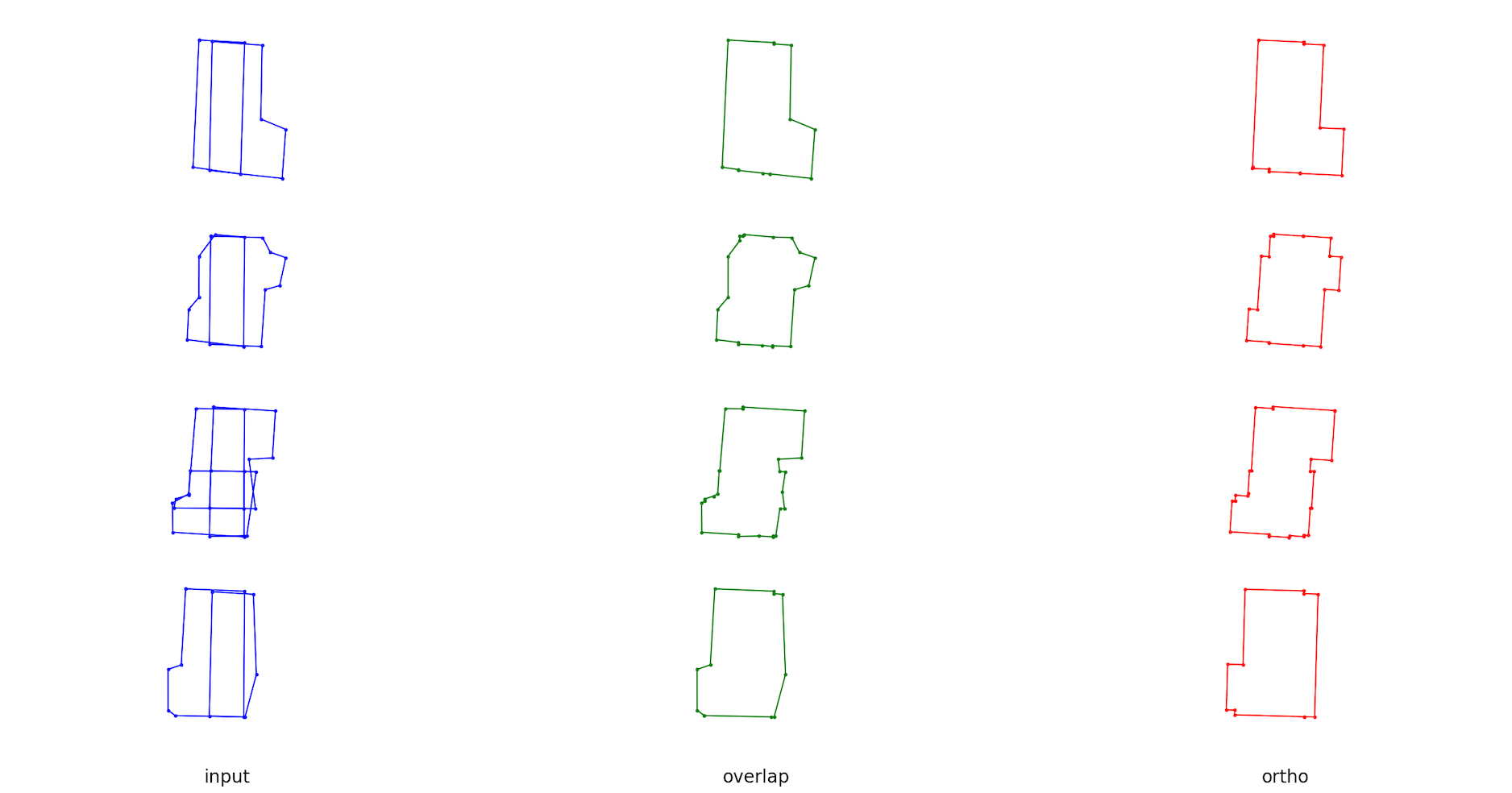
Check demo_vector.py.
Dev
For dev dependencies check requirements.txt.
1 maintainer

Metadata
1 maintainer
Release files for geo-gremlin 0.1.2
For a detailed explanation of source distributions (sdists) and built distributions (wheels), please see the package formats documentation.
Source distribution (sdist)
| File | Size | Uploaded | Provenance | Actions |
|---|---|---|---|---|
| geo_gremlin-0.1.2.tar.gz | 23.7 kB | Without provenance | Details for geo_gremlin-0.1.2.tar.gz |
Built distribution (wheel)
| File | Interpreter | ABI | Platform | Actions Reset |
|---|---|---|---|---|
| geo_gremlin-0.1.2-py3-none-any.whl | Python 3 | none | any | Details for geo_gremlin-0.1.2-py3-none-any.whl |
Total release size: 49.1 kB
Release files / geo_gremlin-0.1.2.tar.gz
| Download URL | geo_gremlin-0.1.2.tar.gz |
|---|---|
| Size | 23.7 kB |
| Tags | Source |
|
SHA-256 checksum How to use checksums |
d10e12348a21543de9f4e50f239cef7e57b0d55346d1319313396e5c17d049ee
|
|
BLAKE2b-256 checksum How to use checksums |
84ddf3d5d7f64b4902723ac02c6d10bba0c16d5e8a69d40c7d243497e6fbee7b
|
| Upload date | |
|
Uploaded using Trusted Publishing? What is trusted publishing? |
No |
| Uploaded via |
twine/7.0.0 CPython/3.12.4
|
Release files / geo_gremlin-0.1.2-py3-none-any.whl
| Download URL | geo_gremlin-0.1.2-py3-none-any.whl |
|---|---|
| Size | 25.4 kB |
| Tags | Python 3 |
|
SHA-256 checksum How to use checksums |
038971d1e82cd0ce635f6285a61ae65bb90c51f3dd8fe016650a4e568aeb8144
|
|
BLAKE2b-256 checksum How to use checksums |
379b8f41a187ac150c3e5d54715b6849a64de8af5729bef7014f233e45b97b91
|
| Upload date | |
|
Uploaded using Trusted Publishing? What is trusted publishing? |
No |
| Uploaded via |
twine/7.0.0 CPython/3.12.4
|
Security for geo-gremlin 0.1.2
Provenance
Provenance describes where a file came from. On PyPI, provenance is shared via attestations, which provide a verifiable record of the build or publishing details. View details, limitations and caveats.
No provenance found
None of the files in this release were uploaded with provenance metadata.
A note on package security
PyPI is a repository for distributing packages, not a service for auditing them. While third-party security researchers and our staff do their best to detect and remove malicious packages, PyPI cannot guarantee the quality, security or suitability of any given package.
To learn more about protecting yourself from malicious actors, visit our package security documentation.














