
geo rasterizer
Rasterize shapes in a geodataframe to a reference geotif.
How to use
geo-rasterizer can be used to create rasters based on a geodataframe that correspond to a given reference image. The shapes from the geodataframe will be projected to a raster of the same size as the reference image. geo-rasteriser supports a single class for each pixel, and will encode the rasterized shapes as one-hot vector, or as a densely encoded int with an index for each class.
To use geo-rasterizer you need a geodataframe that holds shapes, and a corresponding geotif as reference.
For example we’re using the test_df.gpkg and test_geotif from the test_data folder of the repository.
The content of the test_df.gpkg looks like this:
   label                                           geometry
0     r1  POLYGON ((126200.432 425991.321, 126200.901 42...
1      a  POLYGON ((185960.739 442590.177, 185962.729 44...
2     g1  POLYGON ((185853.845 442658.306, 185858.166 44...
...
10    k4  POLYGON ((182581.756 441482.010, 182579.714 44...
Importantly, it contains a “geometry” column with polygons, and a “label” column which contains the corresponding label for each polygon.
The test_geotif.tif file contains a georeferenced geotif which is located in the same area as polygons in the geodataframe. It looks like this:
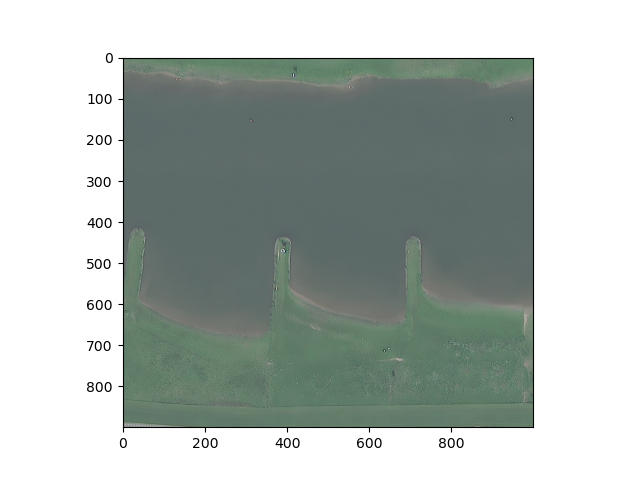
To create a raster that corresponds to the classes in the geodataframe we can use geo_rasterizer.rasterize_multilabel
import geo_rasterizer
import matplotlib.pyplot as plt

gpkg_path = "/path/to/repo/test_data/test_df.gpkg"
ref_path = "/path/to/repo/test_data/test_geotif.tif"

raster = geo_rasterizer.rasterize_multilabel(
    gpkg=gpkg_path,
    reference_image=ref_path,
    class_column="label",
    classes=["r1", "a", "g1", "g6", "k4"],
    include_background_class=True,
    dense=True,
)

plt.imshow(raster.squeeze())
plt.show()
This results in the following image:
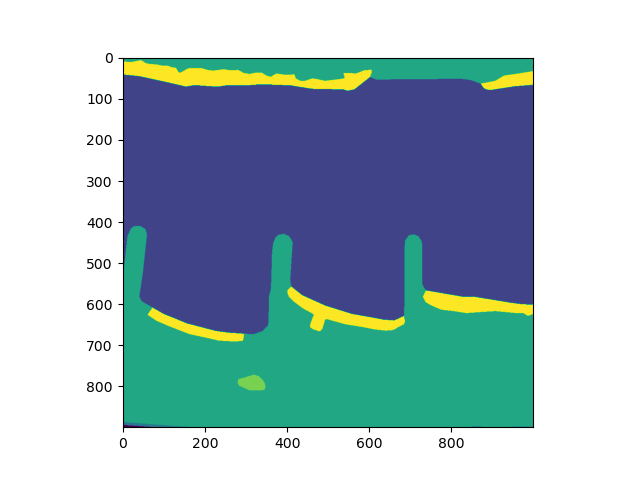
Since the labels are encoded as integers from 0 … n for n classes (with 0 as background), the colors that matplotlib will give to each class is not consistent or visually pleasing. geo_rasterizer provides a function to create an rgb image based on the densely encoded class indices, which takes into account the total number of classes, which keeps class colors consistent between different images, even if not all images contain all classes. Additionally, an alpha-channel is optionally added to make the background class transparent. To use this function on the previous output:
rgb_raster = geo_rasterizer.dense_rasters_to_rgb(
    raster=raster,
    num_classes=5,
    alpha=True,
    cmap="tab10",
)
# transpose to channels last for plotting with matplotlib
plt.imshow(rgb_raster.transpose((1,2,0)))
plt.show()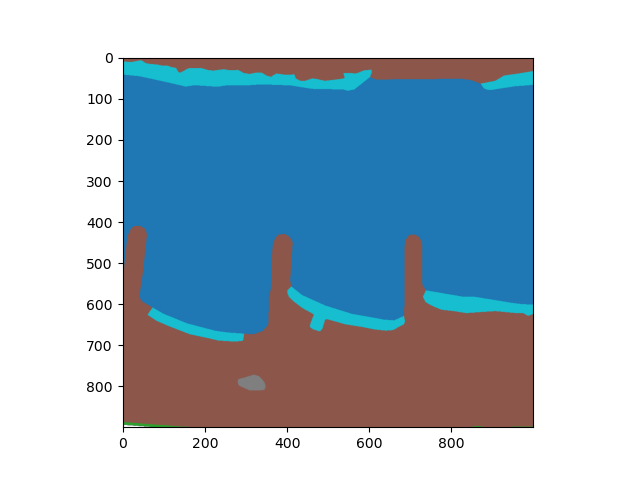
If you would like to save this raster as georeferenced geotif itself, for example: to compare the labels to different map layers in qgis, you can use geo_rasterizer to save the raster as a geotif with the same geo-meta-data as the reference image:
rasters_to_geotif(
    raster=rgb_raster,
    reference=ref_path,
    output="/path/to/labels_georeferenced.tif,
)
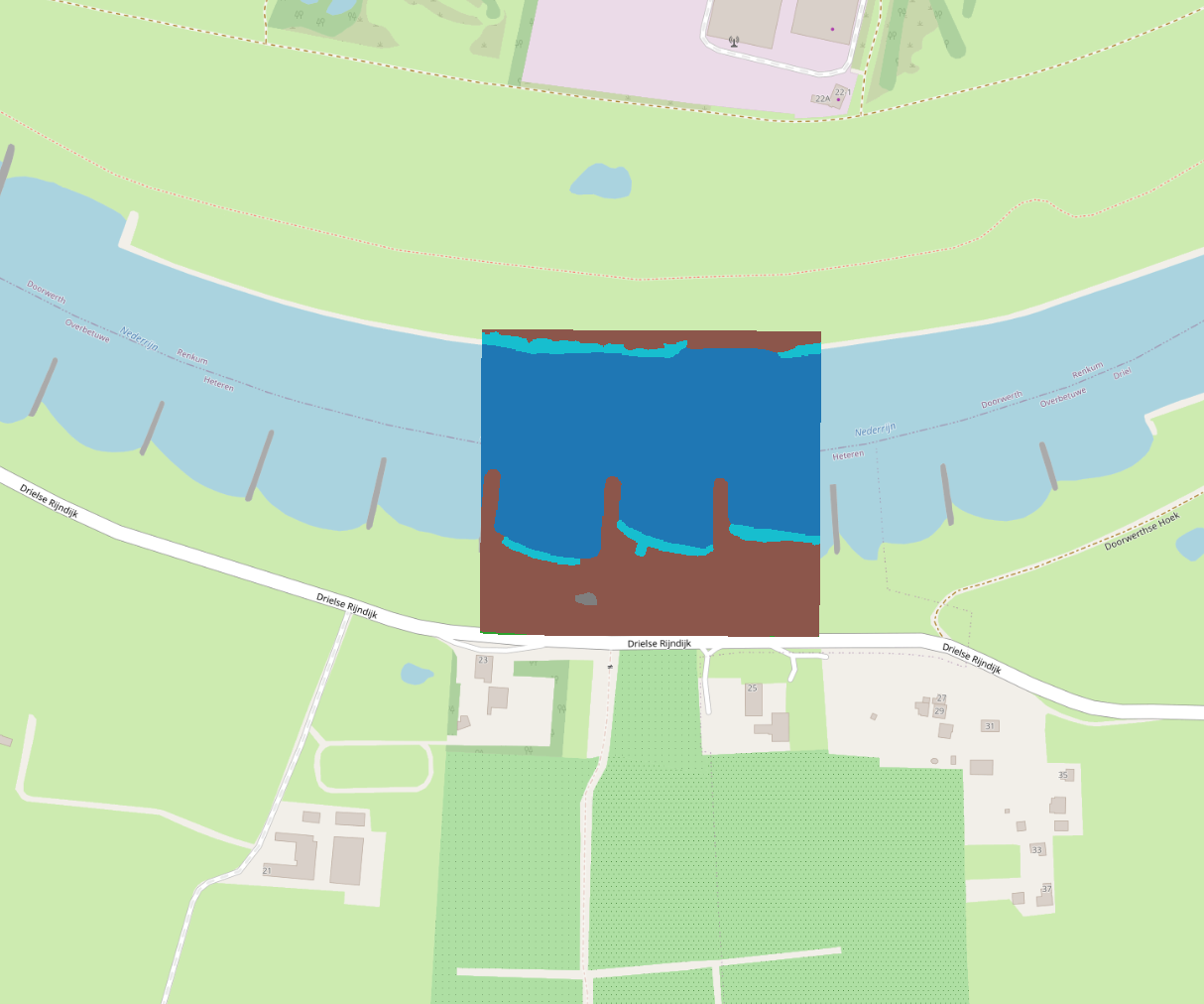
The resulting file in /path/to/labels_georeferenced.tif can for example be compared to open street map in qgis.
Batch rasterization
It is also possible to rasterize a geodataframe with an entire batch of reference images. This will create one geotiff correspond to a reference image for each reference image in the batch.
to rasterize over a batch of reference images we can use rasterize_batch.
import geo_rasterizer
import matplotlib.pyplot as plt

gpkg_path = "/path/to/repo/test_data/test_df.gpkg"
ref_path = "/path/to/repo/test_data/batch"
output_path = "/path/to/repo/output"

geo_rasterizer.rasterize_batch(
    gpkg=gpkg_path,
    reference_images_folder=ref_path,
    class_column="FI_CODE",
    classes=["r1", "r2", "a", "g1", "g6", "k4", "b1"],
    include_background_class=True,
    dense=True,
    prefix = "rasterized",
    output = output_path
)
This wil create an ‘output’ folder inside the repo which contains two tifs, one for each reference image inside the reference_image_folder. The naming convention of the output files is <prefix> + “_” + filename_of_reference_image.
Installation
To install geo-rasterizer, do:
git clone https://gitlab.com/rwsdatalab/public/codebase/image/geo-rasterizer.git
cd geo-rasterizer
pip install .
Run tests (including coverage) with:
pip install ".[dev]"
pytest
Documentation
Find the full documentation at https://rwsdatalab.gitlab.io/public/codebase/image/geo-rasterizer
License
Copyright (c) 2023, Rijkswaterstaat
Licensed under the Apache License, Version 2.0 (the “License”); you may not use this file except in compliance with the License. You may obtain a copy of the License at
http://www.apache.org/licenses/LICENSE-2.0
Unless required by applicable law or agreed to in writing, software distributed under the License is distributed on an “AS IS” BASIS, WITHOUT WARRANTIES OR CONDITIONS OF ANY KIND, either express or implied. See the License for the specific language governing permissions and limitations under the License.
1 maintainer

Metadata
1 maintainer
Release files for geo-rasterizer 0.2.2
For a detailed explanation of source distributions (sdists) and built distributions (wheels), please see the package formats documentation.
Source distribution (sdist)
| File | Size | Uploaded | Provenance | Actions |
|---|---|---|---|---|
| geo-rasterizer-0.2.2.tar.gz | 13.7 kB | Without provenance | Details for geo-rasterizer-0.2.2.tar.gz |
Built distribution (wheel)
| File | Interpreter | ABI | Platform | Actions Reset |
|---|---|---|---|---|
| geo_rasterizer-0.2.2-py3-none-any.whl | Python 3 | none | any | Details for geo_rasterizer-0.2.2-py3-none-any.whl |
Total release size: 25.4 kB
Release files / geo-rasterizer-0.2.2.tar.gz
| Download URL | geo-rasterizer-0.2.2.tar.gz |
|---|---|
| Size | 13.7 kB |
| Tags | Source |
|
SHA-256 checksum How to use checksums |
815c4a8d6efbff8b4f723dc09f8586b9190f41279907ce4fd98c89c6bfec1f24
|
|
BLAKE2b-256 checksum How to use checksums |
dc132ebe8ac4e1b24fc296a7742039b04ad8c876fe2a834d1f75555170ee0521
|
| Upload date | |
|
Uploaded using Trusted Publishing? What is trusted publishing? |
No |
| Uploaded via |
twine/4.0.2 CPython/3.10.12
|
Release files / geo_rasterizer-0.2.2-py3-none-any.whl
| Download URL | geo_rasterizer-0.2.2-py3-none-any.whl |
|---|---|
| Size | 11.6 kB |
| Tags | Python 3 |
|
SHA-256 checksum How to use checksums |
65c03a0fa7da25012de52d22430a185c68499ad405623282b5c59bab5360e221
|
|
BLAKE2b-256 checksum How to use checksums |
f7e2f9738f5405f222ebb9547ea14810791a3b9a58666e64c549c9f46a72497e
|
| Upload date | |
|
Uploaded using Trusted Publishing? What is trusted publishing? |
No |
| Uploaded via |
twine/4.0.2 CPython/3.10.12
|
Security for geo-rasterizer 0.2.2
Provenance
Provenance describes where a file came from. On PyPI, provenance is shared via attestations, which provide a verifiable record of the build or publishing details. View details, limitations and caveats.
No provenance found
None of the files in this release were uploaded with provenance metadata.
A note on package security
PyPI is a repository for distributing packages, not a service for auditing them. While third-party security researchers and our staff do their best to detect and remove malicious packages, PyPI cannot guarantee the quality, security or suitability of any given package.
To learn more about protecting yourself from malicious actors, visit our package security documentation.














