
GEO-Bench: Toward Foundation Models for Earth Monitoring
GEO-Bench is a ServiceNow Research project.


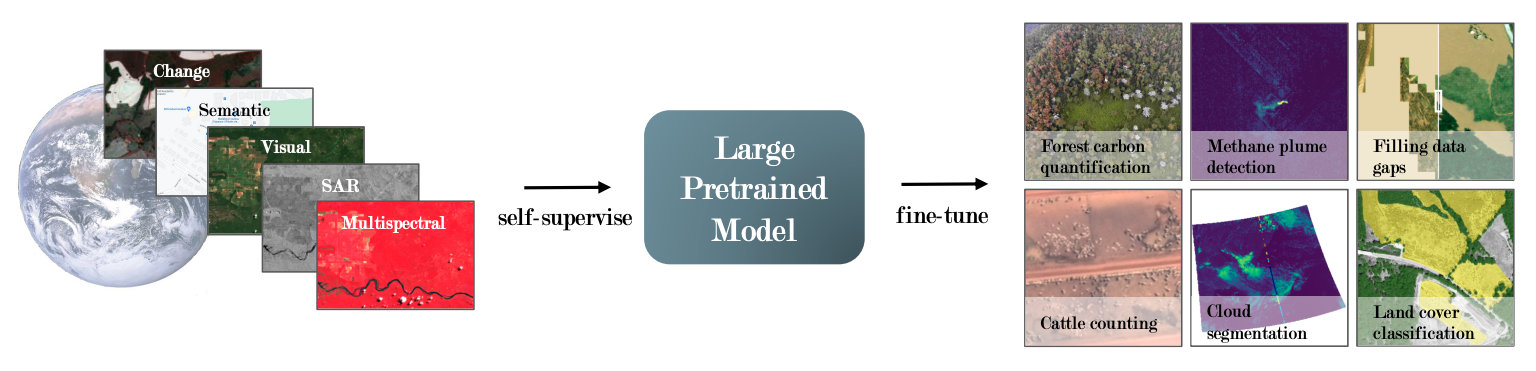
GEO-Bench is a General Earth Observation benchmark for evaluating the performances of large pre-trained models on geospatial data. Read the full paper for usage details and evaluation of existing pre-trained vision models.
Installation
GEO-Bench requires Python 3.12 or newer and is installed from PyPI:
pip install geobench
The base install is enough to download and load the benchmark. The plotting helpers in
geobench.plot_tools additionally need the plot extra (matplotlib, pandas, seaborn), and the
PyTorch Lightning data module in geobench.torch_toolbox needs the torch extra:
pip install "geobench[plot,torch]"
Release 1.0.0 capped Python below 3.13 and pinned outdated upper bounds on its dependencies.
Release 1.1.0 removes both, so installing from main is no longer necessary.
Downloading the data
Set $GEO_BENCH_DIR to your preferred location. If not set, it will be stored in $HOME/dataset/geobench.
Next, use the download script. This will automatically download from Hugging Face
Run the command:
geobench-download
You need ~65 GB of free disk space for download and unzip (once all .zip are deleted it takes 57GB). If some files are already downloaded, it will verify the md5 checksum. Feel free to restart the downloader if it is interrupted.
Using data you already have
If the benchmark is already on disk, either from an earlier download or from a copy shared with you, there are two ways to point geobench at it.
The first is $GEO_BENCH_DIR, which is read when geobench is imported and therefore has to be set
in the environment before Python starts:
export GEO_BENCH_DIR=/path/to/geobench
Setting os.environ["GEO_BENCH_DIR"] or reassigning geobench.GEO_BENCH_DIR after the import has
no effect.
The second is benchmark_dir, which reads a benchmark from elsewhere without changing that
default. The tasks task_iterator yields read their datasets from the directory given here too.
import geobench

for task in geobench.task_iterator(benchmark_dir="/shared/geobench/classification_v1.0"):
    dataset = task.get_dataset(split="train")
benchmark_dir is the path to a single benchmark rather than to the directory holding several of
them, and it takes the place of both $GEO_BENCH_DIR and benchmark_name.
Test installation
You can run tests. Note: Make sure the benchmark is downloaded before launching tests.
pip install pytest
geobench-test
Loading Datasets
See example_load_dataset.py for how to iterate over datasets.
import geobench

for task in geobench.task_iterator(benchmark_name="classification_v1.0"):
    dataset = task.get_dataset(split="train")
    sample = dataset[0]
    for band in sample.bands:
        print(f"{band.band_info.name}: {band.data.shape}")
Known issues
The m-eurosat and m-brick-kiln datasets in classification_v1.0 record the wrong Sentinel-2
band for most of their channels. The pixel data is unaffected; only the band name and wavelength
stored for each channel are wrong, so selecting channels by band name returns the wrong channel.
Reported by @gabrieltseng in #28 and
#29.
The 13 channels are actually in this order:
| Channel | m-eurosat |
m-brick-kiln |
|---|---|---|
| 0–4 | B01–B05 | B01–B05 |
| 5 | B06 | B07 |
| 6 | B07 | B8A |
| 7 | B08 | B08 |
| 8 | B09 | B11 |
| 9 | B10 | B12 |
| 10 | B11 | TCI_R |
| 11 | B12 | TCI_G |
| 12 | B8A | TCI_B |
The stored metadata instead labels all 13 channels, in both datasets, as
B01, B02, B03, B04, B05, B06, B07, B08, B8A, B09, B10, B11, B12. In m-brick-kiln the source
pipeline (mliu356/kiln-scaling) does not export B06,
B09 or B10, and its last three channels are 8-bit true-colour composites rather than reflectance
bands.
The converters in make_benchmark/dataset_converters/ now record the order above; the data on
Hugging Face is not regenerated, so apply this mapping when loading it. Loading either dataset
through GeobenchDataset emits a warning to this effect.
Fine-tuning and reproducing experiments
See the code for reproducing experiments as a starting point for fine-tuning:
Visualizing Results
See the notebook baseline_results.ipynb for an example of how to visualize the results.


Release files for geobench 1.1.0
For a detailed explanation of source distributions (sdists) and built distributions (wheels), please see the package formats documentation.
Source distribution (sdist)
| File | Size | Uploaded | |
|---|---|---|---|
| geobench-1.1.0.tar.gz | 42.5 kB | Details |
Built distribution (wheel)
| File | Interpreter | ABI | Platform | Reset |
|---|---|---|---|---|
| geobench-1.1.0-py3-none-any.whl | Python 3 | none | any | Details |
Total release size: 91.7 kB
Release files / geobench-1.1.0.tar.gz
| Download URL | geobench-1.1.0.tar.gz |
|---|---|
| Size | 42.5 kB |
| Tags | Source |
|
SHA-256 checksum How to use checksums |
5ececb9310db3fc5d86b877333694df2eb518caca8449d4b4bd7d36d152a87b1
|
|
BLAKE2b-256 checksum How to use checksums |
fa17c6c5342328edcce16fc6cf9029338e5fde9c6071d275bf2e3bfe0501c90e
|
| Upload date | |
|
Uploaded using Trusted Publishing? What is trusted publishing? |
No |
| Uploaded via |
uv/0.11.28 {"installer":{"name":"uv","version":"0.11.28","subcommand":["publish"]},"python":null,"implementation":{"name":null,"version":null},"distro":{"name":"Ubuntu","version":"20.04","id":"focal","libc":null},"system":{"name":null,"release":null},"cpu":null,"openssl_version":null,"setuptools_version":null,"rustc_version":null,"ci":null}
|
Release files / geobench-1.1.0-py3-none-any.whl
| Download URL | geobench-1.1.0-py3-none-any.whl |
|---|---|
| Size | 49.2 kB |
| Tags | Python 3 |
|
SHA-256 checksum How to use checksums |
12967e862ef16cf9634c866470179ccb2303707f611b51e885d364e466054e41
|
|
BLAKE2b-256 checksum How to use checksums |
813d77baf0d9a8453423c9300179058939ce79396586de5f3db752f5bf7afc72
|
| Upload date | |
|
Uploaded using Trusted Publishing? What is trusted publishing? |
No |
| Uploaded via |
uv/0.11.28 {"installer":{"name":"uv","version":"0.11.28","subcommand":["publish"]},"python":null,"implementation":{"name":null,"version":null},"distro":{"name":"Ubuntu","version":"20.04","id":"focal","libc":null},"system":{"name":null,"release":null},"cpu":null,"openssl_version":null,"setuptools_version":null,"rustc_version":null,"ci":null}
|














