
geoclustering
📍 command-line tool for clustering geolocations.
Features
- Uses DBSCAN or OPTICS to perform clustering.
- Outputs clustering results as
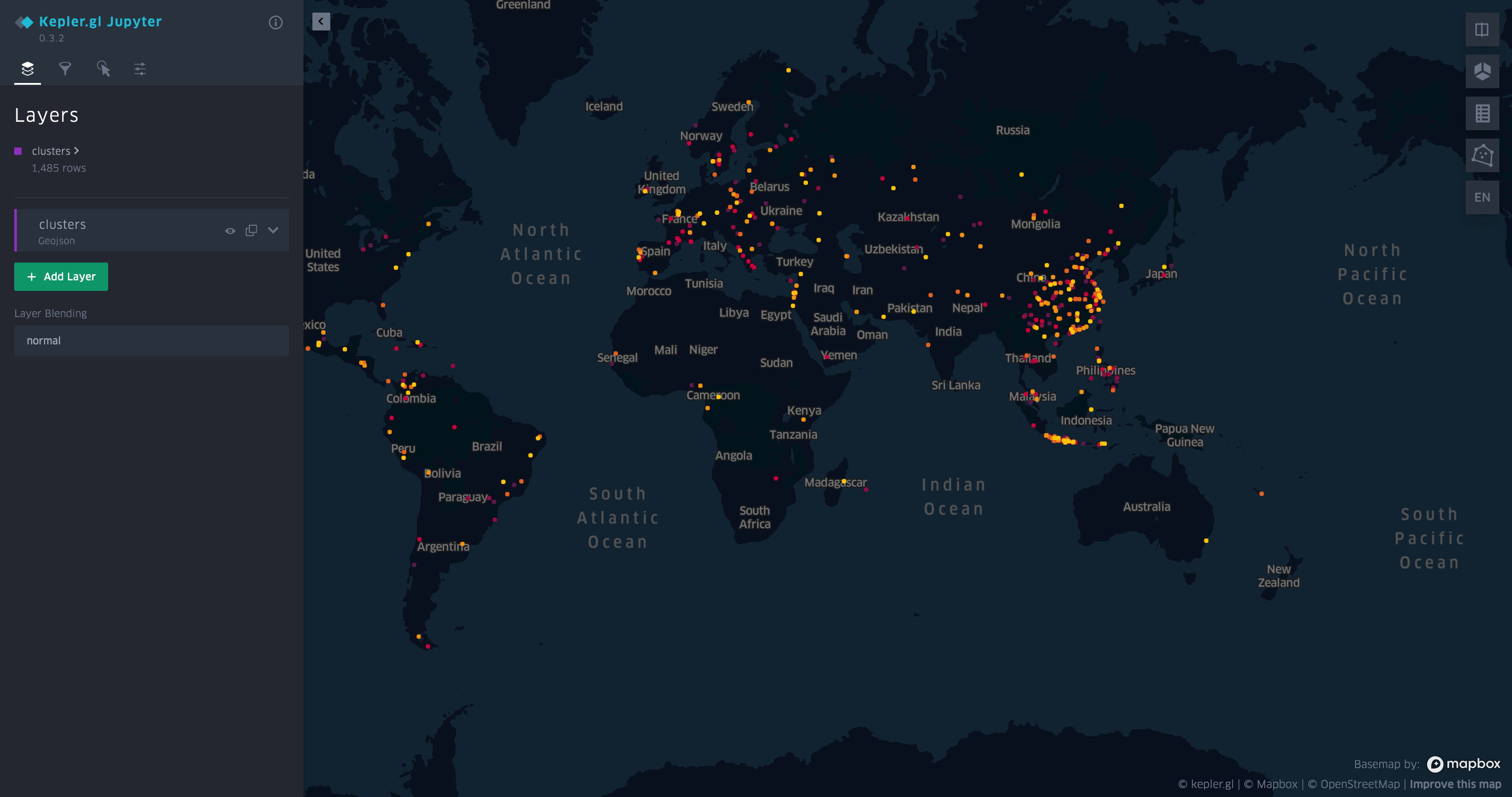
json,txtandgeojson. - Creates a kepler.gl visualization of clusters.
Clustering Method
A cluster is created when a certain number of points (defined with --size) each are within a given distance (defined with --distance) of at least one other point in the cluster.
Install
Install with uv:
# with kepler.gl visualization support
uv tool install 'geoclustering[full]'

# only text-based output
uv tool install geoclustering
If the full install fails, you might need to install kepler.gl build dependencies:
# macos
brew install proj gdal
Usage
Usage: geoclustering [OPTIONS] FILENAME

  Tool to cluster geolocations. A cluster is created when a certain number of
  points (defined with --size) each are within a given distance (defined with
  --distance) of at least one other point in the cluster. Input is supplied as
  a csv file. At a minimum, each row needs to have a 'lat' and a 'lon' column.
  Other rows are reflected to the output.

Options:
  -d, --distance FLOAT            (in km) Max. distance between two points in
                                  a cluster.  [required]
  -s, --size INTEGER              Min. number of points in a cluster.
                                  [required]
  -o, --output PATH               Output directory for results. Default:
                                  ./output
  -a, --algorithm [dbscan|optics]
                                  Clustering algorithm to be used. `optics`
                                  produces tighter clusters but is slower.
                                  Default: dbscan
  --open                          Open the generated visualization in the
                                  default browser automatically.
  --debug                         Print debug output.
  --help                          Show this message and exit.
Input
Inputs are supplied as a .csv file. At a minimum, each row needs to have a lat and a `lon`` column. Other rows are reflected to the output.
id,name,lat,lon
1,Bonnibelle Mathwen,40.1324085,64.4911086
...
Output
If at least one cluster was found, the tool outputs a folder with output as json, geojson, txt, csv files. A kepler.gl html file is generated as well.
JSON
Encodes an array of clusters, each containing an array of points.
[
  {
    "cluster_id": 0,
    "points": [
      {
        "id": 9,
        "name": "Rosanna Foggo",
        "lat": -6.2074293,
        "lon": 106.8915948
      }
    ]
  }
]
GeoJSON
Encodes a single FeatureCollection, containing all points as Feature objects.
{
  "type": "FeatureCollection",
  "features": [
    {
      "type": "Feature",
      "geometry": {
        "type": "Point",
        "coordinates": [
          106.891595,
          -6.207429
        ]
      },
      "properties": {
        "id": 9,
        "name": "Rosanna Foggo",
        "cluster_id": 0
      }
    }
  ]
}
Text
Encodes cluster as blocks separated by a newline, where each line in a cluster block contains one point.
Cluster 0
id 9, name Rosanna Foggo, lat -6.2074293, lon 106.8915948

// ...
CSV
Encodes each event in one line with cluster_id information associated.
cluster_id,name,lat,lon
9,Rosanna Foggo,-6.2074293,106.8915948
...
kepler.gl
Develop
It is assumed that you are using Python3.14+ and uv.
# install dependencies and dev tools
uv sync --group dev --extra full

# run tests
uv run pytest

# run the linter
uv run ruff check .

# install a git hook that runs the linter before each commit
uv run prek install
We use Ruff for linting.
Release
- Update
versionin pyproject.toml - Run
scripts/release.sh - Confirm GH action completed successfully
1 maintainer

Metadata
1 maintainer
Release files for geoclustering 0.5.0
For a detailed explanation of source distributions (sdists) and built distributions (wheels), please see the package formats documentation.
Source distribution (sdist)
| File | Size | Uploaded | |
|---|---|---|---|
| geoclustering-0.5.0.tar.gz | 398.1 kB | Details |
Built distribution (wheel)
| File | Interpreter | ABI | Platform | Reset |
|---|---|---|---|---|
| geoclustering-0.5.0-py3-none-any.whl | Python 3 | none | any | Details |
Total release size: 407.9 kB
Release files / geoclustering-0.5.0.tar.gz
| Download URL | geoclustering-0.5.0.tar.gz |
|---|---|
| Size | 398.1 kB |
| Tags | Source |
|
SHA-256 checksum How to use checksums |
bf4e9103448575aff7059e9d9b711b5d6bc003579d5828873d4f9f03283539fc
|
|
BLAKE2b-256 checksum How to use checksums |
ffa2cf62e5ed187e756df60e099d38e12ebabf447c380aef18b2144d086936ec
|
| Upload date | |
|
Uploaded using Trusted Publishing? What is trusted publishing? |
No |
| Uploaded via |
twine/6.2.0 CPython/3.14.6
|
Release files / geoclustering-0.5.0-py3-none-any.whl
| Download URL | geoclustering-0.5.0-py3-none-any.whl |
|---|---|
| Size | 9.8 kB |
| Tags | Python 3 |
|
SHA-256 checksum How to use checksums |
aae681a142b331ce011dd8840745f47518c0f7eca68588c323906f6d269238e7
|
|
BLAKE2b-256 checksum How to use checksums |
4d11edd22782bcb3a9372f81dd35ad2277e50ff6a3f2497b2f6c1fb958826573
|
| Upload date | |
|
Uploaded using Trusted Publishing? What is trusted publishing? |
No |
| Uploaded via |
twine/6.2.0 CPython/3.14.6
|














