
Converts GIS annotations to Microsoft's Common Objects In Context (COCO) dataset format

Project description





Easily transform your GIS annotations into Microsoft's Common Objects In Context (COCO) datasets with GeoCOCO. This tool allows users to leverage the advanced digitizing solutions of modern GIS software for the annotations of image objects in geographic imagery.
Built with Pydantic and pycocotools, it features a complete implementation of the COCO standard for object detection with out-of-the-box support for JSON-encoding and RLE compression. The resulting datasets are versioned, easily extendable with new annotations and fully compatible with other data applications that accept the COCO format.
Key features
- User-friendly: GeoCOCO is designed for ease of use, requiring minimal configuration and domain knowledge
- Version Control: Datasets created with GeoCOCO are versioned and designed for expansion with future annotations
- Command-line Tool: Use GeoCOCO from your terminal to create, append and copy COCO datasets
- Python Module: Integrate GeoCOCO in your own data applications with the
geococopackage - Representation: GeoCOCO maximizes label representation through an adaptive moving window approach
- COCO Standard: Output datasets are fully compatible with other COCO-accepting applications
- Compact File Size: JSON-encoding and RLE compression are employed to ensure compact file sizes
Installation
Installing from the Python Package Index (PyPI):
# Install from PYPI with Python's package installer (pip)
pip install geococo
Example of usage
After installing geococo, there are a number of ways you can interact with its API.
Command line interface
The easiest way to use geococo is to simply call it from your preferred terminal with one of three commands: new, add and copy.
$ geococo --help
Usage: geococo [OPTIONS] COMMAND [ARGS]...

 Transform your GIS annotations into COCO datasets.

Options:
 --help  Show this message and exit.

Commands:
 add   Transform and add GIS annotations to an existing CocoDataset
 copy  Copy and (optionally) update the metadata of an existing CocoDataset
 new   Initialize a new CocoDataset with user-prompted metadata
Starting a new CocoDataset (will prompt user for metadata like Description and Contributor)
$ geococo new dataset.json
Adding new annotations to existing CocoDataset (will increment version based on input data and update any new categories/images)
$ geococo add image.tif labels.shp dataset.json images/ 512 512 --id-attribute ids
For more information on the different commands, call geococo COMMAND with --help.
$ geococo add --help
Usage: geococo add [OPTIONS] IMAGE_PATH LABELS_PATH JSON_PATH OUTPUT_DIR WIDTH
                  HEIGHT

  Transform and add GIS annotations to an existing COCO dataset.

  This method generates a COCO dataset by moving across the given image
  (image_path) with a moving window (width, height), constantly checking for
  intersecting annotations (labels_path) that represent image objects in said
  image (e.g. buildings in satellite imagery; denoted by (super)category name
  and/or id). Each valid intersection will add n Annotations entries to the
  dataset (json_path) and save a subset of the input image that contained
  these entries (output_dir).

  The output data size depends on your input labels, as the moving window
  adjusts its step size to accommodate the average annotation size, optimizing
  dataset representation and minimizing tool configuration. Each addition will
  also increment the dataset version: patch if using the same image_path,
  minor if using a new image_path, and major if using a new output_dir.

Arguments:
  IMAGE_PATH   Path to geospatial image containing image objects  [required]
  LABELS_PATH  Path to vector file containing annotated image objects
               [required]
  JSON_PATH    Path to json file containing the COCO dataset  [required]
  OUTPUT_DIR   Path to output directory for image subsets  [required]
  WIDTH        Width of image subsets  [required]
  HEIGHT       Height of image subsets  [required]

Options:
  --id-attribute TEXT     Name of column containing category_id values
                          (optional if --name_attribute is given)
  --name-attribute TEXT   Name of column containing category_name values
                          (optional if --id_attribute is given)
  --super-attribute TEXT  Name of column containing supercategory values
  --help                  Show this message and exit.
Python module
This is recommended for most developers as it gives you more granular control over the various steps. It does assume a basic familiarity with the geopandas and rasterio packages (i.e. GIS modules that help you manage vector and raster data respectively).
import pathlib
import geopandas as gpd
import rasterio
from geococo import create_dataset, load_dataset, save_dataset, append_dataset

# Replace this with your preferred output paths
data_path = pathlib.Path("path/to/your/coco/output/images")
json_path = pathlib.Path("path/to/your/coco/json/file")

# Dimensions of the moving window and output images
width, height = 512, 512

# Starting a new CocoDataset
description = "My First Dataset"
contributor = "User"

# version and date_created are automatically set
dataset = create_dataset(description=description, contributor=contributor)
# You can also load existing COCO datasets
# dataset = load_dataset(json_path=json_path)

# Loading GIS data with rasterio and geopandas
labels = gpd.read_file(some_labels_path)
raster_source = rasterio.open(some_image_path)

# (Optional) Apply any spatial or attribute queries here
# labels = labels.loc[labels["ids"].isin([1, 2, 3])]
# labels = labels.loc[labels.within(some_polygon)]

# Find and save all Annotation instances
dataset = append_dataset(
    dataset=dataset,
    images_dir=data_path,
    src=raster_source,
    labels=labels,
    window_bounds=[(width, height)],
    id_attribute=None,  # column with category_id values
    name_attribute="ids",  # column with category_name values
    super_attribute=None,  # optional column with super_category values
)

# Encode CocoDataset instance as JSON and save to json_path
save_dataset(dataset=dataset, json_path=json_path)
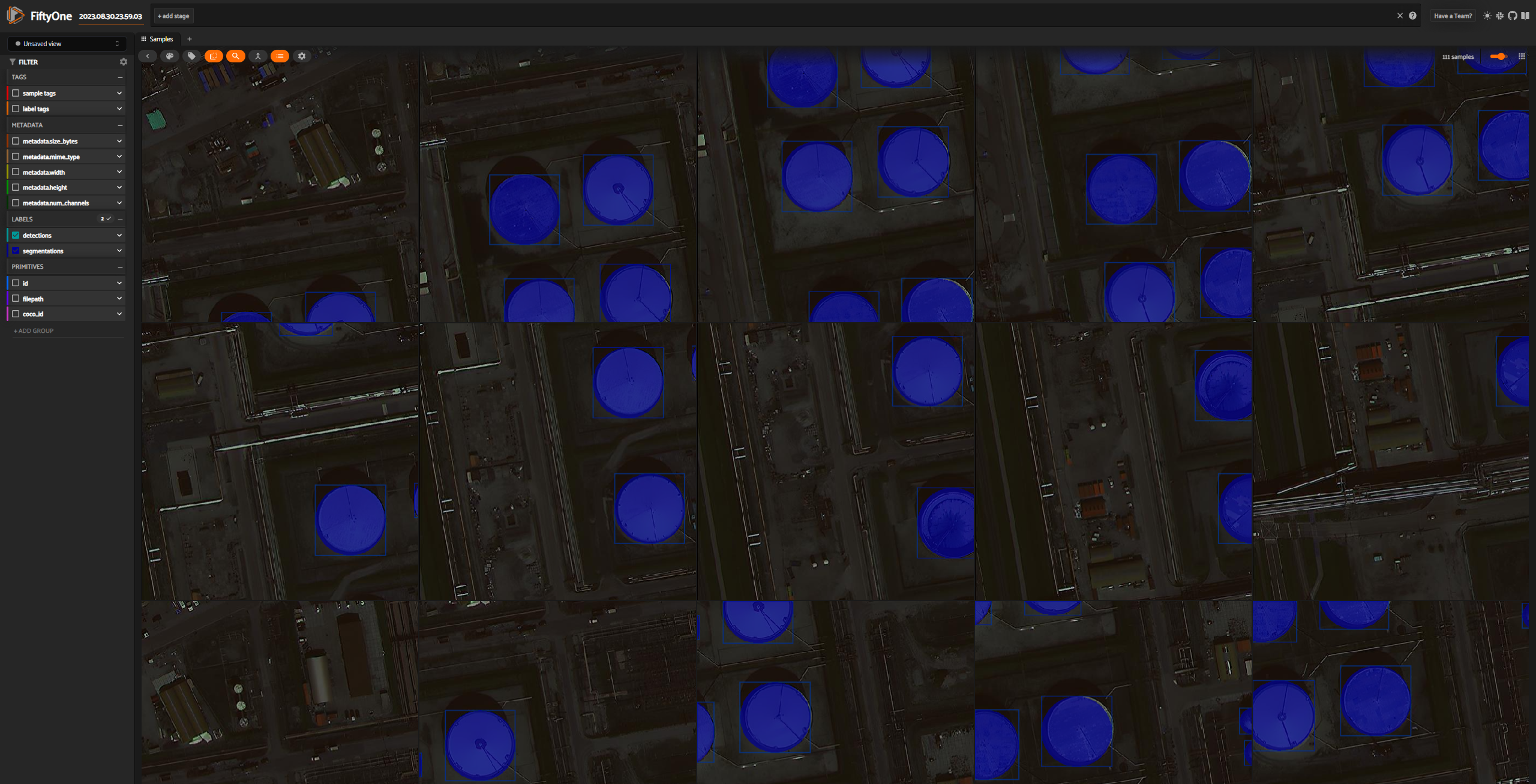
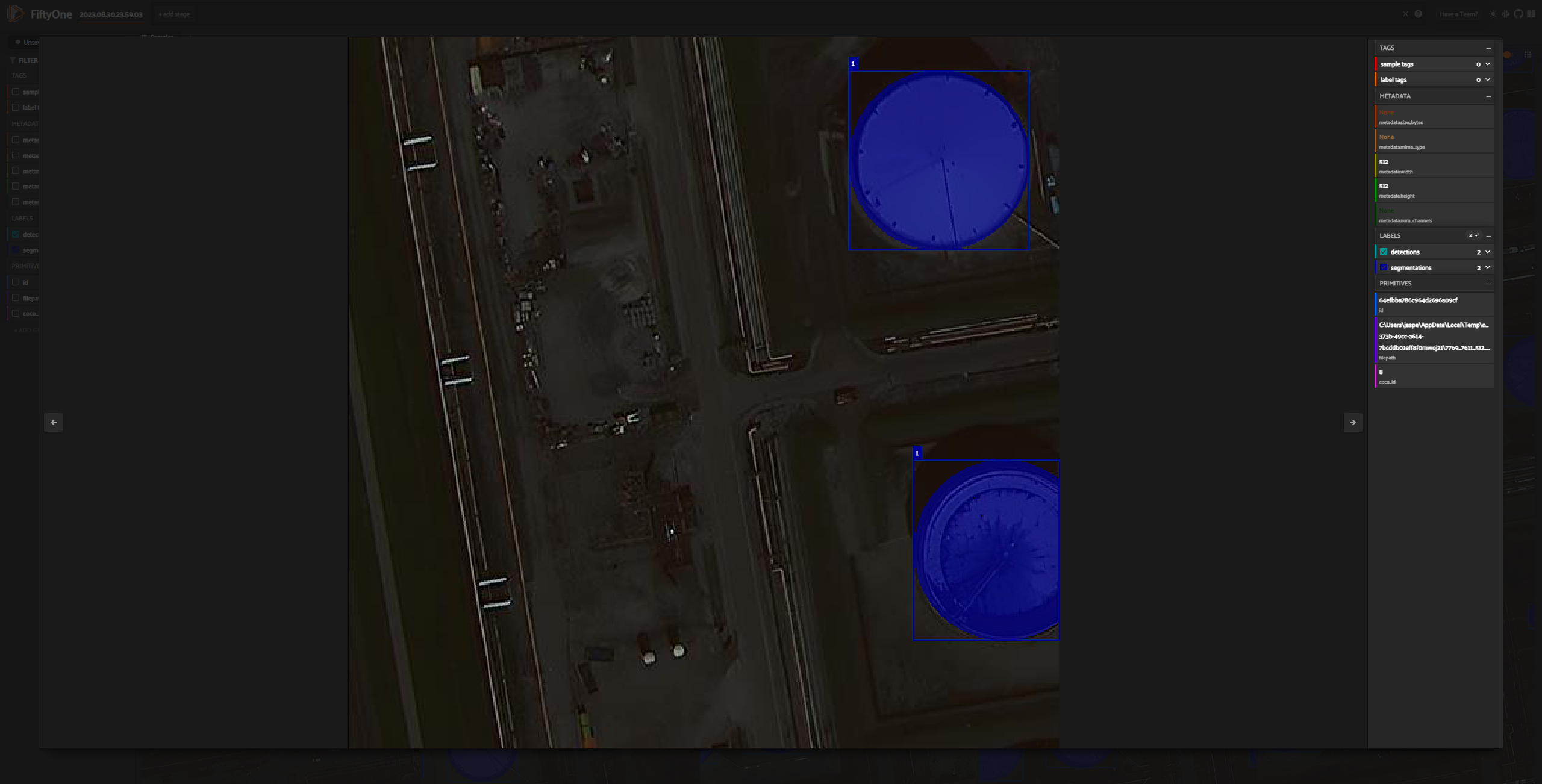
Visualization with FiftyOne
Like the official COCO project, the open source tool FiftyOne can be used to visualize and evaluate your datasets. To do this, you'll need the fiftyone and pycocotools packages. Note that geococo does not install fiftyone by default, so you'll need to install it separately (instructions for installation can be found here). Once you have fiftyone installed, you can use the following command to inspect your COCO dataset in your web browser.
# requires pycocotools and fiftyone
import fiftyone as fo
import fiftyone.zoo as foz
import pathlib

data_path = pathlib.Path("path/to/your/coco/output/images")
json_path = pathlib.Path("path/to/your/coco/json/file")

# Load COCO formatted dataset
coco_dataset = fo.Dataset.from_dir(
    dataset_type=fo.types.COCODetectionDataset,
    data_path=data_path,
    labels_path=json_path,
    include_id=True,
)

# Launch the app
session = fo.launch_app(coco_dataset, port=5151)
Release history Release notifications | RSS feed


Download files
Download the file for your platform. If you're not sure which to choose, learn more about installing packages.
Source Distribution
Built Distribution
Filter files by name, interpreter, ABI, and platform.
If you're not sure about the file name format, learn more about wheel file names.
Copy a direct link to the current filters
File details
Details for the file geococo-0.6.0.tar.gz.
File metadata
- Download URL: geococo-0.6.0.tar.gz
- Upload date:
- Size: 162.8 kB
- Tags: Source
- Uploaded using Trusted Publishing? No
- Uploaded via: uv/0.7.5
File hashes
| Algorithm | Hash digest | |
|---|---|---|
| SHA256 |
3ddaacfe9a6491c711bfeae007a981568d3020df4f26c7ab29d54fac33ae534c
|
|
| MD5 |
16a0565b766938d4b20f454c21fab5e1
|
|
| BLAKE2b-256 |
264fe68be5ce1fdbc0a55587ea5fd5a60b37887520e2580083e72f657c923e65
|
File details
Details for the file geococo-0.6.0-py3-none-any.whl.
File metadata
- Download URL: geococo-0.6.0-py3-none-any.whl
- Upload date:
- Size: 29.9 kB
- Tags: Python 3
- Uploaded using Trusted Publishing? No
- Uploaded via: uv/0.7.5
File hashes
| Algorithm | Hash digest | |
|---|---|---|
| SHA256 |
5ff4ca00c1036969cea900415e3bc0d3fd1a07a9fa570510cccadc58cfe92d32
|
|
| MD5 |
64d781500a329c03f00fe90df7f81e84
|
|
| BLAKE2b-256 |
80084ad066b82d6861203175c64a14a467134ff9834988980567553c18666437
|






