
GeodesicDome — geodesic domes and grids for Python




mt.geodesicdome builds geodesic spheres (domes of any frequency on an icosahedron, tetrahedron or dodecahedron) and
flat hexagonal/rectilinear grids, with fast neighbour search on both. It was written as the
lattice layer for Self-Organising Maps (SOMs), but it works just as well for meshing,
sampling points evenly on a sphere, or cellular automata on a globe.
| What | Name |
|---|---|
pip install … |
geodesicdomes |
| Python import | mt.geodesicdome (mt is a namespace package shared by future mt.* libraries) |
| Repository | takatsuka/GeodesicDome |
What you get
| Feature | Where |
|---|---|
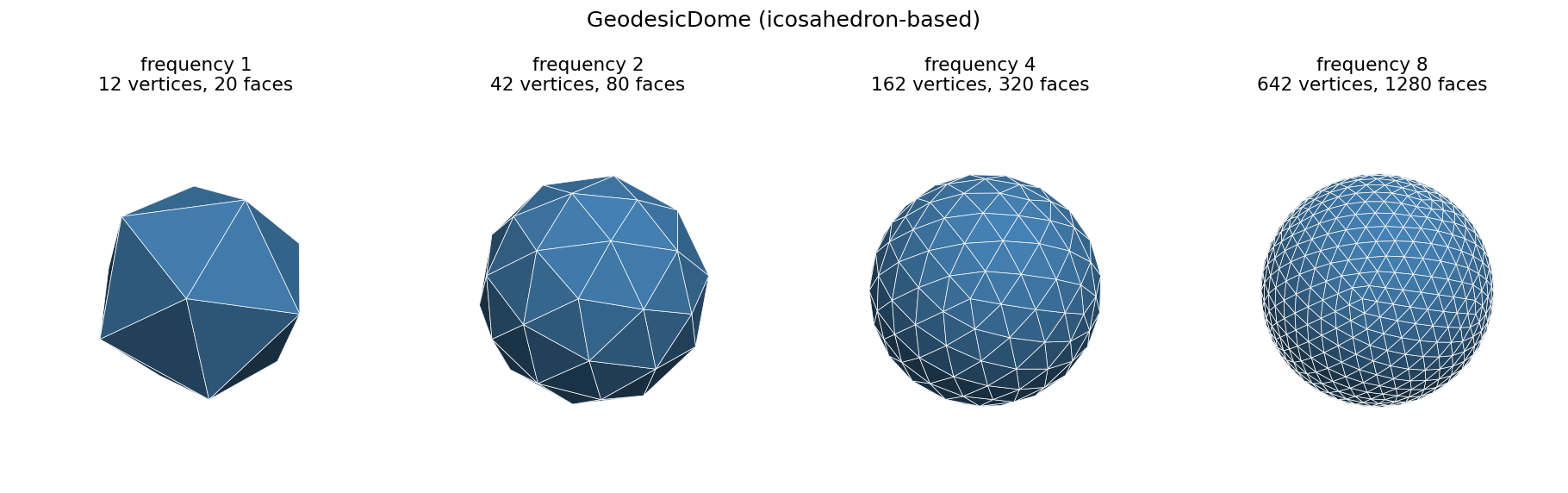
| Geodesic dome of any frequency f: 10f²+2 points, 20f² triangles, all on the unit sphere | mt.geodesicdome.grid.geodesicdome.GeodesicDome |
| Other base solids: tetrahedron (4HSOM array, 2f²+2 points) and dodecahedron (30f²+2 points) | GeodesicDome(f, base='tetrahedron' / 'dodecahedron') |
| Neighbour search and k-ring neighbourhoods that continue across the seams of the net | get_neighbours, get_neighbours_in_distance |
| Fast index-based search with no vertex objects or visited flags | within_hops, neighbour_ids, within_arc |
| NumPy export of points and triangles (outward-facing winding) | get_all_xyz, get_all_triangles |
| A data payload per vertex, e.g. SOM weight vectors | vertex.set_data(...) / vertex.data |
| Four map projections to flatten the sphere | mt.geodesicdome.projection |
| Interactive map: drag with the mouse to rotate the sphere inside the projection | mt.geodesicdome.interactive.ProjectionViewer |
| Flat hexagonal or rectilinear grids, with borders or as a torus | mt.geodesicdome.grid.plane.Plane |
Performance
Domes are stored as NumPy arrays and built with vectorised code; vertex objects are created only when you ask for them. A frequency-32 icosahedral dome (10,242 points) builds in about 3 ms:
| Icosahedron, f = 32 | 1.3.x | 1.4.0, arrays only | 1.4.0, all vertex objects |
|---|---|---|---|
| Build | 170 ms | 3.1 ms | 7.9 ms |
| Memory after build | 7.4 MiB | 1.2 MiB | 3.3 MiB |
| 6-hop neighbourhood | 57 µs | 12 µs (within_hops) |
17 µs (get_neighbours_in_distance) |
| Whole-sphere search (96 hops) | 8.1 ms | 1.2 ms | 1.6 ms |
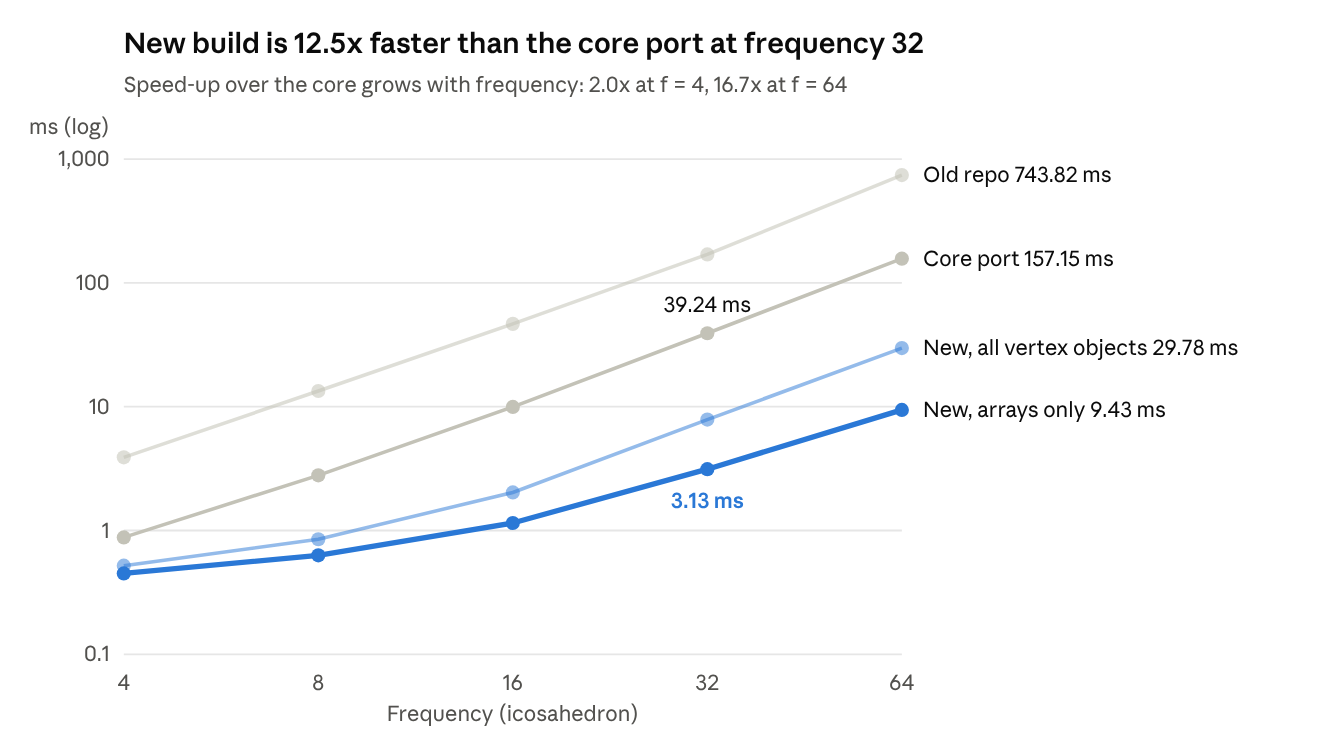
The domes themselves are unchanged: coordinates, ordering, faces, seams and neighbour rings are bit-for-bit the same as before. Details, the tetrahedral and dodecahedral domes, and the scripts to reproduce these numbers: docs/performance.md and benchmarks/.
1. Installation
Requires Python ≥ 3.10 and NumPy. The interactive viewer and the examples also need matplotlib.
pip install geodesicdomes                  # the library (numpy only)
pip install "geodesicdomes[interactive]"   # + matplotlib, for mt.geodesicdome.interactive
pip install "geodesicdomes[gpu]"           # + torch, to use an NVIDIA (CUDA) or Apple Silicon (MPS) GPU
Check that it works:
python -c "from mt.geodesicdome.grid.geodesicdome import GeodesicDome; print(GeodesicDome(4))"
# GeodesicDome(frequency=4)
The examples, the tests and setup_env.sh are in the
GitHub repository, not in the pip package.
Working on this repository: setup_env.sh (recommended)
One command creates a virtual environment with everything the project uses: numpy, matplotlib, pillow,
plotly and dash for the older viewers, and pytest. It also installs this package in editable mode, so any
.py file in any folder of the project can import mt.geodesicdome.
cd GeodesicDome
./setup_env.sh                          # once
python examples/01_quickstart.py        # works straight away, in the same terminal
python examples/09_interactive_projection.py
- It leaves you in a ready shell. When it finishes, it opens a shell in which the environment is active
(the prompt starts with
(GeodesicDome)), sopythonis the project's Python. Typeexitto return to your previous shell.--no-shellskips this. - New terminals are ready too. It adds a small block to
~/.zshrc(and~/.bashrcif you have one) that activates the environment whenever you are inside the project and deactivates it when you leave.--no-shell-hookskips this;./setup_env.sh --remove-shell-hookremoves it. - The environment lives in
~/.venvs/GeodesicDome, outside the repository. This repository sits in Google Drive, which syncs every file of a virtual environment and can make them online-only, so imports hang or fail. - Anywhere else, run
source ~/.venvs/GeodesicDome/bin/activate, or call the environment's Python directly:~/.venvs/GeodesicDome/bin/python path/to/script.py. - It is safe to re-run at any time. A healthy environment is reused, and missing packages are added. A broken
one, for example after
brew upgrade python, is rebuilt automatically. - It picks the newest Python ≥ 3.10 it can find. Use
--python /opt/homebrew/bin/python3.13to choose one. - It installs the GPU packages this machine can use. PyTorch with MPS on Apple Silicon; on Linux/Windows with an
NVIDIA GPU, PyTorch built for the CUDA version the driver supports (read from
nvidia-smi) plus the matching CuPy; PyTorch for ROCm on an AMD GPU. Without a GPU nothing extra is installed and computations use every CPU core. The last step checks that the GPU really works.--gpu torch|cupy|nonenarrows or skips this, and--torch-index cu126(or a URL) overrides the PyTorch wheel index. - Other options:
--recreatebuilds from scratch,--checkonly verifies,--minimalinstalls numpy only (and no GPU packages), and--no-legacyskips plotly and dash. See./setup_env.sh --help. - IDE: in PyCharm or VS Code, choose
~/.venvs/GeodesicDome/bin/pythonas the project interpreter.
Other ways to install
pip install "git+https://github.com/takatsuka/GeodesicDome.git"   # latest development version
pip install -e ".[interactive]"                            # from a local checkout, editable
Optional extras: interactive (matplotlib), examples (+ pillow), legacy (plotly and dash, for the old
viewer scripts), dev (pytest, ruff, build, twine), and all.
2. Quick start
import numpy as np
from mt.geodesicdome.grid.geodesicdome import GeodesicDome

dome = GeodesicDome(frequency=8)          # icosahedron with each edge cut into 8

xyz = dome.get_all_xyz()                              # (N, 3) unit vectors
tri = dome.get_all_triangles().reshape(-1, 3)         # (20 f², 3) indices into xyz
print(xyz.shape, tri.shape)                           # (729, 3) (1280, 3)

# neighbours of a vertex, addressed by its (x, y) position on the index grid
v = dome.get_vertex_at(12, 14)
dome.unmark_vertices()                                # always reset before a search
ring1 = dome.get_neighbours(v, False)                 # 6 neighbours (5 at the 12 corners)

dome.unmark_vertices()
rings = dome.get_neighbours_in_distance(v, 3)         # [[ring 1], [ring 2], [ring 3]]
print([len(r) for r in rings])                        # [6, 12, 18]

v.set_data(np.zeros(3))                               # attach anything to a vertex
You can also refine step by step. split multiplies the frequency, so
GeodesicDome(2).split(3) gives frequency 6.
3. Core concepts
3.1 Frequency
| frequency f | unique points 10f²+2 | triangles 20f² | stored vertices | mean edge (unit sphere) |
|---|---|---|---|---|
| 1 | 12 | 20 | 22 | 1.052 |
| 2 | 42 | 80 | 63 | 0.582 |
| 4 | 162 | 320 | 205 | 0.298 |
| 8 | 642 | 1 280 | 729 | 0.150 |
| 12 | 1 442 | 2 880 | 1 573 | 0.100 |
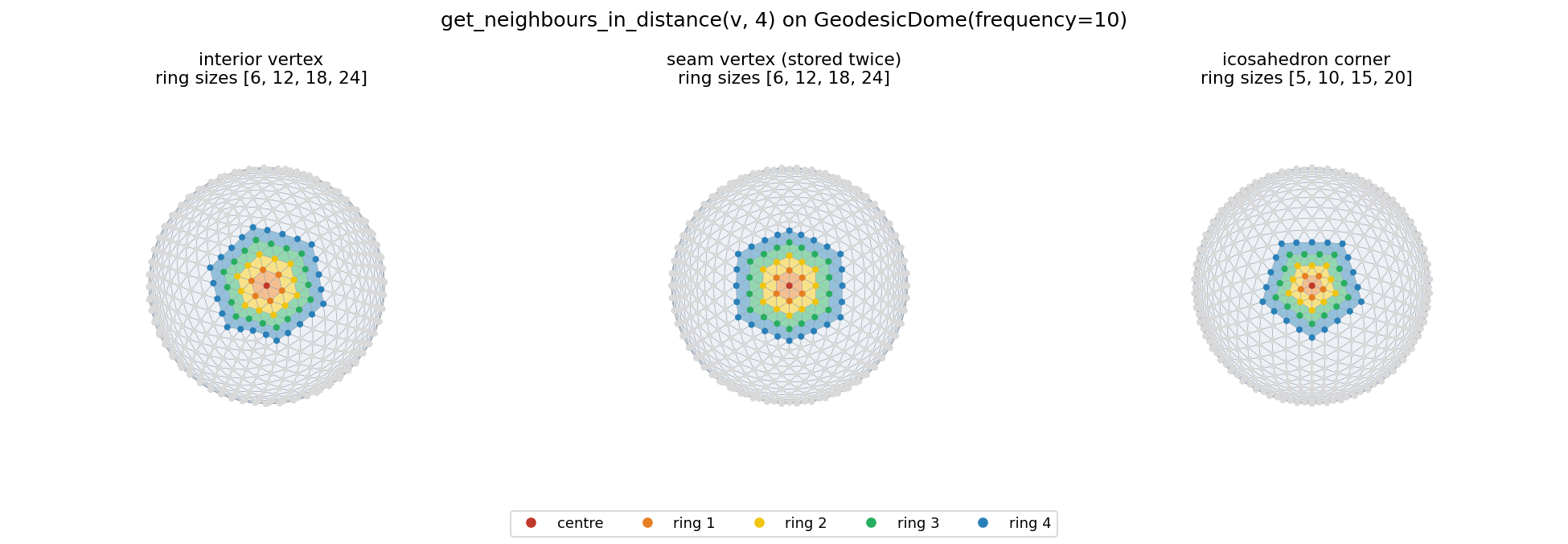
Every point has 6 neighbours, except the 12 original icosahedron corners, which have 5. Rings near a corner are therefore slightly smaller (for example 5, 10, 15 around a corner itself).
3.2 The unfolded net and seam vertices
Internally, the icosahedron is unfolded onto an integer grid. Each vertex has a grid position
(vertex.x, vertex.y), and its neighbours on the sphere are always the six grid offsets
(±1, 0), (0, ±1), (+1, +1) and (−1, −1). That is what makes neighbour look-ups fast.
This indexed geodesic data structure was introduced for the spherical self-organising map in:
Y. Wu and M. Takatsuka, "Spherical self-organizing map using efficient indexed geodesic data structure," Neural Networks, vol. 19, no. 6–7, pp. 900–910, 2006. doi:10.1016/j.neunet.2006.05.021
@article{wu2006spherical,
  author  = {Wu, Yingxin and Takatsuka, Masahiro},
  title   = {Spherical self-organizing map using efficient indexed geodesic data structure},
  journal = {Neural Networks},
  volume  = {19},
  number  = {6--7},
  pages   = {900--910},
  year    = {2006},
  month   = {07},
  doi     = {10.1016/j.neunet.2006.05.021}
}
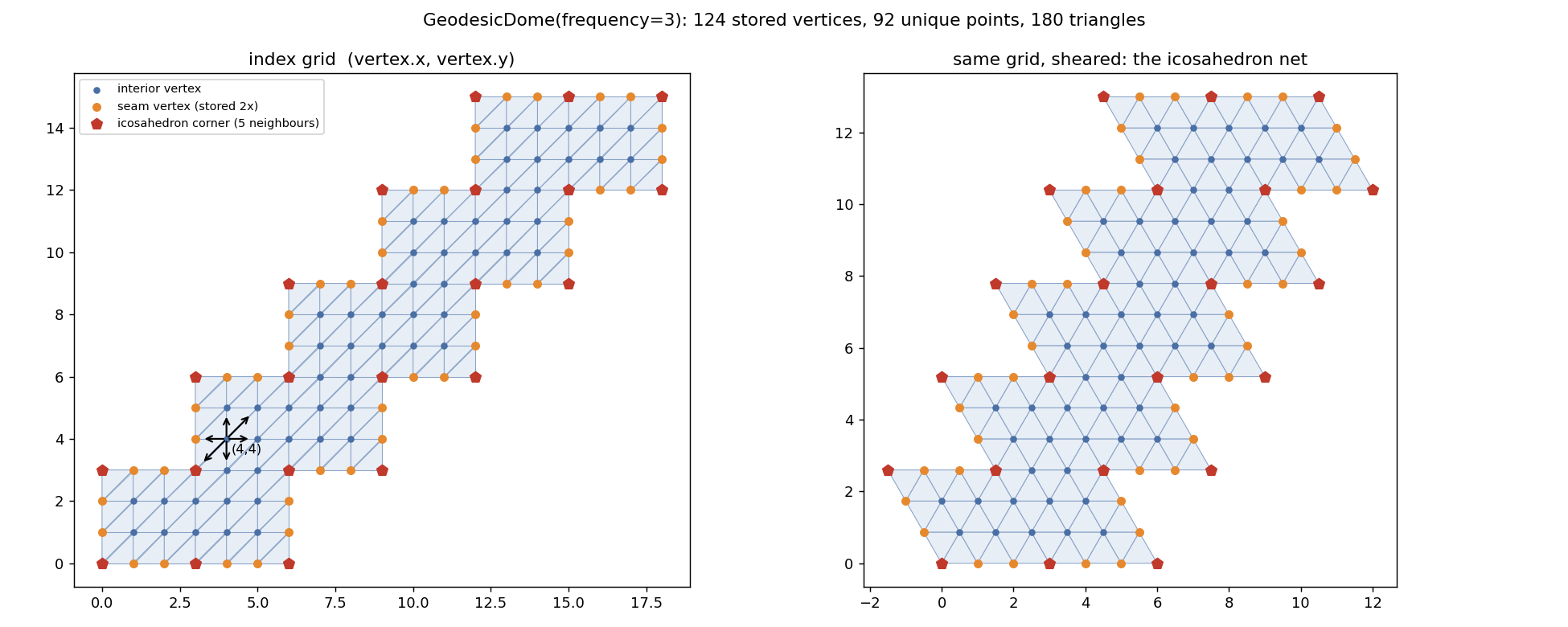
To fold the net back into a sphere, points on its border are stored more than once, and each copy
lists the others in vertex.same_vertices. As a result:
get_all_vertices()/get_all_xyz()return N ≥ 10f²+2 entries (for example 729 instead of 642 at f = 8).- Neighbour searches already handle the copies, so rings continue across seams and never contain the same point twice.
- To get a clean mesh with each point exactly once, de-duplicate by position.
examples/dome_utils.pyhas a ready-madeunique_mesh(dome)that returns(points, faces, index_map).
3.3 The visited flag
The neighbour searches mark vertices with vertex.visited = True so they are not returned twice.
Call dome.unmark_vertices() before every new query. Otherwise vertices from the previous
query will be missing from the result. within_hops / neighbour_ids use no flags and need no reset.
3.4 Coordinates
vertex.coordis the unit vector (x, y, z). The dome is built with its poles on the ±y axis.vertex.latlon_coordis(colatitude from +y, longitude)in radians.vertex.idis the row of the vertex inget_all_xyz(). It is assigned when faces are built (get_faces()/get_all_triangles()), so call one of those first.- The map projections use +z as their north pole (
latitude = arcsin(z)).
3.5 Base polyhedra: tetrahedron, icosahedron, dodecahedron
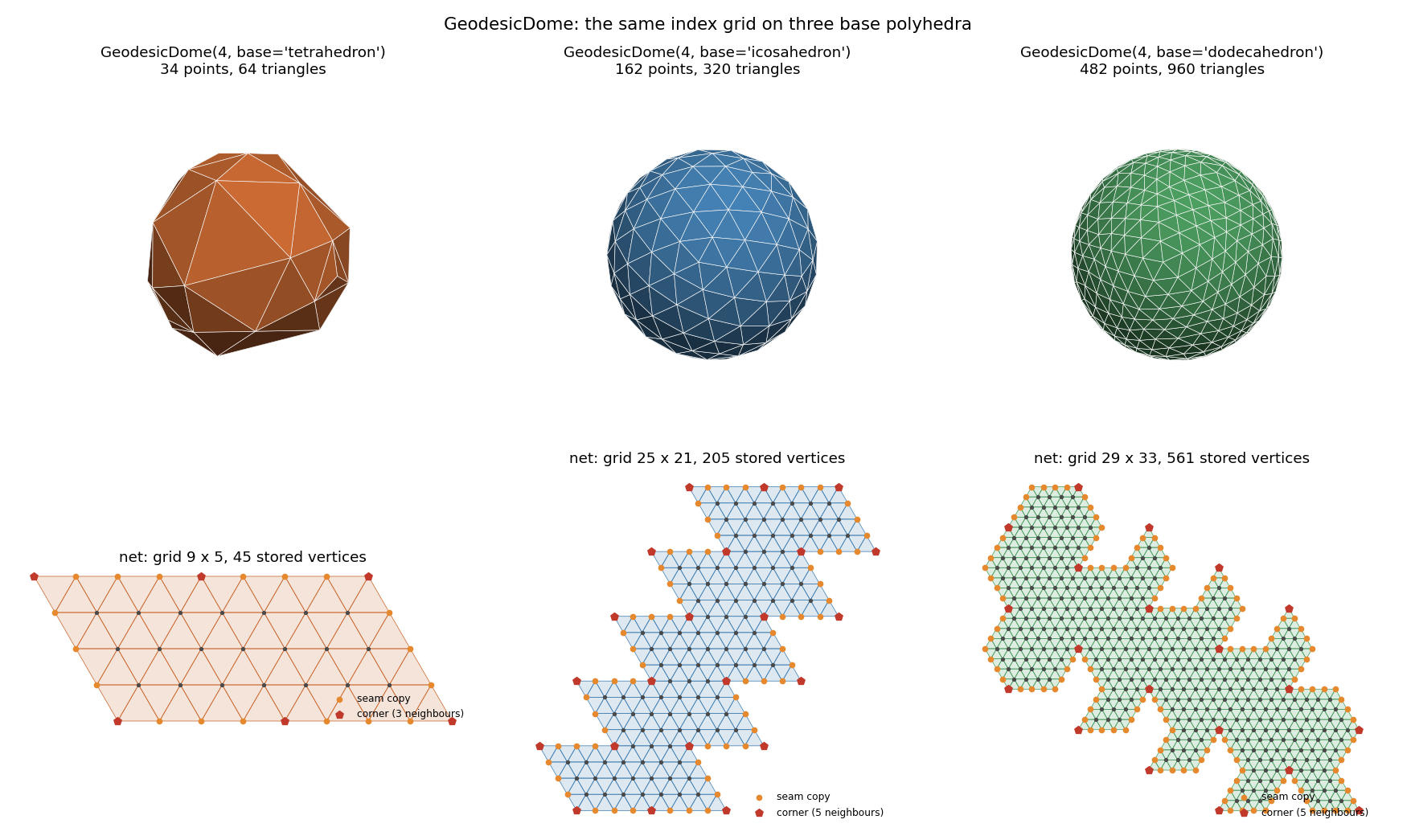
The icosahedron is the default. base= builds the dome on another solid, with the same index grid, the same
six neighbour offsets and the same API:
GeodesicDome(8)                          # icosahedron:  642 points (10f²+2)
GeodesicDome(8, base='tetrahedron')      # tetrahedron:  130 points ( 2f²+2)
GeodesicDome(8, base='dodecahedron')     # dodecahedron: 1922 points (30f²+2)
base takes 'icosahedron' / 'icosa', 'tetrahedron' / 'tetra', 'dodecahedron' / 'dodeca' (any case).
GeodesicDome(...) then returns an IcosahedronDome, TetrahedronDome or DodecahedronDome, all subclasses
of GeodesicDome; dome.base says which.
| base | unique points | triangles | stored vertices (grid) | corners | net |
|---|---|---|---|---|---|
'tetrahedron' |
2f²+2 | 4f² | (f+1)(2f+1): an (f+1) × (2f+1) array, every cell used |
4, with 3 neighbours | the 4HSOM orthogonal array of de Sousa & Oliveira (2012) |
'icosahedron' |
10f²+2 | 20f² | 729 at f = 8 | 12, with 5 neighbours | the 5-strip net of Wu & Takatsuka (2006) |
'dodecahedron' |
30f²+2 | 60f² | 2 081 at f = 8 | 12 pentagon centres, with 5 neighbours | the pentakis dodecahedron on the strip net, cut along pentagon edges |
- Tetrahedron. Following de Sousa & Oliveira's 4HSOM, the four faces form a parallelogram stored as
f + 1rows (y = 0..f) by2f + 1columns (x = 0..2f). Column0and column2fare the same points, and the bottom and top rows fold about their middle points:(i, 0) = (2f − i, 0)and(i, f) = (2f − i, f). The four corners are A at(0, 0)/(2f, 0), B at(f, 0), C at(0, f)/(2f, f)and D, the north pole, at(f, f). Its cells vary much more in area than the icosahedron's. - Dodecahedron. Each pentagon is cut into 5 triangles meeting at its centre (the pentakis dodecahedron) and each triangle into an f-frequency grid on the flat pentagon. Frequency 1 has 32 points: the 20 dodecahedron corners (6 neighbours) and the 12 pentagon centres (5 neighbours), which point the same way as the icosahedron's corners.
For these two solids the net has notches, so each vertex also stores a 6-bit neighbour_mask of the grid
offsets that are real edges; the search is still pure index arithmetic. The nets themselves are in
mt.geodesicdome.grid.polyhedra (base_net(name)).
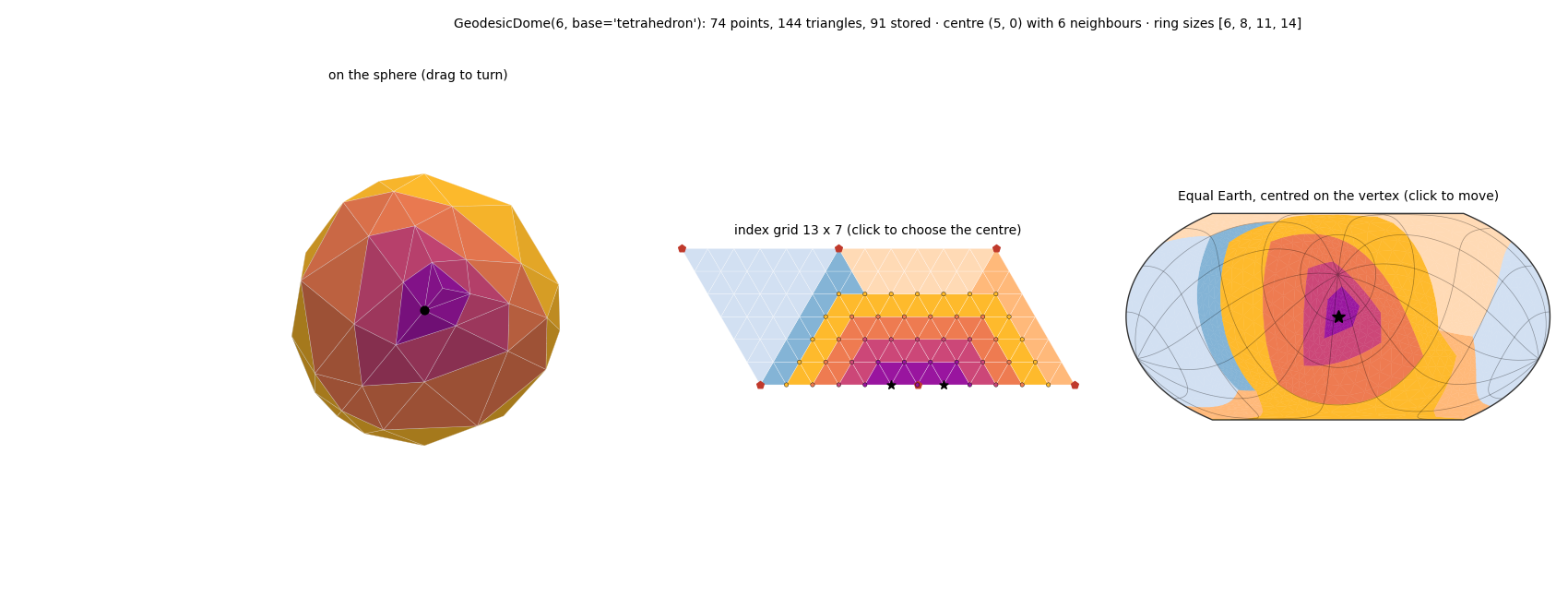
Explore them interactively. examples/11_interactive_base_polyhedra.py (and the notebook of the same name)
shows one dome three ways at once: on the sphere, on its index grid and in a map projection centred on a
vertex. The vertex's neighbour rings are highlighted in all three, so you can see a neighbourhood
that is compact on the sphere split across the seams of the net. Click the net or the map to move it.
It can also colour every cell by its spherical area; compare the tetrahedron with the other two.
ProjectionViewer(dome, colors='base') colours any dome by the faces of its own base solid.
3.6 Lloyd relaxation: even cell areas on the same grid
Subdividing a base face evenly along its flat chords and pushing the points out to the sphere stretches the cells near the face centres: on the icosahedral dome the largest cell is about 2.2 times the smallest. By default every dome is therefore relaxed: Lloyd relaxation moves every point to the centroid of its own cell (Lloyd relaxation), repeatedly, with the dome's triangles held fixed. Every grid position, neighbour, face and seam copy stays as it was, so all index and neighbour queries are unchanged; only the coordinates move.
dome = GeodesicDome(16)                                 # built, then relaxed to convergence (relax=True)
dome.relaxed, dome.relax_steps                          # (True, 131)

plain = GeodesicDome(16, relax=False)                   # the plain subdivided dome, no relaxation
dome = GeodesicDome(16, base='dodecahedron', relax={'iters': 100, 'omega': 1.0})   # plain Lloyd, 100 steps
plain.relax()                                           # relax an existing dome in place
| N = 2 562 (icosahedron, f = 16) | plain | relaxed |
|---|---|---|
| cell-area CV | 0.132 | 0.039 |
| largest ÷ smallest cell | 2.22 | 1.53 |
- Defaults (
mt.geodesicdome.relax.CONVERGED): over-relaxationomega = 1.8, stop once no point moves more than 1e-7 rad in a step, at most 20 000 steps. Over-relaxation changes the speed, not the result: a converged point is its own centroid. - GPU. Each step is one batch of array operations on the compute backend
(
mt.geodesicdome.backend): withtorch(orcupy) installed it runs on a CUDA GPU in float64, or on the Apple GPU (MPS). The Apple GPU has only float32, which cannot resolve moves much below a few 1e-6 rad, so the last few dozen steps are made on the CPU in float64 and the result is as precise as a CPU run. Domes under 5 000 points (relax.GPU_MIN_POINTS) stay on the CPU, where they take under a second. Choose explicitly withrelax(backend='cpu' | 'cuda' | 'mps' | ...)orMTGEODESIC_BACKEND. - Holding the triangles fixed is sound as long as they stay the Delaunay triangulation of the moved points; this
has been checked for all three base solids (
tests/test_relax.py), so the result is a spherical centroidal Voronoi tessellation with the dome's own graph. - Build time. Relaxation dominates the build: on one CPU core about 0.3 s at N = 2 562 (f = 16), 4.5 s at
10 242 (f = 32) and 70 s at 40 962 (f = 64), against milliseconds for
relax=False. Use a GPU orrelax=Falsefor large domes when the plain lattice will do. split()on a relaxed dome subdivides the relaxed coordinates and relaxes the finer dome again with the same settings, soGeodesicDome(2).split(3)matchesGeodesicDome(6)(to 1e-5); an unrelaxed dome stays unrelaxed.mt.geodesicdome.relax.lloyd(points, triangles, ...)relaxes any spherical triangle mesh;cell_areasgives the dual cell areas. The implementation is the one used in thespiralrepository's lattice comparison.
4. API reference
GeodesicDome(frequency=1, base='icosahedron', relax=True) — mt.geodesicdome.grid.geodesicdome
| Member | Description |
|---|---|
base |
'icosahedron', 'tetrahedron' or 'dodecahedron' |
frequency, x_max, y_max |
current frequency and the extent of the index grid |
split(n) |
subdivide every edge into n more segments (frequency ×= n) |
relax(iters, omega, tol) |
Lloyd-relax the points in place, keeping the grid (3.6); relaxed, relax_steps |
get_all_vertices() |
list of GeodesicVertex, including seam copies |
get_vertex_at(x, y) |
vertex at a grid position, or None |
get_faces() |
flat list of vertices, 3 per triangle (also assigns vertex.id) |
get_all_triangles() |
flat ndarray of vertex ids; .reshape(-1, 3) gives the triangles |
get_all_xyz() |
(N, 3) array of coordinates, row = vertex.id |
get_number_of_vertices_per_face() |
3 |
get_neighbours(v, False) |
immediate neighbours of v |
get_neighbours_in_distance(v, d) |
list of d rings: [[ring 1], [ring 2], ...] |
unmark_vertices() |
reset every visited flag (do this before each search) |
within_hops(i, hops) |
storage indices within hops grid steps of position i (i = vertex.id); no vertex objects, no visited flags |
neighbour_ids(i) |
storage indices of the direct neighbours of position i, across seams |
within_arc(i, angle) |
storage indices within a great-circle angle (radians) of position i |
n_points, point_index |
number of distinct sphere points; the point stored at each position (seam copies share one) |
GeodesicVertex
x, y (grid position) · coord (xyz) · latlon_coord · id · same_vertices (seam copies or None) ·
data / set_data(obj) · visited · projected_coord (set by a projection).
Projections — mt.geodesicdome.projection
| Class | Module |
|---|---|
KavrayskiyVII |
kavrayskiy |
WagnerVI, WagnerIII |
wagner |
EqualEarth |
equal_earth |
from mt.geodesicdome.projection.equal_earth import EqualEarth
tri2d = EqualEarth().build(dome)            # (M, 3) triangle ids; sets v.projected_coord
xy = [v.projected_coord for v in dome.get_all_vertices()]
EqualEarth().xyz_to_2d(np.array([0, 0, 1])) # project a single point
build leaves out the few triangles that would wrap across the ±180° meridian, so M < 20f².
For a complete map, with no missing triangles and any orientation of the sphere, use
mt.geodesicdome.interactive (below).
Vectorised helpers on every projection: latlong_to_2d(lat, lon) (arrays, radians),
xyz_to_2d_many(xyz) for an (N, 3) array, and outline(), the map boundary as a polygon.
Interactive projection — mt.geodesicdome.interactive
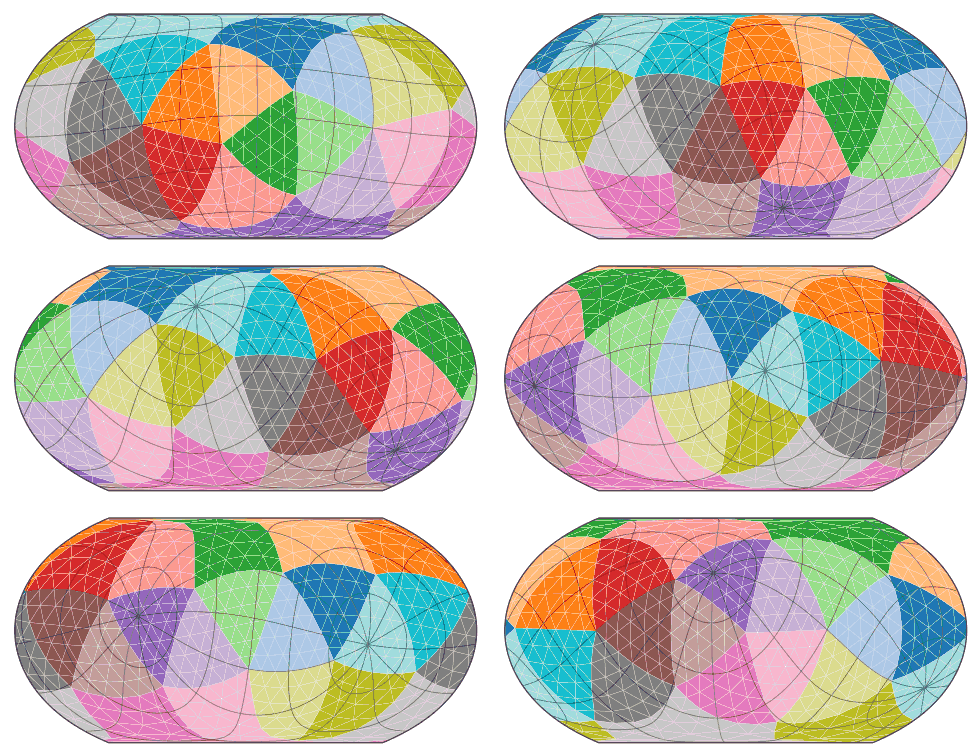
ProjectionViewer shows the dome in a map projection that you can rotate. Click and drag on the map, and the
sphere turns underneath it: dragging left or right spins it about the map's polar axis, and dragging up or down
tilts it. The projection is recomputed on every mouse move.
from mt.geodesicdome.grid.geodesicdome import GeodesicDome
from mt.geodesicdome.interactive import ProjectionViewer

viewer = ProjectionViewer(GeodesicDome(8), 'Equal Earth')
viewer.show()
| Mouse / key | Action |
|---|---|
| drag (left button) | rotate the sphere (a fast preview is drawn while dragging; full quality returns on release) |
| arrow keys | rotate by 5° (with shift: 1°) |
, / . |
roll the view about the map centre |
r / Reset view button |
back to the starting view |
p / radio buttons |
switch projection: Equal Earth, Kavrayskiy VII, Wagner VI, Wagner III |
g / e |
show or hide the graticule / the triangle edges |
The black graticule shows the latitude and longitude lines of the original sphere, so you can see how it has turned. The status line gives the original point now at the map centre.
Options and methods
viewer = ProjectionViewer(
    dome, 'Wagner VI',
    colors='position',     # 'position' (default), 'base' (faces of the dome's base solid), 'icosahedron',
                           # 'data' (vertex.data), a colour name,
                           # or an array per stored vertex / per unique point / per face
    cmap='viridis',        # used when colors holds scalars (a colour bar is added)
    edges=None,            # triangle edges; default: on for frequency <= 12
    graticule=True,
    view=(-33.9, 151.2),   # (lat, lon) in degrees of the original point to put at the centre
)
viewer.rotate(d_lon=30, d_lat=-10, roll=0)   # degrees, same axes as dragging
viewer.set_view(lat, lon)                    # centre the map on an original point
viewer.set_rotation(R)                       # any 3x3 rotation matrix (original -> view)
viewer.set_projection('Kavrayskiy VII')
viewer.set_colors(values, vmin=0, vmax=1)
viewer.on_rotate(lambda v: print(v.centre))  # called after every change of the view
viewer.save('map.png')
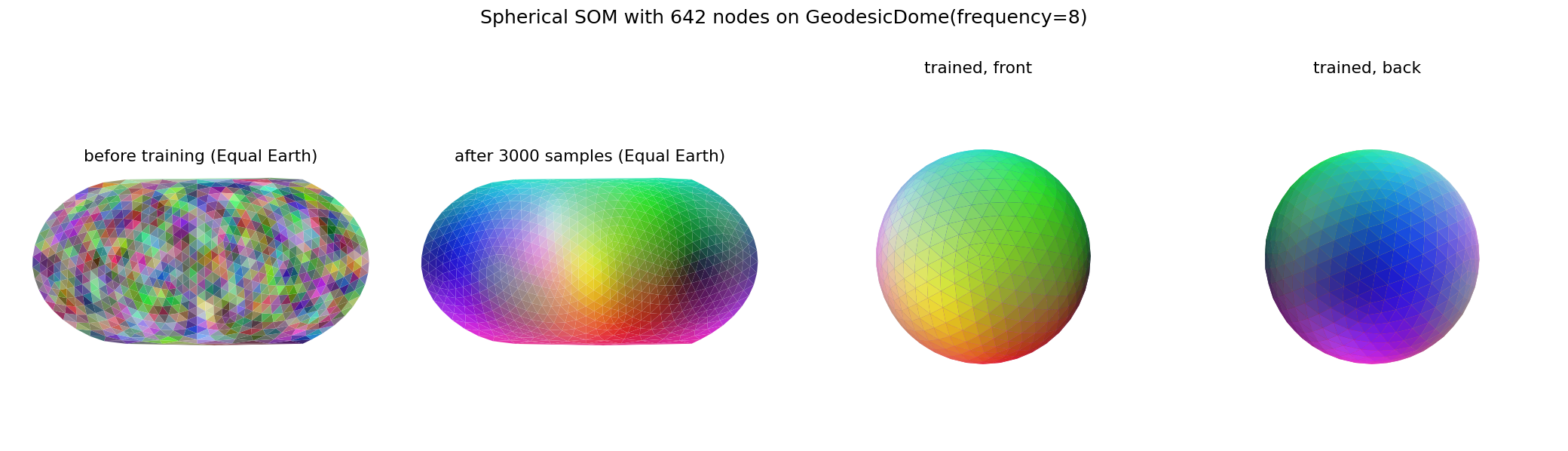
Colouring by vertex.data means a trained spherical SOM (see examples/06_spherical_som.py) can be explored
directly: store each node's weight vector as an RGB colour with set_data and pass colors='data'.
Running it. It needs a matplotlib GUI backend. python examples/09_interactive_projection.py from a desktop
terminal or IDE opens a window. In Jupyter, run %matplotlib widget first (pip install ipympl).
How it works. SphereMap (numpy only) rotates the de-duplicated mesh and projects it. Unlike
Projection.build, it keeps every triangle:
- a triangle that straddles the ±180° meridian is drawn twice, shifted by ±360° of longitude, and clipped to the map outline;
- the triangle that contains a pole becomes a polygon running along the pole line;
- exact alignments, such as a pole lying precisely on an edge in the un-rotated view, are broken by a fixed 10⁻⁶ rad rotation that is invisible on screen.
The tests (tests/test_interactive.py) render random and deliberately degenerate orientations in all four
projections and check that no pixel inside the map is left uncovered. SphereMap.polygons(R) is also usable on
its own, for example to draw a rotated map in your own figure.
Compute backends: GPU or all CPU cores — mt.geodesicdome.backend, mt.geodesicdome.compute
Heavy array work runs on a GPU when one is available and otherwise on every CPU core. Nothing extra is required:
with numpy alone you get the multi-threaded CPU backend; install torch (pip install "geodesicdomes[gpu]") for an
NVIDIA GPU (CUDA) or the Apple Silicon GPU (MPS), or CuPy for CUDA.
from mt.geodesicdome import backend, compute
from mt.geodesicdome.grid.geodesicdome import GeodesicDome

print(backend.describe())                          # what is available, and the default
b = backend.get_backend()                          # auto: CUDA -> CuPy -> MPS -> NumPy on all cores
mesh = compute.DomeArrays.from_dome(GeodesicDome(32))
rings = compute.ring_distance(mesh)                # (10242, 10242) distances in neighbour spacings
idx = compute.nearest_vertex(mesh.points, queries) # nearest dome vertex of each query direction
| Choose | How |
|---|---|
| a device | get_backend('cuda'), 'cuda:1', 'mps', 'cupy', 'cpu'/'numpy', 'torch:cpu'; or pass backend= to any function |
| the default | backend.set_default_backend('cpu') or MTGEODESIC_BACKEND=cpu |
| CPU threads | MTGEODESIC_NUM_THREADS=8 (default: every core) |
| GPU precision | MTGEODESIC_DTYPE=float64 (default float32 on a GPU; the Apple GPU is float32 only; the CPU always uses float64) |
| block size | MTGEODESIC_MEMORY=512MB (default: from the free device memory) |
A Backend offers the few array operations the geodesic libraries need with the same meaning on numpy, cupy and
torch arrays, plus block_rows()/map_blocks() to cut work into blocks that fit in memory and run them on all CPU
cores. GeoSOM trains on it.
Plane(x, y, lattice, topology) — mt.geodesicdome.grid.plane
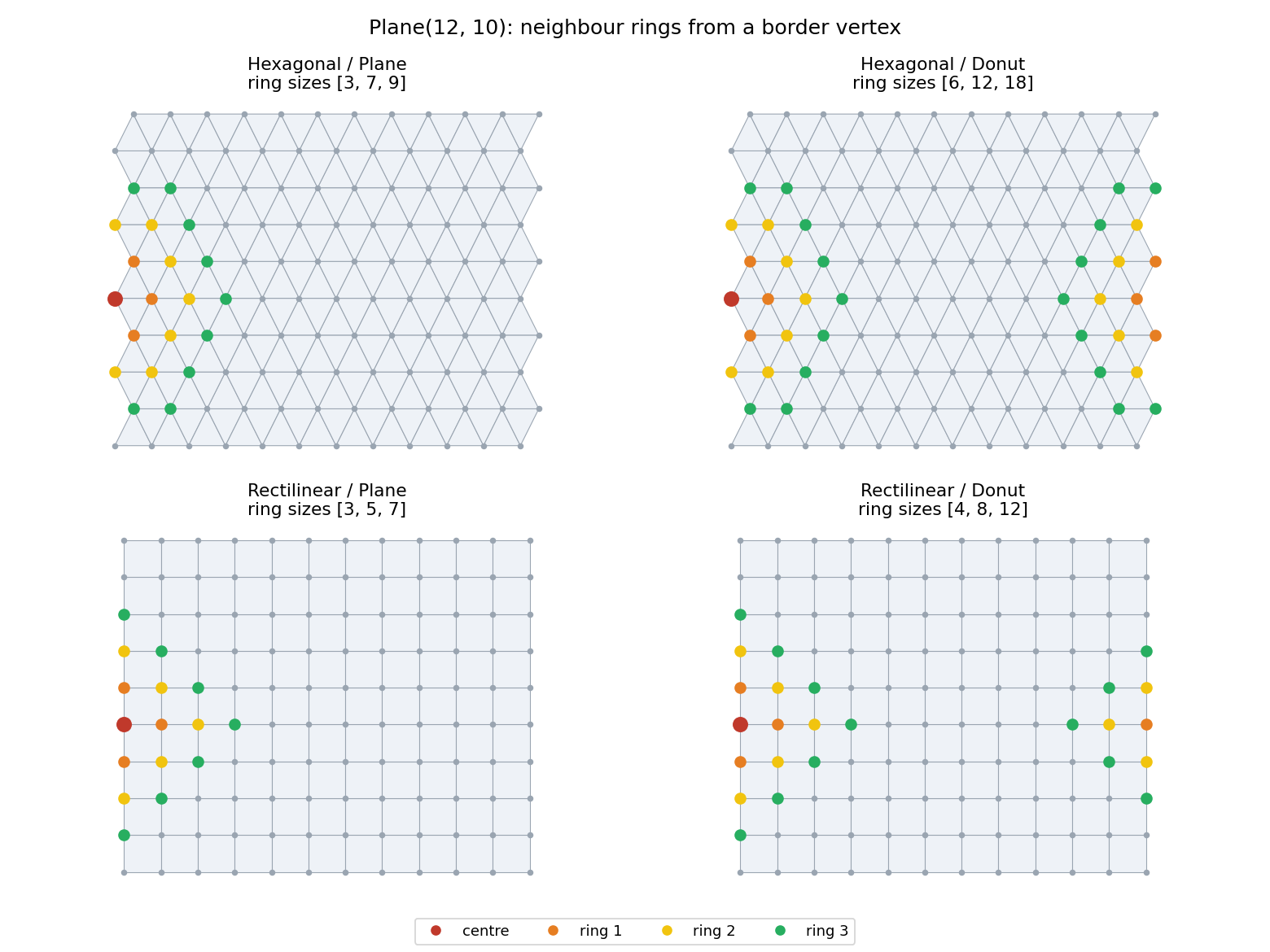
lattice:Lattice.Hexagonal(6 neighbours, odd rows shifted by ½) orLattice.Rectilinear(4 neighbours).topology:Topology.Plane(hard borders) orTopology.Donut(wraps around like a torus). Use an even height with a hexagonal donut. Faces are not generated across the wrap.- It has the same
Manifoldinterface as the dome:get_vertex_at,get_neighbours,get_neighbours_in_distance,get_faces(3 or 4 vertices per face),get_all_xyz,get_all_triangles,unmark_vertices.
Because both classes share the Manifold interface, code such as a SOM can switch between a flat
map, a torus and a sphere without changes.
5. Examples
Run them from the repository root, e.g. python examples/04_neighbours.py. They work straight
from a checkout without installing, and their images and files go to examples/output/.
| Script | Shows |
|---|---|
01_quickstart.py |
building domes, NumPy export, vertex attributes, a size table for each frequency |
02_plot_dome_3d.py |
shaded 3D renders of frequency 1, 2, 4 and 8 |
03_unfolded_net.py |
the index grid, seam copies and the 12 five-neighbour corners |
04_neighbours.py |
k-ring neighbourhoods around an interior, a seam and a corner vertex |
05_map_projections.py |
the four projections, coloured by parent icosahedron face |
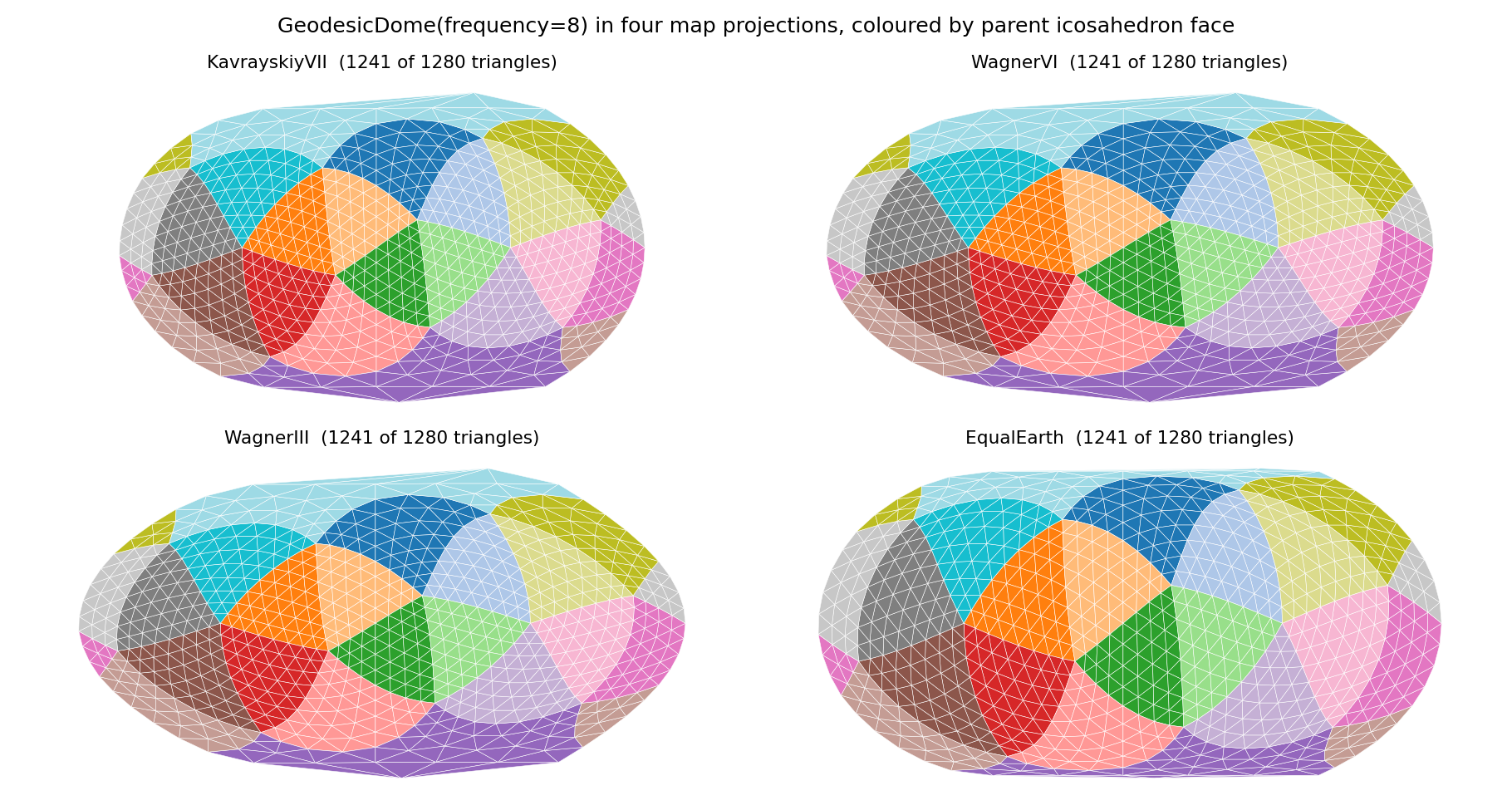
06_spherical_som.py |
showcase: a Self-Organising Map trained on colours, living on the sphere |
07_export_mesh.py [freq] [radius] |
writing a de-duplicated mesh to .obj, .off and .npz |
08_plane_grids.py |
hexagonal and rectilinear Plane, with borders and as a torus |
09_interactive_projection.py |
interactive: drag to rotate the sphere in a map projection (--freq, --projection, --colors, --view, --gif) |
10_base_polyhedra.py |
domes and index-grid nets on the tetrahedron, icosahedron and dodecahedron |
11_interactive_base_polyhedra.py |
interactive: explore any dome type — 3-D sphere, index-grid net and a map centred on a vertex, with its neighbour rings across the seams (click to move; --base, --freq, --rings, --colouring, --save) |
dome_utils.py |
helpers used above: unique_mesh, neighbour_rings, output_path |
Notebooks. Every example is also a Jupyter notebook in
examples/notebooks/, explained step
by step and ending with sliders and buttons to explore it. With ipympl installed the figures are live: 3D plots
rotate with the mouse and the map viewer can be dragged.
pip install -e ".[notebooks]"           # setup_env.sh already includes it
jupyter lab examples/notebooks
The older interactive viewers in examples/legacy/ use plotly/dash (pip install -e ".[legacy]").
6. Changelog
See CHANGELOG.md.
7. Citing
If you use GeodesicDome in research, please cite the paper that introduced the data structure (BibTeX in section 3.2):
Y. Wu and M. Takatsuka, "Spherical self-organizing map using efficient indexed geodesic data structure," Neural Networks, vol. 19, no. 6–7, pp. 900–910, 2006. doi:10.1016/j.neunet.2006.05.021
The tetrahedral dome (base='tetrahedron') follows the layout of
R. M. de Sousa and R. C. L. Oliveira, "Optimization of geodesic self-organizing map using tessellated tetrahedron as spherical lattice," Proc. IJCNN 2012, Brisbane.
The repository's CITATION.cff also lets GitHub's "Cite this repository" button produce a reference to
the software itself.
8. Licence
Copyright © 2022–2026 Masahiro Takatsuka.
GeodesicDome is free software under the GNU Affero General Public License v3.0 or later (LICENSE), with an additional attribution term (NOTICE). In short:
- You may use, study, modify and share it, including commercially.
- If you distribute it, or a modified version, or software that includes it, or let people use a modified version over a network, you must release the complete source code of that work under the same licence.
- You must keep the attribution to the author and to the 2006 paper, both in the source code and in the legal notices your software displays.
- There is no warranty.
Commercial licence. To use GeodesicDome in proprietary software without these obligations, contact masa@takatsuka.org about a commercial licence.
Contributing. Contributions are welcome under the terms in CONTRIBUTING.md.
1 maintainer

Metadata
1 maintainer
Release files for geodesicdomes 1.5.1
For a detailed explanation of source distributions (sdists) and built distributions (wheels), please see the package formats documentation.
Source distribution (sdist)
| File | Size | Uploaded | Provenance | |
|---|---|---|---|---|
| geodesicdomes-1.5.1.tar.gz | 144.9 kB | With provenance | Details |
Built distribution (wheel)
| File | Interpreter | ABI | Platform | Reset |
|---|---|---|---|---|
| geodesicdomes-1.5.1-py3-none-any.whl | Python 3 | none | any | Details |
Total release size: 226.9 kB
Release files / geodesicdomes-1.5.1.tar.gz
| Download URL | geodesicdomes-1.5.1.tar.gz |
|---|---|
| Size | 144.9 kB |
| Tags | Source |
|
SHA-256 checksum How to use checksums |
254b6c760b1144a6595b7672eafde2a4a6a9c70182f81b42c524b04159f16ad5
|
|
BLAKE2b-256 checksum How to use checksums |
1905d07909e8b91d509622f9b790fa230c8d41ef14e4d27e293b678121f3d3ea
|
| Upload date | |
|
Uploaded using Trusted Publishing? What is trusted publishing? |
Yes |
| Uploaded via |
twine/7.0.0 CPython/3.13.14
|
Provenance
Provenance describes where a file came from. On PyPI, provenance is shared via attestations, which provide a verifiable record of the build or publishing details. View details, limitations and caveats.


PyPI Publish Attestation
PyPI verified that this artifact, at this checksum, originated from the publisher listed below.
Signed by GitHub Actions, verified by PyPI on Oct 9, 2026.
Transparency logRelease files / geodesicdomes-1.5.1-py3-none-any.whl
| Download URL | geodesicdomes-1.5.1-py3-none-any.whl |
|---|---|
| Size | 82.1 kB |
| Tags | Python 3 |
|
SHA-256 checksum How to use checksums |
b410218b3975f2f33642de170127e69c83762dab7110236f278d3edba64dc0e7
|
|
BLAKE2b-256 checksum How to use checksums |
cb9865e5b2c20d66552ec4b11061c950c7769ee22d2af6e502a89a2a6cfc705e
|
| Upload date | |
|
Uploaded using Trusted Publishing? What is trusted publishing? |
Yes |
| Uploaded via |
twine/7.0.0 CPython/3.13.14
|
Provenance
Provenance describes where a file came from. On PyPI, provenance is shared via attestations, which provide a verifiable record of the build or publishing details. View details, limitations and caveats.
PyPI Publish Attestation
PyPI verified that this artifact, at this checksum, originated from the publisher listed below.
Signed by GitHub Actions, verified by PyPI on Oct 9, 2026.
Transparency logSecurity for geodesicdomes 1.5.1
Provenance
Provenance describes where a file came from. On PyPI, provenance is shared via attestations, which provide a verifiable record of the build or publishing details. View details, limitations and caveats.
Full provenance
All 2 files in this release have been uploaded with provenance metadata.
Attestation for geodesicdomes-1.5.1.tar.gz
PyPI Publish Attestation
PyPI verified that this artifact, at this checksum, originated from the publisher listed below.
Signed by GitHub Actions, verified by PyPI on Oct 9, 2026.
Transparency logA note on package security
PyPI is a repository for distributing packages, not a service for auditing them. While third-party security researchers and our staff do their best to detect and remove malicious packages, PyPI cannot guarantee the quality, security or suitability of any given package.
To learn more about protecting yourself from malicious actors, visit our package security documentation.














