
A zero-dependency, deterministic, and high-performance Python library for IP-based geofence validation.

Project description
Geofence Validator


A zero-dependency, deterministic, and high-performance Python library for IP-based geofence validation.
Table of Contents
- Philosophy
- Key Features
- Installation
- Quickstart: 5-Minute Example
- High-Performance Usage: The
ValidatorClass - Handling Failures: The Error Hierarchy
- Command-Line Interface (CLI)
- Architectural Deep Dive
- Contributing
- API Reference
- Acknowledgements
- License
Philosophy
Geofencing isn't about complex firewalls or magical APIs. It's about enforcing boundary logic with clarity, testability, and deterministic precision. This library was built from the ground up to embody these principles.
Most geofencing tools either rely on external API calls, introducing network latency and failure points, or they use complex binary database formats that require specific C-bindings. geofence-validator takes a different approach: it is a pure Python, zero-dependency library that bundles its own data, providing zero-latency lookups with completely predictable behavior.
Every design decision was made to serve a single purpose: to give developers a tool that is trustworthy, transparent, and trivial to integrate.
Key Features
- Zero Dependencies:
pip install geofence-validatoris all you need. No hidden system requirements, no C-bindings, just pure Python. - High-Performance: By pre-loading a compiled dataset into memory, the
Validatorclass can perform millions of checks per second with zero I/O or network latency. - Comprehensive Bundled Data: Ships with a complete and up-to-date GeoLite2 Country database, ready to use out-of-the-box. (See Updating the GeoIP Data for how to refresh it).
- Whitelist & Blacklist Policies: Supports both common geofencing strategies with clear, unambiguous rules.
- Deterministic Logic: The handling of unknown or unresolvable IP addresses is explicitly defined and tested, eliminating surprises.
- Extensible: Provides a clean
Resolverinterface for advanced users who wish to supply their own IP data source. - Robust Error Handling: A rich hierarchy of custom exceptions allows for fine-grained, predictable error handling.
- Developer-Friendly Debugging: An optional, rich-powered logger can be enabled with a single command to provide beautiful, colorized diagnostic output.
- Feature-Rich CLI: Includes a powerful command-line interface for quick checks, diagnostics, and testing.
Installation
The library requires Python 3.9 or newer.
pip install geofence-validator
For an enhanced developer experience with beautifully formatted debug logs, you can install the optional rich dependency:
pip install "geofence-validator[rich]"
Quickstart: 5-Minute Example
For simple, one-off checks, the is_ip_allowed function provides a straightforward interface.
from geofence_validator import is_ip_allowed
from geofence_validator.errors import GeofenceError

# Define a whitelist policy for the US and Canada
ALLOWED_COUNTRIES = {"US", "CA"}

# --- Test Cases ---
google_dns_ip = "8.8.8.8"    # Located in the US
german_ip = "78.46.10.20"    # Located in Germany
private_ip = "192.168.1.1"   # Non-public IP

try:
    # Check 1: An IP that should be allowed
    is_google_allowed = is_ip_allowed(google_dns_ip, "whitelist", ALLOWED_COUNTRIES)
    print(f"Check for {google_dns_ip}: {'Allowed' if is_google_allowed else 'Denied'}")
    # Expected: Check for 8.8.8.8: Allowed

    # Check 2: An IP that should be denied
    is_german_ip_allowed = is_ip_allowed(german_ip, "whitelist", ALLOWED_COUNTRIES)
    print(f"Check for {german_ip}: {'Allowed' if is_german_ip_allowed else 'Denied'}")
    # Expected: Check for 78.46.10.20: Denied

    # Check 3: This will raise an error because the IP is not a public, geolocatable address
    is_ip_allowed(private_ip, "whitelist", ALLOWED_COUNTRIES)

except GeofenceError as e:
    print(f"\nA predictable error occurred: {e}")
    # Expected: A predictable error occurred: The IP address '192.168.1.1' is a non-public address (private (RFC 1918)) and cannot be geolocated.
High-Performance Usage: The Validator Class
Why Use the Validator Class?
The is_ip_allowed function is convenient, but it recreates a policy object on every single call. For any application performing more than one check (e.g., a web server middleware, a data processing pipeline), this is inefficient.
The Validator class is the high-performance engine of the library. You instantiate it once with your desired policy and country set. This object pre-compiles the policy logic. Subsequent calls to its .check() method are extremely fast, as they involve no object creation.
Example
import time
from geofence_validator import Validator

# 1. Create a validator instance ONCE at application startup.
# This is the "expensive" step that loads and prepares everything.
print("Initializing validator...")
uk_de_blacklist = Validator(
    policy_rule="blacklist",
    countries={"UK", "DE"}
)
print("Validator ready.")

ips_to_check = [
    "8.8.8.8",        # US -> Allowed
    "212.58.224.1",   # GB -> Allowed
    "78.46.10.20",    # DE -> Denied
    "1.1.1.1",        # AU -> Allowed
]

# 2. Use the same instance repeatedly in your application's hot path.
# These checks are extremely fast.
for ip in ips_to_check:
    is_allowed = uk_de_blacklist.check(ip)
    print(f"IP {ip} is {'Allowed' if is_allowed else 'Denied'}")
Handling Failures: The Error Hierarchy
A core design principle of this library is that failures should be predictable and actionable. All custom exceptions inherit from a common base class, GeofenceError, and are organized into a clear hierarchy. This allows you to handle errors with the exact level of granularity you need.
Catching Specific Input Errors
If you want to handle a specific type of bad input, such as a malformed IP address, you can catch the specific exception. This is useful for returning precise error messages to an end-user (e.g., in an API response).
from geofence_validator import Validator
from geofence_validator.errors import InvalidIPAddressError

validator = Validator("whitelist", {"US"})

try:
    validator.check("not-a-real-ip")
except InvalidIPAddressError as e:
    # This block will execute
    print(f"Error: The provided input '{e.invalid_ip}' is not a valid IP address.")
    # You could return a HTTP 400 Bad Request here.
Catching Categories of Errors
If you want to handle any type of input validation failure without distinguishing between them, you can catch the parent ValidationError.
from geofence_validator import Validator
from geofence_validator.errors import ValidationError

validator = Validator("whitelist", {"US"})

ips_to_test = ["127.0.0.1", "bad-ip-string"]

for ip in ips_to_test:
    try:
        validator.check(ip)
    except ValidationError as e:
        # This block will catch both InvalidIPAddressError and NonPublicIPAddressError
        print(f"Input validation failed for '{ip}': {e}")
Catching Any Library Error
For general-purpose logging or a top-level fallback, you can simply catch the base GeofenceError. This guarantees you will handle any predictable error originating from this library without accidentally catching unrelated exceptions from other parts of your code.
from geofence_validator import Validator
from geofence_validator.errors import GeofenceError

validator = Validator("whitelist", {"US"})

try:
    # This could fail for any number of reasons
    validator.check("...")
except GeofenceError as e:
    # Log the library-specific error and continue
    print(f"A geofence-validator error occurred: {e}")
Command-Line Interface (CLI)
The library includes a powerful CLI for quick checks and diagnostics, executable via python -m geofence_validator.
Basic Checks
The basic syntax is python -m geofence_validator <IP_ADDRESS> <POLICY_RULE> <COUNTRY_CODES...>
# Whitelist check: Is 8.8.8.8 in the US or Canada?
$ python -m geofence_validator 8.8.8.8 whitelist US CA
Result: ALLOWED

# Blacklist check: Is 78.46.10.20 in Germany?
$ python -m geofence_validator 78.46.10.20 blacklist DE
Result: DENIED
The script communicates its result via its exit code:
0: The IP was ALLOWED.1: The IP was DENIED.2: An error occurred.
This allows for easy scripting: python -m geofence_validator $IP whitelist US && ./deploy_to_us.sh
Enabling Verbose Logging
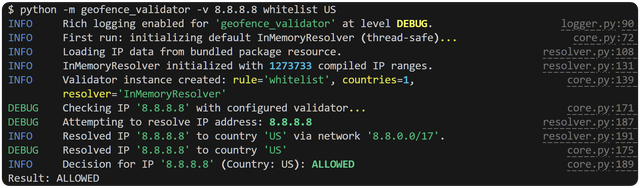
For debugging, use the -v or --verbose flag. If you have rich installed, you will get beautifully colorized output.
$ python -m geofence_validator -v 8.8.8.8 whitelist US
Using a Custom Data File
The --data-file flag allows you to point the resolver to your own CSV data file, which must be in the format CIDR,COUNTRY_CODE.
$ python -m geofence_validator --data-file /path/to/my_ips.csv 8.8.8.8 whitelist US
Architectural Deep Dive
The Components
The library is composed of several specialized, single-responsibility modules:
core.py: The main engine. Contains the high-performanceValidatorclass and theis_ip_allowedfunctional wrapper. Its job is to orchestrate the other components.resolver.py: The data lookup layer. Contains theResolverabstract base class and theInMemoryResolverimplementation, which handles loading the bundled CSV data and performing efficient CIDR range lookups.policy.py: The logic layer. Contains theWhitelistPolicyandBlacklistPolicyimplementations as immutable dataclasses. This module's sole responsibility is to answer the question "is this country allowed according to my rules?".errors.py: The failure contract. Defines the complete hierarchy of custom exceptions. This provides a stable, predictable API for error handling.logger.py: The "good citizen" logging layer. Implements the standardNullHandlerpattern to ensure the library is silent by default, but provides anenable_debugging()helper for a rich diagnostic experience when needed.__main__.py: The CLI application layer. A user-friendly interface to the library's core functionality.
Performance & Memory Considerations
This library makes a deliberate engineering trade-off: it prioritizes zero-latency lookups and zero runtime dependencies over a minimal disk/memory footprint.
- Disk Size: The bundled
ip_ranges.csvfile is over 20 MB. This is the cost of including a comprehensive, real-world dataset directly within the package. - Memory Usage: Upon first use, the
InMemoryResolverloads and parses this entire file into memory. This results in a memory footprint of ~200-300 MB for the resolver object. - The Payoff (Speed): Because the entire dataset resides in memory as optimized objects, lookups are extremely fast. A single
Validatorinstance can perform millions of checks per second on a modern machine, as the process involves no disk I/O, network calls, or database queries.
This architecture is ideal for server-side applications, such as web server middleware or high-throughput data pipelines, where a one-time memory cost is acceptable for a massive gain in request-time performance.
Thread Safety
The most expensive operation is the one-time initialization of the default InMemoryResolver. The library guarantees that this initialization is thread-safe. A threading.Lock protects the creation of the singleton resolver instance, ensuring that even in a highly concurrent environment, the data file will only be read and parsed once.
Contributing
Contributions are welcome and appreciated! This project is built on the principles of clarity and robustness, and any contributions should align with that spirit.
Setting Up the Development Environment
-
Clone the repository:
git clone https://github.com/SunK3R/geofence-validator.git
cd geofence-validator
-
Create a virtual environment:
python -m venv .venv
source .venv/bin/activate  # On Windows, use `.venv\Scripts\activate`
-
Install in editable mode with all development dependencies: This command installs the library in a way that your source code changes are immediately reflected. It also installs
pytest,ruff,mypy,rich, and other development tools.pip install -e ".[dev]"
Running Tests
The library maintains a very high standard of test coverage.
# Run all tests
pytest

# Run tests with coverage report
pytest --cov=geofence_validator --cov-report=term-missing
Updating the GeoIP Data
The bundled ip_ranges.csv is sourced from the MaxMind GeoLite2 Country database. A maintainer script is provided to automate the process of downloading the latest data and regenerating this file.
-
Get a MaxMind License Key:
- Sign up for a free account at MaxMind GeoLite2.
- From your account dashboard, navigate to "Manage License Keys" and generate a new key.
-
Set Environment Variables: The script requires your Account ID and License Key. The best way to manage this is with a
.envfile in the project root. This file must be added to.gitignoreand never committed..envfile:MAXMIND_ACCOUNT_ID="YOUR_ACCOUNT_ID_HERE" MAXMIND_LICENSE_KEY="YOUR_LICENSE_KEY_HERE" -
Run the update script:
python scripts/update_geolite_data.py
This will download the latest data, process it, and overwrite geofence_validator/data/ip_ranges.csv. You can then commit the updated data file as part of a new library release.
API Reference
Primary Interface (geofence_validator)
Validator(policy_rule, countries, *, custom_resolver=None): The main class..check(ip_address): Performs the validation. Returnsbool..policy: Read-only property to inspect the configuredPolicyobject..resolver: Read-only property to inspect the configuredResolverobject.
is_ip_allowed(ip_address, policy_rule, countries, *, custom_resolver=None): A functional wrapper for one-off checks.enable_debugging(): A helper function to enable verbose console logging.
Custom Exceptions (geofence_validator.errors)
All exceptions inherit from errors.GeofenceError.
ValidationError: Base for input validation errors.InvalidIPAddressError(invalid_ip): Contains.invalid_ip.NonPublicIPAddressError(ip_address, reason): Contains.ip_addressand.reason.InvalidCountryCodeError(invalid_code): Contains.invalid_code.InvalidPolicyRuleError(unsupported_rule, supported_rules): Contains.unsupported_ruleand.supported_rules.
ResolutionError: Base for IP lookup errors.IPResolutionFailedError(ip_address, details): Contains.ip_addressand.details.IPAddressNotFoundError(ip_address): Contains.ip_address.
PolicyError: Base for logical policy errors.InvalidPolicyDefinitionError(reason): Contains.reason.
ConfigurationError: Base for setup errors.ResolverInitializationError(details): Contains.details.
Acknowledgements
This product includes GeoLite2 data created by MaxMind, available from https://www.maxmind.com.
License
This project is licensed under the MIT License. See the LICENSE file for details.
Release history Release notifications | RSS feed

Download files
Download the file for your platform. If you're not sure which to choose, learn more about installing packages.
Source Distribution
Built Distribution
Filter files by name, interpreter, ABI, and platform.
If you're not sure about the file name format, learn more about wheel file names.
Copy a direct link to the current filters
File details
Details for the file geofence_validator-0.1.0.tar.gz.
File metadata
- Download URL: geofence_validator-0.1.0.tar.gz
- Upload date:
- Size: 4.6 MB
- Tags: Source
- Uploaded using Trusted Publishing? No
- Uploaded via: twine/6.1.0 CPython/3.12.10
File hashes
| Algorithm | Hash digest | |
|---|---|---|
| SHA256 |
0f670ce0319b2ea9355637ec0cb8505581d639f0a1381d0ef102fc51732c0adb
|
|
| MD5 |
3fd837ddf24c72edef701558bc83f2c0
|
|
| BLAKE2b-256 |
1de6ac75f944d208bd96a4c8dd405e6792adfdd2e76f9b122d29cbefbc629088
|
File details
Details for the file geofence_validator-0.1.0-py3-none-any.whl.
File metadata
- Download URL: geofence_validator-0.1.0-py3-none-any.whl
- Upload date:
- Size: 4.7 MB
- Tags: Python 3
- Uploaded using Trusted Publishing? No
- Uploaded via: twine/6.1.0 CPython/3.12.10
File hashes
| Algorithm | Hash digest | |
|---|---|---|
| SHA256 |
6d75be7f8014fe29526e51153bbaf41c5e457a7cdd27a7461a2b1659a27addd2
|
|
| MD5 |
f71b358087f2ebb7f441c36362f9a41b
|
|
| BLAKE2b-256 |
5e96a8ced3a751918821f31af611863a94539f3ed2a95e572ab84bb4319dc3cf
|






