
geofit
Rotation- and scale-invariant shape matching for machine vision — find a part at any angle, under changing illumination, with pieces of it missing.




Give it a picture of the part you are looking for. It tells you where that part is in the next image, how far it is rotated, and how sure it is — to a tenth of a pixel and a tenth of a degree, for every instance in the frame, in milliseconds.
It keeps working when the lighting drifts, when the part is darker or lighter than the one you taught it, and when something is sitting on top of it. Those are the conditions that break a plain correlation template match, and they are the everyday conditions on a line.
A C++ core behind a Python API that needs only numpy. No OpenCV, no PyTorch, no model to train, nothing to configure. A 2592x1944 image searched over the full 360 degrees takes about 20 ms.
pip install geofit
geofit demo --save result.png     # runs on a bundled sample, nothing else needed
What it looks like
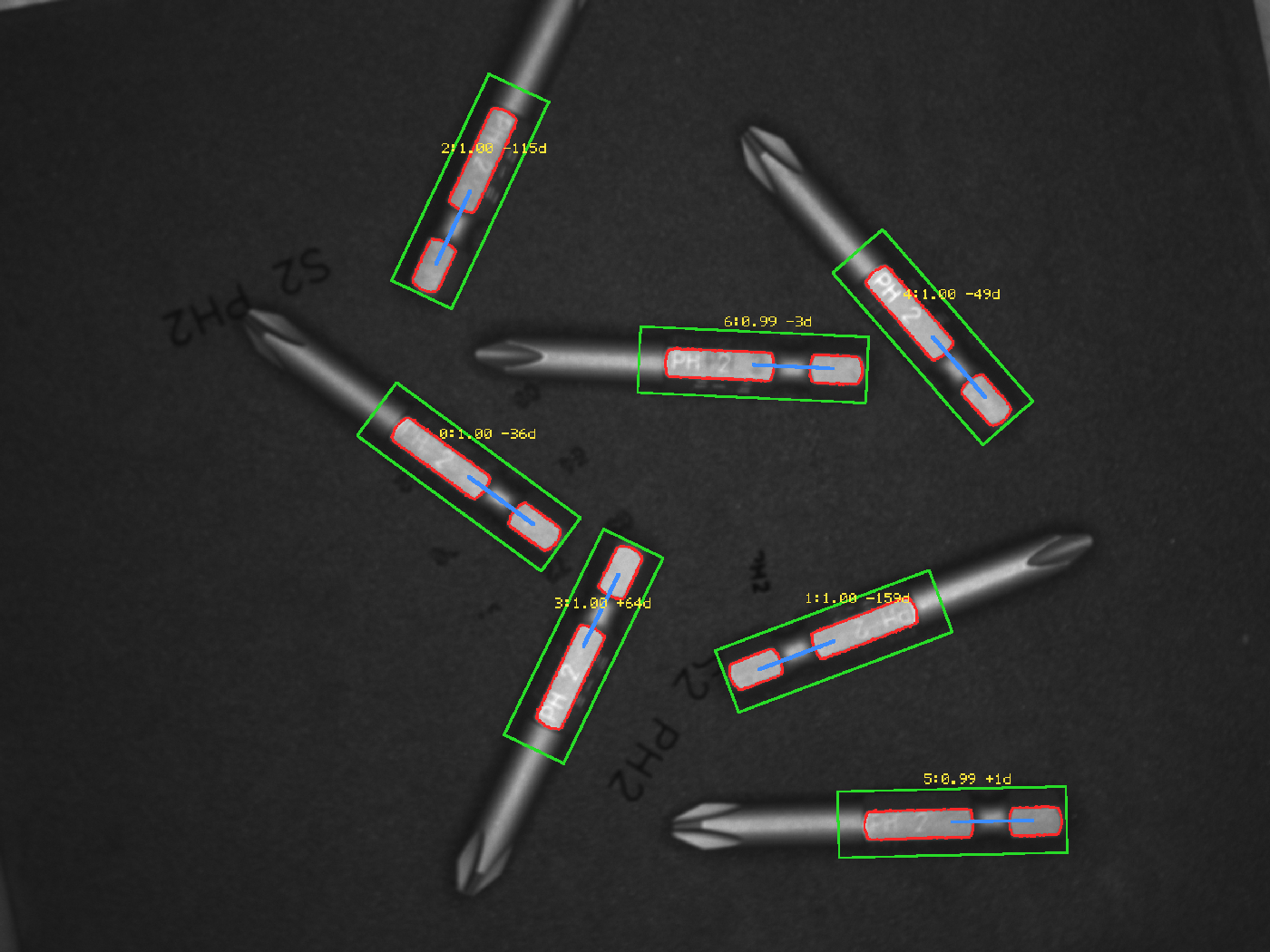
Seven screwdriver bits on a dark background, every one at a different angle. The red outline is the model drawn back onto the pose that was found, the green box is the template footprint, and the blue line shows which way it is facing.
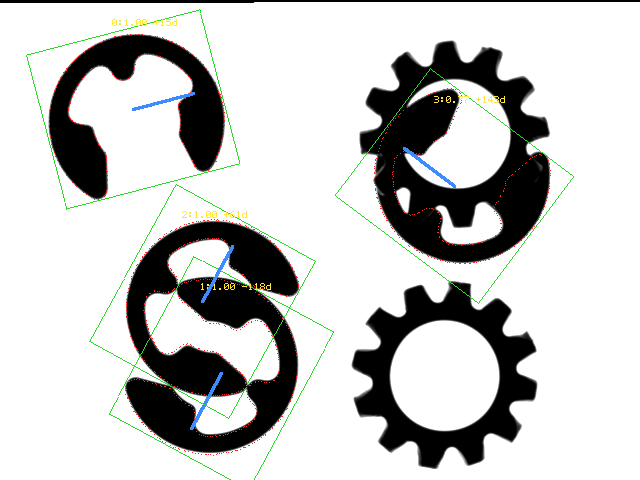
Four retaining clips, two of them overlapping and one lying on top of a gear. All four are found and told apart, in 4 ms:
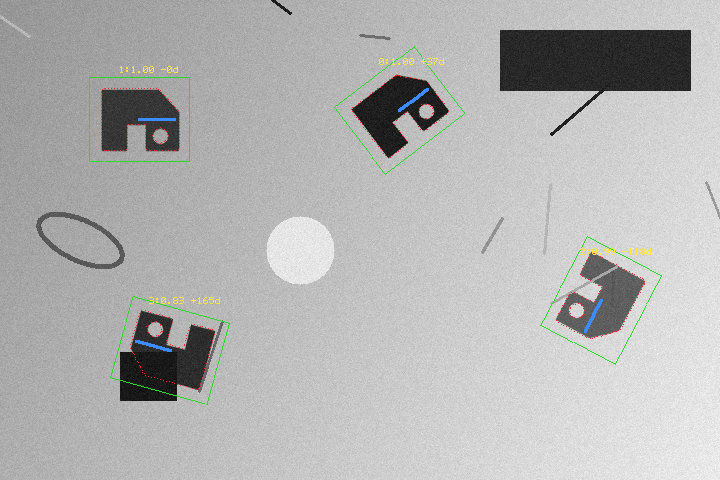
The bundled sample — four rotated instances, an illumination gradient across the frame, noise, and one instance about 30% occluded (bottom left, still scoring 0.83):
Install
pip install geofit
Python 3.10 – 3.14 on Windows x86-64, Linux x86-64 / aarch64, macOS arm64 / x86-64. The only runtime dependency is numpy.
Reading and writing PNG and PGM needs nothing else. Other formats (JPEG, TIFF, …) go through Pillow if it is installed:
pip install "geofit[image]"
The wheel is tagged py3-none-<platform>: it does not link against the CPython ABI, so one
file covers every supported Python and keeps working when a new one is released.
Quick start
import geofit as gf

template = gf.imread("template.png")      # uint8 grayscale numpy array
image    = gf.imread("scene.png")

model = gf.ShapeModel.create(template)
matches = model.find(image, min_score=0.6, num_matches=0)   # 0 = find them all

for m in matches:
    print(m.x, m.y, m.angle, m.scale, m.score)

gf.imwrite("result.png", gf.overlay(image, model, matches))
m.x, m.y is where the centre of the template landed, in image pixels. m.angle is
degrees, positive counter-clockwise on screen. To map a template coordinate p into the
image: R(angle) @ (scale * (p - center)) + (x, y) — or call model.transform(m).
Any uint8 grayscale numpy array works, so gf.imread is a convenience rather than a
requirement: OpenCV, Pillow, scikit-image or a frame grabber SDK all feed it directly.
import cv2
image = cv2.imread("scene.png", cv2.IMREAD_GRAYSCALE)
matches = model.find(image, min_score=0.6)
Command line
geofit serve                           # dashboard: crop a template, try parameters
geofit demo                            # bundled sample, prints the matches
geofit demo --save result.png          # ... and writes an overlay image
geofit find -t tpl.png -i scene.png --min-score 0.6 --save out.png
geofit find -t tpl.png -i scene.png --json        # machine-readable
geofit info                            # version, SIMD path, threads, licence
geofit bench                           # quick timing on the bundled sample
geofit check                           # licence key and evaluation status
The dashboard
geofit serve                # opens http://localhost:8020
geofit serve --port 9000
Drag a rectangle over the part you want to find, press Build model, and the model points appear on top of your crop so you can see what it latched on to. Load a search image, press Search, and the matches are drawn over it with a table and timings.
min_score and the match count are sliders that filter instantly - the search is not
re-run - and the score histogram shows where the gap between real matches and noise
sits, which is a better way to pick a threshold than guessing. Copy as Python gives
you the call with whatever parameters you have arrived at.
It binds to localhost and has no authentication; keep it that way unless you have a reason not to.
geofit demo needs no files of your own — a synthetic template and scene ship inside the
package, and geofit.sample_paths() returns where they are.
$ geofit demo
template 100x84  image 720x480
model    3 levels, points [131, 126, 94], built in 5.9 ms
search   8.5 ms  (pyramid 5.2 / top level 2.9 / refine 0.4)
         early termination: 35.3% of the work done (2.8x saved)

4 matches
    #          x          y     angle   scale   score
    0     399.23     110.09    +37.19   1.000   0.998
    1     139.36     119.18     -0.06   1.000   0.998
    2     600.65     299.97   -118.09   1.000   0.993
    3     169.71     349.85   +164.57   1.000   0.832
--json prints the same thing as a JSON document on stdout and nothing else, so it drops
straight into a pipeline.
Python API
ShapeModel.create(template, ...)
| default | ||
|---|---|---|
num_levels |
0 (auto) | pyramid levels |
min_dist |
3.0 | minimum spacing between model points, px. Larger is faster |
max_points |
400 | maximum points per level |
min_contrast |
15.0 | gradients below this are treated as noise |
canny |
(0, 0) = auto | explicit Canny thresholds when you want them |
blur |
1.0 | Gaussian sigma before computing gradients |
edges |
None |
preset for blur/min_contrast, measured from the image. See below |
detail |
None |
preset for min_dist/max_points, from the template size. See below |
points |
"chain" |
which edges become model points. See below |
min_chain_len |
0 (auto) | edges shorter than this many pixels are treated as noise |
mask |
None |
array the same shape as the template; only non-zero areas are used |
exclude |
None |
[(x, y, w, h), ...] rectangles to leave out |
Presets
Two knobs instead of five. edges says how clean the edges are, detail says how
much to keep, and the library measures the template to turn either one into numbers.
model = gf.ShapeModel.create(tpl, edges="auto", detail="auto")
edges is "auto" (chosen from the measured noise), "sharp", "soft" or
"noisy"; detail is "auto" (from the template size), "fine", "medium" or
"coarse". The numbers are derived from the image, so "noisy" on a lightly textured
part is not "noisy" on a heavily textured one. gf.suggest_params(image, edges, detail) returns them without building, and model.params reports what a build used.
Anything you pass explicitly wins over the preset, so create(tpl, edges="noisy", blur=2) uses the noisy preset for everything except blur. In the dashboard the two
dropdowns have an Apply button that drops the measured numbers onto the sliders,
where you can still nudge them before building.
Points and exclusions
points decides which edges become model points when the template has more of them
than max_points allows. "chain", the default, spreads them over the whole outline
so no single strong contour takes the budget; "magnitude" takes the strongest
gradients first and is what versions before 0.3.0 did. Use "chain" unless you have a
reason not to. min_chain_len sets how short a piece of edge is treated as noise.
mask and exclude keep chosen regions out of the model - background that came in
with a rectangular crop, or anything that differs between parts, such as a date stamp,
a label or a reflection.
model = gf.ShapeModel.create(template, exclude=[(120, 40, 60, 25)])
Excluding a region is not the same as cropping it out or painting it flat: neither of those leaves the surrounding edges intact, and both add an edge of their own along the boundary. The dashboard draws these as exclusion boxes.
model.find(image, ...)
| default | ||
|---|---|---|
min_score |
0.5 | minimum similarity, 0–1 |
num_matches |
1 | 0 returns every match above min_score |
max_overlap |
0.5 | rotated-rectangle IoU above which a match is suppressed |
greediness |
0.7 | 0 never misses a match, 1 is fastest |
angle_start / angle_extent |
−180 / 360 | narrowing this speeds the search proportionally |
scale_min / scale_max / scale_step |
1 / 1 / 0.05 | isotropic scale search |
metric |
use_polarity |
ignore_global_polarity when background brightness flips |
subpixel |
True | parabola fit on position and angle |
num_threads |
0 | 0 uses one thread per core |
with_timing |
False | also return per-stage timings |
Calls release the GIL, so several find() calls from Python threads genuinely run in
parallel.
matches, t = model.find(image, min_score=0.6, num_matches=0, with_timing=True)
print(t.total_ms, t.toplevel_ms, t.early_termination_ratio)
Other functions
gf.imread(path) / gf.imwrite(path, img) |
PGM and PNG with numpy alone; other formats via Pillow |
gf.overlay(image, model, matches) |
the RGB overlay used in the images above |
gf.sample_paths() |
paths to the bundled template and scene |
gf.build_info() / gf.simd_name() / gf.num_threads() |
what the runtime picked |
gf.license_status() |
licence and evaluation state |
model.transform(match) |
model points in image coordinates |
model.points(), model.num_points(), model.template_size |
the model itself |
Getting good results
Four things account for most of the difference between a model that works and one that does not.
Crop the template tightly. Background that varies from one instance to the next costs
more score than any parameter you can tune. On a board where the same component sits next to
different neighbours, trimming 15% off the template border took detections from 14 to 36 —
a bigger change than anything min_score could do.
Elongated, self-similar shapes give duplicate matches slid along their own axis. Raise
min_score rather than max_overlap: a duplicate offset along the axis does not overlap
enough for IoU to catch it, but its score is clearly lower.
A rotationally symmetric part returns its angle modulo the symmetry. A brake rotor with six arms whose shapes alternate has a period of 120°, not 60°, and the search will tell you so: at the 60° offsets the score drops to 0.31.
Narrow the angle range when you know it. angle_start / angle_extent cut the top-level
search proportionally. If parts arrive within ±15°, say so and the search gets an order of
magnitude cheaper.
Accuracy
Measured against exact ground truth by rotating a real 2592×1944 image by known angles:
position error   mean 0.13 px   max 0.28
angle error      mean 0.080°    max 0.218      θ = -150° … +150°, 9/9 found
Against a public benchmark set (DennisLiu1993/Fastest_Image_Pattern_Matching), on ten
scenes covering scattered parts at arbitrary angles, repeated grids, overlapping parts and
fine particles, the detection count matched the expected count in every case where an
expected count is well defined.
Performance
AMD Zen 4, 16 cores, full 360° search:
| Image | Template | Matches | Time |
|---|---|---|---|
| 2592×1944 | 466×135 | 7 | 20 ms |
| 4096×3000 | 848×446 | 16 | 33 ms |
| 4024×3036 | 762×521 | 3 | 31 ms |
| 3648×3648 | 54×54 | 161 | 51 ms |
| 640×480 | 200×200 | 3 | 3.3 ms |
The hot loop is compiled three ways — a portable baseline, AVX2+FMA on x86-64, and NEON on
ARM64 — and the x86 path is chosen at runtime by CPUID. The same wheel therefore runs on
CPUs without AVX2, falling back to the portable path instead of crashing. geofit info
reports which one it picked.
The search spends its time only where a match is still possible, which on real images is a
small fraction of the frame. geofit demo reports how much of the work that saved on the
run you just did — typically three- to eightfold. greediness controls how aggressively it
does this: leave it at the default, raise it when you need speed, drop it to 0 when you
would rather not miss a weak match.
Licensing
pip install geofit gives you a 90-day evaluation, counted from the first run on each
machine. No sign-up, no key, no network call — nothing is transmitted anywhere at any point,
during the evaluation or afterwards.
geofit check # days remaining, and where the settings live
When the 90 days are up geofit stops running: calls raise geofit.TrialExpired and the CLI
exits with status 3.
After the evaluation
Write to pashidl.lab@gmail.com and we will send a licence key — one line of text. There is no account to create and no licence server to reach.
A key is a signed statement, verified offline against a public key inside the package. Install it either way:
# environment variable
setx GEOFIT_LICENSE "<key>"           # Windows
export GEOFIT_LICENSE='<key>'         # macOS / Linux

# or save the key to a file
~/.geofit/license
geofit check then shows the licensee name and the expiry date. Keys carry their own
expiry, and geofit check starts warning 30 days ahead of it.
License
Proprietary. This package is distributed for evaluation; see the LICENSE file inside the wheel for the full terms. Commercial licensing: pashidl.lab@gmail.com
The source code is not distributed.
Documentation and screenshots: https://github.com/pashidl-lab/geofit
1 maintainer

Metadata
1 maintainer
Release files for geofit 0.4.3
For a detailed explanation of source distributions (sdists) and built distributions (wheels), please see the package formats documentation.
Built distributions (wheels)
| File | Reset | |||
|---|---|---|---|---|
| geofit-0.4.3-py3-none-win_amd64.whl | Python 3 | none | Windows x86-64 | Details |
| geofit-0.4.3-py3-none-win32.whl | Python 3 | none | Windows x86-32 | Details |
| geofit-0.4.3-py3-none-musllinux_1_2_x86_64.whl | Python 3 | none | Linux musl 1.2+ x86-64 | Details |
| geofit-0.4.3-py3-none-musllinux_1_2_aarch64.whl | Python 3 | none | Linux musl 1.2+ ARM64 | Details |
| geofit-0.4.3-py3-none-manylinux_2_28_x86_64.whl | Python 3 | none | Linux glibc 2.28+ x86-64 | Details |
| geofit-0.4.3-py3-none-manylinux_2_24_aarch64.manylinux_2_28_aarch64.whl | Python 3 | none | Linux glibc 2.28+ ARM64, Linux glibc 2.24+ ARM64 | Details |
| geofit-0.4.3-py3-none-macosx_11_0_arm64.whl | Python 3 | none | macOS 11.0+ ARM64 | Details |
Total release size: 5.4 MB
Release files / geofit-0.4.3-py3-none-win_amd64.whl
| Download URL | geofit-0.4.3-py3-none-win_amd64.whl |
|---|---|
| Size | 479.8 kB |
| Tags | Python 3 Windows x86-64 |
|
SHA-256 checksum How to use checksums |
33d10c40d5d0c7169c5abf467a8ae59803dc5bb99c553ca8b89e7aee14d2d300
|
|
BLAKE2b-256 checksum How to use checksums |
538b56e4589d6b8ed13542238e733c0cec6dc50ee8dc5c1cc18cb2dca23a7c73
|
| Upload date | |
|
Uploaded using Trusted Publishing? What is trusted publishing? |
Yes |
| Uploaded via |
twine/7.0.0 CPython/3.13.14
|
Provenance
Provenance describes where a file came from. On PyPI, provenance is shared via attestations, which provide a verifiable record of the build or publishing details. View details, limitations and caveats.


PyPI Publish Attestation
PyPI verified that this artifact, at this checksum, originated from the publisher listed below.
Signed by GitHub Actions, verified by PyPI on Sep 19, 2026.
Transparency logRelease files / geofit-0.4.3-py3-none-win32.whl
| Download URL | geofit-0.4.3-py3-none-win32.whl |
|---|---|
| Size | 463.4 kB |
| Tags | Python 3 Windows x86-32 |
|
SHA-256 checksum How to use checksums |
c37d8a02ad4af60d5044266f8ff0f072c76d06872928d93b947dfba8b82c8ebb
|
|
BLAKE2b-256 checksum How to use checksums |
0fbf231c4f5e130d39f37107bb6c2cef7f5c17075c5dcfa34de952f44bec74db
|
| Upload date | |
|
Uploaded using Trusted Publishing? What is trusted publishing? |
Yes |
| Uploaded via |
twine/7.0.0 CPython/3.13.14
|
Provenance
Provenance describes where a file came from. On PyPI, provenance is shared via attestations, which provide a verifiable record of the build or publishing details. View details, limitations and caveats.
PyPI Publish Attestation
PyPI verified that this artifact, at this checksum, originated from the publisher listed below.
Signed by GitHub Actions, verified by PyPI on Sep 19, 2026.
Transparency logRelease files / geofit-0.4.3-py3-none-musllinux_1_2_x86_64.whl
| Download URL | geofit-0.4.3-py3-none-musllinux_1_2_x86_64.whl |
|---|---|
| Size | 1.5 MB |
| Tags | Linux musl 1.2+ x86-64 Python 3 |
|
SHA-256 checksum How to use checksums |
024ab964aa75c62f23c8cbd632452433aaea2bfc53f84a1d53191d3902231b2b
|
|
BLAKE2b-256 checksum How to use checksums |
0433ef3e21c99571aa339e7b2014d3ad77933c9fcaa407a728506b81651700a3
|
| Upload date | |
|
Uploaded using Trusted Publishing? What is trusted publishing? |
Yes |
| Uploaded via |
twine/7.0.0 CPython/3.13.14
|
Provenance
Provenance describes where a file came from. On PyPI, provenance is shared via attestations, which provide a verifiable record of the build or publishing details. View details, limitations and caveats.
PyPI Publish Attestation
PyPI verified that this artifact, at this checksum, originated from the publisher listed below.
Signed by GitHub Actions, verified by PyPI on Sep 19, 2026.
Transparency logRelease files / geofit-0.4.3-py3-none-musllinux_1_2_aarch64.whl
| Download URL | geofit-0.4.3-py3-none-musllinux_1_2_aarch64.whl |
|---|---|
| Size | 1.4 MB |
| Tags | Linux musl 1.2+ ARM64 Python 3 |
|
SHA-256 checksum How to use checksums |
4a240547b5945c689e66a0efd60bbbacf836e86ca509e9583324e961487d1f0d
|
|
BLAKE2b-256 checksum How to use checksums |
5a81d6624dc7f4fe711ea5c857ba3ceb1d6f131d8253e6a47b5f617281a7ccb0
|
| Upload date | |
|
Uploaded using Trusted Publishing? What is trusted publishing? |
Yes |
| Uploaded via |
twine/7.0.0 CPython/3.13.14
|
Provenance
Provenance describes where a file came from. On PyPI, provenance is shared via attestations, which provide a verifiable record of the build or publishing details. View details, limitations and caveats.
PyPI Publish Attestation
PyPI verified that this artifact, at this checksum, originated from the publisher listed below.
Signed by GitHub Actions, verified by PyPI on Sep 19, 2026.
Transparency logRelease files / geofit-0.4.3-py3-none-manylinux_2_28_x86_64.whl
| Download URL | geofit-0.4.3-py3-none-manylinux_2_28_x86_64.whl |
|---|---|
| Size | 587.5 kB |
| Tags | Linux glibc 2.28+ x86-64 Python 3 |
|
SHA-256 checksum How to use checksums |
45ac2c2378795f3653a62158b0e401bbedea0bdb00d0e82944ade89fca7cea71
|
|
BLAKE2b-256 checksum How to use checksums |
97f08ee8c52c91eca199a20c6dd02fcd18631c939b10a0e781db399185ddb115
|
| Upload date | |
|
Uploaded using Trusted Publishing? What is trusted publishing? |
Yes |
| Uploaded via |
twine/7.0.0 CPython/3.13.14
|
Provenance
Provenance describes where a file came from. On PyPI, provenance is shared via attestations, which provide a verifiable record of the build or publishing details. View details, limitations and caveats.
PyPI Publish Attestation
PyPI verified that this artifact, at this checksum, originated from the publisher listed below.
Signed by GitHub Actions, verified by PyPI on Sep 19, 2026.
Transparency logRelease files / geofit-0.4.3-py3-none-manylinux_2_24_aarch64.manylinux_2_28_aarch64.whl
| Download URL | geofit-0.4.3-py3-none-manylinux_2_24_aarch64.manylinux_2_28_aarch64.whl |
|---|---|
| Size | 475.9 kB |
| Tags | Linux glibc 2.24+ ARM64 Linux glibc 2.28+ ARM64 Python 3 |
|
SHA-256 checksum How to use checksums |
7b7f3747b62d19d1416b9ac3dd815b27b22479b1d9b6e5c11ec038e634e81d0e
|
|
BLAKE2b-256 checksum How to use checksums |
dc0b073f9af53d794df59cad76d7545e2f86fc87933707cccc77f5eb655d727f
|
| Upload date | |
|
Uploaded using Trusted Publishing? What is trusted publishing? |
Yes |
| Uploaded via |
twine/7.0.0 CPython/3.13.14
|
Provenance
Provenance describes where a file came from. On PyPI, provenance is shared via attestations, which provide a verifiable record of the build or publishing details. View details, limitations and caveats.
PyPI Publish Attestation
PyPI verified that this artifact, at this checksum, originated from the publisher listed below.
Signed by GitHub Actions, verified by PyPI on Sep 19, 2026.
Transparency logRelease files / geofit-0.4.3-py3-none-macosx_11_0_arm64.whl
| Download URL | geofit-0.4.3-py3-none-macosx_11_0_arm64.whl |
|---|---|
| Size | 475.9 kB |
| Tags | Python 3 macOS 11.0+ ARM64 |
|
SHA-256 checksum How to use checksums |
40bde03ba9d1cc06d55ede8009beb743ea241093e3bbe8fc4b6c6047bf07ff91
|
|
BLAKE2b-256 checksum How to use checksums |
dcef5a8198a87bc06eea2ad0e710aa118726b9db2a4057895e49cdaeef604fdb
|
| Upload date | |
|
Uploaded using Trusted Publishing? What is trusted publishing? |
Yes |
| Uploaded via |
twine/7.0.0 CPython/3.13.14
|
Provenance
Provenance describes where a file came from. On PyPI, provenance is shared via attestations, which provide a verifiable record of the build or publishing details. View details, limitations and caveats.
PyPI Publish Attestation
PyPI verified that this artifact, at this checksum, originated from the publisher listed below.
Signed by GitHub Actions, verified by PyPI on Sep 19, 2026.
Transparency log













