
geoguessr-avatar
Render any GeoGuessr player's 3D avatar as a PNG, in any animation pose: their own win animation (including purchased ones with props, like the office chair), lose poses, taunts, idles and more. Built for things like daily-challenge podium images in community bots.
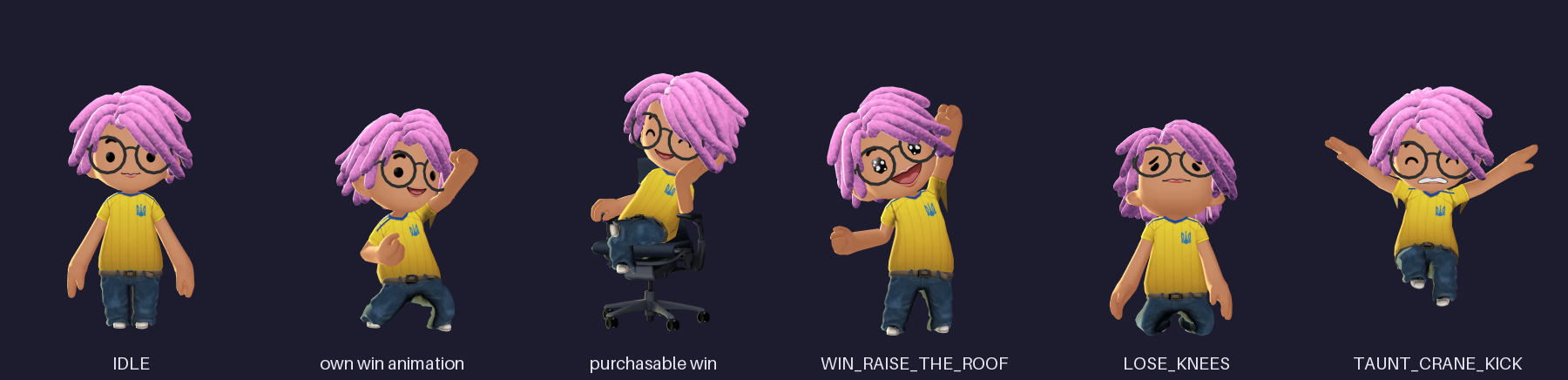
Unofficial. Not affiliated with or endorsed by GeoGuessr. It uses undocumented geoguessr.com endpoints, which can change at any time. Avatar assets belong to GeoGuessr; this package downloads them on demand and does not redistribute them.
Quick start
pip install geoguessr-avatar
playwright install chromium          # one-time download of the browser used for rendering

geoguessr-avatar render 656461a8a02239a1b6a4482e -a LOSE_KNEES -o knees.png
That's a real player (thanks, Felix), so the command works as-is. Swap in anyone's user ID,
or paste their profile URL: https://www.geoguessr.com/user/<user-id>.
From Python:
from geoguessr_avatar import SyncAvatarRenderer

with SyncAvatarRenderer() as renderer:
    renderer.render("656461a8a02239a1b6a4482e").save("win.png")  # their own win animation
    renderer.render("656461a8a02239a1b6a4482e", "LOSE_KNEES").save("knees.png")
No login, API key or GeoGuessr cookie is needed.
Using it in your code
Create one renderer when your program starts and reuse it. Starting the browser takes about a second, and each render after that takes about 0.5–1 s.
from geoguessr_avatar import SyncAvatarRenderer

renderer = SyncAvatarRenderer()

result = renderer.render(user_id, "LOSE_KNEES", progress=0.5)
result.png  # PNG bytes: save, upload, or paste into a bigger image
result.save("knees.png")

renderer.close()  # when your program shuts down
SyncAvatarRenderer is safe to call from several threads, and from inside async code.
If your code is async, use AvatarRenderer. It takes exactly the same arguments:
from geoguessr_avatar import AvatarRenderer

async with AvatarRenderer() as renderer:
    result = await renderer.render(user_id, "LOSE_KNEES", progress=0.5)
For a one-off script, render_avatar(user_id, "LOSE_KNEES") starts a browser, renders
and closes in one call.
Choosing the animation
animation= |
What you get |
|---|---|
| (omitted) | The player's equipped win animation. Players without one get the default WIN. |
a built-in name, e.g. "LOSE_KNEES" |
The same clip for everyone. See the gallery below. |
a win-animation asset ID, e.g. "WINANIMATION_HERMANMILLER_XZNC" |
Any purchasable win animation, on any player. |
Players can only customise their win animation. All the lose, taunt and idle clips are shared, so for "losing" poses your code picks the clip.
To see a player's items and the ID of their win animation:
geoguessr-avatar info 656461a8a02239a1b6a4482e
Built-in animations
Shown at the default frame (see the next section). geoguessr-avatar animations prints the
same list.
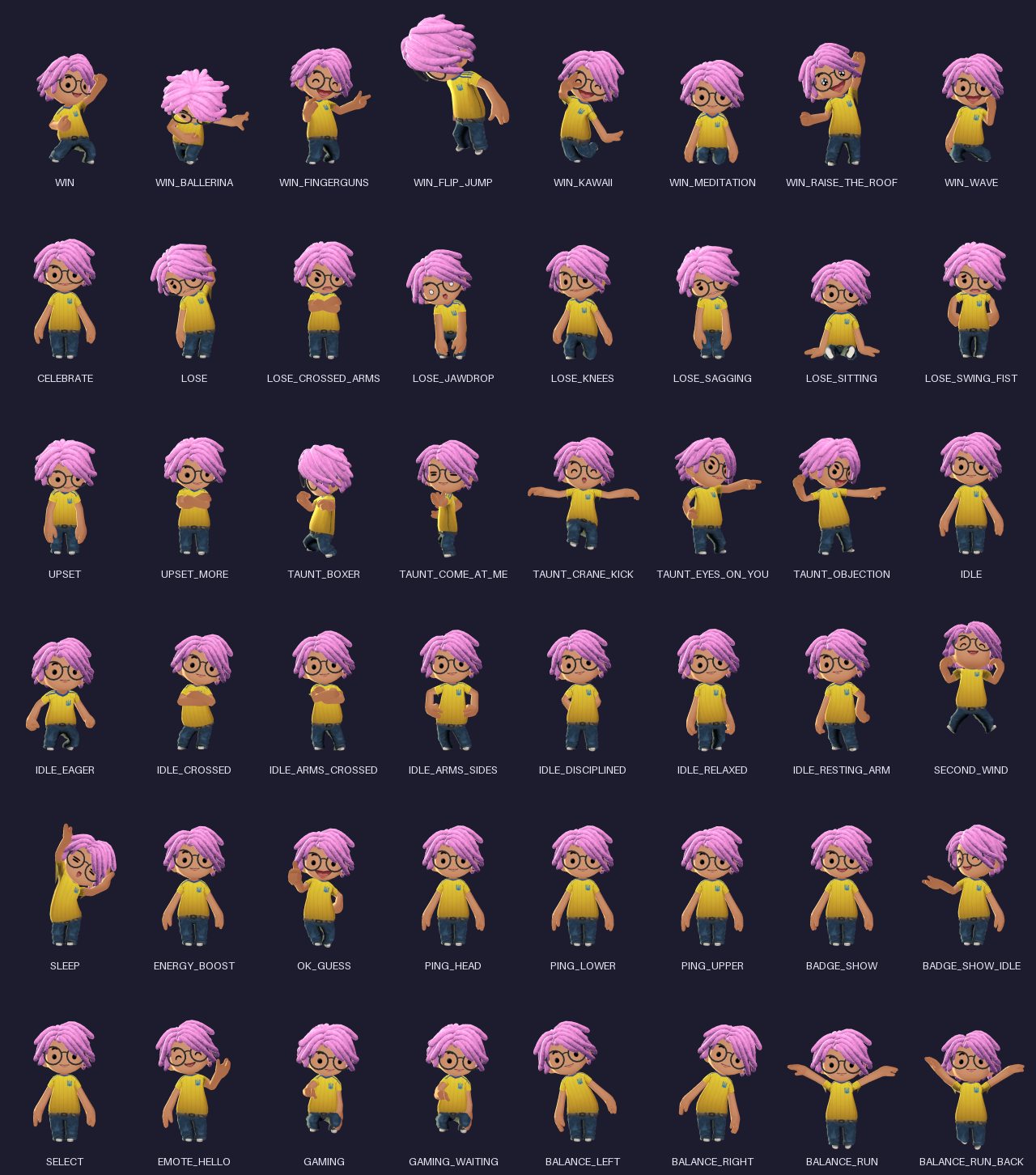
Choosing the moment
An animation is a few seconds long, so you pick which moment becomes the picture:
time=2.5: seconds from the start.progress=0.5: halfway; 0.0 is the start and 1.0 the end.- Neither: 1 second before the end, the frame GeoGuessr itself holds a pose on.
Many clips start and end in a neutral stance. If the default frame looks plain, try a few
progress values; the CLI makes that quick:
for p in 0.2 0.4 0.6 0.8; do geoguessr-avatar render <user> -a LOSE_SAGGING -p $p -o sag_$p.png; done
Size and framing
The default output is a 1080×1440 PNG with a transparent background, framed exactly like GeoGuessr's own full-body image.
| Option | Default | What it does |
|---|---|---|
width, height |
1080, 1440 |
Output size in pixels. |
framing |
"fixed" |
"fixed": the same camera for every player and pose, so everyone has the same scale. "fit": crop tightly around the posed avatar. |
zoom |
1.0 |
Fixed framing only. 0.85 leaves headroom: tall hats and jumps get cropped at 1.0, just like on the site. |
margin |
0.04 |
Fit framing only: empty space around the avatar. |
background |
None |
A hex colour such as "#1d1b2e", or None for transparent. |
supersample |
2.0 |
Anti-aliasing quality. Higher is smoother and slower. |
timeout |
120 |
SyncAvatarRenderer only: seconds before giving up. |
A few clips move the avatar sideways (e.g. WIN_FLIP_JUMP) and can leave a fixed frame. Use
framing="fit" for those.
Recipes
Podium. examples/podium.py puts the top three on a podium: the
winner in their own win animation, the others in a built-in pose. It needs Pillow
(pip install pillow).
python examples/podium.py <first-id> <second-id> <third-id> -o podium.png
Sending to a chat. Apps that recompress photos (Telegram's sendPhoto, for example)
lose the transparency. Either pass background="#...", or paste the PNG onto your own
image first.
Just the data, no rendering:
import asyncio
from geoguessr_avatar import GeoGuessrClient, Slot


async def main():
    async with GeoGuessrClient() as gg:
        avatar = await gg.get_avatar("656461a8a02239a1b6a4482e")
        print([item.id for item in avatar.items], avatar.win_animation)
        hair_glb = await gg.asset(avatar.item(Slot.HAIR).mesh_glb)  # raw 3D model
        static_png = await gg.full_body_png(avatar.user_id)  # GeoGuessr's own static image


asyncio.run(main())
Command line
geoguessr-avatar render <user> [-a ANIMATION] [-t SECONDS | -p PROGRESS] [-o FILE]
                        [--framing fixed|fit] [--zoom 0.85] [--size 540x720] [--background '#1d1b2e']
geoguessr-avatar info <user>       # equipped items and win animation
geoguessr-avatar animations        # list built-in animations
<user> is a user ID or a profile URL. Without -o, the file is named
<user-id>_<animation>.png.
Running on a server
Rendering runs on the CPU (software WebGL), so no GPU is needed. On Linux, install the browser together with its system libraries:
playwright install --with-deps --only-shell chromium
Or use the included Dockerfile:
docker build -t geoguessr-avatar .
docker run --rm -v "$PWD:/out" geoguessr-avatar render <user> -o /out/win.png
Troubleshooting
| Message | Fix |
|---|---|
Chromium for Playwright is not installed |
Run playwright install chromium (on Linux: playwright install --with-deps --only-shell chromium). |
no GeoGuessr user with ID ... |
Check the ID. It's the 24-character code at the end of the profile URL. |
unknown animation ... |
Check the spelling; the error suggests close matches. geoguessr-avatar animations lists them all. |
| Avatar cut off at the top or side | Use zoom=0.85, or framing="fit". |
| First render is slow | The first render downloads the player's models and textures. They're cached after that. |
To see what's happening, turn on logging: logging.basicConfig(level=logging.DEBUG).
API reference
Everything is importable from geoguessr_avatar.
Renderers
SyncAvatarRenderer(cache_dir=None, software_gl=True): blocking..render(...),.close(), usable aswith.AvatarRenderer(client=None, cache_dir=None, software_gl=True): async.await .render(...),await .aclose(), usable asasync with.render(user, animation=None, *, time, progress, width, height, framing, zoom, margin, background, supersample)returns aRenderResult.usercan also be anAvataryou already fetched.render_avatar(user, animation=None, **options): one-shot helper.software_gl=Falseuses the machine's GPU instead of software rendering.
RenderResult: .png (bytes), .save(path), .animation (clip name or asset ID),
.time and .duration (seconds), .bounds (3D bounding box of the posed avatar).
GeoGuessrClient(ncfa=None, cache_dir=None) (async)
get_avatar(user)returns anAvatar.get_user(user)returns the raw public profile as a dict.get_assets([ids])returns a list ofAvatarItem.get_background(user)returns the equipped background, orNone.asset(path),image(path),full_body_png(user)return bytes.
Data
Avatar:.user_id,.items,.item(Slot.X),.win_animation,.emotes.AvatarItem:.id,.slot,.mesh_glb,.texture,.morph_target,.hides,.raw.Slot: equipment slots (HAIR,HATS,ANIMATION_WIN, ...).animations:BUILTIN_ANIMATIONS,WIN_ANIMATIONS,LOSE_ANIMATIONS,TAUNT_ANIMATIONS,IDLE_ANIMATIONS.parse_user_id(text): user ID from an ID or profile URL.
Errors: UserNotFound (subclass of GeoGuessrError), BrowserNotInstalled,
ValueError for bad input, and TimeoutError from SyncAvatarRenderer.
How it works
GeoGuessr doesn't serve posed avatar images; the site draws avatars live with three.js. This package does the same in a headless Chromium:
- reads the player's equipped items from GeoGuessr's public avatar API,
- downloads the 3D models, textures and animation clips (cached on disk),
- assembles the avatar the way the site does: clothing on one skeleton, hats squashing hair, costumes hiding what's under them, face expressions, held items,
- jumps to the chosen moment and renders it with a toon shader matching the site's look.
| Data | Endpoint |
|---|---|
| Equipped items | GET /api/v4/avatar/user/{userId} |
| Asset lookup by ID | GET /api/v4/avatar/assets?ids=... |
| Models, textures, win-animation clips | https://www.geoguessr.com/assets/{path} |
| Built-in clips, head model | /static/avatar-assets/animations/{NAME}.glb, /static/avatar-assets/head/head.glb |
| Profile, static full-body image | GET /api/v3/users/{userId}, /images/plain/{path} |
Caching: files go to ~/.cache/geoguessr-avatar (or $XDG_CACHE_HOME/geoguessr-avatar;
change it with cache_dir=). Models and textures are kept forever because their URLs
change whenever the content does. Built-in clips are re-checked weekly. A player's equipped
items are always fetched fresh.
Limitations
- Still images only. For an animation, render several frames and combine them yourself.
- Club-branded clothing shows its base texture, without the club logo.
- Pets, badges and emote bubbles are not drawn.
- The random idle eye-blink isn't reproduced.
Development
uv sync
uv run playwright install chromium
uv run pytest                                      # offline tests
GEOGUESSR_AVATAR_NETWORK_TESTS=1 uv run pytest     # + live site and Chromium
uv run ruff check . && uv run ruff format --check .
uv run scripts/make_docs_images.py                 # regenerate the README images
CI runs the live tests weekly, so a failing scheduled run means geoguessr.com changed
something. src/geoguessr_avatar/web/vendor/ holds three.js r185 (MIT, see
three-LICENSE), the same version geoguessr.com uses, plus its Draco decoder.
Releasing
- Bump
versioninpyproject.tomland commit. - Create a GitHub release with a tag like
v0.1.0. ThePublish to PyPIworkflow builds the package and uploads it.
License
MIT
1 maintainer

Metadata
1 maintainer
Release files for geoguessr-avatar 0.1.0
For a detailed explanation of source distributions (sdists) and built distributions (wheels), please see the package formats documentation.
Source distribution (sdist)
| File | Size | Uploaded | |
|---|---|---|---|
| geoguessr_avatar-0.1.0.tar.gz | 330.4 kB | Details |
Built distribution (wheel)
| File | Interpreter | ABI | Platform | Reset |
|---|---|---|---|---|
| geoguessr_avatar-0.1.0-py3-none-any.whl | Python 3 | none | any | Details |
Total release size: 670.2 kB
Release files / geoguessr_avatar-0.1.0.tar.gz
| Download URL | geoguessr_avatar-0.1.0.tar.gz |
|---|---|
| Size | 330.4 kB |
| Tags | Source |
|
SHA-256 checksum How to use checksums |
fc5c3d0ffbc4b57ebdee445d0a231d04e5b836f4f897c601d95b15847ec49443
|
|
BLAKE2b-256 checksum How to use checksums |
f2ce31709cb8eecd22eee1d7f3ce331438984ac064153cd09269ebce073e00f9
|
| Upload date | |
|
Uploaded using Trusted Publishing? What is trusted publishing? |
Yes |
| Uploaded via |
twine/7.0.0 CPython/3.13.14
|
Provenance
Provenance describes where a file came from. On PyPI, provenance is shared via attestations, which provide a verifiable record of the build or publishing details. View details, limitations and caveats.


PyPI Publish Attestation
PyPI verified that this artifact, at this checksum, originated from the publisher listed below.
Signed by GitHub Actions, verified by PyPI on Oct 3, 2026.
Transparency logRelease files / geoguessr_avatar-0.1.0-py3-none-any.whl
| Download URL | geoguessr_avatar-0.1.0-py3-none-any.whl |
|---|---|
| Size | 339.8 kB |
| Tags | Python 3 |
|
SHA-256 checksum How to use checksums |
5202b001c128ab91e0fe646578d716e6fd8acaa6f68b6c433746d1eca055d38d
|
|
BLAKE2b-256 checksum How to use checksums |
68e704c726e78e8f6363a5378786d3b40b66feb09c22c3250cc2f4a5c61a6e3b
|
| Upload date | |
|
Uploaded using Trusted Publishing? What is trusted publishing? |
Yes |
| Uploaded via |
twine/7.0.0 CPython/3.13.14
|
Provenance
Provenance describes where a file came from. On PyPI, provenance is shared via attestations, which provide a verifiable record of the build or publishing details. View details, limitations and caveats.
PyPI Publish Attestation
PyPI verified that this artifact, at this checksum, originated from the publisher listed below.
Signed by GitHub Actions, verified by PyPI on Oct 3, 2026.
Transparency log













