
A Python Package offering geometric kernels in NumPy, TensorFlow, PyTorch, and Jax.

Project description
GeometricKernels



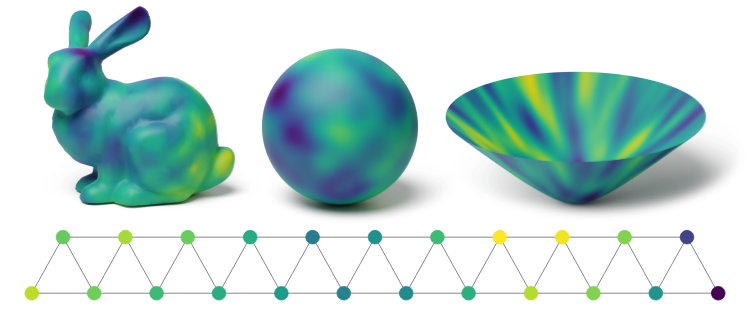
GeometricKernels is a library that implements kernels including the heat and Matérn class on non-Euclidean spaces as Riemannian manifolds, graphs and meshes. This enables kernel methods — in particular Gaussian process models — to be deployed on such spaces.
Installation
-
[Optionally] create and activate a new virtual environment.
You can use Conda
conda create -n [env_name] python=3.[version]
conda activate [env_name]
or virtualenv
virtualenv [env_name]
source [env_name]/bin/activate
-
Install the library in the active environment by running
pip install geometric_kernels
If you want to install specific GitHub branch called
[branch], runpip install "git+https://github.com/geometric-kernels/GeometricKernels@[branch]"
-
Install a backend of your choice
We use LAB to support multiple backends (e.g., TensorFlow, Jax, PyTorch). However, you are not required to install all of them on your system to use the GeometricKernels package. Simply install the backend (and (optionally) a GP package) of your choice. For example,
-
pip install tensorflow tensorflow-probabilityOptionally, you can install the Tensorflow-based Gaussian processes library GPflow, for which we provide a frontend.
pip install gpflow -
pip install torchOptionally, you can install the PyTorch-based Gaussian processes library GPyTorch, for which we provide a frontend.
pip install gpytorch -
JAX (the cpu version)—the gpu and tpu versions can be installed similarly.
pip install "jax[cpu]"Optionally, you can install the JAX-based Gaussian processes library GPJax, for which we provide a frontend.
pip install gpjaxNote. Currently, only some versions of
gpjaxare supported (we testedgpjax==0.6.9).Furthermore, installation might be far from trivial and result in a broken environment. This is due to our conflicting dependencies, see https://github.com/JaxGaussianProcesses/GPJax/issues/441.
-
A basic example
This example shows how to compute a 3x3 kernel matrix for the Matern52 kernel on the standard two-dimensional sphere. It relies on the numpy-based backend. Look up the information on how to use other backends in the documentation.
# Import a backend.
import numpy as np
# Import the geometric_kernels backend.
import geometric_kernels
# Import a space and an appropriate kernel.
from geometric_kernels.spaces import Hypersphere
from geometric_kernels.kernels import MaternGeometricKernel

# Create a manifold (2-dim sphere).
hypersphere = Hypersphere(dim=2)

# Define 3 points on the sphere.
xs = np.array([[0., 0., 1.], [0., 1., 0.], [1., 0., 0.]])

# Initialize kernel.
kernel = MaternGeometricKernel(hypersphere)
params = kernel.init_params()
params["nu"] = np.array([5/2])
params["lengthscale"] = np.array([1.])

# Compute and print out the 3x3 kernel matrix.
print(np.around(kernel.K(params, xs), 2))
This should output
[[1.   0.36 0.36]
 [0.36 1.   0.36]
 [0.36 0.36 1.  ]]
Documentation
The documentation for GeometricKernels is available on a separate website.
For development and running the tests
Run these commands from the root directory of the repository.
Install all backends and the dev requirements (Pytest, black, etc.)
make install
Run style checks
make lint
Run the tests
make test
If you have a question
Post it in issues using the "How do I do ..." and other issues template and the "question" label.
This link chooses the right template and label for you.
Citation
If you are using GeometricKernels, please cite the following paper:
@article{mostowsky2024,
      title = {The GeometricKernels Package: Heat and Matérn Kernels for Geometric Learning on Manifolds, Meshes, and Graphs},
      author = {Peter Mostowsky and Vincent Dutordoir and Iskander Azangulov and Noémie Jaquier and Michael John Hutchinson and Aditya Ravuri and Leonel Rozo and Alexander Terenin and Viacheslav Borovitskiy},
      year = {2024},
      journal = {arXiv:2407.08086},
}
Furthermore, please consider citing the theoretical papers the package is based on. You can find the relevant references for any space in
- the docstring of the respective space class,
- at the end of the respective tutorial notebook.
Release history Release notifications | RSS feed


Download files
Download the file for your platform. If you're not sure which to choose, learn more about installing packages.
Source Distribution
Built Distribution
Filter files by name, interpreter, ABI, and platform.
If you're not sure about the file name format, learn more about wheel file names.
Copy a direct link to the current filters
File details
Details for the file geometric_kernels-0.2.2.tar.gz.
File metadata
- Download URL: geometric_kernels-0.2.2.tar.gz
- Upload date:
- Size: 5.9 MB
- Tags: Source
- Uploaded using Trusted Publishing? No
- Uploaded via: python-requests/2.32.3
File hashes
| Algorithm | Hash digest | |
|---|---|---|
| SHA256 |
0aa2d661ddad8e19eb5e2532a553c83a37ea2409f8f6c57a7223ad6d4afb1289
|
|
| MD5 |
a6e1137af5afea061cfdca6ce7ccab44
|
|
| BLAKE2b-256 |
736d9ae434c5ba69d10a97af9d308c843ec45d2763ded0947c17d89fdceee44c
|
File details
Details for the file geometric_kernels-0.2.2-py3-none-any.whl.
File metadata
- Download URL: geometric_kernels-0.2.2-py3-none-any.whl
- Upload date:
- Size: 152.7 kB
- Tags: Python 3
- Uploaded using Trusted Publishing? No
- Uploaded via: python-requests/2.32.3
File hashes
| Algorithm | Hash digest | |
|---|---|---|
| SHA256 |
e146f6d59d13d3b3eb2f2224f58993687458a3d7884255c75bc0be4731c937e5
|
|
| MD5 |
1709a28e856f3dded7ec21c3e5cc094c
|
|
| BLAKE2b-256 |
1c134d8d8c018c80a4789d9435c24a81ee0dd9702c878e89b55c25f1c6d696ca
|






