
GeoPicTagReader

Project description

GeoVisio is a complete solution for storing and serving your own 📍📷 geolocated pictures (like StreetView / Mapillary).
➡️ Give it a try at panoramax.ign.fr or geovisio.fr !
📦 Components
GeoVisio is modular and made of several components, each of them standardized and ♻️ replaceable.
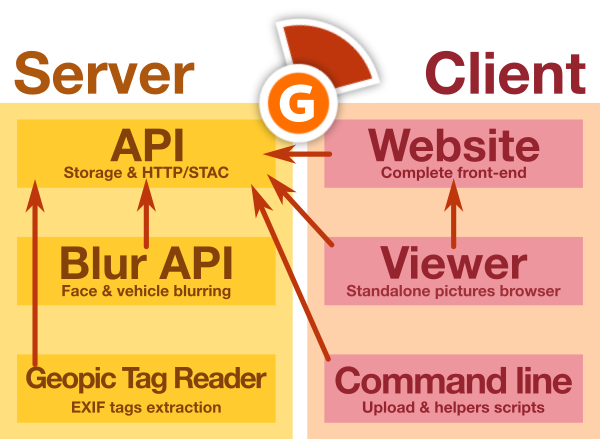
All of them are 📖 open-source and available online:
| 🌐 Server | 💻 Client |
|---|---|
| API | Website |
| Blur API | Web viewer |
| GeoPic Tag Reader | Command line |
📷 GeoPic Tag Reader
This repository only contains the Python library to extract standardized metadata from geolocated pictures EXIF metadata.
Features
This tool allows you to:
- Analyse various EXIF variables to extract standardized metadata for geolocated pictures applications
Install
GeoPicTagReader can be installed using two methods:
- From PyPI, the Python central package repository
- Using this Git repository
GeoPicTagReader is compatible with all python version >= 3.8.
From PyPI
Just launch this command:
pip install geopic_tag_reader
After this you should be able to use the CLI tool with the name geopic-tag-reader:
geopic-tag-reader --help
Alternatively, you can use pipx if you want all the script dependencies to be in a custom virtual env.
You need to install pipx, then:
pipx install geopic_tag_reader
From Git repository
Download the repository:
git clone https://gitlab.com/geovisio/geo-picture-tag-reader.git geopic_tag_reader
cd geopic_tag_reader/
To avoid conflicts, it's considered a good practice to create a virtual environment (or virtualenv). To do so, launch the following commands:
# Create the virtual environment in a folder named "env"
python3 -m venv env

# Launches utilities to make environment available in your Bash
source ./env/bin/activate
Then, install the dependencies using pip:
pip install -e .
You can also install the dev dependencies if necessary (to have lints, format, tests, ...):
pip install -e .[dev]
Then, you can use the geopic-tag-reader command:
geopic-tag-reader --help
Usage
This library can be used both from command-line or as Python module.
As command-line
To see all available commands:
geopic-tag-reader --help
Full documentation is also available here.
As Python library
In your own script, you can use:
from geopic_tag_reader import reader
from PIL import Image

# Open an image with Pillow
img = Image.open("my_picture.jpg")

# Read EXIF metadata
metadata = reader.readPictureMetadata(img)

# Print results
print(metadata)
Full documentation is also available here.
Development
Tests
Tests are run using PyTest. You can simply run this command to launch tests:
pytest
Documentation
High-level documentation is handled by Typer. You can update the generated USAGE.md file using this command:
make docs
Contributing
Pull requests are welcome. For major changes, please open an issue first to discuss what you would like to change.
Note that before opening a pull requests, you may want to check formatting and tests of your changes:
make ci
You can also install git pre-commit hooks to format code on commit with:
pip install -e .[dev]
pre-commit install
Make a release
git checkout main
git pull

make docs ci
vim CHANGELOG.md							# Edit version + links at bottom
vim geopic_tag_reader/__init__.py	# Edit version

git add *
git commit -m "Release x.x.x"
git tag -a x.x.x -m "Release x.x.x"
git push origin main --tags
🤗 Special thanks

GeoVisio was made possible thanks to a group of ✨ amazing people ✨ :
- GéoVélo team, for 💶 funding initial development and for 🔍 testing/improving software
- Carto Cité team (in particular Antoine Riche), for 💶 funding improvements on viewer (map browser, flat pictures support)
- La Fabrique des Géocommuns (IGN) for offering long-term support and funding the Panoramax initiative and core team (Camille Salou, Mathilde Ferrey, Christian Quest, Antoine Desbordes, Jean Andreani, Adrien Pavie)
- Many many wonderful people who worked on various parts of GeoVisio or core dependencies we use : 🧙 Stéphane Péneau, 🎚 Albin Calais & Cyrille Giquello, 📷 Damien Sorel, Pascal Rhod, Nick Whitelegg...
- Adrien Pavie, for ⚙️ initial development of GeoVisio
- And you all ✨ GeoVisio users for making this project useful !
⚖️ License
Copyright (c) GeoVisio team 2022-2023, released under MIT license.
Release history Release notifications | RSS feed


Download files
Download the file for your platform. If you're not sure which to choose, learn more about installing packages.
Source Distribution
Built Distribution
Filter files by name, interpreter, ABI, and platform.
If you're not sure about the file name format, learn more about wheel file names.
Copy a direct link to the current filters
File details
Details for the file geopic_tag_reader-0.2.0.tar.gz.
File metadata
- Download URL: geopic_tag_reader-0.2.0.tar.gz
- Upload date:
- Size: 21.3 MB
- Tags: Source
- Uploaded using Trusted Publishing? No
- Uploaded via: python-requests/2.31.0
File hashes
| Algorithm | Hash digest | |
|---|---|---|
| SHA256 |
7cac958d02ce51d12e499ef23077b3c5c433cbf6afcba5089655ace20eee5d10
|
|
| MD5 |
df9549e7fde1dd5b9a20a2ef52fb8701
|
|
| BLAKE2b-256 |
8c2d6b967b82f203782106cb529dc927cc0537983b83ca6738213af0c13f90bd
|
File details
Details for the file geopic_tag_reader-0.2.0-py3-none-any.whl.
File metadata
- Download URL: geopic_tag_reader-0.2.0-py3-none-any.whl
- Upload date:
- Size: 9.5 kB
- Tags: Python 3
- Uploaded using Trusted Publishing? No
- Uploaded via: python-requests/2.31.0
File hashes
| Algorithm | Hash digest | |
|---|---|---|
| SHA256 |
d9cf8096871dd3c87828d61e4cae64bc95e7f0588026f7882e77d1391a4b599c
|
|
| MD5 |
2dc9120a023f6192784bc86bba7e4c71
|
|
| BLAKE2b-256 |
be3b73a49566138c41f19258d0041190e2616fbfaf8ff7ed39b10f9ac6495cf4
|






