
GeoSOM — Self-Organising Maps on geodesic domes for Python




mt.geosom provides Self-Organising Maps (SOMs) on a geodesic sphere (GeoSOM), a
flat hexagonal/rectilinear grid with borders or as a torus (PlaneSOM), or a finite line (LineSOM).
The sphere and plane lattices come from GeodesicDome.
| What | Name |
|---|---|
pip install … |
geosom |
| Python import | mt.geosom (mt is a namespace package shared with mt.geodesicdome) |
| Repository | takatsuka/GeoSOM |
| Lattices | geodesicdomes (installed automatically) |
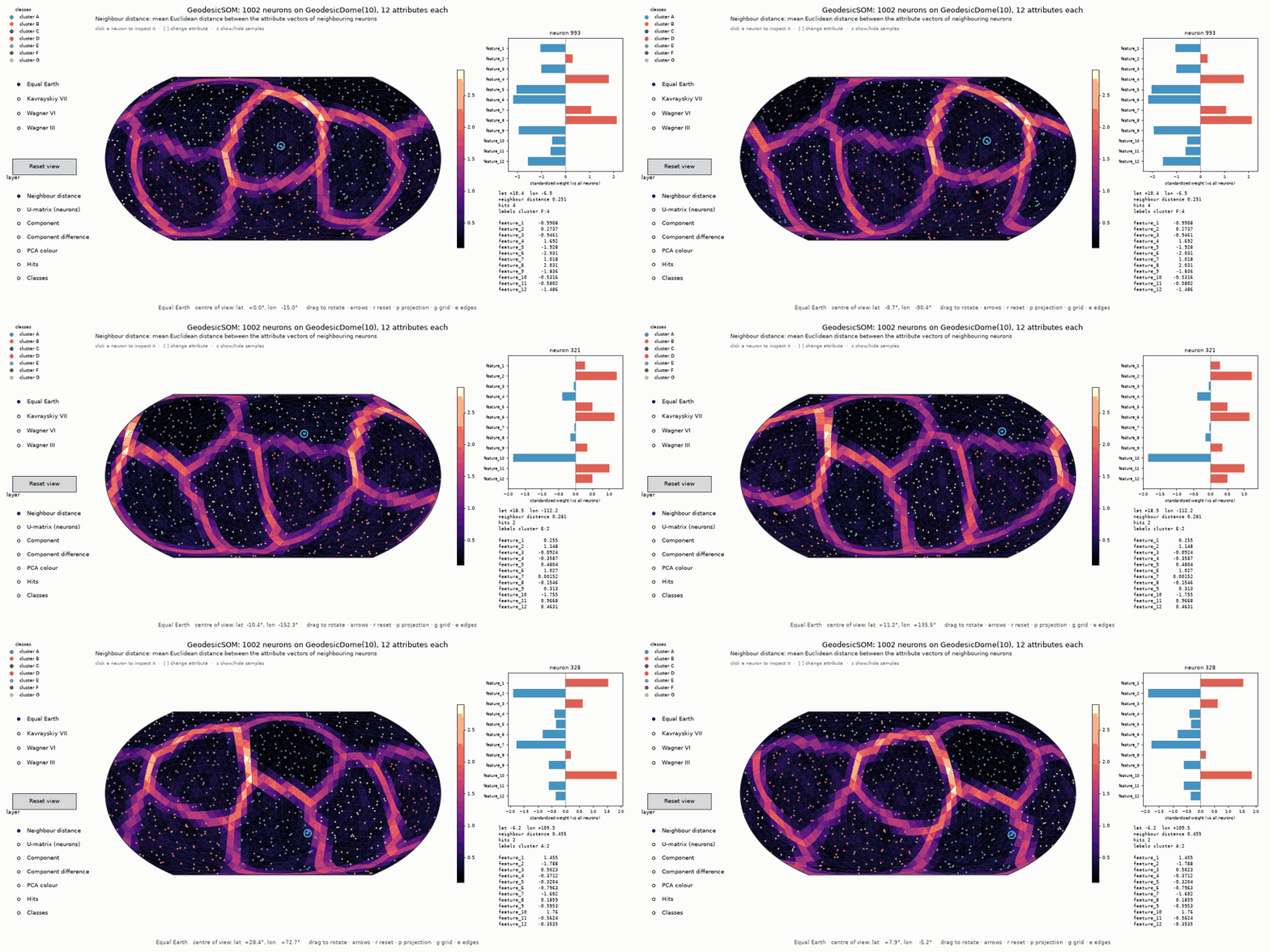
The map view — the whole attribute vectors on a sphere you rotate with the mouse; click a neuron to see its attributes. The triangles between neurons are coloured by the Euclidean distance between their attribute vectors: dark basins are clusters, bright ridges are the borders between them.
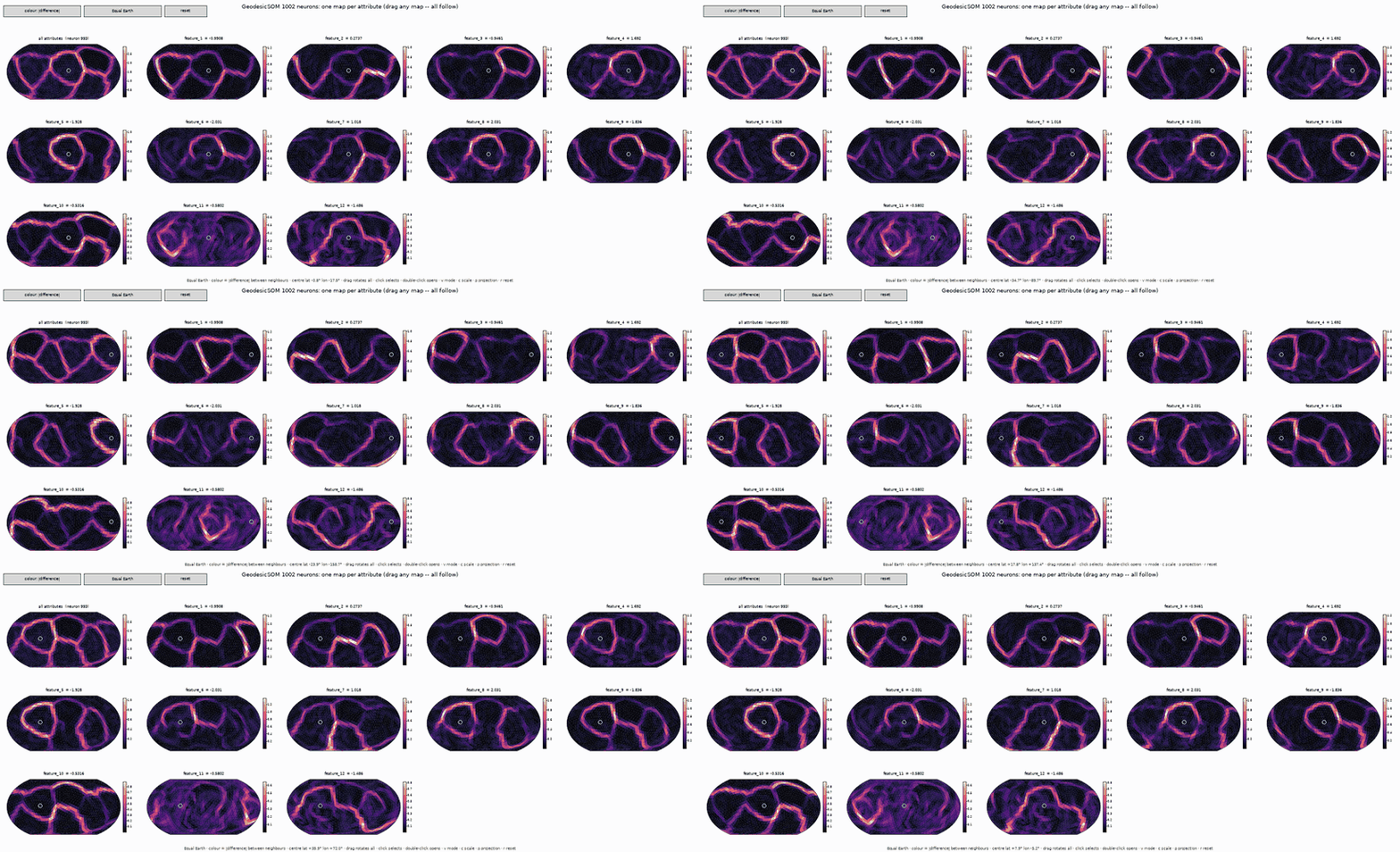
The matrix view — one map per attribute, coloured by how much that attribute changes between neighbouring neurons. Drag any map and every map rotates with it.
What you get
| Feature | Where |
|---|---|
Abstract SOM on any Manifold lattice (dome, plane, torus or line) |
mt.geosom.som.SOM |
| SOM on a flat hexagonal or rectilinear grid, with borders or as a torus, trained the same way | mt.geosom.PlaneSOM.PlaneSOM |
| SOM on a finite one-dimensional line | mt.geosom.LineSOM.LineSOM |
| Neuron: weight vector on a lattice vertex, with labels and a missing-data-aware distance | mt.geosom.neuron.Neuron |
| Spherical SOM on a geodesic dome: batch or online training, PCA initialisation, missing values | mt.geosom.GeoSOM.GeoSOM |
| Euclidean distance between neighbouring neurons' attribute vectors (per edge, per triangle, U-matrix) | edge_distance, face_distance, u_matrix |
| Interactive map of a trained GeoSOM: drag to rotate, click a neuron to see its attributes | mt.geosom.gui.SOMViewer |
| One map per attribute, all at once, synchronised: drag any map and all rotate together | mt.geosom.gui.ComponentMatrixViewer |
| The same two views for a PlaneSOM | mt.geosom.gui.PlaneSOMViewer, PlaneComponentMatrixViewer |
| Keep any viewers (even in separate windows) rotating and selecting together | mt.geosom.gui.link_views |
All views in one call (or python -m mt.geosom from a terminal) |
mt.geosom.gui.explore, train_and_explore |
| Demo data, CSV loading, standardisation | mt.geosom.datasets |
All interactive code is in the subpackage mt.geosom.gui (needs matplotlib); everything else needs only
numpy and geodesicdomes. The step-by-step guide is in docs/index.md.
1. Installation
Requires Python ≥ 3.10, NumPy and geodesicdomes.
pip install geosom                  # the library (numpy + geodesicdomes)
pip install "geosom[interactive]"   # + matplotlib, for the interactive views (mt.geosom.gui)
pip install "geosom[gpu]"           # + torch, to train on an NVIDIA (CUDA) or Apple Silicon (MPS) GPU
For Jupyter notebooks (including the examples in examples/notebooks/) with interactive views:
pip install "geosom[notebooks,interactive]" ipympl
On Google Colab, also run this in the first cell so the interactive views display:
from google.colab import output
output.enable_custom_widget_manager()
%matplotlib widget
Training uses a GPU automatically when torch (with CUDA or MPS) or CuPy is installed, and every CPU core otherwise — see GPU and multi-core below.
Check that it works:
python -c "from mt.geosom.GeoSOM import GeoSOM; print(GeoSOM(4))"
Working on this repository: setup_env.sh (recommended)
cd GeoSOM
./setup_env.sh                             # once
python examples/01_plane_som.py       # works straight away, in the same terminal
By default, it installs everything into .venv in this checkout (override with --venv PATH or GEOSOM_VENV).
It opens an activated shell at the end, auto-activates in new terminals, is safe to re-run, and installs GPU packages
for this machine — torch for CUDA, Apple Silicon or ROCm, plus CuPy on NVIDIA. Use --gpu none to skip them or
--help for all options. If the repository is in cloud-synced storage, use --venv to put the environment elsewhere.
One addition to GeodesicDome's script:
- It uses your local GeodesicDome. If
../GeodesicDomeexists next to this repository, it is installed in editable mode, so changes to both libraries are picked up at once. Use--dome PATH(or$GEODESICDOME_DIR) for another location. Without a checkout, geodesicdomes is installed from PyPI.
Other ways to install
pip install "git+https://github.com/takatsuka/GeoSOM.git"   # latest development version
pip install -e ".[dev]"                                            # from a local checkout, editable
Optional extras: interactive (matplotlib, via geodesicdomes), notebooks (Jupyter, ipywidgets, ipympl), dev (pytest, ruff, build, twine), and all.
Notebooks
Every example is also a Jupyter notebook in
examples/notebooks/, explained step by
step, with controls under every viewer and a "Try it" section to retrain with other settings. With ipympl the
viewers are live in the notebook: drag the spheres, click neurons, use the buttons on the figures.
pip install -e ".[notebooks]"           # setup_env.sh already includes it
jupyter lab examples/notebooks
2. Quick start
2.1 Train a GeoSOM and visualise it, step by step
Train. Every neuron gets a weight vector with one value per attribute of your data.
import numpy as np
from mt.geosom import datasets
from mt.geosom.GeoSOM import GeoSOM
from mt.geosom.som import InitializationType

# 1. data: an array (samples, attributes); NaN marks a missing value
data, labels, names = datasets.load_sample('clusters') # demo: 7 labelled clusters, 12 attributes
# data, labels, names = datasets.load_sample('wine')                              # other samples: animals, iris, penguins, wine
# data, labels, names = datasets.read_csv('mydata.csv', label_column='species')   # your own data
x = datasets.standardise(data)                        # zero mean, unit variance per attribute

# 2. a spherical SOM on GeodesicDome(10): 10*10**2 + 2 = 1002 neurons, no borders
som = GeoSOM(10, seed=0)
som.initialise(InitializationType.Linear, x)          # spread over the first 3 principal components

# 3. train
som.train(x, epochs=30)                               # batch training (mode='online' also works)
print(som)                                            # GeoSOM(frequency=10, neurons=1002, dim=12)
print(f'QE {som.quantisation_error(x):.3f}  TE {som.topographic_error(x):.3f}')

# 4. use it
som.weights                                           # (1002, 12): one weight vector per neuron
bmu = som.bmu(x)                                      # the best matching neuron of every sample
hits = som.hits(x)                                    # how many samples each neuron wins
Visualise. Two interactive views, both built on GeodesicDome's rotatable map projections (needs matplotlib):
import matplotlib.pyplot as plt
from mt.geosom.gui import ComponentMatrixViewer, SOMViewer, link_views

# 5. the whole attribute vectors on one rotatable map of the sphere,
#    with each neuron labelled by the samples it is the best matching unit of
viewer = SOMViewer(som, x, labels=labels, feature_names=names, node_labels='majority')

# 6. the matrix view: one map per attribute, all rotating together
matrix = ComponentMatrixViewer(som, names, data=x, labels=labels)

# 7. keep the two windows in step (rotation and selected neuron), then open them
link_views(viewer, matrix)
plt.show()
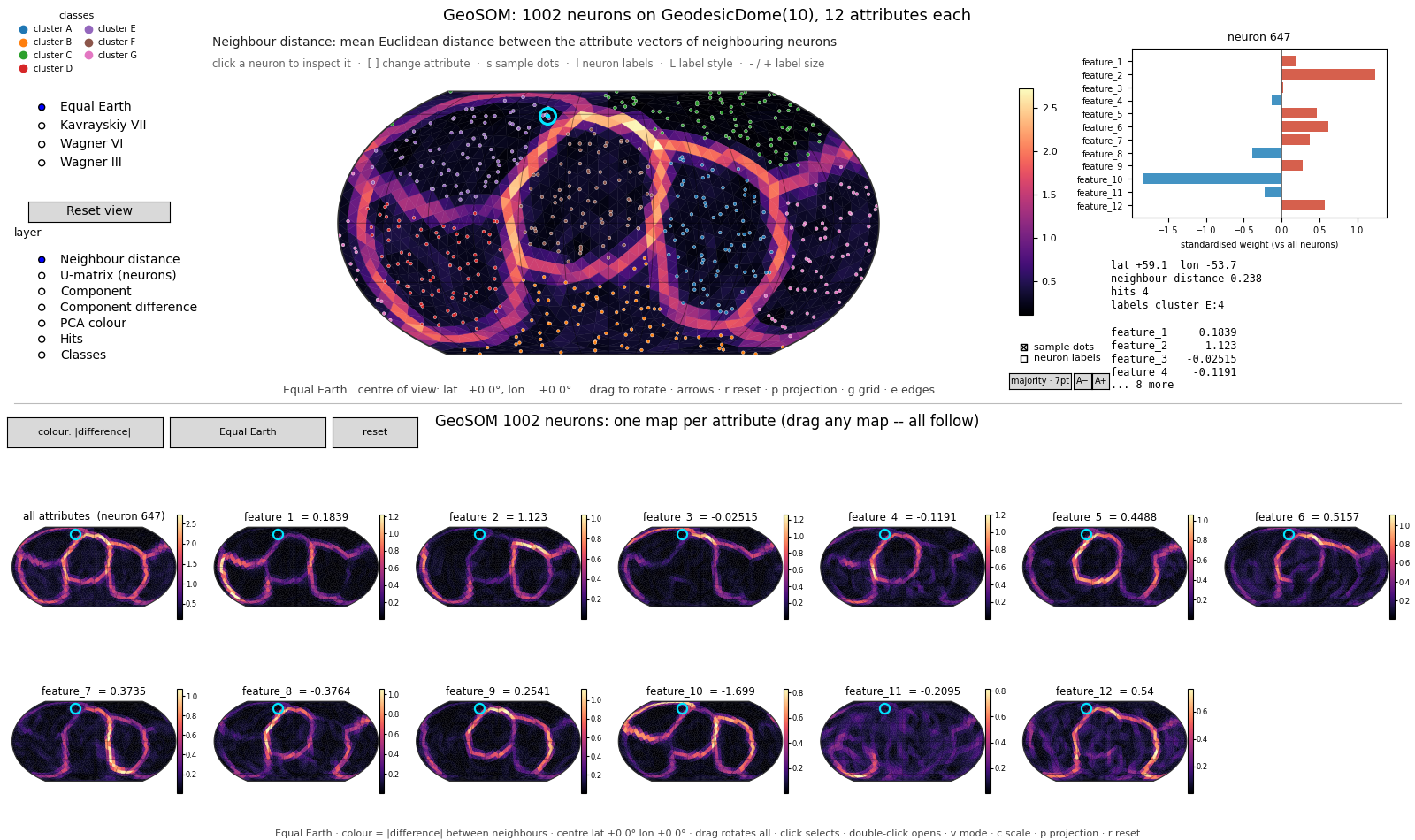
Steps 5–7 in one line: explore(som, x, labels, names) (from mt.geosom.gui). It opens one window: the map
of the whole attribute vectors at the top and one map per attribute in a grid below it, all in step — drag any map
and every map rotates, click a neuron on any map and it is selected on all of them, and switching the projection in
either part switches both. Keys act on the part under the mouse pointer. explore(..., layout='separate') opens the
two parts as two linked windows instead, as in steps 5–7. The same window is CombinedViewer(som, x, labels, names).
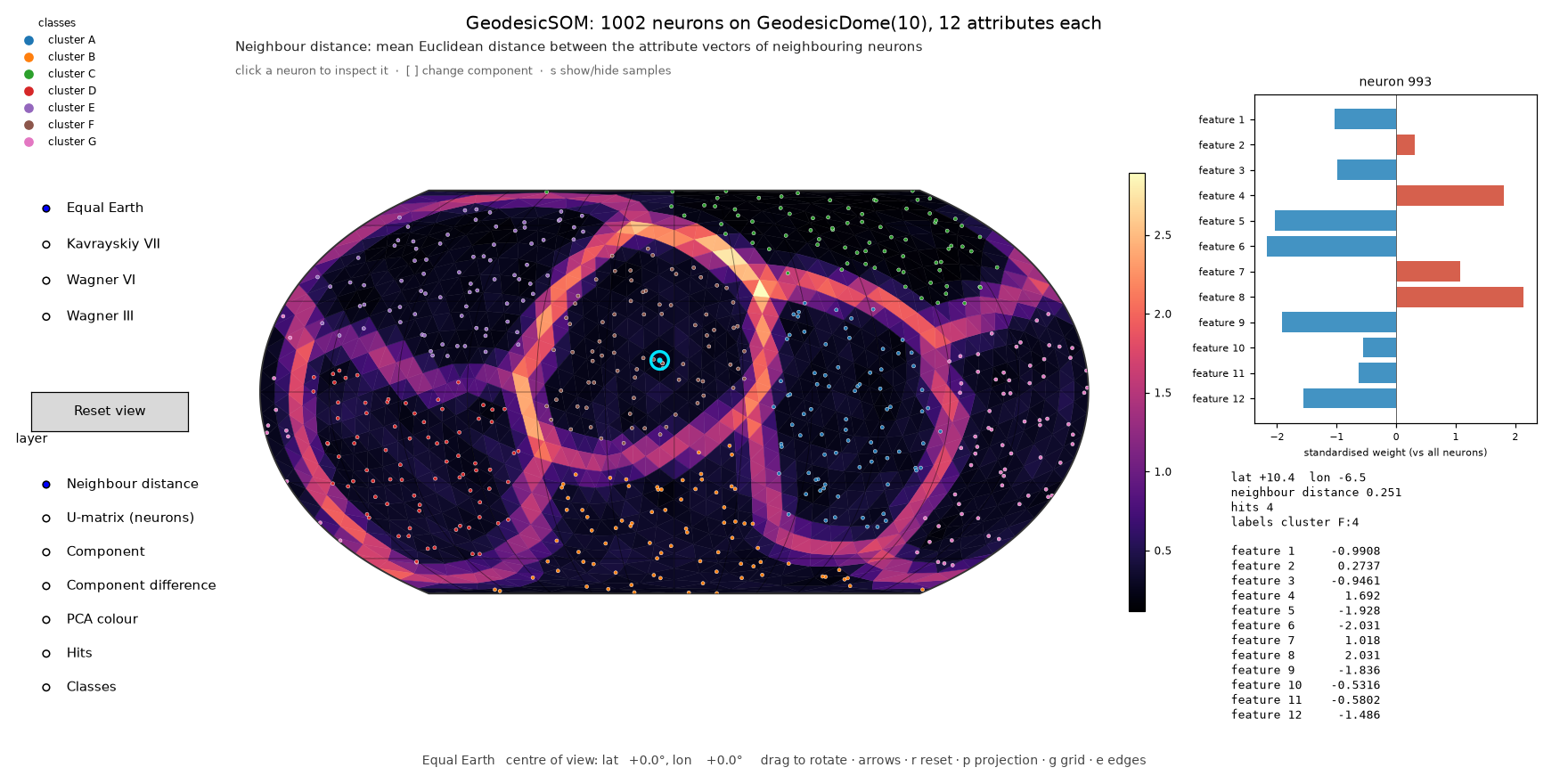
What you see in SOMViewer. The triangles between neighbouring neurons are coloured by the Euclidean
distance between their attribute vectors: dark basins are clusters, bright ridges are the borders between them.
Drag to rotate the sphere; click a neuron to see its attribute vector on the right; switch layers on the left
(U-matrix, one attribute's value or difference, PCA colour, hits, classes). With node_labels, every neuron that is
the best matching unit of some samples shows their label (majority label, all labels, or labels with counts). Turn
the labels and the sample dots on and off with the check boxes below the colour bar (or l and s); the style
button next to them (or L) switches the label style, and A− / A+ (or - / +) change the label size.
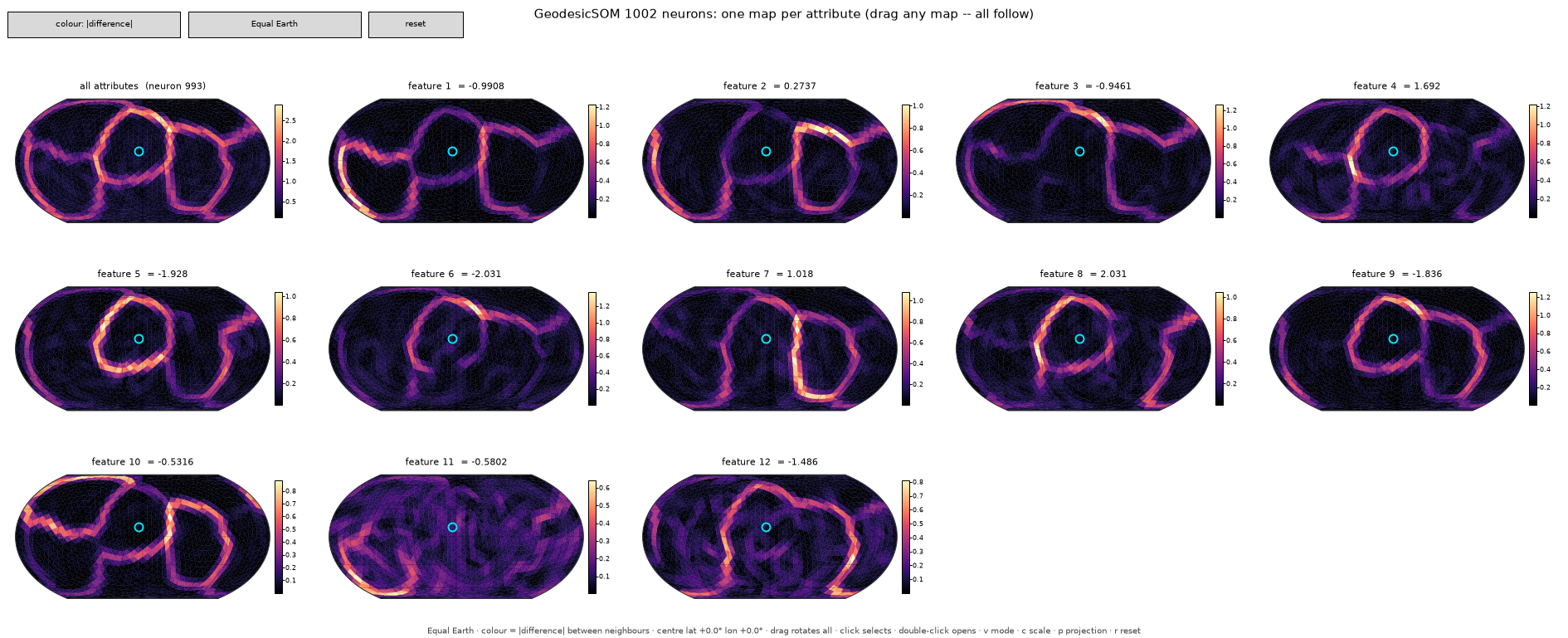
What you see in the matrix view (ComponentMatrixViewer). One map per attribute. Each triangle is coloured by
how much that attribute changes between its three neurons (mean |w_a[k] − w_b[k]|), so you can see which
attributes form which cluster borders; the first map is the distance over all attributes. Drag any map and every map
rotates; click marks a neuron on every map, with its value of each attribute in the titles; double-click opens that
attribute on its own; v switches to the attribute values, c to one colour scale for all maps.
Save images instead of opening windows (e.g. on a server):
import matplotlib
matplotlib.use('Agg')                                  # before any window is created
from mt.geosom.gui import explore

views = explore(som, x, labels, names, select=int(hits.argmax()), show=False)
views.save('som.png', dpi=100)                         # the whole window
views.map.save('som_map.png', dpi=110)                 # or just one part of it
views.matrix.save('som_matrix.png', dpi=90)
Complete scripts: examples/02_geosom_interactive.py (single map), examples/03_component_matrix.py
(matrix view), examples/04_explore_all.py (both, linked, in one window).
2.2 Everything at once, from a terminal
python -m mt.geosom                                  # demo: 7 labelled clusters, 12 attributes, on a sphere
python -m mt.geosom --data wine                      # a sample shipped with the package: animals, iris, penguins, wine
python -m mt.geosom --data mydata.csv --label-column species
python -m mt.geosom --freq 8 --epochs 50 --projection "Wagner VI"
python -m mt.geosom --only matrix --matrix-mode value
python -m mt.geosom --data iris --node-labels counts --label-size 9   # label neurons with the samples they win
python -m mt.geosom --lattice hexagonal              # a flat 20 x 30 hexagonal grid instead
python -m mt.geosom --layout separate               # the map and the matrix in two windows
python -m mt.geosom --save out/som --no-gui          # writes out/som.png, out/som_map.png and out/som_matrix.png
python -m mt.geosom --help
This standardises the data, trains, and opens both views in one window, linked. The installed command geosom is the same,
and so is python main.py in this repository. From Python, train_and_explore(data, labels, names) does the same.
2.3 Flat SOM (PlaneSOM)
import numpy as np
from mt.geodesicdome.grid.plane import Lattice, Topology
from mt.geosom.PlaneSOM import PlaneSOM
from mt.geosom.gui import explore                     # needs matplotlib

data = np.random.rand(500, 6)                              # 500 samples, 6 attributes

plane = PlaneSOM(row=20, col=30, lattice=Lattice.Hexagonal, topology=Topology.Plane)   # or Topology.Donut: a torus
plane.initialise(dataset=data)                             # linear (PCA) initialisation
plane.train(data, epochs=30)
print(plane.quantisation_error(data), plane.topographic_error(data))

explore(plane, data, feature_names=list('abcdef'))         # PlaneSOMViewer + PlaneComponentMatrixViewer
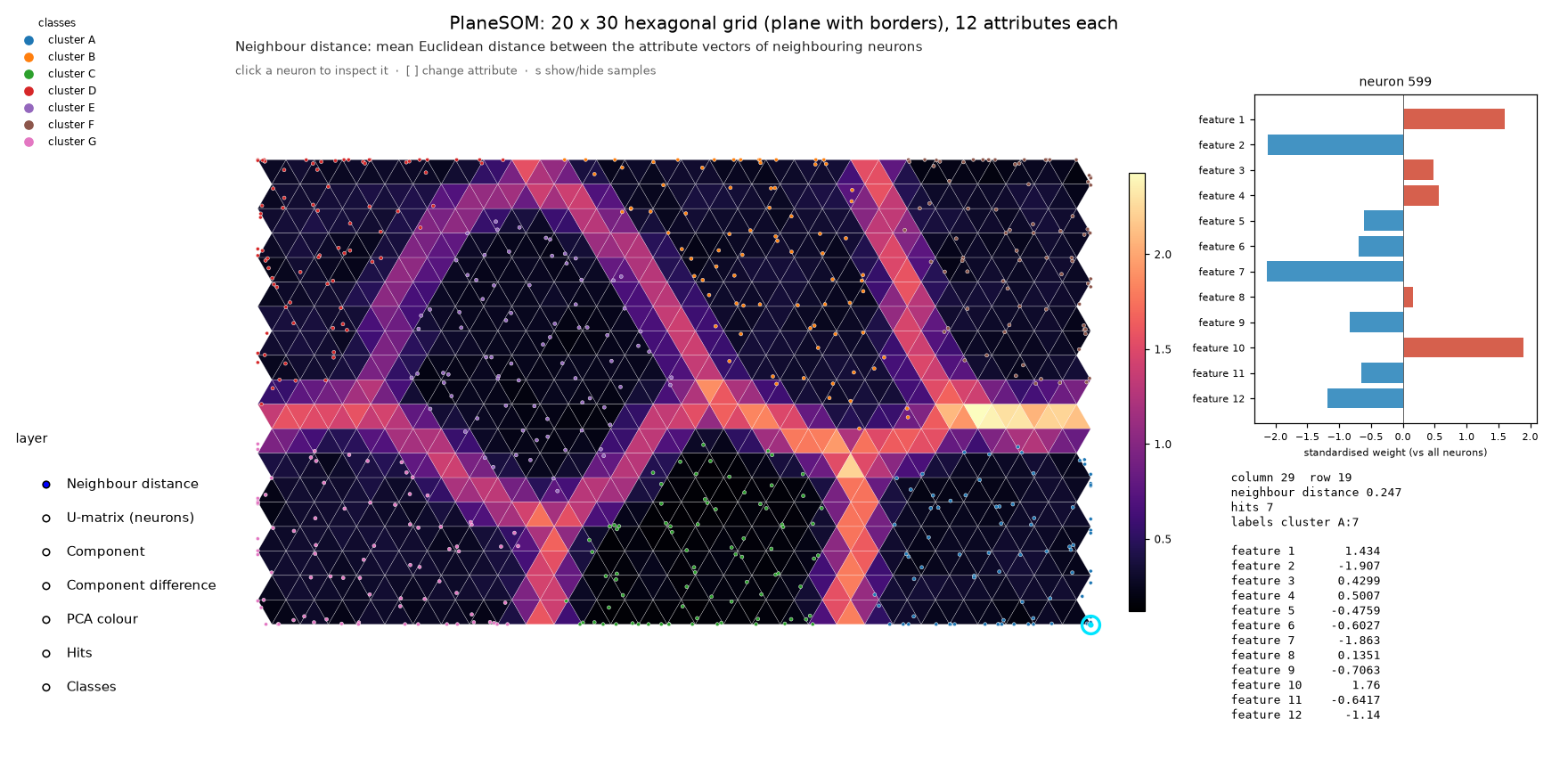
python examples/01_plane_som.py does all this with labelled demo data (--topology torus, --lattice rectilinear,
--data file.csv). Each neuron's weight vector is also stored on its lattice vertex (vertex.data), so the
neighbourhood searches of GeodesicDome (som.grid.get_neighbours_in_distance(v, d)) work directly on the map.
2.4 Kohonen's animals: a semantic map
from mt.geosom import datasets
from mt.geosom.GeoSOM import GeoSOM
from mt.geosom.gui import explore

x, animals, names = datasets.animals(symbols=True)    # 16 animals; 16 symbol values + 13 attributes each
som = GeoSOM(4, seed=3)                          # 162 neurons
som.initialise(dataset=x)
som.train(x, epochs=60)                               # binary attributes: no standardising
explore(som, x, labels=animals, feature_names=names, node_labels='all', matrix=False)
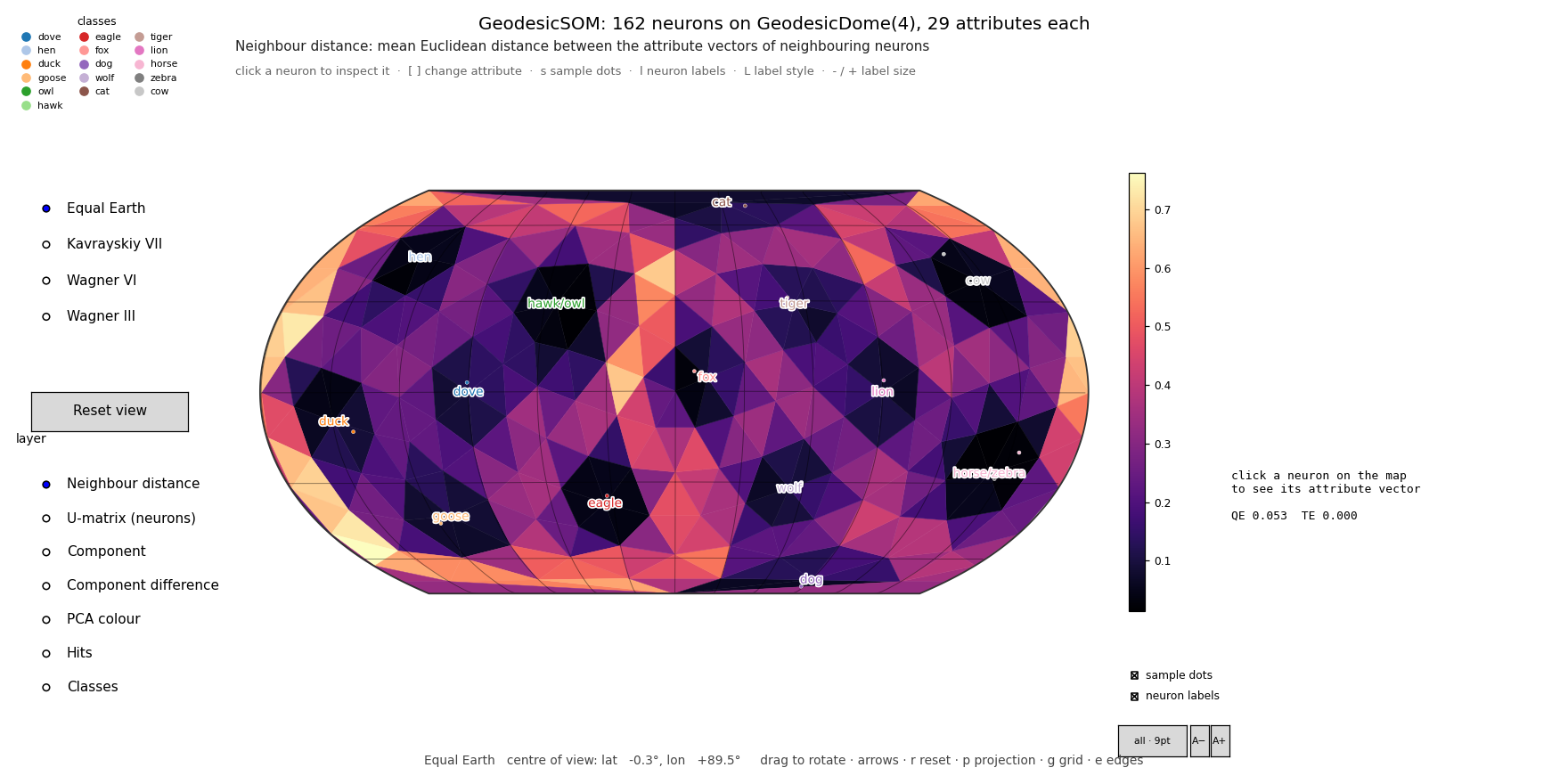
Sixteen animals are described by 13 yes/no attributes (small, medium, big; two legs, four legs, hair, hooves, mane,
feathers; likes to hunt, run, fly, swim) — the data of Ritter & Kohonen's "Self-organizing semantic maps" (1989).
Nothing says which animals are birds, hunters or grazers, yet the trained map puts them in those groups, and the
neuron labels show which animal each neuron stands for. datasets.load_sample('animals') gives the 13 attributes
alone. Owl and hawk have the same attributes, and so do horse and zebra; animals(symbols=True) sets the data up as
in the paper, adding a small "symbol" part (0.2 for the animal itself) to attribute vectors scaled to unit length.
python examples/05_kohonen_animals.py runs it (--symbols; --lattice hexagonal for the paper's flat 10 × 15 map).
3. API
SOM(grid) — mt.geosom.som
Abstract base class. grid is any mt.geodesicdome Manifold (GeodesicDome or Plane); subclasses implement
initialise(type, ...) and train(). InitializationType is Random or Linear.
GeoSOM and PlaneSOM both derive from LatticeSOM (mt.geosom.lattice_som), which holds the
training and every measurement, so the members in the GeoSOM table below apply to both. Distances between
neurons are measured in neighbour spacings (1 = the distance between neighbouring neurons).
PlaneSOM(row, col, dim=None, lattice=Lattice.Hexagonal, topology=Topology.Plane, seed=None, backend=None) — mt.geosom.PlaneSOM
SOM on GeodesicDome's Plane: Lattice.Hexagonal (6 neighbours, odd rows shifted by half a spacing) or
Lattice.Rectilinear (4 neighbours); Topology.Plane (with borders) or Topology.Donut (a torus: no borders, like
the sphere; use an even number of rows with a hexagonal torus). Neuron i sits at column i % col, row i // col.
| Member | Description |
|---|---|
row, col, lattice, topology, grid |
map size and the underlying Plane(col, row, lattice, topology) |
positions, width, height |
(n, 2) map coordinates of the neurons (neighbour spacing 1); size of the map |
faces |
(F, 3) triangles (hexagonal) or (F, 4) squares (rectilinear) between neighbouring neurons; none across a torus's wrap |
| everything else | as for GeoSOM: initialise (Linear uses the first 2 principal components), train, bmu, hits, u_matrix, edge_distance, face_distance, face_component_difference, QE/TE, ... |
Neuron(vertex, weights=None, dimension=0) — mt.geosom.neuron
vertex · weights · dimension · labels · distance(other): Euclidean distance that skips components
where other is missing (mt.geosom.util.MISSING, i.e. NaN).
GeoSOM(grid=8, seed=None, backend=None) — mt.geosom.GeoSOM
Spherical SOM whose neurons are the unique points of a GeodesicDome (grid is a dome or its frequency). Every
neuron has a weight vector with one value per attribute. Distances between neurons are great-circle distances in
rings (1 ring = mean spacing between neighbours), so sigma means the same at any frequency.
| Member | Description |
|---|---|
weights |
(neurons, attributes); after training also on every dome vertex as vertex.data (seam copies included) |
initialise(type=Linear, dataset=None, dim=None) |
Linear: spread over the first 3 principal components by position on the sphere; Random: inside the data range |
train(data, epochs=20, sigma=None, sigma_end=1.0, mode='batch', learning_rate=(0.5, 0.02), verbose=False) |
'batch' or 'online'; the neighbourhood width shrinks from sigma (in neighbour spacings; default a quarter of the largest distance between two neurons) to sigma_end; learning_rate is used by online mode; returns the SOM |
bmu(data, second=False), hits(data), node_labels(data, labels) |
best matching units and what each neuron wins (node_labels: {label: count} per neuron) |
bmu_labels(data, labels, mode='majority', max_per_node=3) |
a text label per neuron from the labels of the samples it is the best matching unit of (None if it wins none); mode: 'majority', 'all' (A/B), 'counts' (A×3 B×1), 'first' |
face_component_difference(), face_component_value() |
(triangles, attributes): per attribute, the mean |difference| between a triangle's three neurons, or their mean value |
edge_distance(), face_distance(), u_matrix() |
Euclidean distance between neighbouring neurons' weight vectors: per edge, per triangle (mean of its 3 edges), per neuron |
quantisation_error(data), topographic_error(data), history |
quality measures; history is the QE after each epoch |
points, faces, edges, neighbours, index_map |
the de-duplicated dome mesh the neurons live on |
Missing values (NaN) are ignored when finding best matching units and when updating weights. Standardise attributes that are on different scales before training, or the largest ones dominate the Euclidean distance.
GPU and multi-core
Best-matching-unit search, distances, the error measures and both training modes run on the compute backend of
GeodesicDome (mt.geodesicdome.backend): an NVIDIA GPU through torch or CuPy, the Apple Silicon GPU through torch
(MPS), otherwise NumPy on every CPU core. The choice is automatic; override it per map or globally:
som = GeoSOM(32, backend='cuda')      # or 'mps', 'cupy', 'cpu', 'numpy', 'torch:cpu'; None = automatic
som.to('cpu')                              # move an existing map
print(som.backend)                         # Backend(torch, cuda:0, float32)
MTGEODESIC_BACKEND=cpu python train.py # default for every map; also MTGEODESIC_NUM_THREADS, MTGEODESIC_DTYPE
Distances between neurons are computed on the device when needed rather than stored as a dense matrix, so very large
maps fit in memory (frequency 64, 40 962 neurons, trains in under 1 GB); the matrix is kept whole only when it fits
comfortably, and node_distance builds it on first use. The CPU computes in float64 and gives the same results as
before; a GPU uses float32 by default (set MTGEODESIC_DTYPE=float64 for double precision on CUDA).
SOMViewer(som, data=None, labels=None, feature_names=None, ...) — mt.geosom.gui
Built on GeodesicDome's ProjectionViewer, so the sphere rotates the same way (drag; arrows; r, p, g, e).
| Layer | Shows |
|---|---|
| Neighbour distance (default) | colour between the neurons: each triangle is coloured by the mean Euclidean distance between the attribute vectors of its three neurons. Dark basins are clusters, bright ridges are the borders between them |
| U-matrix (neurons) | the same per neuron: mean distance to its neighbours |
| Component | one attribute (component plane); [ / ] or click a bar in the side panel to choose it |
| Component difference | colour between the neurons from one attribute: mean |difference| of that attribute across each triangle |
| PCA colour | the whole attribute vector as a colour (first three principal components → RGB) |
| Hits / Classes | samples won by each neuron / their majority label (need data / labels) |
Click a neuron to see its attribute vector (standardised against all neurons) with its raw values, hits and labels.
Samples are drawn as dots at their best matching units (s hides them). select_node(i), set_layer(name, component)
and save(path) do the same from code.
Neuron labels. SOMViewer(..., node_labels='majority') or viewer.set_node_labels(mode, sample_names=None) writes,
on every neuron that is the best matching unit of at least one sample, the label(s) of those samples: 'majority',
'all', 'counts' or 'first' (see bmu_labels), coloured by class; None removes them. By default the text comes
from labels; pass sample_names (any text per sample, e.g. names or IDs) to label neurons with those instead. The
labels rotate with the sphere. On and off: the neuron labels check box below the colour bar, the l key, or
viewer.show_node_labels(True/False) / toggle_node_labels(), which keep the style; the labels: button, L or
set_node_labels(style) change the style (majority → all → counts). Size: the A− / A+ buttons, - / +,
viewer.set_label_size(points), or label_size= when opening the viewer (default 7 pt, kept between 3 and 30); the
labels are resized in place. The sample dots check box, s or set_show_samples(on) do the same for the sample
dots. PlaneSOMViewer has the same.
ComponentMatrixViewer(som, feature_names=None, mode='difference', ...) — mt.geosom.gui
A grid with one rotatable map per attribute (plus, first, the Euclidean distance over all attributes). In the default
'difference' mode each triangle between three neighbouring neurons is coloured by how much that attribute changes
between them, so you can see which attributes make which cluster borders; 'value' shows the attribute itself.
| Mouse / key | Action |
|---|---|
| drag in any map | rotate the sphere in every map |
| click | mark that neuron on every map; its value of each attribute appears in the map titles |
| double-click | open that attribute in a full SOMViewer (layer Component difference), rotation linked to the grid |
v / button |
switch between |difference| and value |
c |
one colour scale for all maps ↔ one per map |
arrows, , ., r, p, g, e |
rotate, roll, reset, projection, graticule, edges |
Options: include_total, shared_scale, ncols, projection, view, and data/labels (passed to the viewers a
double-click opens). Methods: rotate, set_view, set_rotation, set_mode, set_shared_scale, select_node,
open_single(k), on_rotate, save, show.
A drag frame redraws every map. At frequency 10 (1 002 neurons) with 13 maps a frame takes about 0.15 s, so use a lower frequency for smoother rotation with many attributes.
PlaneSOMViewer(som, data=None, labels=None, feature_names=None, ...), PlaneComponentMatrixViewer(som, ...) — mt.geosom.gui
The two views for a PlaneSOM, with the same layers, inspector, keys and options as SOMViewer and
ComponentMatrixViewer (there is nothing to rotate). The faces between neurons are triangles on a hexagonal grid and
squares on a rectilinear one; e shows their edges. In the matrix, click marks a neuron on every map and
double-click opens one attribute in a PlaneSOMViewer, selection linked.
CombinedViewer(som, data=None, labels=None, feature_names=None, ...) — mt.geosom.gui
One window with the map of a GeoSOM or PlaneSOM at the top (window.map: SOMViewer / PlaneSOMViewer) and its
component maps in a grid below (window.matrix: ComponentMatrixViewer / PlaneComponentMatrixViewer), linked:
rotation, selected neuron and projection. Options: those of the two viewers (layer, node_labels, matrix_mode,
include_total, ncols, projection, view, ...), plus map_height (fraction of the window for the top map,
default 0.48), figsize (default 16 × 9.5 in) and link. window.save(path) saves the whole window,
window.map.save / window.matrix.save one part. Every viewer also takes fig=, a matplotlib Figure or
SubFigure to draw into, to build layouts of your own.
explore(som, data=None, labels=None, feature_names=None, ...) — mt.geosom.gui
Opens the two views that suit the SOM (SOMViewer + ComponentMatrixViewer for a GeoSOM, PlaneSOMViewer +
PlaneComponentMatrixViewer for a PlaneSOM), linked, and returns Views(map, matrix). By default both are in one
CombinedViewer window (views.window; views.save(path) saves it); layout='separate' opens two windows. Options:
single, matrix (which views), link, layout, figsize, layer, matrix_mode, projection, view, select (a neuron to select), node_labels and
sample_names and label_size (neuron labels on the single map), show=False
(build without opening windows, e.g. to save).
train_and_explore(data, labels, feature_names, lattice='sphere', frequency=10, rows=20, cols=30, topology='plane', epochs=30, standardise=True, ...) trains first and returns (som, views). python -m mt.geosom /
geosom is the command-line version (--help for its options).
datasets — mt.geosom.datasets
Sample data shipped with the package (CSV files in mt/geosom/data):
| name | samples × attributes | labels | source |
|---|---|---|---|
animals |
16 × 13 (binary) | one per animal | Ritter & Kohonen (1989) |
clusters |
560 × 12 | 7 clusters | synthetic (the same as clusters()) |
iris |
150 × 4 | 3 species | Fisher (1936), public domain |
penguins |
342 × 4 | 3 species | Palmer penguins (Gorman et al. 2014), CC0 |
wine |
178 × 13 | 3 cultivars | UCI Wine, CC BY 4.0 |
load_sample(name) loads one, samples() lists them, sample_path(name) gives the CSV file's path, and
load(name_or_path, label_column=None) accepts a sample name, 'colours' or a CSV path (as --data does). Sources,
citations and licences are in data/README.md.
animals(symbols=False, symbol_weight=0.2) loads the animals, with symbols=True set up as Ritter & Kohonen's
semantic map. clusters(n_clusters=7, dim=12, per_cluster=80, seed=3) (labelled Gaussian clusters) and colours()
(random RGB) generate data; read_csv(path, label_column=None) reads your own (numeric columns become attributes, empty cells and
NA are missing values). All return Dataset(data, labels, feature_names); standardise(x) gives every attribute
zero mean and unit variance.
link_views(*viewers, rotation=True, selection=True) — mt.geosom.gui
Keeps viewers in step, in the same or separate windows: turning one turns the others (SOMViewer,
ComponentMatrixViewer, GeodesicDome's ProjectionViewer), and selecting a neuron in one selects it in the others
(all four SOM viewers).
from mt.geosom.gui import SOMViewer, link_views

a = SOMViewer(som, x, layer='Component difference', component=0)   # som: the trained GeoSOM of section 2.1
b = SOMViewer(som, x, layer='Component difference', component=1)
link_views(a, b)
4. Changelog
See CHANGELOG.md.
5. Citing
If you use GeoSOM in research, please cite:
Y. Wu and M. Takatsuka, "Spherical self-organizing map using efficient indexed geodesic data structure," Neural Networks, vol. 19, no. 6–7, pp. 900–910, 2006. doi:10.1016/j.neunet.2006.05.021
@article{wu2006spherical,
  author  = {Wu, Yingxin and Takatsuka, Masahiro},
  title   = {Spherical self-organizing map using efficient indexed geodesic data structure},
  journal = {Neural Networks},
  volume  = {19},
  number  = {6--7},
  pages   = {900--910},
  year    = {2006},
  month   = {07},
  doi     = {10.1016/j.neunet.2006.05.021}
}
The repository's CITATION.cff also lets GitHub's "Cite this repository" button produce a reference to
the software itself.
6. Licence
Copyright © 2022–2026 Masahiro Takatsuka.
GeoSOM is free software under the GNU Affero General Public License v3.0 or later (LICENSE), with an additional attribution term (NOTICE). In short:
- You may use, study, modify and share it, including commercially.
- If you distribute it, or a modified version, or software that includes it, or let people use a modified version over a network, you must release the complete source code of that work under the same licence.
- You must keep the attribution to the author and to the 2006 paper, both in the source code and in the legal notices your software displays.
- There is no warranty.
Commercial licence. To use GeoSOM in proprietary software without these obligations, contact masa@takatsuka.org about a commercial licence.
Contributing. Contributions are welcome under the terms in CONTRIBUTING.md.
1 maintainer

Metadata
1 maintainer
Release files for geosom 1.2.1
For a detailed explanation of source distributions (sdists) and built distributions (wheels), please see the package formats documentation.
Source distribution (sdist)
| File | Size | Uploaded | Provenance | |
|---|---|---|---|---|
| geosom-1.2.1.tar.gz | 169.8 kB | With provenance | Details |
Built distribution (wheel)
| File | Interpreter | ABI | Platform | Reset |
|---|---|---|---|---|
| geosom-1.2.1-py3-none-any.whl | Python 3 | none | any | Details |
Total release size: 291.3 kB
Release files / geosom-1.2.1.tar.gz
| Download URL | geosom-1.2.1.tar.gz |
|---|---|
| Size | 169.8 kB |
| Tags | Source |
|
SHA-256 checksum How to use checksums |
c3652bdace5e99fdab8c7334266003e615fcec0bf651a9e9cf85f301e2d104d2
|
|
BLAKE2b-256 checksum How to use checksums |
038bb73c48873606ab359ef3773dcb46234dc5b0dfd0b9f278142b06f5165567
|
| Upload date | |
|
Uploaded using Trusted Publishing? What is trusted publishing? |
Yes |
| Uploaded via |
twine/7.0.0 CPython/3.13.14
|
Provenance
Provenance describes where a file came from. On PyPI, provenance is shared via attestations, which provide a verifiable record of the build or publishing details. View details, limitations and caveats.


PyPI Publish Attestation
PyPI verified that this artifact, at this checksum, originated from the publisher listed below.
Signed by GitHub Actions, verified by PyPI on Oct 7, 2026.
Transparency logRelease files / geosom-1.2.1-py3-none-any.whl
| Download URL | geosom-1.2.1-py3-none-any.whl |
|---|---|
| Size | 121.5 kB |
| Tags | Python 3 |
|
SHA-256 checksum How to use checksums |
7350784fb1807890766ff36b3ee43d802347c0b3edc4cbd136b49eac74280384
|
|
BLAKE2b-256 checksum How to use checksums |
12177a95f108c99af94398dd3fa5bb219744903c91ad01a28149f9f4f0ca7602
|
| Upload date | |
|
Uploaded using Trusted Publishing? What is trusted publishing? |
Yes |
| Uploaded via |
twine/7.0.0 CPython/3.13.14
|
Provenance
Provenance describes where a file came from. On PyPI, provenance is shared via attestations, which provide a verifiable record of the build or publishing details. View details, limitations and caveats.
PyPI Publish Attestation
PyPI verified that this artifact, at this checksum, originated from the publisher listed below.
Signed by GitHub Actions, verified by PyPI on Oct 7, 2026.
Transparency logSecurity for geosom 1.2.1
Provenance
Provenance describes where a file came from. On PyPI, provenance is shared via attestations, which provide a verifiable record of the build or publishing details. View details, limitations and caveats.
Full provenance
All 2 files in this release have been uploaded with provenance metadata.
Attestation for geosom-1.2.1.tar.gz
PyPI Publish Attestation
PyPI verified that this artifact, at this checksum, originated from the publisher listed below.
Signed by GitHub Actions, verified by PyPI on Oct 7, 2026.
Transparency logA note on package security
PyPI is a repository for distributing packages, not a service for auditing them. While third-party security researchers and our staff do their best to detect and remove malicious packages, PyPI cannot guarantee the quality, security or suitability of any given package.
To learn more about protecting yourself from malicious actors, visit our package security documentation.














