
Dango


Open-source data platform for small teams.
Dango gives you a complete data stack — ingestion, warehouse, transformations, and dashboards — with the operational machinery a self-assembled stack doesn't have: sync queue management, lock recovery, empty-replace protection, schema drift detection, credential health checks, and backups. It combines dlt for data loading, DuckDB as the analytics database, dbt for SQL transformations, and Metabase for dashboards. One install, one command to start.
Upgrading from v0.1.x? v1.0.0 is a complete rewrite. Back up your data and run
dango initto create a new v1 project. See the migration guide for details.

Quick Start
Prerequisites: Python 3.11-3.13, Docker (for Metabase and dbt docs)
macOS / Linux:
curl -sSL https://getdango.dev/install.sh | bash
Windows (PowerShell):
irm https://getdango.dev/install.ps1 | iex
Prefer pip?
mkdir my-project && cd my-project
pip install getdango
dango init
dango start
Open http://localhost:8800 to see your data platform.
For detailed installation instructions, see the documentation.
Use Dango with your coding agent
dango mcp setup
Connects Claude Code, Cursor, or Windsurf to your project over MCP — your agent can set up sources
(credentials stay in your .env, never in the chat), sync, build and document dbt models, manage
schedules, check PII findings and schema drift, diagnose failures, and run read-only queries with
PII columns masked. Remote tools default to a dry run. See the
full guide for the complete tool reference
and worked examples.
Features
- 34 data sources — Stripe, Google Sheets, Google Analytics, Shopify, PostgreSQL, MySQL, CSV, REST APIs, and more
- Auto-generated dbt models — staging models created automatically when you add a source
- Data catalog — browse tables, columns, and profiling stats; view dbt lineage and test results
- Web dashboard — monitor syncs, manage sources, and view platform health
- Metabase integration — dashboards and SQL queries, auto-configured and ready to use
- Scripts — schedule custom Python scripts alongside your syncs; runs on a schedule with access to your warehouse
- Cloud deployment — deploy to DigitalOcean or any server with
dango deploy - Authentication — admin login, user management, 2FA, API keys
- Schema drift detection — get alerted when source schemas change
- PII scanning — detect personally identifiable information across your tables
- Notebooks — Marimo notebooks connected to your DuckDB warehouse
- Monitoring — metric tracking with trend detection and drill-downs
- Scheduled syncs — cron-based scheduling with queued execution, retry, and timeout handling
- Webhooks — Slack notifications for sync results and alerts
- Local backup —
dango backuplists and restores local project backups - File watcher — auto-sync when CSV files change on disk
Screenshots
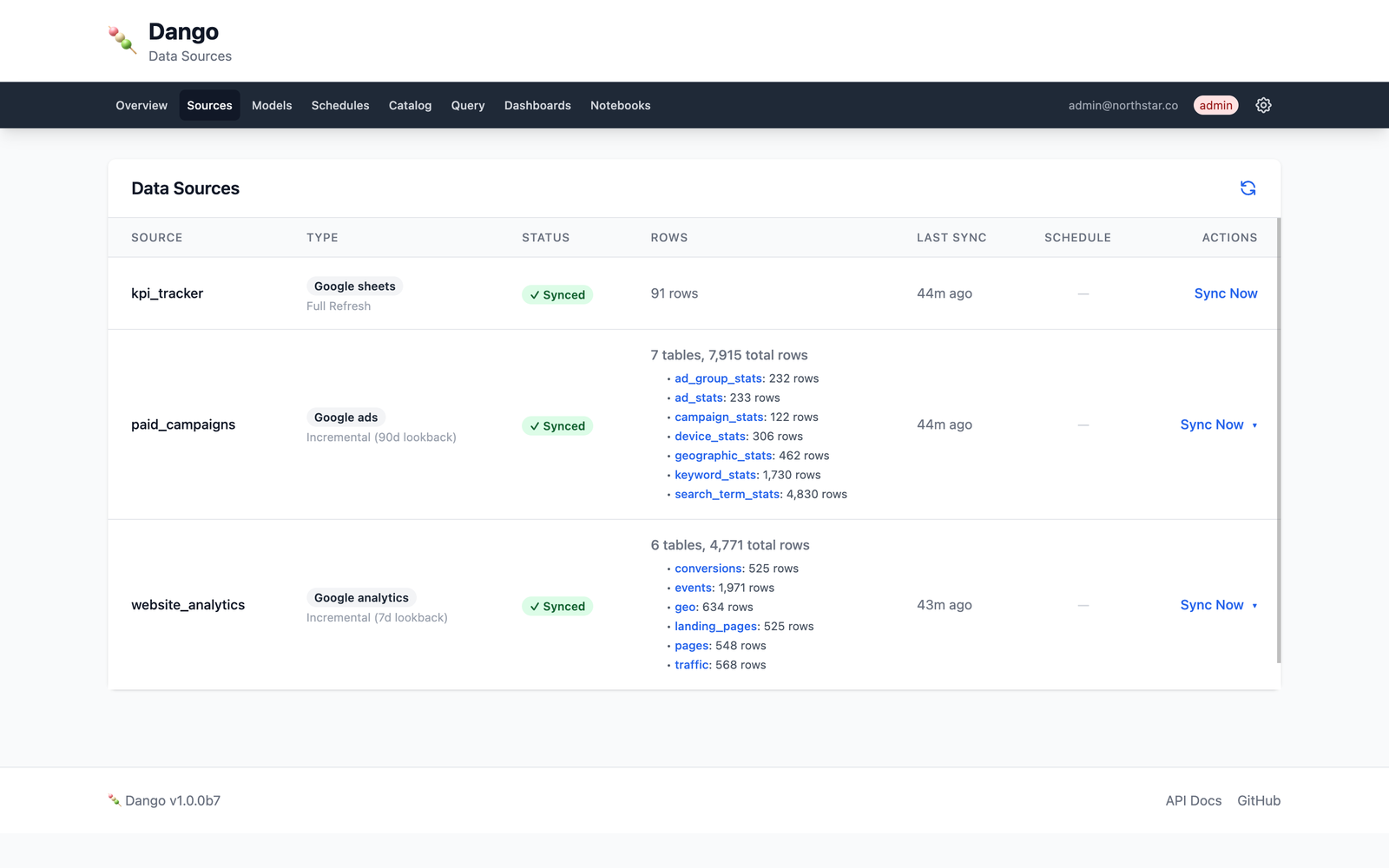
Data Sources page — monitor syncs, row counts, and schedule status for all your data sources.
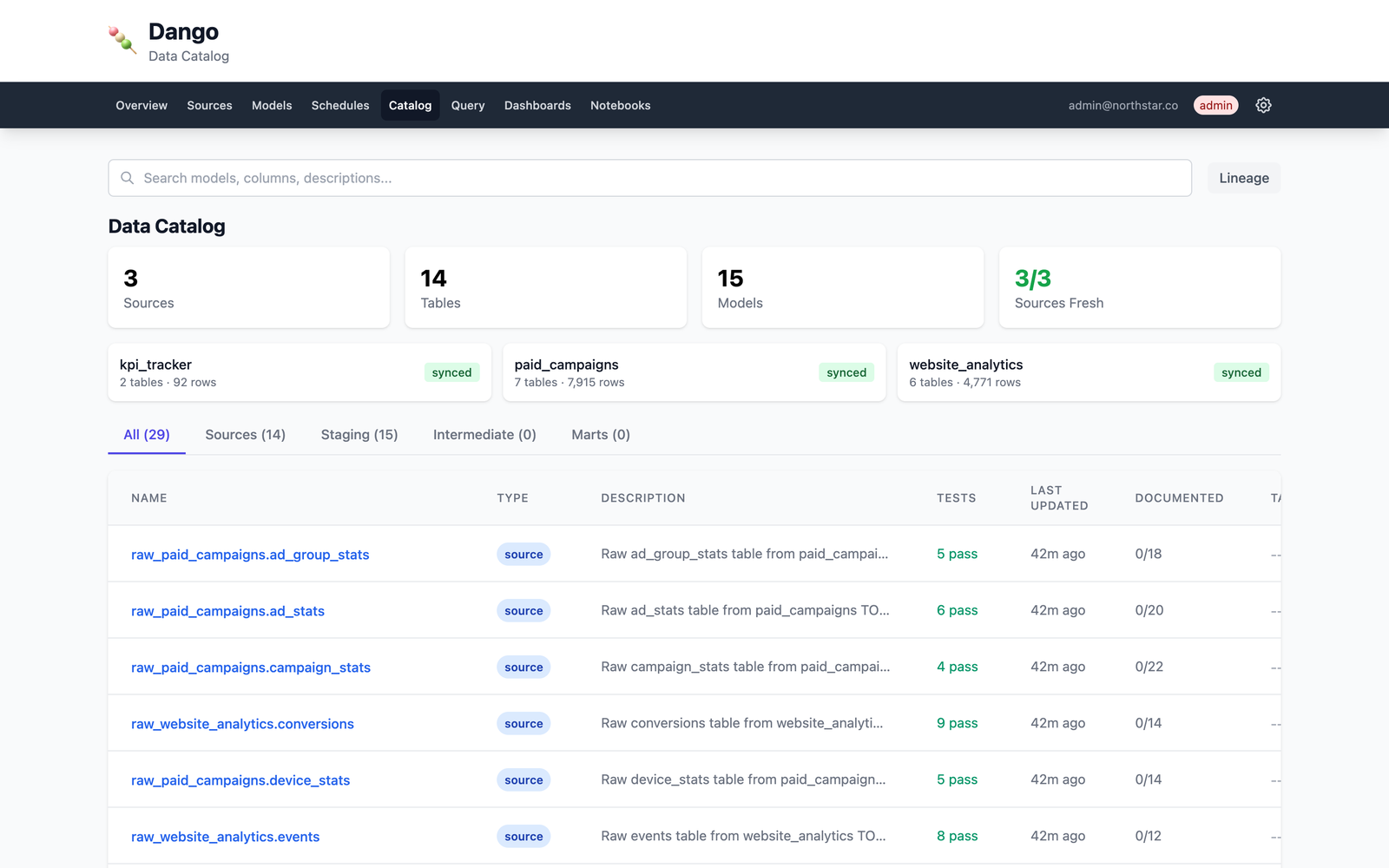
Data Catalog — browse tables, explore columns with profiling stats, view data lineage.
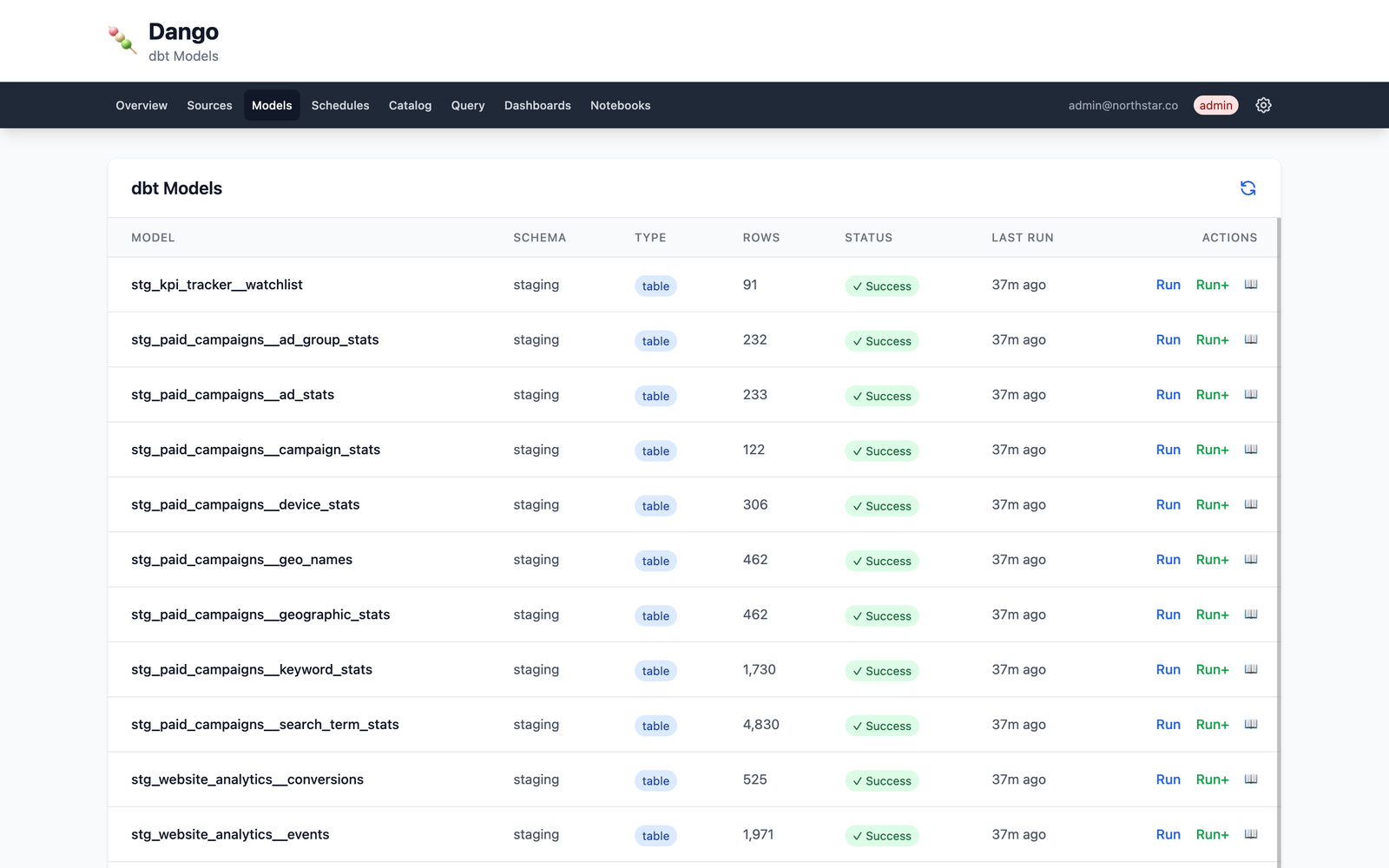
dbt Models — view model status, run transformations, and track test results.
Architecture
Sources  →  dlt  →  DuckDB  →  dbt  →  Metabase
(APIs,       (load)  (warehouse) (transform) (dashboards)
 CSVs,
 databases)
Data lives in a DuckDB file on the machine that runs Dango; no external warehouse is needed. With
dango deploy, that machine is your server, and its data and credentials live there. Server backups
go to DigitalOcean Spaces only if you enable them. Telemetry is described below.
Tech Stack
| Component | Tool | Role |
|---|---|---|
| Ingestion | dlt | Load data from 34 sources |
| Warehouse | DuckDB | Embedded analytics database |
| Transformation | dbt | SQL modeling and testing |
| Dashboards | Metabase | BI and SQL queries |
| Web UI | FastAPI | Monitoring and management |
| Containers | Docker | Metabase and service orchestration |
Documentation
Full documentation at docs.getdango.dev.
Contributing
See CONTRIBUTING.md for development setup and guidelines.
License
Apache 2.0 — see LICENSE for details.
Telemetry
dango init asks once whether to allow anonymous usage data from Dango (install ping and
periodic heartbeat: version, OS, configured source types; never source names, credentials or
data) and from the tools it uses: dbt, dlt and Metabase each report their own anonymous
telemetry. One answer covers all four. To opt out later (or in), run
dango telemetry off --all (or on --all); dango telemetry status shows each provider.
Every outbound host is listed in docs/network-egress.yml.
Security and limitations
Roles. Dango has three roles: Admin, Editor and Viewer. Viewers read dashboards and status. Editors can run Python (notebooks and scripts) as the server user and can run SQL over every table, so treat Editor as a trusted, code-capable role. Dango has no table- or row-level entitlements (DuckDB has no users or grants), so anyone who can query can query everything.
- Query results in the web UI are not PII-masked. The MCP
querytool masks PII, by output column name only. - Code in the shared Marimo notebook process cannot be attributed to a single user.
- A cloud deploy without a domain serves HTTP only: logins and cookies are unencrypted. Set a domain for HTTPS.
- Only restore backups you made yourself; an archive can contain files that later run as code.
To report a vulnerability, see SECURITY.md.
MCP tools by blast radius
An MCP client acts with the permissions of whoever runs dango mcp. The warehouse and your sources
hold untrusted text, so a prompt-injected agent can call any tool you allow.
| Tool | What it can change | Guard |
|---|---|---|
Read-only: list_*, get_*, validate_*, docs_coverage, remote_status, remote_logs, remote_history |
Nothing | Log output is redacted |
query, remote_query |
Nothing; reads the warehouse | One SELECT only; file and URL access blocked; PII masked by column name; row cap |
create_model, update_model, remove_model |
What dbt runs against the warehouse | Model SQL validated: no file or URL access, no COPY/ATTACH/INSTALL/LOAD, restricted Jinja |
create_source, update_source, set_source_enabled, remove_source |
Which sources sync and where | Secrets are refused as config values and stay in .env; rest_api is edited only with dango source edit |
run_sync, run_transform, run_doctor, generate_docs, scan_pii |
API quota, load, warehouse contents | run_sync accepts dry_run |
accept_schema_drift, set_pii_override, update_source_table_docs, add_schedule, update_schedule, set_schedule_enabled, remove_schedule, reload_schedules |
Local project configuration | None beyond your client's approval prompt |
delete_pii_override |
Re-masks a column by removing a not_pii override |
Refuses to delete a pii override (that would unmask the column); ask the user to remove it |
remote_sync |
Runs a real sync on your server | Needs a deployment; no dry run |
remote_push |
Replaces models, scripts and sources on your server | Dry run by default; needs confirm=True to apply |
Do not auto-approve mutation tools; an agent with them can change what runs against your warehouse.
Known limitations
Dango is honest about what it doesn't do yet. The short version — full detail at docs.getdango.dev/reference/limitations:
- Single-writer concurrency until the Quack migration lands (DuckDB 2.0)
- No streaming, CDC, or reverse ETL
- 34 sources today, added on demand
- BYOS deployments need to configure their own backup destination (warned at deploy time)
Links
1 maintainer

Metadata
1 maintainer
Release files for getdango 1.0.14
For a detailed explanation of source distributions (sdists) and built distributions (wheels), please see the package formats documentation.
Source distribution (sdist)
| File | Size | Uploaded | Provenance | Actions |
|---|---|---|---|---|
| getdango-1.0.14.tar.gz | 1.4 MB | Without provenance | Details for getdango-1.0.14.tar.gz |
Built distribution (wheel)
| File | Interpreter | ABI | Platform | Actions Reset |
|---|---|---|---|---|
| getdango-1.0.14-py3-none-any.whl | Python 3 | none | any | Details for getdango-1.0.14-py3-none-any.whl |
Total release size: 3.0 MB
Release files / getdango-1.0.14.tar.gz
| Download URL | getdango-1.0.14.tar.gz |
|---|---|
| Size | 1.4 MB |
| Tags | Source |
|
SHA-256 checksum How to use checksums |
999129963493523ddf60292764546d222c62737544a389b2a4a95d05f4213e69
|
|
BLAKE2b-256 checksum How to use checksums |
3b3baa258aa940cc72a778ef165a559f6e4b607a54b4d8441685bafa490d3fbd
|
| Upload date | |
|
Uploaded using Trusted Publishing? What is trusted publishing? |
No |
| Uploaded via |
twine/7.0.0 CPython/3.11.14
|
Release files / getdango-1.0.14-py3-none-any.whl
| Download URL | getdango-1.0.14-py3-none-any.whl |
|---|---|
| Size | 1.6 MB |
| Tags | Python 3 |
|
SHA-256 checksum How to use checksums |
be21945a158d844d22364484554760fe67c307825245fa9f92586c4251cfb750
|
|
BLAKE2b-256 checksum How to use checksums |
7379adccac4da371e0ad5dab145f171d66ebef0fd7921171435fc7fba4a43894
|
| Upload date | |
|
Uploaded using Trusted Publishing? What is trusted publishing? |
No |
| Uploaded via |
twine/7.0.0 CPython/3.11.14
|
Security for getdango 1.0.14
Provenance
Provenance describes where a file came from. On PyPI, provenance is shared via attestations, which provide a verifiable record of the build or publishing details. View details, limitations and caveats.
No provenance found
None of the files in this release were uploaded with provenance metadata.
A note on package security
PyPI is a repository for distributing packages, not a service for auditing them. While third-party security researchers and our staff do their best to detect and remove malicious packages, PyPI cannot guarantee the quality, security or suitability of any given package.
To learn more about protecting yourself from malicious actors, visit our package security documentation.














