
Capture a codebase's implementation decisions as structured decisions and serve them to coding agents over MCP.
Verified details
These details have been verified by PyPIProject links
GitHub Statistics
Maintainers

Project description

Metatron



Metatron is a self-hosted system that captures a codebase's real implementation decisions — preferred patterns, rejected approaches, edge cases, internal conventions — as structured decisions, and serves them to coding agents over MCP (Model Context Protocol). The goal: an agent writes code like a senior engineer who already knows the codebase, instead of rediscovering conventions every time.
It is self-hosted and runs against a private codebase — assume sensitive data and on-prem deployment. (Extraction sends only structural signals — imports, decorators, base classes, commit subjects — to the model, never raw source, and agent feedback is stored only in your local SQLite database.)
- Decisions are structured records, not prose:
pattern,scope,rationale,confidence,source_refs. - Nothing becomes canonical without a human. Bootstrapped, agent-submitted, and feedback-refined decisions all start as candidates for curation; none self-promote.
See PLAN.md for the design and CLAUDE.md for working ground rules.
How it works — the loop
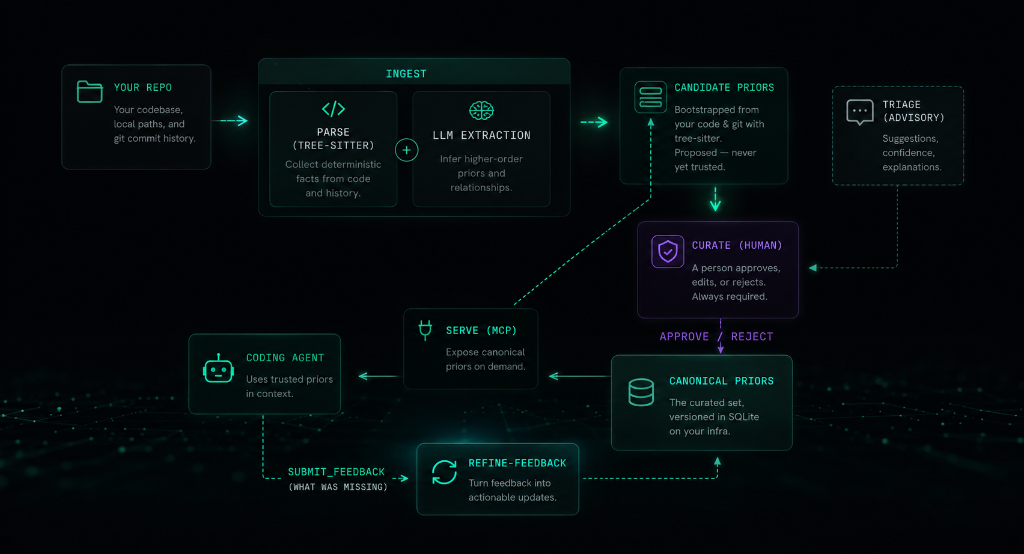
Bootstrap once with ingest, curate candidates into the canonical set, then serve
them to your agent over MCP. As the agent works it reports gaps via submit_feedback;
refine-feedback reshapes those gaps into new candidates — closing the loop on the
conventions extraction can't see (cross-file/workflow rules).
Prerequisites
- Git (installed on your system, to analyze repository commit history and parse files)
- An Anthropic API key — only for the LLM extraction steps (
ingest,triage,refine-feedback).serve,ui, andcandidatesare fully local and need no key.
Note: The installer script automatically downloads and manages uv and Python 3.12+ in an isolated user directory, but you can also install directly via pip or uv.
Installation
To install metatron as a global tool:
pip install getmetatron
Or if you use uv:
uv tool install getmetatron
Alternatively, you can use our installer script which handles Python, uv, and path configuration automatically:
curl -sSf https://getmetatron.com/install.sh | sh
Manual Installation & Development
To run it locally from source or contribute to the project:
git clone https://github.com/kerbelp/metatron.git
cd metatron
uv sync           # create the venv and install dependencies
uv run metatron --help
To install from your local clone as a global tool:
uv tool install .
Run with Docker
A Dockerfile is included (it's also what the Glama.ai listing
builds). The image's entrypoint is the metatron CLI and its default command serves
the MCP server over stdio, so docker run with no arguments starts the server.
docker build -t getmetatron .
Decisions live in a SQLite database, so mount a volume to persist it across runs. Ingest a repo (mount it read-only and pass your API key), curate, then serve:
# 1. ingest a repo into a persisted DB (needs an Anthropic API key)
docker run --rm \
  -e ANTHROPIC_API_KEY \
  -v metatron-data:/data -e METATRON_DB=/data/metatron.db \
  -v /path/to/your/repo:/repo:ro \
  getmetatron ingest /repo

# 2. serve the curated decisions over stdio (no API key needed)
docker run -i --rm \
  -v metatron-data:/data -e METATRON_DB=/data/metatron.db \
  getmetatron serve --repo <id>
ingest prints the <id> to pass to serve. Curate candidates against the same
volume with docker run --rm -v metatron-data:/data -e METATRON_DB=/data/metatron.db getmetatron candidates list (then … candidates approve <decision-id>). The -i flag
on serve is required — stdio needs an open stdin. To point a coding agent at the
container, use it as the MCP command:
{
  "mcpServers": {
    "metatron": {
      "command": "docker",
      "args": ["run", "-i", "--rm",
               "-v", "metatron-data:/data",
               "-e", "METATRON_DB=/data/metatron.db",
               "getmetatron", "serve", "--repo", "<id>"]
    }
  }
}
Metatron vs. Code Graphs & RAG
| Dimension | Code RAG (e.g., Cursor, Copilot) | Code Graphs (e.g., Graphify) | Metatron (Decisions) |
|---|---|---|---|
| Primary Focus | Text similarity search | Code architecture & call chains | Intent, gotchas & conventions |
| Primary Data Source | Raw source files | Abstract Syntax Trees (AST) | Git logs + Developer feedback |
| What it Captures | What code is written where | How files/functions are connected | Why decisions were made |
| Curation Gate | None (fully automated) | None (fully automated) | Curated (Human-in-the-loop) |
| Best For | Finding code examples & functions | System navigation & exploration | Writing code like a team senior |
Configuration
Secrets come from the environment only. The CLI auto-loads a .env from the
working directory (it never overrides an already-exported variable, and .env is
gitignored):
# .env in the repo root
ANTHROPIC_API_KEY=sk-ant-...
…or export ANTHROPIC_API_KEY=sk-ant-... directly.
Non-secret settings live in an optional metatron.toml (environment variables
METATRON_DB / METATRON_MODEL override it):
[metatron]
db_path = "~/.metatron"        # catalog dir: one self-contained .db file per repo
model   = "claude-sonnet-4-6"  # default extraction model
Each repo gets its own SQLite file under the catalog directory, so a repo's decisions
are a single, shippable artifact (see export).
Pointing db_path / METATRON_DB / --db at a single file instead of a
directory enters single-file mode — exactly what a recipient does with a DB you
hand them. An existing single metatron.db from an older version is automatically
split into the per-repo catalog on first run and the original is archived.
Quick start
metatron ingest /path/to/your/repo      # 1. bootstrap candidates (needs API key)
metatron candidates list                # 2. review …
metatron candidates approve <id>        #    … and curate
metatron serve --repo <id>              # 3. serve canonical decisions over MCP
ingest prints the <id> to use for serve. To wire it into a coding agent
automatically, see Connecting a coding agent.
Command reference
$ metatron --help
usage: metatron [-h] {ingest,serve,repo,ui,triage,refine-feedback,candidates} ...

positional arguments:
  {ingest,serve,repo,ui,triage,refine-feedback,candidates}
    ingest              bootstrap candidate decisions from a repo
    serve               serve one repo's decisions to agents over MCP
    repo                inspect the repos in the store
    ui                  launch the local curation web UI
    triage              run the advisory judge over candidate decisions (does not auto-curate)
    refine-feedback     reshape captured agent feedback into structured candidate decisions (Opus)
    candidates          review and curate candidate decisions
Choosing the repo
Repo-scoped commands (serve, candidates list, triage, refine-feedback)
resolve which repo to act on git-style, so you rarely pass --repo. Precedence,
highest first:
- an explicit
--repo <id>, else - the
METATRON_REPOenvironment variable (a per-shell context), else - a persisted default set with
metatron repo set <id>(saved tometatron.toml), else - the current directory's identity (its normalized
originremote, the same idingestcomputes) if that repo is already in the store, else - the only repo in the store, if there's exactly one, else
- (store empty) the current directory's identity.
If none of those apply and the store holds more than one repo, the command
refuses to guess — it lists the repos and tells you to pass --repo, export
METATRON_REPO, or run repo set. Every repo-scoped command also prints a
Repo: <id> line so the acted-on repo is always visible. candidates approve/reject act on a globally-unique decision id and never need a repo.
repo — list repos and choose a default
$ metatron repo list
github.com/acme/app  (canonical=606, candidates=290)  (default)
github.com/acme/lib  (canonical=42,  candidates=11)

$ metatron repo set github.com/acme/lib   # persist a default
$ metatron repo unset                      # clear it
repo list shows each repo id (the same ids serve uses) with its canonical and
candidate counts, marking the persisted default. Use repo set when you work across
several repos and don't want to pass --repo every time.
ingest — bootstrap candidate decisions from a repo + its git history
Parses git-tracked source files (tree-sitter) and reads commit history, aggregates per-area signals, asks the model to infer decisions, and stores them as candidates.
$ metatron ingest /path/to/your/repo
Ingested repo 'github.com/acme/app' from /path/to/your/repo: parsed 214 files, read 500 commits across 38 scopes, created 271 candidate decisions.
Review them with: metatron candidates list --repo github.com/acme/app
Serve them with:  metatron serve --repo github.com/acme/app
| Flag | Default | Meaning |
|---|---|---|
--max-commits N |
500 |
how much git history to read |
--since DATE |
— | only commits after e.g. 2024-01-01 |
--path SUBTREE |
— | limit ingest to a subtree, e.g. src/components |
--repo ID |
origin remote | override the repo identity |
Decisions and usage are keyed by a repo identity derived from the repo's origin
remote (constant across developers; a checkout path isn't), with a --repo override
and a directory-name fallback when there's no remote. One DB holds many repos; each
is isolated on retrieval.
candidates — review and curate (humans decide what becomes canonical)
$ metatron candidates list
1d2ab8e8-e674-4fbd-9875-52bf065e94c1  [high]  (CheckoutSuccessRedirect (paid submit/finish flow))
    After a paid submission completes via CheckoutSuccessRedirect, redirect the user to /my-dashboard/?thanks=1 rather than the public app page.
d672a984-dd56-4974-8111-5ff730a6ed50  [high]  (src/utils/misc/index.ts (makePrettyUrl and any slug generation))
    Any slug-from-name code (e.g. `makePrettyUrl`) must strip "/" characters so a name like "LangChain / LangSmith" does not produce a link_name with slashes that break routing.

$ metatron candidates approve 1d2ab8e8-e674-4fbd-9875-52bf065e94c1
Decision 1d2ab8e8-e674-4fbd-9875-52bf065e94c1 approved.

$ metatron candidates reject d672a984-dd56-4974-8111-5ff730a6ed50
Decision d672a984-dd56-4974-8111-5ff730a6ed50 rejected.
candidates list shows the current repo — decisions are scoped
to one repo and never listed across repos; pass --repo <id> to target another or
--scope <path> to filter. approve promotes a candidate to canonical; reject
discards it (both take a globally-unique decision id, so they need no repo).
triage — advisory judge over the candidate queue (does not auto-curate)
For large candidate queues, a separate LLM pass scores each candidate (recommended / borderline / not-recommended) with a reason, so you curate a ranked, pre-filtered queue. It does not curate — a human still approves.
$ metatron triage --repo github.com/acme/app
Triaged 271 candidates: approve=88, borderline=96, reject=87
  judge cost: ~$0.42
Review by recommendation in the UI's Candidates filter.
Flags: --repo <id> (limit to one repo), --limit N (max candidates to judge).
serve — expose canonical decisions to agents over MCP
metatron serve --repo github.com/acme/app    # MCP server over stdio, one repo
metatron serve                                # same, repo inferred from context
One served instance serves exactly one repo, so an agent only ever sees that repo's
decisions. --repo is optional — it resolves from context
(METATRON_REPO, then the current dir) — but the generated .mcp.json passes it
explicitly so the launched server is unambiguous. It also records usage events (queries,
coverage) to the same DB for the UI. Normally you don't run this by hand — an
MCP-capable agent launches it (see below).
whoami — the identity stamped onto served events
metatron whoami                                            # show current identity
metatron whoami --set-email you@corp.com --set-name "You"  # set it
Metatron serves agents across an org, so every event serve records (queries,
submissions, feedback) is stamped with who was running Metatron — an actor_id,
email, and display name. It's local metadata (no login/auth): stored in
~/.metatron/config.toml and seeded automatically from your git config on first
use. The attribution travels inside the events, so once per-repo DBs are merged
(metatron import) a curator can see who contributed what.
export — share a repo's decisions (no MCP setup)
metatron export --repo github.com/acme/app --out app.db
Copies that repo's self-contained DB to app.db (a consistent snapshot, vacuumed
compact). --repo is optional — it resolves from context;
--out defaults to ./<repo-name>.db. Hand the file to a teammate who doesn't want
to wire up MCP — they just point Metatron at it:
metatron --db app.db ui      # browse the decisions locally, or
metatron --db app.db serve   # serve them to their own agent
In single-file mode the repo is inferred from the file, so no --repo is needed.
import — merge an employee's DB into your catalog
metatron import app.db
The curator side of the hand-off: folds another employee's exported DB (a single-repo
file, or a whole catalog dir) into your catalog, deduping by id — so re-importing the
same file is a no-op. Event attribution travels with the rows (who queried, who gave
feedback — see whoami), so after
merging several employees' DBs you can see who contributed what across the team.
ui — local curation web UI
$ metatron ui
Metatron curation UI on http://127.0.0.1:1337  (Ctrl-C to stop)
Binds to localhost (bumping to the next free port if taken) and reads/writes the
same store as the CLI. Tabs:
- Decisions — browse paginated; filter by status / scope / triage recommendation / origin; full-text search; approve/reject with a click.
- Usage — how often agents query, coverage (share of queries that returned a decision), most-queried scopes, recent queries.
- Quality — decision quality by origin (ingest vs feedback) and one-time ingest cost.
- Feedback — the agent feedback stream, filterable All / Unhandled / Handled. Handled reports expand to show the candidate decisions they were refined into, each with its curation status and usefulness (served / 👍 / 👎). Unhandled reports get a Refine into decisions button to run the refiner on that one report on the spot.
Flag: --port N (starting port, default 1337).
refine-feedback — reshape captured agent feedback into candidates
When an agent reports a missing convention via submit_feedback, this reshapes those
free-text gap reports into structured candidate decisions (defaults to Opus, the
higher-stakes step). Nothing it produces is canonical — it all goes to curation.
$ metatron refine-feedback
Refined 3 feedback report(s) into 13 candidate decision(s) for curation.
  refiner cost: ~$0.19
Review them in the UI Candidates tab (origin: feedback).
Flags: --repo <id>, --limit N (max reports to refine), --model <name>
(override the refiner model).
Connecting a coding agent (MCP)
So a coding agent reliably consults the decisions (rather than rediscovering conventions), run the onboarding script from inside the target repo:
bash /path/to/metatron/metatron_setup.sh # or pass the repo dir as an arg
It is additive and idempotent, and adds (never deletes) four things to the target repo:
- A "query Metatron first" block in
CLAUDE.md(between markers). - A
UserPromptSubmithook in.claude/settings.jsonthat re-injects the directive every turn. - A
Stophook that, when the agent finishes a task where it consulted Metatron but never sent feedback, reminds it (once per session) to callsubmit_feedback. - The
metatronMCP server in.mcp.json.
The repo id is derived from the origin remote (override with METATRON_REPO).
Then reconnect the agent so it loads the hooks and server.
MCP tools exposed
| Tool | Purpose |
|---|---|
get_decisions_for_context(file_path_or_area, task_description) |
the relevant canonical decisions as compact structured context, with a query_id to reference in feedback |
submit_feedback(query_id, ratings, what_was_missing, missing_scope) |
rate each served decision 1-10 by its [index] and report a convention Metatron should have known — ratings auto-weight which decisions are served first (within relevance, never crossing the canonical gate); gaps captured for refine-feedback |
submit_candidate_decision(pattern, scope, rationale, confidence) |
record a convention the agent learned as a new candidate (never auto-promoted) |
A get_decisions_for_context call returns context like this:
metatron:query b1f2… · rev 1101886 (reference the query id in submit_feedback)
[1] [medium] Record payment/sale events into the shared payments ledger when handling subscription billing.
  scope: src/routes/api/subscription
  why: A fix commit explicitly records LemonSqueezy sales into the payments ledger, establishing this as the expected billing-recording pattern for this scope.
[2] [high] serviceForProduct must classify every billable product — including the standard $19 'Publish Now' listing — and never return null, because recordPayment silently drops unclassified products from the payments ledger.
  scope: src/routes/api/subscription/index.ts
  why: Returning null caused listing revenue to never reach the ledger or the admin Payments tile.
Manual MCP client config
If you wire the server up yourself instead of using the script:
For PyPI / Global Installation:
{
  "mcpServers": {
    "metatron": {
      "command": "metatron",
      "args": ["serve", "--repo", "github.com/acme/app"]
    }
  }
}
Note: If you have a custom database location, you can specify it via the METATRON_DB environment variable.
For Local Clone / Development:
{
  "mcpServers": {
    "metatron": {
      "command": "uv",
      "args": ["run", "--project", "/abs/path/to/metatron", "metatron", "serve", "--repo", "github.com/acme/app"],
      "env": { "METATRON_DB": "/abs/path/to/metatron.db" }
    }
  }
}
Development
uv run pytest # run the test suite
See CONTRIBUTING.md for setup, the PR workflow, and contribution guidelines.
Tech stack
Python 3.12+, the official MCP Python SDK, tree-sitter for parsing, SQLite (behind a storage interface, portable to Postgres later), pytest, and uv. These are decided — see CLAUDE.md.
License
Free and open source under the MIT License. Read every line, run it on your own hardware, fork it, and send a PR.
Project details
Verified details
These details have been verified by PyPIProject links
GitHub Statistics
Maintainers


Download files
Download the file for your platform. If you're not sure which to choose, learn more about installing packages.
Source Distribution
Built Distribution
Filter files by name, interpreter, ABI, and platform.
If you're not sure about the file name format, learn more about wheel file names.
Copy a direct link to the current filters
File details
Details for the file getmetatron-0.3.0.tar.gz.
File metadata
- Download URL: getmetatron-0.3.0.tar.gz
- Upload date:
- Size: 1.4 MB
- Tags: Source
- Uploaded using Trusted Publishing? Yes
- Uploaded via: twine/6.1.0 CPython/3.13.12
File hashes
| Algorithm | Hash digest | |
|---|---|---|
| SHA256 |
fb1c32de08f9dded573ac1579e655d0936196fa64d4efd16ff46a48fbff5d224
|
|
| MD5 |
2aea0fa273828b78e6a95233640532d7
|
|
| BLAKE2b-256 |
edc4477d40507a9743a94ecdb044025adf1ef62598b700b4958f00b6bc042c79
|
Provenance
The following attestation bundles were made for getmetatron-0.3.0.tar.gz:
Publisher:
publish.yml on kerbelp/metatron
-
Statement:
-
Statement type:
https://in-toto.io/Statement/v1 -
Predicate type:
https://docs.pypi.org/attestations/publish/v1 -
Subject name:
getmetatron-0.3.0.tar.gz -
Subject digest:
fb1c32de08f9dded573ac1579e655d0936196fa64d4efd16ff46a48fbff5d224 - Sigstore transparency entry: 1743117402
- Sigstore integration time:
-
Permalink:
kerbelp/metatron@5795e7400334367adef0975f99b14c755e208fb3 -
Branch / Tag:
refs/tags/v0.3.0 - Owner: https://github.com/kerbelp
-
Access:
public
-
Token Issuer:
https://token.actions.githubusercontent.com -
Runner Environment:
github-hosted -
Publication workflow:
publish.yml@5795e7400334367adef0975f99b14c755e208fb3 -
Trigger Event:
push
-
Statement type:
File details
Details for the file getmetatron-0.3.0-py3-none-any.whl.
File metadata
- Download URL: getmetatron-0.3.0-py3-none-any.whl
- Upload date:
- Size: 132.4 kB
- Tags: Python 3
- Uploaded using Trusted Publishing? Yes
- Uploaded via: twine/6.1.0 CPython/3.13.12
File hashes
| Algorithm | Hash digest | |
|---|---|---|
| SHA256 |
509cd1d0033693a3a43b12523ad2e02ee48f9b016c930dd974fa8a7067ee609c
|
|
| MD5 |
49ca2e1e6d86b6094bc9874e6a262f55
|
|
| BLAKE2b-256 |
4dcdb0eb455aab2939dac9885967cc558e0a54cfe0d0265ffe68b00c77457cf3
|
Provenance
The following attestation bundles were made for getmetatron-0.3.0-py3-none-any.whl:
Publisher:
publish.yml on kerbelp/metatron
-
Statement:
-
Statement type:
https://in-toto.io/Statement/v1 -
Predicate type:
https://docs.pypi.org/attestations/publish/v1 -
Subject name:
getmetatron-0.3.0-py3-none-any.whl -
Subject digest:
509cd1d0033693a3a43b12523ad2e02ee48f9b016c930dd974fa8a7067ee609c - Sigstore transparency entry: 1743117478
- Sigstore integration time:
-
Permalink:
kerbelp/metatron@5795e7400334367adef0975f99b14c755e208fb3 -
Branch / Tag:
refs/tags/v0.3.0 - Owner: https://github.com/kerbelp
-
Access:
public
-
Token Issuer:
https://token.actions.githubusercontent.com -
Runner Environment:
github-hosted -
Publication workflow:
publish.yml@5795e7400334367adef0975f99b14c755e208fb3 -
Trigger Event:
push
-
Statement type:






