
Unofficial CLI for Google Flow — drive Veo image-to-video generations from the terminal.
Verified details
These details have been verified by PyPIProject links
GitHub Statistics
Maintainers

Project description
gflow-cli
Unofficial Python CLI for Google Flow. Drive Veo (image-to-video, text-to-video) and Imagen (text-to-image) from your terminal: scripted, batched, pipeline-ready.









⚠️ Read this before you install. gflow-cli is unofficial, alpha, and reverse-engineered — not affiliated with Google. It drives a headed browser on your own Google Flow session, so treat it as your own account risk: automation is subject to Google's ToS, and endpoints or UI can change without notice. It requires a Google AI Ultra or Pro subscription with Flow access, and every generation bills your account. Read the full DISCLAIMER.
💳 What failure costs you. Credits are only spent on Veo video generation — images and composition ops are free, so most breakage costs nothing. When Flow's UI drifts mid-run, the CLI fails fast and loudly with distinct exit codes (e.g. selector drift = exit 23) instead of resubmitting, and batch items are recorded locally before submission so a broken run never silently burns credits on a stale state. See KNOWN_ISSUES for the current risk list.
🌐 Headed browser today. gflow drives Flow through a persistent Playwright Chromium profile, because Google's auth and reCAPTCHA gates require it. The Architecture section shows where you can help.
Why gflow-cli?
You pay for Google AI Ultra or Pro, you have Veo credits, and you run real batch work. gflow-cli gives you:
- Batch generation. Loop prompts straight from the shell:
for p in $(cat prompts.txt); do gflow image t2i "$p"; done. Image batching plusgflow video t2v/i2v/r2vall ship today. - Consistent subjects.
gflow character createmints a Flow Character (face and body reference) so the same person appears from one generation to the next. - Prompt tools.
--tool creative-directorrewrites a terse prompt into a vivid one (Google's 5-component formula) before generating — on any command. Bring your own with My Tools. - Pipelines. Wire Veo into your content automation, AI-video stack, or batch experiments.
- Terminal-native. After one
gflow auth login, you stay in the shell. No clicking through dialogs.
Same Veo and Imagen models, same quality, same Ultra/Pro billing, now programmatic.
60-second quick start
# 1 · Install (uv recommended; also: pip install gflow-cli)
uv tool install gflow-cli
uv tool run --from gflow-cli playwright install chromium     # one-time, ~150 MB

# 2 · Authenticate (one-time, opens a real Chrome window)
gflow auth login --browser chrome

# 3 · Generate
gflow image t2i "a hot air balloon over Tokyo at sunrise"
# or:
gflow video t2v "Slow cinematic push-in on a sunlit forest clearing" --aspect 16:9
# or mint a reusable Character (face + body reference):
gflow character create --project <id> --name "Aria" --face-prompt "..." --body-prompt "..."
Outputs land under $GFLOW_CLI_OUTPUT_DIR, or you can route them to S3, MinIO, or Google Cloud Storage with GFLOW_CLI_STORAGE_URI. The first call takes 30 to 90 seconds while Chromium warms up; later calls reuse the warm session.
Why
--browser chrome? Google rejects Playwright's bundled Chromium. The CLI fails fast with a friendly error (AuthBrowserRejectedError, exit code 14) if you pick anything else.
For the full 10-minute walkthrough with troubleshooting and multi-account setup, see USER_GUIDE: Journey 1.
Examples
One command in, real Flow output back. Left: gflow image t2i generating a photorealistic scene in your library. Right: a frame-to-frame transform.
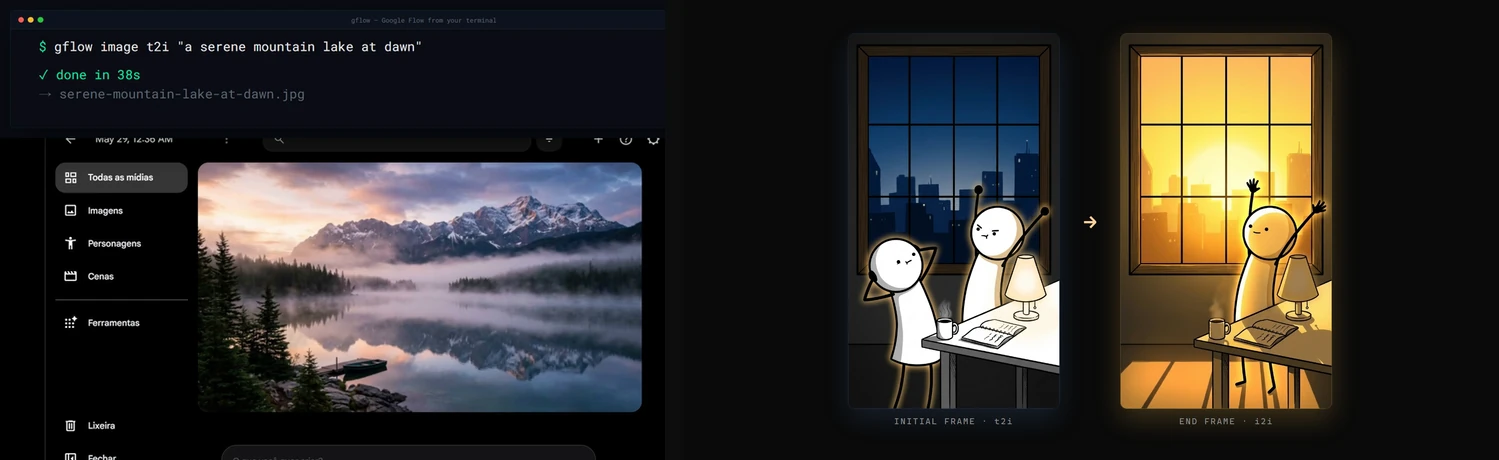
Demo
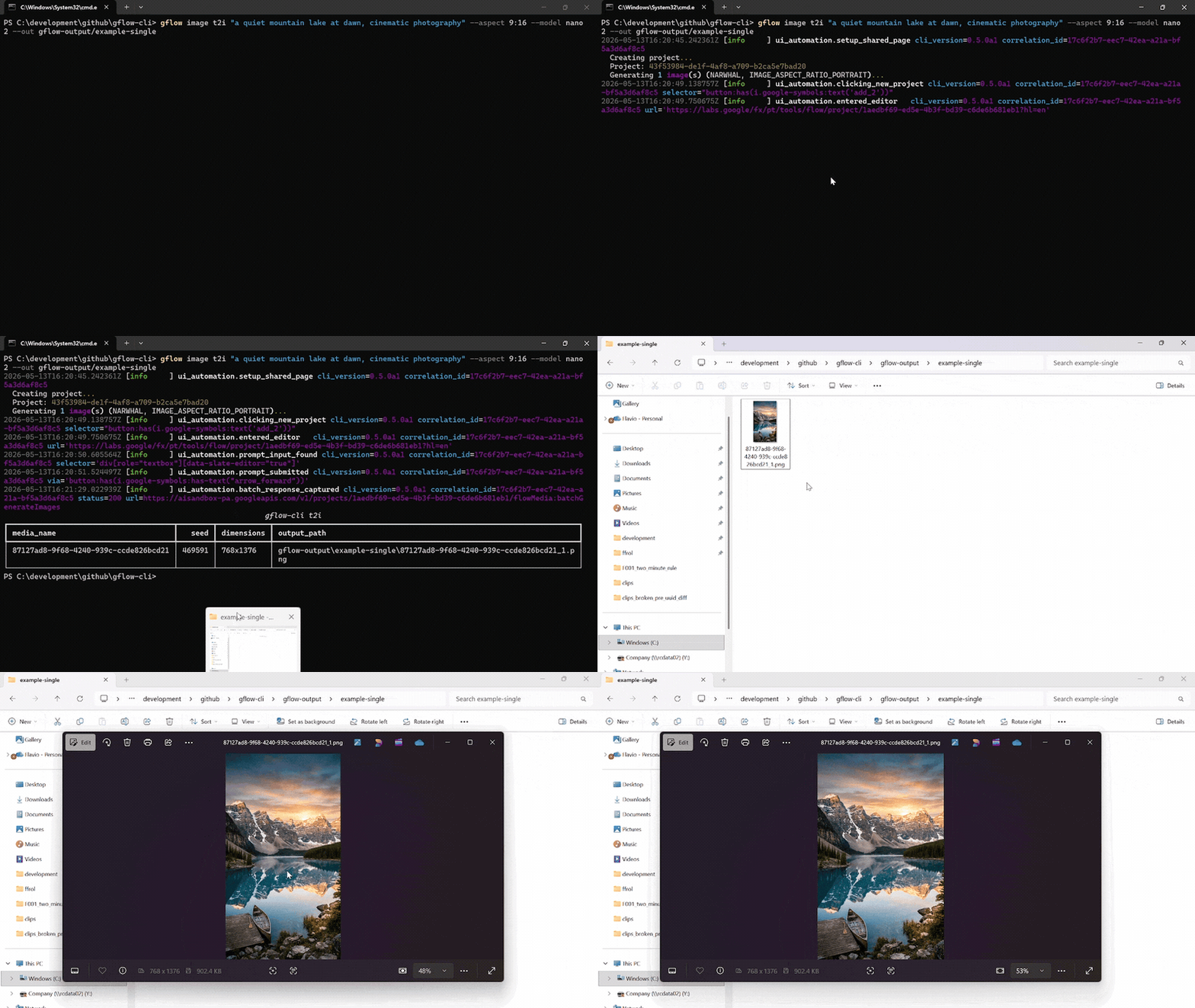
A single gflow image t2i "..." --aspect 9:16 --model nano2 call against a logged-in Pro/Ultra profile. The terminal streams the run's structlog JSON, then lists the written PNG. Chromium drives the Flow editor silently in the background.
Reproduce the recording with scripts/record_demo.ps1 (Windows, OBS, ffmpeg, gifski). More formats, including the side-by-side split-screen: docs/DEMOS.md.
Documentation
docs/INDEX.md is the master routing layer. Quick links:
| Topic | Read |
|---|---|
| 🎯 Getting started | User Guide · Usage · Configuration |
| Storage & catalog | External Storage · Data Layer |
| 🎭 Characters | Characters, reusable subjects (gflow character) |
| 🤖 Agentic & automation | Instructions (gflow instructions, persistent brief cards) · Movie (gflow movie, multi-scene manifests) · Tools (--tool, prompt rewriting) · MCP server (gflow mcp run / gflow serve) |
| 🔐 Auth & sessions | Authentication · Known issues |
| 🏗️ Internals | Architecture · Security · Debugging |
| 📦 Releases | Changelog · Roadmap · Release protocol · Project status |
| 🤝 Contributing | Contributing · Development · GitHub workflow |
For AI agents & LLMs
gflow-cli ships four agent entry points. Pick the one your tool reads first.
| File | Audience | Tools |
|---|---|---|
| AGENTS.md | Universal coding-agent spec | Cursor · Codex · Aider · Gemini CLI · Jules · Devin · Windsurf · Zed · Warp · opencode · Copilot |
| CLAUDE.md | Claude Code's auto-loaded memory | Claude Code |
| llms.txt | LLM-readable summary (llmstxt.org format) | Paste into ChatGPT, Claude, or Gemini to onboard the model |
skills/gflow-cli/SKILL.md |
Claude Code Skill | Symlink into ~/.claude/skills/ |
Onboard any agent in one line. Paste this into your agent of choice:
"Read AGENTS.md and docs/INDEX.md, then help me with my Flow batch."
Architecture & current limitations
gflow CLI  →  Provider (interchangeable)  →  Flow (ui_automation) / Mock (tests) / [planned: Official Veo]
                                              ↓
                                      Playwright Chromium (headed login, headless after)
                                              ↓
                              aisandbox-pa.googleapis.com  (Google's private Flow API)
Current transport: ui_automation drives Flow through a persistent Playwright Chromium profile. It is production-stable and verified end-to-end every release (see the per-release LIVE_VERIFICATION_* evidence files).
What's blocked: a pure HTTP transport for video generation. The video upload endpoint returns HTTP 401 under non-Chrome browsers plus a reCAPTCHA mint we cannot reproduce headlessly. Three earlier HTTP strategies (evaluate_fetch, bearer, sapisidhash) live under src/gflow_cli/api/transports/experimental/ for research, off the production path.
How you can help: if you have driven aisandbox-pa.googleapis.com from outside a real Chrome session, or you understand Google's anti-bot stack here, please open an issue. A working REST transport would unlock serverless deployments, true horizontal concurrency, and roughly 10x the project's reach. Details: docs/ARCHITECTURE.md § Headed-browser dependency.
Project status
Alpha. Image (t2i, i2i, upload, upscale, batch) and video (t2v, i2v, r2v, batch, chain) run end-to-end on ui_automation, with a 5-model Veo picker plus --duration and --count. Beyond single generations: gflow movie renders multi-scene manifests, gflow instructions manages persistent Agent-Mode brief cards (credits-free), gflow character handles reusable subjects, gflow scene does credit-free server-side stitching, --tool applies prompt-rewriting tools, and an MCP server (gflow mcp run stdio / gflow serve HTTP-SSE) exposes the core surface to AI agents with a CI-enforced CLI↔MCP parity contract.
Full milestone history lives in CHANGELOG.md. Where the project is heading: ROADMAP.md.
License & legal
MIT License © 2026 Flavio Oliva (ffroliva). The MIT license covers gflow-cli's code only. It grants no rights to Flow, Veo model output, or any Google service. Google's own terms (Labs Additional Terms, Ultra/Pro subscription terms) govern your generations. See the DISCLAIMER.
Acknowledgements
edge-tts, design inspiration for community SDKs over private cloud APIs.googleapis/python-genai, the official Veo SDK that a future provider release may alias.- Keysight, Google Labs – Flow AI with Veo3: A Network Traffic Analysis, an independent capture that helped validate the route patterns.
Stats






If gflow-cli saves you time, please ⭐ the repo. It is the cheapest way to support the project.
Project details
Verified details
These details have been verified by PyPIProject links
GitHub Statistics
Maintainers
Release history Release notifications | RSS feed


Download files
Download the file for your platform. If you're not sure which to choose, learn more about installing packages.
Source Distribution
Built Distribution
Filter files by name, interpreter, ABI, and platform.
If you're not sure about the file name format, learn more about wheel file names.
Copy a direct link to the current filters
File details
Details for the file gflow_cli-0.40.0.tar.gz.
File metadata
- Download URL: gflow_cli-0.40.0.tar.gz
- Upload date:
- Size: 3.9 MB
- Tags: Source
- Uploaded using Trusted Publishing? Yes
- Uploaded via: twine/6.1.0 CPython/3.13.12
File hashes
| Algorithm | Hash digest | |
|---|---|---|
| SHA256 |
abff4f8be8ba6df8bca675e2e8900b8cf46943bb5435a1ba29025c6ea8a52760
|
|
| MD5 |
f38382e5a9bd81f58fe79c7f31380f4c
|
|
| BLAKE2b-256 |
b8cd9a459858ac65b62cbd75f4846fa8717a49b094705c65cfed1cd12a9101d8
|
Provenance
The following attestation bundles were made for gflow_cli-0.40.0.tar.gz:
Publisher:
release.yml on ffroliva/gflow-cli
-
Statement:
-
Statement type:
https://in-toto.io/Statement/v1 -
Predicate type:
https://docs.pypi.org/attestations/publish/v1 -
Subject name:
gflow_cli-0.40.0.tar.gz -
Subject digest:
abff4f8be8ba6df8bca675e2e8900b8cf46943bb5435a1ba29025c6ea8a52760 - Sigstore transparency entry: 2199868916
- Sigstore integration time:
-
Permalink:
ffroliva/gflow-cli@0ecf4550e2ca32fddb61312c4b0bd6ad320db04a -
Branch / Tag:
refs/tags/v0.40.0 - Owner: https://github.com/ffroliva
-
Access:
public
-
Token Issuer:
https://token.actions.githubusercontent.com -
Runner Environment:
github-hosted -
Publication workflow:
release.yml@0ecf4550e2ca32fddb61312c4b0bd6ad320db04a -
Trigger Event:
push
-
Statement type:
File details
Details for the file gflow_cli-0.40.0-py3-none-any.whl.
File metadata
- Download URL: gflow_cli-0.40.0-py3-none-any.whl
- Upload date:
- Size: 471.3 kB
- Tags: Python 3
- Uploaded using Trusted Publishing? Yes
- Uploaded via: twine/6.1.0 CPython/3.13.12
File hashes
| Algorithm | Hash digest | |
|---|---|---|
| SHA256 |
e0c86953e4cb8cc901896a4d294cbc18ce66ee09f26be32bd84f5914d5db1669
|
|
| MD5 |
92b64e19ccb8f9f0517fa433820bdb22
|
|
| BLAKE2b-256 |
2f21aba2f384141136c0e2d54c9e91498218c05521795ccba7c2310c11f35f22
|
Provenance
The following attestation bundles were made for gflow_cli-0.40.0-py3-none-any.whl:
Publisher:
release.yml on ffroliva/gflow-cli
-
Statement:
-
Statement type:
https://in-toto.io/Statement/v1 -
Predicate type:
https://docs.pypi.org/attestations/publish/v1 -
Subject name:
gflow_cli-0.40.0-py3-none-any.whl -
Subject digest:
e0c86953e4cb8cc901896a4d294cbc18ce66ee09f26be32bd84f5914d5db1669 - Sigstore transparency entry: 2199868949
- Sigstore integration time:
-
Permalink:
ffroliva/gflow-cli@0ecf4550e2ca32fddb61312c4b0bd6ad320db04a -
Branch / Tag:
refs/tags/v0.40.0 - Owner: https://github.com/ffroliva
-
Access:
public
-
Token Issuer:
https://token.actions.githubusercontent.com -
Runner Environment:
github-hosted -
Publication workflow:
release.yml@0ecf4550e2ca32fddb61312c4b0bd6ad320db04a -
Trigger Event:
push
-
Statement type:






