
gglint


Keep the MCP servers of every coding agent in your repository in sync.
Claude Code, Codex, Cursor and OpenCode each read MCP servers from their own config file, in
their own format. In a repository set up for more than one of them, those files drift apart:
a server is added to .mcp.json but not to .cursor/mcp.json, a version is pinned in one
file and not the other, or an agent has no MCP config at all. gglint finds every difference
and adds the missing servers for you, written in each agent's own format.
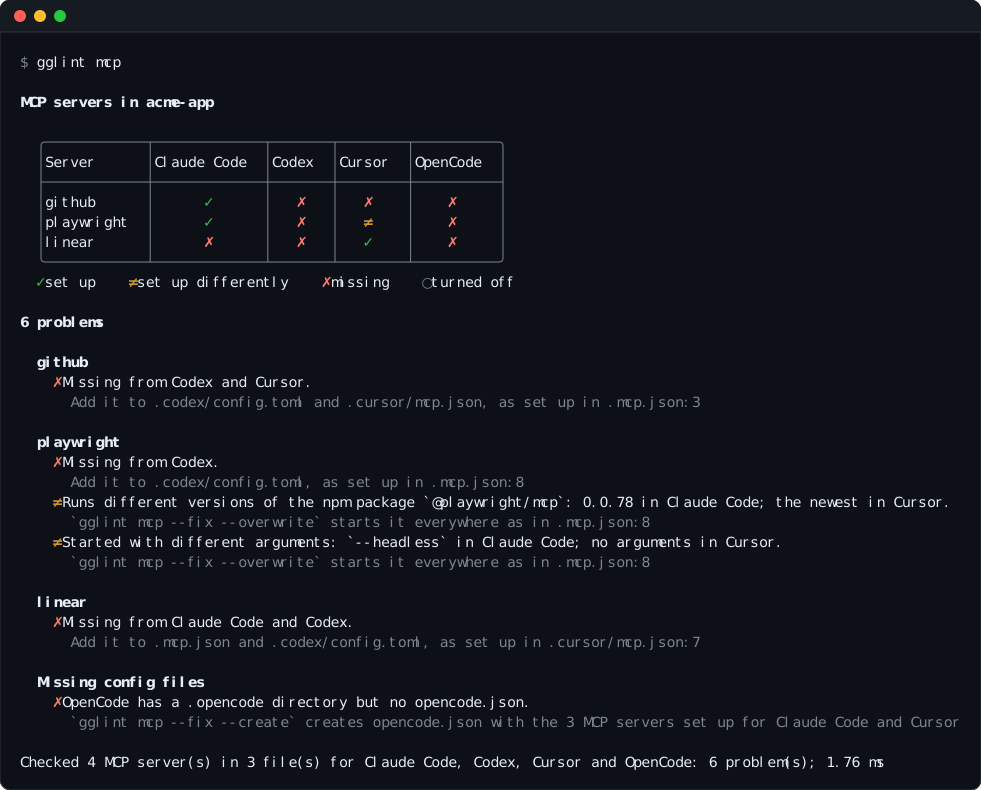
- One view of every agent. A table shows which agent gets which server, and how each one differs.
- Safe fixes.
--fixonly adds servers. It never changes or removes an existing entry, and keeps your comments and formatting. - Each agent's own format. A server is translated between JSON and TOML, between each agent's syntax for environment variables, and between local and remote server types.
- Fast and read-only by default. gglint reads a handful of files at fixed paths and finishes in under a millisecond. It never starts a server or downloads anything.
- Built for CI. It exits with status 1 when it finds a problem, and
--format linesprints one problem per line.
In November 2026 we checked the 258 most-starred GitHub repositories set up for two or more of these agents. Of the 179 that configure MCP servers, 128 (72%) had at least one of the problems gglint reports.
Installation
gglint is a single compiled program, published on PyPI with prebuilt wheels for Linux (x86_64 and aarch64, glibc and musl), macOS (Intel and Apple silicon) and Windows (x64 and ARM64). Any Python 3.8 or later can install it.
pipx install gglint
uv tool install gglint
pip install gglint
To run it once without installing it, use uvx gglint mcp or pipx run gglint mcp.
To build it from source, install a Rust toolchain (1.88 or later) and run:
cargo install --git https://github.com/corridor/gglint --locked
Quick start
From the root of a repository:
gglint mcp          # report every problem
gglint mcp --fix    # add the missing servers
git diff            # review what changed
Usage
gglint mcp [--fix [--create]] [--format table|lines] [PATH]
gglint mcp --servers [PATH]
| Option | Effect |
|---|---|
| (none) | Report every problem and draw each server in each agent. |
--fix |
Add the servers missing from existing config files, then report what's left. |
--fix --create |
Also create the config file of an agent that has its own directory but no MCP config. |
--format lines |
Print one line per problem instead of the table, for editors and CI. |
--servers |
List every configured server, file by file, without comparing them. |
PATH |
The repository's root. Defaults to the current directory. |
| Exit status | Meaning |
|---|---|
0 |
Every agent gets the same servers, set up the same way. |
1 |
gglint found a problem, one is left after --fix, or there are no MCP config files. |
Colours are used when standard output is a terminal and NO_COLOR isn't set. The summary
line, with counts and timing, goes to standard error.
What gglint checks
| Rule | Reported when | Fixed by |
|---|---|---|
missing-server |
A server in one agent's config file is missing from another agent's. | --fix |
missing-config |
An agent has its own directory but no MCP config file, while other agents have servers. | --fix --create |
different-server |
The same server runs another program, URL or version, or has other arguments, environment variables or headers, or is turned off in one agent. | Reported only |
renamed-server |
The same server has a different name in some agents. | Reported only |
Differences in how a server is set up are often deliberate, such as each agent running its own runtime or port, so gglint reports them and leaves the choice to you.
Matching servers. Servers are matched by name, then by what they run, so a server named differently in one agent is still recognised as the same server. The way a package is launched doesn't count as a difference:
npx -y pkg,npx --yes pkg@latest,pnpm dlx pkg,yarn dlx pkg,bunx pkgandbun x pkgall run the npm packagepkg.uvx pkg,uv tool run pkgandpipx run pkgall run the PyPI packagepkg.npx mcp-remote <url>reaches the remote server at<url>.- No version and
latestboth mean the newest version. ${KEY}in Claude Code and${env:KEY}in Cursor refer to the same environment variable.
Environment variables and headers are compared by name only, since their values can be secrets.
Supported agents
| Agent | MCP config file | Agent directory | Format |
|---|---|---|---|
| Claude Code | .mcp.json |
.claude/ |
JSON, mcpServers |
| Codex | .codex/config.toml |
.codex/ |
TOML, [mcp_servers.<name>] |
| Cursor | .cursor/mcp.json |
.cursor/ |
JSON, mcpServers |
| OpenCode | opencode.json, opencode.jsonc |
.opencode/ |
JSON with comments, mcp.servers or mcp |
gglint compares the agents that have an MCP config file or their own directory at the
repository's root. A CLAUDE.md, .cursorrules or AGENTS.md file on its own doesn't
count, because it doesn't show that the agent is set up in the repository.
How fixing works
--fix adds and never changes or removes anything that is already written.
- A missing server is copied from the first config file where it's turned on, and added to each config file that lacks it.
- A config file is created only with
--create, and only for an agent with its own directory. It receives every server that is turned on in the other agents. - JSON is edited with jsonc-parser and TOML with toml_edit, so comments and formatting are kept.
- Running
--fixa second time changes nothing. - A file excluded by
.gitignoreis still updated, and markedgitignoredin the output, because the change won't be committed.
References to environment variables are rewritten in each agent's syntax, in values and in command lines:
| Agent | Environment variable KEY |
|---|---|
| Claude Code | ${KEY} |
| Cursor | ${env:KEY} |
| OpenCode | {env:KEY} |
| Codex | env_vars = ["KEY"], env_http_headers, or bearer_token_env_var for Authorization: Bearer |
Remote servers get "type": "http" in Claude Code, or "sse" for a URL ending in /sse.
OpenCode servers get "type": "local" or "remote", with the command and its arguments in
one list.
A server is skipped, and listed under Not added:, when its setup can't be expressed in the
other agent's format: for example Claude Code's ${KEY:-default}, Cursor's
${workspaceFolder}, or an environment variable inside a command line, which Codex doesn't
expand.
Example
$ gglint mcp --fix
Changed 3 files:
  .mcp.json            added linear
  .codex/config.toml   added github, playwright, linear
  .cursor/mcp.json     added github

Review the changes with `git diff`.
The same github server, written for Codex and Cursor:
# .codex/config.toml
+[mcp_servers.github]
+url = "https://api.githubcopilot.com/mcp/"
+bearer_token_env_var = "GITHUB_TOKEN"

# .cursor/mcp.json
+    "github": {
+      "url": "https://api.githubcopilot.com/mcp/",
+      "headers": {
+        "Authorization": "Bearer ${env:GITHUB_TOKEN}"
+      }
+    }
$ gglint mcp --fix --create
Changed 1 file:
  opencode.json (new)   added github, playwright, linear
Output formats
--format lines prints one problem per line: where it is, the rule, and a description, with
the server's other locations indented below it.
$ gglint mcp --format lines
./.mcp.json:3:5  missing-server   `github` is set up for Claude Code but not for Codex (.codex/config.toml) or Cursor (.cursor/mcp.json)
./.mcp.json:8:5  different-server `playwright` runs different versions of the npm package `@playwright/mcp`: 0.0.78 in Claude Code; the newest in Cursor
    also at ./.cursor/mcp.json:3:5
./.mcp.json:3:5  missing-config   OpenCode has a .opencode directory but no opencode.json, so it gets none of the 3 MCP servers set up for Claude Code and Cursor
--servers lists every server as it's written. Environment variables and headers are shown
by name, never by value.
$ gglint mcp --servers
./.mcp.json:3:5  claude-code  github  https://api.githubcopilot.com/mcp/  (headers=[Authorization])
./.mcp.json:8:5  claude-code  playwright  npx -y @playwright/mcp@0.0.78 --headless
./.cursor/mcp.json:3:5  cursor       playwright  npx -y @playwright/mcp@latest
./.cursor/mcp.json:7:5  cursor       linear  https://mcp.linear.app/sse
Continuous integration
Fail a pull request when the agents' MCP servers drift apart:
# .github/workflows/mcp.yml
name: MCP servers
on: [pull_request]

jobs:
  gglint:
    runs-on: ubuntu-latest
    steps:
      - uses: actions/checkout@v4
      - run: pipx run --spec gglint==0.1.0 gglint mcp --format lines
Security
- Read-only by default. Without
--fix, gglint reads files and writes nothing. - Nothing is executed or fetched. MCP servers aren't started, packages aren't resolved, and environment variables aren't expanded. It's safe to run on an untrusted repository.
- Secrets stay out of the output. Environment variables and headers are printed by name only.
- One external program. During
--fix, gglint runsgit check-ignoreto mark files your.gitignoreexcludes.
Limitations
- Servers added by Claude Code plugins, enabled in
.claude/settings.json, aren't read. A server provided by a plugin can be reported as missing from Claude Code. - User-level settings such as
~/.claude.jsonor~/.codex/config.tomlaren't read. - Only config files at the repository's root are read, so each package of a monorepo is checked separately.
- VS Code and GitHub Copilot (
.vscode/mcp.json) and Gemini CLI (.gemini/settings.json) aren't supported yet. - Codex only reads
.codex/config.tomlin projects you have marked as trusted.
Development
cargo test                          # unit and integration tests
cargo clippy --all-targets          # lints
cargo fmt                           # formatting
tests/corpus.rs runs --fix against a directory of real repositories and checks that
nothing existing is removed or changed, that config files are created only with --create
and only in an agent's directory, that no file becomes unreadable, that problems never
increase, and that a second run changes nothing:
GGLINT_CORPUS=path/to/clones cargo test --release --test corpus -- --ignored --nocapture
The code lives in src/harness/:
mcp.rs reads each agent's config, compare.rs finds the problems, and fix.rs writes the
fixes.
Releasing
- Update
versioninCargo.tomland add the release toCHANGELOG.md. - Merge to
main. - Publish a GitHub release tagged
v<version>, for examplev0.1.0.
The release workflow builds and tests every wheel, publishes them to PyPI, and attaches them to the release.
License
gglint is licensed under the Apache License 2.0. The licenses of the libraries compiled into it are listed in THIRD_PARTY_LICENSES.
1 maintainer

Metadata
1 maintainer
Release files for gglint 0.1.0
For a detailed explanation of source distributions (sdists) and built distributions (wheels), please see the package formats documentation.
Source distribution (sdist)
| File | Size | Uploaded | Provenance | Actions |
|---|---|---|---|---|
| gglint-0.1.0.tar.gz | 55.8 kB | With provenance | Details for gglint-0.1.0.tar.gz |
Built distributions (wheels)
Total release size: 3.9 MB
Release files / gglint-0.1.0.tar.gz
| Download URL | gglint-0.1.0.tar.gz |
|---|---|
| Size | 55.8 kB |
| Tags | Source |
|
SHA-256 checksum How to use checksums |
3d430d64706719249444353e94c675b7136e7ae044df9af223138fe44223a6ae
|
|
BLAKE2b-256 checksum How to use checksums |
bc4b4a44b8b0ee54e4f70cc961c2ba71baef01dd069eb3bbbc1b825143ea188f
|
| Upload date | |
|
Uploaded using Trusted Publishing? What is trusted publishing? |
Yes |
| Uploaded via |
twine/7.0.0 CPython/3.13.16
|
Provenance
Provenance describes where a file came from. On PyPI, provenance is shared via attestations, which provide a verifiable record of the build or publishing details. View details, limitations and caveats.


PyPI Publish Attestation
PyPI verified that this artifact, at this checksum, originated from the publisher listed below.
Signed by GitHub Actions, verified by PyPI on Nov 11, 2026.
Transparency logRelease files / gglint-0.1.0-py3-none-win_arm64.whl
| Download URL | gglint-0.1.0-py3-none-win_arm64.whl |
|---|---|
| Size | 425.8 kB |
| Tags | Python 3 Windows ARM64 |
|
SHA-256 checksum How to use checksums |
eeb2a7dd11df133031d9c194e7378dba879c9e1cbd3837a285136d15637de4a9
|
|
BLAKE2b-256 checksum How to use checksums |
e93e735b810385e375723198dd1f49c7f12dcca04ce437c67cc29b805a6aad0a
|
| Upload date | |
|
Uploaded using Trusted Publishing? What is trusted publishing? |
Yes |
| Uploaded via |
twine/7.0.0 CPython/3.13.16
|
Provenance
Provenance describes where a file came from. On PyPI, provenance is shared via attestations, which provide a verifiable record of the build or publishing details. View details, limitations and caveats.
PyPI Publish Attestation
PyPI verified that this artifact, at this checksum, originated from the publisher listed below.
Signed by GitHub Actions, verified by PyPI on Nov 11, 2026.
Transparency logRelease files / gglint-0.1.0-py3-none-win_amd64.whl
| Download URL | gglint-0.1.0-py3-none-win_amd64.whl |
|---|---|
| Size | 457.1 kB |
| Tags | Python 3 Windows x86-64 |
|
SHA-256 checksum How to use checksums |
d773ffb28524037c6891cfd43a94823b687f17a0e809bc66c73f4aeb13402f7a
|
|
BLAKE2b-256 checksum How to use checksums |
2fa397ec7ae7f5091f9419ce47e3e13e3b615aebbd3438977f43559f428b1aab
|
| Upload date | |
|
Uploaded using Trusted Publishing? What is trusted publishing? |
Yes |
| Uploaded via |
twine/7.0.0 CPython/3.13.16
|
Provenance
Provenance describes where a file came from. On PyPI, provenance is shared via attestations, which provide a verifiable record of the build or publishing details. View details, limitations and caveats.
PyPI Publish Attestation
PyPI verified that this artifact, at this checksum, originated from the publisher listed below.
Signed by GitHub Actions, verified by PyPI on Nov 11, 2026.
Transparency logRelease files / gglint-0.1.0-py3-none-musllinux_1_2_x86_64.whl
| Download URL | gglint-0.1.0-py3-none-musllinux_1_2_x86_64.whl |
|---|---|
| Size | 552.7 kB |
| Tags | Linux musl 1.2+ x86-64 Python 3 |
|
SHA-256 checksum How to use checksums |
d2f33a01915360e87b2989669fa48542ab3eb76e4132a27255c538432dd1e772
|
|
BLAKE2b-256 checksum How to use checksums |
97d0ddbfaa1fde9f2a4bb1c81bb8fa1b2d2ad123ccb3774539e2540882bff46a
|
| Upload date | |
|
Uploaded using Trusted Publishing? What is trusted publishing? |
Yes |
| Uploaded via |
twine/7.0.0 CPython/3.13.16
|
Provenance
Provenance describes where a file came from. On PyPI, provenance is shared via attestations, which provide a verifiable record of the build or publishing details. View details, limitations and caveats.
PyPI Publish Attestation
PyPI verified that this artifact, at this checksum, originated from the publisher listed below.
Signed by GitHub Actions, verified by PyPI on Nov 11, 2026.
Transparency logRelease files / gglint-0.1.0-py3-none-musllinux_1_2_aarch64.whl
| Download URL | gglint-0.1.0-py3-none-musllinux_1_2_aarch64.whl |
|---|---|
| Size | 516.3 kB |
| Tags | Linux musl 1.2+ ARM64 Python 3 |
|
SHA-256 checksum How to use checksums |
b19ed1e6b215c2d6f78879f2a2320f2e80930ba925f13c421b46056c247ba943
|
|
BLAKE2b-256 checksum How to use checksums |
cb1e9c2aaf8bd8fe7478204e33b274004f02f7708ddb0de3414e5c9a2313d8b8
|
| Upload date | |
|
Uploaded using Trusted Publishing? What is trusted publishing? |
Yes |
| Uploaded via |
twine/7.0.0 CPython/3.13.16
|
Provenance
Provenance describes where a file came from. On PyPI, provenance is shared via attestations, which provide a verifiable record of the build or publishing details. View details, limitations and caveats.
PyPI Publish Attestation
PyPI verified that this artifact, at this checksum, originated from the publisher listed below.
Signed by GitHub Actions, verified by PyPI on Nov 11, 2026.
Transparency logRelease files / gglint-0.1.0-py3-none-manylinux2014_x86_64.manylinux_2_17_x86_64.whl
| Download URL | gglint-0.1.0-py3-none-manylinux2014_x86_64.manylinux_2_17_x86_64.whl |
|---|---|
| Size | 503.3 kB |
| Tags | Linux glibc 2.17+ x86-64 Python 3 |
|
SHA-256 checksum How to use checksums |
d0990d932e251881fce2e2610bfca5af33c39ac269a7b2f1493073d49323cfa0
|
|
BLAKE2b-256 checksum How to use checksums |
03823ad1f148e4b6a52325f9b945a7679c4672fa4611b9e2b97dff57eebd6b36
|
| Upload date | |
|
Uploaded using Trusted Publishing? What is trusted publishing? |
Yes |
| Uploaded via |
twine/7.0.0 CPython/3.13.16
|
Provenance
Provenance describes where a file came from. On PyPI, provenance is shared via attestations, which provide a verifiable record of the build or publishing details. View details, limitations and caveats.
PyPI Publish Attestation
PyPI verified that this artifact, at this checksum, originated from the publisher listed below.
Signed by GitHub Actions, verified by PyPI on Nov 11, 2026.
Transparency logRelease files / gglint-0.1.0-py3-none-manylinux2014_aarch64.manylinux_2_17_aarch64.whl
| Download URL | gglint-0.1.0-py3-none-manylinux2014_aarch64.manylinux_2_17_aarch64.whl |
|---|---|
| Size | 469.5 kB |
| Tags | Linux glibc 2.17+ ARM64 Python 3 |
|
SHA-256 checksum How to use checksums |
154a7885a26d9051b0dbb30474588db1700a333e163eb6f410437c4ff589da6e
|
|
BLAKE2b-256 checksum How to use checksums |
2512a15adb8a53f6a43060c64e0ef0e953b225f0b48429a559e1c373ca06d344
|
| Upload date | |
|
Uploaded using Trusted Publishing? What is trusted publishing? |
Yes |
| Uploaded via |
twine/7.0.0 CPython/3.13.16
|
Provenance
Provenance describes where a file came from. On PyPI, provenance is shared via attestations, which provide a verifiable record of the build or publishing details. View details, limitations and caveats.
PyPI Publish Attestation
PyPI verified that this artifact, at this checksum, originated from the publisher listed below.
Signed by GitHub Actions, verified by PyPI on Nov 11, 2026.
Transparency logRelease files / gglint-0.1.0-py3-none-macosx_11_0_arm64.whl
| Download URL | gglint-0.1.0-py3-none-macosx_11_0_arm64.whl |
|---|---|
| Size | 456.3 kB |
| Tags | Python 3 macOS 11.0+ ARM64 |
|
SHA-256 checksum How to use checksums |
21b8827545b591d4a8d4ca3cda3fe63c25a477fc68c7587a00447a84d733e967
|
|
BLAKE2b-256 checksum How to use checksums |
21a8ebc65c321de4323e658620f10410fba641b15d5417dcb5b32b10c953642e
|
| Upload date | |
|
Uploaded using Trusted Publishing? What is trusted publishing? |
Yes |
| Uploaded via |
twine/7.0.0 CPython/3.13.16
|
Provenance
Provenance describes where a file came from. On PyPI, provenance is shared via attestations, which provide a verifiable record of the build or publishing details. View details, limitations and caveats.
PyPI Publish Attestation
PyPI verified that this artifact, at this checksum, originated from the publisher listed below.
Signed by GitHub Actions, verified by PyPI on Nov 11, 2026.
Transparency logRelease files / gglint-0.1.0-py3-none-macosx_10_12_x86_64.whl
| Download URL | gglint-0.1.0-py3-none-macosx_10_12_x86_64.whl |
|---|---|
| Size | 485.4 kB |
| Tags | Python 3 macOS 10.12+ x86-64 |
|
SHA-256 checksum How to use checksums |
e4b4d22bf06fa727c2d903bf4cde104539572f38350dc62b025adeb0e10ca7ae
|
|
BLAKE2b-256 checksum How to use checksums |
7e345158c10312d1c392182464a9057ebc1eff5f7c3bda46bac586bd2f5ff62c
|
| Upload date | |
|
Uploaded using Trusted Publishing? What is trusted publishing? |
Yes |
| Uploaded via |
twine/7.0.0 CPython/3.13.16
|
Provenance
Provenance describes where a file came from. On PyPI, provenance is shared via attestations, which provide a verifiable record of the build or publishing details. View details, limitations and caveats.
PyPI Publish Attestation
PyPI verified that this artifact, at this checksum, originated from the publisher listed below.
Signed by GitHub Actions, verified by PyPI on Nov 11, 2026.
Transparency logSecurity for gglint 0.1.0
Provenance
Provenance describes where a file came from. On PyPI, provenance is shared via attestations, which provide a verifiable record of the build or publishing details. View details, limitations and caveats.
Full provenance
All 9 files in this release have been uploaded with provenance metadata.
Attestation for gglint-0.1.0.tar.gz
PyPI Publish Attestation
PyPI verified that this artifact, at this checksum, originated from the publisher listed below.
Signed by GitHub Actions, verified by PyPI on Nov 11, 2026.
Transparency logA note on package security
PyPI is a repository for distributing packages, not a service for auditing them. While third-party security researchers and our staff do their best to detect and remove malicious packages, PyPI cannot guarantee the quality, security or suitability of any given package.
To learn more about protecting yourself from malicious actors, visit our package security documentation.














