
TUI for Google Tasks

Project description
ggltasks - Google Tasks TUI
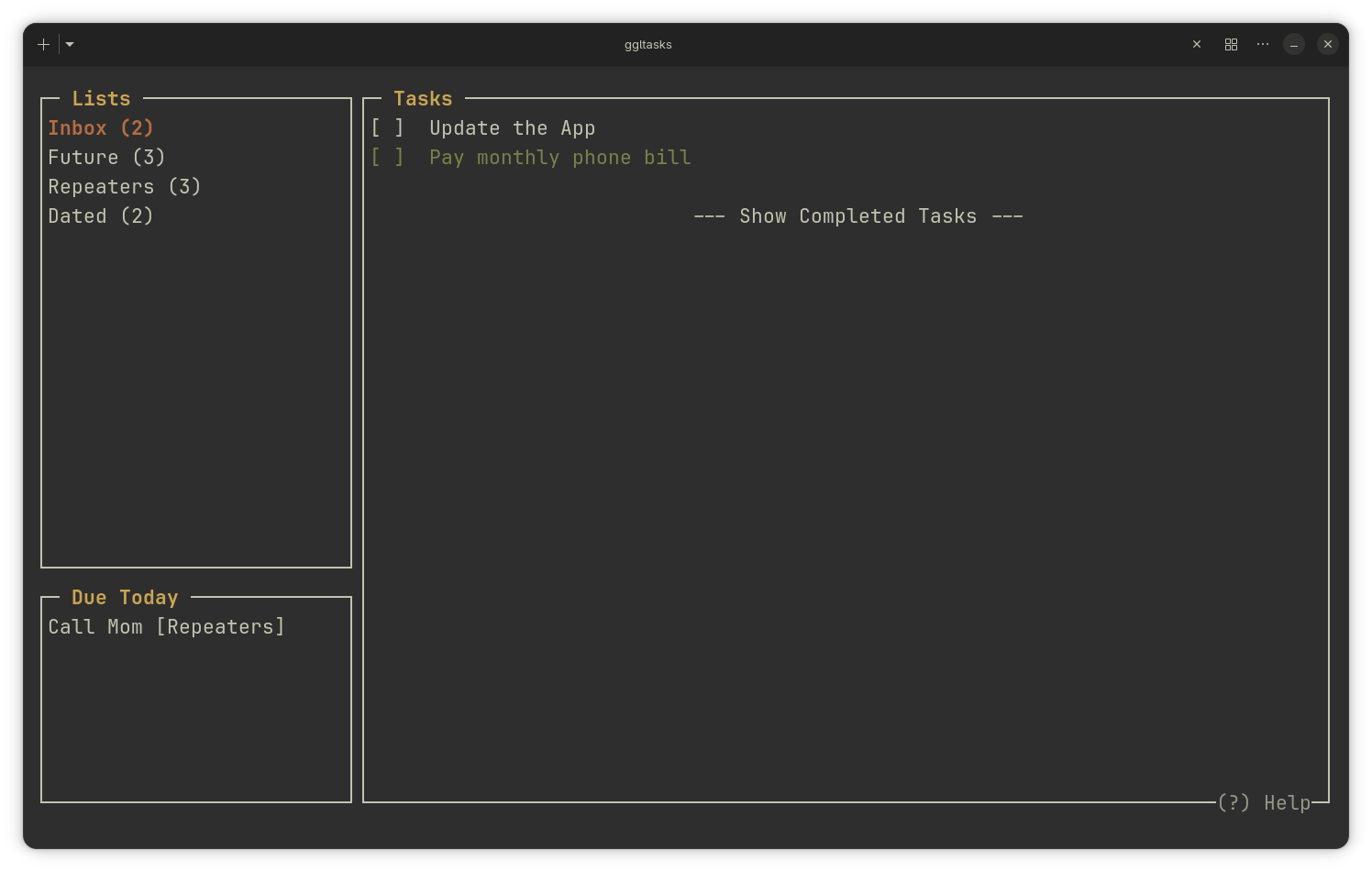
A lightning-fast, robust TUI for Google Tasks, built for terminal power users.
Features
- Async UI: Network requests are threaded. The app boots instantly and never freezes.
- Native Sync: Moves, completions, and deletions flawlessly sync with the official Google backend.
- Smart Timestamps: Due dates and "Last Updated" timestamps.
- Vim Navigation: Navigate entirely using
h/j/k/l.
Screenshots
Installation
Google requires you to generate a personal "Client Secret" to access your data securely.
Step 1: Get Google API Credentials
- Go to the Google Cloud Console.
- Create a New Project (e.g.,
ggltasks-cli). - Search for Google Tasks API and click Enable.
- Go to APIs & Services → Credentials.
- Click + CREATE CREDENTIALS → OAuth client ID. (Choose "Desktop app" as the Application type).
- Download the JSON file and rename it exactly to
client_secrets.json.
Step 2: Install and Run
- Install via pip:
pip install ggltasks
- Run the app:
ggltasks
- The app will automatically create the
.ggltasksconfig folder in your home directory and give you instructions on where to place yourclient_secrets.jsonfile. - Move your
client_secrets.jsonfile into that folder and runggltasksagain!
Note: The first time it successfully connects, a browser window will pop up asking you to log in to your Google Account. A local token is saved so you only have to do this once.
Usage
| Key | Action |
|---|---|
q |
Quit |
w |
Force Sync |
↑ / k |
Navigate Up |
↓ / j |
Navigate Down |
← / h |
Back / Switch Panels |
→ / l |
Enter Subtasks |
Shift + K |
Move Task Up |
Shift + J |
Move Task Down |
o |
Add new task/list |
d |
Delete item |
r |
Rename item |
c |
Toggle task completion |
Shift + X |
Clear Completed Tasks |
a |
Set Due Date |
i |
Edit Notes |
p |
Paste deleted task |
? |
Toggle Help Menu |
Task Status Symbols
[ ]: Pending[X]: Completed*: Has text Note(N): Number of direct subtasks[Upd: MM-DD HH:MM]: Local time the task was last updated
Known Limitations (Google Tasks API)
These are inherit limitations of the official Google Tasks API backend, not this app:
- No Times on Due Dates: The API strips specific hours/minutes off due dates, forcing them to midnight UTC. You can assign a day, but not a time.
- No Recurring Tasks: The API does not allow 3rd party apps to create or manage recurring/repeating tasks.
- Subtask Display Limits: The API allows infinitely deep subtasks (and this CLI app fully supports them). However, Google's official web/mobile apps will only display 1 level deep.
License
MIT License.


Download files
Download the file for your platform. If you're not sure which to choose, learn more about installing packages.
Source Distribution
Built Distribution
Filter files by name, interpreter, ABI, and platform.
If you're not sure about the file name format, learn more about wheel file names.
Copy a direct link to the current filters
File details
Details for the file ggltasks-0.2.5.tar.gz.
File metadata
- Download URL: ggltasks-0.2.5.tar.gz
- Upload date:
- Size: 15.4 kB
- Tags: Source
- Uploaded using Trusted Publishing? No
- Uploaded via: twine/6.2.0 CPython/3.14.6
File hashes
| Algorithm | Hash digest | |
|---|---|---|
| SHA256 |
c4d21d326d6176c62345bd2db75b327a55d41fec35bec7b3dae9a01b7b3767ac
|
|
| MD5 |
3b33dbf5edfca55853c02d82dc68f02b
|
|
| BLAKE2b-256 |
5ce87a716a6b48357885c0c8d8f97228291f6564de566d51c968428fa8ace15c
|
File details
Details for the file ggltasks-0.2.5-py3-none-any.whl.
File metadata
- Download URL: ggltasks-0.2.5-py3-none-any.whl
- Upload date:
- Size: 15.2 kB
- Tags: Python 3
- Uploaded using Trusted Publishing? No
- Uploaded via: twine/6.2.0 CPython/3.14.6
File hashes
| Algorithm | Hash digest | |
|---|---|---|
| SHA256 |
4c87543e8a998b6f38ee9b70663a4e2bec7711b140aa90b1361fe983664bcb7f
|
|
| MD5 |
1b652464887d133ddaf03b0fedaf0709
|
|
| BLAKE2b-256 |
0842ab3dddbf7698aaebbc84a9884785a24a922c6554528cd72b7ccfe5125dca
|






