






What is Changelog CI?
Changelog CI is a GitHub Action and Python CLI that enables a project to automatically generate changelogs.
Changelog CI can be triggered on pull_request, workflow_dispatch and any other events that can provide the required inputs.
Learn more about events that trigger workflows
The workflow can be configured to perform any (or all) of the following actions:
-
For
pull_requestevent:- Generates changelog using Pull Request Titles or Commit Messages made after the last release.
- Prepends the generated changelog to the
CHANGELOG.md/CHANGELOG.rstfile. - Then Commits the modified
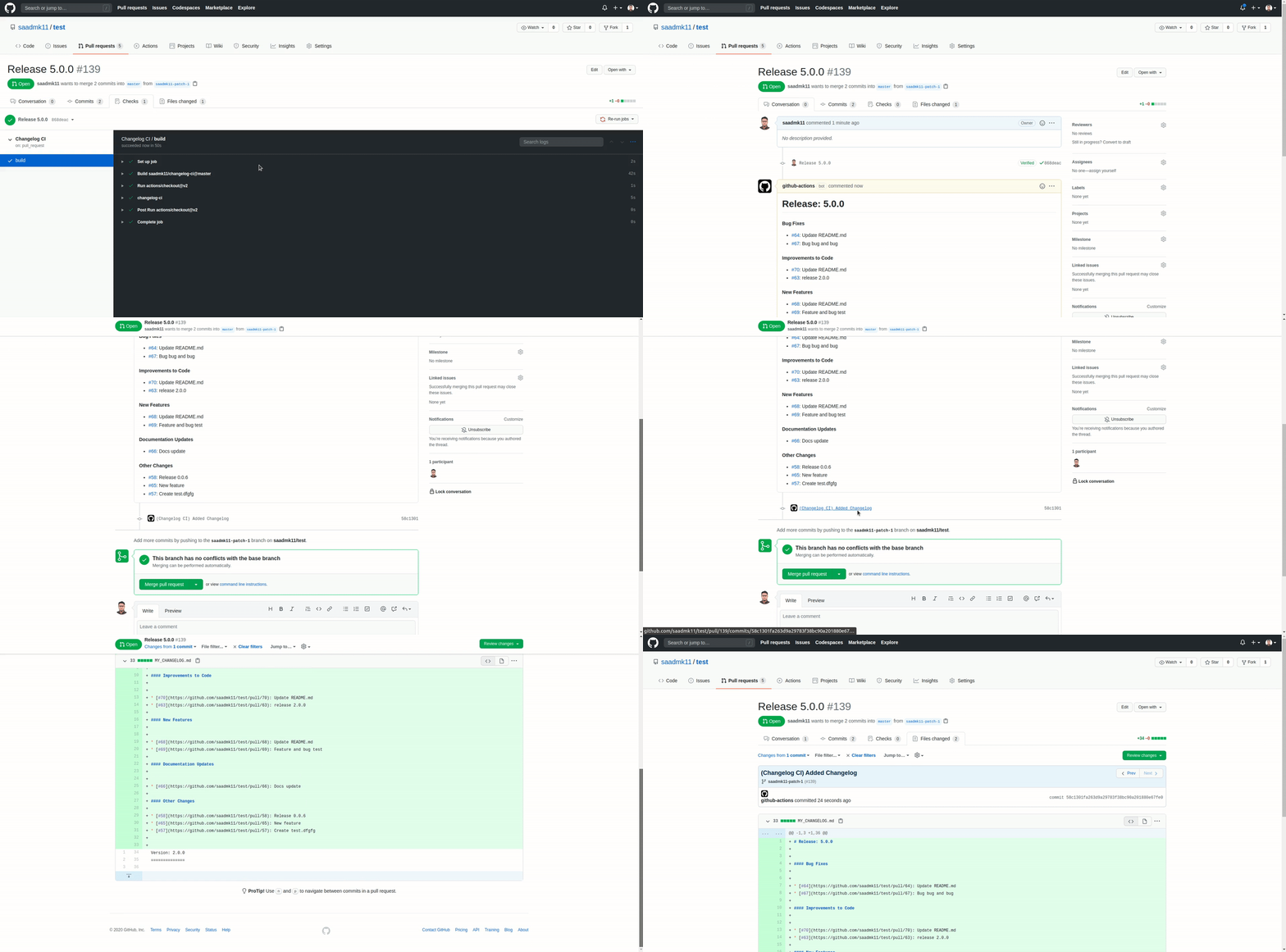
CHANGELOG.md/CHANGELOG.rstfile to the release pull request branch. - Adds a Comment on the release pull request with the generated changelog.
-
For other events:
- Generate changelog using Pull Request Title or Commit Messages made after the last release.
- Prepends the generated changelog to the
CHANGELOG.md/CHANGELOG.rstfile. - Then Creates a Pull Request with the
CHANGELOG.md/CHANGELOG.rstfile changes.
| GitHub Action | Python package | |
|---|---|---|
| Run with | uses: saadmk11/changelog-ci@v2.0.2 |
pip install gh-changelog-ci or uvx gh-changelog-ci |
| Changelog text | Use the changelog output |
gh-changelog-ci generate |
| Commit, comment or open a PR | Configure the Action inputs | Install gh-changelog-ci[actions] and run gh-changelog-ci actions |
The Python package supports CPython 3.11–3.15. The Action installs its own isolated CPython 3.15 environment.
Contents
- Usage
- Action inputs
- Configuration
- Configuration precedence
- Python package and CLI
- Outputs and exit statuses
- Development
- Releasing
- Example changelogs
How Does It Work:
Changelog CI uses python and GitHub API to generate changelog for a
repository. First, it tries to get the latest release from the repository (If
available). Then, it checks all the pull requests / commits merged after the last release
using the GitHub API. After that, it parses the data and generates
the changelog. It is able to use Markdown or reStructuredText to generate Changelog.
Finally, It writes the generated changelog at the beginning of
the CHANGELOG.md/CHANGELOG.rst (or user-provided filename) file. In addition to that,
if a user provides a configuration file (JSON/YAML), Changelog CI parses the user-provided configuration
file and renders the changelog according to users configuration. Then, if the workflow run was triggered
by a pull_request event, the changes are committed and/or commented to the release Pull request,
otherwise a new Pull Request is created with the changes.
Usage:
The composite Action installs Python, uv and the package automatically. It accepts inputs directly or reads a JSON/YAML configuration file.
Use checkout v7.0.1 or its full commit pin. Committing requires contents: write;
comments and new PRs require pull-requests: write. When using a PAT for pushes,
pass it to checkout as well as the Action.
Self-hosted runners need Bash, support for Node 24 actions, and Git for commit
operations. The installer downloads uv and Python from GitHub and the package
from public PyPI. Checkout-provided credentials authenticate Git pushes;
github_token authenticates GitHub API requests. Comment-only runs do not need
Git or a checkout.
GitHub Action
-
To use this Action on a
pull_requestevent, The pull request title must match with the defaultpull_request_title_regexor the user-providedpull_request_title_regexfrom the config file. -
To use this Action on any other events, You must provide
release_versionas an input to the workflow. It can be provided usingworkflow_dispatcheventsinputoption or from any other sources.
Basic Integration (for pull_request event): To integrate Changelog CI on your repositories, Put
.github/workflows/changelog-ci.yml file in your repository with the following content:
name: Changelog CI

on:
  pull_request:
    types: [ opened ]

permissions:
  contents: write

jobs:
  build:
    runs-on: ubuntu-latest

    steps:
      - uses: actions/checkout@3d3c42e5aac5ba805825da76410c181273ba90b1 # v7.0.1

      - name: Run Changelog CI
        uses: saadmk11/changelog-ci@v2.0.2
Workflow input options
These are the inputs that can be provided on the workflow.
| Name | Required | Description | Default |
|---|---|---|---|
changelog_filename |
No | Name of the changelog file (Any file name with .md or .rst extension) |
CHANGELOG.md |
config_file |
No | User configuration file path (configuration file can be in JSON or YAML format) |
null |
committer_username |
No | Name of the user who will commit the changes to GitHub | github-actions[bot] |
committer_email |
No | Email Address of the user who will commit the changes to GitHub | github-actions[bot]@users.noreply.github.com |
release_version |
No (Required if workflow run is not triggered by a pull_request event) |
The release version that will be used on the generated Changelog | null |
github_token |
No | GITHUB_TOKEN provided by the workflow run or Personal Access Token (PAT) |
github.token |
Additional optional inputs (omit them to keep the configured defaults):
| Input | Value |
|---|---|
changelog_type |
pull_request or commit_message |
header_prefix |
Text before the release label |
commit_changelog |
Whether to commit and push (JSON boolean) |
comment_changelog |
Whether to comment on the release PR (JSON boolean) |
pull_request_title_regex |
Release pull request title regular expression |
version_regex |
Release version regular expression |
group_by |
labels or issue_type from linked issues |
group_config |
Ordered JSON array of objects with title and labels or issue_types |
exclude_labels |
JSON array of labels to exclude |
include_unlabeled_changes |
Include changes unmatched by groups (JSON boolean) |
unlabeled_group_title |
Heading for changes unmatched by groups |
create_pull_request |
Whether to create a new PR (JSON boolean) |
new_branch |
Optional branch name for non-PR events |
new_pull_request_title |
Optional new PR title |
commit_message |
Optional commit message |
dry_run |
Preview without writes or mutations (JSON boolean) |
diff |
Show a unified file diff (JSON boolean) |
verbose |
Show collection, branch and commit details plus a changelog preview (JSON boolean) |
quiet |
Suppress progress groups, notices and the automatic changelog preview (JSON boolean) |
summary |
Append a GitHub job summary (JSON boolean) |
Repository, API URL, workspace and PR details come from the runner environment
and event payload. For workflow_dispatch, supply release_version; the Action
creates a changelog branch and opens a PR against the dispatched branch by
default. Tag dispatches use the repository's default branch. The PR body contains
the changelog. Commenting applies to existing PRs on pull_request events.
To add fields to GitHub's Run workflow form, declare them under
on.workflow_dispatch.inputs in your workflow and pass their values to the
Action through with. Inputs defined in action.yaml do not automatically
appear in the form. Only declare the values you want users to enter manually;
other Action inputs can use defaults or configuration-file values.
The example below adds a required release_version field for manual runs.
PR runs continue to select the version from the PR title.
Workflow with All Options:
name: Changelog CI

on:
  pull_request:
    types: [ opened ]

  # Optionally you can use `workflow_dispatch` to run Changelog CI Manually
  workflow_dispatch:
    inputs:
      release_version:
        description: 'Set Release Version'
        required: true
        type: string

permissions:
  contents: write
  pull-requests: write

jobs:
  build:
    runs-on: ubuntu-latest

    steps:
      # Checks-out your repository
      - uses: actions/checkout@3d3c42e5aac5ba805825da76410c181273ba90b1 # v7.0.1

      - name: Run Changelog CI
        uses: saadmk11/changelog-ci@v2.0.2
        with:
          # Optional, you can provide any name for your changelog file,
          # We currently support Markdown (.md) and reStructuredText (.rst) files
          # defaults to `CHANGELOG.md` if not provided.
          changelog_filename: CHANGELOG.rst
          # Optional, only required when you want more customization
          # e.g: group your changelog by labels with custom titles,
          # different version prefix, pull request title and version number regex etc.
          # config file can be in JSON or YAML format.
          config_file: changelog-ci-config.json
          # Optional, This will be used to configure git
          # defaults to `github-actions[bot]` if not provided.
          committer_username: 'test'
          committer_email: 'test@test.com'
          # Optional, only required when you want to run Changelog CI
          # on an event other than `pull_request` event.
          # In this example `release_version` is fetched from `workflow_dispatch` events input.
          # You can use any other method to fetch the release version
          # such as environment variable or from output of another action
          release_version: ${{ inputs.release_version }}
          # Optional
          github_token: ${{ secrets.GITHUB_TOKEN }}
          # Optional: extra diagnostic details and a grouped changelog preview.
          # Leave false for concise progress. Do not enable together with quiet.
          verbose: 'false'
          # Optional: hide progress groups and notices; keep warnings and errors.
          quiet: 'false'
          # Optional: display the rendered changelog in the job summary.
          summary: 'true'
Note: To Enable Commenting, Disable Committing, Group Changelog Items, Use Commit Messages and some other options, see Configuration to learn more.
Changelog CI Badge:


Workflow Output:
The workflow outputs the changelog as a GitHub Action Output. The name of the output is changelog.
The output can be used in other steps of the action. For example:
- name: changelog-ci
  uses: saadmk11/changelog-ci@v2.0.2
  id: changelog-ci

- name: Get Changelog Output
  env:
    CHANGELOG: ${{ steps.changelog-ci.outputs.changelog }}
  run: |
    printf '%s\n' "$CHANGELOG"
Set summary: true on the Action to write rendered Markdown to the job summary.
See output details for the returned values and their
encoding.
Choosing log output
Grouped progress and verbose changelog previews are available in v2.0.2.
Neither verbose nor quiet is needed for a normal run. They provide two optional
ways to adjust how much the Action prints:
| Mode | When to use it | Action log output |
|---|---|---|
| Default (omit both) | Everyday runs | Concise grouped progress and results for generation, commits, comments and PRs |
verbose: 'true' |
Troubleshooting or inspecting a release | Default output plus collection source and count, repository, branch preparation, commit author and file details, and a grouped changelog preview |
quiet: 'true' |
Keeping routine CI logs small | Warnings and errors only; progress groups, notices and the automatic preview are suppressed |
verbose and quiet are mutually exclusive; enabling both is an error. They only
control log output: generated files, commits, comments, Action outputs and the
optional job summary behave the same in every mode. Explicit dry_run and diff
previews are still shown in quiet mode.
Use one of these examples in your workflow after the checkout step.
For normal runs, keep the default logs and enable the rendered job summary:
- name: Generate changelog
  uses: saadmk11/changelog-ci@v2.0.2
  with:
    summary: 'true'
To include extra details and a changelog preview in the log:
- name: Generate changelog with detailed logs
  uses: saadmk11/changelog-ci@v2.0.2
  with:
    verbose: 'true'
    summary: 'true'
To keep logs quiet while retaining the rendered job summary:
- name: Generate changelog quietly
  uses: saadmk11/changelog-ci@v2.0.2
  with:
    quiet: 'true'
    summary: 'true'
Configuration
Using an optional configuration file
Changelog CI runs without a configuration file.
If a user seeks to modify the default behaviors of Changelog CI, they can do so
by adding a JSON or YAML config file to the project. For example:
The Action retains file-over-input precedence. The standalone CLI uses explicit
options over environment values over file settings. The composite
also accepts the configuration keys below as optional inputs; group_config
and exclude_labels use JSON arrays. See the precedence reference.
-
Including
JSONfilechangelog-ci-config.json:with: config_file: changelog-ci-config.json
-
Including
YAMLfilechangelog-ci-config.yaml:with: config_file: changelog-ci-config.yaml
Configuration File options
These are the options that can be provided on the config_file.
| Option | Purpose | Default |
|---|---|---|
changelog_type |
pull_request titles or commit_message entries |
pull_request |
header_prefix |
Text before the release label | Version: |
commit_changelog |
Commit and push; create a PR on non-PR events | true |
comment_changelog |
Append a comment on a release PR | false |
pull_request_title_regex |
Identify release PR titles | ^(?i:release) |
version_regex |
Extract a version from the title; fall back to release_version |
SemVer pattern |
group_by |
Group PRs by their labels or linked issue_type |
labels |
group_config |
Ordered objects with a title and labels or issue_types array |
Empty |
include_unlabeled_changes |
Include PRs not assigned to any configured group | true |
unlabeled_group_title |
Heading for unmatched PRs | Other Changes |
exclude_labels |
Labels to exclude; see the compatibility rule below | Empty |
Grouping by linked issue types
For changelog_type: pull_request, set group_by: issue_type and match GitHub
issue type names using each group's issue_types array:
{
  "changelog_type": "pull_request",
  "group_by": "issue_type",
  "group_config": [
    {"title": "Bug Fixes", "issue_types": ["Bug"]},
    {"title": "New Features", "issue_types": ["Feature"]},
    {"title": "Maintenance", "issue_types": ["Task"]}
  ]
}
Issue type names are case-sensitive and may include custom types. Changelog CI
reads the types of issues returned by GitHub's
closingIssuesReferences.
This includes manual Development links and closing keywords such as Fixes #123
in the PR description. GitHub recognizes closing keywords only for PRs targeting
the default branch; ordinary issue mentions do not create these links. See
linking a PR to an issue.
The changelog still lists PR titles and links. When several linked issues have
different types, the PR appears once, in the first matching configured group.
PRs with no linked issue, no issue type, or no matching type follow
include_unlabeled_changes and unlabeled_group_title, just like unmatched PRs
in label mode. exclude_labels continues to exclude PRs by their labels.
This mode requires an authenticated GitHub GraphQL API with issue type support
and a token that can read the PR and its linked issues, including any linked
issues in other repositories. For this mode, add issues: read to your workflow's
existing permissions when using GITHUB_TOKEN. A repository's token cannot
read private issues in other repositories; use a PAT or GitHub App token with
access to those repositories when needed. Only issues visible to the token can
be used for grouping. Lookup errors stop generation instead of treating the PR
as untyped.
The same settings work in YAML, standalone [tool.changelog-ci] TOML, and Action
inputs (group_config uses a JSON array). The CLI also accepts
--group-by issue_type --group-config '{"title":"Bug Fixes","issue_types":["Bug"]}',
and the standalone environment equivalent is CHANGELOG_CI_GROUP_BY=issue_type.
Existing configurations and workflow permissions continue to work unchanged;
label grouping remains the default. Issue type lookups run only for pull request
changelogs with group_by: issue_type and a nonempty group_config, after
excluding PRs that match exclude_labels.
Example Configuration File
Written in JSON:
{
  "changelog_type": "commit_message",
  "header_prefix": "Version:",
  "commit_changelog": true,
  "comment_changelog": true,
  "include_unlabeled_changes": true,
  "unlabeled_group_title": "Unlabeled Changes",
  "pull_request_title_regex": "^Release",
  "version_regex": "v?([0-9]{1,2})+[.]+([0-9]{1,2})+[.]+([0-9]{1,2})\\s\\(\\d{1,2}-\\d{1,2}-\\d{4}\\)",
  "exclude_labels": ["bot", "dependabot", "ci"],
  "group_config": [
    {
      "title": "Bug Fixes",
      "labels": ["bug", "bugfix"]
    },
    {
      "title": "Code Improvements",
      "labels": ["improvements", "enhancement"]
    },
    {
      "title": "New Features",
      "labels": ["feature"]
    },
    {
      "title": "Documentation Updates",
      "labels": ["docs", "documentation", "doc"]
    }
  ]
}
Written in YAML:
changelog_type: 'commit_message' # or 'pull_request'
header_prefix: 'Version:'
commit_changelog: true
comment_changelog: true
include_unlabeled_changes: true
unlabeled_group_title: 'Unlabeled Changes'
pull_request_title_regex: '^Release'
version_regex: 'v?([0-9]{1,2})+[.]+([0-9]{1,2})+[.]+([0-9]{1,2})\s\(\d{1,2}-\d{1,2}-\d{4}\)'
exclude_labels:
  - bot
  - dependabot
  - ci
group_config:
  - title: Bug Fixes
    labels:
      - bug
      - bugfix
  - title: Code Improvements
    labels:
      - improvements
      - enhancement
  - title: New Features
    labels:
      - feature
  - title: Documentation Updates
    labels:
      - docs
      - documentation
      - doc
-
In this Example
version_regexmatches any version number including date ( e.g:v1.1.0 (01-23-2018)) in the pull request title. If you don't provide anyregexChangelog CI will use defaultSemVerpattern. e.g.1.0.1,v1.0.2. -
Here the changelog will be generated using commit messages because of
changelog_type: 'commit_message'. -
Here
pull_request_title_regexwill match any pull request title that starts withReleaseyou can match Any Pull Request Title by adding thispull_request_title_regex": ".*",
See this example output with group_config
See this example output without group_config
Configuration precedence
Both commands accept JSON and safely loaded YAML files through --config-file.
Without a selected file, generate reads [tool.changelog-ci] from
pyproject.toml in the selected workspace only. It does not search parent folders.
For generate, precedence is highest first:
- Explicit command options, including false and cleared lists.
CHANGELOG_CI_environment variables.- The selected JSON/YAML file, or workspace TOML.
- Defaults.
Environment names use the option's underscore name in uppercase, such as
CHANGELOG_CI_RELEASE_VERSION, CHANGELOG_CI_GROUP_CONFIG, and
CHANGELOG_CI_EXCLUDE_LABELS. Boolean and list environment values use JSON:
false, true, [], or [{"title":"Fixes","labels":["bug"]}].
CHANGELOG_CI_CONFIG_FILE selects a file. The documented GitHub fallbacks are
GITHUB_TOKEN, GITHUB_REPOSITORY, GITHUB_API_URL, and GITHUB_WORKSPACE.
For actions and the composite, the selected file overrides
changelog_filename, committer_username, committer_email, release_version
and github_token. Other configuration inputs override matching file values
when supplied. A version found in the PR title takes precedence over
release_version. Workspace TOML and CHANGELOG_CI_* variables apply to
generate only.
The accepted aliases git_committer_username and git_committer_email map to
committer_username and committer_email. Lists supplied through CLI flags
replace configured lists. Use --clear-groups or --clear-exclude-labels to
explicitly clear one; combining a clear flag and values is an error.
generate configuration rejects unknown keys, invalid regular expressions,
wrong types, malformed groups and missing selected files. Action files ignore
unknown keys. Existing configuration keys accept numeric booleans 0/1, retain
valid groups from partially invalid lists, and use defaults for invalid settings.
Additional controls such as dry_run and create_pull_request are validated
strictly. Warnings do not echo the supplied values.
Tokens are stored as secrets and validation errors never print them.
Groups retain their configured order. A PR appears in its first matching group.
“Unlabeled” includes changes whose labels or linked issue types do not match any
configured group, depending on group_by.
The Action applies label exclusions when groups are configured; generate
applies them with or without groups. Commit-source generation omits messages
starting with Merge pull request # or Merge branch and does not group commits.
Release labels may be dates or other single-line text; SemVer is not required.
Output filenames must end in .md or .rst, stay inside the workspace, and not
traverse symlinks or .git. Existing file bytes and permissions are preserved
when prepending, including CRLF line endings. Reruns prepend another section
and append another comment.
Python package and CLI
Install the package with pip or uv:
pip install gh-changelog-ci
uv tool install gh-changelog-ci
For package invocation of the integration inside GitHub Actions, install the extra:
pip install 'gh-changelog-ci[actions]'
uvx gh-changelog-ci generate --repository owner/repo --release-version 2.0.2
gh-changelog-ci generate --repository owner/repo --release-version 2.0.2 --stdout
gh-changelog-ci generate --repository owner/repo --release-version 2.0.2 \
  --changelog-type commit_message --changelog-filename CHANGELOG.rst
The CLI also supports optional progress controls. Use --verbose for extra
diagnostics or --quiet to suppress progress; do not combine them:
# Show collection progress as well as the normal result.
gh-changelog-ci generate --repository owner/repo --release-version 2.0.2 --verbose

# Show warnings and errors, with no progress messages.
gh-changelog-ci generate --repository owner/repo --release-version 2.0.2 --quiet
These flags do not change the generated changelog. --stdout, --dry-run and
--diff still print their requested content when --quiet is enabled.
gh-changelog-ci --version reports the installed package version. python -m gh_changelog_ci --help provides the same commands.
generate collects and renders changes and normally prepends them to the file.
It never stages, commits, pushes, comments or creates PRs. --stdout prints only
the section and writes nothing. --dry-run previews without writes; combine it
with --diff to preview a unified diff. Diagnostics go to stderr.
actions requires a GitHub Actions runner and the actions extra, which the
composite installs automatically. Local execution is rejected before loading
workflow context or performing operations, even with the extra installed.
actions --dry-run suppresses file, Git, PR and comment mutations.
Installing the extra does not change generate behavior or load workflow events.
CLI options
Shared options:
| Option | Meaning |
|---|---|
--config-file PATH |
Selected JSON/YAML file |
--changelog-filename PATH |
Output, default CHANGELOG.md |
--release-version TEXT |
Required standalone release label |
--github-token TEXT |
Token; prefer environment transport |
--changelog-type pull_request|commit_message |
Collection source |
--header-prefix TEXT |
Heading prefix, default Version: |
--group-config JSON_OBJECT |
Repeat once per ordered group |
--exclude-label TEXT |
Repeat once per excluded label |
--clear-groups, --clear-exclude-labels |
Explicitly clear a configured list |
--include-unlabeled-changes / --no-include-unlabeled-changes |
Include unmatched changes |
--unlabeled-group-title TEXT |
Default Other Changes |
--output-mode terminal|github |
GitHub mode requires a runner and the actions extra |
--dry-run, --diff |
Preview without writes, or display a diff while running |
--verbose, --quiet |
More progress or no progress; mutually exclusive |
--summary / --no-summary |
Opt-in GitHub step summary |
Generation-only options:
| Option | Meaning |
|---|---|
--repository OWNER/REPO |
Repository to read |
--api-url URL |
Trusted HTTPS API base, default https://api.github.com |
--workspace PATH |
Workspace root, default current directory |
--stdout |
Print only the generated section without writing files |
Options for actions, available for execution inside GitHub Actions:
| Option | Meaning |
|---|---|
--commit-changelog / --no-commit-changelog |
Commit and push, default true |
--comment-changelog / --no-comment-changelog |
Append a PR comment, default false |
--committer-username TEXT, --committer-email TEXT |
Git identity |
--pull-request-title-regex TEXT, --version-regex TEXT |
Release PR eligibility and version selection |
--create-pull-request / --no-create-pull-request |
Defaults on for non-PR events with commits |
--new-branch TEXT |
Override the timestamp branch for non-PR events |
--new-pull-request-title TEXT, --commit-message TEXT |
Override generated titles |
Runner context supplies the event, PR and branch details. The destination must be a real branch. Comment-only mode needs no checkout. Git writes require a matching origin, a clean target changelog and no staged user changes. PR commits also require the head repository to be present in the event payload. Unrelated unstaged/untracked files are retained. Git uses checkout-provided credentials; an API token alone does not configure push authentication. API writes require a token. Dry runs do not require write credentials. GitHub outputs and summaries require the corresponding runner-provided output files.
Outputs and exit statuses
| Action output | Meaning |
|---|---|
changelog |
Generated release section with percent escaping |
changed |
Whether the calculated file differs, including during dry runs |
changelog-file |
Requested output filename |
pull-request-number |
Number of a newly created PR, otherwise empty |
pull-request-url |
URL of a newly created PR, otherwise empty |
--stdout conflicts with GitHub output, summary and diff. Summary requires
GitHub output and GITHUB_STEP_SUMMARY; GitHub output requires GITHUB_OUTPUT.
The composite's changelog output escapes %, carriage returns and newlines as
%25, %0D and %0A. Standalone GitHub output contains literal multiline text.
Title mismatches and empty results omit the changelog output. Outputs over 1 MB
fail with an error; summaries over 1 MB are omitted with a warning.
Exit statuses:
generate:0for success or no changes,1for API/filesystem failures,2for invalid options, configuration or missing dependencies.- The composite:
0for success, unmatched PR titles, ordinary collection HTTP failures and recoverable PR/comment warnings;1for a missing non-PR version or both operations being disabled. Authentication, permission, collection rate-limit and transport failures are errors. - Standalone
actionsreports failed mutations as errors. Git failures return their positive exit status.
Development
Use stable CPython 3.15 and uv 0.13.1 for development. The package supports CPython 3.11–3.15; the Action provisions its own Python.
uv sync --locked --group dev --extra actions
uv run --locked --group dev tox run -e lint,type
uv run --locked --group dev tox run -e py311,py312,py313,py314,py315
uv run --locked --group dev tox run -e py315-actions,package
uv run --locked --group dev tox run -e minimum,latest
uv build --no-sources
Tests use mocked HTTP and disposable Git remotes. Tox installs managed Python
interpreters and fails if a required version is unavailable. Base environments
exclude the actions extra. minimum and latest recreate their environments
and resolve dependencies independently of the lockfile.
Code lives in src/gh_changelog_ci; Git and GitHub mutations are under actions/.
Both commands use the same immutable Settings model. Runner event facts are
held separately in an immutable context and are loaded only inside GitHub Actions.
Run Ruff and strict mypy on production code and tests. Add regression tests for
changes to configuration, rendering, Git operations and credentials.
tests/fixtures/legacy contains rendering, configuration and event fixtures.
test.yaml covers Python 3.11–3.15 on Linux and the oldest/newest versions on
macOS and Windows. action-test.yaml installs the built wheel through a test
copy of the composite and checks comments, release-PR commits and new PRs on all
three platforms. Its API and Git destinations are local test services.
Releasing
Configure the protected pypi environment and a matching PyPI Trusted Publisher
for gh-changelog-ci. Use a separate TestPyPI environment and publisher for a
publishing rehearsal.
- Set the version in
pyproject.tomland the exact package requirement inaction.yamltogether, then refresh the lock and run the test workflows. - Tag the reviewed commit as
vMAJOR.MINOR.PATCH.publish.yamlchecks that the tag, package version and Action requirement agree. - The workflow builds and validates wheel/sdist artifacts, then publishes those
artifacts with OIDC and PEP 740 attestations. Only the protected publish job
receives
id-token: write. - After the workflow verifies a fresh exact-version installation from PyPI, publish the GitHub release and advance the moving major tag.
Verify self-hosted workflows before moving a supported tag. Keep exact-version tags immutable. For partial uploads, compare artifact hashes and resume only matching artifacts; use a new patch version for changed contents.
Changelog CI in Action (Comment & Commit)
Example Changelog Output using config file (Pull Request):
Version: v2.1.0 (02-25-2020)
Bug Fixes
New Features
- #68: Update README.md
Documentation Updates
- #66: Docs update
Version: v1.1.0 (01-01-2020)
Bug Fixes
Documentation Updates
- #66: Docs update
Example Changelog Output using config file (Commit Messages):
Version: v2.1.0 (02-25-2020)
- 123456: Keep updating the readme
- 123456: Again updating the Same Readme file
- 123456: Update README.md
- 123456: Docs update
Version: v1.1.0 (01-01-2020)
Example Changelog Output without using config file:
Version: 0.0.2
Version: 0.0.1
- #43: It feels like testing never ends
- #35: Testing again and again
- #44: This is again another test, getting tired
- #37: This is again another test
License
The code in this project is released under the MIT License.
1 maintainer

Metadata
1 maintainer
Release files for gh-changelog-ci 2.0.2
For a detailed explanation of source distributions (sdists) and built distributions (wheels), please see the package formats documentation.
Source distribution (sdist)
| File | Size | Uploaded | |
|---|---|---|---|
| gh_changelog_ci-2.0.2.tar.gz | 181.7 kB | Details |
Built distribution (wheel)
| File | Interpreter | ABI | Platform | Reset |
|---|---|---|---|---|
| gh_changelog_ci-2.0.2-py3-none-any.whl | Python 3 | none | any | Details |
Total release size: 224.3 kB
Release files / gh_changelog_ci-2.0.2.tar.gz
| Download URL | gh_changelog_ci-2.0.2.tar.gz |
|---|---|
| Size | 181.7 kB |
| Tags | Source |
|
SHA-256 checksum How to use checksums |
286b1731156e8df9787b3643d39369a81c83b2bd0398b0d7a220e4215324191b
|
|
BLAKE2b-256 checksum How to use checksums |
93c7df7283cbef964a9066d80e9a3684b77dc5088b33fb79502fa47bb2d0c620
|
| Upload date | |
|
Uploaded using Trusted Publishing? What is trusted publishing? |
Yes |
| Uploaded via |
uv/0.13.1 {"installer":{"name":"uv","version":"0.13.1","subcommand":["publish"]},"python":null,"implementation":{"name":null,"version":null},"distro":{"name":"Ubuntu","version":"24.04","id":"noble","libc":null},"system":{"name":null,"release":null},"cpu":null,"openssl_version":null,"setuptools_version":null,"rustc_version":null,"ci":true}
|
Provenance
Provenance describes where a file came from. On PyPI, provenance is shared via attestations, which provide a verifiable record of the build or publishing details. View details, limitations and caveats.


PyPI Publish Attestation
PyPI verified that this artifact, at this checksum, originated from the publisher listed below.
Signed by GitHub Actions, verified by PyPI on Oct 18, 2026.
Transparency logRelease files / gh_changelog_ci-2.0.2-py3-none-any.whl
| Download URL | gh_changelog_ci-2.0.2-py3-none-any.whl |
|---|---|
| Size | 42.6 kB |
| Tags | Python 3 |
|
SHA-256 checksum How to use checksums |
5334d54dcfe10ceb99f729494f9e2901da68ab355311827031594c19223bed23
|
|
BLAKE2b-256 checksum How to use checksums |
adae16548e762f4bc29ab11bef104e8bc22e504a423ce95355fa3134af768fc5
|
| Upload date | |
|
Uploaded using Trusted Publishing? What is trusted publishing? |
Yes |
| Uploaded via |
uv/0.13.1 {"installer":{"name":"uv","version":"0.13.1","subcommand":["publish"]},"python":null,"implementation":{"name":null,"version":null},"distro":{"name":"Ubuntu","version":"24.04","id":"noble","libc":null},"system":{"name":null,"release":null},"cpu":null,"openssl_version":null,"setuptools_version":null,"rustc_version":null,"ci":true}
|
Provenance
Provenance describes where a file came from. On PyPI, provenance is shared via attestations, which provide a verifiable record of the build or publishing details. View details, limitations and caveats.
PyPI Publish Attestation
PyPI verified that this artifact, at this checksum, originated from the publisher listed below.
Signed by GitHub Actions, verified by PyPI on Oct 18, 2026.
Transparency log













