
A local web dashboard that monitors all your GitHub Copilot CLI sessions in real-time

Project description
Copilot Session Dashboard







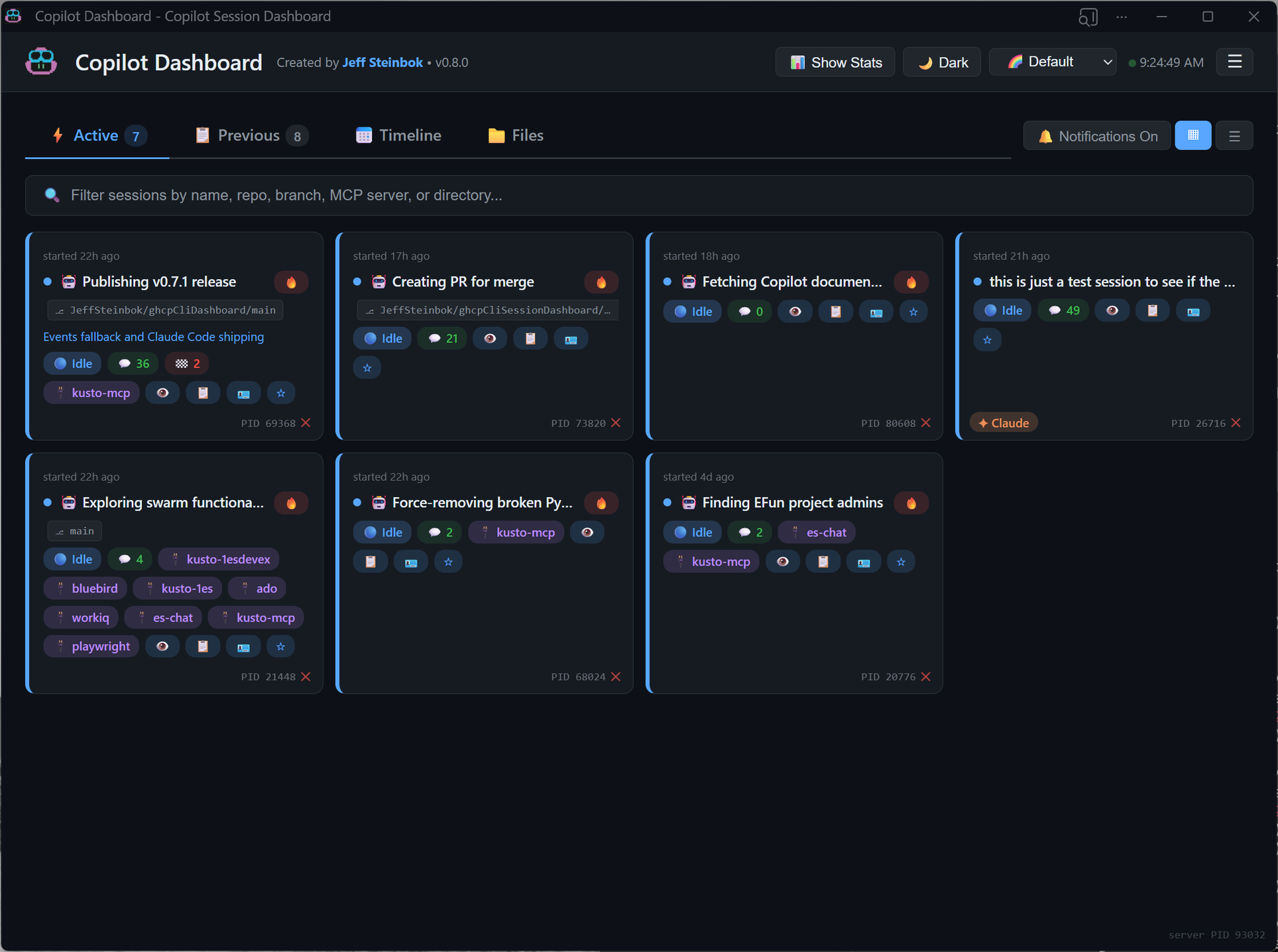
A local web dashboard that monitors all your GitHub Copilot CLI and Claude Code sessions in real-time. Designed for power users running multiple AI coding sessions simultaneously.
[!TIP] The dashboard works out of the box by reading
events.jsonlfiles from your Copilot session directories. For richer session history (summaries, checkpoints), enable the SESSION_STORE experimental feature: add"experimental": trueto~/.copilot/config.jsonand start a new Copilot session.
Installation
Option 1: From PyPI
pip install ghcp-cli-dashboard
Option 2: From Source
# Clone the repo
git clone https://github.com/JeffSteinbok/ghcpCliDashboard.git
cd ghcpCliDashboard

# Install in editable mode
pip install -e .
Usage
# Start the dashboard
copilot-dashboard start

# Start in background
copilot-dashboard start --background

# Check status
copilot-dashboard status

# Stop
copilot-dashboard stop
Open http://localhost:5111 in your browser.
Features
Session States
- Working / Thinking (green) — session is actively running tools or reasoning
- Waiting (yellow) — session needs your input (
ask_userorask_permissionpending) - Idle (blue) — session is done and ready for your next task
Desktop Notifications
Click the 🔕 button in the header to enable browser notifications. You'll get an alert whenever a session transitions from working to waiting or idle, so you can stay on top of sessions that need attention without watching the dashboard.
Views
- Tile view (default) — compact card grid to see all sessions at a glance
- List view — detailed expandable rows with full session info
- Toggle between views with the buttons next to the Active/Previous tabs
Session Monitoring
- Active vs Previous — sessions with a running
copilot.exeorclaude.exeprocess appear in the Active tab - Claude Code support — automatically discovers Claude Code sessions from
~/.claude/projects/, including active sessions not yet indexed. Claude sessions display a✦ Claudebadge. - Waiting context — when a session is waiting, shows what it's asking (e.g. the
ask_userquestion and choices) - Background tasks — shows count of running subagents per session
- YOLO mode indicator — shows 🔥 YOLO badge for sessions running with
--yolo - MCP servers — displays connected MCP servers (e.g. bluebird, icm, github) for both active and past sessions
- Project grouping — sessions are auto-categorized by repo, working directory, or content analysis
Actions
- Focus window — click 📺 on an active session to bring its terminal window to the foreground
- Restart commands — each session has a copy-pasteable
copilot --resume <id>command (includes--yoloonly if the session was running with it) - Session details — click any session to see checkpoints, recent tool output, references, and conversation history
Appearance
- Light/Dark mode toggle
- 9 color palettes — Default, Pink, Ocean, Forest, Sunset, Mono, Neon, Slate, and Rose Gold
- Auto-refresh — active sessions poll every 5s, full session list every 30s; expanded sections and collapsed groups persist across refreshes
Cross-Machine Sync
See active sessions from all your machines in one dashboard — powered by OneDrive, Google Drive, or any cloud-synced folder. No Git commits needed.
How it works:
- On each poll cycle, the dashboard exports your active sessions as JSON files to a shared cloud folder
- Other machines read those files and display them in a "Remote Sessions" section under Active
- Each machine only writes to its own subfolder — no sync conflicts
Auto-detection (priority order):
OneDriveCommercial(preferred — prevents data leakage to personal accounts)OneDriveConsumer- User Documents folder
Configuration (~/.copilot/dashboard-config.json):
{
  "sync": {
    "enabled": true,
    "folder": "D:\\MyCloudSync"
  }
}
- Set
"enabled": falseto disable sync entirely - Set
"folder"to override auto-detection with a specific path
What remote sessions show:
- Live state indicators (working, waiting, idle)
- Session summary, intent, branch, MCP servers, turn/checkpoint counts
- Machine name badge (e.g.
🖥️ LAPTOP-HOME)
What remote sessions don't show:
- No detail drill-down (checkpoints, turns, files)
- No focus or kill actions (those are local-only)
- No past/previous sessions from remote machines
Prerequisites
| Package | Purpose |
|---|---|
fastapi |
Web framework with auto-generated OpenAPI docs |
uvicorn |
ASGI server |
pywin32 |
Window focus and process detection (Windows-only) |
Both are installed automatically via pip install ghcp-cli-dashboard.
For more details on architecture, data sources, and API endpoints, see DEVELOPMENT.md.
Release history Release notifications | RSS feed


Download files
Download the file for your platform. If you're not sure which to choose, learn more about installing packages.
Source Distribution
Built Distribution
Filter files by name, interpreter, ABI, and platform.
If you're not sure about the file name format, learn more about wheel file names.
Copy a direct link to the current filters
File details
Details for the file ghcp_cli_dashboard-0.7.1.tar.gz.
File metadata
- Download URL: ghcp_cli_dashboard-0.7.1.tar.gz
- Upload date:
- Size: 338.1 kB
- Tags: Source
- Uploaded using Trusted Publishing? Yes
- Uploaded via: twine/6.1.0 CPython/3.13.7
File hashes
| Algorithm | Hash digest | |
|---|---|---|
| SHA256 |
f09ee6eb8ac3413af619696d5125daef79734c04cd3df0c6e1e7d06d78926e29
|
|
| MD5 |
310b3062cdd89ba8759d3bd94bdb221d
|
|
| BLAKE2b-256 |
683284f82aff98b5d64de95f9c48280b1eca774ff4463651f15e4968fc2cb3e0
|
Provenance
The following attestation bundles were made for ghcp_cli_dashboard-0.7.1.tar.gz:
Publisher:
publish-pypi.yml on JeffSteinbok/ghcpCliDashboard
-
Statement:
-
Statement type:
https://in-toto.io/Statement/v1 -
Predicate type:
https://docs.pypi.org/attestations/publish/v1 -
Subject name:
ghcp_cli_dashboard-0.7.1.tar.gz -
Subject digest:
f09ee6eb8ac3413af619696d5125daef79734c04cd3df0c6e1e7d06d78926e29 - Sigstore transparency entry: 1013495735
- Sigstore integration time:
-
Permalink:
JeffSteinbok/ghcpCliDashboard@98e4f243aa9647ff205c48b0c4850bc5f4ddb0df -
Branch / Tag:
refs/tags/v0.7.1 - Owner: https://github.com/JeffSteinbok
-
Access:
public
-
Token Issuer:
https://token.actions.githubusercontent.com -
Runner Environment:
github-hosted -
Publication workflow:
publish-pypi.yml@98e4f243aa9647ff205c48b0c4850bc5f4ddb0df -
Trigger Event:
release
-
Statement type:
File details
Details for the file ghcp_cli_dashboard-0.7.1-py3-none-any.whl.
File metadata
- Download URL: ghcp_cli_dashboard-0.7.1-py3-none-any.whl
- Upload date:
- Size: 325.4 kB
- Tags: Python 3
- Uploaded using Trusted Publishing? Yes
- Uploaded via: twine/6.1.0 CPython/3.13.7
File hashes
| Algorithm | Hash digest | |
|---|---|---|
| SHA256 |
33d11f364386f7091fe6c7f187147866a0245c739c14796db7628add4661695d
|
|
| MD5 |
81af28a15a67fcd6806cab08c7310240
|
|
| BLAKE2b-256 |
3bf9ce06dbc5cf68912b277d748d170831684c27aee7602c84f75a27e7b7441f
|
Provenance
The following attestation bundles were made for ghcp_cli_dashboard-0.7.1-py3-none-any.whl:
Publisher:
publish-pypi.yml on JeffSteinbok/ghcpCliDashboard
-
Statement:
-
Statement type:
https://in-toto.io/Statement/v1 -
Predicate type:
https://docs.pypi.org/attestations/publish/v1 -
Subject name:
ghcp_cli_dashboard-0.7.1-py3-none-any.whl -
Subject digest:
33d11f364386f7091fe6c7f187147866a0245c739c14796db7628add4661695d - Sigstore transparency entry: 1013495764
- Sigstore integration time:
-
Permalink:
JeffSteinbok/ghcpCliDashboard@98e4f243aa9647ff205c48b0c4850bc5f4ddb0df -
Branch / Tag:
refs/tags/v0.7.1 - Owner: https://github.com/JeffSteinbok
-
Access:
public
-
Token Issuer:
https://token.actions.githubusercontent.com -
Runner Environment:
github-hosted -
Publication workflow:
publish-pypi.yml@98e4f243aa9647ff205c48b0c4850bc5f4ddb0df -
Trigger Event:
release
-
Statement type:






