
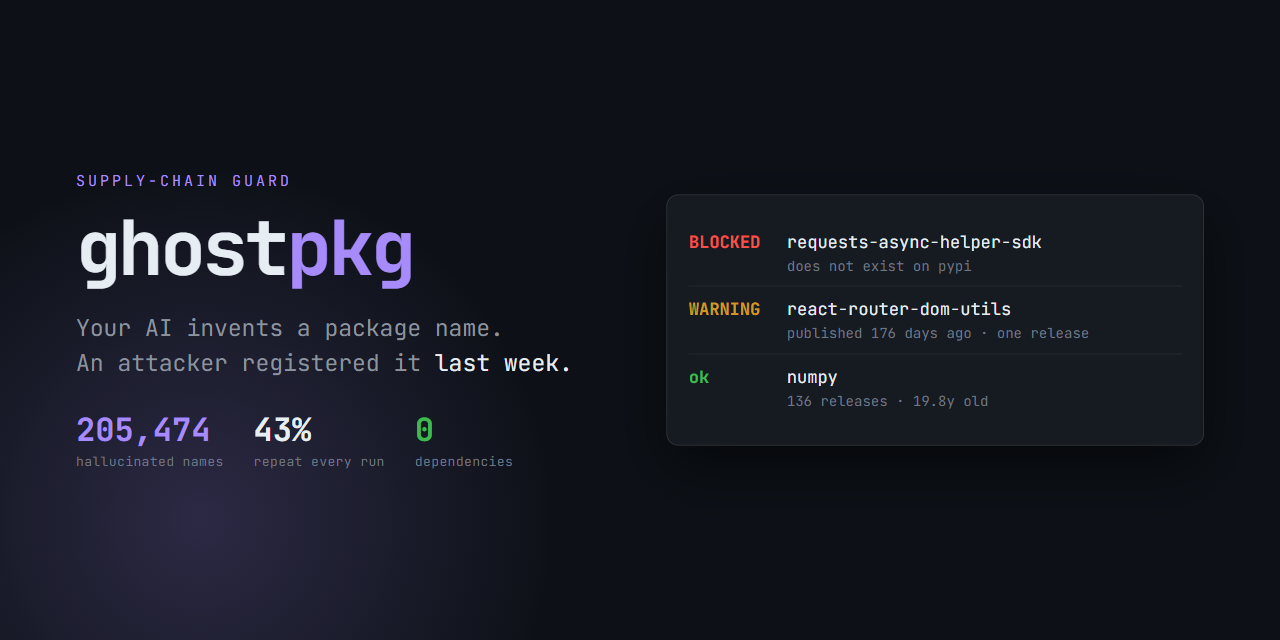
ghostpkg
Stops you installing packages that don't exist.
Language models invent library names. Attackers register those names in advance.
ghostpkg checks the name against the real registry — before pip or npm downloads anything.
English · Українська





Contents
- The problem
- What ghostpkg does
- Install
- Usage
- Every signal it checks
- Why it doesn't block on "suspicious"
- Where it fits in your workflow
- How it works internally
- Comparison
- Honest limitations
- Prior art and credit
The problem
A study of ~200,000 code-generation prompts found 205,474 unique hallucinated package names. The dangerous part isn't the count — it's the consistency:
43% of those hallucinations reappeared in all ten reruns of the same prompt.
That makes them predictable. An attacker can work out in advance which name a
model will invent, register it on PyPI or npm, and wait. By the time your agent
confidently writes pip install fastapi-middleware, the package is already there.
The attack has a name: slopsquatting.
This isn't theoretical. Malicious packages exploiting exactly this pattern have been found with tens of thousands of downloads, and the Cloud Security Alliance published a formal research note on it in April 2026.
What ghostpkg does
It answers one question, precisely: does this package actually exist, and if so, does anything about it look wrong?
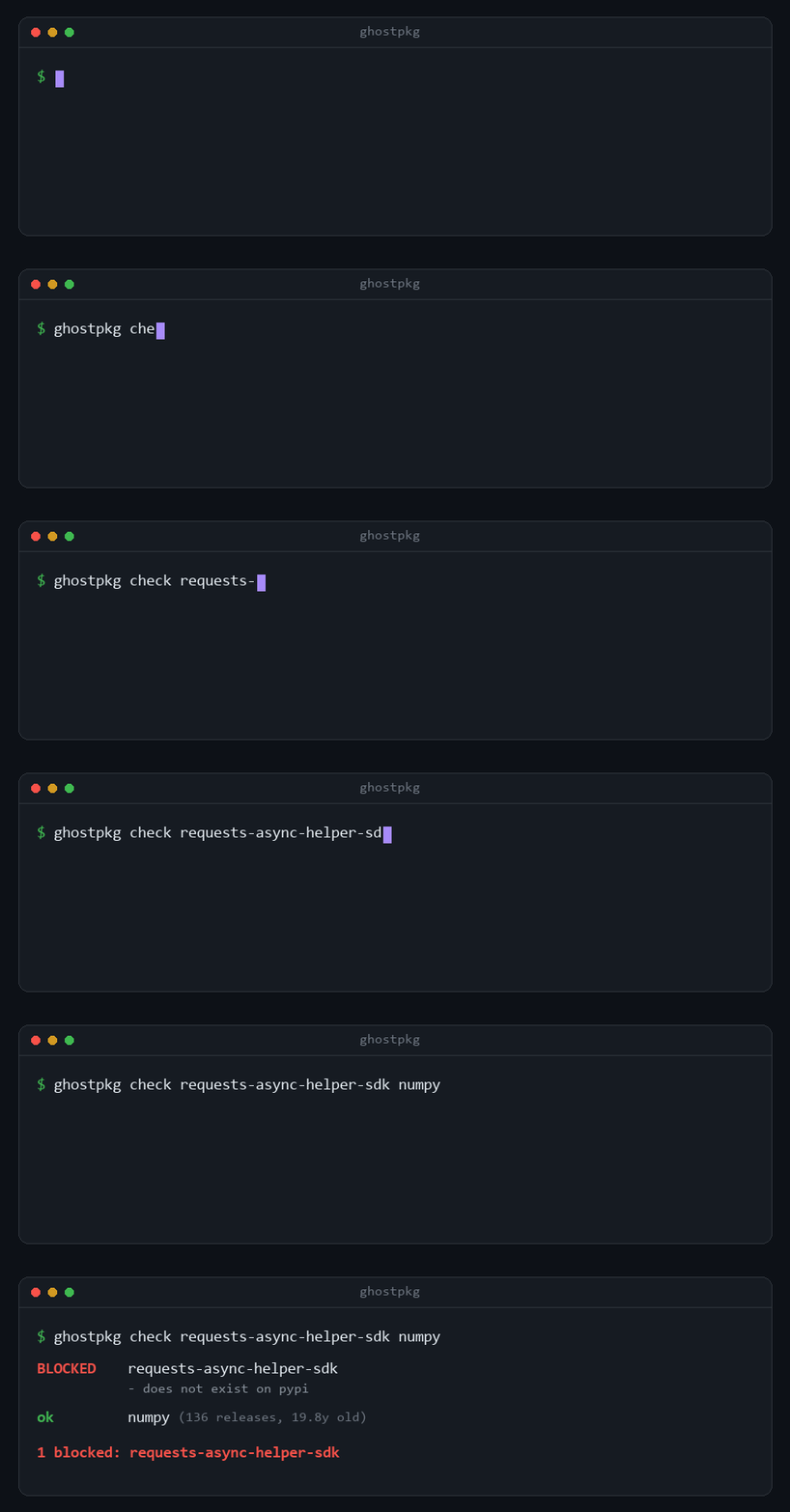
The exit code is 1 when anything is blocked, so it drops straight into CI or a
pre-install hook with no glue code.
What it is: a fast, narrow, dependency-free gate you can put in front of every install.
What it is not: a code scanner, a malware detector, or a replacement for an SCA product. It does one job.
Install
pip install ghostpkg
Other ways:
uvx ghostpkg check requests      # run without installing
pipx install ghostpkg            # isolated, global command
[!NOTE] Zero dependencies. Python standard library only. A supply-chain security tool that drags in a dependency tree of its own is a questionable proposition. This one has none.
Requires Python 3.9+. Tested on Linux, macOS and Windows.
Usage
Check names directly
ghostpkg check fastapi-middleware pandas-utils
ghostpkg check requests==99.99.99          # pins are checked too
ghostpkg check react-router-dom-utils -e npm
Scan a manifest
ghostpkg scan requirements.txt
ghostpkg scan pyproject.toml
ghostpkg scan package.json
| Manifest | What is read |
|---|---|
requirements*.txt |
Every requirement line. Comments, flags, VCS URLs and direct links are skipped. |
pyproject.toml |
PEP 621 project.dependencies and project.optional-dependencies, plus Poetry's tool.poetry groups. [build-system] requires is not included, and the python constraint is not treated as a package. |
package.json |
dependencies, devDependencies, optionalDependencies, peerDependencies. |
package-lock.json |
Every locked package, both the v1 nested and v2/v3 packages layouts. Workspace members and anything resolved from git, a path or a private registry are skipped. |
yarn.lock |
Every locked package, classic (v1) and berry (v2+). Aliases are checked under the name that actually gets installed. |
pnpm-lock.yaml |
Every locked package, lockfile versions 5, 6 and 9. |
poetry.lock, uv.lock |
Every locked package. |
README, AGENTS.md, CLAUDE.md, .cursorrules, *.md |
Package names out of install commands written in prose. |
Why prose matters: the hallucination arrives before the manifest does. A
model writes pip install foo-bar into a README or an agent instruction file,
somebody copies the line and runs it — the install has already happened by the
time that name reaches requirements.txt.
Extraction is deliberately narrow, because a README is full of words that look
like package names. Measured across thirteen real READMEs, it finds the genuine
names with a 0% false-positive rate; pip install -r requirements.txt,
npm run build, pip is a package manager and npx create-react-app my-app
(where my-app is an argument) all yield nothing.
Lockfiles are worth scanning even when you already scan the manifest: CI installs from the lockfile, so it holds the names that actually get fetched -- including transitive ones the manifest never mentions -- and every entry is version-pinned, so all of them are checkable.
Several files can be scanned in one run, and they may be different ecosystems:
ghostpkg scan requirements.txt package.json pnpm-lock.yaml
Or point it at a directory -- or at nothing, which means the current one:
ghostpkg scan          # searches the current directory
ghostpkg scan ../other-project
The search skips node_modules, .venv, .git, dist and other vendored or
generated trees, and a lockfile supersedes the manifest beside it: a
lockfile is that manifest resolved, so reading both prints most packages twice
and checks nothing extra. Alongside manifests it picks up agent instruction
files -- AGENTS.md, CLAUDE.md, .cursorrules -- and the README at the root,
since that is where an install command is most likely to be copied from.
Anything else is refused with an error rather than guessed at. Guessing is
what made an earlier version read pyproject.toml with the requirements parser
and report TOML keys as package names.
Options
| Flag | Purpose |
|---|---|
-e, --ecosystem |
pypi (default) or npm |
--strict |
Promote warnings to blocks |
--json |
Machine-readable output for scripts and CI |
-q, --quiet |
Hide packages that passed |
--no-cache |
Neither read nor write the cache |
--deep |
Download recently published packages and statically inspect their install scripts |
--workers N |
Parallel lookups (default 8) |
--timeout SECONDS |
Per-request timeout |
--version |
Print the version |
Exit codes
| Code | Meaning |
|---|---|
0 |
Nothing blocked (warnings may still be present) |
1 |
At least one package blocked |
2 |
Usage error, unreadable manifest, or a name could not be checked |
3 |
Nothing was scanned — no dependencies found. Distinct from "checked and clean". |
Caching
Lookups are cached on disk, so re-scanning a 150-package manifest takes 0.4s instead of 4.7s.
Time-to-live depends on the answer, and the negative case is the one that matters: "does not exist" is held for only an hour, because a free name can be registered at any moment and that is the entire attack. Young packages are held six hours, established ones a day.
ghostpkg scan requirements.txt --no-cache   # bypass it
ghostpkg clear-cache                        # delete it
GHOSTPKG_CACHE_DIR=/tmp/gp ghostpkg check x # move it
A corrupt, unreadable or unwritable cache degrades to no cache rather than breaking your run.
Suppressing a finding you have decided about
One false positive is enough for a team to remove a security check from CI, so there is a way to say "we know about this one".
{
  "ignore": [
    { "package": "acme-*", "rule": "GP001",
      "reason": "internal, lives on our own index" },
    { "package": "some-lib", "rule": "GP003",
      "reason": "vendor published it last week, reviewed",
      "expires": "2026-12-31" }
  ]
}
ghostpkg scan requirements.txt --config ~/ghostpkg-ignore.json
export GHOSTPKG_CONFIG=~/ghostpkg-ignore.json
The file is never read from the project directory. ghostpkg is meant to sit
in front of a coding agent, and an agent with shell access can edit files in the
repository it is working on -- a suppression list next to the code would be one
the guarded thing can rewrite. It is read from --config, from
GHOSTPKG_CONFIG, or from your config directory
(%APPDATA%\ghostpkg, ~/Library/Application Support/ghostpkg,
$XDG_CONFIG_HOME/ghostpkg).
A reason is required, an expires date is optional but recommended, and a
malformed file stops the run rather than quietly leaving you unprotected.
| Rule | Meaning |
|---|---|
GP001 |
Package does not exist |
GP002 |
Pinned version does not exist |
GP003 |
Recently published |
GP004 |
Single release |
GP005 |
No repository link |
GP006 |
Resembles a popular package |
GP007 |
Install script does something unusual |
GP008 |
Could not be checked |
GP009 |
Install scripts not inspected |
GP010 |
Pinned version was withdrawn |
GP011 |
Registry removed this name over malware |
JSON output
$ ghostpkg check somepkgthatisnotreal9911 --json
[
  {
    "name": "somepkgthatisnotreal9911",
    "ecosystem": "pypi",
    "verdict": "BLOCK",
    "reasons": [
      "does not exist on pypi"
    ]
  }
]
Every signal it checks
| Signal | Verdict | Why |
|---|---|---|
| Not in the registry | 🔴 Blocked | The name is a ghost. There is nothing to install, and this is exactly what a hallucination looks like. |
| The registry confiscated this name over malware | 🔴 Blocked | npm replaces such a name with a placeholder it owns rather than deleting it, so the name still resolves — which is why this used to come back "ok". crossenv and ffmepg are real examples. |
| A pinned version the maintainer withdrew | 🟡 Warning | Reported with the reason they gave. It warns rather than blocks because pip installs a yanked version when it is pinned explicitly. PyPI only: npm's deprecated covers 5.78% of versions and 160 of glob's 168, so it is noise. |
| A pinned version that does not exist | 🔴 Blocked | requests==99.99.99. A model invents versions as readily as names, and the registry lists every real one, so this is a lookup rather than a heuristic. Only exact pins are checked — a range like >=2.31 or ^4.18.0 may be satisfied by some other version. |
| First published < 90 days ago | 🟡 Warning | Attackers register fast. So do honest authors — hence a warning, not a block. |
| First published < 1 year ago | 🟡 Warning | Weaker version of the same signal. |
| Only one release | 🟡 Warning | Squats are usually published once and abandoned. |
| No repository or homepage link | 🟡 Warning | Real projects almost always link to source. |
| 1–2 edits from a popular name, and the package is either recent or abandoned (≤2 releases and no repository link) | 🟡 Warning | Classic typosquat shape. A swap of adjacent characters counts as one edit, because recat/react is what squatters actually publish. Age alone was the wrong gate: expresss has sat on npm since 2016 with one release and ~2,500 typo-driven downloads a month. |
Warnings are advisory by default. Nothing but non-existence blocks unless you pass
--strict.
Why it doesn't block on "suspicious"
The obvious design is to score packages and block anything that looks shady. I built that version first, then measured it against the live feed of newly published PyPI packages.
It flagged 100% of legitimate packages published that day.
That is not a threshold-tuning problem — it's the shape of the data. A malicious slopsquat registered three days ago and an honest new library published three days ago are the same package from the outside. Both are young. Both have one release. Both often lack a repository link.
So ghostpkg blocks on exactly one signal — the package does not exist — because
that signal is precise, and it's the one that actually corresponds to a hallucination.
Everything softer is reported for a human to read.
$ ghostpkg check react-router-dom-utils -e npm

  WARNING  react-router-dom-utils
           - first published 176 days ago
           - only one release
           - no repository or homepage link
There is a second lesson baked into the code. A naive typosquat check using a flat
edit-distance budget flagged flask, click and black as typos of each other —
short popular names sit inherently close together. The budget now scales with name
length, and only applies to packages young enough to plausibly be a squat.
Where it fits in your workflow
In CI
- uses: M1rwana12/ghostpkg@v0.18.0
That is the whole step. It searches the checkout, skips node_modules and
friends, and annotates the pull request diff on the offending line rather
than leaving the answer in a job log:
::error file=requirements.txt,line=12,title=ghostpkg GP001::fastapi-auth-helper: does not exist on pypi
A blocking finding is an error and a soft signal is a warning, so the annotations and the exit code agree about severity.
Optional inputs -- paths, strict, deep, version, python-version,
fail-on-error. Pin version if you want the run to be reproducible.
Or without the action, if you prefer:
- run: pip install ghostpkg && ghostpkg scan --format github
As a pre-commit hook
repos:
  - repo: https://github.com/M1rwana12/ghostpkg
    rev: v0.18.0
    hooks:
      - id: ghostpkg
The hook receives only the staged files that match, so it costs one registry lookup per changed dependency rather than a full scan on every commit. Vendored trees are excluded.
In front of a coding agent
Point your agent's shell hook at ghostpkg check before it is allowed to run an
install command. The non-zero exit code stops the install, and --json gives the
agent a structured reason it can act on.
How it works internally
  name ──▶ registry lookup ──▶ 404? ──yes──▶ BLOCK ("does not exist")
                                │
                                no
                                ▼
                      collect facts:
                      age · release count · repo link
                                │
                                ▼
                   young enough to be a squat?
                                │
                        yes ────┴──── no ──▶ OK
                         │
                         ▼
              typo distance to top 2,000 names
              (budget scales with name length)
                         │
                         ▼
                 reasons found? ──no──▶ OK
                         │yes
                         ▼
                  WARN  (BLOCK if --strict)
| Module | Responsibility |
|---|---|
registries.py |
PyPI and npm clients over urllib. Returns a PackageFacts record. |
assess.py |
The policy. Turns facts into a verdict plus human-readable reasons. |
data.py |
The 2,000 most-downloaded PyPI names, used only for typo distance. |
cli.py |
Subcommands, manifest parsing, colour output, exit codes. |
Lookups run concurrently across a small thread pool, so scanning a manifest costs roughly one round trip rather than one per dependency.
--deep: inspecting install scripts
The existence check cannot see the dangerous case — a name an attacker has already registered. That package exists, so it passes; and it is young, with one release and no repository link, which describes every honest new package too. Age cannot separate them.
Install-time behaviour can. A slopsquat has to run something when it is installed — that is the entire point of publishing it. An honest new library almost never does.
ghostpkg scan requirements.txt --deep
--deep downloads the archive only for recently published packages, reads
only setup.py from it (or the install hooks out of package.json, plus any
script those hooks name), and pattern-matches the text. npm hooks are matched
against shell-command patterns rather than source-code ones, because that is
what they are. If a package cannot be inspected — no source archive, or an
archive over the size limit — it says so rather than passing quietly. Nothing is ever executed. Archive and member sizes
are capped, so a decompression bomb cannot exhaust memory.
| Signal | What it means |
|---|---|
exfiltration |
Reads environment variables and contacts the network |
pipe-to-shell |
Downloads a script and pipes it straight into a shell (npm hooks) |
inline-script |
Runs code passed on the command line, e.g. node -e (npm hooks) |
network |
Makes a network request during install |
subprocess |
Runs a shell command during install |
encoded-payload |
Decodes a hidden blob, or carries a large encoded string |
dynamic-exec |
Executes code it just decoded or downloaded |
It was measured before it was allowed to block
The last signal adopted on intuition — score packages by age — flagged 100% of legitimate same-day publications. So this one was measured first:
| Group | Flagged |
|---|---|
| 27 established legitimate packages | 0% |
| 32 packages published to PyPI that day | 0% |
| 6 known malicious install-script shapes | 6 of 6 |
That is why a young package with install-time signals is blocked, while age alone can only ever warn. An established package showing the same signals is warned about rather than blocked: old packages do sometimes build things at install time, and the sample behind that judgement is small.
Limits, stated plainly: a squat that waits until import time rather than install time will not be caught, obfuscation beyond the listed patterns will not be caught, and packages published without an sdist cannot be inspected at all.
Comparison
ghostpkg |
SCA scanners (Snyk, Socket) | pip install alone |
|
|---|---|---|---|
| Catches a name that doesn't exist | ✅ before install | after install / in a PR | ❌ |
| Inspects install scripts without running them | ✅ --deep |
varies | ❌ |
| Runs without an account | ✅ | ❌ | — |
| Runtime dependencies | 0 | many | — |
| Blocks legitimate new packages | ❌ no | varies | — |
| PyPI + npm in one tool | ✅ | ✅ | ❌ |
| Detects known malware | ❌ | ✅ | ❌ |
| Licence / CVE analysis | ❌ | ✅ | ❌ |
ghostpkg is deliberately narrow, and the last two rows are where a real SCA product
earns its keep. Use both.
Honest limitations
[!WARNING] The hard case is partly addressed by
--deep, not solved. A hallucinated name an attacker has already registered passes the existence check.--deeplooks at install-time behaviour and catches the usual shapes, but an attacker who does nothing during install will still get through. Discussion in #1.
- Typo detection compares against the 2,000 most-downloaded projects in each ecosystem, so a squat on a less popular package won't be flagged as a lookalike.
- Names shorter than five characters are not compared at all: below that the name space is too dense for edit distance to mean anything.
- The cache lives on disk.
ghostpkg clear-cacheremoves it andGHOSTPKG_CACHE_DIRmoves it. - Registry outages surface as exit code
2rather than a silent pass — deliberately, but it does mean a flaky network fails your build.
Prior art and credit
The scale of the problem was established by Spracklen et al., "We Have a Package for You! A Comprehensive Analysis of Package Hallucinations by Code Generating LLMs" (USENIX Security 2025).
Those authors deliberately did not publish their list of hallucinated package
names, because such a list is a ready-made target list for attackers. ghostpkg
follows that decision and ships no corpus of hallucinated names — it checks names
live instead.
Contributing
Issues and pull requests welcome — see CONTRIBUTING.md.
git clone https://github.com/M1rwana12/ghostpkg
cd ghostpkg
pip install -e ".[dev]"
pytest
The most valuable contribution is a false positive report. If ghostpkg flagged
a real package, that's a bug — a tool that cries wolf on legitimate packages gets
turned off, and then it protects nothing.
The threat model, and an explicit list of what this tool does not catch, is in SECURITY.md.
License
1 maintainer

Download files
Download the file for your platform. If you're not sure which to choose, learn more about installing packages.
Source Distribution
Built Distribution
Filter files by name, interpreter, ABI, and platform.
If you're not sure about the file name format, learn more about wheel file names.
Copy a direct link to the current filters
File details
Details for the file ghostpkg-0.18.0.tar.gz.
File metadata
- Download URL: ghostpkg-0.18.0.tar.gz
- Upload date:
- Size: 378.8 kB
- Tags: Source
- Uploaded using Trusted Publishing? No
- Uploaded via:
twine/7.0.0 CPython/3.14.5
File hashes
| Algorithm | Hash digest | |
|---|---|---|
| SHA256 |
6189982a9243cb2d13fadd5aa3584c482688bf5922e70f3b6ab3ed8f871bf93a
|
|
| MD5 |
c006c2cc3d39c0e49654328ca660acea
|
|
| BLAKE2b-256 |
b5aa631872a2857c04c2b779c73a6248cd7e18c82869c3deba03239a73a66907
|
File details
Details for the file ghostpkg-0.18.0-py3-none-any.whl.
File metadata
- Download URL: ghostpkg-0.18.0-py3-none-any.whl
- Upload date:
- Size: 78.1 kB
- Tags: Python 3
- Uploaded using Trusted Publishing? No
- Uploaded via:
twine/7.0.0 CPython/3.14.5
File hashes
| Algorithm | Hash digest | |
|---|---|---|
| SHA256 |
f4c6c112f3752fba49edc4fcdba3f59884ab647c25440b3d1ac430799fe6ea27
|
|
| MD5 |
2afa36a625073f8845dc22c943166515
|
|
| BLAKE2b-256 |
46103d8cde7af4711eee1033ccd7df69375a375dbe34fb41afc371cd0dd3f5ad
|














