

ghostty-config
Themes, fonts, shortcuts and every everyday setting of Ghostty, in a full-screen interface inside the terminal.
A single binary, installed with one command. Website.



Install
curl -fsSL https://ghostty-config.vitruves.workers.dev/install.sh | sh
Or with pip (pipx and uv work too): pip install ghostty-config.
The script puts a checksum-verified binary for your system (macOS or Linux, Intel or ARM) in ~/.local/bin. No Go, no git, no dependencies. From source: git clone https://github.com/vitruves/ghostty-config.git && cd ghostty-config && make build && make local-install.
Use
Run ghostty-config. Browsing changes nothing: a theme or a font is written when you press Enter on it, a setting when you change its value.
Layouts
The same settings, three ways to reach them. A chooser asks for one at first launch; switch any time with F4 or in Tool → Interface → Layout.
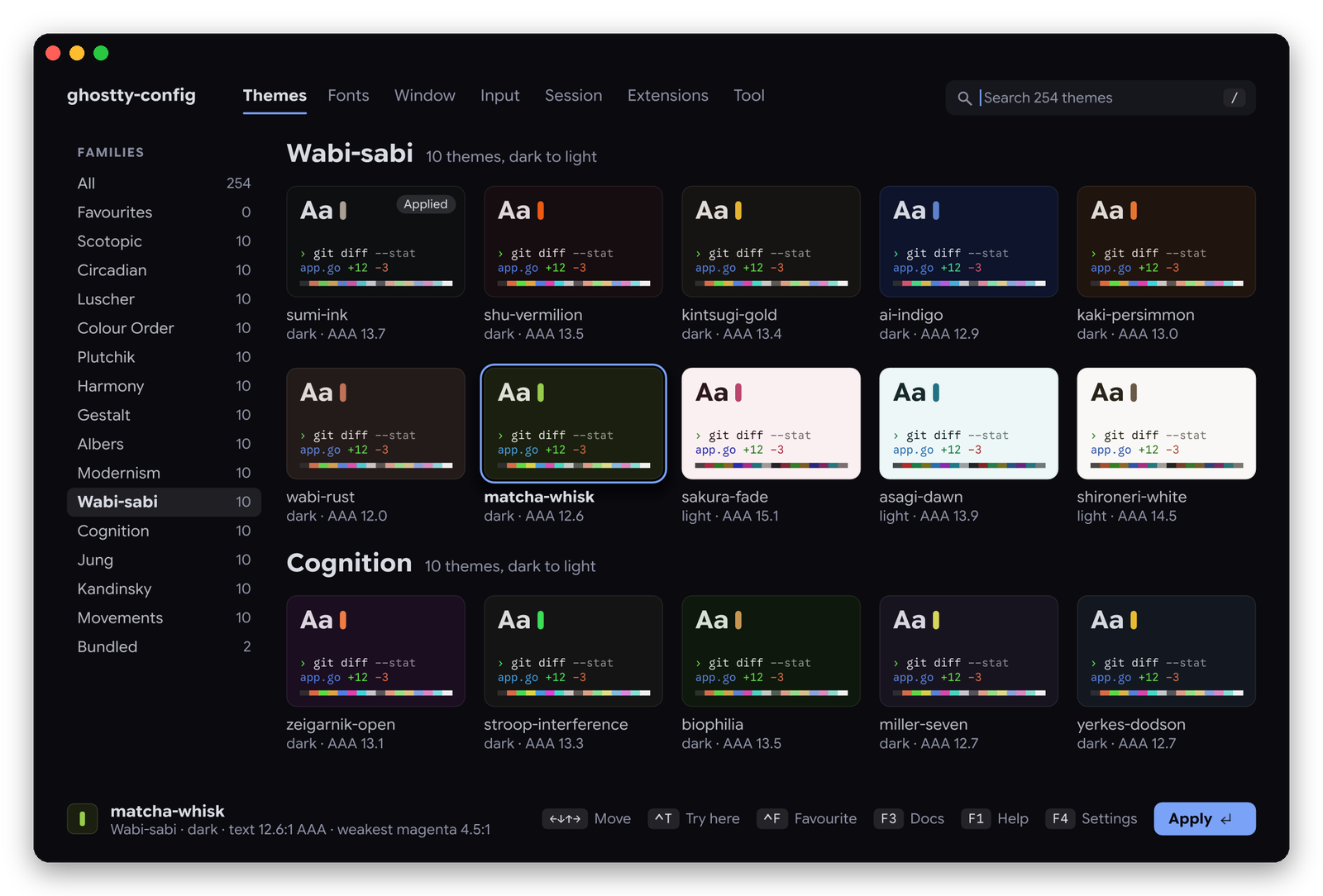
- Atelier: sections in a sidebar, the wall of themes, every setting in its place (the screenshots above and below).
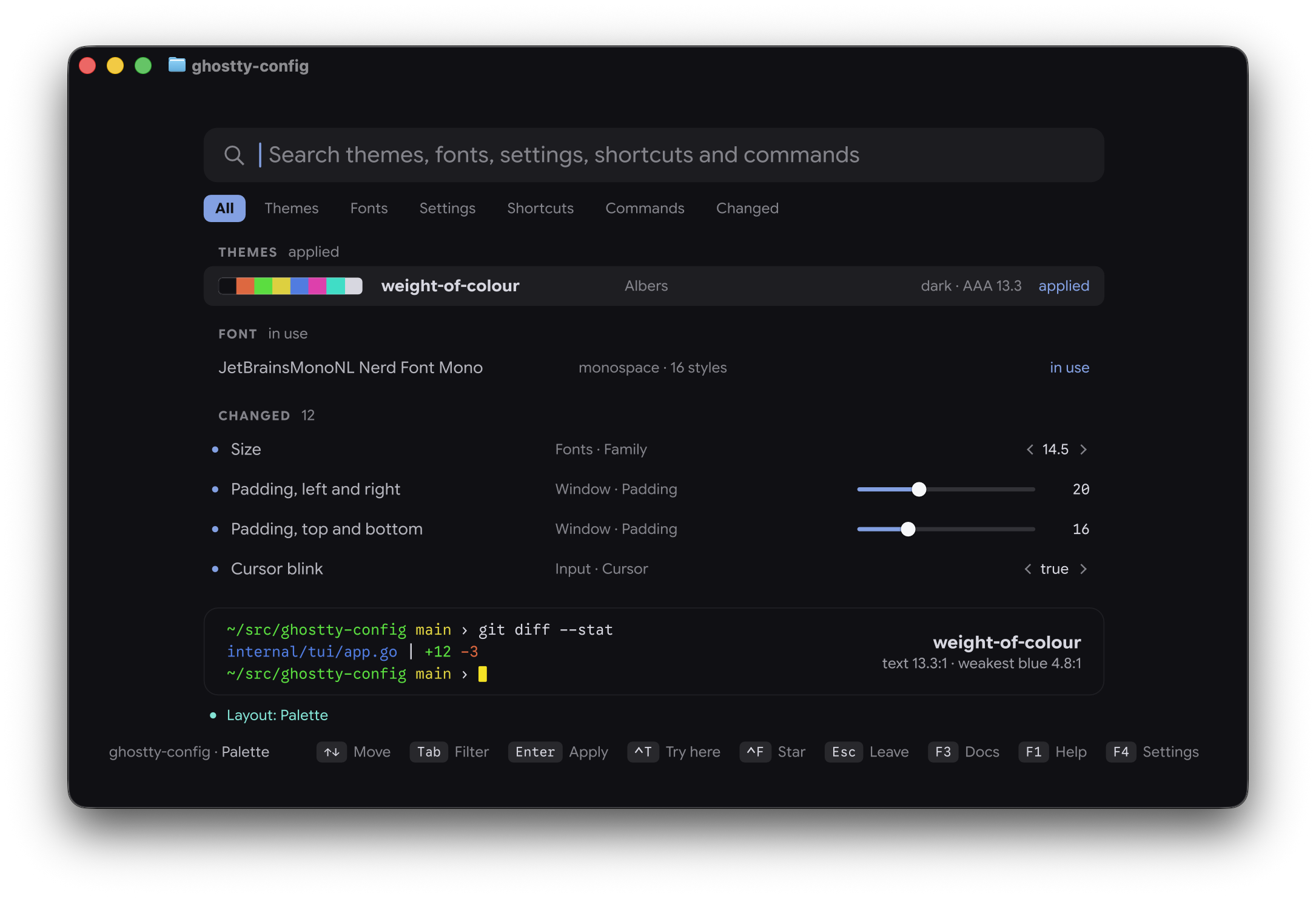
- Palette: one search line over themes, fonts, settings, shortcuts and commands, with filters. The highlighted setting opens in place; a theme previews in a strip drawn in its colours.
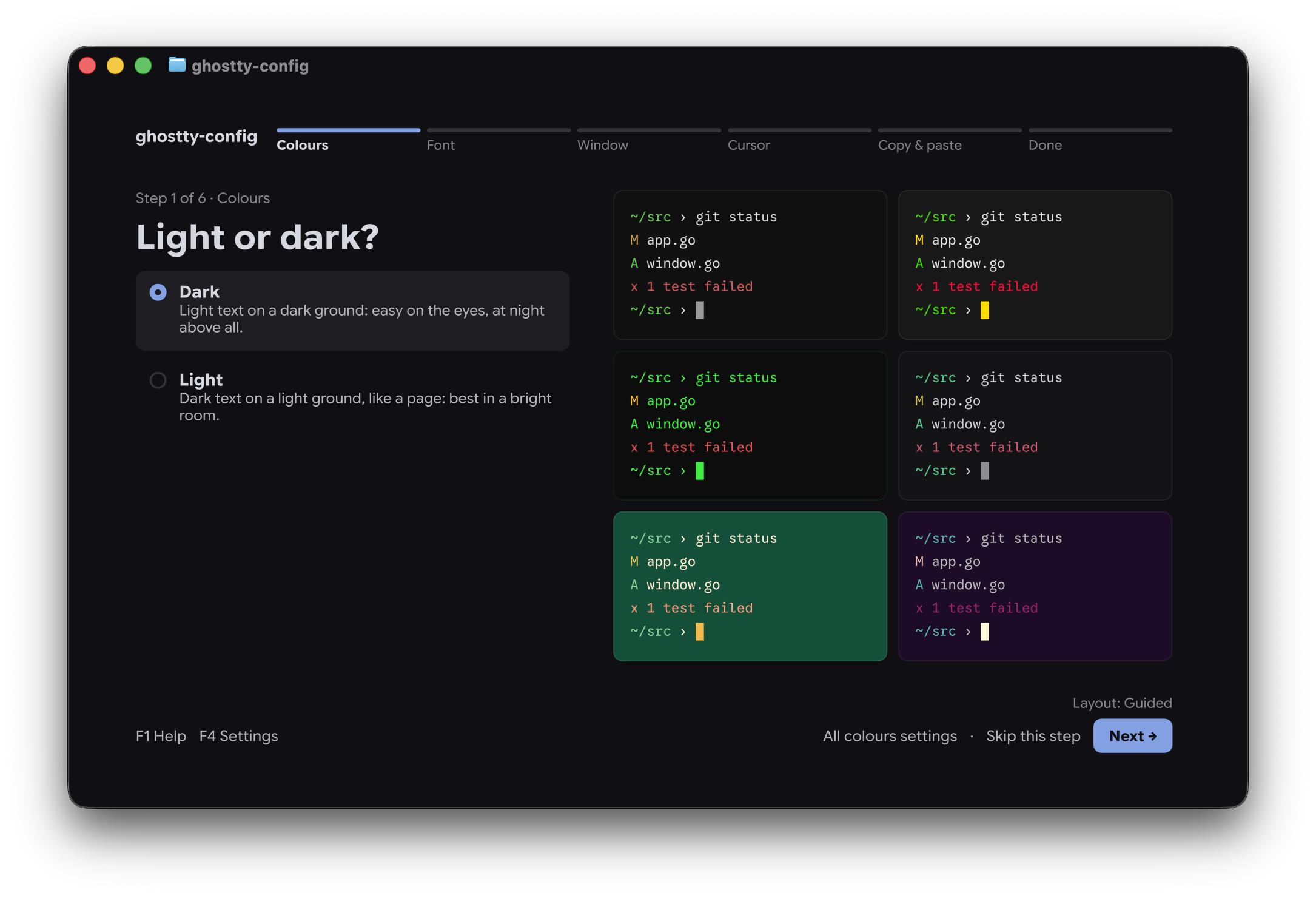
- Guided: six plain questions, one page at a time (Colours, Font, Window, Cursor, Copy & paste, Done), with large previews and a link to all the settings of each step.
Keys
The keys of Atelier; Palette and Guided show theirs in the footer.
| Key | Action |
|---|---|
Tab |
Next section |
↑ ↓ |
Move through the list |
← → |
Change the highlighted setting |
Enter |
Apply, or open the full list of values |
Delete |
Back to Ghostty's default |
Ctrl+Z |
Undo the last change |
/ or type |
Search themes, settings and commands |
Ctrl+T Ctrl+F |
Try a theme in this terminal; star it |
F3 |
Ghostty's own documentation of the highlighted line (Ghostty 1.4) |
F4 |
ghostty-config's own settings: layout, look, reload, update check, drawing |
F1 Esc |
Help; go back, then quit |
Everything can be clicked too: sections, pills, switches, the arrows beside a long value, and a double click on a theme card applies it. Sliders are pulled: the preview follows the pointer and the value is written when you let go. What the pointer is over lights up, and the mark of a changed setting turns into an arrow that puts Ghostty's default back.
Sections
- Themes: 1071 themes, the 252 of the curated collection in 27 families and the 819 Ghostty 1.4 ships, plus your own, each shown as a card and checked for contrast. Create, edit and save your own.
- Fonts: family, style and size with a specimen set in the font itself, spacing, ligatures, the OpenType features and variable axes the font really has, Nerd Font icons. 70 monospace families can be downloaded in one Enter, and if your font is missing or proportional the tool offers one.
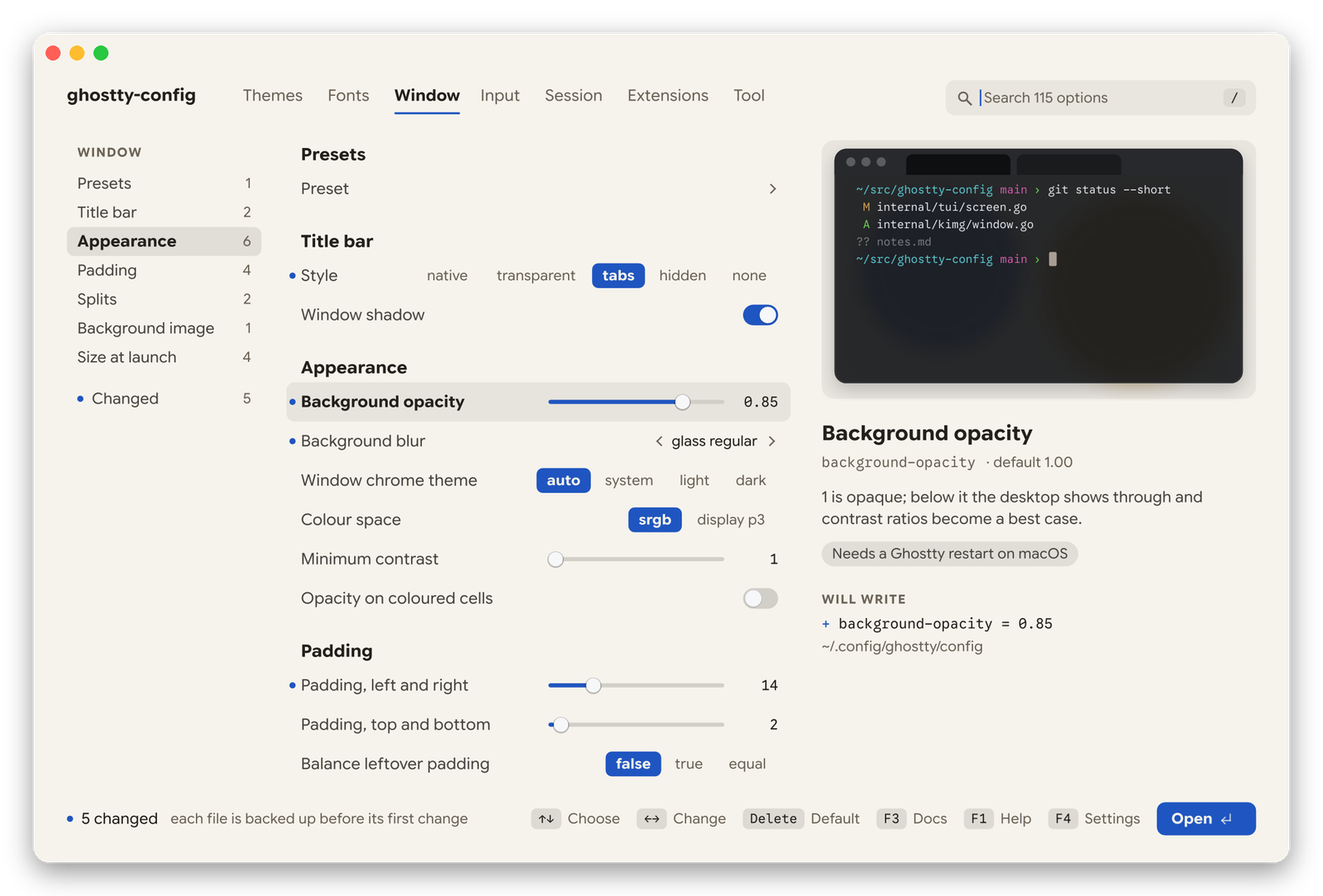
- Window: opacity, blur, title bar and title, padding, size and position at launch, full screen, tabs, splits, search and palette colours, background image, with a preview that follows every value.
- Input: cursor, mouse (right click, scroll speed), selection, clipboard, links, and every keyboard shortcut: press the new one, conflicts are shown.
- Session: window restore, startup command and directory, scrollback, notifications, bell, quick terminal, shell integration, updates, the macOS or Linux specifics, and an Advanced part. 212 Ghostty options in all on macOS with Ghostty 1.4; the few that are lists of lines (
env,key-remap…) stay in the file. - Extensions: shaders (cursor trails, screen effects) and theme packs, with their source and licence shown before install. Programs that put Ghostty to use, installed in one Enter and started with your shell: a prompt and completions (starship, zoxide, fzf, atuin, carapace, lig), images in the terminal through the Kitty graphics protocol (yazi, superfile, presenterm, fastfetch, kitten icat, chafa, viu, tdf for PDFs), clickable file names (ripgrep, eza, fd, delta for git), everyday tools in true colour (bat, glow, lazygit), system and disk (btop, bottom, dust, duf, procs, hyperfine), search and data (television, jq, fx, tealdeer, navi), editors (neovim, helix, micro), sessions that outlive their window (zmx, zellij). The list shows one group at a time under a row of tabs:
←→or a click turns them, typing searches them all. A program comes from Homebrew when you have it, else from its GitHub release into~/.local/bin, checked against the SHA-256 GitHub gives for the file; nothing runs as root. The line that starts it goes in one marked block of~/.zshrcor~/.bashrc(~/.bash_profileon macOS), backed up before its first change, or inconf.d/ghostty-config.fishfor fish; switching a program off takes its line out, and a line of your own is left alone.Ctrl+Xuninstalls a program after a yes: its line goes, thenbrew uninstall, or its files leave~/.local/bin(lig runs its ownlig uninstallfirst); a program installed some other way (apt, cargo…) is left to its installer. - Tool: reload Ghostty, check the config, see the session's changes, restore a backup, the interface's own layout and look: its scheme, accent colour and contrast, and when drawn as images its size and the width of theme cards.
Settings follow the Ghostty you have: 1.4's new ones (scrollback in bytes, clipboard access and limits, link-osc8, the SSH terminfo cache…) are offered to 1.4, and 1.3 keeps working. See CHANGELOG.md for what changed in each version.
Good to know
- Your files. Each setting is rewritten on its own line and comments are kept. If a file changed elsewhere meanwhile, your edits there are kept too. Every file is backed up to
~/.config/ghostty-config/backups/before its first change. - Checked. After each write the config goes through
ghostty +validate-config, and any problem is shown with its line. - Reload. On macOS with Ghostty 1.3 or later the tool asks Ghostty to reload over AppleScript (macOS asks once, under Privacy & Security → Automation); older versions get the reload shortcut instead (needs the Accessibility permission). On Linux it activates Ghostty's
reload-configaction over D-Bus, which needsgdbusand a single-instance Ghostty; otherwise, reload Ghostty yourself. - Display. In Ghostty and Kitty the interface is drawn as images (Kitty graphics protocol), elsewhere and in tmux with plain text.
- Updates. At most once an hour, a background check on GitHub offers new releases. Nothing else uses the network except downloads you ask for.
Options
-config file            edit this file instead of the default config
-themes dir             user themes directory
-cells                  draw the interface with terminal text, keeping images for theme cards
-no-images              never draw images
-images                 draw images even where the terminal is not known to support them
-plain                  use only characters every terminal can draw
-no-reload              never ask Ghostty to reload
-no-update-check        never check GitHub for a new release
-export-collection dir  write the curated themes to a directory and exit
-paths                  print the files that are read and written
-version                print the version
-cells, -no-images, -images, -plain, -no-reload and -no-update-check hold for one launch. To keep a choice for every launch, set it in F4 (Drawing, Simple glyphs, Reload Ghostty after each change, Check for updates); a flag given on the command line overrides the saved preference, and F4 shows that row as set by the flag.
Credits
Ghostty is by Mitchell Hashimoto and its contributors. Shaders come from KroneCorylus/ghostty-shader-playground, hackrdotsh/ghostty-shaders, sahaj-b/cursor-shaders, hced/ghostty-cursor-trails and s0xDk/ghostty-blackhole; programs and theme packs from the projects named in the interface. The interface is set in Google Sans Flex and Google Sans Code (SIL OFL). MIT licence.
1 maintainer

Metadata
1 maintainer
Release files for ghostty-config 2.4.0
For a detailed explanation of source distributions (sdists) and built distributions (wheels), please see the package formats documentation.
Built distributions (wheels)
| File | Actions Reset | |||
|---|---|---|---|---|
| ghostty_config-2.4.0-py3-none-manylinux_2_17_x86_64.manylinux2014_x86_64.musllinux_1_1_x86_64.whl | Python 3 | none | Linux musl 1.1+ x86-64, Linux glibc 2.17+ x86-64 | Details for ghostty_config-2.4.0-py3-none-manylinux_2_17_x86_64.manylinux2014_x86_64.musllinux_1_1_x86_64.whl |
| ghostty_config-2.4.0-py3-none-manylinux_2_17_aarch64.manylinux2014_aarch64.musllinux_1_1_aarch64.whl | Python 3 | none | Linux musl 1.1+ ARM64, Linux glibc 2.17+ ARM64 | Details for ghostty_config-2.4.0-py3-none-manylinux_2_17_aarch64.manylinux2014_aarch64.musllinux_1_1_aarch64.whl |
| ghostty_config-2.4.0-py3-none-macosx_12_0_x86_64.whl | Python 3 | none | macOS 12.0+ x86-64 | Details for ghostty_config-2.4.0-py3-none-macosx_12_0_x86_64.whl |
| ghostty_config-2.4.0-py3-none-macosx_12_0_arm64.whl | Python 3 | none | macOS 12.0+ ARM64 | Details for ghostty_config-2.4.0-py3-none-macosx_12_0_arm64.whl |
Total release size: 18.5 MB
Release files / ghostty_config-2.4.0-py3-none-manylinux_2_17_x86_64.manylinux2014_x86_64.musllinux_1_1_x86_64.whl
| Download URL | ghostty_config-2.4.0-py3-none-manylinux_2_17_x86_64.manylinux2014_x86_64.musllinux_1_1_x86_64.whl |
|---|---|
| Size | 4.8 MB |
| Tags | Linux glibc 2.17+ x86-64 Linux musl 1.1+ x86-64 Python 3 |
|
SHA-256 checksum How to use checksums |
59d2c3cb7faf5b62479e0625b41f2cd28b4f504beddb2b124dc86a05ff8cc475
|
|
BLAKE2b-256 checksum How to use checksums |
e5eb988333a201854c0221b0bf08c32a971a0651be92031d7373272405d67cab
|
| Upload date | |
|
Uploaded using Trusted Publishing? What is trusted publishing? |
Yes |
| Uploaded via |
twine/7.0.0 CPython/3.13.16
|
Provenance
Provenance describes where a file came from. On PyPI, provenance is shared via attestations, which provide a verifiable record of the build or publishing details. View details, limitations and caveats.


PyPI Publish Attestation
PyPI verified that this artifact, at this checksum, originated from the publisher listed below.
Signed by GitHub Actions, verified by PyPI on Nov 16, 2026.
Transparency logRelease files / ghostty_config-2.4.0-py3-none-manylinux_2_17_aarch64.manylinux2014_aarch64.musllinux_1_1_aarch64.whl
| Download URL | ghostty_config-2.4.0-py3-none-manylinux_2_17_aarch64.manylinux2014_aarch64.musllinux_1_1_aarch64.whl |
|---|---|
| Size | 4.3 MB |
| Tags | Linux glibc 2.17+ ARM64 Linux musl 1.1+ ARM64 Python 3 |
|
SHA-256 checksum How to use checksums |
19b5747ef191de5aa6db77c859b5be093ecbde4a769118c53ccf3f330d0e3b3f
|
|
BLAKE2b-256 checksum How to use checksums |
db9a6fc4c40857e3dab03c8eb2e90ee467f023564f50c1a7e0abe400873c1fd3
|
| Upload date | |
|
Uploaded using Trusted Publishing? What is trusted publishing? |
Yes |
| Uploaded via |
twine/7.0.0 CPython/3.13.16
|
Provenance
Provenance describes where a file came from. On PyPI, provenance is shared via attestations, which provide a verifiable record of the build or publishing details. View details, limitations and caveats.
PyPI Publish Attestation
PyPI verified that this artifact, at this checksum, originated from the publisher listed below.
Signed by GitHub Actions, verified by PyPI on Nov 16, 2026.
Transparency logRelease files / ghostty_config-2.4.0-py3-none-macosx_12_0_x86_64.whl
| Download URL | ghostty_config-2.4.0-py3-none-macosx_12_0_x86_64.whl |
|---|---|
| Size | 4.9 MB |
| Tags | Python 3 macOS 12.0+ x86-64 |
|
SHA-256 checksum How to use checksums |
8eaf76648e5805caa8aaee51ef2b2ebacee6ee55b4672549d0f08478f8d03dd8
|
|
BLAKE2b-256 checksum How to use checksums |
437245434fe13c04a56e852c19a25cd1faf1caaf1d866d113200527093564d0d
|
| Upload date | |
|
Uploaded using Trusted Publishing? What is trusted publishing? |
Yes |
| Uploaded via |
twine/7.0.0 CPython/3.13.16
|
Provenance
Provenance describes where a file came from. On PyPI, provenance is shared via attestations, which provide a verifiable record of the build or publishing details. View details, limitations and caveats.
PyPI Publish Attestation
PyPI verified that this artifact, at this checksum, originated from the publisher listed below.
Signed by GitHub Actions, verified by PyPI on Nov 16, 2026.
Transparency logRelease files / ghostty_config-2.4.0-py3-none-macosx_12_0_arm64.whl
| Download URL | ghostty_config-2.4.0-py3-none-macosx_12_0_arm64.whl |
|---|---|
| Size | 4.5 MB |
| Tags | Python 3 macOS 12.0+ ARM64 |
|
SHA-256 checksum How to use checksums |
bc579fd6cfb5acd0812089cd82d4fe03350e50224402460cb3107d55eb38a284
|
|
BLAKE2b-256 checksum How to use checksums |
bfba9eaaed5c7faca6401ec243c4f19874af3e3a655db1e2d833710945679797
|
| Upload date | |
|
Uploaded using Trusted Publishing? What is trusted publishing? |
Yes |
| Uploaded via |
twine/7.0.0 CPython/3.13.16
|
Provenance
Provenance describes where a file came from. On PyPI, provenance is shared via attestations, which provide a verifiable record of the build or publishing details. View details, limitations and caveats.
PyPI Publish Attestation
PyPI verified that this artifact, at this checksum, originated from the publisher listed below.
Signed by GitHub Actions, verified by PyPI on Nov 16, 2026.
Transparency logSecurity for ghostty-config 2.4.0
Provenance
Provenance describes where a file came from. On PyPI, provenance is shared via attestations, which provide a verifiable record of the build or publishing details. View details, limitations and caveats.
Full provenance
All 4 files in this release have been uploaded with provenance metadata.
Attestation for ghostty_config-2.4.0-py3-none-manylinux_2_17_x86_64.manylinux2014_x86_64.musllinux_1_1_x86_64.whl
PyPI Publish Attestation
PyPI verified that this artifact, at this checksum, originated from the publisher listed below.
Signed by GitHub Actions, verified by PyPI on Nov 16, 2026.
Transparency logA note on package security
PyPI is a repository for distributing packages, not a service for auditing them. While third-party security researchers and our staff do their best to detect and remove malicious packages, PyPI cannot guarantee the quality, security or suitability of any given package.
To learn more about protecting yourself from malicious actors, visit our package security documentation.














