
Near-real time detection of derelict (ghost) crab pots with side-scan sonar.

Project description
GhostVision
🚧UNDER CONSTRUCTION🚧




Near-real time detection of derelict (ghost) crab pots with side-scan sonar.
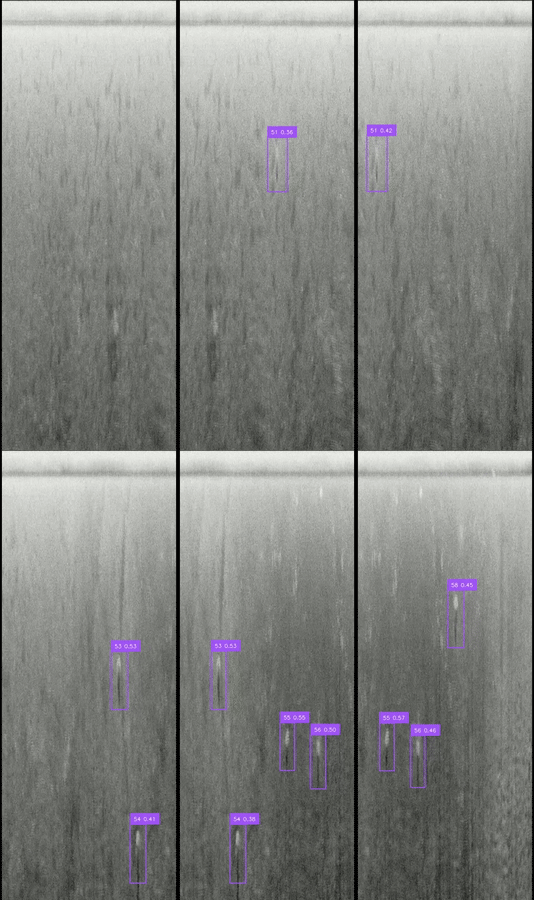
Overview
GhostVision is an open-source Python interface for automatically detecting and mapping ghost (derelict) crab pots from side-scan sonar imagery. GhostVision leverages Yolo models trained with Roboflow. Detections are then georeferenced with PINGMapper.
Installation
GPU (Fast Inference)
GhostVision is optimized for running inference (predictions) on the GPU. The processing environment is installed with conda. Any flavor of conda will do, but we recommend Miniforge. Follow the instructions below based on your OS.
Windows Only
Windows does not natively support inference on the GPU. A utility called WSL (Windows Subsystem for Linux) needs to be installed in order to run inference on the GPU.
- Install WSL (Windows Subsystem for Linux) &
- Open the command prompt by launching
Ubuntufrom the Windows Start menu.
Install Miniforge
- In a command prompt, download
Miniforgewith:wget "https://github.com/conda-forge/miniforge/releases/latest/download/Miniforge3-$(uname)-$(uname -m).sh" - Install
Miniforgewith:bash Miniforge3-$(uname)-$(uname -m).sh
Install GhostVision
- Install
PINGInstaller:pip install pinginstaller - Install
GhostVision:python -m pinginstaller ghostvision-gpu
CPU (Slow Inference; Experimental)
An experimental version of GhostVision is available to test inference speeds on the CPU. This has been tested on Windows 11 only.
- Install
Miniforge. - Open the
Miniforgeprompt. - Install
PINGInstaller:pip install pinginstaller - Install
GhostVision.python -m pinginstaller ghostvision
Usage
- Open the appropriate command prompt based on your installation above.
- Launch
GhostVision:conda activate ghostvision python -m ghostvision - Select desired parameters and click
Submit.
Download Custom Roboflow Object Detection Model
GhostVision includes Roboflow object detection models designed to detect crab pots from side-scan sonar imagery. You can train and use your own object detection model by downloading the model from Roboflow with the included utility.
- Open the appropriate command prompt based on your installation above.
- Launch the Roboflow model download utility:
conda activate ghostvision python -m ghostvision rf-download - Supply your Roboflow API Key.
- Enter the project name (all lowercase).
- Enter the project version.
The model will be downloaded and available to use.
Acknowledgments
GhostVision has been made possible through mentorship, partnerships, financial support, open-source software, manuscripts, and documentation linked below.
NOTE: The contents of this repository are those of the author(s) and do not necessarily represent the views of the individuals and organizations specifically mentioned here.
Development Team: Cameron Bodine, Art Trembanis, Kleio Baxevani, Naveed Abbasi, Onur Bagoren, Olivia Hines, Jared Wierzbicki, Ophelia Christoph, Catherine Hughes, Julia Greco.
Release history Release notifications | RSS feed


Download files
Download the file for your platform. If you're not sure which to choose, learn more about installing packages.
Source Distribution
Built Distribution
Filter files by name, interpreter, ABI, and platform.
If you're not sure about the file name format, learn more about wheel file names.
Copy a direct link to the current filters
File details
Details for the file ghostvision-1.0.0b3.tar.gz.
File metadata
- Download URL: ghostvision-1.0.0b3.tar.gz
- Upload date:
- Size: 17.4 kB
- Tags: Source
- Uploaded using Trusted Publishing? No
- Uploaded via: twine/6.2.0 CPython/3.12.12
File hashes
| Algorithm | Hash digest | |
|---|---|---|
| SHA256 |
ea7783981ef685d969d9aa884800da692cc74884e8428966722b394489bd165d
|
|
| MD5 |
a22a250d76cd3d97a6681bc2c0436ec7
|
|
| BLAKE2b-256 |
4cce8df46f2a28402a09f4d9f8cbe72f4f2f802942643c0e958a1bb206f510ba
|
File details
Details for the file ghostvision-1.0.0b3-py3-none-any.whl.
File metadata
- Download URL: ghostvision-1.0.0b3-py3-none-any.whl
- Upload date:
- Size: 16.3 kB
- Tags: Python 3
- Uploaded using Trusted Publishing? No
- Uploaded via: twine/6.2.0 CPython/3.12.12
File hashes
| Algorithm | Hash digest | |
|---|---|---|
| SHA256 |
6e79d3d18534f8e3e79c2998c32404d86853e674e0777ab5d46793c736cf16d4
|
|
| MD5 |
aafce11859ca84da483578b8a831ca36
|
|
| BLAKE2b-256 |
32c3a4bdaa5706659d412088aec037c7b174fab022e740a9bdea65364737689c
|






