
GigAI
GigAI runs AI work on your own computer, under your control. Your settings, your credentials and your work stay on your machine, and every model call can be inspected. It works through the model you already use: Codex, Claude Code, Ollama or OpenRouter.
Scout is its first Gig, for a job search. It keeps a local store of public job postings, ranks them against your resume, assesses the ones you approve, asks you the questions a posting leaves open, remembers your answers and stories, and drafts a tailored resume you download as a PDF. You use it from the browser, or from your own AI agent.
Quickstart
Run GigAI on your own computer and your own network, not a work laptop or office Wi-Fi. Scout checks about 10,000 public job boards (Greenhouse, Lever, Ashby): thousands of requests, and it keeps checking 8 times a day. An employer can see that traffic.
-
Requirements. macOS or Linux with Python 3.11+,
uv, and one model CLI installed and logged in: Codex (codex login) or Claude Code (claude, then/login). -
Install.
uv tool install gigai
-
Run.
gigai scout run # starts Scout and opens the browser
The setup wizard asks for your model, your resume (
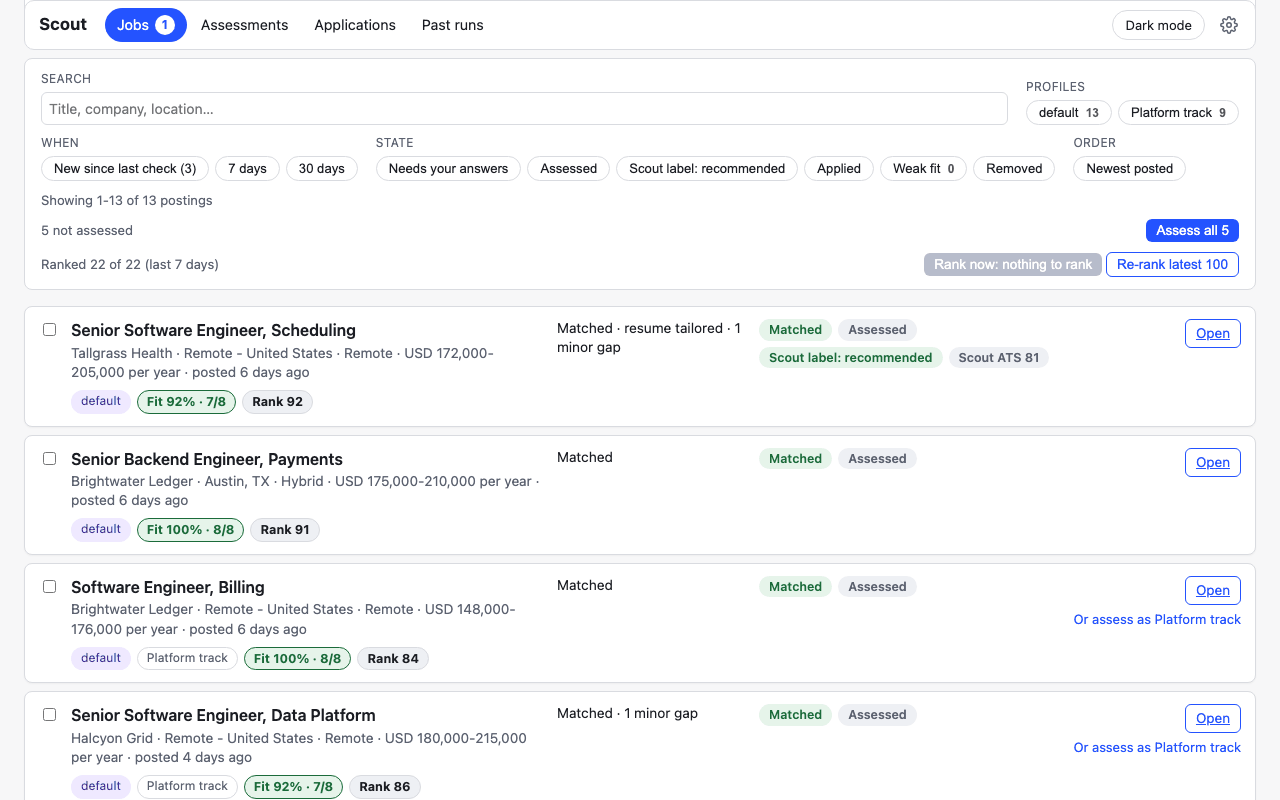
.mdor.txt) and your roles. Then Update sources fills the store, the Jobs page lists what matches, Assess these assesses what you approve, and Tailor resume drafts a resume for one job. Update later withuv tool upgrade gigai. You can turn the background checks off under Settings > Background updates.
Let your agent set it up
Remove your name, email, phone, address and links from your resume before you give it to an agent.
Paste this into Claude Code or Codex. The agent installs what is missing, checks your resume file for contact details before it reads it, and asks before anything that uses the network or a model.
Set up GigAI for me. Read https://raw.githubusercontent.com/karthik446/gigai/main/gigai-docs/src/content/docs/scout/agents/start.md first (if you cannot open it, run `curl -fsSL https://raw.githubusercontent.com/karthik446/gigai/main/gigai-docs/src/content/docs/scout/agents/start.md` and read that) and follow it exactly. Check whether `uv` is installed; if not, install it (macOS with Homebrew: `brew install uv`; otherwise `curl -LsSf https://astral.sh/uv/install.sh | sh`; on Windows use WSL) and tell me what you installed; do not use sudo without asking me. Then `uv tool install gigai`, open a new shell if `gigai` is not found (`uv tool update-shell`), and run `gigai scout run --no-browser`. Before anything touches my resume, run GigAI's contact-details check on the file and stop if it finds any. Ask me before any step that makes thousands of network requests (Update sources) or spends model calls (assessing). When it is set up, show me what's new on Scout.
With Codex, codex --search "<the prompt>" turns on live web search; the curl line in the prompt is the fallback either way.
Use it from your AI agent
gigai agent-skill          # prints the instructions that teach your agent the loop
gigai agent-permissions    # prints a permissions snippet for you to apply; GigAI applies nothing
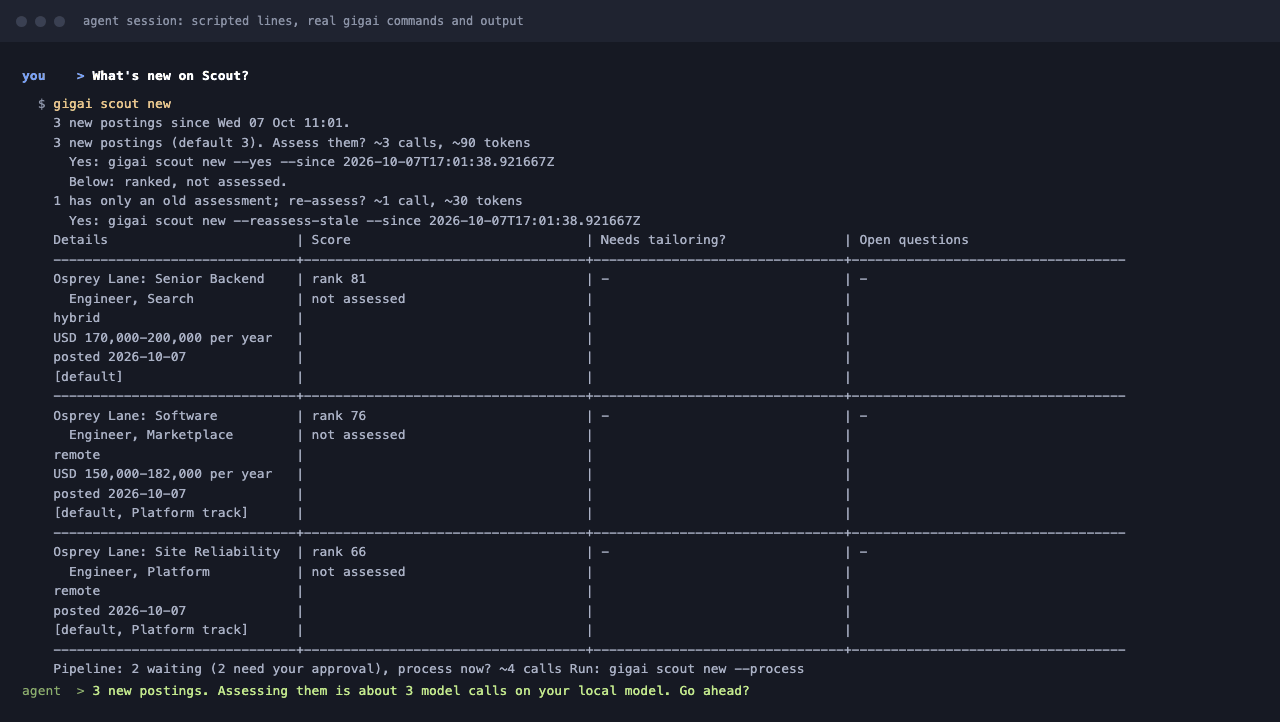
gigai scout new            # what is new since your last check
- You ask your agent "what's new?". It runs
gigai scout newand shows you a grid. - Scout asks before it assesses: you see the count and an estimate, and say yes or no.
- The agent asks you each job's open questions and saves your answers. A longer reply becomes a story, if you agree.
- Jobs you answered are tailored and scored in the background, within daily limits (10 jobs per trigger, 40 model calls a day; more waits for your approval).
- For a PDF the agent gives you an "open in Scout" link. You add your name and contact details there, in your browser. The agent never gets them.
How each agent picks it up:
- Claude Code:
gigai agent-skill --format skill --out ~/.claude/skills/gigai-scout/SKILL.md, merge whatgigai agent-permissionsprints into your Claude Code settings, start a new session, and ask "what's new on Scout?". - Codex: add what
gigai agent-skill --format agents-mdprints to~/.codex/AGENTS.md(every project) or a repository'sAGENTS.md. Codex asks for approval for commands that use the network or write outside the folder it was started in. - Any other agent: the same
AGENTS.mdsection, or paste whatgigai agent-contextprints. A running Scout serves/llms.txtand/api/openapi.jsononhttp://127.0.0.1:8765.
For agents has the full workflow, the per-agent setup and an example session. Token usage says what it costs: the first run is the expensive one.
Privacy
GigAI never stores your name, email, phone, address or links. You type them only when you make a PDF, and GigAI forgets them right after. A resume you add is stored without its name and contact lines; that removal works on patterns and can't catch personal details elsewhere in the text, so keep those out. Earlier versions did store contact lines: a one-time cleanup after you upgrade removes them from the current files, but older copies can remain in GigAI's local history on your computer.
Everything else you give GigAI (your answers, stories, notes and the body of your resume) stays on your computer unless you or your agent send it somewhere. GigAI's own model calls send your resume (without the contact lines) and your answers to the model you picked. With Ollama the resume stays on this machine.
Anything GigAI gives your agent is sent to that agent's model provider. Agents get no contact data from GigAI, but an agent with shell access can read local files.
See Privacy and security for exactly what is stored, what is sent, and to whom.
Links
- Documentation: quickstart, concepts, CLI and API reference, known limitations
- What Scout's numbers and labels mean: rank, verdict, Scout label, Scout ATS score
- Roadmap: what is planned, without dates
- CHANGELOG and Releases
- CONTRIBUTING and issues
GigAI is an alpha; expect rough edges. Apache-2.0, see LICENSE.
1 maintainer

Metadata
1 maintainer
Release files for gigai 0.1.10.9
For a detailed explanation of source distributions (sdists) and built distributions (wheels), please see the package formats documentation.
Source distribution (sdist)
| File | Size | Uploaded | |
|---|---|---|---|
| gigai-0.1.10.9.tar.gz | 2.9 MB | Details |
Built distribution (wheel)
| File | Interpreter | ABI | Platform | Reset |
|---|---|---|---|---|
| gigai-0.1.10.9-py3-none-any.whl | Python 3 | none | any | Details |
Total release size: 5.9 MB
Release files / gigai-0.1.10.9.tar.gz
| Download URL | gigai-0.1.10.9.tar.gz |
|---|---|
| Size | 2.9 MB |
| Tags | Source |
|
SHA-256 checksum How to use checksums |
67d2ede17687b341ae69c9064b14c2417dfc2e6819dbb62a8540fc96d993477f
|
|
BLAKE2b-256 checksum How to use checksums |
4d2fa14131ad4678a897e8798cc08b394ddb17320a36089f9b838d713436b602
|
| Upload date | |
|
Uploaded using Trusted Publishing? What is trusted publishing? |
Yes |
| Uploaded via |
twine/7.0.0 CPython/3.13.14
|
Provenance
Provenance describes where a file came from. On PyPI, provenance is shared via attestations, which provide a verifiable record of the build or publishing details. View details, limitations and caveats.


PyPI Publish Attestation
PyPI verified that this artifact, at this checksum, originated from the publisher listed below.
Signed by GitHub Actions, verified by PyPI on Oct 4, 2026.
Transparency logRelease files / gigai-0.1.10.9-py3-none-any.whl
| Download URL | gigai-0.1.10.9-py3-none-any.whl |
|---|---|
| Size | 3.1 MB |
| Tags | Python 3 |
|
SHA-256 checksum How to use checksums |
f7300636ce12afa852bdeaa1e5b4bc87662403110230437d7c0e2e3a1257ffaa
|
|
BLAKE2b-256 checksum How to use checksums |
7d776e93719623e37c1b65126c5d7336fe8d364849d9f860d8b36b45fdaf2cfb
|
| Upload date | |
|
Uploaded using Trusted Publishing? What is trusted publishing? |
Yes |
| Uploaded via |
twine/7.0.0 CPython/3.13.14
|
Provenance
Provenance describes where a file came from. On PyPI, provenance is shared via attestations, which provide a verifiable record of the build or publishing details. View details, limitations and caveats.
PyPI Publish Attestation
PyPI verified that this artifact, at this checksum, originated from the publisher listed below.
Signed by GitHub Actions, verified by PyPI on Oct 4, 2026.
Transparency log













