
Gigatoken
~1000x faster than HuggingFace's tokenizers, drop-in replacement.
Tokenize your text data at GB/s!
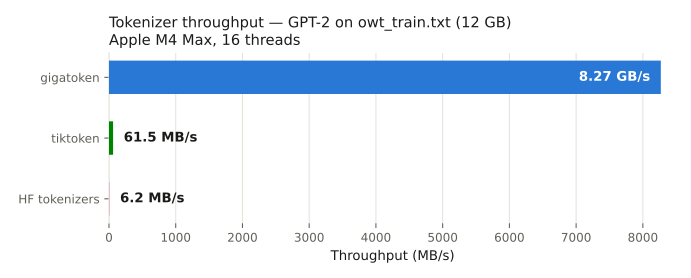
Note that both HF tokenizers and tiktoken are already running multithreaded Rust!
What is Gigatoken?
Gigatoken is the fastest tokenizer for language modeling. It supports a wide range of CPU hardware, and nearly all commonly used tokenizers. See the Benchmarks section for detailed throughput numbers across tokenizers and CPUs.
Installation
pip install gigatoken
Usage
Gigatoken can be used with its own API, or in compatibility mode with HuggingFace Tokenizers or Tiktoken.
Compatibility Mode (Easiest)
import gigatoken as gt

# Minimum change from existing HuggingFace tokenizers usage (compatibility mode)
hf_tokenizer = ...
tokenizer = gt.Tokenizer(hf_tokenizer).as_hf()

# tokenizer can be used in the same contexts as hf_tokenizer
tokens = tokenizer.encode_batch(["This is a test string", "And here is another"])

# OR with tiktoken
tiktokenizer = ...
tokenizer = gt.Tokenizer(tiktokenizer).as_tiktoken()

# Now works like existing tiktoken tokenizers
tokens = tokenizer.encode_batch(["This is a test string", "And here is another"])
A substantial amount of effort has been put into making sure the outputs match exactly with what you would get with HuggingFace Tokenizers in this setting, but this is at a non-negligible cost to performance. You can still expect way faster performance across the board, but not quite the 1000x you will get with the Gigatoken API.
Gigatoken API (Fastest)
import gigatoken as gt

tokenizer = gt.Tokenizer("Qwen/Qwen3-8B")  # Accepts HF model names
file_source = gt.TextFileSource(["owt_train.txt"], separator=b"<|endoftext|>")
tokens = tokenizer.encode_files(file_source)
Using the Gigatoken API lets the Rust implementation read data directly, and skips as much overhead as possible while allowing for maximum parallelism. Keep in mind that passing Python data structures through this API still incurs the overhead of reading from Python.
Benchmarks
Encoding throughput on owt_train.txt (11.9 GB) — AMD EPYC 9565 72-Core Processor x 2 sockets (144 cores)
| Tokenizer | gigatoken | HF tokenizers | tiktoken | vs HF | vs tiktoken |
|---|---|---|---|---|---|
| GPT-2 | 24.53 GB/s | 24.8 MB/s | 36.0 MB/s | 989× | 681× |
| Phi-4 | 24.00 GB/s | 29.9 MB/s | — | 801× | — |
| GPT-OSS | 23.96 GB/s | 49.7 MB/s | 42.8 MB/s | 482× | 560× |
| OLMo 2 / 3 | 23.06 GB/s | 27.7 MB/s | — | 833× | — |
| Nemotron 3 | 22.79 GB/s | 49.4 MB/s | — | 462× | — |
| Qwen 3 | 22.16 GB/s | 34.2 MB/s | — | 648× | — |
| Llama 3 / 3.1 / 3.2 | 22.15 GB/s | 48.5 MB/s | — | 457× | — |
| GLM 5 | 20.97 GB/s | 74.8 MB/s | — | 280× | — |
| Llama 3.3 | 20.82 GB/s | 48.3 MB/s | — | 431× | — |
| Llama 4 | 20.77 GB/s | 72.7 MB/s | — | 286× | — |
| GLM 4 | 20.61 GB/s | 72.3 MB/s | — | 285× | — |
| Phi-4-mini | 20.05 GB/s | 27.6 MB/s | — | 726× | — |
| DeepSeek V3 / R1 / V4 | 19.69 GB/s | 26.2 MB/s | — | 750× | — |
| Qwen 2 / 2.5 | 19.12 GB/s | 27.7 MB/s | — | 691× | — |
| Kimi K2 | 18.85 GB/s | — | — | — | — |
| Qwen 3.5 / 3.6 | 15.49 GB/s | 27.7 MB/s | — | 558× | — |
| Gemma 4 | 4.82 GB/s | 334.1 MB/s | — | 14× | — |
| ModernBERT | 4.18 GB/s | 26.9 MB/s | — | 155× | — |
| Mistral 7B v0.3 | 3.57 GB/s | 354.7 MB/s | — | 10× | — |
| TinyLlama / Phi-3 (Llama 2) | 3.48 GB/s | 323.6 MB/s | — | 11× | — |
| CodeLlama | 3.47 GB/s | 347.4 MB/s | — | 10.0× | — |
| Gemma 3 | 3.43 GB/s | 357.2 MB/s | — | 9.6× | — |
| Gemma 1 | 2.51 GB/s | 342.2 MB/s | — | 7.3× | — |
Encoding throughput on owt_train.txt (11.9 GB) — Apple M4 Max (16 cores)
| Tokenizer | gigatoken | HF tokenizers | tiktoken | vs HF | vs tiktoken |
|---|---|---|---|---|---|
| GPT-2 | 8.79 GB/s | 6.9 MB/s | 62.8 MB/s | 1,268× | 140× |
| Nemotron 3 | 7.82 GB/s | 10.9 MB/s | — | 715× | — |
| Phi-4 | 7.76 GB/s | 7.7 MB/s | — | 1,012× | — |
| Llama 3 / 3.1 / 3.2 | 7.60 GB/s | 11.2 MB/s | — | 676× | — |
| OLMo 2 / 3 | 7.56 GB/s | 5.8 MB/s | — | 1,299× | — |
| Llama 3.3 | 7.50 GB/s | 15.7 MB/s | — | 479× | — |
| Phi-4-mini | 6.97 GB/s | 7.2 MB/s | — | 964× | — |
| Kimi K2 | 6.88 GB/s | — | — | — | — |
| Llama 4 | 6.81 GB/s | 11.6 MB/s | — | 590× | — |
| Qwen 2 / 2.5 | 6.37 GB/s | 5.8 MB/s | — | 1,105× | — |
| Qwen 3 | 6.36 GB/s | 6.9 MB/s | — | 918× | — |
| Qwen 3.5 / 3.6 | 6.31 GB/s | 6.3 MB/s | — | 994× | — |
| GPT-OSS | 6.20 GB/s | 20.2 MB/s | 87.2 MB/s | 306× | 71× |
| GLM 4 | 6.17 GB/s | 15.8 MB/s | — | 392× | — |
| DeepSeek V3 / R1 / V4 | 5.68 GB/s | 7.2 MB/s | — | 788× | — |
| GLM 5 | 5.55 GB/s | 12.2 MB/s | — | 456× | — |
| ModernBERT | 2.64 GB/s | 5.8 MB/s | — | 452× | — |
| Mistral 7B v0.3 | 1.99 GB/s | 95.1 MB/s | — | 21× | — |
| Gemma 4 | 1.82 GB/s | 85.2 MB/s | — | 21× | — |
| CodeLlama | 1.73 GB/s | 80.2 MB/s | — | 22× | — |
| TinyLlama / Phi-3 (Llama 2) | 1.69 GB/s | 80.1 MB/s | — | 21× | — |
| Gemma 1 | 1.42 GB/s | 85.7 MB/s | — | 17× | — |
| Gemma 3 | 1.38 GB/s | 82.2 MB/s | — | 17× | — |
Encoding throughput on owt_train.txt (11.9 GB) — AMD Ryzen 7 9800X3D 8-Core Processor (16 cores)
| Tokenizer | gigatoken | HF tokenizers | tiktoken | vs HF | vs tiktoken |
|---|---|---|---|---|---|
| GPT-2 | 6.27 GB/s | 59.0 MB/s | 92.1 MB/s | 106× | 68× |
| Phi-4 | 6.09 GB/s | 55.4 MB/s | — | 110× | — |
| OLMo 2 / 3 | 6.06 GB/s | 55.4 MB/s | — | 109× | — |
| Phi-4-mini | 5.80 GB/s | 54.6 MB/s | — | 106× | — |
| GPT-OSS | 5.68 GB/s | 79.6 MB/s | 112.7 MB/s | 71× | 50× |
| Qwen 3 | 5.34 GB/s | 54.4 MB/s | — | 98× | — |
| Qwen 2 / 2.5 | 5.30 GB/s | 51.7 MB/s | — | 103× | — |
| Llama 3.3 | 5.26 GB/s | 79.9 MB/s | — | 66× | — |
| Llama 3 / 3.1 / 3.2 | 5.24 GB/s | 79.5 MB/s | — | 66× | — |
| Kimi K2 | 5.23 GB/s | — | — | — | — |
| Qwen 3.5 / 3.6 | 5.22 GB/s | 51.6 MB/s | — | 101× | — |
| Nemotron 3 | 5.20 GB/s | 79.0 MB/s | — | 66× | — |
| GLM 5 | 5.05 GB/s | 79.5 MB/s | — | 63× | — |
| GLM 4 | 5.04 GB/s | 79.5 MB/s | — | 63× | — |
| Llama 4 | 5.03 GB/s | 78.2 MB/s | — | 64× | — |
| DeepSeek V3 / R1 / V4 | 4.21 GB/s | 51.6 MB/s | — | 82× | — |
| ModernBERT | 2.84 GB/s | 52.1 MB/s | — | 54× | — |
| Mistral 7B v0.3 | 1.47 GB/s | 91.6 MB/s | — | 16× | — |
| Gemma 4 | 1.45 GB/s | 78.8 MB/s | — | 18× | — |
| CodeLlama | 1.38 GB/s | 85.2 MB/s | — | 16× | — |
| TinyLlama / Phi-3 (Llama 2) | 1.37 GB/s | 84.9 MB/s | — | 16× | — |
| Gemma 1 | 1.14 GB/s | 84.9 MB/s | — | 13× | — |
| Gemma 3 | 1.12 GB/s | 83.0 MB/s | — | 13× | — |
Benchmark details
OWT (openwebtext) was chosen because it's roughly representative of the text you get after extraction from CommonCrawl documents.
Gigatoken encodes the whole file un-split, and is thus doing more work than the other tokenizers to find the split boundaries and automatically parallelize.
HuggingFace tokenizers (encode_batch_fast) gets the first 100 MB and tiktoken (encode_ordinary_batch) the first 1 GB, both presplit on <|endoftext|>.
This is fair because neither of the compared tokenizers do caching, meaning the speed is roughly uniform throughout processing.
Tiktoken rows are currently only filled in for tokenizers with official support.
The slowest rows are the SentencePiece-based tokenizers, which are not well optimized in Gigatoken.
Each row is one distinct tokenizer (identical vocab/merges/pretokenizer), measured on a representative repo. If you don't see your tokenizer here, it's likely based on some existing one. For instance:
- Llama 3 / 3.1 / 3.2 — Llama 3 / 3.1 / 3.2, DeepSeek-R1-Distill-Llama, Hermes 3, Saiga, and other Llama-3 finetunes
- Llama 3.3 — Llama 3.3, Llama-3.1-Nemotron-Nano-VL, SmolLM3, Kanana 1.5, jina-embeddings-v5, Ultravox
- Qwen 2 / 2.5 — Qwen 2 and 2.5 (incl. Coder and VL), Qwen3-Coder, Qwen3-VL, DeepSeek-R1 Qwen distills, MiMo V2.5, MiniCPM-o 2.6, InternVL3
- Qwen 3 — Qwen 3 (incl. Embedding and Reranker), Qwen2.5-Omni, Qwen3-VL-Embedding, MiMo V2.5 Pro, jina-reranker-m0, pplx-embed, MOSS-TTS, Zeta
- DeepSeek V3 / R1 / V4 — DeepSeek V3 / V3.1 / V3.2, R1, V4 Flash and Pro, DeepSeek-VL2
- GLM 4 — GLM 4.1V, 4.5, and 4.7
- GLM 5 — GLM 5 / 5.2 and GLM-4.7-Flash
- Nemotron 3 — Nemotron 3 Nano, Super, and Ultra
- Kimi K2 — Kimi K2 / K2.5 / K2.6 / K2.7, Kimi-Linear, Kimi-VL, Moonlight
- Phi-4-mini — Phi-4-mini and Phi-4-multimodal
- TinyLlama / Phi-3 (Llama 2) — TinyLlama, Phi-3-mini, Phi-3.5-mini and Phi-3.5-vision (the Llama 2 vocab)
- Gemma 3 — Gemma 3 (270M–27B) and EmbeddingGemma
- Gemma 4 — Gemma 4 (dense, MoE, and E-series) and DiffusionGemma
FAQ
Q: Did you just way over-optimize for a specific CPU and tokenizer? How is it so fast?
No, I way over-optimized for every combination of these! The results are very consistent across CPUs (modern x86 and ARM), and across specific tokenizers.
The major improvements are in optimizing heavily an implementation that usually is outsourced to a Regex engine (pretokenization) using SIMD, minimizing branching and other tricks, as well as heavily optimizing caching of pretoken mappings (if a word has been seen before, look up its encoded tokens efficiently). Caching is a very hard problem in this domain since the cache grows very quickly, and pretoken distributions are very long-tailed.
Some gains are also achieved from minimizing interactions with Python, and avoiding communication between threads.
Q: How can I quickly check if my tokenizer is supported?
You can try it out without installing anything! The following command will validate and time tokenization for a given HuggingFace model repo:
# Download your data
wget https://huggingface.co/datasets/stanford-cs336/owt-sample/resolve/main/owt_train.txt.gz  # Just an example!
gunzip owt_train.txt.gz
uvx --with tokenizers gigatoken bench 'openai-community/gpt2' owt_train.txt \
    --validate --doc-separator "<|endoftext|>"
      cpu: Apple M4 Max, 16 cores
gigatoken:    1.432 s |   11920.51 MB at  8327.05 MB/s |  2701.65 Mtok at 1887.23 Mtok/s
       hf:   16.250 s |     100.00 MB at     6.15 MB/s |    22.76 Mtok at    1.40 Mtok/s
gigatoken is 1353.13x faster than hf
validation OK: 20401 documents match
      cpu: AMD EPYC 9565 72-Core Processor, 144 cores, 2 sockets
gigatoken:    0.486 s |   11920.51 MB at 24532.45 MB/s |  2701.65 Mtok at 5564.94 Mtok/s
       hf:    4.033 s |     100.00 MB at    24.80 MB/s |    22.76 Mtok at    5.63 Mtok/s
gigatoken is 989.21x faster than hf
validation OK: 20401 documents match
At the rates we see on the EPYC CPU, you could tokenize the entirety of Common Crawl (often considered to be the entire internet, 130 trillion tokens) in just under 6.5 hours!
This example uses the train sample from this dataset, and the CLI by default subsets to the first 100MB of the file for validation and comparison with HF.
You can see help for these flags with uvx gigatoken bench --help.
You might need to run your commands twice on macOS to get a good reading, since the first run will always perform a security scan, which will slow down the Rust code.
Q: I've found a mismatch/slow use-case, is this expected?
Most likely not! Despite reasonably wide testing I don't have every use-case on hand, so please report anything you find in a GitHub Issue so I can address it as soon as possible.
Citation
If you use Gigatoken in your research, please cite it as:
@software{roed2026gigatoken,
  author = {Marcel R{\o}d},
  title = {{G}igatoken: SIMD and Cache Hierarchies for 1000x Faster Byte-Pair Encoding Tokenization on Modern CPUs},
  url = {https://github.com/marcelroed/gigatoken},
  year = {2026},
}
Known Issues
- Python iteration is handled in Rust, but uses ABI3, which is slower than using internal version-specific CPython APIs. In the future I intend to specialize for each Python version to cut this overhead. Early experiments show a 2x speed improvement for overhead-bound cases.
- File sinks are not yet implemented in the Gigatoken API.
- WordPiece is not yet supported.
- SentencePiece-based tokenization is not nearly as optimized as the more common BPE tokenizers. This is low priority for now since mostly Google models/BERT style models use SentencePiece.
- Windows has not been tested much, so for now prefer using WSL.
- CJK-heavy data is much slower to tokenize. Most pretokenizers make caching a challenge in this setting. There is an ongoing effort to improve this.
AI Use Disclosure
A majority of this code base was crafted by hand without any use of AI (which can be seen from the project's Git history). In the final stages of the project, AI was used to assist:- Implementing the user-facing API
- Widening of compatibility, for instance generalizing and porting the pretokenizer implementations to support more tokenizers, less interesting features like padding/truncation/unicode normalization
- Porting SIMD strategies between AVX512/AVX2/NEON
- Final profiling stages and the last ~4x worth of performance from eliminating branching and improving the pretoken cache hierarchy
- Refactoring and code reuse
1 maintainer

Metadata
1 maintainer
Release files for gigatoken 0.11.0
For a detailed explanation of source distributions (sdists) and built distributions (wheels), please see the package formats documentation.
Source distribution (sdist)
| File | Size | Uploaded | Provenance | Actions |
|---|---|---|---|---|
| gigatoken-0.11.0.tar.gz | 1.3 MB | Without provenance | Details for gigatoken-0.11.0.tar.gz |
Built distributions (wheels)
Total release size: 30.5 MB
Release files / gigatoken-0.11.0.tar.gz
| Download URL | gigatoken-0.11.0.tar.gz |
|---|---|
| Size | 1.3 MB |
| Tags | Source |
|
SHA-256 checksum How to use checksums |
39d5743e984bf0001516fad1ab82c9d2e74d307650291a5f308a9fc3f21880cf
|
|
BLAKE2b-256 checksum How to use checksums |
c74eb12a9b1d2792ac466dbb5d07fd9f23c3651df8611bfbde20d5f7bdcb32a3
|
| Upload date | |
|
Uploaded using Trusted Publishing? What is trusted publishing? |
No |
| Uploaded via |
uv/0.13.6 {"installer":{"name":"uv","version":"0.13.6","subcommand":["publish"]},"python":null,"implementation":{"name":null,"version":null},"distro":{"name":"macOS","version":null,"id":null,"libc":null},"system":{"name":null,"release":null},"cpu":null,"openssl_version":null,"setuptools_version":null,"rustc_version":null,"ci":null}
|
Release files / gigatoken-0.11.0-cp310-abi3-win_arm64.whl
| Download URL | gigatoken-0.11.0-cp310-abi3-win_arm64.whl |
|---|---|
| Size | 4.4 MB |
| Tags | CPython 3.10 Windows ARM64 abi3 |
|
SHA-256 checksum How to use checksums |
1cb67628b6bbad957f0de73c8204196925c3d833a0e638eaf038fe43fda77b03
|
|
BLAKE2b-256 checksum How to use checksums |
4455e5a22fc06a863fac7b06ce03156c7b5fac9113083cc015339ff5d8ce57a7
|
| Upload date | |
|
Uploaded using Trusted Publishing? What is trusted publishing? |
No |
| Uploaded via |
uv/0.13.6 {"installer":{"name":"uv","version":"0.13.6","subcommand":["publish"]},"python":null,"implementation":{"name":null,"version":null},"distro":{"name":"macOS","version":null,"id":null,"libc":null},"system":{"name":null,"release":null},"cpu":null,"openssl_version":null,"setuptools_version":null,"rustc_version":null,"ci":null}
|
Release files / gigatoken-0.11.0-cp310-abi3-win_amd64.whl
| Download URL | gigatoken-0.11.0-cp310-abi3-win_amd64.whl |
|---|---|
| Size | 5.5 MB |
| Tags | CPython 3.10 Windows x86-64 abi3 |
|
SHA-256 checksum How to use checksums |
1c0e52c00b80ec9b688714c290cae43a02d748ac222325a25cb78595731ef31d
|
|
BLAKE2b-256 checksum How to use checksums |
f2f447c80a73b32bae71a65330c3da52c40c73af58eacb128c079c1b0d110b77
|
| Upload date | |
|
Uploaded using Trusted Publishing? What is trusted publishing? |
No |
| Uploaded via |
uv/0.13.6 {"installer":{"name":"uv","version":"0.13.6","subcommand":["publish"]},"python":null,"implementation":{"name":null,"version":null},"distro":{"name":"macOS","version":null,"id":null,"libc":null},"system":{"name":null,"release":null},"cpu":null,"openssl_version":null,"setuptools_version":null,"rustc_version":null,"ci":null}
|
Release files / gigatoken-0.11.0-cp310-abi3-manylinux_2_17_x86_64.manylinux2014_x86_64.whl
| Download URL | gigatoken-0.11.0-cp310-abi3-manylinux_2_17_x86_64.manylinux2014_x86_64.whl |
|---|---|
| Size | 5.4 MB |
| Tags | CPython 3.10 Linux glibc 2.17+ x86-64 abi3 |
|
SHA-256 checksum How to use checksums |
11992abc7f41e41e5be03c722df1c5205b5d0fcc4bcbd4fb440d2a0b97f7ac3f
|
|
BLAKE2b-256 checksum How to use checksums |
45b685e9a2351bf93897782bfcb58eacc64ac4d5b8654fb8ee463a830b1795e5
|
| Upload date | |
|
Uploaded using Trusted Publishing? What is trusted publishing? |
No |
| Uploaded via |
uv/0.13.6 {"installer":{"name":"uv","version":"0.13.6","subcommand":["publish"]},"python":null,"implementation":{"name":null,"version":null},"distro":{"name":"macOS","version":null,"id":null,"libc":null},"system":{"name":null,"release":null},"cpu":null,"openssl_version":null,"setuptools_version":null,"rustc_version":null,"ci":null}
|
Release files / gigatoken-0.11.0-cp310-abi3-manylinux_2_17_aarch64.manylinux2014_aarch64.whl
| Download URL | gigatoken-0.11.0-cp310-abi3-manylinux_2_17_aarch64.manylinux2014_aarch64.whl |
|---|---|
| Size | 4.5 MB |
| Tags | CPython 3.10 Linux glibc 2.17+ ARM64 abi3 |
|
SHA-256 checksum How to use checksums |
816b68af9a61927ef95f9ccbaa4c76717dc20de0fcab846c0090cf163321b8ba
|
|
BLAKE2b-256 checksum How to use checksums |
281676a482e25b44d36fc456ca285185ccc6555009aa8712217e8b26703479ee
|
| Upload date | |
|
Uploaded using Trusted Publishing? What is trusted publishing? |
No |
| Uploaded via |
uv/0.13.6 {"installer":{"name":"uv","version":"0.13.6","subcommand":["publish"]},"python":null,"implementation":{"name":null,"version":null},"distro":{"name":"macOS","version":null,"id":null,"libc":null},"system":{"name":null,"release":null},"cpu":null,"openssl_version":null,"setuptools_version":null,"rustc_version":null,"ci":null}
|
Release files / gigatoken-0.11.0-cp310-abi3-macosx_11_0_arm64.whl
| Download URL | gigatoken-0.11.0-cp310-abi3-macosx_11_0_arm64.whl |
|---|---|
| Size | 4.2 MB |
| Tags | CPython 3.10 abi3 macOS 11.0+ ARM64 |
|
SHA-256 checksum How to use checksums |
f884690bf9019188c10678fd18858c62d07468d112d8f1c4eca7f3b93ccc6195
|
|
BLAKE2b-256 checksum How to use checksums |
6f6b5044db634b772f7262150c08a6b44c5eec07ed37adafff2d6bc817e8c8d0
|
| Upload date | |
|
Uploaded using Trusted Publishing? What is trusted publishing? |
No |
| Uploaded via |
uv/0.13.6 {"installer":{"name":"uv","version":"0.13.6","subcommand":["publish"]},"python":null,"implementation":{"name":null,"version":null},"distro":{"name":"macOS","version":null,"id":null,"libc":null},"system":{"name":null,"release":null},"cpu":null,"openssl_version":null,"setuptools_version":null,"rustc_version":null,"ci":null}
|
Release files / gigatoken-0.11.0-cp310-abi3-macosx_10_12_x86_64.whl
| Download URL | gigatoken-0.11.0-cp310-abi3-macosx_10_12_x86_64.whl |
|---|---|
| Size | 5.2 MB |
| Tags | CPython 3.10 abi3 macOS 10.12+ x86-64 |
|
SHA-256 checksum How to use checksums |
8b6ad679a5d1b19173ddfa5e1943350298a49b9267b5d55302f57b128e237d01
|
|
BLAKE2b-256 checksum How to use checksums |
572dfd78504d28b44474e87d0366a392e53703a17eb231599a3b96c01c9dd99f
|
| Upload date | |
|
Uploaded using Trusted Publishing? What is trusted publishing? |
No |
| Uploaded via |
uv/0.13.6 {"installer":{"name":"uv","version":"0.13.6","subcommand":["publish"]},"python":null,"implementation":{"name":null,"version":null},"distro":{"name":"macOS","version":null,"id":null,"libc":null},"system":{"name":null,"release":null},"cpu":null,"openssl_version":null,"setuptools_version":null,"rustc_version":null,"ci":null}
|
Security for gigatoken 0.11.0
Provenance
Provenance describes where a file came from. On PyPI, provenance is shared via attestations, which provide a verifiable record of the build or publishing details. View details, limitations and caveats.
No provenance found
None of the files in this release were uploaded with provenance metadata.
A note on package security
PyPI is a repository for distributing packages, not a service for auditing them. While third-party security researchers and our staff do their best to detect and remove malicious packages, PyPI cannot guarantee the quality, security or suitability of any given package.
To learn more about protecting yourself from malicious actors, visit our package security documentation.














