
gingertea
Download videos and audio in your terminal. Convert local media files in batches.
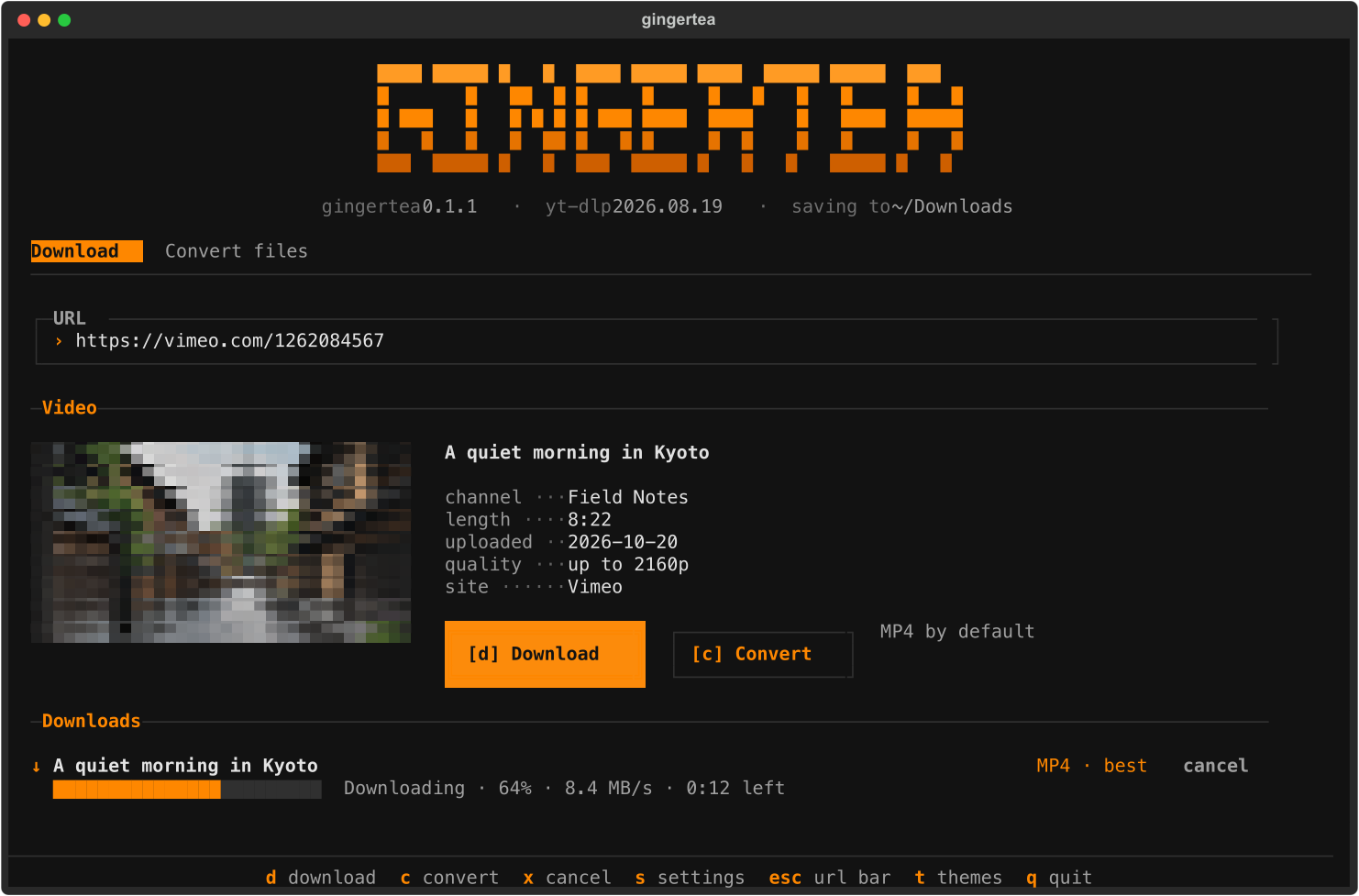
Paste a link, press d to save an MP4, or press c to choose a format and quality.
gingertea uses yt-dlp,
ffmpeg, and Textual.
Install
On macOS or Linux:
curl -LsSf https://raw.githubusercontent.com/orbitcord/gingertea/main/install.sh | sh
On Windows, run this in PowerShell:
powershell -ExecutionPolicy ByPass -c "irm https://raw.githubusercontent.com/orbitcord/gingertea/main/install.ps1 | iex"
The installer sets up uv, Python, gingertea, and ffmpeg. Set
GINGERTEA_NO_FFMPEG=1 to skip the ffmpeg download. The app can fetch it later.
If you already use uv or pipx:
uv tool install gingertea
# Or, with Python 3.10 or newer:
pipx install gingertea
To install the current GitHub version:
uv tool install git+https://github.com/orbitcord/gingertea
Use
gingertea                  # Open the app
gingertea <url>            # Load a video link
gingertea <file>           # Add a local file to Convert files
gingertea setup            # Download ffmpeg and check available formats
gingertea update           # Update yt-dlp
gingertea --version
Download and Convert files have separate queues. Each queue runs one job at a time. You can add another link while a download runs.
Keyboard controls
Press Tab to leave the input field before using letter or number shortcuts.
The footer also has clickable shortcuts.
| Key | Action |
|---|---|
1 |
Open Download |
2 |
Open Convert files |
3 or s |
Open Settings |
4 or l |
Search supported sites |
ctrl+t |
Switch between Download and Convert files |
d |
Download the loaded video as MP4 |
c |
Choose a format and quality |
f |
Browse local files |
r |
Remove the selected local file |
x |
Cancel the current job |
o |
Reveal the last saved file |
u |
Update yt-dlp |
t |
Choose a theme |
esc |
Focus the current input field |
q |
Quit |
Download and Convert files use full-width tabs. The text wordmark and thumbnail collapse in compact terminals to keep the input, actions, and queue visible. The shortcut bar stays centered at the bottom.
Download formats
| Media | Formats |
|---|---|
| Video | MP4, MKV, WebM, MOV, GIF |
| Audio | MP3, M4A, Opus, FLAC, WAV, OGG |
The quality picker lists the resolutions available for the loaded video. The default MP4 choice selects H.264 for compatibility. YouTube usually limits H.264 to 1080p. Higher MP4 resolutions may contain VP9 or AV1 and need a compatible player.
Downloads go to your Downloads folder. Change the folder in Settings. Existing files keep their names. A new download gets a numbered suffix if needed.
Convert local files
Open Convert files. Drop files into the terminal, paste their paths, or press f
to browse. Press c to select an output format. You can mix video, audio, and images
in one batch. The dialog shows which files the selection applies to.
| Media | Formats |
|---|---|
| Video | MP4, MKV, WebM, MOV, M4V, AVI, TS, FLV, WMV, MPG, 3GP, OGV, GIF, animated PNG, animated WebP |
| Audio | MP3, M4A, AAC, Opus, OGG, FLAC, ALAC, WAV, AIFF, WMA, AC3, E-AC3, MP2, WavPack, TTA, CAF, AU, MKA |
| Image | JPG, PNG, WebP, AVIF, JPEG XL, HEIC, JPEG 2000, TIFF, BMP, GIF, TGA, QOI, EXR, HDR, PPM, PCX, SGI, DPX |
The Frames tab exports video frames to a folder of images. Converted files go next to each original. gingertea leaves the original file unchanged. When the streams fit the output format, it copies them without re-encoding. The dialog explains whether the selected conversion will copy or re-encode.
Some formats need codecs that your ffmpeg build may lack. Unavailable formats stay visible with a note about the missing codec. Pillow plugins handle HEIC and JPEG XL.
Themes
gingertea is the default dark theme with orange accents. Press t or click themes
in the footer to choose Tea House, Matcha, Earl Grey, Masala Chai, Hibiscus,
gingertea light, or a built-in Textual theme. gingertea saves your choice.
The text wordmark uses terminal block characters and follows the selected theme. No image protocol is needed.
Videos that require a login
For age-restricted or members-only videos, choose a browser in Settings where you are signed in to the site. gingertea reads its cookies through yt-dlp. Cookies remain off until you choose a browser. macOS may show a Keychain prompt.
If a site blocks a download, update yt-dlp with u and try again. Browser cookies
may help with authentication errors. The Sites screen can check whether yt-dlp
has a dedicated extractor for a link.
Settings and updates
Settings live in these locations:
| Platform | File |
|---|---|
| macOS | ~/Library/Application Support/gingertea/config.toml |
| Linux | ~/.config/gingertea/config.toml |
| Windows | %LOCALAPPDATA%\gingertea\config.toml |
gingertea checks for newer yt-dlp and gingertea releases at startup. With a uv tool
or pipx install, it can update itself after you quit. Set
GINGERTEA_NO_AUTO_UPDATE=1 to disable that behavior.
Development
git clone https://github.com/orbitcord/gingertea
cd gingertea
uv sync --locked
uv run gingertea
uv run pytest -q
uv run ruff check src tests
uv run ruff format --check src tests
uv build --no-sources
The default tests replace network downloads with fakes. Set GINGERTEA_LIVE=1 to
include tests that download real videos.
For a release, update the version in pyproject.toml, run uv lock, and push a
matching vX.Y.Z tag. Configure PyPI Trusted Publishing for owner orbitcord,
repository gingertea, workflow release.yml, and environment pypi first.
The release workflow runs checks, builds the package, publishes it, and creates a
GitHub release.
Uninstall
uv tool uninstall gingertea
# Or:
pipx uninstall gingertea
The cached ffmpeg binary stays outside the Python environment. To remove it,
delete the gingertea data directory. On macOS it is
~/Library/Application Support/gingertea/ffmpeg. On Linux it is
~/.local/share/gingertea/ffmpeg. On Windows it is
%LOCALAPPDATA%\gingertea\ffmpeg.
License
MIT. The source copyright notices remain in LICENSE.
1 maintainer

Metadata
1 maintainer
Release files for gingertea 0.1.1
For a detailed explanation of source distributions (sdists) and built distributions (wheels), please see the package formats documentation.
Source distribution (sdist)
| File | Size | Uploaded | Provenance | |
|---|---|---|---|---|
| gingertea-0.1.1.tar.gz | 52.3 kB | With provenance | Details |
Built distribution (wheel)
| File | Interpreter | ABI | Platform | Reset |
|---|---|---|---|---|
| gingertea-0.1.1-py3-none-any.whl | Python 3 | none | any | Details |
Total release size: 115.4 kB
Release files / gingertea-0.1.1.tar.gz
| Download URL | gingertea-0.1.1.tar.gz |
|---|---|
| Size | 52.3 kB |
| Tags | Source |
|
SHA-256 checksum How to use checksums |
f157fa9d023e865ca6098e4f3d36891f413ce8b176d2937b3da8df7e45bcded7
|
|
BLAKE2b-256 checksum How to use checksums |
3dcf9ab559cbe4bde496fa97ed9d3eb32a01241b6d757587fe867cebb556968d
|
| Upload date | |
|
Uploaded using Trusted Publishing? What is trusted publishing? |
Yes |
| Uploaded via |
twine/7.0.0 CPython/3.13.16
|
Provenance
Provenance describes where a file came from. On PyPI, provenance is shared via attestations, which provide a verifiable record of the build or publishing details. View details, limitations and caveats.


PyPI Publish Attestation
PyPI verified that this artifact, at this checksum, originated from the publisher listed below.
Signed by GitHub Actions, verified by PyPI on Oct 21, 2026.
Transparency logRelease files / gingertea-0.1.1-py3-none-any.whl
| Download URL | gingertea-0.1.1-py3-none-any.whl |
|---|---|
| Size | 63.1 kB |
| Tags | Python 3 |
|
SHA-256 checksum How to use checksums |
9062cc261592d1bac7997bcb061ec8f67e3ecccee246dd9f5737be5f10e6661c
|
|
BLAKE2b-256 checksum How to use checksums |
ae7eaf845438a2ed89829d164eea0170c08c701d9f4564274ccbd616a98f666d
|
| Upload date | |
|
Uploaded using Trusted Publishing? What is trusted publishing? |
Yes |
| Uploaded via |
twine/7.0.0 CPython/3.13.16
|
Provenance
Provenance describes where a file came from. On PyPI, provenance is shared via attestations, which provide a verifiable record of the build or publishing details. View details, limitations and caveats.
PyPI Publish Attestation
PyPI verified that this artifact, at this checksum, originated from the publisher listed below.
Signed by GitHub Actions, verified by PyPI on Oct 21, 2026.
Transparency logSecurity for gingertea 0.1.1
Provenance
Provenance describes where a file came from. On PyPI, provenance is shared via attestations, which provide a verifiable record of the build or publishing details. View details, limitations and caveats.
Full provenance
All 2 files in this release have been uploaded with provenance metadata.
Attestation for gingertea-0.1.1.tar.gz
PyPI Publish Attestation
PyPI verified that this artifact, at this checksum, originated from the publisher listed below.
Signed by GitHub Actions, verified by PyPI on Oct 21, 2026.
Transparency logA note on package security
PyPI is a repository for distributing packages, not a service for auditing them. While third-party security researchers and our staff do their best to detect and remove malicious packages, PyPI cannot guarantee the quality, security or suitability of any given package.














