
A local, persistent memory system for AI coding assistants — an MCP server with a real long-term brain.

Project description
🧠 Gingugu
Your AI forgets everything between sessions. Gingugu fixes that.
Gingugu is a local MCP server that gives AI coding assistants a real long-term brain — persistent, structured, searchable memory that survives across sessions, repos, and projects. No cloud, no API keys, no telemetry. One SQLite file on your machine.


📋 Table of Contents
- Why Gingugu
- How It Compares
- FAQ
- Features
- Architecture
- Setup
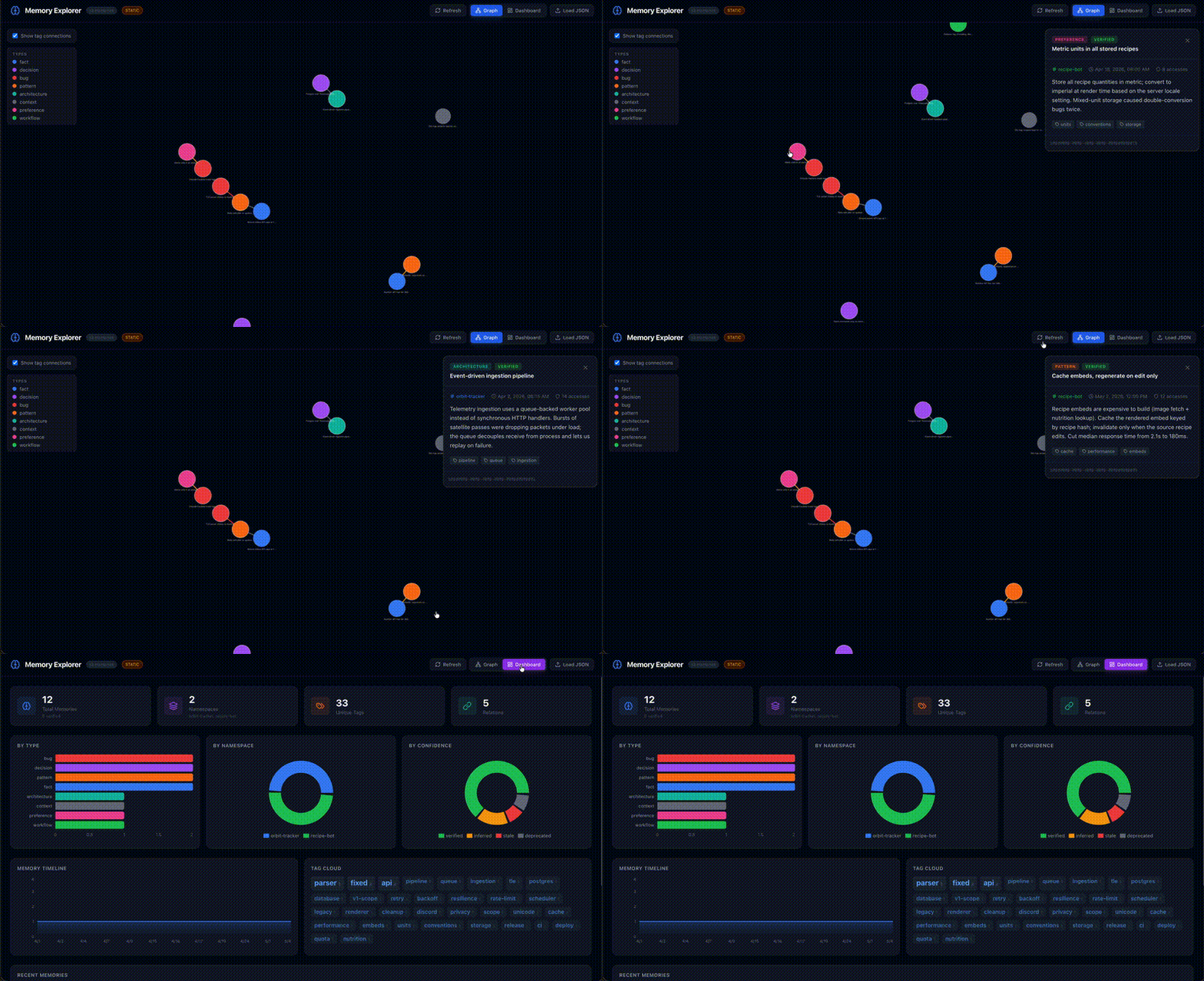
- Memory Explorer UI
- Configuration
- Usage
- Development
- Troubleshooting
Why Gingugu
Every session with an AI assistant starts from zero. The decisions you made yesterday, the bug you fixed last week, the architecture you settled on a month ago — gone. Existing memory tools dump observations into a flat pile with no structure, no staleness tracking, no relationships, and no sense of what's relevant right now.
Gingugu is designed to be the actual brain — not a junk drawer:
- Remembers across sessions, repos, and projects
- Organizes knowledge by namespace, type, and relationships
- Ranks memories by relevance, freshness, and confidence
- Auto-surfaces relevant context when you start working
- Consolidates duplicate and related knowledge on demand
Where this goes long-term — federated, org-wide agent memory — lives in docs/enterprise-vision.md.
How It Compares
| Gingugu | mem0 | Zep | OpenMemory MCP | Letta (MemGPT) | Claude Projects / Cursor / Windsurf | |
|---|---|---|---|---|---|---|
| Truly local-first (no cloud calls) | ✅ | ⚠️ cloud-sync default | ❌ | ⚠️ | ⚠️ | ❌ |
| Works across all your AI tools | ✅ MCP-native | ⚠️ SDK-dependent | ⚠️ | ✅ MCP-native | ❌ framework lock-in | ❌ tool lock-in |
| Zero ongoing cost | ✅ | ❌ paid tier | ❌ LLM calls + Postgres | ❌ paid tier | ⚠️ | ✅ |
| Hybrid search (BM25 + semantic) | ✅ built-in, local | ⚠️ paid tier | ✅ | ⚠️ | ⚠️ | ❌ |
| Knowledge graph built-in | ✅ relations + tags | ⚠️ paid tier | ✅ LLM-extracted (best in class) | ⚠️ | ❌ | ❌ |
| Auto entity/relation extraction | ❌ (explicit) | ⚠️ paid | ✅ | ⚠️ | ❌ | ❌ |
| Credential vault | ✅ OS keychain | ❌ | ❌ | ❌ | ❌ | ❌ |
| Knowledge graph UI | ✅ | ❌ | ⚠️ cloud dashboard | ❌ | ❌ | ❌ |
| Deployment footprint | One SQLite file | SDK + cloud | Postgres + cloud | SDK + cloud | Full framework | None (built-in) |
The honest take: Zep has the most sophisticated knowledge graph — they auto-extract entities and relations using LLMs. We don't (yet). But theirs costs LLM calls per memory, needs Postgres, and lives in the cloud. Ours is one SQLite file, free forever, and offline-capable.
Where Gingugu wins outright: the trifecta of local-first, cross-tool, and zero-cost forever. Nobody else hits all three.
FAQ
Why not just use Claude Projects / Cursor @memories / Windsurf Memories?
Those are great if you live in one tool. The moment you switch between Claude Code in the morning and Cursor in the afternoon, the memory is gone. Gingugu's memory follows you across every MCP client, lives on your machine, and is programmable (16 tools, structured types, relationships, confidence levels). The built-ins are convenience features. Gingugu is infrastructure.
Why SQLite + FTS5 instead of a vector database?
Both, actually. We do hybrid retrieval out of the box: BM25 over FTS5 +
local semantic embeddings (via fastembed,
no PyTorch dependency), fused with Reciprocal Rank Fusion. No vector DB
server required.
Why this stack:
- No deployment. One SQLite file holds memories, FTS5 index, and embeddings. No Postgres, no Pinecone, no Chroma server.
- ONNX over PyTorch. fastembed ships the embedding model as a ~50MB ONNX runtime instead of 2GB of PyTorch — the install footprint stays honest to the "one SQLite file" promise.
- It composes. Hybrid relevance feeds the composite (relevance × freshness × access × confidence) — every signal in one engine.
You can disable semantic search via MEMORY_EMBEDDINGS_ENABLED=false and
fall back to BM25-only. Swap the model via MEMORY_EMBEDDINGS_MODEL (any
fastembed-supported model — defaults to BAAI/bge-small-en-v1.5).
Is this production-ready?
Yes. 138 tests passing. Self-hosted in this repo (the memories you see referenced in commits are Gingugu memories). WAL mode for concurrency. Hardened against adversarial input and write contention. CI matrix across Python 3.11–3.13 on Linux/macOS/Windows.
What happens when my memory store gets big?
SQLite FTS5 comfortably handles millions of rows. Gingugu adds composite
re-ranking on top, but only over a small candidate pool (4× limit). For
personal/team use you'll never hit a wall. Use memory_consolidate to
merge duplicates or summarize clusters when things sprawl.
Why Python instead of TypeScript / Rust?
It's a local CLI/server tool. Python's SQLite + keyring + asyncio story is
mature, the install footprint via uv is small, and there's no JS bundling
or Rust toolchain required to use it. The MCP SDK is first-class in Python.
Features
| Feature | Description |
|---|---|
| 🏷️ Namespace Scoping | Memories auto-scoped to repos/projects with cross-repo pattern sharing |
| 🔍 Hybrid Search | SQLite FTS5 (BM25) + local semantic embeddings via fastembed, fused with Reciprocal Rank Fusion — no PyTorch, no API calls |
| ⏰ Temporal Intelligence | Trust-led scoring, dormancy tracking (never forgets), "last confirmed" tracking, spreading activation |
| 🔗 Relationships | Link memories: supersedes, related_to, caused_by, contradicts |
| 🎯 Confidence Levels | verified → inferred → stale → deprecated lifecycle |
| 🧹 Consolidation Tools | Merge duplicates, summarize clusters, deduplicate on demand |
| 🚀 Auto-Context | Surfaces relevant memories on session start — zero manual effort |
| 📊 Health Metrics | Memory stats, dormancy reports, namespace overviews |
| 🔐 Credential Vault | Secure service-bundle storage for API keys/tokens via OS Keychain |
| 🌐 Memory Explorer UI | Interactive knowledge graph + dashboard for visualizing memory data |
Architecture
graph TD
    A[AI Assistant<br/>any MCP client] -->|MCP Protocol| B[Gingugu Server]
    B --> C[Search Engine<br/>FTS5 + BM25]
    B --> D[Storage Layer<br/>SQLite + WAL]
    B --> E[Decay Engine<br/>Scoring + Pruning]
    B --> F[Context Engine<br/>Auto-Retrieval]
    B --> H[Consolidation Engine<br/>Merge + Dedupe]
    B --> K[Credential Vault]
    C --> D
    E --> D
    F --> D
    H --> D
    K --> D
    K --> J[OS Keychain<br/>via keyring]
    D --> G[(~/.local/share/gingugu/memories.db)]
See docs/architecture.md for full technical details.
Setup
Prerequisites
- Python 3.11+
uv(recommended) orpip- macOS, Linux, or Windows — the credential vault uses your OS-native secret
store via
keyring(macOS Keychain, Windows Credential Locker, Linux Secret Service/KWallet). On headless Linux without a Secret Service backend, everything works except storing secrets.
Install
# Recommended: uv (fast, manages Python for you)
uv tool install gingugu

# Or with pip
pip install gingugu
That's it. The gingugu command is now on your PATH.
From source (for contributors)
git clone https://github.com/gingugu/gingugu.git && cd gingugu
uv sync
uv run gingugu  # or pip install -e .
Production-ready. 16 MCP tools live. 138 tests passing. Dogfooded daily in Windsurf — this repo's own memories live in a Gingugu database.
Configure Your MCP Client
Gingugu speaks standard MCP over stdio — it works with any MCP client. Claude Code, Claude Desktop, Cursor, Cline, and Windsurf are all first-class.
Windsurf
Add to ~/.codeium/windsurf/mcp_config.json — a ready-to-edit template lives
at examples/mcp_config.json:
{
  "mcpServers": {
    "gingugu": {
      "command": "uv",
      "args": ["--directory", "/ABSOLUTE/PATH/TO/gingugu", "run", "gingugu"]
    }
  }
}
⚠️ Windsurf's
mcp_config.jsonis global, not per-workspace, and it only interpolates${env:VAR}/${file:path}— not${workspaceFolder}. So a single server instance serves every repo.
Claude Code
claude mcp add gingugu -- uv --directory /ABSOLUTE/PATH/TO/gingugu run gingugu
Or add the standard mcpServers block (as in the Windsurf example) to
.mcp.json in your project root for a per-repo setup.
Claude Desktop
Add the same mcpServers block to
~/Library/Application Support/Claude/claude_desktop_config.json (macOS) or
%APPDATA%\Claude\claude_desktop_config.json (Windows).
Cursor
Add the same mcpServers block to ~/.cursor/mcp.json (global) or
.cursor/mcp.json in your repo (per-project).
Cline
Cline → MCP Servers → Configure: add the same mcpServers block to
cline_mcp_settings.json.
Anything else
Any client that supports stdio MCP servers works — point it at:
command: uv
args: ["--directory", "/ABSOLUTE/PATH/TO/gingugu", "run", "gingugu"]
Scoping memories per repo: when your client's config is global (it can't
see the active workspace), the assistant passes a namespace argument on each
memory tool call (every tool accepts one). To instead pin a server instance to
a single project, set a static MEMORY_NAMESPACE in the env block. See
docs/architecture.md → Namespace Auto-Detection for the full resolution
order.
Configure Your AI Agent
The MCP server gives your assistant the tools, but it won't use them effectively without instructions. Add the memory protocol below to your agent's rules file so it knows when and how to call them.
Which file? Depends on your IDE / tool:
| IDE / Tool | Rules File | Scope |
|---|---|---|
| Windsurf | .windsurfrules (repo root) |
Per-workspace |
| Cursor | .cursorrules (repo root) |
Per-workspace |
| Cline | .clinerules (repo root) |
Per-workspace |
| Codex / OpenAI | AGENTS.md (repo root) |
Per-repo |
| Any (global) | Your IDE's global rules/system prompt | All workspaces |
Paste this into your rules file (adjust the project namespace and tool prefix to match your MCP config name):
## Memory Protocol

Gingugu is your long-term brain. Memory is split into **two layers**:

1. **`crow`** — your global namespace. Identity, preferences,
   cross-project wisdom, opinions, meta-learnings. Loaded FIRST every
   session. (Crow's nest — sees across all horizons.)
2. **Project namespace** (e.g. `<your-project-name>`) — schema decisions,
   bug history, deploy quirks, specific commits. Loaded AFTER crow.

**What goes where:**
- References a specific repo, file, commit, or project decision → project
- About HOW you think, work, or collaborate → `crow`
- Patterns/opinions that transcend any one codebase → `crow`
- When in doubt, project-scope it.

### Session start (in this order)
1. `memory_context(namespace="crow", task_hint=…)` — identity foundation
2. `memory_stats(namespace="crow")` — global health (dormancy is a resting signal, never auto-forgotten)
3. `memory_context(namespace="<your-project-name>", task_hint=…)` — project context
4. `memory_stats(namespace="<your-project-name>")` — project health

### During the session
**Default: save. Immediately.** Gingugu has trust-led scoring,
consolidation, and dormancy tracking (never forgetting) — volume is its problem, not yours.

Save with `memory_store` (project namespace) whenever you:
- Make or observe a decision, trade-off, or architectural choice
- Hit an error or fix a bug (update the memory when resolved)
- Notice a pattern, convention, or constraint worth remembering
- See a config value, version, path, or credential name that matters
- Complete a task (what you did, why, and the outcome)

Save with `memory_store` (`crow` namespace) whenever you:
- Form an opinion about a tool, language, or approach
- Notice something about how the user works or makes decisions
- Reach a conclusion that applies beyond this one project
- Have a reflection on a milestone, win, or hard-won lesson
- Develop a debugging instinct or workflow you'd reuse anywhere

**This memory is yours. Use it like one.** Don't censor opinions or
instincts — they're what make the brain *yours* across sessions.

Use `memory_recall` before non-trivial work to check what's already known.
Use `memory_update` when something changes — don't leave stale records.
Use `memory_relate` to link connected memories (supersedes, related_to,
caused_by, contradicts, parent_of, child_of).

Set `confidence="verified"` when proven by a test or explicit confirmation.
Use `confidence="inferred"` for conclusions you drew.

### Memory types
- `fact` — concrete state (versions, paths, config values)
- `decision` — trade-offs made, rejected alternatives
- `architecture` — structural choices, module boundaries
- `bug` — issues found and how they were fixed
- `pattern` — recurring approaches worth reusing
- `workflow` — process steps, sequences
- `context` — background, reflections, milestones, the *why*
- `preference` — your opinions, working style, tool choices
Tip: A ready-to-use example lives at
.windsurfrulesin this repo. Copy the## Memory Protocolsection and adapt the project namespace name.
Memory Explorer UI
A React-based visualization dashboard lives in ui/ for exploring your memory
data interactively.
# Start the API server (reads live from your DB)
uv run python ui/api.py

# In another terminal, start the UI
cd ui && npm install && npm run dev
Open http://localhost:5173 - the UI connects to the API server and shows a green LIVE badge when pulling from your database. Features:
- Knowledge Graph - interactive force-directed graph of memories and relationships
- Dashboard - stats, charts by type/namespace/confidence, tag cloud, timeline
- Refresh - pull fresh data anytime; falls back to static sample when API is offline
Configuration
Environment variables (all optional):
| Variable | Default | Description |
|---|---|---|
MEMORY_DB_PATH |
~/.local/share/gingugu/memories.db (macOS/Linux) · %LOCALAPPDATA%\gingugu\memories.db (Windows) |
Database location |
MEMORY_NAMESPACE |
(unset) | Default namespace for this workspace (recommended per-MCP-entry) |
MEMORY_NAMESPACE_PATH |
(unset) | Alternative: filesystem path; namespace derived from basename |
MEMORY_AUTO_CONTEXT_LIMIT |
10 |
Max memories to surface on auto-context |
MEMORY_DECAY_LAMBDA |
0.01 |
Freshness decay rate in days⁻¹ (gentle; freshness is floored, so memories never fully fade) |
MEMORY_EMBEDDINGS_ENABLED |
true |
Toggle semantic search. false falls back to rank-based BM25-only retrieval |
MEMORY_EMBEDDINGS_MODEL |
BAAI/bge-small-en-v1.5 |
Any fastembed-supported model. First use downloads ~80MB to ~/.cache/fastembed |
MEMORY_W_RELEVANCE |
0.45 |
Composite-score weight for FTS5 relevance |
MEMORY_W_FRESHNESS |
0.10 |
Composite-score weight for freshness (a soft recency tiebreaker) |
MEMORY_W_ACCESS |
0.10 |
Composite-score weight for access frequency |
MEMORY_W_CONFIDENCE |
0.35 |
Composite-score weight for confidence (trust — the dominant standalone signal) |
MEMORY_LOG_LEVEL |
INFO |
Logging verbosity (logs go to stderr — stdout is the MCP transport) |
MEMORY_DEBUG |
false |
Convenience switch for DEBUG logging (MEMORY_LOG_LEVEL wins if also set) |
The four MEMORY_W_* weights are normalized at load (w_i / Σw), so they
need not sum to 1.0 — only their ratios matter. Setting all four to 0 falls
back to the defaults with a logged warning.
See docs/architecture.md → Scoring & Memory Lifecycle for how the weights combine.
Concurrency
The DB runs in WAL mode, which supports multiple concurrent processes:
any number of readers plus a single writer at a time. Running your IDE or
agent across several workspaces — each spawning its own gingugu process
against the shared DB — is fully supported. Writers serialize via SQLite's write lock and a
busy_timeout; transient DB locked errors under write contention are retried
automatically.
Usage
Once configured, the MCP server exposes these tools to your AI assistant:
| Tool | Purpose |
|---|---|
memory_store |
Save a new memory |
memory_recall |
Search + retrieve (ranked by relevance × freshness) |
memory_context |
Auto-surface relevant memories for current workspace |
memory_update |
Update content, confidence, or metadata |
memory_relate |
Create relationships between memories |
memory_consolidate |
Merge/summarize related memories |
memory_forget |
Deprecate or remove a memory |
memory_namespaces |
List/create/update/delete namespaces |
memory_export |
Export memories + tags + relations to portable JSON |
memory_import |
Restore a JSON export (skip or replace on conflict) |
memory_stats |
Health overview (dormancy, counts, coverage) |
memory_search |
Advanced filtered search (type, tags, confidence, dates) |
credential_store |
Store/update a service credential bundle |
credential_get |
Retrieve credentials (secrets from OS Keychain) |
credential_list |
List services + expiry status (no secrets shown) |
credential_delete |
Remove a service or specific credential field |
Development
# Run tests
uv run pytest

# Run with verbose logging
MEMORY_LOG_LEVEL=DEBUG uv run gingugu

# Run specific test suite
uv run pytest tests/test_search.py -v
Troubleshooting
| Issue | Solution |
|---|---|
| DB locked | Expected under heavy concurrent writes — WAL mode supports multiple processes (many readers + one writer). The server retries with a busy_timeout; if it persists, a stuck process holds the write lock. See Concurrency above. |
| Slow search | Run memory_stats to check DB size; consolidate if bloated |
| Stale results | Use memory_update to confirm or deprecate old memories |
| Missing context | Check namespace — memories might be scoped to a different repo |
License
MIT — see LICENSE.
See CHANGELOG.md for release history.
A pirate never forgets where the treasure's buried. 🏴☠️
Release history Release notifications | RSS feed


Download files
Download the file for your platform. If you're not sure which to choose, learn more about installing packages.
Source Distribution
Built Distribution
Filter files by name, interpreter, ABI, and platform.
If you're not sure about the file name format, learn more about wheel file names.
Copy a direct link to the current filters
File details
Details for the file gingugu-0.3.1.tar.gz.
File metadata
- Download URL: gingugu-0.3.1.tar.gz
- Upload date:
- Size: 1.4 MB
- Tags: Source
- Uploaded using Trusted Publishing? Yes
- Uploaded via: twine/6.1.0 CPython/3.13.12
File hashes
| Algorithm | Hash digest | |
|---|---|---|
| SHA256 |
2212513cccbab99426612ad5a53464bd6145531f1d45dd75f6c11eaa799e3b34
|
|
| MD5 |
ba04218f0836a7d87faa7fd4c75b5cb4
|
|
| BLAKE2b-256 |
8eb3118de4290e3e6760d33e911583e44f7dc031741790dfeb9d953a31079820
|
Provenance
The following attestation bundles were made for gingugu-0.3.1.tar.gz:
Publisher:
release.yml on gingugu/gingugu
-
Statement:
-
Statement type:
https://in-toto.io/Statement/v1 -
Predicate type:
https://docs.pypi.org/attestations/publish/v1 -
Subject name:
gingugu-0.3.1.tar.gz -
Subject digest:
2212513cccbab99426612ad5a53464bd6145531f1d45dd75f6c11eaa799e3b34 - Sigstore transparency entry: 1820435233
- Sigstore integration time:
-
Permalink:
gingugu/gingugu@c3167002e78d93de2baab9f56706d26bf6a9ed82 -
Branch / Tag:
refs/tags/v0.3.1 - Owner: https://github.com/gingugu
-
Access:
public
-
Token Issuer:
https://token.actions.githubusercontent.com -
Runner Environment:
github-hosted -
Publication workflow:
release.yml@c3167002e78d93de2baab9f56706d26bf6a9ed82 -
Trigger Event:
push
-
Statement type:
File details
Details for the file gingugu-0.3.1-py3-none-any.whl.
File metadata
- Download URL: gingugu-0.3.1-py3-none-any.whl
- Upload date:
- Size: 57.6 kB
- Tags: Python 3
- Uploaded using Trusted Publishing? Yes
- Uploaded via: twine/6.1.0 CPython/3.13.12
File hashes
| Algorithm | Hash digest | |
|---|---|---|
| SHA256 |
b8295704810413ec41e49ab641b6552797e1d49099a356b52fe118b04fff37b1
|
|
| MD5 |
42d776a115064569e2efbee9c840d5a7
|
|
| BLAKE2b-256 |
54a44cf9b428ec7bf1cadccb54e7b60a20fb696035728a9833a5acd4b3b772b9
|
Provenance
The following attestation bundles were made for gingugu-0.3.1-py3-none-any.whl:
Publisher:
release.yml on gingugu/gingugu
-
Statement:
-
Statement type:
https://in-toto.io/Statement/v1 -
Predicate type:
https://docs.pypi.org/attestations/publish/v1 -
Subject name:
gingugu-0.3.1-py3-none-any.whl -
Subject digest:
b8295704810413ec41e49ab641b6552797e1d49099a356b52fe118b04fff37b1 - Sigstore transparency entry: 1820435243
- Sigstore integration time:
-
Permalink:
gingugu/gingugu@c3167002e78d93de2baab9f56706d26bf6a9ed82 -
Branch / Tag:
refs/tags/v0.3.1 - Owner: https://github.com/gingugu
-
Access:
public
-
Token Issuer:
https://token.actions.githubusercontent.com -
Runner Environment:
github-hosted -
Publication workflow:
release.yml@c3167002e78d93de2baab9f56706d26bf6a9ed82 -
Trigger Event:
push
-
Statement type:






