
Brisk Blame Browser for Git ⚡



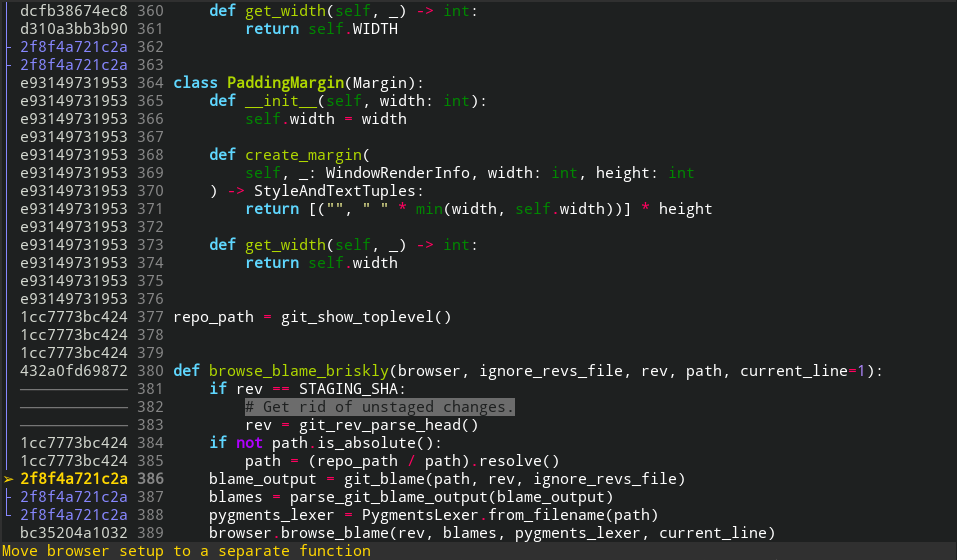
git-bbb is a wraper around git blame, that lets you seamlessly warp
between different revisions.
Features ✨
- Sensible TUI made with Prompt Toolkit
- Syntax highlighting thanks to Pygments!)
- Seamlessly switches between revisions in just one keypress
- Shows you where the lines of a commit are in the file
- Uses
.git-ignore-revsfile as an input to--ignore-revs-fileby default - Vi style key bindings
- Search functionality
- Coming soon: customizability via
git config - Coming soon: seamlessly browse through file history, even if it was moved multiple times
- Coming soon: highlight contributions made by a given author
Installation
# Install git-bbb via pip
pip install git-bbb
Usage
# Installing git-bbb will add a "git bbb" command
git bbb file/in/the/repo
Key bindings
- Use h & j or ↓ & ↑ to move to the next/previous blame line
- Enter to switch (warp) to the highlighted revision, or P to go to its ancestor.
- S runs
git showfor the commit indicated by the cursor. - u to go back to the previously viewed revision - a.k.a. undo.
- ctrl+r to redo previous warp.
- ctrl+J & ctrl+K move the whole document view up and down
- Stepping between the lines of the currently highlighted revision: H - first, L - last, J - next, K - previous.
- gg and G will make git bbb go to the first and last line, respectively
- Ctrl+d and Ctrl+u will scroll half a page up and down, respectively
- Page Up & Page Down do what they are supposed to do
- / & ? to search through file contents. This works mostly in the same way as in Vi(m). Use n and N to cycle through results.
- q to quit
- ...many more to come
1 maintainer

Metadata
1 maintainer
Release files for git-bbb 0.0.10
For a detailed explanation of source distributions (sdists) and built distributions (wheels), please see the package formats documentation.
Source distribution (sdist)
| File | Size | Uploaded | Provenance | Actions |
|---|---|---|---|---|
| git_bbb-0.0.10.tar.gz | 27.4 kB | Without provenance | Details for git_bbb-0.0.10.tar.gz |
Built distribution (wheel)
| File | Interpreter | ABI | Platform | Actions Reset |
|---|---|---|---|---|
| git_bbb-0.0.10-py3-none-any.whl | Python 3 | none | any | Details for git_bbb-0.0.10-py3-none-any.whl |
Total release size: 53.3 kB
Release files / git_bbb-0.0.10.tar.gz
| Download URL | git_bbb-0.0.10.tar.gz |
|---|---|
| Size | 27.4 kB |
| Tags | Source |
|
SHA-256 checksum How to use checksums |
335db38460989cedf7e23abfa446f960a368c6550c32d1e57ea47e08f9ca07dc
|
|
BLAKE2b-256 checksum How to use checksums |
09b75b678d2119ae5ea70ae38b5fdc02fbbf33b156af61538734dca2f7459218
|
| Upload date | |
|
Uploaded using Trusted Publishing? What is trusted publishing? |
No |
| Uploaded via |
twine/5.0.0 CPython/3.9.18
|
Release files / git_bbb-0.0.10-py3-none-any.whl
| Download URL | git_bbb-0.0.10-py3-none-any.whl |
|---|---|
| Size | 25.8 kB |
| Tags | Python 3 |
|
SHA-256 checksum How to use checksums |
22b820edfa3d4a755187e351d16172d4e034719ea2e09abcafa7b1c372df8f6e
|
|
BLAKE2b-256 checksum How to use checksums |
f4d26f8d8faff6961d5f1f6b7c531aa773e9e932a50d6fb831c941fb0d86ecc5
|
| Upload date | |
|
Uploaded using Trusted Publishing? What is trusted publishing? |
No |
| Uploaded via |
twine/5.0.0 CPython/3.9.18
|
Security for git-bbb 0.0.10
Provenance
Provenance describes where a file came from. On PyPI, provenance is shared via attestations, which provide a verifiable record of the build or publishing details. View details, limitations and caveats.
No provenance found
None of the files in this release were uploaded with provenance metadata.
A note on package security
PyPI is a repository for distributing packages, not a service for auditing them. While third-party security researchers and our staff do their best to detect and remove malicious packages, PyPI cannot guarantee the quality, security or suitability of any given package.
To learn more about protecting yourself from malicious actors, visit our package security documentation.














