
git-branches





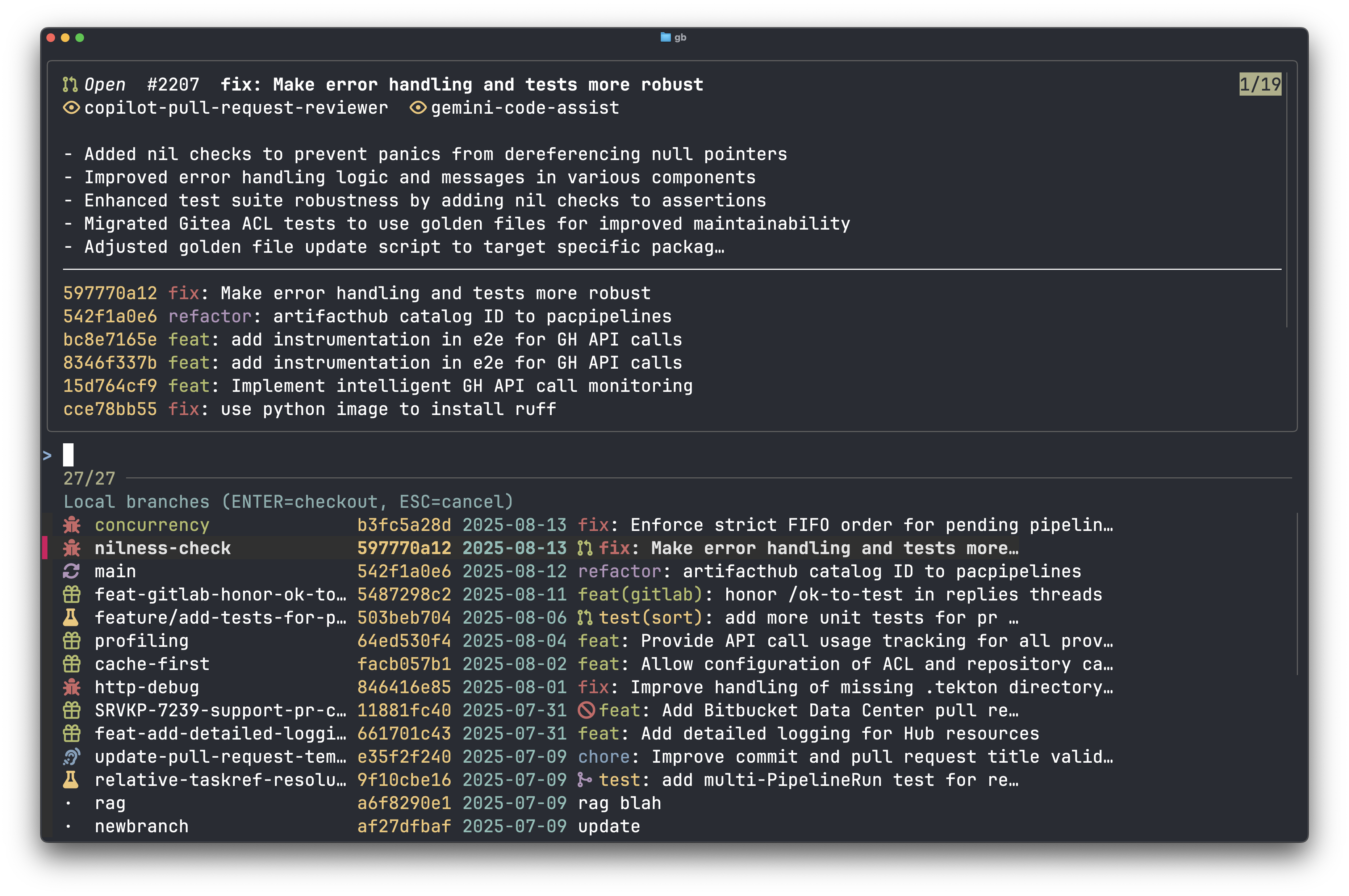
An interactive Git branch browser powered by fzf, with rich previews for GitHub PRs and CI status. It’s fast, keyboard-first, and designed for day-to-day workflows: jump to branches, spin up local tracking from remotes, open the PR in your browser, or prune branches in bulk.
🍺 Homebrew CI:
TL;DR ⚡️
# Install (Homebrew tap)
brew tap chmouel/git-branches https://github.com/chmouel/git-branches
brew install --HEAD chmouel/git-branches/git-branches

# Browse local branches (preview on top)
git-branches

# Browse remote branches (pick a remote)
git-branches -r

# Show pushed-status icons for local branches
git-branches -s   # add -S to show all

# Show GitHub Actions status (fetch over network)
git-branches --checks
Highlights
- fzf-native UX: reverse list, previews, key bindings, multi-select for deletes.
- Rich preview: PR status (Open/Draft/Merged/Closed), OSC-8 link to the PR, CI combined status, and the last 10 commits with colors.
- GitHub awareness: shows whether a local branch exists on the remote (
-s) and the CI status for the PR head commit. - One-keystroke actions: checkout, open PR (
ctrl-o), delete quickly (alt-k).
Requirements
- git and fzf on PATH
- Python 3.12+ (uv-managed)
- Optional:
GITHUB_TOKEN(improves rate limits and enables private repos) - Optional: a Nerd Font for icons (fallback text is still readable)
Installation 🍺
-
Local dev via uv
make installmake run(or pass flags withARGS="...")
-
System-wide (optional)
- From this directory:
uv tool install . - Then invoke the console script:
git-branches
- From this directory:
Homebrew (Tap)
You can install via a Homebrew tap that ships a Formula for git-branches.
Option A — tap this repo directly (HEAD installs from the main branch):
brew tap chmouel/git-branches https://github.com/chmouel/git-branches
brew install --HEAD chmouel/git-branches/git-branches
Option B — local developer tap (no remote push needed):
TAP="${USER}/git-branches-dev"
brew tap-new "$TAP"
TAP_DIR="$(brew --repo "$TAP")"
mkdir -p "$TAP_DIR/Formula"
cp Formula/git-branches.rb "$TAP_DIR/Formula/"
brew install --HEAD "$TAP/git-branches"
Or use the Makefile helper (does the same steps for you):
make brew-local
# or pick a custom tap name
make brew-local TAP="${USER}/git-branches-dev"
Option C — copy Formula/git-branches.rb into your own GitHub tap repo (recommended for teams) and install:
brew tap <org>/<tap>
brew install --HEAD <org>/<tap>/git-branches
Notes:
- The Formula uses Homebrew’s Python virtualenv and installs
git-branchesalong with its Python dependencies. - Runtime dependencies
gitandfzfare declared and installed by Homebrew. --HEADinstalls from the main branch. For a pinned/stable release, update the Formulaurlandsha256to a tagged tarball.
Quickstart 🚀
- Browse and checkout local branches:
git-branches
- Browse remotes and checkout (creates tracking branch if needed):
git-branches -r(select remote interactively)git-branches -R origin
- Deletion workflows:
git-branches -d(delete local; multi-select)git-branches -D -R origin(delete remote)
- See if local branches exist on the remote:
git-branches -s(shows pushed status with default limit of 10)git-branches -s -S(disable default limit)
Command-line options 🧭
-r: Browse remote branches (choose remote via fzf)-R <remote>: Browse a specific remote (e.g., origin)-d: Delete local branches (multi-select)-D: Delete remote branches (multi-select)-s: Show pushed status for local branches (GitHub API)-n <N>: Limit to first N branches-S: With-s, disable default limit (show all)-C: Disable colors-l: List-only mode (no checkout)--refresh: Force refresh of PR cache (ignore stale cache and ETag)--checks: Fetch and show GitHub Actions status (preview and a small indicator in rows). Without this flag, cached results (if available) are still displayed, but no network calls are made for checks.
Icons legend 🔤
- PR state:
- Open:
(green) - Draft:
(yellow) - Merged:
(magenta) - Closed:
(red)
- Open:
- GitHub Actions:
- In progress:
(yellow) - Success:
(green) - Failed/Timed out:
(red) - Cancelled:
(red) - Skipped/Neutral:
(cyan)
- In progress:
Tip: Use a Nerd Font for best results. Without it, the text remains legible.
Key bindings (fzf)
ctrl-o: Open the PR for the highlighted ref in the default browseralt-k: Force-delete highlighted local branch (quick action)
Shell Completion 🔌
Supported shells and scripts under contrib/:
- Zsh:
_git-branches - Bash:
git-branches.bash - Fish:
git-branches.fish
Zsh
Add the contrib directory to your fpath in .zshrc and re-init completions:
fpath+=($PWD/contrib)
autoload -U compinit && compinit
Use the absolute path to your clone instead of $PWD in your dotfiles.
Bash
Source the completion script from your .bashrc or .bash_profile:
source /absolute/path/to/contrib/git-branches.bash
Fish
Copy or symlink the Fish completion to your user completions directory:
mkdir -p ~/.config/fish/completions
ln -sf /absolute/path/to/contrib/git-branches.fish ~/.config/fish/completions/git-branches.fish
Arch Linux (PKGBUILD / AUR-style)
This repository includes a PKGBUILD under aur/ for a -git style package (builds from HEAD).
- Build locally with makepkg (requires
base-devel):
cd aur
makepkg -sci --noconfirm
How it works
- Uses git for data (branch lists, recent commits) and fzf for the UI.
- Detects GitHub repository from the upstream of the current branch when possible, falling back to
originor the first remote. - For
-sand preview CI status, calls the GitHub API withAuthorization: Bearer $GITHUB_TOKENwhen set.
Performance and Caching ⚙️
To improve performance and reduce API calls, git-branches batches git metadata and PR queries and caches PR data locally.
- Git metadata: branches and last-commit info are fetched via a single
git for-each-refcall. - PR list: fetched via REST in one call (
/pulls?state=open&per_page=100) with ETag support; a small slice of recently closed PRs is also fetched to catch merges. - Disk cache:
~/.cache/git-branches/prs.jsonwithtimestamp,etag, and a{head.ref -> PR}map. Default TTL: 5 minutes.
Controls:
GIT_BRANCHES_OFFLINE=1: skip all GitHub API calls.GIT_BRANCHES_PREFETCH_DETAILS=1: batch GraphQL for labels/reviews/body to make previews instant.GIT_BRANCHES_NO_CACHE=1: ignore and do not write disk cache; do not use in-memory caches.--refreshorGIT_BRANCHES_REFRESH=1: ignore existing cache and ETag this run, then write a fresh cache.
Environment Variables 🔧
GIT_BRANCHES_OFFLINE=1: Run fully offline (no GitHub requests).GIT_BRANCHES_NO_CACHE=1: Bypass disk/memory caching and ETag.GIT_BRANCHES_REFRESH=1: Force refresh of caches for this run.GIT_BRANCHES_PREFETCH_DETAILS=1: Prefetch PR details (GraphQL batches).GIT_BRANCHES_SHOW_CHECKS=1: Allow fetching Actions status (same as--checks). If unset, cached checks are still displayed; no fetches.GIT_BRANCHES_NO_PROGRESS=1: Disable spinners/progress indicators.
Troubleshooting 🛠️
-
“fzf not found”: Install fzf and ensure it’s on PATH (
brew install fzf,apt install fzf, etc.). -
“Not in a git repository”: Run within a git repo.
-
No icons? Install a Nerd Font and configure your terminal to use it.
-
Low API rate limit? Set
GITHUB_TOKEN(a classic or fine-grained PAT works). -
Homebrew says “formula not in a tap”: create a local tap and install:
TAP="${USER}/git-branches-dev"
brew tap-new "$TAP"
TAP_DIR="$(brew --repo "$TAP")"
mkdir -p "$TAP_DIR/Formula"
cp Formula/git-branches.rb "$TAP_DIR/Formula/"
brew install --HEAD "$TAP/git-branches"
Development 🧪
- Lint:
make lint(auto-fix:make fix) - Tests:
make test(pytest) - Dev loop:
make dev(ruff fix → pytest → ruff format) - Format:
make format(ruff)
License
See the repository’s LICENSE file.
1 maintainer

Metadata
1 maintainer
Release files for git-branches 0.1.1
For a detailed explanation of source distributions (sdists) and built distributions (wheels), please see the package formats documentation.
Source distribution (sdist)
| File | Size | Uploaded | |
|---|---|---|---|
| git_branches-0.1.1.tar.gz | 32.3 kB | Details |
Built distribution (wheel)
| File | Interpreter | ABI | Platform | Reset |
|---|---|---|---|---|
| git_branches-0.1.1-py3-none-any.whl | Python 3 | none | any | Details |
Total release size: 60.3 kB
Release files / git_branches-0.1.1.tar.gz
| Download URL | git_branches-0.1.1.tar.gz |
|---|---|
| Size | 32.3 kB |
| Tags | Source |
|
SHA-256 checksum How to use checksums |
827990dd17ccdc53c2d88efd469cdf2b72102b2c29942cb5b7294e0dca83b4ea
|
|
BLAKE2b-256 checksum How to use checksums |
f2fba18ec8e7f582ce6284e9d1eed3956cc874bb42db361674a1c448e4be0959
|
| Upload date | |
|
Uploaded using Trusted Publishing? What is trusted publishing? |
No |
| Uploaded via |
uv/0.8.9
|
Release files / git_branches-0.1.1-py3-none-any.whl
| Download URL | git_branches-0.1.1-py3-none-any.whl |
|---|---|
| Size | 28.0 kB |
| Tags | Python 3 |
|
SHA-256 checksum How to use checksums |
3fa4a1d2e696c54f5cca2fb6a244ac756ec51e193af30a4beb2cc21dac5cd8b3
|
|
BLAKE2b-256 checksum How to use checksums |
c94080aa5aaec262a792c5019bb4113cab9c614245489ec113435aa0b6a36103
|
| Upload date | |
|
Uploaded using Trusted Publishing? What is trusted publishing? |
No |
| Uploaded via |
uv/0.8.9
|













