
git-commit-editor
This is my equivalent of Simon Willison's commit-rewriter. I had the exact-same problem as him: AI agents writing grandiose and ridiculous commit messages that often needed rewriting, or minor tweaks across all commits. This tool lets me do it all in one place, in bulk.
⚠️ Much of this is AI-generated, and not formally reviewed by hand or eye. It's published chiefly for myself: for my own reference, use, and for experimentation with the whole open-source publishing process. I also use this code: I dogfood it. It works, for me. I also write tests, and run them to check that it works, and does what it says.
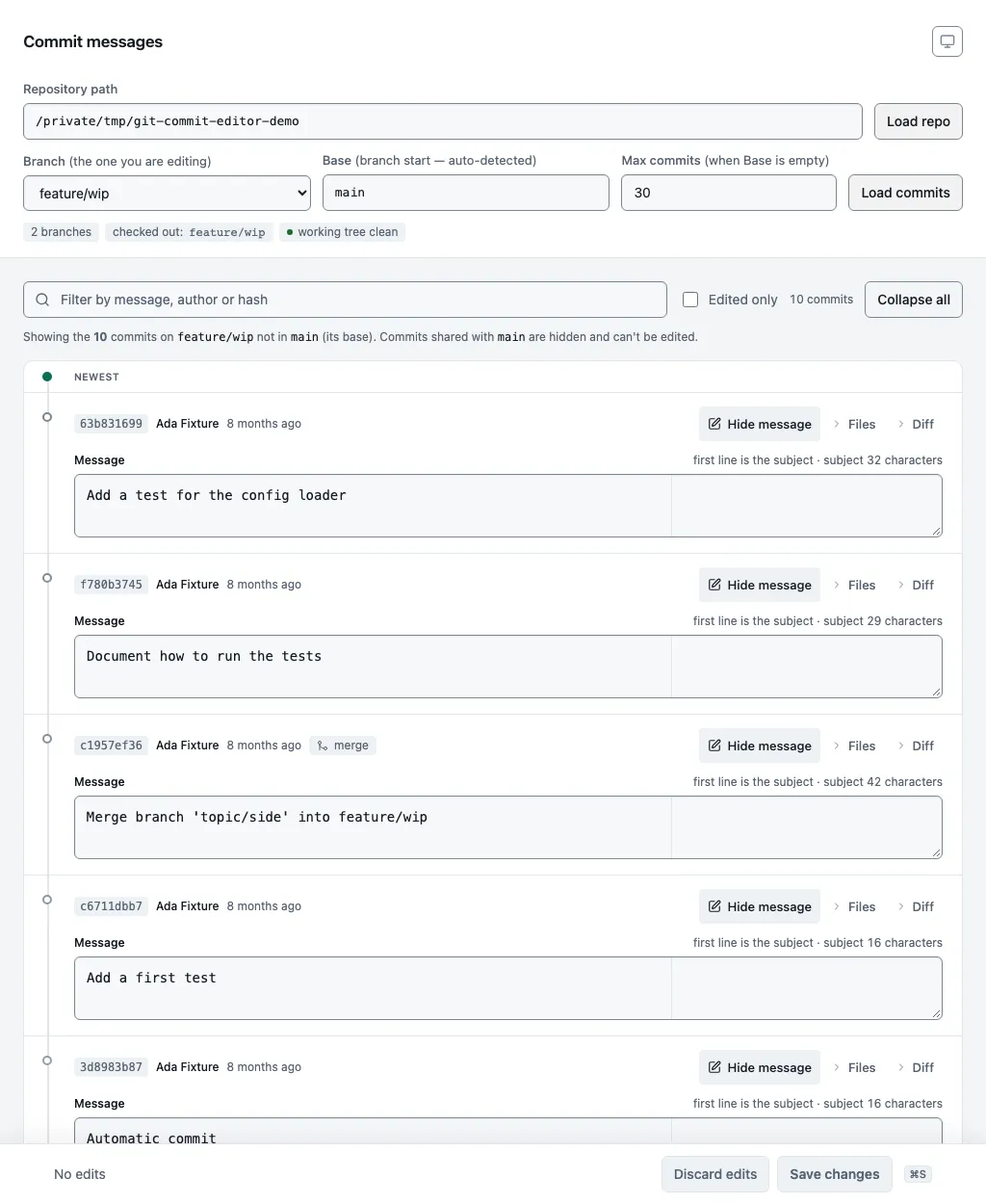
A local web app for rewording the commit messages on a git branch. Point it at a repository, pick a branch, edit any message in the browser, and save. It rewrites the edited commits and replays their descendants, keeping every author, date and file tree as it was.
It changes messages only. It never reorders, squashes, splits or drops
commits, and every rewritten commit keeps an identical tree, so git status
stays clean after a save. For anything structural, use git rebase -i.
Installation
Run it without installing, from inside the repository you want to edit:
cd path/to/your/repo
uvx git-commit-editor
Or install it:
uv tool install git-commit-editor   # or: pip install git-commit-editor
git-commit-editor --repo path/to/your/repo
Then open http://127.0.0.1:5050. Requires Python 3.14 or later and git on
PATH. python -m git_commit_editor works too.
Usage
git-commit-editor [--repo PATH] [--port PORT] [--host HOST] [--wrap-width N] [--debug] [--version]
| Flag | Default | Meaning |
|---|---|---|
--repo |
current directory | Repository path prefilled in the page. Any path inside the repository works. |
--port |
5050 |
Port to listen on. |
--host |
127.0.0.1 |
Bind address. Only loopback addresses are accepted; anything else is refused. |
--wrap-width |
72 |
Hard-wrap message bodies at this column on save. 0 disables wrapping. |
--debug |
off | Flask debug mode. |
--version |
Print the version and exit. |
In the page:
- Choose a branch. The checked-out one is preselected.
- Check the base. It is auto-detected (
origin/HEAD, then a localmain,master,developortrunk, theninit.defaultBranch, then those names underorigin/) and the editor shows the commits inbase..branch: the ones on your branch that are not on the base. Clear it to see the most recent N commits instead (default 30, maximum 1,000). A range larger than the cap is refused rather than truncated, because saving rewrites the whole range. - Edit messages. Each commit has one textarea holding the whole message. The subject counter turns amber past 50 characters and red past 72. Files and Diff load on demand.
- Save with the button or
Cmd/Ctrl+S. A dialog shows how many commits will be rewritten, including untouched descendants, and warns about signed, pushed or checked-out commits. Confirm withCmd/Ctrl+Enter.
Unsaved edits are kept in the browser's localStorage, keyed by repository,
branch and commit SHA, so a reload or a crash does not lose them. Drafts for
commits outside the current view appear in a drawer rather than being dropped.
Message wrapping
On save, each edited message's body is re-flowed to --wrap-width columns.
The subject is never wrapped. Blank lines separate paragraphs. Lists wrap
with a hanging indent. Trailers such as Signed-off-by:, indented code
blocks, URLs and hyphenated words are left alone. Leading blank lines are
stripped, and a blank line is inserted after the subject if there is none.
Untouched commits carry their text over unchanged.
How it works
Changing a commit's message changes its hash, so every descendant has to be
rebuilt too. The app rebuilds commits oldest-first with git commit-tree,
mapping each commit's parents through an old-to-new table. Merge commits keep
all their parents. Every rebuilt commit reuses the original tree, author,
committer and dates, so the only difference between old and new history is
the text.
Before the branch moves, the app writes a backup branch named
commit-editor-backup/<branch>-<unixtime>-<oldtip>. The backup and the branch
move are one atomic git update-ref --stdin transaction with a
compare-and-swap on the old tip. If the branch moved since you loaded it,
nothing happens and no backup is left behind.
The app refuses to save when a rewrite would silently produce wrong history:
during a rebase, merge, cherry-pick, revert or bisect in any linked worktree;
with an unmerged index; in a shallow clone; and when refs/replace/* or a
grafts file is present. Every git call strips GIT_DIR, GIT_WORK_TREE and
the other repository-routing variables from the environment, and pins commit
encoding to UTF-8.
Undo
Backups are ordinary branches. The page lists them with a copyable restore
command and a delete button, and git branch --list 'commit-editor-backup/*'
shows them from the shell. To restore by hand:
# Branch not checked out:
git -C path/to/repo update-ref refs/heads/<branch> refs/heads/commit-editor-backup/<name>

# Branch checked out, working tree clean:
git reset --hard commit-editor-backup/<name>
Caveats
- Rewriting pushed commits means a force-push and every collaborator
reconciling. The
pushedbadge marks commits reachable from the branch's upstream;on a remotemarks commits reachable from any other remote-tracking ref. The app never fetches, so a missing badge is not proof a commit is private. - Signatures are dropped. Rewritten commits are not re-signed. GPG- and SSH-signed commits are flagged and the save dialog warns about them.
- Moving a branch that is checked out in another worktree leaves that
worktree's HEAD on the new tip with its files untouched, which can show as
spurious
git statusoutput there. The app warns before doing it. - There is no authentication. The app binds to loopback only, checks the
Hostheader, requires a per-process CSRF token on every API request, and sets aContent-Security-Policywith no inline script. Use an SSH tunnel (ssh -L) if you need it from another machine.
Development
git clone https://github.com/nmpowell/git-commit-editor
cd git-commit-editor
uv sync --locked
uv run playwright install chromium   # once; add --with-deps on Linux
uv run pytest                        # 205 backend tests + 20 browser tests, about 60 s
uv run mypy
uv run ruff check .
uv run ruff format --check .
uv run pytest --ignore=tests/test_ui.py skips the browser tests and takes
about 20 seconds.
The screenshot is generated, so it stays at one window size. shot-scraper multi shots.yml builds a throwaway demo repository under /tmp, starts the
app against it and writes screenshot.webp. It needs
shot-scraper 1.12 or later.
To release: bump the version with uv version --bump patch or --bump minor,
commit as Release <version>, push, wait for the Test workflow, then publish a
GitHub Release whose tag matches the version. The Publish workflow runs the
tests again and uploads to PyPI.
Licence
Apache 2.0. See LICENSE.
1 maintainer

Metadata
1 maintainer
Release files for git-commit-editor 0.1.1
For a detailed explanation of source distributions (sdists) and built distributions (wheels), please see the package formats documentation.
Source distribution (sdist)
| File | Size | Uploaded | |
|---|---|---|---|
| git_commit_editor-0.1.1.tar.gz | 104.9 kB | Details |
Built distribution (wheel)
| File | Interpreter | ABI | Platform | Reset |
|---|---|---|---|---|
| git_commit_editor-0.1.1-py3-none-any.whl | Python 3 | none | any | Details |
Total release size: 178.0 kB
Release files / git_commit_editor-0.1.1.tar.gz
| Download URL | git_commit_editor-0.1.1.tar.gz |
|---|---|
| Size | 104.9 kB |
| Tags | Source |
|
SHA-256 checksum How to use checksums |
bfbe3a1ad18737f7c6e45ad855b7112b231d2cad6400a494362e06d7963a98f6
|
|
BLAKE2b-256 checksum How to use checksums |
583d93f043fb242b1cfc3dffc1989ea130b93e3904f20f5b3ad205c575e49ac3
|
| Upload date | |
|
Uploaded using Trusted Publishing? What is trusted publishing? |
Yes |
| Uploaded via |
twine/7.0.0 CPython/3.13.14
|
Provenance
Provenance describes where a file came from. On PyPI, provenance is shared via attestations, which provide a verifiable record of the build or publishing details. View details, limitations and caveats.


PyPI Publish Attestation
PyPI verified that this artifact, at this checksum, originated from the publisher listed below.
Signed by GitHub Actions, verified by PyPI on Sep 18, 2026.
Transparency logRelease files / git_commit_editor-0.1.1-py3-none-any.whl
| Download URL | git_commit_editor-0.1.1-py3-none-any.whl |
|---|---|
| Size | 73.1 kB |
| Tags | Python 3 |
|
SHA-256 checksum How to use checksums |
eceafded9d40aeb8664dc062682019d1352ccd10e2f3bfcad454174ac82e8c2d
|
|
BLAKE2b-256 checksum How to use checksums |
67e7676809abe3fb3680b7360ce16fbb29a0966315be8b4abad4dd16ff22e8ed
|
| Upload date | |
|
Uploaded using Trusted Publishing? What is trusted publishing? |
Yes |
| Uploaded via |
twine/7.0.0 CPython/3.13.14
|
Provenance
Provenance describes where a file came from. On PyPI, provenance is shared via attestations, which provide a verifiable record of the build or publishing details. View details, limitations and caveats.
PyPI Publish Attestation
PyPI verified that this artifact, at this checksum, originated from the publisher listed below.
Signed by GitHub Actions, verified by PyPI on Sep 18, 2026.
Transparency log













