
git-dirty-triage
A Git command that separates unpublished edits from work already on the remote.
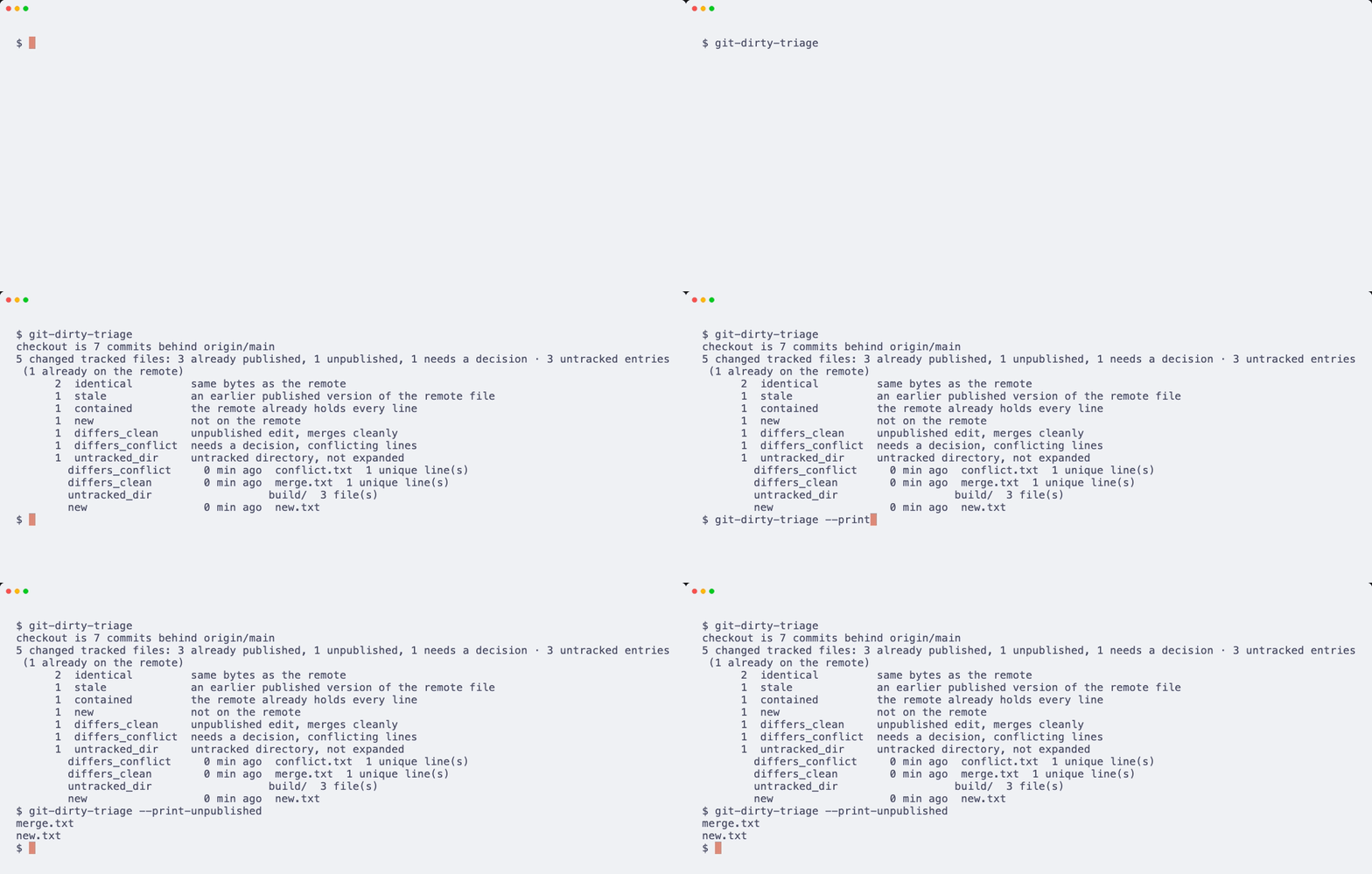
The demo uses a throwaway remote and two clones. One clone publishes seven commits; the other keeps local edits. Fixture and tape.
Install
pipx install git-dirty-triage
uv tool install git-dirty-triage
pip install git-dirty-triage
Python 3.9+, Git 2.x, and no Python dependencies. The installed command also works as git dirty-triage.
Verified on macOS arm64 with Python 3.12. Linux and Windows have not been exercised.
Quick start
Run it from your checkout. It fetches the remote first, then classifies the changed paths. These outputs were captured from the bundled throwaway repository.
$ git-dirty-triage
checkout is 7 commits behind origin/main
5 changed tracked files: 3 already published, 1 unpublished, 1 needs a decision · 3 untracked entries (1 already on the remote)
      2  identical         same bytes as the remote
      1  stale             an earlier published version of the remote file
      1  contained         the remote already holds every line
      1  new               not on the remote
      1  differs_clean     unpublished edit, merges cleanly
      1  differs_conflict  needs a decision, conflicting lines
      1  untracked_dir     untracked directory, not expanded
        differs_conflict     0 min ago  conflict.txt  1 unique line(s)
        differs_clean        0 min ago  merge.txt  1 unique line(s)
        untracked_dir                  build/  3 file(s)
        new                  0 min ago  new.txt
$ git-dirty-triage --print-unpublished
merge.txt
new.txt
$ git-dirty-triage --prefix build
checkout is 7 commits behind origin/main
1 untracked entry
      1  untracked_dir     untracked directory, not expanded
        untracked_dir                  build/  3 file(s)
merge.txt and new.txt carry unpublished work. conflict.txt needs a decision. The untracked build/ directory stays one row unless you pass --untracked all.
Why
In a shared checkout, another session can publish your bytes without moving your local branch or index. git status still calls those files modified because it compares them with your index. That leaves you sorting old work from new work before every commit.
This command compares the working files with the remote tip and earlier published versions. It separates already-published bytes, new edits, and conflicts. A normal report does not change your branch, index, or working files; the default fetch does update remote-tracking refs.
| Tool | Use it for |
|---|---|
git status / git diff |
Changes against your own index or local commit |
git log / git range-diff |
Commit history and differences between commit series |
git-dirty-triage |
Working files in a checkout that lags behind published work |
If your checkout already follows the remote, start with git status.
Measurement
A previous warm-cache run classified 38,925 paths in 107 seconds on an Apple-silicon Mac with Python 3.12. This is one observed checkout, not a throughput guarantee. Unique differences require per-path history and content reads; use --prefix to limit the work to your directory.
Reference
| Option | What you get |
|---|---|
--repo PATH |
Inspect that checkout instead of the current directory |
--remote NAME, --branch NAME |
Choose the comparison ref; remote defaults to origin |
--prefix PATH |
Limit the scan and report to a repo-relative prefix; repeatable |
--json |
Full report, counts and per-path classifications |
--print-unpublished |
One unpublished path per line |
--untracked normal |
One row per untracked directory, with a file count; default |
--untracked all |
Expand untracked directories into file rows |
--untracked no |
Omit untracked paths |
--ahead |
Inspect paths touched by local-only commits, even with clean working files |
--no-fetch |
Use the last fetched ref |
--commit-unpublished -m MESSAGE |
Build a commit on the remote tip; do not push |
There is no configuration file or tool-specific environment variable. With no --branch, the tool tries the remote's default branch, then main, then master.
Classes
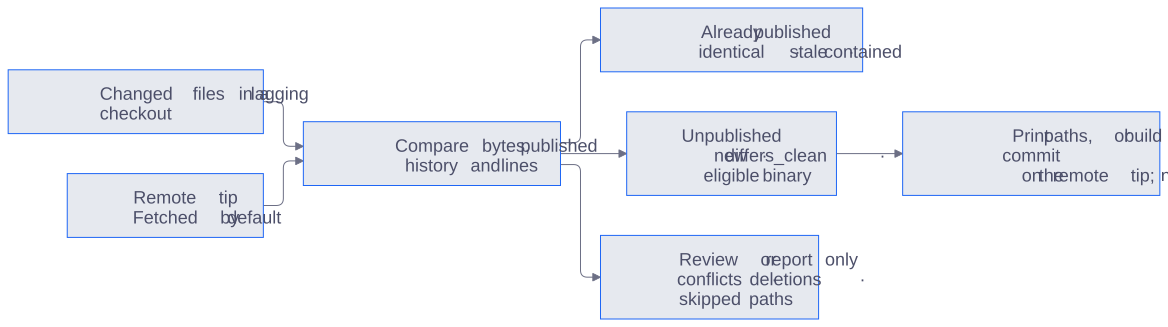
This groups classification outcomes. Contained does not prove equivalent line order; opaque untracked directories are counted without content comparison.
| Class | Meaning | Commit candidate? |
|---|---|---|
identical |
Same bytes as the remote | No |
stale |
Same bytes as an earlier published version | No |
contained |
Every nonblank local line is already in the remote file | No |
new |
No remote file at that path | Yes |
differs_clean |
Unique lines; three-way merge succeeds | Yes |
differs_conflict |
Three-way merge conflicts | Needs a decision |
differs_binary |
Binary difference | Only if remote bytes are unchanged since HEAD |
deleted |
Working file removed | Report only |
untracked_dir |
Unexpanded directory | Report only |
skipped |
Unsupported path, such as a symlink or newline in a name | Report only |
contained is a line-membership heuristic. It does not preserve line order or repetition, so it cannot establish semantic equivalence. Review reorder-only changes yourself.
Build a commit
git-dirty-triage --commit-unpublished -m "Update the parser"
The commit uses a temporary index and the remote tip as its parent. It keeps a private ref under refs/git-dirty-triage/<branch>. Your current branch, index and working tree stay as they were; the command prints a suggested push command but does not run it.
For differs_clean, the committed bytes are the three-way merge, which can differ from your working file. Conflicting, deleted, skipped, and opaque directory rows are excluded. Unpublished does not mean ready to publish: inspect the selected changes before using this option.
JSON and exits
--json returns repo, ref, behind, mode, counts, summary, and paths. summary separates tracked changes from untracked entries; per-class counts include both. Every path has class, reason, untracked, and files (a count for opaque directories, otherwise null).
Exit 0 means the report was produced, even if it contains conflicts. Exit 2 means a usage or Git error. Commit mode also exits 0 when there is nothing to commit.
Limits
- A failed fetch prints a warning and uses the last fetched ref. The report then describes that cached state.
stalemeans previously published, not equal to the current remote.containedcompares lines, not meaning.- Renames appear as deletion plus addition. Deleted paths are reported, never committed.
- Untracked directories are counted but not hashed or compared unless expanded with
--untracked all. --aheadneeds a merge base; a depth-one shallow clone may lack one.- Empty repositories without a remote tip are unsupported.
- Linux and Windows are untested. The saved measurement covers one macOS checkout only.
Contributing
Issues and platform reports are welcome; run python3 -m compileall -q src from the source checkout. See AGENTS.md for the code layout and safety rules.
License: MIT.
1 maintainer

Metadata
1 maintainer
Release files for git-dirty-triage 0.1.2
For a detailed explanation of source distributions (sdists) and built distributions (wheels), please see the package formats documentation.
Source distribution (sdist)
| File | Size | Uploaded | Provenance | Actions |
|---|---|---|---|---|
| git_dirty_triage-0.1.2.tar.gz | 17.8 kB | Without provenance | Details for git_dirty_triage-0.1.2.tar.gz |
Built distribution (wheel)
| File | Interpreter | ABI | Platform | Actions Reset |
|---|---|---|---|---|
| git_dirty_triage-0.1.2-py3-none-any.whl | Python 3 | none | any | Details for git_dirty_triage-0.1.2-py3-none-any.whl |
Total release size: 35.5 kB
Release files / git_dirty_triage-0.1.2.tar.gz
| Download URL | git_dirty_triage-0.1.2.tar.gz |
|---|---|
| Size | 17.8 kB |
| Tags | Source |
|
SHA-256 checksum How to use checksums |
72f59f691ef23acb043ef47da7af41d51e3420ec9c4ef95e7dbcb37a79e6d445
|
|
BLAKE2b-256 checksum How to use checksums |
aa9d7b7711d3aeb1c738e56a5dd02f641b8d0fe8e943d264fcf2bacf27b4e381
|
| Upload date | |
|
Uploaded using Trusted Publishing? What is trusted publishing? |
No |
| Uploaded via |
twine/7.0.0 CPython/3.12.8
|
Release files / git_dirty_triage-0.1.2-py3-none-any.whl
| Download URL | git_dirty_triage-0.1.2-py3-none-any.whl |
|---|---|
| Size | 17.7 kB |
| Tags | Python 3 |
|
SHA-256 checksum How to use checksums |
c7cac61801d3617743b62bc5b2385d181dd75968c0e9db84401f8f74fe418a00
|
|
BLAKE2b-256 checksum How to use checksums |
d79a96eeec5dd63c19e6238cf5f37f522232cc97154e6f5c56dcc2c07aecf443
|
| Upload date | |
|
Uploaded using Trusted Publishing? What is trusted publishing? |
No |
| Uploaded via |
twine/7.0.0 CPython/3.12.8
|
Security for git-dirty-triage 0.1.2
Provenance
Provenance describes where a file came from. On PyPI, provenance is shared via attestations, which provide a verifiable record of the build or publishing details. View details, limitations and caveats.
No provenance found
None of the files in this release were uploaded with provenance metadata.
A note on package security
PyPI is a repository for distributing packages, not a service for auditing them. While third-party security researchers and our staff do their best to detect and remove malicious packages, PyPI cannot guarantee the quality, security or suitability of any given package.
To learn more about protecting yourself from malicious actors, visit our package security documentation.














