
git-dummy





Git repositories on demand: generate the exact history, remote, and working-tree state you need for tests, demos, tutorials, and practice, without touching real data.
- Build any repo shape in one command: linear, divergent, commits, branches, merges, tags, a stopped merge conflict, untracked files, modified files, staged files, stashes, a remote that is ahead or behind, a detached HEAD, worktrees, and submodules.
- Start from a named scenario for the situations people actually get into, like a conflicted merge, a diverged remote, rebase-ready, or a dirty working tree.
- Make it look real, and reproducible: real-looking files, commit messages, and authors, persistent object ID's by specifying a starting seed, and large histories fast through
git fast-import. - Use it anywhere: a one-liner in the terminal, a Python API that returns the paths, ids, and states it made, a recipe file, or a plain shell script of
gitcommands for machines without Python. - Agentic: your agents can use it as a part of their testing flows if they depend on Git repo structure / state.
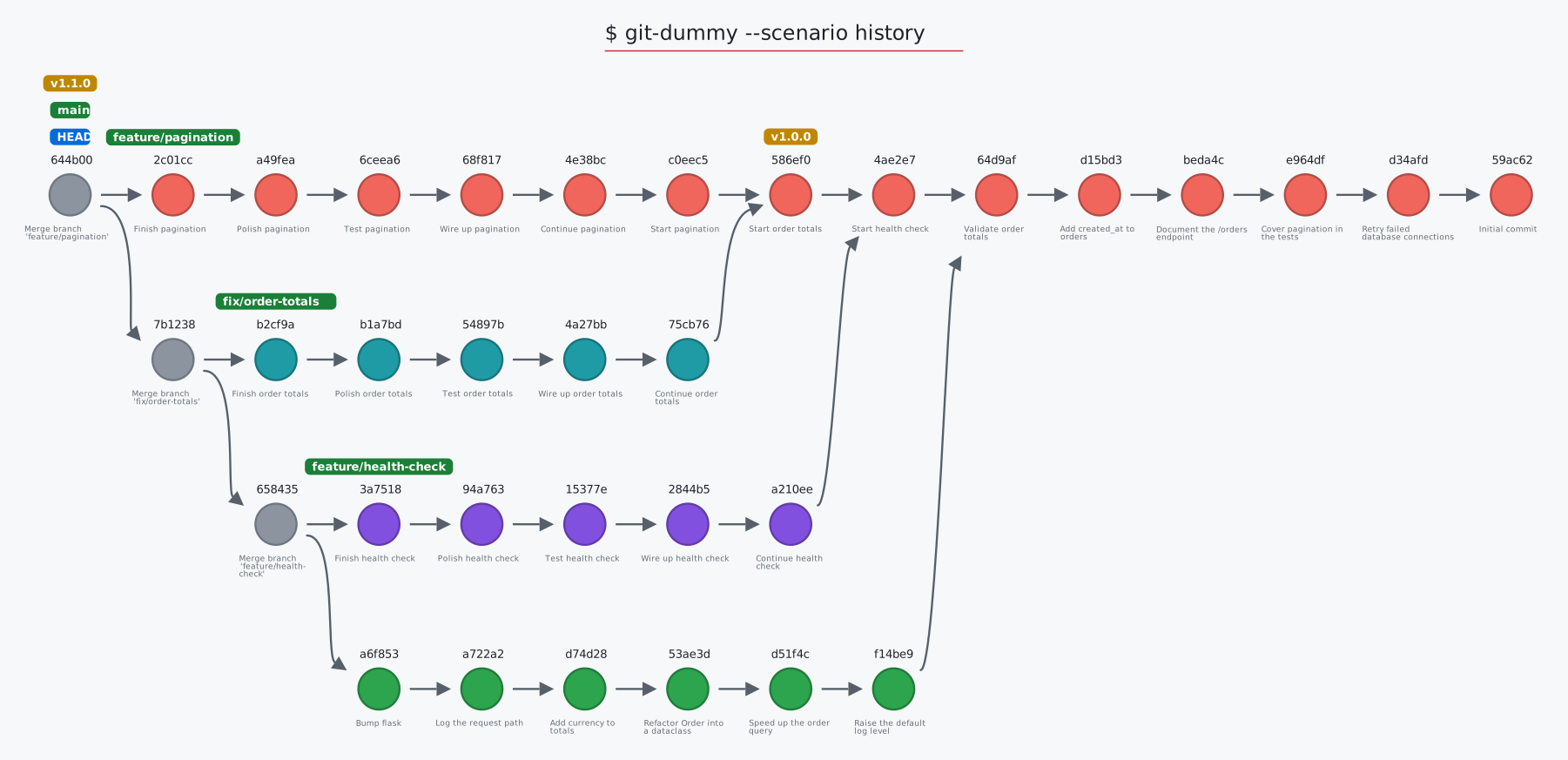
The graph above is the history scenario, drawn by git-sim.
Requirements
- Python 3.8 or later
- Git 2.28 or later on your PATH: git-dummy runs your own
git, and needs nothing else
Get started
1. Install git-dummy
$ pip install git-dummy
Or pipx install git-dummy, or uv tool install git-dummy.
2. Build a repo: in the folder you want it in, ask for the shape
$ git-dummy --commits=10 --branches=4 --merge=1
This creates a repo called dummy by default (override with --name=<name>), in the current folder, with 4 branches of up to 10 commits each, and branch1 merged back into main.
Run git-dummy -h to list all options.
3. Start from a scenario: the situation you want to practice, test, or demo
$ git-dummy --scenario merge-conflict       # a merge stopped on a conflict, markers in the file
$ git-dummy --scenario diverged-remote      # local and remote both moved on: push is rejected, pull merges
$ git-dummy --list-scenarios                # list all available scenarios
4. Make it look real: like a small web service with real-looking files, messages, and authors, consistent across generations via the same seed
$ git-dummy --style realistic --seed 42 --commits 8 --branches 2 --remote --behind 2 --ahead 1
5. Build one in a test: the Python API returns everything git-dummy made
from git_dummy import build

repo = build(scenario="rebase-ready", git_dir=tmp_path)
repo["branches"]["main"]   # the tip of main
6. See it: draw the repo with git-sim, and visually simulate Git commands on it
$ git-dummy --scenario orders
$ cd orders
$ git-sim log --all
Scenarios
git-dummy --scenario <name> starts from one of these, and specifying additional options (like --commits or --branches overrides the scenario's defaults. List all scenarios with git-dummy --list-scenarios
| Scenario | What you get |
|---|---|
clean |
A tidy linear history on main. |
history |
Twelve commits on main, three merged topic branches with their own commits, two tags: for log and graph demos. |
rebase-ready |
A feature branch diverged from main with commits on both, checked out on the feature. |
merge-conflict |
A merge stopped on a conflict, markers in the file. |
messy-worktree |
Staged, modified, and untracked files plus a stash. |
ahead-of-remote |
Two local commits not pushed yet. |
behind-remote |
Two commits on the remote not fetched yet. |
diverged-remote |
Both sides moved on: push rejected, pull merges, force-push overwrites. |
detached-head |
HEAD detached at an older commit. |
release |
Tagged releases on main and a hotfix branch off the last one. |
orphan |
A gh-pages branch with its own root. |
criss-cross |
Two branches that each merged the other. |
octopus |
Three topic branches merged into main in one commit. |
submodule |
A submodule pinned to a small library repo built beside the repo. |
worktree |
A linked worktree beside the repo, checked out on a branch. |
reflog |
A few HEAD moves so the reflog has entries. |
large |
Two thousand commits on five branches, through fast-import. |
orders |
The sample app git-sim's README draws: two topic branches, a tag, a remote, something in every working-tree zone, a stash, and a reflog. Build it, then run the README's git-sim commands inside it. |
orders-behind |
The same app with a remote two commits ahead, for fetch and pull. |
Python API
from git_dummy import build, Spec

r = build(commits=6, branches=2, style="realistic", seed=7, remote=True, behind=2, git_dir="/tmp")
r["path"]                  # where it is
r["branches"]["main"]      # tip ids
r["remote"]["path"]        # the bare remote beside it
r["worktree"]["staged"]    # what is staged, modified, untracked, in conflict
r["commits"]               # every commit: sha, parents, author, message

build(scenario="merge-conflict", git_dir="/tmp", name="cx")
build(Spec.from_recipe("repo.yaml"))
git_dummy.script(spec) returns the shell script, and git_dummy.clean(path) removes a repo git-dummy made. Use it to generate repos for functional tests of Git tools, with the exact shape a test needs.
Recipes, scripts, and cleanup
A recipe file holds the same options as the command line, in JSON or YAML. --print-script writes the plain git commands that would build the repo instead of actually doing it, for a machine without Python or a tutorial's appendix:
$ cat repo.json
{"scenario": "rebase-ready", "name": "practice", "commits": 8}
$ git-dummy --from repo.json
$ git-dummy --from repo.json --print-script > build-practice.sh
--json prints a description of what was built, and --clean removes a repo git-dummy made, and nothing else.
What gets created where
By default git-dummy creates a project folder called dummy and initializes the dummy Git repo with .git/ folder in there. Override that with by specifying --git-dir and/or --name, which will create the repo at <git-dir>/<name> (or put the .git/ folder in the current directory with --no-subdir). Everything else git-dummy makes sits beside it and is listed in the repo's .git/git-dummy.json, which is what --clean reads:
<name>.git: the bare remote (--remote)<name>-<branch>: a linked worktree (--worktree)<name>.lib: the library a submodule points at (--submodule)
Every repo has at least one branch, main. Other branches are named branch1, branch2, and so on (or given with --branch-names, or realistic names with --style realistic). Each branch diverges from main at --diverge-at if given, or else at a randomly chosen commit, and is at most --commits long. --merge=<x>,<y> picks which branches are merged back into main.
Options
$ git-dummy [options]
The ones you'll reach for most:
--name <name>, --git-dir <path>: what to call the repo, and where to put it
--commits <number>, --branches <number>, --merge <x>,<y>: the shape of the history
--scenario <name>: start from a named scenario
--style realistic, --seed <number>: real-looking content, the same every time
--remote, --ahead <number>, --behind <number>: a remote, and how far apart they are
--modified, --staged, --untracked, --stashes, --conflict: something in the working tree
Every option can also be set with an environment variable named git_dummy_ plus the option, such as git_dummy_git_dir=~/Desktop or git_dummy_style=realistic. Specifying an option on the command line overrides the environment variable.
All options
--name: The name of the dummy Git repo, defaults to "dummy".
--commits: The number of commits to populate in the dummy Git repo, defaults to 5.
--branches: The number of branches to generate in the dummy Git repo, defaults to 1.
--diverge-at: The commit number at which branches diverge from main.
--merge: A comma separated list of branch postfix ids to merge back into main.
--git-dir: The path at which to store the dummy Git repo, defaults to current directory.
--no-subdir: Initialize the dummy Git repo in the current directory instead of in a subdirectory.
--constant-sha: Use constant values for commit author, email, and commit date parameters to yield consistent sha1 values across git-dummy runs.
--allow-nested: Allow dummy repo creation within an existing Git repo, as long as it's not at the level of an existing .git/ folder.
--style: plain (the classic main.1 files and "Dummy commit #1" messages, the default) or realistic.
--seed: Seed every random choice and fix the commit dates, so the same seed gives the same repository.
--branch-names: Comma separated names for the branches other than main.
--tags: Comma separated tags to place along main, the last on its tip.
--files: Extra files added by every commit on main, for large trees.
--octopus: Merge the unmerged branches into main in one octopus merge.
--criss-cross: Make main and the first branch each merge the other.
--orphan-branch: Add a branch with its own root and a single page.
--fast / --no-fast: Write the history with git fast-import (default: only when it is large, above a few hundred commits).
--remote: Create a bare remote beside the repo (<name>.git), add it as origin by the relative path ../<name>.git, push everything to it, and track it. Git writes the remote's URL into messages like "Merge branch 'main' of ../", so no path from your machine ends up in the history.
--ahead: Commits on local main the remote does not have.
--behind: Commits the remote gained since the last fetch.
--modified, --staged, --untracked: Tracked files with uncommitted edits, edits staged for the next commit, and new files.
--conflict: Leave a merge stopped on a conflict.
--stashes: Entries on the stash.
--reflog: Extra HEAD moves so the reflog has entries.
--detached: Leave HEAD detached at the commit before the tip.
--checkout: The branch to leave checked out.
--worktree: Add a linked worktree beside the repo, checked out on this branch.
--submodule: Add a submodule pinned to a small library repo built beside this one.
--scenario, --list-scenarios: Start from a named scenario, or list them.
--from: Read the options from a JSON or YAML recipe file (YAML needs pip install git-dummy[yaml]).
--json: Print what was built as JSON.
--print-script: Print the plain git commands that would build the repo, and build nothing.
--clean: Remove the dummy repo at the target path and what git-dummy made beside it.
Installation
$ pip install git-dummy
Or pipx install git-dummy, or uv tool install git-dummy. YAML recipe files need PyYAML, which pip install "git-dummy[yaml]" adds. JSON recipes always work.
Learn more
Learn more on the git-dummy project page. git-dummy is what git-sim uses for its demos, its tests, and the graphs in its README, and git-dummy powers all Git simulations on the Initial Commit website including:
- The animated Git cheat sheet: pick the commands you use and print your own sheet, each with an animation of what it does to your repo
- The visual Git command reference: every command git-sim simulates, each drawn on a sample repo
- The Git command articles: one page per command, with interactive before-and-after simulations
Support git-dummy
git-dummy is free and open-source software. Your support helps me work on it, and other Git projects, full time:
Authors
Jacob Stopak - on behalf of Initial Commit
1 maintainer

Metadata
1 maintainer
Release files for git-dummy 0.2.0
For a detailed explanation of source distributions (sdists) and built distributions (wheels), please see the package formats documentation.
Source distribution (sdist)
| File | Size | Uploaded | |
|---|---|---|---|
| git_dummy-0.2.0.tar.gz | 39.6 kB | Details |
Built distribution (wheel)
| File | Interpreter | ABI | Platform | Reset |
|---|---|---|---|---|
| git_dummy-0.2.0-py3-none-any.whl | Python 3 | none | any | Details |
Total release size: 74.7 kB
Release files / git_dummy-0.2.0.tar.gz
| Download URL | git_dummy-0.2.0.tar.gz |
|---|---|
| Size | 39.6 kB |
| Tags | Source |
|
SHA-256 checksum How to use checksums |
f0f00f511f1d9aa5e6b3d4561d55939d8a273bdc60df5abd90cde2c951f02957
|
|
BLAKE2b-256 checksum How to use checksums |
1d15c444ed38c4cd9687b162e7c480b9dcf82bda32a40b3aa00e78b7bac70f5a
|
| Upload date | |
|
Uploaded using Trusted Publishing? What is trusted publishing? |
No |
| Uploaded via |
twine/7.0.0 CPython/3.11.1
|
Release files / git_dummy-0.2.0-py3-none-any.whl
| Download URL | git_dummy-0.2.0-py3-none-any.whl |
|---|---|
| Size | 35.0 kB |
| Tags | Python 3 |
|
SHA-256 checksum How to use checksums |
360a4234e6e9cdedf0d324745b57ea8cb1704b32bbc6301f2f15d4bba1faac3a
|
|
BLAKE2b-256 checksum How to use checksums |
418dbd21bf5c5271aae85d73d6a074c3a8014c2a7e013368514593ff83cdf512
|
| Upload date | |
|
Uploaded using Trusted Publishing? What is trusted publishing? |
No |
| Uploaded via |
twine/7.0.0 CPython/3.11.1
|














