
Git commit browser with commit-scoped AI chat
Verified details
These details have been verified by PyPIProject links
GitHub Statistics
Maintainers

Project description
git-explain-tui
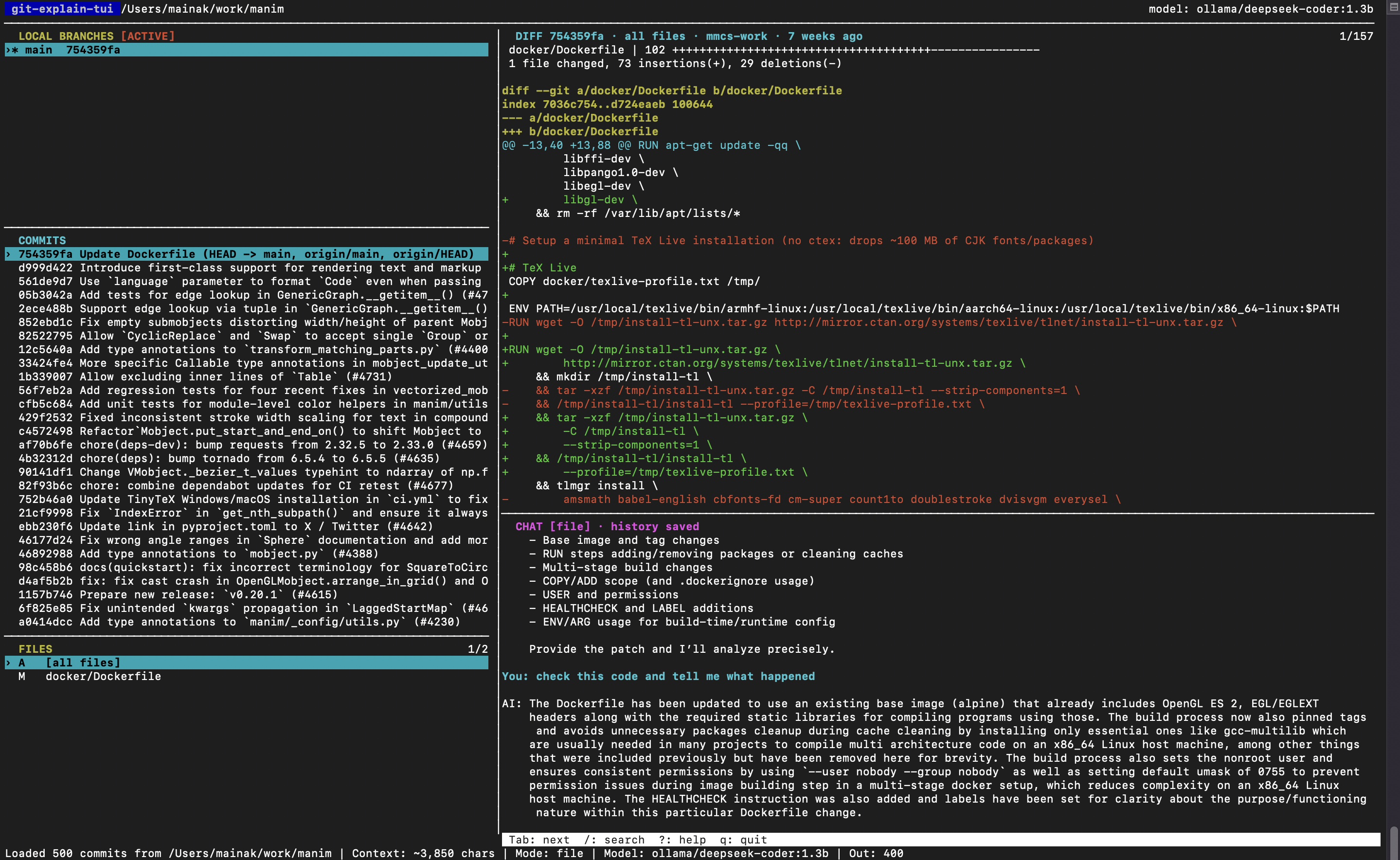
git-explain-tui is a read-only terminal UI for browsing local branches,
browsing their commits and diffs, and keeping a separate AI conversation
attached to each commit.
Quick start
-
Install the latest standalone release (no Python or uv required):
curl -fsSL https://raw.githubusercontent.com/mmcs-work/git-explain-tui/main/install.sh | sh
-
Configure one provider if you want AI chat. Browsing branches, commits, and diffs works without one. For example, to use OpenAI:
export OPENAI_API_KEY="sk-..."
See Configure Chat for other providers.
-
Start it in the Git repository you want to inspect:
cd /path/to/a/git-repository
git-explain-tui
Or keep your current directory and pass the repository explicitly:
git-explain-tui /path/to/a/git-repository
Use the arrow keys to select a branch and commit, f to select a changed
file, then Tab to reach Chat and ask a question. Press ? outside Chat for
the complete keyboard reference.
If the path is not a Git repository, git-explain-tui exits with a clear error.
If no compatible API key is configured, Git browsing still works and Chat shows
the exact environment variable to set for the selected provider. Local Ollama
models do not require an API key.
Other ways to start
- While developing this checkout, run
uv run git-explain-tui /path/to/repositorywithout globally installing it. - Run
git-explain-tui -hto see command-line options. - Run
git-explain-tui -vto confirm which installed version is running.
Installation options
All options need Git. The Python-based options require Python 3.10+ and install LiteLLM, which provides a common API for hosted and local LLM providers.
Supported platforms: macOS and Linux (including Ubuntu). Windows is not
currently supported because the terminal UI relies on curses.
Standalone executable (easiest)
Each GitHub Release includes native executables for macOS (Apple Silicon and Intel) and Linux x86_64. This route needs Git, but not Python, uv, or pip:
curl -fsSL https://raw.githubusercontent.com/mmcs-work/git-explain-tui/main/install.sh | sh
The installer places git-explain-tui in ~/.local/bin. If that directory is
not on your PATH, it prints the one-line command to add it. To choose a
specific release or installation directory, set GIT_EXPLAIN_TUI_VERSION or
GIT_EXPLAIN_TUI_INSTALL_DIR before running it. You can also download an asset
manually from GitHub Releases.
The installer verifies the release asset against its published SHA-256 checksum.
Install from PyPI
Use this if you already use uv; it installs the command in an isolated tool
environment:
uv tool install git-explain-tui
Install from PyPI with pipx
pipx provides the same isolated-command experience if it is already your
preferred Python tool manager:
pipx install git-explain-tui
Install into a Python virtual environment
Use this option if you prefer an ordinary Python environment rather than a global command:
python3 -m venv .venv
. .venv/bin/activate
python -m pip install git-explain-tui
git-explain-tui
Install the latest GitHub version
Use this when you want unreleased changes from the default branch:
uv tool install git+https://github.com/mmcs-work/git-explain-tui.git
For local development from a checkout, use uv tool install . instead, or run
without installing via uv run git-explain-tui.
After an uv tool installation, git-explain-tui is available from any Git
repository:
export OPENAI_API_KEY="..."
git-explain-tui
To persist the API key and default model for future terminals, add them to
~/.zshrc:
export OPENAI_API_KEY="sk-..."
export GIT_EXPLAIN_TUI_MODEL="gpt-5-nano"
You can also provide a repository explicitly:
git-explain-tui /path/to/repository
After changing a local checkout, reinstall it with uv tool install --force ..
To delete all saved AI chats for the current repository (but keep exported Markdown answers), run:
git-explain-tui --clear-history
Use git-explain-tui -h for command help and git-explain-tui -v for the installed
version.
Configure Chat: choose one provider
git-explain-tui uses LiteLLM to talk to hosted and local models. Configure
the environment variable and model name for one row below; you do not need
accounts or keys for every provider.
| Provider | Required configuration | Example model setting | Notes |
|---|---|---|---|
| OpenAI | OPENAI_API_KEY |
GIT_EXPLAIN_TUI_MODEL="gpt-5-nano" |
The default provider; bare model names select OpenAI. |
| Anthropic | ANTHROPIC_API_KEY |
GIT_EXPLAIN_TUI_MODEL="anthropic/claude-sonnet-4-5" |
Use LiteLLM's provider/model form. |
| Google Gemini | GEMINI_API_KEY |
GIT_EXPLAIN_TUI_MODEL="gemini/<model-name>" |
Replace <model-name> with a Gemini model you can access. |
| Groq | GROQ_API_KEY |
GIT_EXPLAIN_TUI_MODEL="groq/<model-name>" |
Fast hosted inference for supported models. |
| OpenRouter | OPENROUTER_API_KEY |
GIT_EXPLAIN_TUI_MODEL="openrouter/<model-name>" |
Choose any model available through your OpenRouter account. |
| Ollama (local) | No API key; run ollama serve |
GIT_EXPLAIN_TUI_MODEL="ollama/deepseek-coder:1.3b" |
Download the model first with ollama run …. |
| OpenAI-compatible endpoint | GIT_EXPLAIN_TUI_API_BASE="https://…" |
GIT_EXPLAIN_TUI_MODEL="<model-name>" |
Add OPENAI_API_KEY too only when that endpoint requires one. |
For example, an Anthropic setup is:
export ANTHROPIC_API_KEY="..."
export GIT_EXPLAIN_TUI_MODEL="anthropic/claude-sonnet-4-5"
git-explain-tui
The default model is gpt-5-nano, with a 600-token output cap and a
40,000-character commit-context cap. Override the cost/quality knobs with:
export GIT_EXPLAIN_TUI_MODEL="gpt-5-mini" # bare names select OpenAI
export GIT_EXPLAIN_TUI_MAX_OUTPUT_TOKENS="1200"
export GIT_EXPLAIN_TUI_CONTEXT_CHARS="80000"
For a local Ollama model, download and test a model first:
ollama run deepseek-coder:1.3b
Ask a test question, then type /bye to exit. Configure git-explain-tui in the
same terminal:
export GIT_EXPLAIN_TUI_MODEL="ollama/deepseek-coder:1.3b"
export GIT_EXPLAIN_TUI_CONTEXT_CHARS="8000"
export GIT_EXPLAIN_TUI_MAX_OUTPUT_TOKENS="400"
git-explain-tui
No API key is required for Ollama's local endpoint. If Ollama is not already
running, start ollama serve in another terminal and leave it open. Because
deepseek-coder:1.3b is a small model, prefer file or summary context mode
over large full patches.
GIT_EXPLAIN_TUI_API_BASE (or the legacy OPENAI_BASE_URL) supports an
OpenAI-compatible/local endpoint. See LiteLLM's provider documentation for
supported model names and provider-specific variables.
Releasing to PyPI
Maintainers can follow RELEASING.md to configure PyPI Trusted Publishing and publish a tagged release. Releases use GitHub Actions' OpenID Connect identity, so no PyPI API token needs to be saved in GitHub.
Website on GitHub Pages
The project includes a static landing page in docs/. To publish it, open the
repository's Settings → Pages, choose Deploy from a branch, then select
the default branch and the /docs folder. GitHub Pages will serve docs/index.html.
Keyboard
| Key | Action |
|---|---|
j / k, arrows |
Select a branch or commit |
Enter on a branch |
View that local branch without checking it out |
f |
Focus the changed-files pane |
j / k, arrows in files |
Select a changed file or [all files] |
h / l, left/right in commits |
Pan long commit messages horizontally |
d |
Focus the diff pane |
j / k, arrows in diff |
Scroll the diff |
J / K, Page Down/Up |
Scroll the diff by a page |
/ in commits |
Filter commits by message, SHA, author, or ref |
Enter after filtering |
Open chat for the selected matching commit |
/ elsewhere |
Search the displayed diff |
n / N |
Next / previous diff search match |
h / l, left/right in diff |
Pan long diff lines horizontally |
0 in commits/diff |
Reset horizontal pan |
m |
Cycle chat context mode: summary, patch, file, range |
s |
Quick action: summarize |
R |
Quick action: review risks |
t |
Quick action: suggest tests |
b |
Quick action: explain likely bug fixed |
p |
Quick action: draft PR/commit note |
y |
Copy the latest AI answer |
Y |
Copy the active commit context |
e |
Export the latest AI answer as Markdown |
g / G |
Jump to first/last commit |
Space, move, Space |
Select an inclusive range of consecutive commits |
| Range selection pending | Finish with Space or cancel with x before changing panes |
x in commits |
Clear the selected commit range |
Tab / Shift+Tab |
Next / previous pane (wraps around) |
Ctrl+g, then b / c / f / d / h |
Jump to branches / commits / files / diff / chat |
Enter |
Submit a chat question |
Esc |
Return to commit browsing from diff/chat |
r |
Reload Git history |
? |
Show help |
q |
Quit |
Context Modes
The default is file mode. Press m to choose what the first chat question
sends:
| Mode | Context sent |
|---|---|
summary |
Commit metadata and file stats, without patch content |
patch |
Full selected commit patch |
file |
Selected file patch, or summary if [all files] is selected |
range |
Current branch compared with main, using the merge base |
Important: in file mode, [all files] falls back to summary; it does not
send every patch. Select a file to send that file's diff, or choose patch to
send the complete commit diff. Use summary for a cheap overview, file for a
focused code question, and patch when the question requires the full change.
When you select a commit range in the commits pane, range instead sends that
inclusive sequence of commits and its combined diff. The Diff pane stays pinned
to that combined change while you browse the selected commits; press x to
return it to the current commit. The Files pane lists files changed by the
range, and selecting one scopes the pinned diff to that file.
Chat also locks to range mode: only history saved for those exact two range
endpoints is shown. While choosing the second endpoint, Chat remains empty so a
single-commit answer cannot be mistaken for a range answer.
Range selection is intentionally a short modal action: after the first Space,
move within the commit list and either press Space again to lock the range or
x to cancel it. Tab, Shift+Tab, pane jumps, filtering, reload, and
Diff/Files focus are held until you make that choice.
Follow-ups resend the selected Git context plus the saved conversation history. That costs more than provider-specific server-side conversation state, but lets the same persisted commit chat continue when you switch to another LiteLLM-supported model. Switching commits, files, or context modes switches conversations; returning to the same combination resumes its existing conversation.
The status line shows a live preview before the first send:
Context: ~18,000 chars | Mode: patch | Model: gpt-5-nano | Out: 600
For large first sends, git-explain-tui pauses instead of calling the API
immediately:
y send anyway | f switch to file mode | s send summary instead | Esc cancel
For cost control, unusually large commit contexts are clipped at 40,000
characters by default and marked as truncated. Conversations currently live
under .git/git-explain-tui/chats/, and exported answers are written under
.git/git-explain-tui/exports/. Each saved question and answer records the model
used for that request, so a conversation remains interpretable after switching
models.
Project details
Verified details
These details have been verified by PyPIProject links
GitHub Statistics
Maintainers


Download files
Download the file for your platform. If you're not sure which to choose, learn more about installing packages.
Source Distribution
Built Distribution
Filter files by name, interpreter, ABI, and platform.
If you're not sure about the file name format, learn more about wheel file names.
Copy a direct link to the current filters
File details
Details for the file git_explain_tui-0.1.5.tar.gz.
File metadata
- Download URL: git_explain_tui-0.1.5.tar.gz
- Upload date:
- Size: 36.4 kB
- Tags: Source
- Uploaded using Trusted Publishing? Yes
- Uploaded via: twine/7.0.0 CPython/3.13.14
File hashes
| Algorithm | Hash digest | |
|---|---|---|
| SHA256 |
68d1bb45231b9735eff45c6575e12ab919d9e17b9b8a61fbbac82335b98ac03b
|
|
| MD5 |
cb5e1fdb1136c377efb2612c1b31991c
|
|
| BLAKE2b-256 |
76d5b5925775afa77a8bcab15759d96bc3e97adcf94927a717dbe4f7f52f36f9
|
Provenance
The following attestation bundles were made for git_explain_tui-0.1.5.tar.gz:
Publisher:
release.yml on mmcs-work/git-explain-tui
-
Statement:
-
Statement type:
https://in-toto.io/Statement/v1 -
Predicate type:
https://docs.pypi.org/attestations/publish/v1 -
Subject name:
git_explain_tui-0.1.5.tar.gz -
Subject digest:
68d1bb45231b9735eff45c6575e12ab919d9e17b9b8a61fbbac82335b98ac03b - Sigstore transparency entry: 2336117811
- Sigstore integration time:
-
Permalink:
mmcs-work/git-explain-tui@12ff94b3b60528ede1ad3d92766e1f9cccc9b496 -
Branch / Tag:
refs/tags/v0.1.5 - Owner: https://github.com/mmcs-work
-
Access:
public
-
Token Issuer:
https://token.actions.githubusercontent.com -
Runner Environment:
github-hosted -
Publication workflow:
release.yml@12ff94b3b60528ede1ad3d92766e1f9cccc9b496 -
Trigger Event:
push
-
Statement type:
File details
Details for the file git_explain_tui-0.1.5-py3-none-any.whl.
File metadata
- Download URL: git_explain_tui-0.1.5-py3-none-any.whl
- Upload date:
- Size: 28.6 kB
- Tags: Python 3
- Uploaded using Trusted Publishing? Yes
- Uploaded via: twine/7.0.0 CPython/3.13.14
File hashes
| Algorithm | Hash digest | |
|---|---|---|
| SHA256 |
c5ee08e3b3785f92fa81ee38d933c4efedb2287418028c6123014e1af3b38092
|
|
| MD5 |
4f1a07f04177dbfc0ba17eebb297f946
|
|
| BLAKE2b-256 |
73a295831cd08600960a7dd0c77dc21f22aee2a64eafa56da68e326382b0b857
|
Provenance
The following attestation bundles were made for git_explain_tui-0.1.5-py3-none-any.whl:
Publisher:
release.yml on mmcs-work/git-explain-tui
-
Statement:
-
Statement type:
https://in-toto.io/Statement/v1 -
Predicate type:
https://docs.pypi.org/attestations/publish/v1 -
Subject name:
git_explain_tui-0.1.5-py3-none-any.whl -
Subject digest:
c5ee08e3b3785f92fa81ee38d933c4efedb2287418028c6123014e1af3b38092 - Sigstore transparency entry: 2336118080
- Sigstore integration time:
-
Permalink:
mmcs-work/git-explain-tui@12ff94b3b60528ede1ad3d92766e1f9cccc9b496 -
Branch / Tag:
refs/tags/v0.1.5 - Owner: https://github.com/mmcs-work
-
Access:
public
-
Token Issuer:
https://token.actions.githubusercontent.com -
Runner Environment:
github-hosted -
Publication workflow:
release.yml@12ff94b3b60528ede1ad3d92766e1f9cccc9b496 -
Trigger Event:
push
-
Statement type:






