
Pretty-print git repository collaborators sorted by contributions.














https://git-fame.cdcl.ml/gh/{owner}/{repo}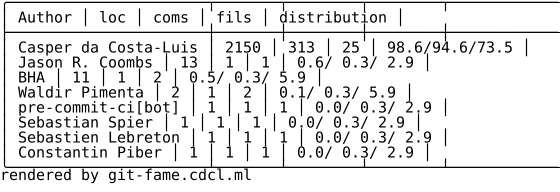
git-fame --cost hour,month --loc insProcessing: 100%|██████████████████████████| 1/1 [00:00<00:00, 2.16repo/s]
Total commits: 1775
Total ctimes: 2770
Total files: 461
Total hours: 449.7
Total loc: 41659
Total months: 151.0
| Author | hrs | mths | loc | coms | fils | distribution |
|:---------------------|------:|-------:|------:|-------:|-------:|:----------------|
| Casper da Costa-Luis | 228 | 108 | 28572 | 1314 | 172 | 68.6/74.0/37.3 |
| Stephen Larroque | 28 | 18 | 5243 | 203 | 25 | 12.6/11.4/ 5.4 |
| pgajdos | 2 | 9 | 2606 | 2 | 18 | 6.3/ 0.1/ 3.9 |
| Martin Zugnoni | 2 | 5 | 1656 | 3 | 3 | 4.0/ 0.2/ 0.7 |
| Kyle Altendorf | 7 | 2 | 541 | 31 | 7 | 1.3/ 1.7/ 1.5 |
| Hadrien Mary | 5 | 1 | 469 | 31 | 17 | 1.1/ 1.7/ 3.7 |
| Richard Sheridan | 2 | 1 | 437 | 23 | 3 | 1.0/ 1.3/ 0.7 |
| Guangshuo Chen | 3 | 1 | 321 | 18 | 7 | 0.8/ 1.0/ 1.5 |
| Noam Yorav-Raphael | 4 | 1 | 229 | 11 | 6 | 0.5/ 0.6/ 1.3 |
| github-actions[bot] | 2 | 1 | 186 | 1 | 51 | 0.4/ 0.1/11.1 |
...The distribution column is a percentage breakdown of loc/coms/fils. (e.g. in the table above, Casper has written surviving code in 172/461 = 37.3% of all files).
Installation
Latest PyPI stable release


pip install git-fameLatest development release on GitHub





Pull and install:
pip install "git+https://github.com/casperdcl/git-fame.git@main#egg=git-fame"Latest Conda release
conda install -c conda-forge git-fameLatest Snapcraft release
snap install git-fameLatest Docker release
docker run --rm casperdcl/git-fame --help
docker run --rm -v "/local/path/to/repository:/repo" -u "$(id -u)" casperdcl/git-fame
Register alias with git
On Windows, run:
git config --global alias.fame "!python -m gitfame"This is probably not necessary on UNIX systems. If git fame doesn’t work after restarting the terminal on Linux & Mac OS, try (with single quotes):
git config --global alias.fame '!python -m gitfame'Tab completion
This doesn’t currently work with the alias (git fame), but does work with git-fame.
Completion scripts are generated by git-fame --print-completion <shell>. For example, in bash:
$ # Ensure completion works for `git` itself
$ sudo apt-get install bash-completion

$ # Install `git-fame` completions
$ git-fame --print-completion bash |
  sudo tee /etc/bash_completion.d/git-fame_completion.bash
See shtab for more information on where to place the completion script for your shell.
Changelog
The list of all changes is available on the Releases page:
Usage
git-fame              # Console script (with tab completion support)
git-fame -h           # Print help
python -m gitfame     # Alternative execution as python module
git fame              # Alternative git alias (see above)
For example, to print statistics regarding all source files in a C++/CUDA repository (*.c/h/t(pp), *.cu(h)), carefully handling whitespace and line copies:
git-fame --incl '\.[cht][puh]{0,2}$' -twMCIt is also possible to run from within a python shell or script.
>>> import gitfame
>>> gitfame.main(['--sort=commits', '-wt', '/path/to/my/repo'])
Finally, there is a live server for public GitHub repositories at git-fame.cdcl.ml/gh/{owner}/{repo}.
The rendered by git-fame.cdcl.ml watermark is removed for sponsors of casperdcl:
Documentation
Usage:
  git-fame [--help | options] [<gitdir>...]

Arguments:
  <gitdir>       Git directory [default: ./].
                 May be specified multiple times to aggregate across
                 multiple repositories.

Options:
  -h, --help     Print this help and exit.
  -v, --version  Print module version and exit.
  --branch=<b>   Branch or tag [default: HEAD] up to which to check.
  --sort=<key>   [default: loc]|commits|files|hours|months.
  --min=<val>    Minimum value (of `--sort` key) to show [default: 0:int].
  --loc=<type>   surv(iving)|ins(ertions)|del(etions)
                 What `loc` represents. Use 'ins,del' to count both.
                 defaults to 'surviving' unless `--cost` is specified.
  --excl=<f>     Excluded files (default: None).
                 In no-regex mode, may be a comma-separated list.
                 Escape (\,) for a literal comma (may require \\, in shell).
  --incl=<f>     Included files [default: .*]. See `--excl` for format.
  --since=<date>  Date from which to check. Can be absolute (eg: 1970-01-31)
                  or relative to now (eg: 3.weeks).
  --until=<date>  Date to which to check. See `--since` for format.
  --cost=<method>  Include time cost in person-months (COCOMO) or
                   person-hours (based on commit times).
                   Methods: month(s)|cocomo|hour(s)|commit(s).
                   May be multiple comma-separated values.
                   Alters `--loc` default to imply 'ins' (COCOMO) or
                   'ins,del' (hours).
  -R, --recurse  Recursively find repositories & submodules within <gitdir>.
  -n, --no-regex  Assume <f> are comma-separated exact matches
                  rather than regular expressions [default: False].
                  NB: if regex is enabled ',' is equivalent to '|'.
  -s, --silent-progress    Suppress `tqdm` [default: False].
  -j=<n>, --jobs=<n>  Number of concurrent `git blame` threads per <gitfir>
                      [default: 0:int]: automatic.
  --warn-binary  Don't silently skip files which appear to be binary data
                 [default: False].
  --show=<info>  Author information to show [default: name]|email.
                 Use 'name,email' to show both.
  -e, --show-email  Shortcut for `--show=email`.
  --enum         Show row numbers [default: False].
  -t, --bytype             Show stats per file extension [default: False].
  -w, --ignore-whitespace  Ignore whitespace when comparing the parent's
                           version and the child's to find where the lines
                           came from [default: False].
  -M             Detect intra-file line moves and copies [default: False].
  -C             Detect inter-file line moves and copies [default: False].
  --ignore-rev=<rev>       Ignore changes made by the given revision
                           (requires `--loc=surviving`).
  --ignore-revs-file=<f>   Ignore revisions listed in the given file
                           (requires `--loc=surviving`).
  --format=<format>        Table format
      fame|svg|[default: md]|yaml|json|csv|tsv.
      Any `tabulate.tabulate_formats` is also accepted.
      Most formats can also be prefixex by `svg-`, e.g. `svg-fame`.
  --log=<lvl>    FATAL|CRITICAL|ERROR|WARN(ING)|[default: INFO]|DEBUG|NOTSET.
If multiple user names and/or emails correspond to the same user, aggregate git-fame statistics and maintain a git repository properly by adding a .mailmap file.
FAQs
Options such as -w, -M, and -C can increase accuracy, but take longer to compute.
Note that specifying --sort=hours or --sort=months requires --cost to be specified appropriately.
Note that --cost=months (--cost=COCOMO) approximates person-months and should be used with --loc=ins.
Meanwhile, --cost=hours (--cost=commits) approximates person-hours.
Extra care should be taken when using ins and/or del for --loc since all historical files (including those no longer surviving) are counted. In such cases, --excl may need to be significantly extended. On the plus side, it is faster to compute ins and del compared to surv.
Examples
Badges
An SVG image for inclusion in README files and websites:
git-fame -wMC --format svg --min 1 > docs/authors.svgWhich can also be dynamically created for public GitHub repositories:
CODEOWNERS
Generating CODEOWNERS:
# bash syntax function for current directory git repository
owners(){
  for f in $(git ls-files); do
    # filename
    echo -n "$f "
    # author emails if loc distribution >= 30%
    git-fame -esnwMC --incl "$f" | tr '/' '|' \
      | awk -F '|' '(NR>6 && $6>=30) {print $2}' \
      | xargs echo
  done
}

# print to screen and file
owners | tee .github/CODEOWNERS

# same but with `tqdm` progress for large repos
owners \
  | tqdm --total $(git ls-files | wc -l) \
    --unit file --desc "Generating CODEOWNERS" \
  > .github/CODEOWNERS
Zenodo config
Generating .zenodo.json:
git-fame -wMC --format json \
  | jq -c '{creators: [.data[] | {name: .[0]}]}' \
  | sed -r -e 's/(\{"name")/\n    \1/g' -e 's/:/: /g' \
  > .zenodo.json
Contributions


All source code is hosted on GitHub. Contributions are welcome.
The rendered by git-fame.cdcl.ml watermark is removed for sponsors of casperdcl:
LICENCE
Open Source (OSI approved):
Citation information:

1 maintainer

Download files
Download the file for your platform. If you're not sure which to choose, learn more about installing packages.
Source Distribution
Built Distribution
Filter files by name, interpreter, ABI, and platform.
If you're not sure about the file name format, learn more about wheel file names.
Copy a direct link to the current filters
File details
Details for the file git_fame-4.0.0.tar.gz.
File metadata
- Download URL: git_fame-4.0.0.tar.gz
- Upload date:
- Size: 28.4 kB
- Tags: Source
- Uploaded using Trusted Publishing? Yes
- Uploaded via:
twine/7.0.0 CPython/3.14.6
File hashes
| Algorithm | Hash digest | |
|---|---|---|
| SHA256 |
752d30e80eb452c6a3ef32b00a97e8da019706e6ae7a99436f24a7200707423b
|
|
| MD5 |
da3b39656e8d4a890e9c9456d73bd836
|
|
| BLAKE2b-256 |
4914b1528d5050446401b3492d31a88eccde0f117a7230ed233ce3047a29f92f
|
Provenance
The following attestation bundles were made for git_fame-4.0.0.tar.gz:
Publisher:
test.yml on casperdcl/git-fame
-
Statement:
-
Statement type:
https://in-toto.io/Statement/v1 -
Predicate type:
https://docs.pypi.org/attestations/publish/v1 -
Subject name:
git_fame-4.0.0.tar.gz -
Subject digest:
752d30e80eb452c6a3ef32b00a97e8da019706e6ae7a99436f24a7200707423b - Sigstore transparency entry: 2372041560
- Sigstore integration time:
-
Permalink:
casperdcl/git-fame@41e9e487421febdcc670c09c7db5914a547181d2 -
Branch / Tag:
refs/tags/v4.0.0 - Owner: https://github.com/casperdcl
-
Access:
public
-
Token Issuer:
https://token.actions.githubusercontent.com -
Runner Environment:
github-hosted -
Publication workflow:
test.yml@41e9e487421febdcc670c09c7db5914a547181d2 -
Trigger Event:
push
-
Statement type:
File details
Details for the file git_fame-4.0.0-py3-none-any.whl.
File metadata
- Download URL: git_fame-4.0.0-py3-none-any.whl
- Upload date:
- Size: 18.8 kB
- Tags: Python 3
- Uploaded using Trusted Publishing? Yes
- Uploaded via:
twine/7.0.0 CPython/3.14.6
File hashes
| Algorithm | Hash digest | |
|---|---|---|
| SHA256 |
3d86001859976a741b9ff3fbac14478e3efdc19ca3def593635995cb38efe8b6
|
|
| MD5 |
07bb6c6be660b4c767fea0cba645b114
|
|
| BLAKE2b-256 |
8e882f63d3b75e021a164dd086c7c2176939b6c5ed68f22c5454a29f3963c57a
|
Provenance
The following attestation bundles were made for git_fame-4.0.0-py3-none-any.whl:
Publisher:
test.yml on casperdcl/git-fame
-
Statement:
-
Statement type:
https://in-toto.io/Statement/v1 -
Predicate type:
https://docs.pypi.org/attestations/publish/v1 -
Subject name:
git_fame-4.0.0-py3-none-any.whl -
Subject digest:
3d86001859976a741b9ff3fbac14478e3efdc19ca3def593635995cb38efe8b6 - Sigstore transparency entry: 2372041238
- Sigstore integration time:
-
Permalink:
casperdcl/git-fame@41e9e487421febdcc670c09c7db5914a547181d2 -
Branch / Tag:
refs/tags/v4.0.0 - Owner: https://github.com/casperdcl
-
Access:
public
-
Token Issuer:
https://token.actions.githubusercontent.com -
Runner Environment:
github-hosted -
Publication workflow:
test.yml@41e9e487421febdcc670c09c7db5914a547181d2 -
Trigger Event:
push
-
Statement type:







