
Audit AI-authored code quality in git repositories

Project description
git-forensic
Git 저장소에서 AI가 작성한 코드의 품질을 감사합니다.
2026년, 공개 GitHub 커밋의 ~4%가 AI가 작성한 것이며, 연말까지 20%에 도달할 전망입니다.
git-forensic은 "우리 레포의 AI 코드 품질은 몇 점인가?" 라는 질문에 답합니다.
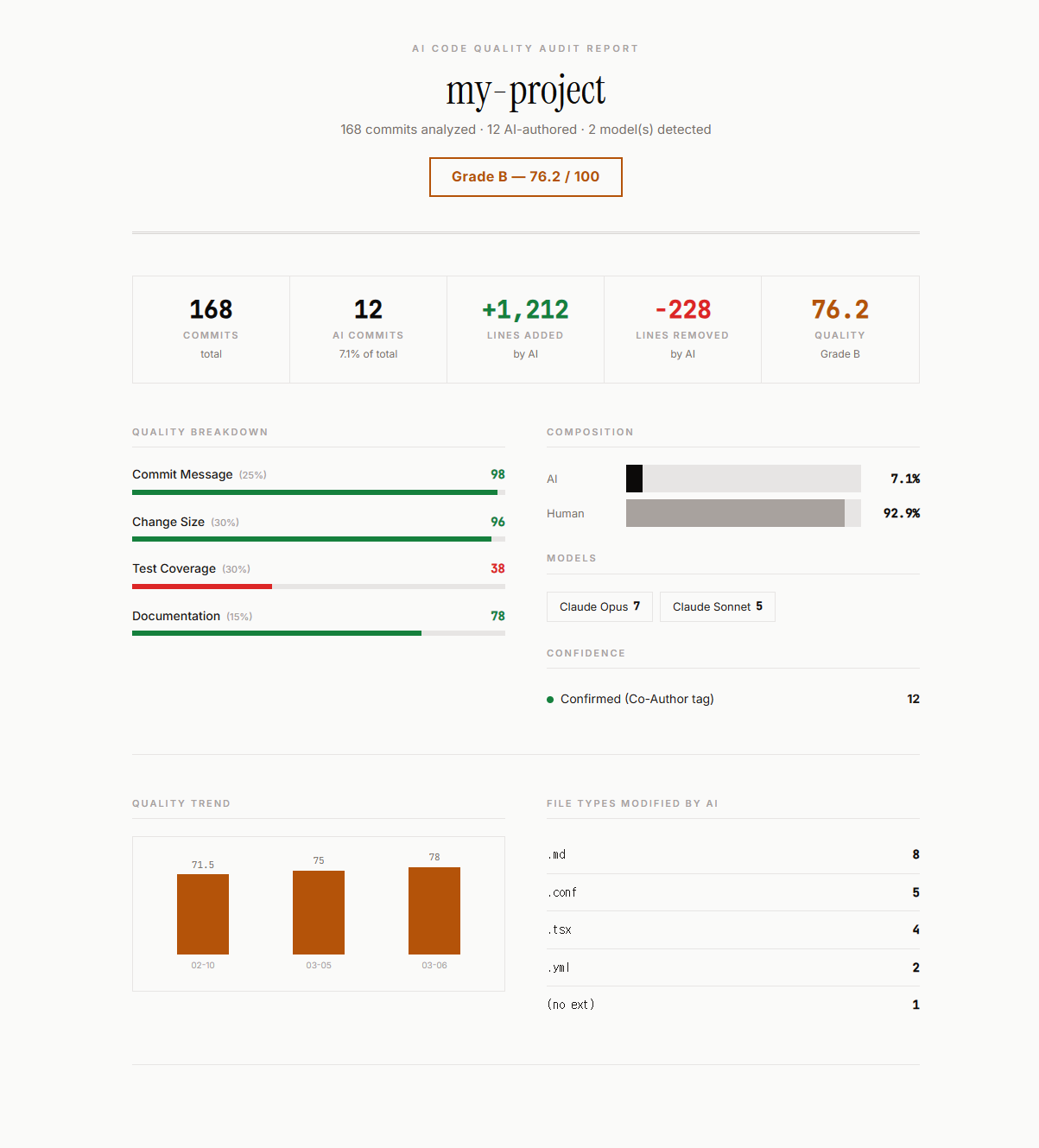
대시보드 — 품질 트렌드 & 파일 타입 분석
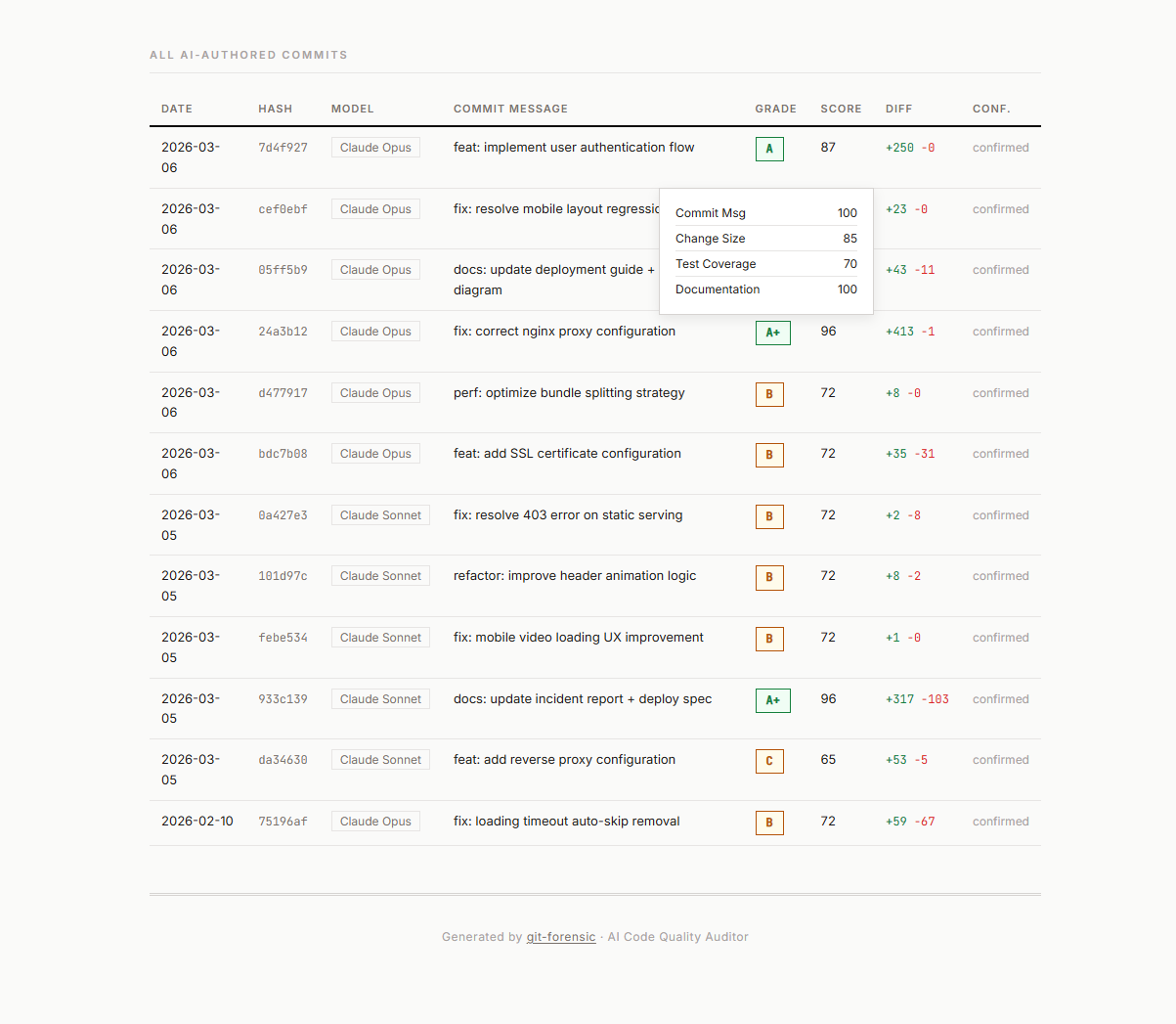
커밋별 품질 점수 상세
설치 방법
macOS / Linux
# 1. uv 설치 (미설치 시)
curl -LsSf https://astral.sh/uv/install.sh | sh

# 2. 설치 없이 바로 실행
uvx git-forensic /path/to/repo

# 또는 전역 설치 후 실행
uv tool install git-forensic
git-forensic /path/to/repo
Windows (PowerShell)
# 1. uv 설치
powershell -ExecutionPolicy ByPass -c "irm https://astral.sh/uv/install.ps1 | iex"

# 2. 터미널 재시작 후:
uvx git-forensic C:\path\to\repo

# 또는 전역 설치 후 실행
uv tool install git-forensic
git-forensic C:\path\to\repo
Windows (CMD)
:: 1. uv 설치
powershell -ExecutionPolicy ByPass -c "irm https://astral.sh/uv/install.ps1 | iex"

:: 2. CMD 재시작 후:
uvx git-forensic C:\path\to\repo

:: 또는 전역 설치 후 실행
uv tool install git-forensic
git-forensic C:\path\to\repo
pip (모든 플랫폼)
pip install git-forensic
git-forensic /path/to/repo
요구사항: Python 3.11 이상, Git이 설치되어 PATH에 등록되어 있어야 합니다.
빠른 시작
# 현재 디렉토리 스캔
git-forensic .

# 특정 레포 스캔
git-forensic /path/to/my-project
바로 터미널에 등급과 품질 점수가 출력됩니다.
명령어 & 옵션
| 플래그 | 단축 | 설명 |
|---|---|---|
--html FILE |
-h |
HTML 대시보드 리포트 내보내기 |
--open |
HTML 리포트를 브라우저에서 자동 열기 | |
--json-out FILE |
-o |
JSON 리포트 내보내기 |
--since DATE |
-s |
특정 날짜 이후 커밋만 스캔 (YYYY-MM-DD) |
--branch NAME |
-b |
특정 브랜치만 스캔 (기본: 전체) |
--min-confidence N |
-c |
신뢰도 임계값 0-1 (기본: 0.5) |
--limit N |
-n |
표시할 최대 커밋 수 (기본: 30) |
--name NAME |
리포트에 표시할 커스텀 레포 이름 | |
--all-commits |
낮은 신뢰도의 휴리스틱 매치도 포함 | |
--help |
도움말 표시 |
사용 예시
기본 스캔 (터미널 출력)
git-forensic .
HTML 대시보드 + 브라우저 자동 열기
# macOS / Linux
git-forensic ./my-project --html report.html --open

# Windows
git-forensic C:\projects\my-app --html report.html --open
날짜 범위 필터링
# 2026년 이후 커밋만
git-forensic . --since 2026-01-01

# 최근 3개월
git-forensic . --since 2025-12-01
CI/CD용 JSON 내보내기
git-forensic . --json-out audit.json
특정 브랜치 스캔
git-forensic . --branch main
git-forensic . --branch feature/auth
모든 커밋 표시 (낮은 신뢰도 포함)
git-forensic . --all-commits
레포 이름 익명화 (보안)
git-forensic . --html report.html --name "my-project"
옵션 조합 사용
git-forensic /path/to/repo \
  --since 2026-01 \
  --html report.html \
  --json-out report.json \
  --name "project-x" \
  --open
터미널 출력 예시
┌──────────────────────────── git-forensic ────────────────────────────┐
│ Total Commits:    168                                                │
│ AI Commits:       12 (7.1%)                                          │
│ AI Lines Added:   +1,212                                             │
│ Quality Grade:    B (78.5/100)                                       │
│ Models:           Claude Opus: 7 | Claude Sonnet: 5                  │
└──────────────────────────────────────────────────────────────────────┘

Quality Breakdown:
  Commit Message  97.9  ████████████████████████░  25%
  Change Size     96.2  ████████████████████████░  30%
  Test Coverage   45.0  ███████████░░░░░░░░░░░░░░  30%  ← 약점
  Documentation   77.5  ████████████████████░░░░░  15%
품질 측정 기준
| 항목 | 비중 | 측정 내용 |
|---|---|---|
| Commit Message | 25% | Conventional Commit 형식, 길이, 설명성 |
| Change Size | 30% | 집중된 변경 vs 대규모 리팩토링 |
| Test Coverage | 30% | 코드 변경에 테스트가 동반되었는지 |
| Documentation | 15% | 문서 커밋 여부, 자기 설명적 메시지 |
AI 감지 시그널
| 시그널 | 신뢰도 | 예시 |
|---|---|---|
Co-Authored-By: Claude |
95% | Claude Code 커밋 |
Co-Authored-By: GitHub Copilot |
95% | Copilot 제안 |
Generated by Claude/GPT |
85% | 명시적 AI 태그 |
aider: 접두사 |
90% | Aider CLI 커밋 |
| Conventional Commit + 구조화된 설명 | <40% | 휴리스틱 (낮은 신뢰도) |
기술 스택
- Python 3.11+ — uv로 빠른 패키지 관리
- GitPython — 커밋 히스토리 파싱
- Rich — 터미널 UI (테이블, 바, 색상)
- Click — CLI 인터페이스
- 외부 API 호출 없음 — 100% 로컬 실행
라이선스
MIT
Release history Release notifications | RSS feed

Download files
Download the file for your platform. If you're not sure which to choose, learn more about installing packages.
Source Distribution
git_forensic-0.1.0.tar.gz
(265.0 kB
view details)
Built Distribution
Filter files by name, interpreter, ABI, and platform.
If you're not sure about the file name format, learn more about wheel file names.
Copy a direct link to the current filters
File details
Details for the file git_forensic-0.1.0.tar.gz.
File metadata
- Download URL: git_forensic-0.1.0.tar.gz
- Upload date:
- Size: 265.0 kB
- Tags: Source
- Uploaded using Trusted Publishing? No
- Uploaded via: uv/0.10.9 {"installer":{"name":"uv","version":"0.10.9","subcommand":["publish"]},"python":null,"implementation":{"name":null,"version":null},"distro":null,"system":{"name":null,"release":null},"cpu":null,"openssl_version":null,"setuptools_version":null,"rustc_version":null,"ci":null}
File hashes
| Algorithm | Hash digest | |
|---|---|---|
| SHA256 |
3aa6ce1ac1bff6a5f62d4612c912af34c18bc4a71046cb2860a51c1d7c68065e
|
|
| MD5 |
189c9f405cd3075493840539ecb94959
|
|
| BLAKE2b-256 |
2db124ddff91b6445836c43d2f30e10c2013414d111ae1ebbc5a3fb76a1af57f
|
File details
Details for the file git_forensic-0.1.0-py3-none-any.whl.
File metadata
- Download URL: git_forensic-0.1.0-py3-none-any.whl
- Upload date:
- Size: 18.1 kB
- Tags: Python 3
- Uploaded using Trusted Publishing? No
- Uploaded via: uv/0.10.9 {"installer":{"name":"uv","version":"0.10.9","subcommand":["publish"]},"python":null,"implementation":{"name":null,"version":null},"distro":null,"system":{"name":null,"release":null},"cpu":null,"openssl_version":null,"setuptools_version":null,"rustc_version":null,"ci":null}
File hashes
| Algorithm | Hash digest | |
|---|---|---|
| SHA256 |
1307005172c135dd7af16d92880799374f1b9122c1984cace2b802d651beee61
|
|
| MD5 |
afbdb1d309b21dcd5a92606fcd1b4e36
|
|
| BLAKE2b-256 |
9596356d1a2ede3ef79f0183edc99ffb95842157f85ed1bf8272cb18de3802c4
|






