
hop

Helper for quick git branch hopping.
When you live in short-lived feature branches, switching between them with git checkout means
remembering names and typing them out. hop shows the branches you've touched most recently at the
top, so the one you want is almost always a keystroke away.
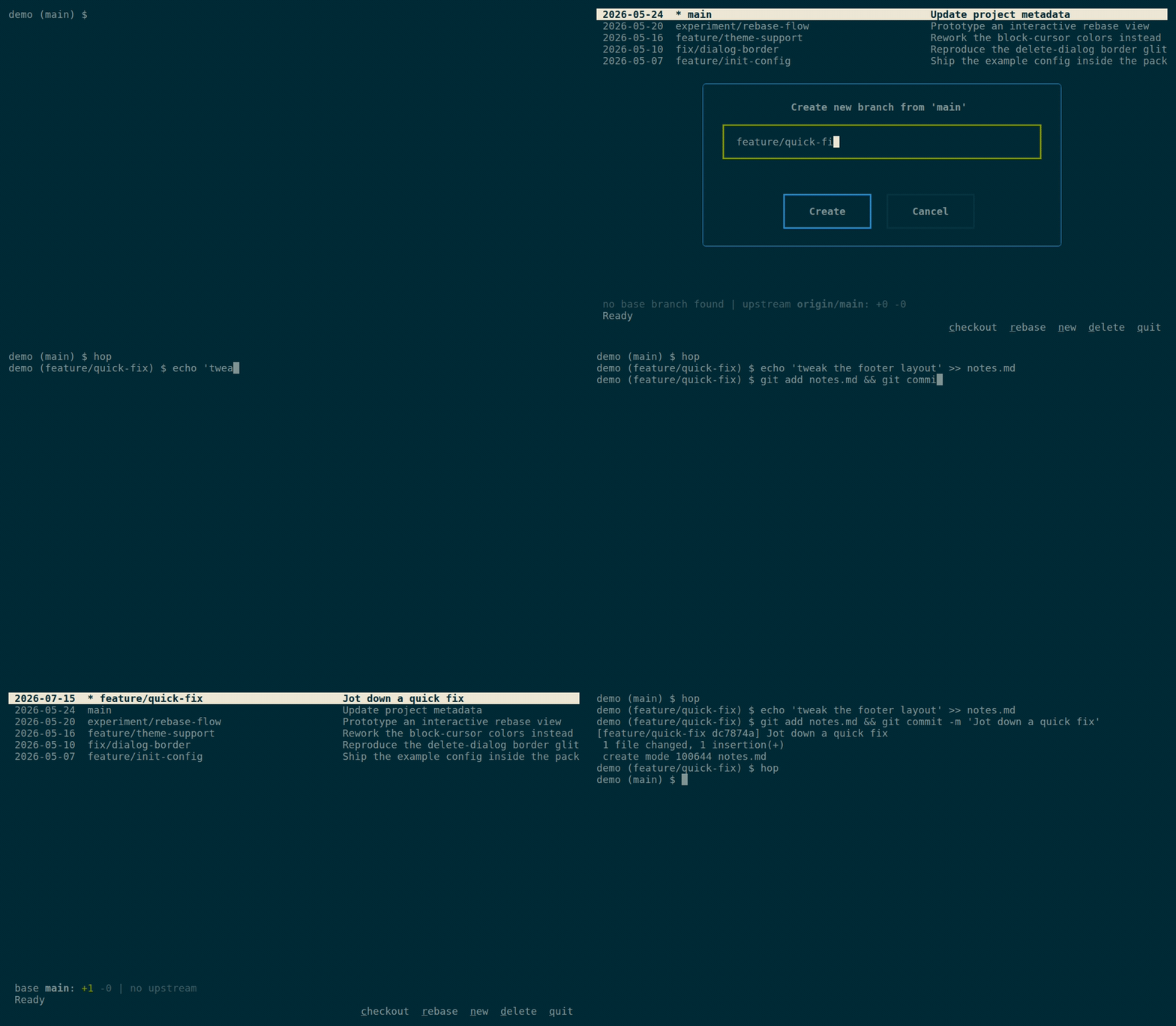
Recorded from a reproducible synthetic repo — see demo/PLAYBOOK.md.
Features
- Interactive text-based UI for browsing git branches
- List branches ordered by last commit date
- Type-to-filter:
/narrows the list as you type - Show branch info: date, name, and last commit message
- Details line for the selected branch: commits ahead/behind its base branch
and its upstream (e.g.
base main: +2 -5 | upstream origin/x: +1 -0) - Quick actions: checkout, rebase, delete, or create branches
- Shows upstream branch and merge status
- Worktree aware: branches checked out in another worktree are marked
+(likegit branch), checkout/delete of them is refused with a clear message, and rebase runs inside the worktree that holds them - Vim-style navigation (arrow keys or j/k)
Installation
Requires Python 3.12 or newer. Installation via uv recommended (isolated, added to PATH):
uv tool install git-hop
Or install the latest development state straight from the repository:
uv tool install git+https://github.com/LarsMichelsen/hop.git
Updating
uv tool upgrade git-hop
Usage
The package installs the command as both hop and a git hop subcommand:
hop            # launch the interactive branch browser
git hop        # the same, as a git subcommand
hop --help     # show usage and exit
hop --version  # print the version and exit
Note: the worktree-jumping shell wrapper below wraps hop; git hop runs
without it (everything works, jumping to another worktree just tells you the
path instead of changing into it). And as with any external git subcommand,
git hop --help asks git for a man page — use hop --help instead.
Unexpected errors are reported as a one-line message. Run with HOP_DEBUG=1
to get the full traceback instead — please include it in bug reports.
Controls
↑/↓orj/k- Navigate branchescorEnter- Checkout selected branch (or jump to its worktree, see below)/- Filter branches: type to narrow,↑/↓to pick,Enterto checkout,Escto cancelr- Rebase selected branch onto its basen- Create new branch from selected branchd- Delete selected brancht- Cycle theme (dark/light, then back to the startup theme)h- Show help screenq- Quit
Shell integration: jump between worktrees
Branches checked out in another worktree are marked +. Pressing c on one
jumps to that worktree — but hop runs as a child process and cannot change
your shell's working directory by itself. Add this wrapper to your
~/.bashrc / ~/.zshrc:
hop() {
    local tmp target
    tmp="$(mktemp)"
    command hop --cd-file "$tmp" "$@"
    target="$(cat "$tmp")"
    rm -f "$tmp"
    if [ -n "$target" ] && [ "$target" != "$PWD" ]; then
        cd "$target" || return
    fi
}
Or for fish (~/.config/fish/config.fish):
function hop
    set -l tmp (mktemp)
    command hop --cd-file $tmp $argv
    set -l target (cat $tmp)
    rm -f $tmp
    if test -n "$target" -a "$target" != "$PWD"
        cd $target
    end
end
Without the wrapper everything else still works; pressing c on a + branch
then shows where the branch lives instead of jumping.
Configuration
hop reads an optional TOML file at ~/.config/hop/config.toml. Everything in
it is optional. An absent file, section, or key falls back to the defaults
shown below. A file that exists but cannot be parsed (or contains invalid
values) is an error: hop refuses to start until it is fixed — or rewritten
with hop init-config --force. Create a documented starting point with:
hop init-config          # write ~/.config/hop/config.toml
hop init-config --force  # overwrite an existing file
[ui]
# Color theme. "auto" (default) honours $HOP_THEME, otherwise adapts to the
# terminal's ANSI palette. Also accepts "light", "dark", or any built-in
# Textual theme, e.g. "nord", "gruvbox", "dracula", "monokai", "tokyo-night",
# "catppuccin-mocha", "catppuccin-latte", "solarized-light", "flexoki".
theme = "auto"

[defaults]
# Prefix pre-filled in the "new branch" dialog when the source branch has no
# entry in [branch_prefixes].
branch_prefix = ""

# Candidate base branches for the ahead/behind counts and as rebase target,
# in priority order. A branch's base is the candidate it most recently forked
# from. Override when your mainline has an unconventional name:
# base_branches = ["trunk"] or ["2.5.0", "2.4.0", "master"].
base_branches = ["main", "master", "develop", "development"]

[branch_prefixes]
# Per-source-branch prefixes: creating a branch from one of these pre-fills the
# input with the mapped prefix. Quote names containing dots or slashes —
# unquoted, TOML splits keys like 2.5.0 at the dots.
main = "feature/"
develop = "feat/"
# "release/v1.0" = "bugfix/"
# "2.5.0" = "bugfix/"
| Setting | Purpose |
|---|---|
[ui] theme |
Color theme; "auto" adapts to the terminal. Cycle themes at runtime with t (always returns to the configured theme). |
[defaults] branch_prefix |
Default prefix for new branch names. |
[defaults] base_branches |
Base-branch candidates for ahead/behind counts and rebase, in priority order. |
[branch_prefixes] |
Prefix overrides keyed by the source branch you create from. |
Development
# Install dependencies
uv sync

# Run the tool
uv run hop
See docs/DEVELOPMENT.md for development workflow and pre-commit checks.
License
Apache License 2.0 © Lars Michelsen
1 maintainer

Download files
Download the file for your platform. If you're not sure which to choose, learn more about installing packages.
Source Distribution
Built Distribution
Filter files by name, interpreter, ABI, and platform.
If you're not sure about the file name format, learn more about wheel file names.
Copy a direct link to the current filters
File details
Details for the file git_hop-0.2.0.tar.gz.
File metadata
- Download URL: git_hop-0.2.0.tar.gz
- Upload date:
- Size: 26.7 kB
- Tags: Source
- Uploaded using Trusted Publishing? Yes
- Uploaded via:
twine/7.0.0 CPython/3.13.14
File hashes
| Algorithm | Hash digest | |
|---|---|---|
| SHA256 |
b360e8bebf71eb96c32db83ce04672c90d3d5e1f58538e97e74dec92c770cf02
|
|
| MD5 |
2089ab58a17a74e37a88da9a3b492ede
|
|
| BLAKE2b-256 |
af36daeeb892aae8ecee9d75a2ebc4085b57fece2029f436c29c287d931e0575
|
Provenance
The following attestation bundles were made for git_hop-0.2.0.tar.gz:
Publisher:
release.yml on LarsMichelsen/hop
-
Statement:
-
Statement type:
https://in-toto.io/Statement/v1 -
Predicate type:
https://docs.pypi.org/attestations/publish/v1 -
Subject name:
git_hop-0.2.0.tar.gz -
Subject digest:
b360e8bebf71eb96c32db83ce04672c90d3d5e1f58538e97e74dec92c770cf02 - Sigstore transparency entry: 2396909561
- Sigstore integration time:
-
Permalink:
LarsMichelsen/hop@d7baffad160c6402769dd6f9e7f5534c1ac08bd6 -
Branch / Tag:
refs/tags/v0.2.0 - Owner: https://github.com/LarsMichelsen
-
Access:
public
-
Token Issuer:
https://token.actions.githubusercontent.com -
Runner Environment:
github-hosted -
Publication workflow:
release.yml@d7baffad160c6402769dd6f9e7f5534c1ac08bd6 -
Trigger Event:
push
-
Statement type:
File details
Details for the file git_hop-0.2.0-py3-none-any.whl.
File metadata
- Download URL: git_hop-0.2.0-py3-none-any.whl
- Upload date:
- Size: 29.1 kB
- Tags: Python 3
- Uploaded using Trusted Publishing? Yes
- Uploaded via:
twine/7.0.0 CPython/3.13.14
File hashes
| Algorithm | Hash digest | |
|---|---|---|
| SHA256 |
250c6011a26235abc237137ec71a181029c858035dd5fea9075312dab8d079e1
|
|
| MD5 |
89a30aa96cbda45ca6221c45833d5618
|
|
| BLAKE2b-256 |
c37854bc366960c0b8fb9eb00f533c4ef188a0ee878bdb9fc589eaf818c580b4
|
Provenance
The following attestation bundles were made for git_hop-0.2.0-py3-none-any.whl:
Publisher:
release.yml on LarsMichelsen/hop
-
Statement:
-
Statement type:
https://in-toto.io/Statement/v1 -
Predicate type:
https://docs.pypi.org/attestations/publish/v1 -
Subject name:
git_hop-0.2.0-py3-none-any.whl -
Subject digest:
250c6011a26235abc237137ec71a181029c858035dd5fea9075312dab8d079e1 - Sigstore transparency entry: 2396909889
- Sigstore integration time:
-
Permalink:
LarsMichelsen/hop@d7baffad160c6402769dd6f9e7f5534c1ac08bd6 -
Branch / Tag:
refs/tags/v0.2.0 - Owner: https://github.com/LarsMichelsen
-
Access:
public
-
Token Issuer:
https://token.actions.githubusercontent.com -
Runner Environment:
github-hosted -
Publication workflow:
release.yml@d7baffad160c6402769dd6f9e7f5534c1ac08bd6 -
Trigger Event:
push
-
Statement type:














