
git-hunk




Non-interactive, programmatic alternative to git add -p.
Every staged or unstaged Hunk gets a durable ID so you can inspect, filter, and stage changes without interactive prompts. Duplicate Hunks get unique Conditional IDs.
Comparison • Install • For AI agents • Quick start • Usage • JSON output
Why?
git add -p requires interactive input. That makes it unusable for:
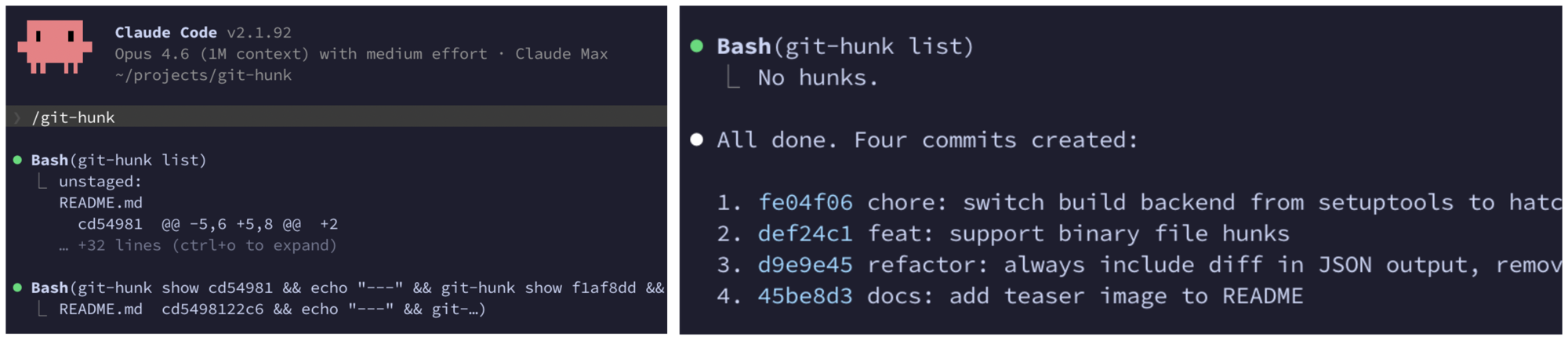
- AI agents (Claude Code, Codex, etc.) that need to split changes into logical commits
- Scripts & CI/CD that automate commit organization
- Editor integrations that want hunk-level staging without shelling out to a TUI
git-hunk solves this by assigning each staged or unstaged Hunk a durable ID
and exposing simple stage/unstage/discard commands.
Comparison
| Interactive | Programmatic | Hunk IDs | Line-level control | JSON output | |
|---|---|---|---|---|---|
git add -p |
Yes | No | No | Yes | No |
git add <file> |
No | Yes | No | No | No |
git-hunk |
No | Yes | Yes | Yes | Yes |
Eval
One agent (Claude Code 2.1.226, claude-sonnet-5, reasoning effort high)
attempted the same eight tasks from identical repository state, five times per
variant: organize a dirty working tree into correct, focused commits, once
following git-hunk's bundled skills and once restricted to bare Git. The
checked-in eval harness
grades the exact resulting repository state — commit partition and order, final
tree, index, and leftovers. This table records the qualifying run; just eval
reruns the protocol and prints a table in the same format.
| Task | git-hunk | bare Git |
|---|---|---|
| split_refactor_vs_feature | PASS 5/5 · 3c · 4t | PASS 5/5 · 3c [2-5] · 4t [3-6] |
| separate_mixed_hunks | PASS 5/5 · 3c · 4t | PASS 5/5 · 8c [7-12] · 9t [8-13] |
| drop_debug_lines | PASS 5/5 · 3c [3-4] · 4t [4-5] | MIXED 4/5 partition · 8c [7-27] · 9t [8-28] |
| protect_unrelated_work | PASS 5/5 · 3c · 4t | PASS 5/5 · 3c [3-4] · 4t [4-5] |
| split_single_hunk | PASS 5/5 · 4c [3-4] · 5t [4-5] | PASS 5/5 · 11c [9-19] · 12t [10-20] |
| separate_formatter_noise | PASS 5/5 · 4c [4-6] · 5t [5-7] | PASS 5/5 · 13c [12-16] · 14t [13-17] |
| pick_duplicate_hunk | PASS 5/5 · 3c · 4t | PASS 5/5 · 8c [7-25] · 9t [8-26] |
| commit_parseable_subset | PASS 5/5 · 4c [3-5] · 5t [4-6] | MIXED 4/5 partition · 13c [10-23] · 14t [11-24] |
| total | 8/8 · 27c [25-31] · 35t [33-39] | 6/8 (2 mixed) · 67c [57-131] · 75t [65-139] |
c = tool calls, t = turns; a cell reports the median of its five repeats
with the observed range in brackets, dropped where every repeat agreed, and the
pass column counts passing repeats. MIXED j/5 means the variant passed j of its
five repeats, and partition names the failure: the commits made do not match
the required change groups. The cost column is omitted: bare Git runs second in
each pair and partly reads the prompt cache the git-hunk run warmed, so raw costs
are not order-neutral
(#224). Five samples per task
variant, dated 2026-08-10 at commit 0ef14be.
Install
Requires Git 2.28 or later. git-hunk forces canonical diff paths with
git diff --no-relative, which earlier versions of Git do not accept.
pip install git-hunk
Or with uv:
uv tool install git-hunk
Verify it works:
git-hunk --version
For AI agents
A usage guide ships inside the CLI, so agents (Claude Code, Codex, etc.) can load it on demand. It always matches the installed version, so it never goes stale:
git-hunk skills get core
core covers the tool itself. A separate logical-commits skill covers how to
group hunks into commits and order them; it is optional, so a project that
already defines its own commit conventions can load core alone:
git-hunk skills                           # list available skills
git-hunk skills get core logical-commits  # load both
git-hunk --help points here first.
Quick start
# See all hunks across staged, unstaged, and untracked files
git-hunk list

# Show the diff for a specific hunk
git-hunk show d161935

# Stage specific hunks, then commit
git-hunk stage d161935 a3f82c1
git commit -m "feat: add validation for user input"

# Stage the remaining hunks
git-hunk stage e7b4012
git commit -m "fix: handle empty response in API client"
Usage
Repository paths
A Repository path is relative to the worktree root, uses /, and has the same
meaning from every invocation directory. Every path in output and every file
operand for list, stage, unstage, discard, and commit is a Repository
path. A leading ./ and internal .. components are normalized. Absolute paths
and paths that escape the worktree are rejected.
File operands select one exact changed file. Directories, globs, and Git pathspec
syntax are not expanded. Quote operands that contain shell metacharacters so the
shell passes them unchanged. For example, from sub/, same.txt selects the
file at the worktree root, while sub/same.txt selects the file inside sub/.
show remains ID-only.
Unsupported repository states
git-hunk rejects detected rename, copy, and unmerged index states before it writes inventory output or changes the repository. This prevents partial JSON, partial inventory, false clean results, and partial mutation. Resolve an unmerged index with Git before retrying. Full rename and copy support is not yet available; it remains tracked in #53.
Hunk IDs
A canonical Hunk ID is a full SHA-256 value. JSON returns it in full. Human output shows the shortest unambiguous prefix of at least seven characters, and commands accept unambiguous prefixes without case sensitivity. IDs are calculated from the combined staged and unstaged inventory, including when a status filter shows only one side.
An Unchanged Hunk keeps its ID when it moves completely between staged and unstaged state or when other complete Hunks move. A partial-line operation creates new Hunks with new IDs.
Hunks with the same Repository path and patch content form a Duplicate Hunk
group. Each member gets a unique Conditional Hunk ID, shown with a
conditional label in human output and "id_stability": "conditional" in JSON.
The ID can change when its Duplicate Hunk group changes. After a partial-line
operation or an operation on a Conditional Hunk ID, address anything remaining
by Repository path, which is ID-independent, or run git-hunk list again for
the new IDs.
List hunks
git-hunk list                          # all hunks (unstaged + staged + untracked)
git-hunk list --unstaged               # unstaged hunks only
git-hunk list --staged                 # staged hunks only
git-hunk list src/foo.py src/bar.py    # specific files
git-hunk list --json                   # JSON output for scripting
Show hunks
git-hunk show                          # show all hunks (staged + unstaged)
git-hunk show d161935                  # show a single hunk
git-hunk show d161935 a3f82c1          # show multiple hunks
git-hunk show --staged                 # show all staged hunks
git-hunk show --unstaged               # show all unstaged hunks
Stage, unstage, discard
git-hunk stage d161935                 # stage a hunk
git-hunk stage d161935 a3f82c1         # stage multiple hunks
git-hunk stage d161935 -l 3,5-7        # stage specific lines only
git-hunk stage d161935 --exclude-matching debug    # stage all but lines containing "debug"
git-hunk stage d161935 --include-matching xfail    # stage only lines containing "xfail"
git-hunk unstage d161935               # move back to working tree
git-hunk unstage d161935 -l 3,5-7      # unstage specific lines only
git-hunk discard d161935               # restore from the index
git-hunk discard d161935 -l ^3,^5-7    # discard excluding specific lines
--include-matching / --exclude-matching select changed lines by content
instead of line number (literal substring by default, --regex for regular
expressions). Both are repeatable and OR'd, case-sensitive, and error if nothing
matches. They are mutually exclusive with -l and with each other.
Line selection accepts any subset of a pure addition or pure deletion. Selecting
one side of a one-for-one replacement is rejected, because it would leave a
deletion-only or addition-only half; select both lines, match text they share,
or pass --allow-one-sided when that half is what you want. A grouped
replacement with multiple deleted or added lines must be selected as a whole or
not selected, and --allow-one-sided does not relax that. Numeric range
endpoints are checked against the Hunk before expansion, and no-newline state is
preserved for each patch side. Submodule pointer changes and whole-file Hunks do
not support line selection. Select the Hunk as a whole.
A binary, mode-only, type, or empty tracked file change is a whole-file Hunk.
Plain output labels empty tracked changes as Empty file (added) or
Empty file (deleted). When one file has a mode change and text edits, the mode
and each text range are separate Hunks. Selecting text does not apply the mode
change, and selecting the mode Hunk does not apply text.
Commit
git-hunk commit d161935 -m "fix: ..."      # stage a hunk and commit it in one step
git-hunk commit d161935 -l 3,5-7 -m "..."  # stage specific lines and commit
git-hunk commit d161935 --exclude-matching debug -m "..."  # commit all but matching lines
commit aborts if anything is already staged, so the commit contains exactly
the selected hunks. It accepts the same -l, --include-matching,
--exclude-matching, --regex, and --allow-one-sided selection options as
stage.
JSON output
git-hunk list --json     # inventory: every hunk, no body
git-hunk show <id> --json # the same hunks plus a structured per-line body
Both emit a versioned envelope (schema_version is currently 2) so consumers
can depend on a stable shape. list --json is a lean inventory and carries no
body; show --json adds a structured lines array. A show --json hunk
(list --json is identical but without the lines field):
{
  "schema_version": 2,
  "hunks": [
    {
      "id": "d161935000000000000000000000000000000000000000000000000000000000",
      "id_stability": "stable",
      "file": { "text": "src/main.py" },
      "status": "unstaged",
      "change_kind": "M",
      "a_mode": "100644",
      "b_mode": "100644",
      "binary": false,
      "header": "@@ -10,3 +10,5 @@",
      "context_before": { "text": "def main():" },
      "additions": 2,
      "deletions": 0,
      "lines": [
        { "n": 1, "op": " ", "content": { "text": "    x = 1" } },
        { "n": 2, "op": "+", "content": { "text": "    y = 2" } }
      ]
    }
  ]
}
| Field | Type | Description |
|---|---|---|
schema_version |
int | Envelope version; bumped on any incompatible change to the shape below. |
hunks |
array | The hunks (empty array when there are no changes). |
id |
string | Full canonical SHA-256 Hunk ID; empty for an untracked entry, which no command can address. Human output uses a unique prefix of at least seven characters. |
id_stability |
string | stable or conditional. An untracked inventory entry reports stable, but its empty id remains unaddressable. |
file |
union | Repository path of the changed file, as a byte-safe {text|bytes} union (see below). |
status |
string | One of staged, unstaged, untracked. |
change_kind |
string | Git status letter: A added, D deleted, M modified, T typechange (R/C reserved and currently rejected). Always present. |
a_mode |
string | null |
b_mode |
string | null |
binary |
bool | Whether the change is binary. Always present. |
header |
string | null |
context_before |
union | null |
additions |
int | Number of added lines. |
deletions |
int | Number of removed lines. |
lines |
array | show --json only. The structured body; [] for a whole-file hunk. See below. |
A lines entry is { "n", "op", "content", "no_newline"? }:
| Field | Type | Description |
|---|---|---|
n |
int | 1-based position within the hunk body — the index -l line selection uses. Counts every body line. |
op |
string | " " context, "+" addition, "-" deletion. |
content |
union | The line text without its leading op character, as a {text|bytes} union. |
no_newline |
bool | Present and true only when the line has no trailing newline; consumes no n. |
Any field carrying arbitrary git/source bytes (file, context_before,
lines[].content) is a byte-safe {text | bytes} union: {"text": "..."} for
valid UTF-8, else {"bytes": "<base64>"}. It is always an object, so consumers
have one code path and strict JSON parsers never see a lone surrogate.
Adding a new field is backward-compatible and does not change schema_version;
renaming, removing, or changing the type of an existing field bumps it. (Before
schema_version existed, list --json returned a bare array.)
How it works
- Rejects detected rename, copy, and unmerged states.
- Parses staged and unstaged
git diffoutput into one combined Hunk inventory. - Assigns each Hunk a full canonical SHA-256 ID and a unique human prefix.
- Gives members of a Duplicate Hunk group unique Conditional Hunk IDs.
- For staging, reconstructs a minimal patch and pipes it through
git apply --cached. - For discarding, reconstructs a reverse patch and applies it to the working tree.
Text IDs use the Repository path and patch body, including context and newline
state. They exclude @@ ranges, section headings, and staged state. Whole-file
IDs include the actual binary, mode, or type change. This keeps an Unchanged
Hunk stable while complete Hunks move. A partial operation changes the patch
content and creates new IDs.
Contributing
Bug reports, feature requests, and pull requests are welcome on GitHub.
Install just 1.58.0 or newer and
uv. Recipes use Bash;
on Windows, install Git for Windows and make its Bash available on PATH.
git clone https://github.com/wkentaro/git-hunk.git
cd git-hunk
just setup   # install dependencies
just test    # run tests
just lint    # run linters
License
MIT (LICENSE)
1 maintainer

Release files for git-hunk 0.4.2
For a detailed explanation of source distributions (sdists) and built distributions (wheels), please see the package formats documentation.
Source distribution (sdist)
| File | Size | Uploaded | |
|---|---|---|---|
| git_hunk-0.4.2.tar.gz | 38.7 kB | Details |
Built distribution (wheel)
| File | Interpreter | ABI | Platform | Reset |
|---|---|---|---|---|
| git_hunk-0.4.2-py3-none-any.whl | Python 3 | none | any | Details |
Total release size:76.3 kB
Release files / git_hunk-0.4.2.tar.gz
| Download URL | git_hunk-0.4.2.tar.gz |
|---|---|
| Size | 38.7 kB |
| Tags | Source |
|
SHA-256 checksum How to use checksums |
58b4ed06a020e8a62b0b4c56683af34ef28697e9dc91da26a3bb06e67714fd6f
|
|
BLAKE2b-256 checksum How to use checksums |
f1ea56205cc05b9558a8bf88efcb868e3b8529ead12672968eab1562de576284
|
| Upload date | |
|
Uploaded using Trusted Publishing? What is trusted publishing? |
Yes |
| Uploaded via |
twine/7.0.0 CPython/3.13.14
|
Provenance
Provenance describes where a file came from. On PyPI, provenance is shared via attestations, which provide a verifiable record of the build or publishing details. View details, limitations and caveats.


PyPI Publish Attestation
PyPI verified that this artifact, at this checksum, originated from the publisher listed below.
Signed by GitHub Actions, verified by PyPI on Sep 18, 2026.
Transparency logRelease files / git_hunk-0.4.2-py3-none-any.whl
| Download URL | git_hunk-0.4.2-py3-none-any.whl |
|---|---|
| Size | 37.6 kB |
| Tags | Python 3 |
|
SHA-256 checksum How to use checksums |
3c61d4bf0255952b49fc6e2077699139ef348ac8706d764c012ecfc78afe2265
|
|
BLAKE2b-256 checksum How to use checksums |
9828a528f77056b6a91f8bcde0cb63192a2a0ead14d1a7a60e3bfabb0826fe2f
|
| Upload date | |
|
Uploaded using Trusted Publishing? What is trusted publishing? |
Yes |
| Uploaded via |
twine/7.0.0 CPython/3.13.14
|
Provenance
Provenance describes where a file came from. On PyPI, provenance is shared via attestations, which provide a verifiable record of the build or publishing details. View details, limitations and caveats.
PyPI Publish Attestation
PyPI verified that this artifact, at this checksum, originated from the publisher listed below.
Signed by GitHub Actions, verified by PyPI on Sep 18, 2026.
Transparency log













